
The sum and average of an array are the total of all its elements and that total divided by the number of elements; in Java we get both with a for loop or with Arrays.stream(array).sum() and average(). For an int[], the average must be computed as a double, or the fraction is lost.
Totals and averages appear in every report screen, such as the order total of an invoice, the average rating of a product, or the average number of daily visitors on a website. The array is the simplest place to start, and the same rules apply to lists and streams.
The following example adds up five days of website visits and computes the daily average.
int[] visits = {4200, 8100, 6500, 9000, 7300};
long total = Arrays.stream(visits).asLongStream().sum();        // 35100
double average = Arrays.stream(visits).average().orElse(0.0);   // 7020.0
Notice the asLongStream() call and the orElse() fallback. They protect against the two bugs that matter here, an int sum that overflows and an empty array. After the plain loop and the stream methods, we handle overflow, empty arrays, money values and partial sums.
1. Adding Up the Elements in a for Loop
The loop keeps a running total and adds each element to it. We declare the total as long, because the sum of many int values can exceed Integer.MAX_VALUE even when every single value fits.
int[] visits = {4200, 8100, 6500, 9000, 7300};
long total = 0;
for (int v : visits) {
    total += v;
}
double average = (double) total / visits.length;   // 7020.0
Dividing two integers in Java gives an integer, so we cast the total to double before the division, not after it. With ratings of 4, 5, 5 and 4, the integer division returns 4 and drops the half.
int[] ratings = {4, 5, 5, 4};
int sum = Arrays.stream(ratings).sum();             // 18
int wrongAvg = sum / ratings.length;                 // 4
double lateCast = (double) (sum / ratings.length);   // 4.0
double rightAvg = (double) sum / ratings.length;     // 4.5
2. Stream Methods for Sum and Average
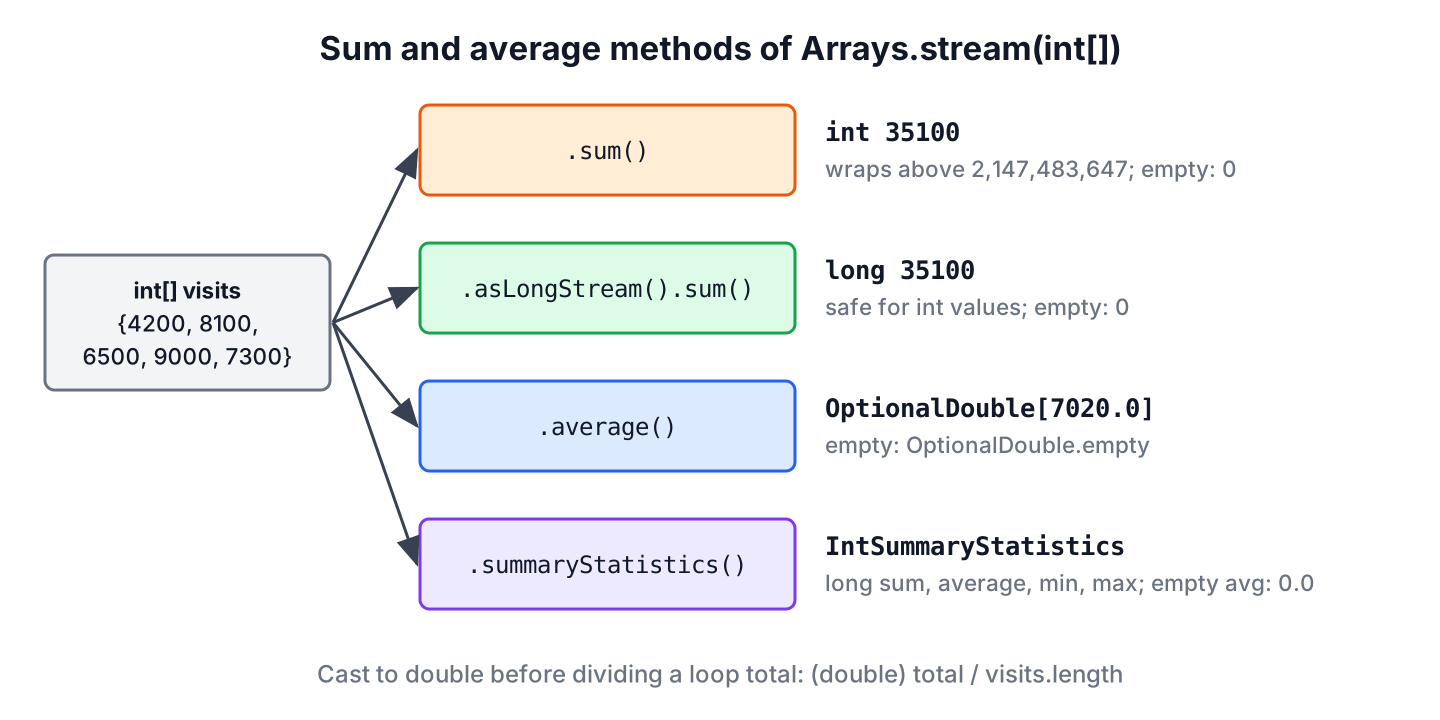
The method Arrays.stream() turns an int[] into an IntStream, which has sum() and average(). The return types differ, and that matters.
- The method sum() returns an int, so it overflows like an int loop variable.
- The method average() returns an OptionalDouble, which is empty for an empty array.
- The method summaryStatistics() returns an IntSummaryStatistics with a long sum, the count, the average, the minimum and the maximum, all from one pass.
int[] visits = {4200, 8100, 6500, 9000, 7300};
int sum = Arrays.stream(visits).sum();                         // 35100
OptionalDouble avg = Arrays.stream(visits).average();          // OptionalDouble[7020.0]
IntSummaryStatistics stats = Arrays.stream(visits).summaryStatistics();
long statsSum = stats.getSum();                               // 35100
double statsAvg = stats.getAverage();                         // 7020.0
When we need both values, summaryStatistics() reads the array once instead of twice, and its getSum() cannot overflow for any realistic int[]. It also gives the max and min of the array.
An Integer[] or a List<Integer> holds objects, so we unbox the values with mapToInt() first. Unboxing a null element throws a NullPointerException, which a filter prevents.
Integer[] scores = {12, null, 30};
int safeSum = Arrays.stream(scores).filter(Objects::nonNull).mapToInt(Integer::intValue).sum();   // 42
int crash = Arrays.stream(scores).mapToInt(Integer::intValue).sum();                                // NullPointerException
The JDK has Arrays.stream() overloads for int[], long[], double[] and object arrays only. For byte[], short[], char[] and float[], we stream the indexes, and a boolean[] has no numeric sum at all.
short[] temps = {21, 23, 19};
int tempSum = IntStream.range(0, temps.length).map(i -> temps[i]).sum();   // 63
long[] bytesSent = {3_000_000_000L, 2_500_000_000L};
long sent = Arrays.stream(bytesSent).sum();                                // 5500000000
double[] km = {5.2, 10.0, 3.3};
double kmAvg = Arrays.stream(km).average().orElse(0.0);                    // 6.166666666666667
3. When the int Sum Overflows
An int holds values up to 2,147,483,647. A video platform that sums watch time in milliseconds passes that limit in under 25 days of video, and IntStream.sum() wraps around to a negative number without any exception.
int[] watchMillis = {2_000_000_000, 2_000_000_000};
int wrapped = Arrays.stream(watchMillis).sum();                     // -294967296
long correct = Arrays.stream(watchMillis).asLongStream().sum();     // 4000000000
long viaStats = Arrays.stream(watchMillis).summaryStatistics().getSum();   // 4000000000
When an overflow means a bug and we want the code to fail instead of continuing with a wrong total, Math.addExact() throws an exception at the first overflowing addition. The exact arithmetic methods exist for int and long.
int[] watchMillis = {2_000_000_000, 2_000_000_000};
int strict = Arrays.stream(watchMillis).reduce(0, Math::addExact);   // ArithmeticException: integer overflow
4. Empty and null Arrays
An empty array has a sum of 0 and no average, and each method reports the missing average differently. Some return a value that looks valid, so we decide on purpose what an empty input should show.
| Code on an empty int[] | Result |
|---|---|
| (double) total / a.length | NaN |
| total / a.length with int or long values | ArithmeticException |
| Arrays.stream(a).average() | OptionalDouble.empty |
| summaryStatistics().getAverage() | 0.0 |
| Arrays.stream(a).sum() | 0 |
int[] none = {};
double nan = (double) 0 / none.length;                      // NaN
OptionalDouble empty = Arrays.stream(none).average();       // OptionalDouble.empty
double zero = Arrays.stream(none).summaryStatistics().getAverage();   // 0.0
long boom = 0L / none.length;                               // ArithmeticException: / by zero
A product with no reviews should show no rating, not a rating of 0.0, so the OptionalDouble fits that case better than a default value. A null array throws a NullPointerException in every variant, so a method that may get null checks for it first.
static OptionalDouble averageRating(int[] ratings) {
    if (ratings == null) {
        return OptionalDouble.empty();
    }
    return Arrays.stream(ratings).average();
}
OptionalDouble noReviews = averageRating(null); // OptionalDouble.empty
String label = noReviews.isPresent() ? "%.1f".formatted(noReviews.getAsDouble()) : "No ratings yet"; // "No ratings yet"
String shown = "%.1f".formatted(averageRating(new int[]{4, 5, 5}).orElse(0)); // "4.7"5. Summing Prices with BigDecimal
A double stores most decimal fractions as the nearest binary value, so adding prices produces small errors that show up on an invoice. For money, we keep the values as BigDecimal and add them with reduce().
double[] cart = {0.10, 0.20};
double doubleTotal = Arrays.stream(cart).sum();   // 0.30000000000000004
BigDecimal[] prices = {new BigDecimal("0.10"), new BigDecimal("0.20"), new BigDecimal("19.99")};
BigDecimal total = Arrays.stream(prices).reduce(BigDecimal.ZERO, BigDecimal::add);   // 20.29
BigDecimal avg = total.divide(BigDecimal.valueOf(prices.length), 2, RoundingMode.HALF_UP);   // 6.76
The average needs a scale and a rounding mode, because 20.29 divided by 3 has no finite decimal result. Without them, divide() throws an ArithmeticException.
6. Partial Sums, Filters and 2D Arrays
Reports often need the total of part of an array, such as the visits of the first three days or only the days above a traffic target. The Arrays.stream(array, from, to) overload streams a range without copying, and filter() picks the values to include.
int[] visits = {4200, 8100, 6500, 9000, 7300};
int firstThree = Arrays.stream(visits, 0, 3).sum();                          // 18800
double busyDaysAvg = Arrays.stream(visits).filter(v -> v >= 7000).average().orElse(0.0);   // 8133.333333333333
long busyDays = Arrays.stream(visits).filter(v -> v >= 7000).count();       // 3
For a 2D array, such as one row of daily visits per week, flatMapToInt() joins the rows into one stream for the grand total, and a stream over the rows gives one total per row.
int[][] weeks = {{4200, 8100}, {6500, 9000, 7300}};
int grandTotal = Arrays.stream(weeks).flatMapToInt(Arrays::stream).sum();             // 35100
int[] perWeek = Arrays.stream(weeks).mapToInt(w -> Arrays.stream(w).sum()).toArray(); // [12300, 22800]
For an array of objects, the collectors summingInt() and averagingInt() sum or average one field. The averagingInt() collector returns 0.0 for no elements.
record Workout(String day, int minutes) {}Workout[] log = {new Workout("mon", 30), new Workout("wed", 45), new Workout("fri", 20)};
int minutes = Arrays.stream(log).collect(Collectors.summingInt(Workout::minutes)); // 95
double avgMinutes = Arrays.stream(log).collect(Collectors.averagingInt(Workout::minutes)); // 31.6666666666666687. Sum and Average of an Array FAQs
Sum and average programs raise a few common follow-up questions.
7.1. How do we find the average of an array without a loop?
We call Arrays.stream(array).average() and unwrap the OptionalDouble with orElse(), or summaryStatistics().getAverage(). Both still visit every element; the loop is inside the stream.
7.2. Why does average() return an OptionalDouble instead of a double?
Because an empty array has no average. The OptionalDouble forces the caller to decide what to show in that case, whereas summaryStatistics().getAverage() returns 0.0, which looks like a real result.
7.3. How do we round the average to two decimal places?
For display, we format the value with “%.2f”.formatted(avg), which gives the text “4.67” for 4.666. For a rounded number, Math.round(avg * 100) / 100.0 works for ordinary values, and BigDecimal.setScale(2, RoundingMode.HALF_UP) is exact. The Math rounding methods tutorial compares the options.
7.4. How do we find the average of an ArrayList?
We call list.stream().mapToInt(Integer::intValue).average(), the same as for an Integer[]. The average of N numbers example also reads the values from user input.
7.5. Can a double sum overflow too?
Not in the same way. A double sum turns into Infinity above about 1.8 x 10308, and long before that it loses precision, so adding 1.0 to 1.0E16 leaves the value unchanged. For exact totals of large or decimal values, we use BigDecimal.
8. Conclusion
Summing an array is a loop with a long total, or Arrays.stream(array).sum(), which returns an int and needs asLongStream() or summaryStatistics() when the total can pass two billion. The average divides that total by the length after a cast to double.
Empty arrays are the other trap. The stream average() returns an empty OptionalDouble, the cast division returns NaN, and summaryStatistics() returns 0.0, so we pick the one that matches what the screen should show. For prices, BigDecimal with an explicit rounding mode keeps the total exact.
9. References
- IntStream (Java SE 25 API)
- IntSummaryStatistics (Java SE 25 API)
- Math.addExact() (Java SE 25 API)
- BigDecimal (Java SE 25 API)
- JLS 25, Division Operator
Happy Learning !!
