
To convert a map to a list, an array or a set in Java, we take one of its three views, keySet(), values() or entrySet(), and copy it into the target type, for example with new ArrayList<>(map.values()) or map.keySet().toArray(String[]::new). A map has no single list form, so the first decision is whether we need the keys, the values, or both together.
We convert maps when an API expects a collection, such as a JSON response that must be an array, a dropdown that needs a list of names, or a method that takes a String[].
The following example converts a map of ages into every common target type, with the result of each line as a comment.
Map<String, Integer> ages = new TreeMap<>(Map.of("Lokesh", 37, "Alex", 31, "Maria", 31));

List<String> names = new ArrayList<>(ages.keySet());                       // [Alex, Lokesh, Maria]
List<Integer> ageList = new ArrayList<>(ages.values());                    // [31, 37, 31]
List<Map.Entry<String, Integer>> pairs = new ArrayList<>(ages.entrySet()); // [Alex=31, Lokesh=37, Maria=31]

String[] nameArray = ages.keySet().toArray(String[]::new);                 // [Alex, Lokesh, Maria]
int[] ageArray = ages.values().stream().mapToInt(Integer::intValue).toArray();   // [31, 37, 31]

Set<String> nameSet = new HashSet<>(ages.keySet());                        // 3 names
Set<Integer> distinctAges = new TreeSet<>(ages.values());                  // [31, 37]
The list of values keeps the duplicate 31, whereas the Set of values drops it. We start with the three views and why we copy them, go through lists, arrays and sets, and finish with ordering, lists of records and the questions that come up most often.
1. The Three Views of a Map
A Map stores key-value pairs and is not a Collection itself, but it offers three collection views. The keySet() method returns a Set of keys, values() returns a Collection of values, and entrySet() returns a Set of Map.Entry objects that each hold one key and its value.
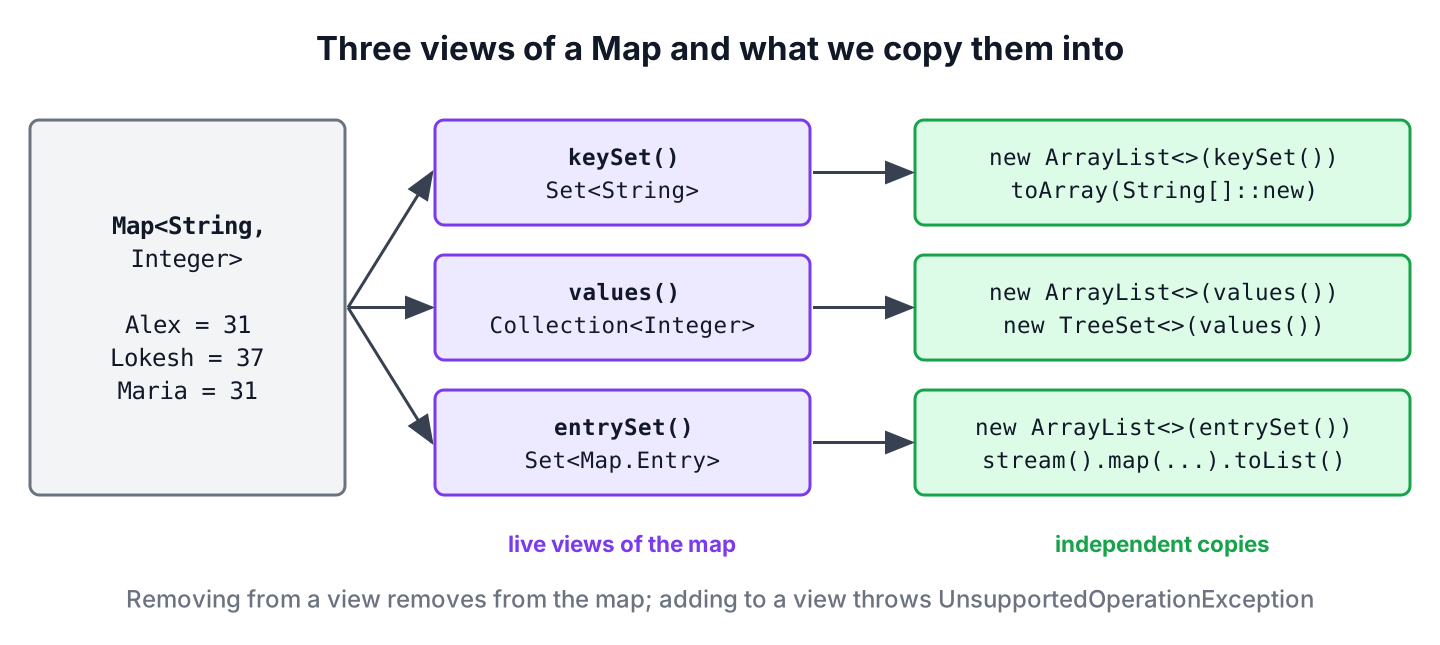
The views are live, which means they read from the map on every access and do not hold copies. Removing a key from keySet() removes the entry from the map, and adding to a view throws an UnsupportedOperationException. When code keeps the result or changes it, we copy the view into a new collection instead of passing the view around.
Map<String, Integer> ages = new TreeMap<>(Map.of("Lokesh", 37, "Alex", 31, "Maria", 31));
Set<String> keyView = ages.keySet();
boolean removed = keyView.remove("Alex");                                  // true
int sizeAfter = ages.size();                                               // 2 (removed from the map too)
boolean added = keyView.add("Zoe");                                        // UnsupportedOperationException
2. Convert a Map to a List
The ArrayList copy constructor takes any Collection, so it accepts each of the three views and copies the elements in the iteration order of the map. Since Java 16, a stream with toList() does the same in one expression and returns an unmodifiable list.
2.1. Map Values to a List
A list of values keeps duplicates, because two keys can map to the same value. The constructor version gives a modifiable ArrayList, and the stream version is useful when we transform the values on the way.
Map<String, Integer> ages = new TreeMap<>(Map.of("Lokesh", 37, "Alex", 31, "Maria", 31));
List<Integer> ageList = new ArrayList<>(ages.values());                    // [31, 37, 31]
List<Integer> readOnly = List.copyOf(ages.values());                       // [31, 37, 31] (unmodifiable)
List<String> labels = ages.values().stream().map(age -> age + " years").toList();   // [31 years, 37 years, 31 years]
2.2. Map Keys to a List
Keys are unique, so a list of keys has no duplicates. We use a list instead of the key set when the code needs index access, sorting with List.sort(), or a type that a library method expects.
Map<String, Integer> ages = new TreeMap<>(Map.of("Lokesh", 37, "Alex", 31, "Maria", 31));
List<String> names = new ArrayList<>(ages.keySet());                       // [Alex, Lokesh, Maria]
List<String> upper = ages.keySet().stream().map(String::toUpperCase).toList();   // [ALEX, LOKESH, MARIA]
2.3. Map Entries to a List
A list of entries keeps each key next to its value, which separate key and value lists cannot guarantee once one of them is sorted or filtered. The entries in that list are the entries of the map, so calling setValue() on one of them changes the map. The method Map.Entry.copyOf(), added in Java 17, makes a detached, unmodifiable copy of an entry.
Map<String, Integer> ages = new TreeMap<>(Map.of("Lokesh", 37, "Alex", 31, "Maria", 31));
List<Map.Entry<String, Integer>> pairs = new ArrayList<>(ages.entrySet());
Integer old = pairs.get(0).setValue(32);                                   // 31
Integer inMap = ages.get("Alex");                                          // 32 (the map changed)

List<Map.Entry<String, Integer>> snapshot = ages.entrySet().stream().map(Map.Entry::copyOf).toList();
Integer blocked = snapshot.get(0).setValue(40);                            // UnsupportedOperationException
2.4. Sorting and Filtering While Converting
A stream lets us sort or filter the entries before we keep only the keys or the values. A common case is a list of keys ordered by their values, such as the names of the youngest people first.
Map<String, Integer> ages = new TreeMap<>(Map.of("Lokesh", 37, "Alex", 31, "Maria", 31));
List<String> youngestFirst = ages.entrySet().stream().sorted(Map.Entry.comparingByValue()).map(Map.Entry::getKey).toList();   // [Alex, Maria, Lokesh]
List<String> over35 = ages.entrySet().stream().filter(e -> e.getValue() > 35).map(Map.Entry::getKey).toList();               // [Lokesh]
Sorting is stable, so Alex and Maria, who share the age 31, keep their order from the map. The sort a Map by values article covers reverse order and sorting into a new map.
3. Converting a Map to an Array
The method toArray(IntFunction), added to Collection in Java 11, takes an array constructor such as String[]::new and returns an array of the right type. The older toArray(new String[0]) form gives the same result, and the plain toArray() without arguments returns an Object[], which is rarely what we want.
Map<String, Integer> ages = new TreeMap<>(Map.of("Lokesh", 37, "Alex", 31, "Maria", 31));
String[] nameArray = ages.keySet().toArray(String[]::new);                 // [Alex, Lokesh, Maria]
Integer[] boxedAges = ages.values().toArray(Integer[]::new);               // [31, 37, 31]
Object[] untyped = ages.keySet().toArray();                                // [Alex, Lokesh, Maria]
An Integer[] is not an int[], and Java does not convert between them. For a primitive array, we unbox the values in a stream with mapToInt(), which also lets us fail early on a null value instead of storing it.
Map<String, Integer> ages = new TreeMap<>(Map.of("Lokesh", 37, "Alex", 31, "Maria", 31));
int[] ageArray = ages.values().stream().mapToInt(Integer::intValue).toArray();   // [31, 37, 31]
int total = Arrays.stream(ageArray).sum();                                       // 99
For more on moving between lists and arrays, read converting between a List and an array.
4. Converting a Map to a Set
The key set of a map is already a Set, so converting keys only needs a copy. Values are a different case, because a Set keeps only distinct elements, and duplicate values disappear in the conversion.
Map<String, Integer> ages = new TreeMap<>(Map.of("Lokesh", 37, "Alex", 31, "Maria", 31));
Set<String> nameSet = new HashSet<>(ages.keySet());                        // 3 names, no order
Set<Integer> distinctAges = new TreeSet<>(ages.values());                  // [31, 37]
Set<Integer> fixedAges = Set.copyOf(ages.values());                        // 2 ages, unmodifiable
Set<Map.Entry<String, Integer>> entrySetCopy = new HashSet<>(ages.entrySet());   // 3 entries
A HashSet has no defined order, a TreeSet sorts the elements, and a LinkedHashSet keeps the order in which the elements were added. We pick the set type by the order the result needs, as with lists.
5. Keeping the Order of the Map
Every conversion follows the iteration order of the source map. Because a HashMap has no defined order, the list it produces can come out in any order and can change between Java versions. A LinkedHashMap gives insertion order, and a TreeMap gives key order.
Since Java 21, LinkedHashMap and TreeMap implement SequencedMap, whose sequencedKeySet(), sequencedValues() and sequencedEntrySet() views have a reversed() method. That gives us the newest entries first without sorting.
SequencedMap<String, Integer> visits = new LinkedHashMap<>();
visits.put("home", 3);
visits.put("blog", 7);
visits.put("about", 1);
List<String> oldestFirst = new ArrayList<>(visits.sequencedKeySet());            // [home, blog, about]
List<String> newestFirst = new ArrayList<>(visits.sequencedKeySet().reversed()); // [about, blog, home]
List<Integer> lastValues = visits.sequencedValues().reversed().stream().limit(2).toList();   // [1, 7]
6. Converting a Map to a List of Objects
A REST endpoint of an HR app returns team members as a JSON array, but the service keeps them in a Map from name to age. JSON libraries turn a list of records into an array of objects, so we map each entry to a record and collect the records into a list.
record Member(String name, int age) {}Map<String, Integer> ages = new TreeMap<>(Map.of("Lokesh", 37, "Alex", 31, "Maria", 31));
List<Member> members = ages.entrySet().stream().map(e -> new Member(e.getKey(), e.getValue())).toList(); // [Member[name=Alex, age=31], Member[name=Lokesh, age=37], Member[name=Maria, age=31]]When each key holds a list, such as a map of teams to member names, flatMap() joins all the inner lists into one list.
Map<String, List<String>> teams = new TreeMap<>(Map.of("backend", List.of("Alex", "Lokesh"), "design", List.of("Maria")));
List<String> everyone = teams.values().stream().flatMap(List::stream).toList();   // [Alex, Lokesh, Maria]
7. Map to List, Array and Set FAQs
Once the first conversion works, the next questions are about casting, copies, null values and arrays.
7.1. Can I Cast map.values() to a List?
No. The values() method returns a Collection view whose class is not a List, so the cast compiles but fails at runtime. We copy the values instead.
Map<String, Integer> ages = new HashMap<>(Map.of("Lokesh", 37));
List<Integer> cast = (List<Integer>) ages.values();                        // ClassCastException
List<Integer> copy = new ArrayList<>(ages.values());                       // [37]
7.2. Does keySet() Return a Copy of the Keys?
No. It returns a live view backed by the map, as section 1 shows. Changes to the map are visible in the view, and removing from the view removes from the map. To get an independent copy, we pass the view to new HashSet<>(…), new ArrayList<>(…) or Set.copyOf().
7.3. Should I Use toList(), List.copyOf() or new ArrayList<>()?
Use new ArrayList<>(…) when the list must be modifiable. Both Stream.toList() and List.copyOf() return unmodifiable lists, but List.copyOf() throws a NullPointerException if a value is null, whereas Stream.toList() accepts null elements.
Map<String, Integer> scores = new HashMap<>();
scores.put("ben", null);
List<Integer> viaStream = scores.values().stream().toList();               // [null]
List<Integer> viaCopy = List.copyOf(scores.values());                      // NullPointerException
7.4. How Do I Convert a Map to a Two-Column Array?
We map each entry to an Object[] pair and collect the pairs into an Object[][]. Tables in Swing and some test frameworks expect that shape.
Map<String, Integer> ages = new TreeMap<>(Map.of("Lokesh", 37, "Alex", 31));
Object[][] rows = ages.entrySet().stream().map(e -> new Object[] {e.getKey(), e.getValue()}).toArray(Object[][]::new);   // [[Alex, 31], [Lokesh, 37]]
8. Conclusion
Every map conversion starts from one of three views. We take keySet() for keys, values() for values and entrySet() for key-value pairs, and copy the view into a list with the ArrayList constructor or toList(), into an array with toArray(String[]::new), or into a set with a HashSet or TreeSet.
The views are live, so we copy them when we keep or change the result, and we remember that a value set drops duplicates. The order of the result comes from the map, which is why a HashMap needs sorting or a LinkedHashMap or TreeMap source when the order matters.
9. References
- Map Javadoc (Java 25)
- Collection.toArray(IntFunction) Javadoc (Java 25)
- Stream.toList() Javadoc (Java 25)
- SequencedMap Javadoc (Java 25)
Happy Learning !!
