
To create a new file in Java, we call Files.createFile(path), which creates an empty file and throws FileAlreadyExistsException when a file with that name already exists. The method checks for an existing file and creates the new one in a single atomic step, so two threads or two processes can never both create the same file.
We create files for exports, log and report output, upload targets and marker files such as a lock file that tells a second instance of a job to stay away. Most of the time we also want to write content, and Files.writeString() with StandardOpenOption.CREATE_NEW does both in one call.
The following example creates an empty todo.txt file in a fresh folder and shows what happens on the second attempt.
Path notes = Files.createTempDirectory("notes");        // new empty folder
Path todo = Files.createFile(notes.resolve("todo.txt"));  // creates todo.txt
boolean created = Files.exists(todo);                     // true
long size = Files.size(todo);                             // 0
Path again = Files.createFile(todo);                      // FileAlreadyExistsException
Notice that the second call does not overwrite anything, it fails. We look at the exceptions createFile() throws, create the missing parent folders, write content while creating the file, set permissions at creation time and compare the older options such as File.createNewFile() and FileOutputStream. For the rest of the file API, the Java IO tutorial groups every task in one place.
1. Creating an Empty File With Files.createFile()
The method Files.createFile() takes a Path and an optional list of file attributes, and returns the same Path. It never replaces an existing file. When something goes wrong, it throws an exception that names the cause, so we don’t have to guess what a false return value means.
The exceptions map one to one to the failure cases.
| Situation | What createFile() does |
|---|---|
| The file does not exist, the parent folder does | Creates an empty file and returns its Path |
| A file or folder with that name exists | Throws FileAlreadyExistsException |
| The parent folder does not exist | Throws NoSuchFileException |
| No write permission on the folder, disk full and similar | Throws AccessDeniedException or another IOException |
In real code, an existing file is often a normal case and not an error. The following method creates the file when it is missing and reports whether it did, so the caller can decide what to do with an existing file.
static boolean createIfMissing(Path file) throws IOException {
    try {
        Files.createFile(file);
        return true;
    } catch (FileAlreadyExistsException e) {
        return false;                       // someone created it first
    }
}
Path inbox = Files.createTempDirectory("inbox");
boolean first = createIfMissing(inbox.resolve("orders.csv")); // true
boolean second = createIfMissing(inbox.resolve("orders.csv")); // falseWe don’t call Files.exists() before createFile(). Another process can create the file between the two calls, and catching the exception is both shorter and correct. The file exists check article explains that race in detail.
1.1. Creating the Missing Parent Folders First
A path such as reports/2026/10/summary.txt fails with NoSuchFileException when the 2026/10 folders don’t exist yet. We call Files.createDirectories() on the parent first. It creates every missing folder and does nothing when they exist.
Path base = Files.createTempDirectory("reports");
Path summary = base.resolve("2026/10/summary.txt");
Path missing = Files.createFile(summary);                 // NoSuchFileException
Path base = Files.createTempDirectory("reports");
Path summary = base.resolve("2026/10/summary.txt");
Path parent = Files.createDirectories(summary.getParent()); // creates 2026/10
Path file = Files.createFile(summary); // creates summary.txt
boolean isFile = Files.isRegularFile(file); // true2. Creating a File and Writing to It in One Step
An empty file is rarely the goal. When we write content anyway, Files.writeString(), Files.write() and Files.newBufferedWriter() create the file for us. The open options decide what happens when the file exists, and the default is the dangerous one.
| Open options | File missing | File exists |
|---|---|---|
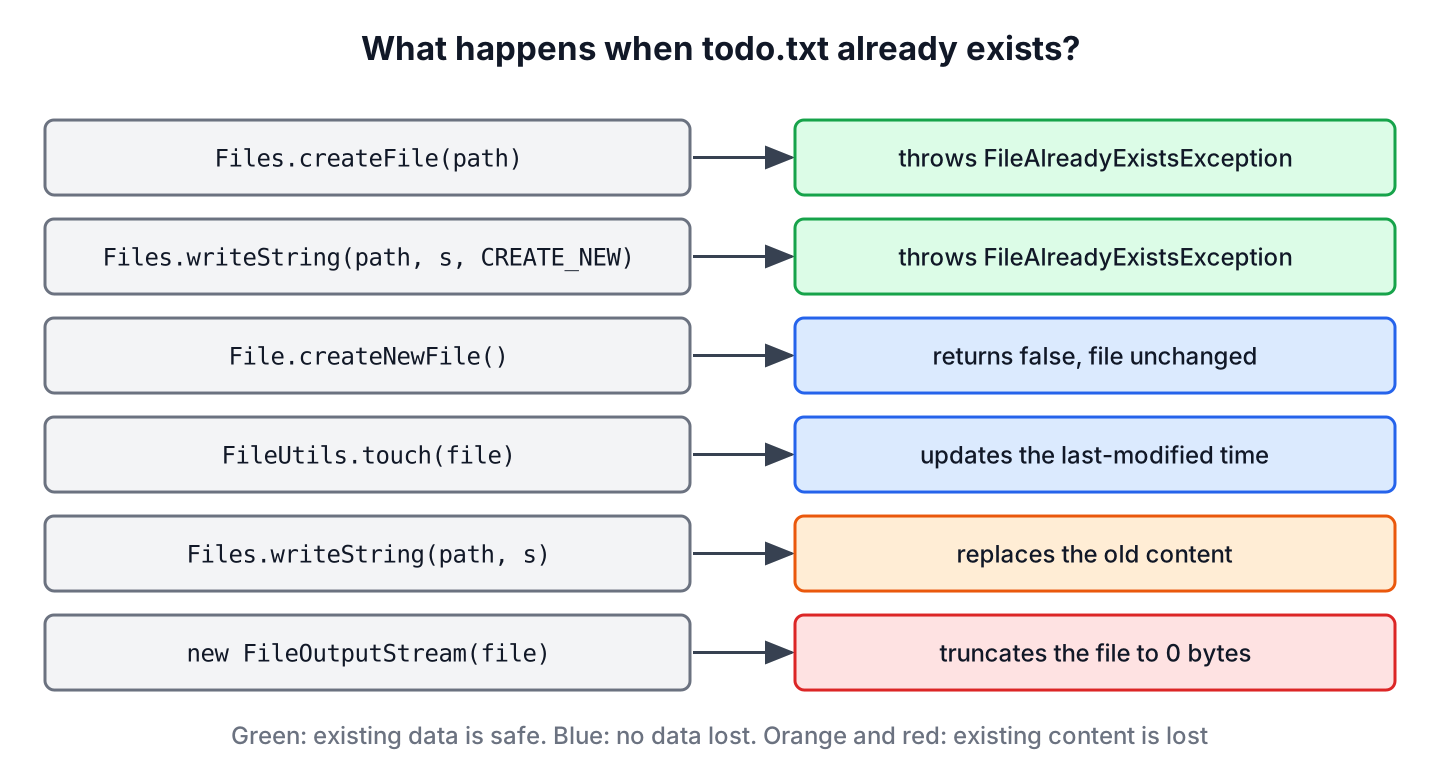
| None, which defaults to CREATE, TRUNCATE_EXISTING and WRITE | Creates it | Deletes the old content and writes the new text |
| CREATE_NEW | Creates it | Throws FileAlreadyExistsException |
| CREATE, APPEND | Creates it | Adds the text at the end |
Say a nightly job exports the day’s invoices to invoices-2026-10-10.csv. If an operator starts the job a second time by mistake, the default options would replace the file that the accounting system may already be reading. With CREATE_NEW, the second run fails, and the first file stays as it was.
Path exports = Files.createTempDirectory("exports");
Path csv = exports.resolve("invoices-2026-10-10.csv");
Path written = Files.writeString(csv, "id,amount\n1,40\n", StandardOpenOption.CREATE_NEW);
long rows = Files.readAllLines(written).size();           // 2
Path rerun = Files.writeString(csv, "id,amount\n", StandardOpenOption.CREATE_NEW); // FileAlreadyExistsException
For larger output, we open a BufferedWriter with the same option inside try-with-resources, so the file is closed even when a write fails.
Path exports = Files.createTempDirectory("exports");
Path log = exports.resolve("import.log");
try (BufferedWriter out = Files.newBufferedWriter(log, StandardOpenOption.CREATE_NEW)) {
    out.write("started");
    out.newLine();
}
long lines = Files.readAllLines(log).size();              // 1
The Files methods write UTF-8 when we don’t pass a charset, and since Java 18 (JEP 400) FileWriter and other java.io classes use UTF-8 by default as well. The write to a file and append to a file articles cover the writing side in depth.
3. Setting Permissions While Creating the File
On Linux and macOS, a new file gets the default permissions minus the process umask, which is often rw-r–r–. When the file holds a secret, such as an API key or a private key, we pass the permissions to createFile(). The file never exists with wider permissions, not even for a moment.
Path secrets = Files.createTempDirectory("secrets");
FileAttribute<Set<PosixFilePermission>> ownerOnly =
        PosixFilePermissions.asFileAttribute(PosixFilePermissions.fromString("rw-------"));
Path key = Files.createFile(secrets.resolve("api.key"), ownerOnly);
String perms = PosixFilePermissions.toString(Files.getPosixFilePermissions(key)); // "rw-------"
Two limits apply. The umask still removes bits, so asking for rw-rw-rw- gives rw-r–r– under the common umask 022. On Windows, the default file system does not support POSIX attributes, and createFile() throws UnsupportedOperationException. Making an existing file read-only is a separate topic, covered in make a file read-only.
4. File.createNewFile() and Its Boolean Result
Before java.nio.file, we created files with java.io.File. The method createNewFile() is also atomic, but it returns false when the file exists instead of throwing. An I/O problem, such as a missing parent folder, still throws IOException.
File folder = Files.createTempDirectory("legacy").toFile();
File notes = new File(folder, "notes.txt");
boolean createdNow = notes.createNewFile();               // true
boolean createdAgain = notes.createNewFile();             // false, already exists
Path asPath = notes.toPath();                             // switch to the Files API
Callers often ignore the false result, so new code is better off with Files.createFile(). Code that receives a File from a library converts it with toPath() and continues with Files.
5. FileOutputStream Overwrites Existing Files
Opening a FileOutputStream also creates the file, and several old tutorials show it for that purpose. If the file already exists, the constructor truncates it to zero bytes before we write anything. A missing parent folder gives FileNotFoundException.
Path dir = Files.createTempDirectory("photos");
Path meta = Files.writeString(dir.resolve("meta.txt"), "camera=x100");
try (FileOutputStream out = new FileOutputStream(meta.toFile())) {
    // nothing written
}
long sizeAfter = Files.size(meta);                        // 0, old content is gone
When we need a byte stream for a new file, Files.newOutputStream(path, StandardOpenOption.CREATE_NEW) gives the same OutputStream and refuses to destroy existing data.
6. Comparing Ways to Create a New File in Java
The methods differ in two ways that matter in production, namely what they do with an existing file and how they report failure.
| Method | Existing file | Missing parent folder | Reports failure by |
|---|---|---|---|
| Files.createFile() | FileAlreadyExistsException | NoSuchFileException | Exception |
| Files.writeString(.., CREATE_NEW) | FileAlreadyExistsException | NoSuchFileException | Exception |
| Files.writeString() default | Replaces the content | NoSuchFileException | Exception |
| File.createNewFile() | Returns false | IOException | Return value or exception |
| new FileOutputStream() | Truncates to 0 bytes | FileNotFoundException | Exception |
| Commons IO FileUtils.touch() | Updates the timestamp | Creates the parents | Exception |
For a temporary file that the app deletes later, none of these is the right choice. We use Files.createTempFile(), explained in creating a temporary file.
7. Creating Files With Commons IO or Guava
Projects that already depend on Apache Commons IO (version 2.22.0 at the time of writing) can call FileUtils.touch(file). It works like the Unix touch command, i.e. it creates an empty file when it is missing, creates missing parent folders and updates the last-modified time of an existing file. Guava has com.google.common.io.Files.touch(file) with the same idea.
Path cache = Files.createTempDirectory("cache");
File marker = cache.resolve("thumbs/ready.flag").toFile();
FileUtils.touch(marker);
boolean ready = marker.exists();                          // true
We don’t add a library only for creating files, because Files.createDirectories() plus Files.createFile() does the same in two lines.
8. Creating Files in Java FAQs
A reviewer looking at file creation code checks overwriting, the create-if-missing pattern, relative paths and thread safety.
8.1. Does createNewFile() overwrite an existing file?
No. File.createNewFile() returns false and leaves the existing file and its content as they are. The same holds for Files.createFile(), which throws FileAlreadyExistsException instead.
8.2. How do we create a file only if it does not exist?
We call Files.createFile() and catch FileAlreadyExistsException, as the createIfMissing() method in section 1 shows. A check with Files.exists() followed by createFile() has a race between the two calls.
8.3. Where does Java create a file with a relative path?
A relative path such as Path.of(“todo.txt”) is relative to the current working directory, which is the folder the JVM started in. In an IDE that is the project root by default, and in a service it depends on how the service is launched, so we build paths from a configured base folder instead.
Path base = Path.of("data");                  // relative to the working directory
Path file = base.resolve("todo.txt").toAbsolutePath(); // full path, starts with the working directory
8.4. Is Files.createFile() thread-safe?
Yes. The existence check and the creation are one atomic file system operation, so when two threads call it for the same path, only one succeeds and the other gets FileAlreadyExistsException.
9. Conclusion
Files.createFile() is the standard way to create a new, empty file in Java, and its exceptions tell us whether the file existed or the parent folder was missing. When we also write content, Files.writeString() or Files.newBufferedWriter() with CREATE_NEW creates and fills the file without the risk of overwriting data.
We create parent folders with Files.createDirectories(), pass POSIX permissions at creation for sensitive files and keep File.createNewFile() and FileOutputStream for code that already uses java.io, remembering that the stream truncates existing files.
10. References
- Files Javadoc (Java 25)
- StandardOpenOption Javadoc
- File.createNewFile() Javadoc
- JEP 400, UTF-8 by Default
- Commons IO FileUtils
Happy Learning !!
