
The Apache POI SAX parser approach, also called the event API, reads an .xlsx file as a stream of XML events, so it gets one callback per row and per cell instead of loading the whole workbook into memory. The classes XSSFReader and XSSFSheetXMLHandler do most of the work, and we only write a small handler that receives the cell values.
We use the event API when a large Excel file, such as a 300,000-row price list or a bank statement export, makes XSSFWorkbook fail with an OutOfMemoryError. Memory stays almost flat no matter how many rows the sheet has, because POI keeps only the current row.
The following example reads the first sheet of orders.xlsx with POI 5.5.1 and collects every cell as text, using the RowCollector handler from section 4.
Path file = Path.of("orders.xlsx");
List<List<String>> rows = new ArrayList<>();
try (OPCPackage pkg = OPCPackage.open(file.toFile(), PackageAccess.READ)) {
    XSSFReader reader = new XSSFReader(pkg);
    SharedStrings strings = new ReadOnlySharedStringsTable(pkg);
    XMLReader parser = XMLHelper.newXMLReader();
    parser.setContentHandler(new XSSFSheetXMLHandler(
            reader.getStylesTable(), strings, new RowCollector(rows), false));
    try (InputStream sheet = reader.getSheetsData().next()) {
        parser.parse(new InputSource(sheet));
    }
}
List<String> header = rows.get(0);     // [Item, Qty, Price, Ordered]
List<String> first = rows.get(1);      // [apple, 5, 1.2, 2026-10-01]
Notice that the date comes out as 2026-10-01 and not as a raw number, because XSSFSheetXMLHandler applies the cell styles for us. We look at why the regular API runs out of memory, the classes involved, a reusable header-aware reader, a hand-written SAX handler, batch imports and writing large files with SXSSF.
1. Why XSSFWorkbook Runs Out of Memory on Large Files
An .xlsx file is a ZIP archive of XML files. The Apache POI usermodel API (XSSFWorkbook, Sheet, Row, Cell) unzips that XML and builds a Java object for every row, cell and style. A 20 MB file can take more than a gigabyte of heap, so large imports fail with java.lang.OutOfMemoryError: Java heap space.
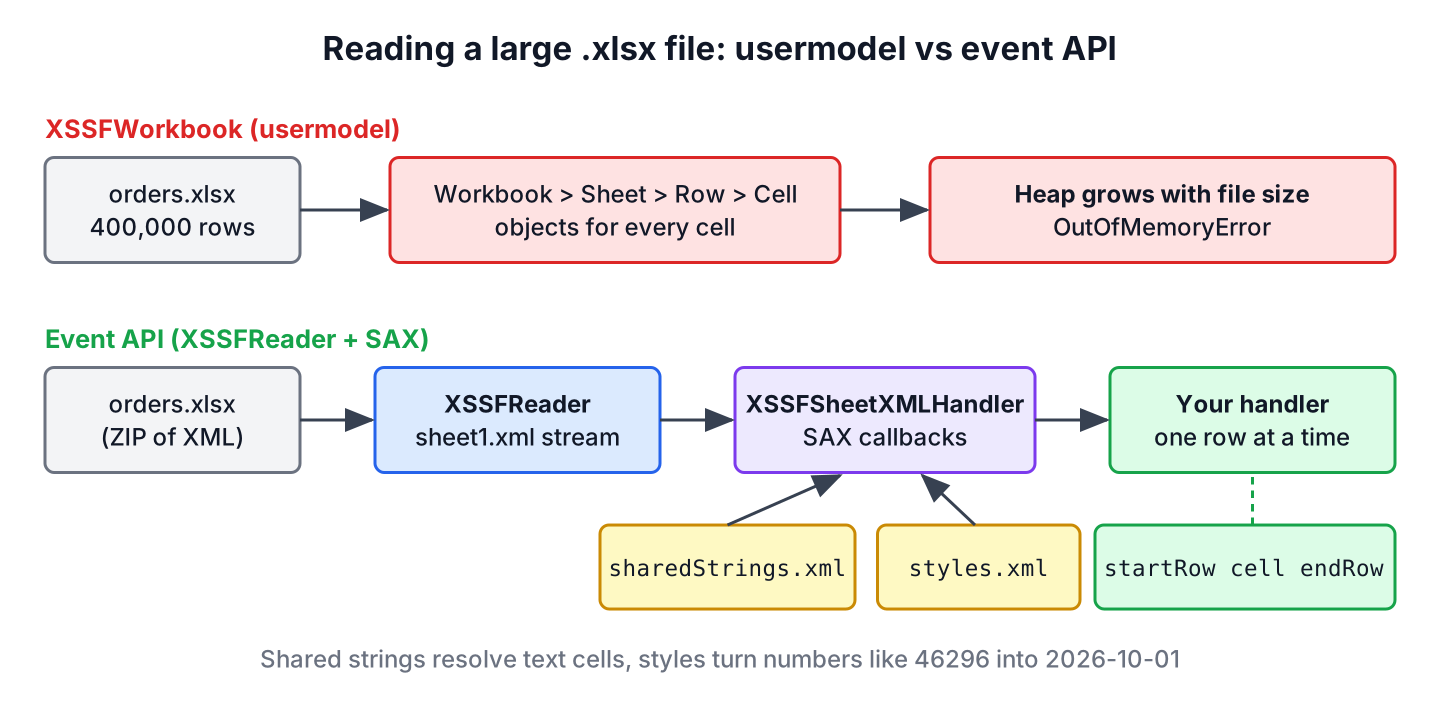
The event API skips the object model. The SAX parser reads the sheet XML from top to bottom and calls our code for each element, so there is no tree to keep in memory. Each row of the sheet looks like this inside xl/worksheets/sheet1.xml.
<row r="2">
  <c r="A2" t="s"><v>4</v></c>              <!-- index 4 in sharedStrings.xml: "apple" -->
  <c r="B2" t="n"><v>5.0</v></c>
  <c r="C2" t="n"><v>1.2</v></c>
  <c r="D2" t="n" s="1"><v>46296.0</v></c>  <!-- date stored as a number, style 1 -->
</row>
Text cells hold only an index into xl/sharedStrings.xml, and dates are numbers that need the style from xl/styles.xml to look like dates. Those two lookups are the reason we use POI helper classes instead of a plain XML parser. The choice between the POI options depends on whether we read or write and how much of the file we need at once.
| Approach | Reads | Writes | Memory | Random access to cells |
|---|---|---|---|---|
| XSSFWorkbook (usermodel) | Yes | Yes | Whole workbook | Yes |
| Event API (XSSFReader + SAX) | Yes | No | One row plus shared strings | No, top to bottom only |
| SXSSFWorkbook (streaming usermodel) | No | Yes | A window of rows, 100 by default | Only rows inside the window |
| FastExcel reader and writer | Yes | Yes | Low, streaming | No |
Use the event API for reading large files and SXSSFWorkbook for writing them, because neither one can do both. For files of a few thousand rows, XSSFWorkbook is simpler and fast enough.
2. Adding poi-ooxml to the Project
The event API is part of poi-ooxml, which also pulls in poi, xmlbeans and commons-compress. POI 5.5.1 is the current release and runs on Java 8 and later, including Java 25.
<dependency>
    <groupId>org.apache.poi</groupId>
    <artifactId>poi-ooxml</artifactId>
    <version>5.5.1</version>
</dependency>
POI logs through the Log4j API. Without a Log4j provider on the classpath, the first run prints Log4j API could not find a logging provider, which is harmless. To route the messages to SLF4J or Logback, we add log4j-to-slf4j, and for Log4j itself we add log4j-core.
3. Core Classes of the Event API
Five POI classes and one SAX interface take part in every read. We open the package, ask XSSFReader for the parts, and connect the parts to a parser.
| Class | What it does |
|---|---|
| OPCPackage | Opens the .xlsx ZIP container. Open it with PackageAccess.READ so POI never writes back to the file. |
| XSSFReader | Gives access to the raw parts, such as the sheet streams, the styles table and the sheet names. |
| ReadOnlySharedStringsTable | Loads the shared strings with less memory than the editable SharedStringsTable. |
| StylesTable | Holds the number formats, so dates and percentages can be formatted. |
| XSSFSheetXMLHandler | A ready-made SAX handler that resolves shared strings and formats, and calls our SheetContentsHandler. |
| SheetContentsHandler | Our callback interface with startRow(), cell() and endRow(). |
The XML reader comes from XMLHelper.newXMLReader() instead of SAXParserFactory. The POI helper turns on namespace support and turns off external entities, which protects the app from XXE attacks when users upload files.
4. Reading Excel with the Apache POI SAX Parser
The SheetContentsHandler interface reports rows and cells, and its cell reference, such as B2, tells us the column. Empty cells do not appear in the XML at all, so a handler that only appends values would shift the columns of every row with a gap.
The following example is the RowCollector from the intro. It fills the gaps with empty strings by converting the column letters of the reference into an index with CellReference.
static class RowCollector implements XSSFSheetXMLHandler.SheetContentsHandler {
    private final List<List<String>> rows;
    private List<String> current;

    RowCollector(List<List<String>> rows) {
        this.rows = rows;
    }

    @Override
    public void startRow(int rowNum) {
        current = new ArrayList<>();
    }

    @Override
    public void cell(String ref, String value, XSSFComment comment) {
        int col = new CellReference(ref).getCol();
        while (current.size() < col) {
            current.add("");                   // missing cell
        }
        current.add(value);
    }

    @Override
    public void endRow(int rowNum) {
        rows.add(current);
    }
}
In the sample file, cherry has no quantity, and row 5 is empty. The collector keeps the column positions for cherry, and empty rows produce no callbacks, so row 5 does not show up in the result.
List<List<String>> rows = new ArrayList<>();
try (OPCPackage pkg = OPCPackage.open(new File("orders.xlsx"), PackageAccess.READ)) {
    XSSFReader reader = new XSSFReader(pkg);
    XMLReader parser = XMLHelper.newXMLReader();
    parser.setContentHandler(new XSSFSheetXMLHandler(reader.getStylesTable(),
            new ReadOnlySharedStringsTable(pkg), new RowCollector(rows), false));
    try (InputStream sheet = reader.getSheetsData().next()) {
        parser.parse(new InputSource(sheet));
    }
}
List<String> cherry = rows.get(3);      // [cherry, , 4, 2026-10-03]
List<String> total = rows.get(4);       // [total, 8]
int size = rows.size();                 // 5
The last argument of the XSSFSheetXMLHandler constructor is formulasNotResults. With false, we get the result that Excel saved for the formula, here 8 for SUM(B2:B4). With true, we get the formula text. POI does not recalculate anything in the event API.
4.1. Header Names and Sheet Selection
Most imports want rows as column-name-to-value pairs and need only some sheets. The method getSheetIterator() returns an iterator that also knows the name of the sheet it is on, so we can skip the sheets we do not need before parsing them.
static List<Map<String, String>> readSheet(Path file, String sheetName) throws Exception {
    List<List<String>> rows = new ArrayList<>();
    try (OPCPackage pkg = OPCPackage.open(file.toFile(), PackageAccess.READ)) {
        XSSFReader reader = new XSSFReader(pkg);
        SharedStrings strings = new ReadOnlySharedStringsTable(pkg);
        StylesTable styles = reader.getStylesTable();
        XSSFReader.SheetIterator sheets = reader.getSheetIterator();
        while (sheets.hasNext()) {
            try (InputStream sheet = sheets.next()) {
                if (!sheets.getSheetName().equals(sheetName)) {
                    continue;                  // skip other sheets unparsed
                }
                XMLReader parser = XMLHelper.newXMLReader();
                parser.setContentHandler(new XSSFSheetXMLHandler(
                        styles, strings, new RowCollector(rows), new DataFormatter(), false));
                parser.parse(new InputSource(sheet));
            }
        }
    }
    if (rows.isEmpty()) {
        return List.of();
    }
    List<String> header = rows.get(0);
    List<Map<String, String>> result = new ArrayList<>();
    for (List<String> row : rows.subList(1, rows.size())) {
        Map<String, String> values = new LinkedHashMap<>();
        for (int i = 0; i < header.size(); i++) {
            values.put(header.get(i), i < row.size() ? row.get(i) : "");
        }
        result.add(values);
    }
    return result;
}
List<Map<String, String>> returns = readSheet(Path.of("orders.xlsx"), "Returns");
Map<String, String> firstReturn = returns.get(0); // {Item=banana, Reason=bruised}
List<Map<String, String>> none = readSheet(Path.of("orders.xlsx"), "Archive"); // []The readSheet() method collects the rows in a list to keep the example short, so it still holds the whole sheet in memory. For sheets with hundreds of thousands of rows, we process each row inside endRow() and keep nothing, as the batch import in section 6 does.
5. Writing Your Own SAX Handler
We can also extend DefaultHandler and react to the raw row, c and v elements ourselves. The raw handler is faster than XSSFSheetXMLHandler because it skips the formatting, which is useful for numeric columns that need no styles, such as totals or IDs.
The following example sums the Qty column (column B) of the data rows. Two details matter in a hand-written handler. We compare localName, which ignores namespace prefixes such as x:row, and we skip t=”s” cells because their value is a shared-string index and not a number.
static class ColumnSum extends DefaultHandler {
    private final String column;
    private final StringBuilder text = new StringBuilder();
    private boolean inValue;
    private boolean wanted;
    private int row;
    double sum;

    ColumnSum(String column) {
        this.column = column;
    }

    @Override
    public void startElement(String uri, String localName, String qName, Attributes atts) {
        switch (localName) {
            case "row" -> row = Integer.parseInt(atts.getValue("r"));
            case "c" -> {
                String ref = atts.getValue("r");
                boolean number = atts.getValue("t") == null || "n".equals(atts.getValue("t"));
                wanted = row > 1 && number && ref.equals(column + row);
            }
            case "v" -> {
                inValue = wanted;
                text.setLength(0);
            }
            default -> { }
        }
    }

    @Override
    public void characters(char[] ch, int start, int length) {
        if (inValue) {
            text.append(ch, start, length);
        }
    }

    @Override
    public void endElement(String uri, String localName, String qName) {
        if ("v".equals(localName) && inValue) {
            sum += Double.parseDouble(text.toString());
            inValue = false;
        }
    }
}
ColumnSum qty = new ColumnSum("B");
try (OPCPackage pkg = OPCPackage.open(new File("orders.xlsx"), PackageAccess.READ)) {
XMLReader parser = XMLHelper.newXMLReader();
parser.setContentHandler(qty);
try (InputStream sheet = new XSSFReader(pkg).getSheetsData().next()) {
parser.parse(new InputSource(sheet));
}
}
double totalQty = qty.sum; // 16.0The result is 16 and not 8, because the total row also has a number in column B. A raw handler sees every value, including formula results, so the import rules (skip the header, stop at a total row) are our job. The characters() method can also be called several times for one value, which is why the text goes into a StringBuilder until endElement().
The example takes the first sheet from getSheetsData() on purpose. Many tutorials call getSheet(“rId1”), but rId1 is a relationship ID and not a sheet number. In a file written by POI, rId1 points to sharedStrings.xml, so that call parses the wrong part and the sum stays at 0.
A raw handler also has to deal with inline strings (t=”inlineStr”, text in an is element instead of v), shared strings and dates. Unless we need the extra speed, XSSFSheetXMLHandler is the safer choice.
6. Importing a Large Sheet in Batches
A wholesale shop uploads a supplier price list with 400,000 rows every night, and the app stores it in a database table. Loading the file into XSSFWorkbook needs several gigabytes of heap, and inserting row by row is slow. The event API reads one row at a time, and we hand the rows to the database in batches of 1,000.
The following handler maps each row to a PriceRow record and calls a Consumer whenever a batch is full and once more at the end of the sheet. The consumer is where a real app runs a JDBC batch insert or a Spring Data saveAll().
record PriceRow(String item, int qty, double price) {}static class BatchingHandler implements XSSFSheetXMLHandler.SheetContentsHandler {
private final int batchSize;
private final Consumer<List<PriceRow>> sink;
private final List<PriceRow> batch = new ArrayList<>();
private final Map<Integer, String> cells = new HashMap<>();
BatchingHandler(int batchSize, Consumer<List<PriceRow>> sink) {
this.batchSize = batchSize;
this.sink = sink;
}
@Override
public void startRow(int rowNum) {
cells.clear();
}
@Override
public void cell(String ref, String value, XSSFComment comment) {
cells.put((int) new CellReference(ref).getCol(), value);
}
@Override
public void endRow(int rowNum) {
if (rowNum == 0 || "total".equals(cells.get(0))) {
return; // skip header and total rows
}
int qty = cells.containsKey(1) ? Integer.parseInt(cells.get(1)) : 0;
batch.add(new PriceRow(cells.get(0), qty, Double.parseDouble(cells.get(2))));
if (batch.size() == batchSize) {
sink.accept(List.copyOf(batch));
batch.clear();
}
}
@Override
public void endSheet() {
if (!batch.isEmpty()) {
sink.accept(List.copyOf(batch));
batch.clear();
}
}
}List<Integer> batchSizes = new ArrayList<>();
try (OPCPackage pkg = OPCPackage.open(new File("orders.xlsx"), PackageAccess.READ)) {
XSSFReader reader = new XSSFReader(pkg);
XMLReader parser = XMLHelper.newXMLReader();
BatchingHandler handler = new BatchingHandler(2, batch -> batchSizes.add(batch.size()));
parser.setContentHandler(new XSSFSheetXMLHandler(reader.getStylesTable(),
new ReadOnlySharedStringsTable(pkg), handler, false));
try (InputStream sheet = reader.getSheetsData().next()) {
parser.parse(new InputSource(sheet));
}
}
List<Integer> sizes = batchSizes; // [2, 1]With a batch size of 2, the three data rows arrive as one batch of two and one batch of one. The rowNum passed to endRow() is zero-based, so the header row is row 0. Because nothing is kept after a batch is stored, the heap use stays the same for 3 rows or 400,000 rows. Only the shared strings table grows with the file.
7. Writing Large Excel Files with SXSSFWorkbook
The event API cannot write. For writing, POI has SXSSFWorkbook, a streaming version of XSSFWorkbook that keeps only the last rows in memory and writes older rows to a temporary file. The window size defaults to 100 rows, and rows outside the window can no longer be read with getRow().
Path out = Path.of("prices.xlsx");
try (SXSSFWorkbook wb = new SXSSFWorkbook(100);
     OutputStream os = Files.newOutputStream(out)) {
    Sheet sheet = wb.createSheet("Prices");
    for (int i = 0; i < 10_000; i++) {
        Row row = sheet.createRow(i);
        row.createCell(0).setCellValue("item-" + i);
        row.createCell(1).setCellValue(i % 50);
    }
    wb.write(os);
}
long bytes = Files.size(out);           // about 115 KB
The try-with-resources block closes the workbook, and in POI 5.5 close() also deletes the temporary files. Older tutorials call wb.dispose(), which current POI releases mark as deprecated because close() does that job in these versions. To add rows to an existing file instead, see appending rows to an Excel file with POI.
8. Apache POI Large Excel FAQs
Questions about large files start with memory and end with features that the event API leaves out, such as old .xls files, formulas and simpler streaming libraries.
8.1. Can the SAX parser read .xls files?
No. The .xls format is binary, not XML. For large .xls files, POI has a separate HSSF event API built on HSSFEventFactory and HSSFListener, which also delivers one record at a time.
8.2. Why do dates come out as numbers like 46296?
Excel stores a date as the number of days since 1900, and only the cell style marks it as a date. XSSFSheetXMLHandler formats the value with the StylesTable and returns 2026-10-01. A raw DefaultHandler sees the number, and DateUtil.getLocalDateTime(46296.0) converts it.
8.3. Does the event API calculate formulas?
No. It returns the result that Excel saved with the file, or the formula text when formulasNotResults is true. A file written by a tool that does not save results, such as FastExcel or SXSSF, has no value to return, so the cell comes back empty.
8.4. Is there a simpler streaming reader than SAX?
Yes. The excel-streaming-reader library (version 5.3.2) wraps the event API behind the familiar Workbook, Row and Cell interfaces, and the FastExcel reader returns a Stream of rows. Both read top to bottom only.
8.5. How much memory does the event API need?
The parser itself needs very little, but ReadOnlySharedStringsTable keeps all unique strings of the workbook in memory. A sheet of numbers stays small at any size, whereas a sheet with millions of distinct text values can still take hundreds of megabytes.
9. Conclusion
The POI event API reads large .xlsx files with almost constant memory. XSSFReader opens the parts of the file, XSSFSheetXMLHandler resolves shared strings and formats, and our SheetContentsHandler gets one row at a time. Missing cells, header rows and formula results are the details to handle in that callback.
For the highest speed, a raw DefaultHandler reads the XML elements without formatting, at the cost of more code. Writing is a separate problem, which SXSSFWorkbook solves with a sliding window of rows.
10. References
- Apache POI, Busy Developers’ Guide to the event API and SXSSF
- XSSFSheetXMLHandler Javadoc
- SXSSFWorkbook Javadoc
- Apache POI release notes
Happy Learning !!
