

To find the max or min value in a Java Stream, we call stream.max(comparator) or stream.min(comparator). The Comparator tells Java which of two elements is larger, and both methods return an Optional that holds the result, or is empty when the stream has no elements. We take the value out with orElseThrow(), or with orElse() when we want a default value instead.
Both methods are terminal operations, which means they run the stream pipeline and produce the result. For a stream of numbers, IntStream.max() needs no Comparator, and Collectors.maxBy() gives the same answer when we need a collector.
We use max() and min() to pick one element by some value, for example the most liked recipe on a cooking site or the latest order date in an order history.
The following example finds the max and min of numbers and recipes, with the result of each line as a comment.
List<Integer> numbers = List.of(4, 8, 15, 16, 23, 42);

Integer max = numbers.stream().max(Comparator.naturalOrder()).orElseThrow();       // 42
Integer min = numbers.stream().min(Comparator.naturalOrder()).orElseThrow();       // 4
int maxInt = numbers.stream().mapToInt(Integer::intValue).max().orElseThrow();     // 42

Recipe mostLiked = recipes.stream().max(Comparator.comparing(Recipe::likes)).orElseThrow();   // pizza
Recipe quickest = recipes.stream().min(Comparator.comparing(Recipe::minutes)).orElseThrow();  // tacos
Optional<Recipe> top = recipes.stream().collect(Collectors.maxBy(Comparator.comparing(Recipe::likes)));  // Optional[pizza]

Optional<Integer> none = Stream.<Integer>empty().max(Comparator.naturalOrder());   // Optional.empty
Integer value = none.orElseThrow();                                                // NoSuchElementException
Notice that the empty stream returns Optional.empty, and only the call to orElseThrow() turns it into an exception.
Next, we find the max and min of dates, numbers, strings and objects. After that, we look at ties, comparing by two fields, the max per group, empty streams, null values, summaryStatistics() and Collections.max().
1. Overview
Java gives us four ways to find the max and min values of a Stream.
- Stream.max(comparator) returns the largest element according to the given Comparator, wrapped in an Optional.
- Stream.min(comparator) returns the smallest element in the same way, also wrapped in an Optional.
- IntStream.max() and IntStream.min() work on plain int values, so they need no Comparator. LongStream and DoubleStream have the same methods, and the result is an OptionalInt, OptionalLong or OptionalDouble.
- Collectors.maxBy(comparator) and Collectors.minBy(comparator) do the same job inside collect(), which we need when we group elements with groupingBy().
A Comparator compares two objects and returns a negative number, zero or a positive number, depending on which object is larger. Most of the time, we build a comparator with the static methods of the Comparator interface.
| Comparator | Compares by | Example result of max() |
|---|---|---|
| Comparator.naturalOrder() | The class’s own order, from compareTo() (numbers, String, LocalDate) | 42 for [4, 8, 15, 16, 23, 42] |
| Comparator.reverseOrder() | The opposite of the natural order | 1 for [1..9], so max() acts like min() |
| Comparator.comparing(Recipe::likes) | One field of the object, turned into an Integer object (boxing) | pizza |
| Comparator.comparingInt(Recipe::likes) | One int field, kept as a plain int | pizza |
| Integer::compare | Two Integer values | 9 for [1..9] |
All snippets use the same example data, a list of recipes. Recipe is a record (a short class that only holds data), and its toString() returns the recipe name, so the comments show pizza instead of the full record.
record Recipe(String name, String cuisine, int minutes, int likes) {
  @Override
  public String toString() { return name; }
}

List<Recipe> recipes = List.of(
    new Recipe("pasta", "italian", 20, 120),
    new Recipe("pizza", "italian", 45, 150),
    new Recipe("risotto", "italian", 35, 150),
    new Recipe("tacos", "mexican", 15, 90),
    new Recipe("burrito", "mexican", 25, 110),
    new Recipe("curry", "indian", 40, 150),
    new Recipe("dal", "indian", 30, 80));
2. Finding Min or Max Date
LocalDate implements Comparable, so a date already knows how to compare itself with another date. Comparator.naturalOrder() uses that order, so the latest date is the max and the earliest date is the min. For example, an order history page finds the dates of the first and the last order of a customer with max() and min().
List<LocalDate> dates = List.of(
    LocalDate.of(2026, 3, 15), LocalDate.of(2025, 12, 1), LocalDate.of(2026, 7, 4));

LocalDate latest = dates.stream().max(Comparator.naturalOrder()).orElseThrow();     // 2026-07-04
LocalDate earliest = dates.stream().min(Comparator.naturalOrder()).orElseThrow();   // 2025-12-01
Older code often writes Comparator.comparing(LocalDate::toEpochDay), where toEpochDay() returns the number of days since 1970-01-01. The result is the same (2026-07-04), but the natural order is shorter, and it also works for LocalDateTime, Instant and ZonedDateTime.
3. Find Min or Max Number
For a stream of Integer, Long or Double objects, we compare the values with Comparator.naturalOrder() or with Integer::compare. Older code writes Comparator.comparing(Integer::valueOf), which also works, but valueOf() turns each value into an Integer object again for no reason.
Integer maxNumber = Stream.of(1, 2, 3, 4, 5, 6, 7, 8, 9).max(Integer::compare).orElseThrow();   // 9
Integer minNumber = Stream.of(1, 2, 3, 4, 5, 6, 7, 8, 9).min(Integer::compare).orElseThrow();   // 1

Integer reversedMax = Stream.of(1, 2, 3, 4, 5, 6, 7, 8, 9).max(Comparator.reverseOrder()).orElseThrow();   // 1
In the last line, max() returns 1, the smallest number. Passing Comparator.reverseOrder() to max() is a common bug, because the reversed comparator makes max() behave like min(). When we need the smallest value, we call min() with the natural order instead.
A primitive stream, such as IntStream, holds plain values like int instead of objects. It has its own max() and min() methods that need no Comparator, as we will see in section 8 together with summaryStatistics().
4. Find Min or Max Char or String
By default, String values compare in alphabetical order. To be exact, Java compares the Unicode value of each character, so uppercase letters come before lowercase letters. To compare by something else, such as the length, we pass Comparator.comparing(String::length).
String maxChar = Stream.of("H", "T", "D", "I", "J").max(Comparator.naturalOrder()).orElseThrow();   // T
String minChar = Stream.of("H", "T", "D", "I", "J").min(Comparator.naturalOrder()).orElseThrow();   // D

String longest = Stream.of("kiwi", "banana", "cherry", "fig")
    .max(Comparator.comparing(String::length)).orElseThrow();      // banana
String shortest = Stream.of("kiwi", "banana", "cherry", "fig")
    .min(Comparator.comparing(String::length)).orElseThrow();      // fig

char maxLetter = (char) "streams".chars().max().orElseThrow();     // t
The strings banana and cherry both have 6 letters, and max() returned banana, the first of the two (section 6 explains why). In the last line, chars() returns an IntStream of character codes, so we cast the result back to char.
5. Find Min or Max Object by Field Value
To compare objects, we need a custom comparator that looks at the field we care about. For example, Comparator.comparingInt(Recipe::likes) compares two recipes by their likes, and we pass the same comparator to max() or min(). We use the same Comparator objects for sorting.
Comparator<Recipe> byLikes = Comparator.comparingInt(Recipe::likes);

Recipe mostLiked = recipes.stream().max(byLikes).orElseThrow();      // pizza
Recipe leastLiked = recipes.stream().min(byLikes).orElseThrow();     // dal
Recipe slowest = recipes.stream()
    .max(Comparator.comparingInt(Recipe::minutes)).orElseThrow();    // pizza

int maxLikes = recipes.stream().mapToInt(Recipe::likes).max().orElseThrow();   // 150
The last line returns only the number 150, not the recipe. We call max() on the objects when we need the whole object, and mapToInt(…).max() when we need only the value. For int fields, comparingInt() is the better choice, because comparing() first turns every int into an Integer object (a step called boxing).
6. Which Element Wins a Tie?
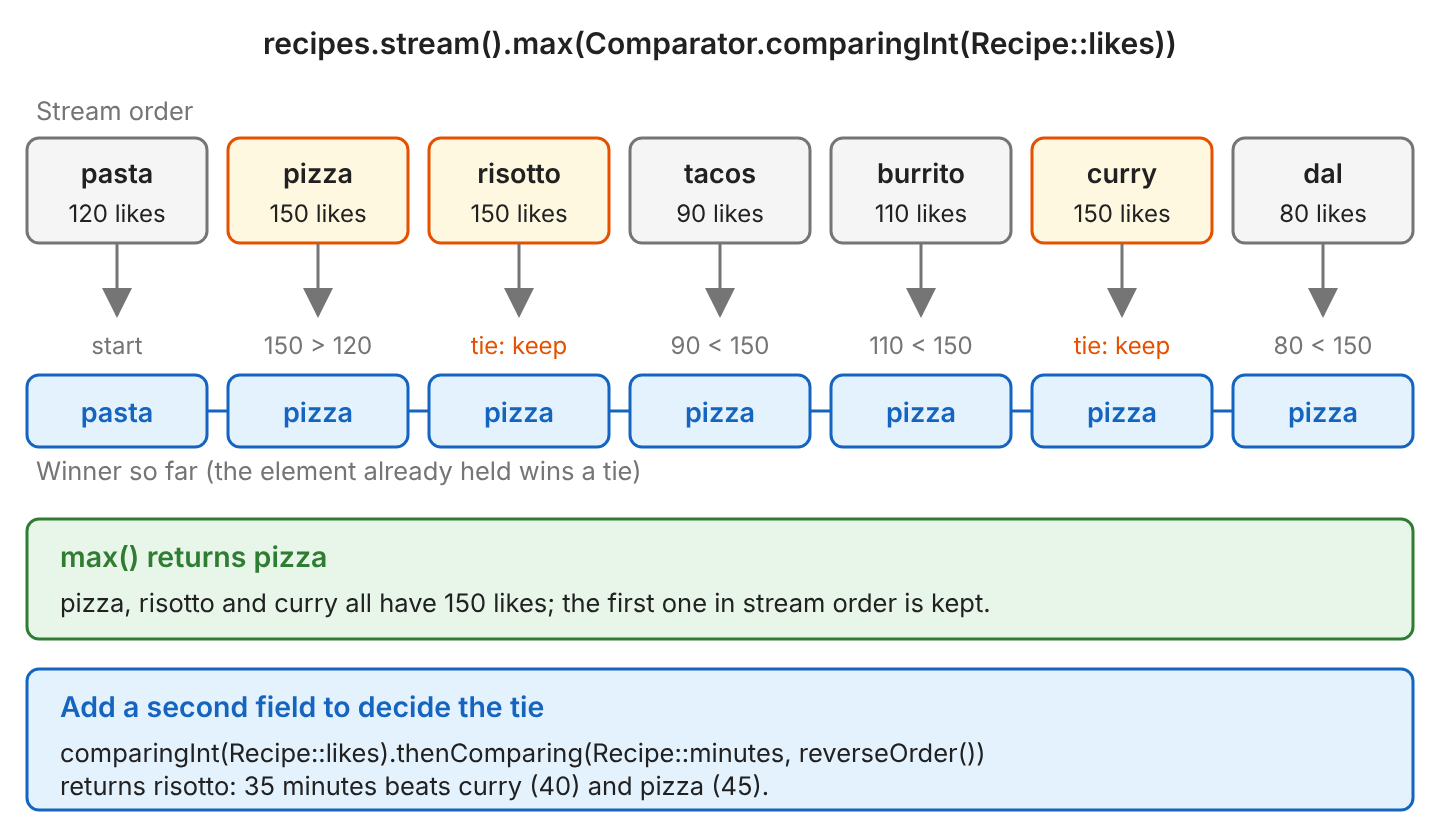
Three recipes have 150 likes, namely pizza, risotto and curry, and max() returns pizza, the first of them. To see why, we look at how max() works. It keeps a winner so far, compares it with the next element and keeps the larger one, which is called a reduction (combining the elements two at a time). The diagram shows each step.
When the comparator returns 0 (a tie), the JDK keeps the element it already holds. So on a tie, max() and min() return the first matching element in stream order.
Recipe sequential = recipes.stream().max(byLikes).orElseThrow();            // pizza
Recipe parallel = recipes.parallelStream().max(byLikes).orElseThrow();      // pizza
Recipe fromCollections = Collections.max(recipes, byLikes);                 // pizza
A parallel stream splits the elements across several threads, yet the parallel stream and Collections.max() also return pizza, the first element. However, the Stream.max() Javadoc does not promise which of the equal elements we get. When the result must be predictable, we add a second field to the comparator with thenComparing().
Recipe likedThenQuick = recipes.stream()
    .max(Comparator.comparingInt(Recipe::likes)
        .thenComparing(Recipe::minutes, Comparator.reverseOrder()))
    .orElseThrow();                                     // risotto
The method thenComparing() runs only when the first comparison returns 0, so here it runs only for recipes with equal likes. The second comparison uses minutes with Comparator.reverseOrder(), so a shorter cooking time counts as the larger value. So risotto (35 minutes) beats curry (40) and pizza (45). We can chain more fields the same way to sort on multiple fields.
To get all tied elements instead of only one, we first find the max value, and then we filter the stream to keep the elements with that value.
int maxLikes = recipes.stream().mapToInt(Recipe::likes).max().orElseThrow();      // 150
List<Recipe> allTop = recipes.stream().filter(r -> r.likes() == maxLikes).toList(); // [pizza, risotto, curry]
7. Find Max or Min per Group
Sometimes we need the max of each group, for example, the most liked recipe of each cuisine. For that, we combine Collectors.groupingBy(), which puts the recipes of each cuisine into one group, with Collectors.maxBy(), which picks the max inside each group. The TreeMap::new argument keeps the keys sorted. Without it, groupingBy() returns a HashMap, and the key order is not fixed.
Map<String, Optional<Recipe>> topPerCuisine = recipes.stream()
    .collect(Collectors.groupingBy(Recipe::cuisine, TreeMap::new,
        Collectors.maxBy(byLikes)));
// {indian=Optional[curry], italian=Optional[pizza], mexican=Optional[burrito]}
Each value in the map is an Optional, because maxBy() does not know that a group always has at least one recipe. There are two ways to remove the Optional.
- Wrap maxBy() in collectingAndThen(), which runs one more function on the result. Here the function is Optional::get, and since a group always has at least one element, get() is safe.
- Use Collectors.toMap() with BinaryOperator.maxBy() as the merge function. The method toMap() calls the merge function when two recipes have the same key, and BinaryOperator.maxBy() keeps the larger of the two.
Map<String, Recipe> topPerCuisine = recipes.stream()
    .collect(Collectors.groupingBy(Recipe::cuisine, TreeMap::new,
        Collectors.collectingAndThen(Collectors.maxBy(byLikes), Optional::get)));
// {indian=curry, italian=pizza, mexican=burrito}

Map<String, Recipe> topPerCuisine2 = recipes.stream()
    .collect(Collectors.toMap(Recipe::cuisine, Function.identity(),
        BinaryOperator.maxBy(byLikes), TreeMap::new));
// {indian=curry, italian=pizza, mexican=burrito}

Map<String, Recipe> quickestPerCuisine = recipes.stream()
    .collect(Collectors.toMap(Recipe::cuisine, Function.identity(),
        BinaryOperator.minBy(Comparator.comparingInt(Recipe::minutes)), TreeMap::new));
// {indian=dal, italian=pasta, mexican=tacos}
When we need only the max value per group, not the whole object, we use summarizingInt(). It collects the count, sum, min, average and max of each group, and getMax() reads the max.
Map<String, Integer> maxLikesPerCuisine = recipes.stream()
    .collect(Collectors.groupingBy(Recipe::cuisine, TreeMap::new,
        Collectors.collectingAndThen(Collectors.summarizingInt(Recipe::likes),
            IntSummaryStatistics::getMax)));
// {indian=150, italian=150, mexican=110}
8. Max and Min of Primitive Streams with summaryStatistics()
IntStream, LongStream and DoubleStream hold plain primitive values, not objects, so their max() and min() methods take no Comparator. The result is an OptionalInt (or OptionalLong, OptionalDouble), and we read the value with getAsInt() or orElseThrow(). To turn a stream of Integer objects into an IntStream, we call mapToInt().
OptionalInt maxOpt = IntStream.of(4, 8, 15, 16, 23, 42).max();                // OptionalInt[42]
int minPrim = IntStream.of(4, 8, 15, 16, 23, 42).min().getAsInt();            // 4
double maxDouble = numbers.stream().mapToDouble(Integer::doubleValue).max().orElseThrow();   // 42.0
A stream can be used only once, so calling both max() and min() needs two streams. The method summaryStatistics() avoids the second stream, because it returns the count, sum, min, average and max in one pass.
IntSummaryStatistics stats = numbers.stream().mapToInt(Integer::intValue).summaryStatistics();
// IntSummaryStatistics{count=6, sum=108, min=4, average=18.000000, max=42}
int minValue = stats.getMin();   // 4
int maxValue = stats.getMax();   // 42

IntSummaryStatistics emptyStats = IntStream.empty().summaryStatistics();
// IntSummaryStatistics{count=0, sum=0, min=2147483647, average=0.000000, max=-2147483648}
The last output line shows a trap. On an empty stream, summaryStatistics() does not throw, but getMax() returns Integer.MIN_VALUE and getMin() returns Integer.MAX_VALUE. Both numbers look like real values even though no element produced them, so we check getCount() > 0 before we trust them.
When we need both the min and the max objects in one pass, we use Collectors.teeing() (Java 12+). It sends each element to two collectors, here minBy() and maxBy(), and at the end it merges the two results with the function we pass.
List<Integer> minAndMax = numbers.stream().collect(Collectors.teeing(
    Collectors.minBy(Comparator.<Integer>naturalOrder()),
    Collectors.maxBy(Comparator.<Integer>naturalOrder()),
    (lo, hi) -> List.of(lo.orElseThrow(), hi.orElseThrow())));     // [4, 42]
9. Collections.max() and Collections.min() for a Plain Collection
When the data is already in a List or Set and we need no other stream steps such as filter(), Collections.max() and Collections.min() are shorter. Both methods return the element itself, not an Optional.
Integer maxNumber = Collections.max(numbers);                                       // 42
Integer minNumber = Collections.min(numbers);                                       // 4
Recipe quickest = Collections.min(recipes, Comparator.comparingInt(Recipe::minutes));   // tacos

Integer fromEmpty = Collections.max(List.<Integer>of());                            // NoSuchElementException
The two approaches differ mainly in the return type and in what happens on an empty input.
| stream.max(comparator) | Collections.max(collection, comparator) | |
|---|---|---|
| Return type | Optional<T> | T |
| Empty input | Optional.empty | NoSuchElementException |
| null element | NullPointerException | NullPointerException |
| Can filter() or map() first | Yes | No, the collection must already hold the right elements |
| Tie | First element (JDK behavior) | First element |
10. Handling Empty Streams
For an empty stream, max() and min() return Optional.empty. Older code calls get() to read the value, which throws NoSuchElementException when the Optional is empty. We prefer orElseThrow(), because it throws the same exception but its name makes the intent clear in the code.
List<Integer> empty = List.of();

Optional<Integer> result = empty.stream().max(Comparator.naturalOrder());           // Optional.empty
Integer viaGet = empty.stream().max(Comparator.naturalOrder()).get();               // NoSuchElementException: No value present
Integer viaThrow = empty.stream().max(Comparator.naturalOrder()).orElseThrow();     // NoSuchElementException: No value present
Integer orZero = empty.stream().max(Comparator.naturalOrder()).orElse(0);           // 0
Integer orCustom = empty.stream().max(Comparator.naturalOrder())
    .orElseThrow(() -> new IllegalStateException("no numbers"));                   // IllegalStateException: no numbers
empty.stream().max(Comparator.naturalOrder())
    .ifPresent(System.out::println);                                                // prints nothing
The right choice depends on what an empty input means for our code. For example, a dashboard that shows the highest order total of the day can show 0 on a day without orders, whereas a payroll job that finds the highest salary must stop when the salary list is empty.
- The method orElse(defaultValue) fits when a default, such as 0, is a valid answer.
- The method orElseThrow(() -> new SomeException(“…”)) fits when an empty input is an error, and the message can say what went wrong.
- The method ifPresent() fits when we want to act on the value only if one exists.
11. Handling null Values
Both max() and min() throw NullPointerException in two cases. The first case is when the comparator meets a null element and cannot compare it. The second case is when the selected element itself is null, because an Optional cannot hold null.
List<Integer> withNulls = Arrays.asList(4, null, 15);

Optional<Integer> maxWithNull = withNulls.stream().max(Comparator.naturalOrder());   // NullPointerException
Integer maxNonNull = withNulls.stream().filter(Objects::nonNull)
    .max(Comparator.naturalOrder()).orElseThrow();                                  // 15

Integer nullsFirstMax = withNulls.stream().max(Comparator.nullsFirst(Comparator.naturalOrder())).orElseThrow();   // 15
Optional<Integer> nullsLastMax = withNulls.stream().max(Comparator.nullsLast(Comparator.naturalOrder()));         // NullPointerException
Integer nullsLastMin = withNulls.stream().min(Comparator.nullsLast(Comparator.naturalOrder())).orElseThrow();    // 4
Comparator.nullsFirst() wraps another comparator and treats null as smaller than every value, whereas Comparator.nullsLast() treats null as larger than every value. With nullsLast(), the max element is the null itself, so max() throws again. The safest fix is filter(Objects::nonNull) before max() or min(), which removes the null elements first. The same comparators also handle sorting with null values.
Sometimes the object is not null, but the field we compare can be. For example, the recipe pasta has a null cuisine, so we pass nullsFirst() as the second argument of comparing(). The comparator nullsFirst() treats the null cuisine as the smallest value, so max() returns tacos.
List<Recipe> list = List.of(new Recipe("pasta", null, 20, 120), new Recipe("tacos", "mexican", 15, 90));

Recipe maxByCuisine = list.stream()
    .max(Comparator.comparing(Recipe::cuisine, Comparator.nullsFirst(Comparator.naturalOrder())))
    .orElseThrow();                                      // tacos
12. Stream Max and Min FAQs
12.1. What Is the Difference Between max(), Collectors.maxBy() and reduce()?
All three return the same element. In the JDK source, max(comparator) is a short form of reduce(BinaryOperator.maxBy(comparator)), and reduce() combines the elements two at a time, as we saw in section 6. Collectors.maxBy() exists for places that need a collector, such as the collector we pass to groupingBy() or teeing().
Optional<Integer> viaMax = numbers.stream().max(Comparator.naturalOrder());                           // Optional[42]
Optional<Integer> viaReduce = numbers.stream().reduce(Integer::max);                                  // Optional[42]
Optional<Integer> viaCollector = numbers.stream().collect(Collectors.maxBy(Comparator.naturalOrder())); // Optional[42]
12.2. How Do We Get the Last Element of a Tie Instead of the First?
We write the reduction ourselves and, when two values are equal, keep the right one, which is the later element. In the example, curry is the last of the three recipes with 150 likes.
Recipe lastOfTies = recipes.stream()
    .reduce((a, b) -> byLikes.compare(b, a) >= 0 ? b : a)
    .orElseThrow();                                      // curry
A clearer option is often a second field with thenComparing(), as in section 6.
12.3. How Do We Find the Map Entry with the Max Value?
We stream the entry set of the map, where each entry holds one key and its value, and compare the entries with Map.Entry.comparingByValue(). The same comparator works with Collections.min().
Map<String, Integer> ages = new LinkedHashMap<>();
ages.put("Lokesh", 37);
ages.put("John", 40);
ages.put("Alex", 29);

Map.Entry<String, Integer> oldest = ages.entrySet().stream()
    .max(Map.Entry.comparingByValue()).orElseThrow();                              // John=40
String youngest = Collections.min(ages.entrySet(), Map.Entry.comparingByValue()).getKey();   // Alex
12.4. Is max() Faster Than sorted().findFirst()?
Yes. Both max() and min() read each element once, which is O(n), whereas sorted(…).findFirst() first sorts the whole stream, which is O(n log n) and keeps all elements in memory. So we use max() or min() when we need one element, and we sort only when we need the top few elements in order.
13. Conclusion
For most code, stream.max(comparator).orElseThrow() and stream.min(comparator).orElseThrow() are the answer. We use Comparator.naturalOrder() for numbers, strings, dates and other Comparable types, and Comparator.comparingInt() for object fields. When ties must be decided, we add thenComparing(). For the max per group, we use groupingBy() with maxBy(), or toMap() with BinaryOperator.maxBy().
The method summaryStatistics() gives several numbers in one pass, and Collections.max() fits a collection that needs no other stream step. Finally, we filter out null elements before the comparison, so max() and min() never throw NullPointerException.
14. References
- Stream Javadoc (Java 25)
- Comparator Javadoc (Java 25)
- Collectors Javadoc (Java 25)
- IntSummaryStatistics Javadoc (Java 25)
- Collections Javadoc (Java 25)
Happy Learning !!

kindly write a program for second highest number using java 8 given list of numbers
See if it helps.
Is there any way if we want our comparator object to be capable of using more than 1 property of the Employee object so that we can sort the elements based on multiple properties rather than only 1 property.
Implement
compare()method and implement your logic the way you want. There is no restriction.we can use
Comarator multComparator = Comparato.comparing(property1).thenComparing(property2);no,it will throw an exception,but you can use filter to filter it
Hello Lokesh,
What about with a list that include null elements? Its possible filter this null elements?
Thanks!