
Maven 4 is the next major version of Apache Maven, and its main change is that the POM we build with (the build POM) is separate from the POM that Maven publishes to repositories (the consumer POM). Maven 4.0.0 is not released as GA (general availability) yet. On October 5, 2026, the newest release is 4.0.0-rc-7 (September 24, 2026), which its release notes call the expected last release candidate, and the current stable line is Maven 3.10.0.
We use Maven 4 today to test our builds before the GA release, and in new multi-module projects that want less boilerplate. With the new POM model version 4.1.0, a subproject no longer repeats the parent coordinates or the versions of its sibling subprojects, and Maven still publishes a POM that Maven 3 and Gradle can read.
The following example is a subproject POM written for Maven 4. Each comment shows what Maven 4.0.0-rc-7 does with the line.
<project xmlns="http://maven.apache.org/POM/4.1.0">  <!-- new namespace, Maven 4 only -->
  <modelVersion>4.1.0</modelVersion>                <!-- build POM model 4.1.0 -->
  <parent/>                                         <!-- groupId, artifactId, version read from ../pom.xml -->
  <artifactId>playlist-app</artifactId>             <!-- groupId and version 1.0.0-SNAPSHOT inherited -->
  <dependencies>
    <dependency>
      <groupId>com.howtodoinjava.playlist</groupId>
      <artifactId>playlist-core</artifactId>        <!-- no version: 1.0.0-SNAPSHOT from the reactor -->
    </dependency>
  </dependencies>
</project>
Notice that the POM declares neither a project version nor a dependency version, yet the published playlist-app-1.0.0-SNAPSHOT.pom is a plain model 4.0.0 file with every version filled in.
In this guide, we build the same multi-module project with Maven 3 (3.9.16 and 3.10.0) and with Maven 4.0.0-rc-7 and compare the output. After that, we go through each Maven 4 feature, the POM problems that fail in Maven 4, the mvnup upgrade tool and a migration checklist.
1. What Is New in Maven 4?
Maven 4 builds Maven 3 projects (POM model version 4.0.0) without changes, as long as they have no errors that Maven 3 only warned about and no plugins built on Maven 2 APIs. The new POM features need model version 4.1.0, which only Maven 4 can build.
The last column of the table shows which changes need model version 4.1.0, and What’s new in Maven 4? has the full list.
| Change | Maven 3 | Maven 4 | Needs model 4.1.0 |
|---|---|---|---|
| Java version to run Maven | Java 8 | Java 17 | No |
| Published POM | The pom.xml as written | A generated consumer POM (model 4.0.0) | No |
| Multi-module element | <modules> | <subprojects> (<modules> is deprecated) | Yes |
| Parent and sibling versions | Repeated in every child POM | Inferred from the files on disk | Yes |
| CI-friendly revision property | Needs the flatten-maven-plugin to install and deploy | Built in | No |
| BOM | pom packaging | bom packaging | Yes |
| Phase hooks | pre-clean, post-clean, pre-integration-test, … | before: and after: for every phase, ordered with [n] | No |
| Profile activation | JDK, OS, property, file | Plus <condition> expressions | Yes |
| Root directory | .mvn folder, no official property in 3.9 | .mvn folder or root=”true”, exposed as project.rootDirectory | root only |
| Deploy | Each module right after it is built | Only after every subproject succeeds (deployAtEnd defaults to true) | No |
| Upgrade tool | None | mvnup ships with Maven | No |
1.1. Maven 4 Release Status
Maven 4 has been in preview builds since 2022 (4.0.0-alpha-2 is the first one in the release history), so many posts about it are out of date. The Maven release history lists the current versions and the Java version each one needs to run.
| Version | Released | Status | Java to run Maven |
|---|---|---|---|
| 4.0.0-rc-7 | 2026-09-24 | Release candidate (“Preview” on the download page) | 17 |
| 3.10.0 | 2026-09-27 | Current stable | 8 |
| 3.9.16 | 2026-05-13 | Previous stable line, still maintained | 8 |
Maven 3.10.0 already uses the Maven Resolver 2.x of Maven 4 and turns several old warnings into errors, so it is the right first step for a Maven 4 migration.
1.2. Maven 4 Needs Java 17 to Run
Maven 4 needs Java 17 only to run Maven itself. The compiler plugin can still produce bytecode for an older release, and toolchains can compile with another JDK. When JAVA_HOME points to Java 11, the mvn script stops at once.
Error: Apache Maven 4.x requires Java 17 or newer to run.
openjdk version "11.0.32.1" 2026-08-18
Please upgrade your Java installation or set JAVA_HOME to point to a compatible JDK.
Maven 3 runs on Java 17 too, so we can switch the CI build JDK before we switch Maven.
2. Build POM and Consumer POM
For 20 years, Maven published our pom.xml to the repository as it was. Every tool that reads Maven Central, such as Maven 3, Gradle, IDEs and security scanners, parses that file, so the POM format could not change. Maven 4 keeps two POMs instead.
- The build POM is our pom.xml in source control. It may use model version 4.1.0 and holds everything needed to build, such as plugin configuration and profiles.
- The consumer POM is generated during install and deploy. It uses model version 4.0.0 and holds what a dependent project needs, such as coordinates and dependencies.
When we run mvn install, Maven 4.0.0-rc-7 installs the consumer POM as playlist-app-1.0.0-SNAPSHOT.pom and a copy of the build POM as playlist-app-1.0.0-SNAPSHOT-build.pom.
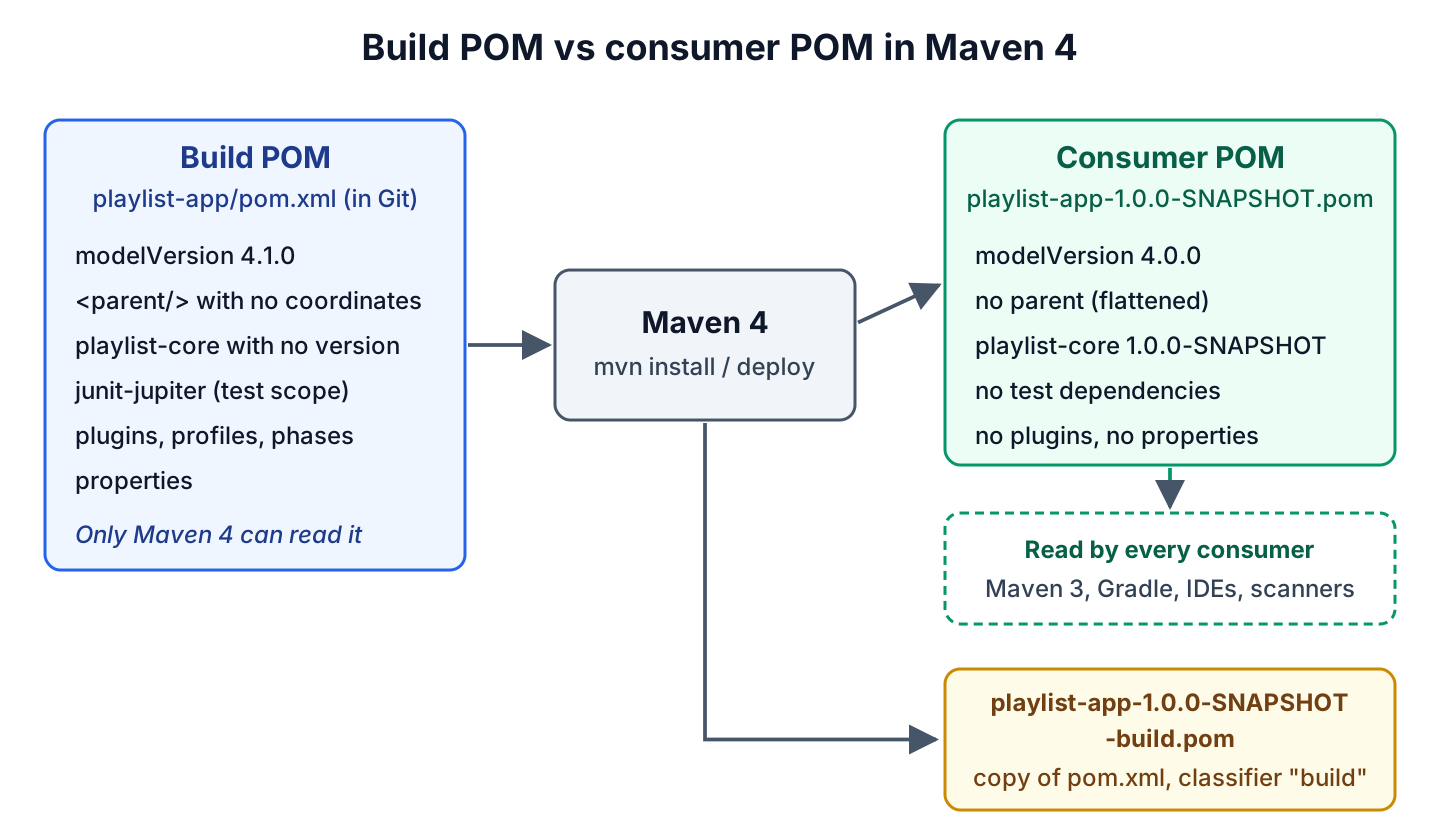
By default, the consumer POM keeps the parent reference, so the parent POM must be published too. When the property maven.consumer.pom.flatten is true, Maven inlines everything inherited from the parent and keeps only the compile and runtime dependencies. We set it for the whole project in .mvn/maven-user.properties.
maven.consumer.pom.flatten=trueWith flattening on, the consumer POM of playlist-app is self-contained. The parent, the JUnit test dependency, the plugins and the properties of the build POM are gone, and the version of playlist-core is resolved.
<project xmlns="http://maven.apache.org/POM/4.0.0" ...>
  <modelVersion>4.0.0</modelVersion>
  <groupId>com.howtodoinjava.playlist</groupId>
  <artifactId>playlist-app</artifactId>
  <version>1.0.0-SNAPSHOT</version>
  <dependencies>
    <dependency>
      <groupId>com.howtodoinjava.playlist</groupId>
      <artifactId>playlist-core</artifactId>
      <version>1.0.0-SNAPSHOT</version>
      <scope>compile</scope>
    </dependency>
  </dependencies>
</project>
A POM with pom packaging, such as a parent POM, is an exception. Its consumer POM keeps the build section, because child projects inherit plugin configuration from it.
3. Maven 4 Example With a Maven 3 Project
The first test is to run Maven 4 on the project as it is. The following example is a playlist app with a parent POM and two modules. The playlist-core module holds the Song record and the Playlist class, and playlist-app depends on it and prints a one-line summary of a three-song playlist. The POMs use model version 4.0.0, pinned plugin versions (maven-compiler-plugin 3.16.0, maven-surefire-plugin 3.6.0), JUnit 6.1.3 and Java 17 bytecode. The complete project is on GitHub.
A child module in this multi-module project repeats the parent coordinates and uses the project version for its sibling, as Maven 3 requires.
<parent>
  <groupId>com.howtodoinjava.playlist</groupId>
  <artifactId>playlist-parent</artifactId>
  <version>1.0.0-SNAPSHOT</version>         <!-- hard-coded in every child -->
</parent>
<artifactId>playlist-app</artifactId>
The parent POM also binds a maven-antrun-plugin execution to the post-clean phase, which prints one line. We run mvn -B clean verify with each Maven version on JDK 25. All three builds succeed with 4 tests, but the logs differ.
[WARNING] Unable to find the root directory. Create a .mvn directory in the root directory or add the root="true" attribute on the root project's model to identify it.
[INFO] Scanning for projects...
[INFO] Loaded 23987 auto-discovered prefixes for remote repository central (prefixes-central.txt)
...
[INFO] --- clean:3.5.0:clean (default-clean) @ playlist-parent ---
[INFO] --- antrun:3.2.0:run (clean-report) @ playlist-parent ---
[WARNING]      [echo] post-clean: old playlist build removed
...
[INFO] BUILD SUCCESS
Each version prints different output for the same POMs.
| Output | Maven 3.9.16 | Maven 3.10.0 | Maven 4.0.0-rc-7 |
|---|---|---|---|
| Root directory warning | No | No | Yes, no .mvn folder |
| “auto-discovered prefixes” lines (Resolver 2.x) | No | Yes | Yes |
| post-clean execution during clean verify | Skipped | Skipped | Runs |
| Tests | 4 passed | 4 passed | 4 passed |
An empty .mvn folder in the project root removes the warning and also works with Maven 3. The post-clean change is a behavior change, covered in section 5.
4. POM Model Version 4.1.0
Model version 4.1.0 is the new build POM format, with the namespace http://maven.apache.org/POM/4.1.0. It adds new elements and attributes and deprecates some old ones, while the consumer POM stays at 4.0.0.
The Maven 4 version of the playlist project uses model 4.1.0 in every POM. The root POM marks itself as the root directory and lists its subprojects, including a BOM.
<project xmlns="http://maven.apache.org/POM/4.1.0"
         xmlns:xsi="http://www.w3.org/2001/XMLSchema-instance"
         xsi:schemaLocation="http://maven.apache.org/POM/4.1.0 https://maven.apache.org/xsd/maven-4.1.0.xsd"
         root="true">
  <modelVersion>4.1.0</modelVersion>

  <groupId>com.howtodoinjava.playlist</groupId>
  <artifactId>playlist-parent</artifactId>
  <!-- version: the CI-friendly revision property, see section 4.3 -->
  <packaging>pom</packaging>

  <subprojects>
    <subproject>playlist-bom</subproject>
    <subproject>playlist-core</subproject>
    <subproject>playlist-app</subproject>
  </subprojects>
</project>
Maven 3.10.0 cannot read this POM at all. It reports the unknown root attribute and the newer model version.
[ERROR] Malformed POM .../maven4-project/pom.xml: Unknown attribute 'root' for tag 'project' ...
[FATAL] 'modelVersion' of '4.1.0' is newer than the versions supported by this version of Maven: [4.0.0].
4.1. Subprojects Instead of Modules
Maven 4 calls the projects inside a multi-project build subprojects, because “module” also means a Java Platform Module since Java 9. The new <subprojects> element replaces <modules>, which still works but is deprecated in model 4.1.0.
We can also leave the list out. When a POM has pom packaging and no <subprojects> or <modules> element, Maven 4 builds every direct subfolder that contains a pom.xml.
4.2. Automatic Parent and Subproject Versions
Every Maven 3 child POM repeats the parent version, so a release changes every pom.xml in the project. In Maven 4, an empty <parent/> element tells Maven to read ../pom.xml and take the parent coordinates from it. For a parent in another folder, we put only a <relativePath> element inside <parent>.
The same inference works for dependencies on other subprojects of the reactor (the set of projects built together in one Maven run), so the child POM in the intro declares playlist-core without a version.
[INFO] The packaging attribute of the 'playlist-bom' project is configured as 'bom' and changed to 'pom'
[INFO] Reactor Build Order:
[INFO] playlist-parent                                                    [pom]
[INFO] playlist-bom                                                       [pom]
[INFO] playlist-core                                                      [jar]
[INFO] playlist-app                                                       [jar]
...
[INFO] Building playlist-app 1.0.0-SNAPSHOT                               [4/4]
...
[INFO] BUILD SUCCESS
4.3. CI-Friendly Versions Without the Flatten Plugin
CI-friendly versions let a CI server set the project version on the command line instead of committing a POM change. Maven 3.5 added the revision property for this, but the installed and deployed POMs kept the unresolved property, so projects needed the flatten-maven-plugin. Maven 4 resolves it in the consumer POM, and any property name works.
In our root POM, the <version> element holds the revision property placeholder instead of a literal version (the exact line is in pom.xml on GitHub), and the <properties> section gives the default value.
<properties>
  <revision>1.0.0-SNAPSHOT</revision>       <!-- default; mvn -Drevision=1.1.0 overrides it -->
</properties>
A CI job passes the version with -D, and the subprojects pick it up through <parent/>.
mvn -B install -Drevision=1.1.0[INFO] Building playlist-parent 1.1.0 [1/4]
[INFO] Building playlist-bom 1.1.0 [2/4]
[INFO] Building playlist-core 1.1.0 [3/4]
[INFO] Building playlist-app 1.1.0 [4/4]
[INFO] Installing .../playlist-app/target/consumer-3111780091822378322.pom to .../playlist-app/1.1.0/playlist-app-1.1.0.pom
[INFO] BUILD SUCCESSThe installed playlist-app-1.1.0.pom declares playlist-core with the literal version 1.1.0. Maven 4 resolves the property even in a model 4.0.0 POM, whereas Maven 3.10.0 installs the child POM with the unresolved placeholder in its <parent> element. So we can remove the flatten-maven-plugin once the project builds only with Maven 4.
4.4. BOM Packaging
A BOM (bill of materials) is a POM that only manages versions, so consumers import it and drop the versions from their dependencies. In Maven 3, a BOM is an ordinary pom project that can also hold plugins like a parent POM. Maven 4 adds the bom packaging to make the purpose explicit.
<parent/>
<artifactId>playlist-bom</artifactId>
<packaging>bom</packaging>

<dependencyManagement>
  <dependencies>
    <dependency>
      <groupId>com.howtodoinjava.playlist</groupId>
      <artifactId>playlist-core</artifactId>      <!-- 1.0.0-SNAPSHOT in the consumer POM -->
    </dependency>
  </dependencies>
</dependencyManagement>
As the log in section 4.2 shows, Maven changes the packaging to pom during the build, so the published consumer POM is a normal BOM with literal versions that Maven 3 and Gradle users can import. Maven 4.0 warns when a project imports a BOM from its own reactor, so a BOM subproject is meant for other projects.
5. The New before: and after: Lifecycle Phases
Maven 3 has pre- and post- phases only in the clean and site lifecycles and around integration-test, so a plugin that must run before compile has to bind to an unrelated phase such as process-resources. Maven 4 gives every phase a before: and an after: phase, such as before:compile or after:test. The old pre- and post- names are deprecated aliases.
The behavior also changed. When Maven 4 runs a phase, it always runs its before: and after: phases too, whereas Maven 3 runs post-clean only when we call it by name. That is why the post-clean echo appeared only in the Maven 4 log in section 3.
Inside one phase, a number in square brackets orders the executions. In playlist-app, two antrun executions prepare test data before the integration tests, and we declare them in reverse order on purpose.
<execution>
  <id>load-songs</id>
  <phase>before:integration-test[200]</phase>     <!-- runs second -->
  ...
</execution>
<execution>
  <id>create-music-folder</id>
  <phase>before:integration-test[100]</phase>     <!-- runs first -->
  ...
</execution>
[INFO] --- jar:3.5.1:jar (default-jar) @ playlist-app ---
[INFO] --- antrun:3.2.0:run (create-music-folder) @ playlist-app ---
[WARNING] [echo] 1. create music folder
[INFO] --- antrun:3.2.0:run (load-songs) @ playlist-app ---
[WARNING] [echo] 2. load sample songs
[INFO] --- failsafe:3.6.0:integration-test (default) @ playlist-app ---
[INFO] Running com.howtodoinjava.playlist.app.PlaylistAppIT
[INFO] Tests run: 1, Failures: 0, Errors: 0, Skipped: 0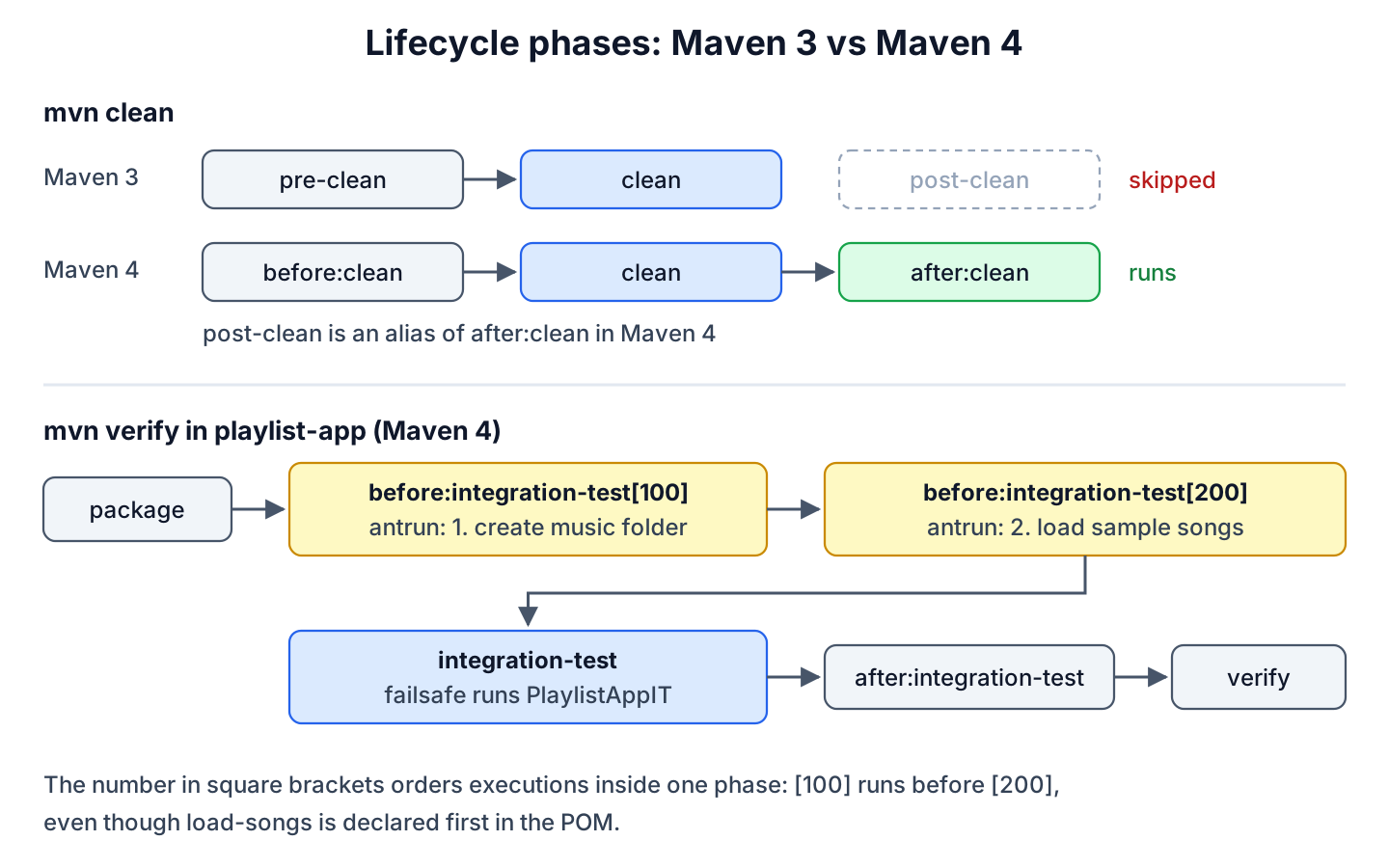
Maven 4 also adds the phases all and each (with before:all, after:all, before:each and after:each) for work that runs once around a whole project tree or around each subproject.
6. Condition-Based Profile Activation
In Maven 3, a profile activates on a JDK version, an OS, a property or a file. Maven 4 adds a <condition> element with comparison and logical operators and functions such as exists(), missing(), matches() and inrange(), listed in the Maven 4 POM reference under activation.
For example, our root POM turns on the Maven Failsafe Plugin, which runs integration tests, only in subprojects that contain integration test classes. Maven evaluates the glob against each subproject folder.
<profile>
  <id>integration-tests</id>
  <activation>
    <condition>exists('src/test/java/**/*IT.java')</condition>   <!-- true only in playlist-app -->
  </activation>
  <build>
    <plugins>
      <plugin>
        <groupId>org.apache.maven.plugins</groupId>
        <artifactId>maven-failsafe-plugin</artifactId>
        ...
      </plugin>
    </plugins>
  </build>
</profile>
The build log in section 5 shows Failsafe running in playlist-app only. A condition profile in a parent POM has one limitation. Without flattening, the first mvn install failed on the parent, because a model 4.0.0 consumer POM cannot express the condition.
[ERROR] Failed to execute goal org.apache.maven.plugins:maven-install-plugin:3.2.0:install (default-install) on project playlist-parent: The consumer POM for com.howtodoinjava.playlist:playlist-parent:pom:1.0.0-SNAPSHOT cannot be downgraded to model version 4.0.0 because it contains features that require a newer model version. Since consumer POM flattening is disabled, the parent reference is preserved, which requires consumers to resolve the parent POM.
[ERROR] You have the following options to resolve this:
[ERROR]   1. Enable flattening by setting the property 'maven.consumer.pom.flatten=true' to inline parent content and produce a self-contained 4.0.0 consumer POM
[ERROR]   2. Preserve the model version by setting 'preserve.model.version=true' on the <project> element (Maven 4 consumers only)
[ERROR]   3. Remove the features that require a newer model version
We chose option 1, the .mvn/maven-user.properties file from section 2. The jar consumer POMs have no parent reference, so Maven 3 users never read the model 4.1.0 parent.
Maven 4 also accepts optional profiles on the command line. With mvn verify -P?ci, a missing ci profile is logged at INFO level instead of failing the build.
7. Maven 3 Plugin Compatibility and POM Problems That Fail
Maven 4 runs plugins built against the Maven 3 API, but not plugins that still use Maven 2 APIs or the long-deprecated Plexus component injection. It also turns some old POM warnings into errors, as Maven 3.10.0 already does.
The legacy-pom-problems project in the repository has two such problems, namely a duplicate plugin declaration and maven-enforcer-plugin 1.0 from 2011. Maven 3.9.16 builds it with a warning, and both newer versions refuse.
# Maven 3.9.16
[WARNING] 'build.plugins.plugin.(groupId:artifactId)' must be unique but found duplicate declaration of plugin org.apache.maven.plugins:maven-jar-plugin @ line 41, column 15
[INFO] BUILD SUCCESS

# Maven 4.0.0-rc-7 (Maven 3.10.0 prints the same error)
[ERROR]   The project com.howtodoinjava.playlist:legacy-playlist:jar:1.0.0-SNAPSHOT (.../legacy-pom-problems/pom.xml) has 1 error
[ERROR]     'build.plugins.plugin.(groupId:artifactId)' must be unique but found duplicate declaration of plugin org.apache.maven.plugins:maven-jar-plugin @ ..., line 41, column 7
After we delete the duplicate, Maven 3.10.0 builds the project, while Maven 4 fails inside the old enforcer plugin.
[ERROR] Failed to execute goal org.apache.maven.plugins:maven-enforcer-plugin:1.0:display-info (show-build-info) on project legacy-playlist: Execution show-build-info of goal org.apache.maven.plugins:maven-enforcer-plugin:1.0:display-info failed: An API incompatibility was encountered while executing org.apache.maven.plugins:maven-enforcer-plugin:1.0:display-info: java.lang.NoSuchMethodError: 'void org.apache.maven.plugin.PluginParameterExpressionEvaluator.<init>(...)'We can find such plugins while still on Maven 3 by running the build with -Dmaven.plugin.validation=verbose. With this plugin validation level, Maven 3.10.0 reports every plugin that Maven 4 will reject.
[WARNING]  * org.apache.maven.plugins:maven-enforcer-plugin:1.0
[WARNING]   Plugin EXTERNAL issue(s):
[WARNING]    * Plugin is a Maven 2.x plugin, which will be not supported in Maven 4.x
[WARNING]   Mojo EXTERNAL issue(s):
[WARNING]    * Mojo enforcer:display-info (org.apache.maven.plugins.enforcer.DisplayInfoMojo)
[WARNING]      - Mojo implements `Contextualizable` interface from Plexus Container, which is EOL.
The fix is to upgrade the plugin. The Maven Enforcer Plugin 3.6.3 runs on Maven 4.0.0-rc-7 without problems, and so does the Maven Shade Plugin 3.6.2, which we tried on the same project. A migration also needs four more checks.
- Replace the internal properties executionRootDirectory and multiModuleProjectDirectory with the new public properties, such as session.rootDirectory and project.rootDirectory.
- Keep bindings to pre-integration-test and post-integration-test while the build still runs on Maven 3. Maven 3.10.0 builds a POM with a before:integration-test binding without an error, but it never runs that execution. Replace them with before: and after: phases in the model 4.1.0 step.
- Pin every plugin version. Maven 4 ships newer default plugin versions in its Super POM (the built-in POM every project inherits from), so an unpinned build can behave differently after the upgrade.
- Check builds that rely on deployAtEnd being false, because Maven 4 deploys only after every subproject succeeds.
8. The New Maven Resolver
Maven Resolver is the library that downloads dependencies and resolves version conflicts. Maven 4.0.0-rc-7 uses Resolver 2.0.23, and Maven 3.10.0 moved to the same 2.0 line (2.0.24), so most resolver differences show up on Maven 3.10.0 already.
The “Loaded 23987 auto-discovered prefixes” line in section 3 comes from remote repository filtering, where Resolver reads the group prefixes a repository serves and stops asking it for other artifacts. The classpath order also changed from depth-first to breadth-first, which matters only when two jars contain the same class. With Maven 3.10.0, -Daether.system.dependencyVisitor=preOrder restores the old order.
9. Upgrading POMs With mvnup
The Maven Upgrade Tool mvnup ships in the Maven 4 bin folder since 4.0.0-rc-4. It has two goals, check to report what it would change and apply to rewrite the POMs. By default it targets model version 4.0.0, so the result still builds with Maven 3; –model-version 4.1.0 upgrades to the Maven 4 only format.
mvnup check --model-version 4.1.0 --all
mvnup apply --model-version 4.1.0 --all
For our Maven 3 project, check lists every change it plans.
[INFO] Found 3 POM file(s)
[INFO] === Upgrading POM model version ===
[INFO]     .../mvnup-demo/pom.xml (current: 4.0.0)
[INFO]         Updated modelVersion to 4.1.0
[INFO]         Converted <modules> to <subprojects>
[INFO]         Upgraded phase: post-clean -> after:clean
[INFO] === Applying Maven inference optimizations ===
[INFO]     .../mvnup-demo/playlist-app/pom.xml (current: 4.1.0)
[INFO]       Removed: parent groupId (child has no explicit groupId)
[INFO]       Removed: parent version (child has no explicit version)
[INFO]       Removed: parent artifactId (can be inferred from relativePath)
[INFO] === Migrating source configuration to <source> elements ===
[INFO]     .../mvnup-demo/pom.xml (current: 4.1.0)
[INFO]       Migrated property: maven.compiler.release = 17
[INFO]       Set targetVersion: 17
[INFO]   Total POMs modified: 3
The last strategy changes how the Java release is configured. It removes the maven.compiler.release property and writes the Java release into the new <build><sources><source><targetVersion> element. Only maven-compiler-plugin 4.x reads <sources>, so with maven-compiler-plugin 3.16.0 the next build falls back to Java 8.
[INFO] Compiling 2 source files with javac [debug target 1.8] to target/classes
[ERROR] .../playlist-core/src/main/java/com/howtodoinjava/playlist/Song.java:[5,8] records are not supported in -source 8
[ERROR]   (use -source 16 or higher to enable records)
Either of two fixes made the upgraded project build again.
- Restore the maven.compiler.release property in the root POM.
- Move to maven-compiler-plugin 4.0.0-beta-5, which reads <sources>.
So we build the project and read the diff before we commit what apply changed.
10. Using the Maven Wrapper With Maven 4
The Maven Wrapper is the simplest way to try a Maven 4 release candidate, because the mvnw script downloads the Maven version named in .mvn/wrapper/maven-wrapper.properties on the first run. We generate it with maven-wrapper-plugin 3.3.4.
mvn -N org.apache.maven.plugins:maven-wrapper-plugin:3.3.4:wrapper -Dmaven=4.0.0-rc-7wrapperVersion=3.3.4
distributionType=only-script
distributionUrl=https://repo.maven.apache.org/maven2/org/apache/maven/apache-maven/4.0.0-rc-7/apache-maven-4.0.0-rc-7-bin.zipApache Maven 4.0.0-rc-7 (6d8f301b38af7399b36b862969d520974944f0b9)
Maven home: /root/.m2/wrapper/dists/apache-maven-4.0.0-rc-7/41bf3b95When the GA release comes out, we change only the version in distributionUrl. A project that uses the enforcer rule requireMavenVersion with an upper bound such as [3.9,4) must widen the range too.
11. Maven 4 Migration Checklist
The Maven team suggests three steps in its migration guide. The first two keep the POMs at model version 4.0.0, so the same commit builds with Maven 3 and Maven 4, and we can stop there until Maven 4.0.0 is GA. Only the third step makes Maven 4 mandatory for our build.
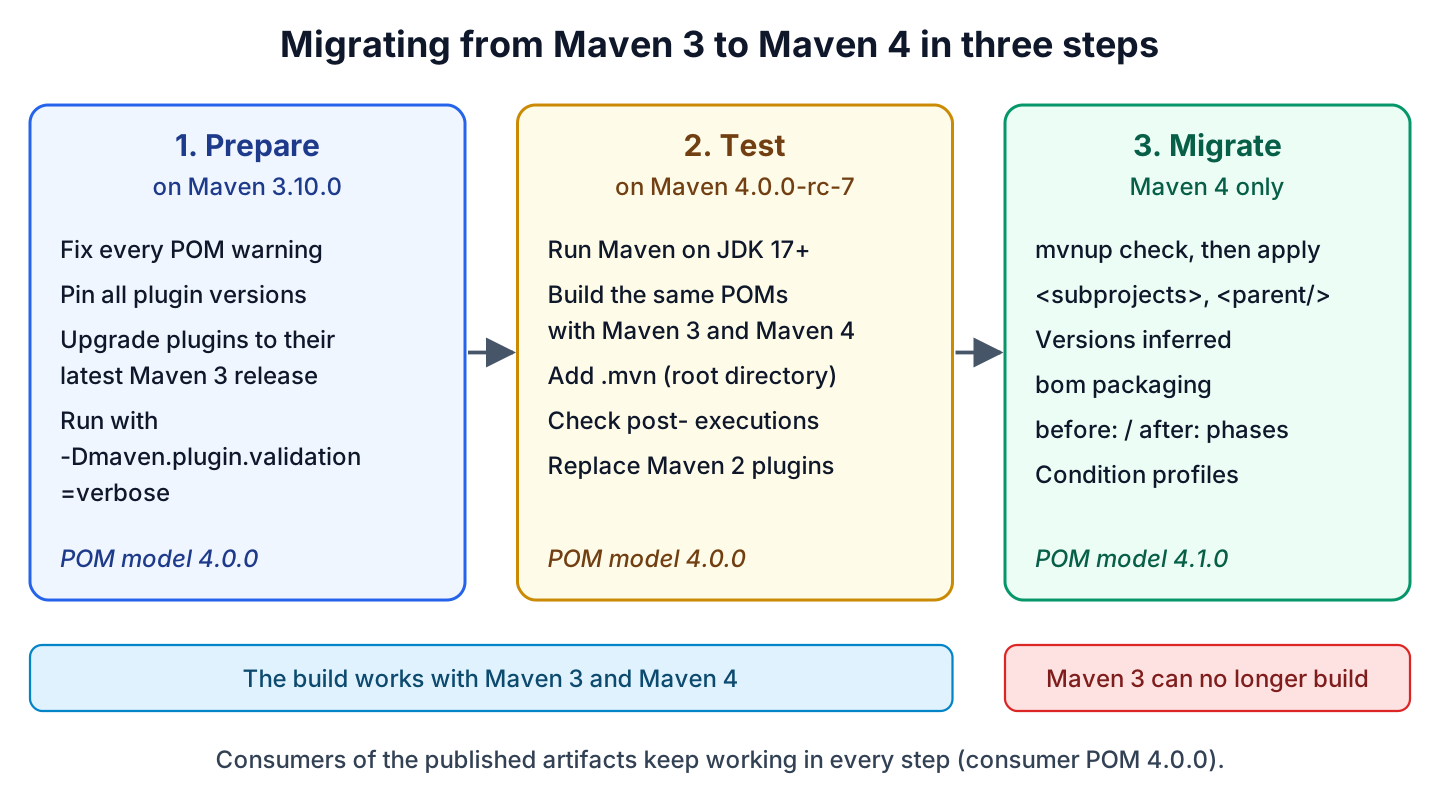
- Prepare on Maven 3.10.0. Fix every POM warning, pin all plugin versions and run once with -Dmaven.plugin.validation=verbose.
- Test on Maven 4.0.0-rc-7 through the wrapper. Switch the build JDK to Java 17 or newer, add an empty .mvn folder, upgrade every plugin that Maven 4 rejects and check the post- executions, which Maven 4 always runs. The same commit still builds with Maven 3.
- Migrate to model 4.1.0 after Maven 4.0.0 GA. Run mvnup check –model-version 4.1.0, then apply, and review the diff. Replace the pre- and post- bindings as described in section 7, remove the flatten-maven-plugin if it only served CI-friendly versions, and set maven.consumer.pom.flatten if a parent POM uses Maven 4 only features.
12. Maven 4 FAQs
12.1. When Will Maven 4.0.0 Be Released?
There is no fixed date. The 4.0.0-rc-7 release notes say it is expected to be the last release candidate and that the team aims to publish 4.0.0 GA “in the coming weeks, pending community feedback”. Until the GA release, Maven 3.10.0 is the version the Maven site recommends for production builds.
12.2. Do We Have to Change pom.xml to Use Maven 4?
No. Maven 4 builds model 4.0.0 POMs, as the playlist project in section 3 shows. We need changes only when the POM has errors that Maven 3 tolerated, such as duplicate plugins, or uses plugins built on Maven 2 APIs. Model version 4.1.0 is optional in Maven 4.0.0.
13. Conclusion
Maven 4 separates the build POM from the consumer POM. That separation lets the POM format move to model version 4.1.0 with subprojects, inferred parent and sibling versions, BOM packaging and condition-based profiles, while the published POMs stay at model 4.0.0 for Maven 3, Gradle and IDEs.
Maven 4.0.0 is still a release candidate, so the practical work today is preparation. Move to Maven 3.10.0 and Java 17, fix the POM warnings, find Maven 2 plugins with verbose plugin validation, and build the unchanged project with Maven 4.0.0-rc-7 through the Maven Wrapper.
When we move to model 4.1.0, mvnup does most of the edits. We still review what it changed, because a migrated maven.compiler.release property needs maven-compiler-plugin 4.x.
14. References
- What’s new in Maven 4?
- Starting with Maven 4 (migration guide)
- Apache Maven 4.0.0-rc-7 Release Notes
- Maven 3.10.0 Release Notes
- Maven Releases History
- Maven Upgrade Tool (mvnup)
- Maven 4 POM Reference (model 4.1.0)
- Maven Wrapper
- Maven CI Friendly Versions
Happy Learning !!
