

To initialize a List in one line in Java, we call List.of(“apple”, “banana”), which returns an unmodifiable list, or we wrap the values in new ArrayList<>(List.of(…)) when the code adds or removes elements later. One-line Java list initialization with List.of() needs Java 9 or later. On older code, Arrays.asList() creates a fixed-size list in one line.
We use one-line list initialization for values that never change while the app runs, such as the file types an upload form accepts, and for test data in unit tests. When the list grows later, for example a shopping basket that starts with the items of the last order, we start from a modifiable ArrayList.
The following example creates the same kind of grocery list in several ways, with the result of each line as a comment.
List<String> fruits = List.of("apple", "banana", "cherry");                  // [apple, banana, cherry] (unmodifiable)
List<String> basket = new ArrayList<>(List.of("apple", "banana"));           // [apple, banana] (modifiable)
List<String> fixed = Arrays.asList("apple", "banana");                       // [apple, banana] (fixed size)
List<String> single = List.of("apple");                                      // [apple]
List<Integer> zeros = new ArrayList<>(Collections.nCopies(3, 0));            // [0, 0, 0]
List<String> upper = Stream.of("apple", "banana").map(String::toUpperCase).toList();   // [APPLE, BANANA]

boolean added = basket.add("cherry");                                        // true
boolean failed = fruits.add("kiwi");                                         // UnsupportedOperationException
Notice that the ArrayList copy accepts a new element, whereas the list from List.of() throws an UnsupportedOperationException on add().
Next, we compare all one-line options in one table, so we can pick the right one by mutability and null support. After that, we look at each option in detail, including the Stream collectors and Guava, and answer the common questions about List.of() and Arrays.asList().
1. Which One-Line List to Choose
The one-line ways to create a List differ in what the list allows later. Java lists come in three levels of mutability, and the method we call decides the level.
- A modifiable list, such as an ArrayList, accepts every change, including add() and set().
- A fixed-size list, such as the one from Arrays.asList(), accepts set() but throws an UnsupportedOperationException on add() or remove().
- An unmodifiable list, such as the one from List.of(), throws an UnsupportedOperationException on every change.
The second difference is null. Some methods reject a null element with a NullPointerException, which matters when the values come from a form or a database column that can be empty. The table compares both properties for each one-line option.
| One-line code | Since | add() and remove() | set() | null elements |
|---|---|---|---|---|
| List.of(“apple”, “banana”) | Java 9 | throws | throws | NullPointerException |
| new ArrayList<>(List.of(“apple”, “banana”)) | Java 9 | works | works | allowed after creation |
| Arrays.asList(“apple”, “banana”) | Java 1.2 | throws | works | allowed |
| Stream.of(“apple”, “banana”).toList() | Java 16 | throws | throws | allowed |
| Stream.of(…).collect(Collectors.toList()) | Java 8 | works (not guaranteed) | works | allowed |
| Collections.unmodifiableList(list) | Java 1.2 | throws | throws | allowed |
| Collections.singletonList(“apple”) | Java 1.3 | throws | throws | allowed |
| ImmutableList.of(“apple”, “banana”) | Guava | throws | throws | NullPointerException |
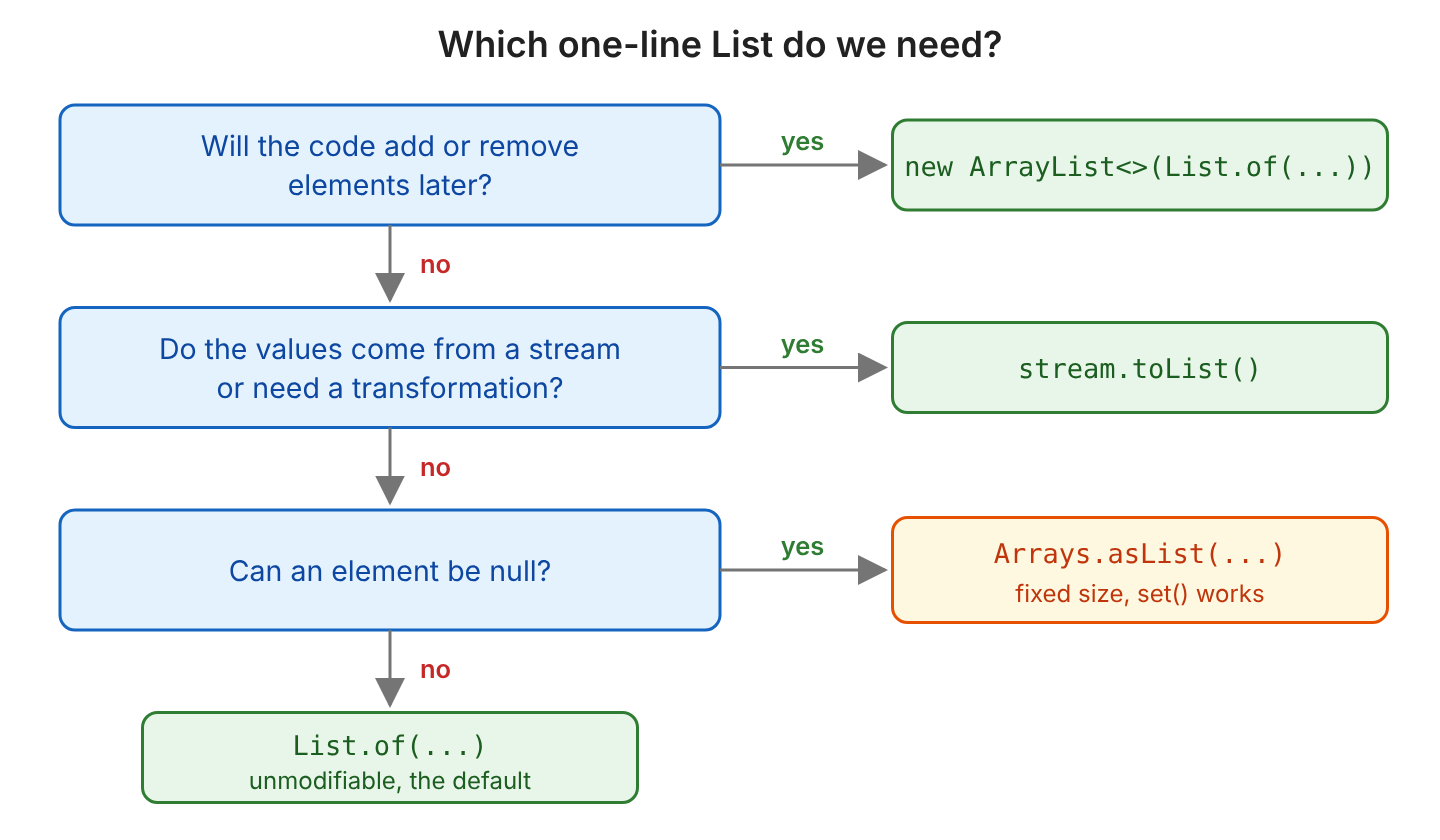
When the code adds or removes elements later, we copy the values into a new ArrayList, because every other option in the table, except Collectors.toList(), throws on add(). The decision chart puts the same rules in the order we check them.
2. Using List.of() [Java 9]
Java 9 added static factory methods to the List interface. The method List.of() returns an unmodifiable list that holds the given elements in the given order. The List interface has 12 overloads of of(), one for each count from zero to ten elements plus a varargs version, so a short list is created without an extra array.
For example, a grocery app shows the same featured fruits on its home page, and no code may change them while the app runs. A list from List.of() fits the featured fruits, because any call that changes the list fails with an exception.
List<String> fruits = List.of("apple", "banana", "cherry");   // [apple, banana, cherry]
String second = fruits.get(1);                               // banana

boolean added = fruits.add("kiwi");                          // UnsupportedOperationException
String replaced = fruits.set(0, "kiwi");                     // UnsupportedOperationException
List<String> withNull = List.of("apple", null);              // NullPointerException
boolean hasNull = fruits.contains(null);                     // NullPointerException
The list rejects null in two places. Creating the list with a null element throws a NullPointerException, and so do the calls contains(null) and indexOf(null). The second case happens when a lookup value comes from an optional request parameter, so we check the value for null before we call contains().
String lookup = null;                                         // from an optional request parameter
boolean found = lookup != null && fruits.contains(lookup);    // false
To make an unmodifiable copy of an existing list, we call List.copyOf() (Java 10). The copy keeps the elements it had at creation, so later changes to the source list do not show up in the copy.
List<String> source = new ArrayList<>(List.of("apple", "banana"));
List<String> copy = List.copyOf(source);    // [apple, banana]
source.add("cherry");                       // source = [apple, banana, cherry], copy = [apple, banana]
3. Creating a Modifiable ArrayList in One Line
To get a list that accepts every change, we pass a one-line list to the copy constructor of ArrayList. The constructor copies the elements into a new array, so the new list has none of the limits of the source list.
List<String> basket = new ArrayList<>(List.of("apple", "banana"));         // [apple, banana]
basket.add("cherry");                                                      // [apple, banana, cherry]
basket.remove("apple");                                                    // [banana, cherry]

List<String> withNull = new ArrayList<>(Arrays.asList("apple", null));     // [apple, null]
The last line uses Arrays.asList() as the source, because List.of(“apple”, null) throws the NullPointerException before the ArrayList constructor runs. An ArrayList itself accepts null elements.
When the list already exists, we add multiple elements in one line with Collections.addAll() or with the addAll() method of the list.
List<String> cart = new ArrayList<>();
Collections.addAll(cart, "apple", "banana", "cherry");   // [apple, banana, cherry]
cart.addAll(List.of("kiwi", "mango"));                   // [apple, banana, cherry, kiwi, mango]
4. Using Arrays.asList() to Convert Array to List
The method Arrays.asList() returns a fixed-size list that is backed by an array, so the list and the array share the same elements. The list supports set(), but add() and remove() throw an UnsupportedOperationException, because both calls would change the length of the array. Unlike List.of(), the list accepts null elements.
List<String> fixed = Arrays.asList("apple", "banana", "cherry");   // [apple, banana, cherry]
String old = fixed.set(0, "kiwi");                                 // apple, fixed = [kiwi, banana, cherry]
boolean added = fixed.add("mango");                                // UnsupportedOperationException
List<String> withNull = Arrays.asList("apple", null);              // [apple, null]
When we pass an existing array, a change on one side shows up on the other side. Sharing the array saves a copy, but it also means that code holding the array can change our list.
String[] array = {"apple", "banana"};
List<String> view = Arrays.asList(array);
view.set(0, "kiwi");      // array = [kiwi, banana]
array[1] = "mango";       // view = [kiwi, mango]
The method Arrays.asList() does not box a primitive array. For an int[], it returns a list with one element of type int[], so we convert the values with Arrays.stream(…).boxed() instead.
int[] numbers = {1, 2, 3};
List<int[]> wrong = Arrays.asList(numbers);                      // size 1, the element is the int[] itself
List<Integer> right = Arrays.stream(numbers).boxed().toList();   // [1, 2, 3]
For more array conversions, read converting an array to mutable, immutable and unmodifiable lists.
5. Collecting Stream Items to List
When the values need a change before they go into the list, such as trimming or converting to upper case, we create them with a Java Stream and collect the result. The collectors differ in mutability and in null support.
- The method toList() (Java 16) returns an unmodifiable list and allows null elements.
- The collector Collectors.toList() (Java 8) returns an ArrayList in JDK 25, but its Javadoc gives no guarantee about the type or the mutability of the list.
- The collector Collectors.toCollection(ArrayList::new) returns the ArrayList that the supplier creates, so we can change the list.
- The collector Collectors.toUnmodifiableList() (Java 10) returns an unmodifiable list and rejects null elements.
List<String> upper = Stream.of("apple", "banana").map(String::toUpperCase).toList();   // [APPLE, BANANA]
boolean added = upper.add("KIWI");                                                     // UnsupportedOperationException
List<String> withNull = Stream.of("apple", null).toList();                             // [apple, null]

List<String> collected = Stream.of("apple", "banana").collect(Collectors.toList());    // [apple, banana]
ArrayList<String> basket = Stream.of("apple", "banana")
    .collect(Collectors.toCollection(ArrayList::new));                                 // [apple, banana]
List<String> readOnly = Stream.of("apple", "banana")
    .collect(Collectors.toUnmodifiableList());                                         // [apple, banana]
When the code changes the collected list, we use Collectors.toCollection(ArrayList::new), because it is the only collector that guarantees a modifiable ArrayList. The methods toList() and Collectors.toList() both allow null elements, so the difference between them is the mutability of the result and the Java version they need.
6. Creating an Unmodifiable List
Besides List.of(), the Collections class and the Guava library create unmodifiable lists. These two options are useful in code that must run on Java 8, and in cases where a read-only view of another list is what we need.
6.1. Using Collections
The method Collections.unmodifiableList() returns an unmodifiable view of the list we pass. The view throws an UnsupportedOperationException on every change, but it shows the changes that other code makes to the source list.
For example, a basket service keeps its items in an ArrayList and returns them to callers as a view. The callers can read the items but cannot change them, and they always see the current content.
List<String> basket = new ArrayList<>(List.of("apple", "banana"));
List<String> readOnly = Collections.unmodifiableList(basket);
boolean added = readOnly.add("kiwi");    // UnsupportedOperationException
basket.add("cherry");                    // readOnly = [apple, banana, cherry]
When the callers need a snapshot that never changes, we return List.copyOf(basket) instead, as we saw in section 2.
The Collections class also has factory methods for special cases, such as a list with one element or a list with one value repeated n times. All of them return unmodifiable lists.
List<String> single = Collections.singletonList("apple");          // [apple]
List<String> empty = Collections.emptyList();                     // []
List<Integer> zeros = Collections.nCopies(3, 0);                  // [0, 0, 0]

List<Integer> counts = new ArrayList<>(Collections.nCopies(3, 0));
counts.set(0, 5);                                                 // [5, 0, 0]
6.2. Using Guava
The Guava library has its own ImmutableList class. The method ImmutableList.of() returns an immutable list with the given elements, and ImmutableList.copyOf() copies the elements of another collection. Both methods throw a NullPointerException when an element is null.
<dependency>
  <groupId>com.google.guava</groupId>
  <artifactId>guava</artifactId>
  <version>33.7.2-jre</version>
</dependency>
ImmutableList<String> fruits = ImmutableList.of("apple", "banana", "cherry"); // [apple, banana, cherry]
ImmutableList<String> copy = ImmutableList.copyOf(Arrays.asList("apple", "banana")); // [apple, banana]
boolean hasNull = fruits.contains(null); // false
ImmutableList<String> withNull = ImmutableList.of("apple", null); // NullPointerException: at index 1Notice the contains(null) call. Guava returns false, whereas a list from List.of() throws a NullPointerException for the same call. Since Java 10, List.of() and List.copyOf() cover most cases, so we use Guava only when the project already depends on it, or when a field of type ImmutableList should show in the code that the list never changes.
7. List Initialization FAQs
7.1. What Is the Difference Between List.of() and Arrays.asList()?
The list from List.of() is unmodifiable and rejects null, whereas the list from Arrays.asList() has a fixed size, accepts set() and allows null. The list from Arrays.asList() also shares its elements with the array we pass, as we saw in section 4.
| List.of() | Arrays.asList() | |
|---|---|---|
| add() and remove() | UnsupportedOperationException | UnsupportedOperationException |
| set() | UnsupportedOperationException | works |
| null elements | NullPointerException | allowed |
| contains(null) | NullPointerException | false |
| Backed by the array | no | yes |
7.2. Can List.of() Contain null?
No. The method List.of() throws a NullPointerException when any element is null. For a list with null elements, we use Arrays.asList(), or new ArrayList<>(Arrays.asList(…)) when the list must also grow.
7.3. How Do We Create a List With One Element?
We call List.of(“apple”) for an unmodifiable list. The method Collections.singletonList(“apple”) also returns an unmodifiable list and accepts a null element, so it is the choice for Java 8 code. For a list that grows later, we write new ArrayList<>(List.of(“apple”)).
7.4. How Do We Initialize a List With the Same Value n Times?
We call Collections.nCopies(n, value) and wrap the result in a new ArrayList when the values change later, as shown in section 6.1. The method stores one reference n times, so it fits immutable values such as numbers and strings. With a mutable object, all positions share the same object.
List<List<String>> shared = Collections.nCopies(2, new ArrayList<>());
shared.get(0).add("apple");                                        // shared = [[apple], [apple]]
7.5. Why Should We Avoid Double Brace Initialization?
Double brace initialization creates an anonymous subclass of ArrayList at every place we use it. When we write it in an instance method, the anonymous class also keeps a reference to the outer object, which can keep that object in memory longer than needed. The one-line methods in section 3 give the same result without an extra class.
List<String> fruits = new ArrayList<>() {{
  add("apple");
  add("banana");
}};                                                 // [apple, banana], class InitializeListInOneLine$1
7.6. Why Does add() Throw UnsupportedOperationException?
The list is unmodifiable or has a fixed size, as the table in section 1 shows. We copy the values into a new ArrayList before we add elements. The collections from Set.of() and Map.of() throw the same UnsupportedOperationException on every change.
7.7. How Do We Set the Initial Capacity of an ArrayList?
We pass the capacity to the ArrayList constructor. An ArrayList stores its elements in an internal array and grows that array when it is full, so a list that will hold thousands of elements saves a few resize operations when we give the size up front. The default initial capacity is 10, and the capacity is only a hint, so the list still grows when we add more elements than we planned.
List<Integer> ids = new ArrayList<>(64);     // empty list, room for 64 elements before the first resize
boolean empty = ids.isEmpty();                   // true
8. Conclusion
For a list that never changes, List.of() is the shortest one-line initialization, and it rejects null elements. For a list that grows later, we wrap the values in new ArrayList<>(…).
The method Arrays.asList() returns a fixed-size list that allows set() and null but no add() or remove(). When the values come from a Stream, toList() returns an unmodifiable list, and Collectors.toCollection(ArrayList::new) returns a list we can change.
9. References
- List JavaDoc (Java 25)
- Arrays JavaDoc (Java 25)
- Collections JavaDoc (Java 25)
- Collectors JavaDoc (Java 25)
- Stream JavaDoc (Java 25)
- Guava ImmutableList JavaDoc
Happy Learning !!
