
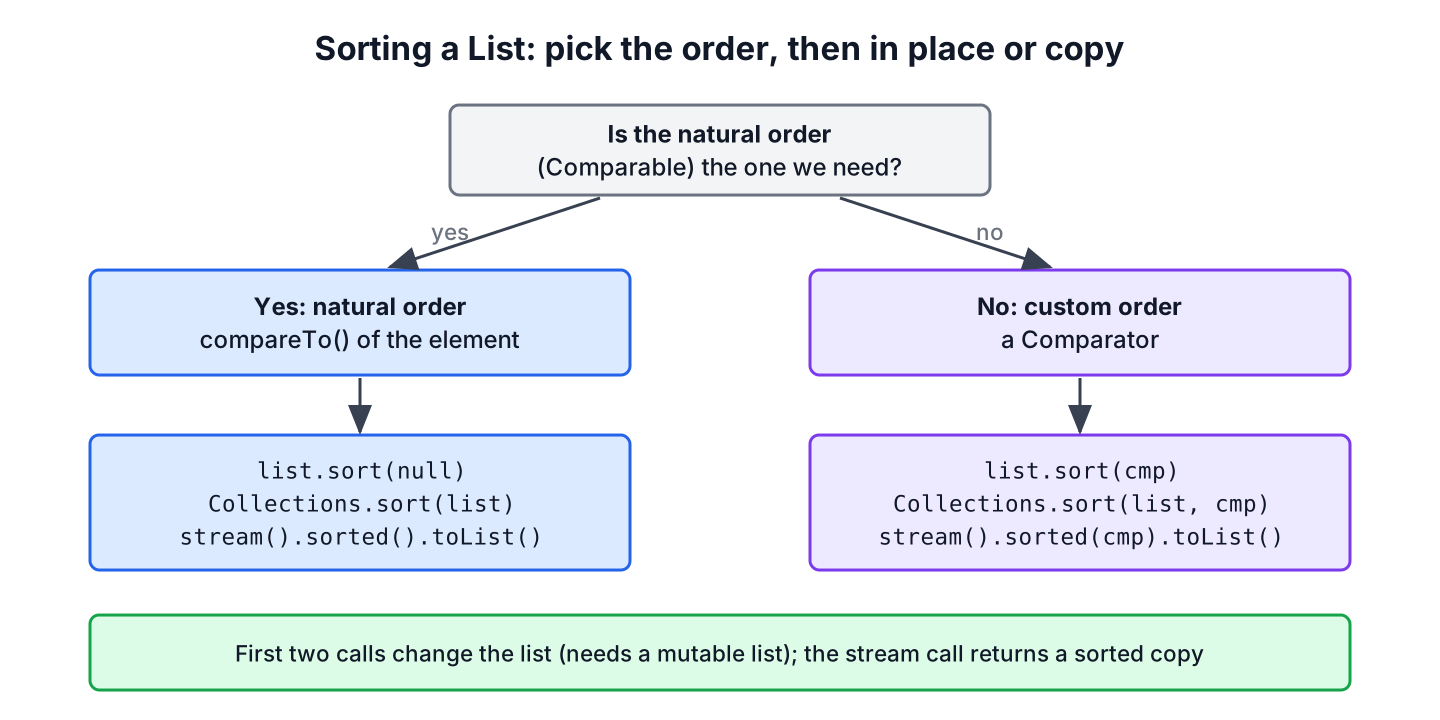
To sort a List in Java, we call list.sort(null) or Collections.sort(list) for the natural order that the elements define through Comparable, and pass a Comparator for every other order. These two calls reorder the list itself, whereas list.stream().sorted() returns a sorted copy.
Every app sorts lists, such as products by name on a shop page, orders by date in an admin screen, or scores from high to low on a leaderboard. Each case comes down to choosing the order and deciding whether the original list may change.
The following example puts a list of fruit names in four different orders.
List<String> fruits = new ArrayList<>(List.of("pear", "fig", "apple", "kiwi"));
fruits.sort(null);
List<String> natural = List.copyOf(fruits);                                  // [apple, fig, kiwi, pear]
fruits.sort(Comparator.reverseOrder());
List<String> reversed = List.copyOf(fruits);                                 // [pear, kiwi, fig, apple]
fruits.sort(Comparator.comparingInt(String::length));
List<String> byLength = List.copyOf(fruits);                                 // [fig, pear, kiwi, apple]
List<String> copy = fruits.stream().sorted().toList();                       // [apple, fig, kiwi, pear]
Notice that the first sort needs no rule at all, because String already implements Comparable, and that the length sort keeps pear before kiwi because the sort is stable. We cover the JDK types, a natural order for our own record, custom orders, the three sort calls, the errors they throw and a product catalog that sorts by a request parameter.
1. Natural Order or Custom Order
A type has a natural order when it implements Comparable and its compareTo() method. Numbers, strings, dates and enums all have one, so sorting them needs no extra code. A Comparator is a separate object that defines any other order, and a sort method that receives one ignores the natural order completely.
| Task | Order comes from | Call |
|---|---|---|
| Sort names, numbers or dates ascending | Comparable of the element | list.sort(null) |
| Sort the same elements descending | Comparable, reversed | list.sort(Comparator.reverseOrder()) |
| Sort objects by a field | Comparator | list.sort(Comparator.comparing(Product::price)) |
| Keep the original list unchanged | Either | list.stream().sorted(…).toList() |
In practice, a class implements Comparable only when one order is obvious to everyone, and every screen-specific order is a Comparator. The Comparable interface guide explains the compareTo() contract in detail.
2. Sorting Lists of JDK Types
Lists of JDK value types sort in their natural order without arguments. The results are the ones we expect, except for String, whose order follows UTF-16 code values, so “Zara” sorts ahead of “apple”.
List<Integer> prices = new ArrayList<>(List.of(30, 5, 120, 18));
Collections.sort(prices);
List<Integer> cheapFirst = prices;                                          // [5, 18, 30, 120]
List<String> brands = new ArrayList<>(List.of("bose", "apple", "Zara"));
brands.sort(null);
List<String> byCharCode = List.copyOf(brands);                              // [Zara, apple, bose]
List<String> mixed = new ArrayList<>(List.of("bose", "Zara", "apple"));
mixed.sort(String.CASE_INSENSITIVE_ORDER);
List<String> ignoreCase = mixed;                                            // [apple, bose, Zara]
List<LocalDate> days = new ArrayList<>(List.of(LocalDate.of(2026, 3, 1), LocalDate.of(2025, 12, 24)));
days.sort(null);
LocalDate earliest = days.getFirst();                                       // 2025-12-24
List<DayOfWeek> open = new ArrayList<>(List.of(DayOfWeek.FRIDAY, DayOfWeek.MONDAY));
Collections.sort(open);
List<DayOfWeek> inWeekOrder = open;                                         // [MONDAY, FRIDAY]
Enums sort by declaration order, not by name, which is why Monday comes before Friday. A list of names shown to users needs String.CASE_INSENSITIVE_ORDER or a java.text.Collator, which also places accented letters next to their base letters.
3. Giving a Record a Natural Order
A class we write gets a natural order only by implementing Comparable. The following example is a shop catalog. Each record holds the product name, the price in cents and the date it was added, and its natural order is by name, because that is how the catalog lists products by default.
record Product(String name, int price, LocalDate added) implements Comparable<Product> {
    @Override
    public int compareTo(Product other) {
        return name.compareTo(other.name);
    }
}
List<Product> catalog = new ArrayList<>(List.of(
new Product("mug", 1200, LocalDate.of(2026, 5, 2)),
new Product("cap", 1900, LocalDate.of(2026, 1, 15)),
new Product("tee", 1200, LocalDate.of(2026, 8, 30))));
Collections.sort(catalog);
List<String> byName = catalog.stream().map(Product::name).toList(); // [cap, mug, tee]
catalog.sort(Comparator.reverseOrder());
List<String> byNameDesc = catalog.stream().map(Product::name).toList(); // [tee, mug, cap]A compareTo() that compares numbers uses Integer.compare(), never subtraction such as price – other.price, because subtraction overflows for large values of opposite sign. Once the record implements Comparable, Comparator.reverseOrder(), TreeSet and Collections.max() all work on it without further code.
4. Sorting by Another Field With a Comparator
The product page also sorts by price and by newest first. Changing compareTo() for every screen would break the other screens, so each extra order is a Comparator built with Comparator.comparing() and its primitive versions.
List<Product> catalog = new ArrayList<>(List.of(
        new Product("mug", 1200, LocalDate.of(2026, 5, 2)),
        new Product("cap", 1900, LocalDate.of(2026, 1, 15)),
        new Product("tee", 1200, LocalDate.of(2026, 8, 30))));
catalog.sort(Comparator.comparingInt(Product::price));
List<String> cheapest = catalog.stream().map(Product::name).toList();      // [mug, tee, cap]
catalog.sort(Comparator.comparing(Product::added).reversed());
List<String> newest = catalog.stream().map(Product::name).toList();        // [tee, mug, cap]
catalog.sort(Comparator.comparingInt(Product::price).thenComparing(Comparator.naturalOrder()));
List<String> priceThenName = catalog.stream().map(Product::name).toList(); // [mug, tee, cap]
The last sort combines both interfaces. The price comes from a Comparator, and Comparator.naturalOrder() reuses the compareTo() of the record to break ties by name. Longer chains are covered in sorting on multiple fields, and the Comparator guide lists every factory method.
5. List.sort(), Collections.sort() or Stream.sorted()
Three calls sort a list, and the main difference is what happens to the original. List.sort() (Java 8) and Collections.sort() sort in place and give the same result, because Collections.sort() calls List.sort(). The stream version leaves the source alone and returns a new list.
| Call | Changes the list | Returns | Works on List.of() |
|---|---|---|---|
| list.sort(cmp) or list.sort(null) | Yes | void | No, UnsupportedOperationException |
| Collections.sort(list), Collections.sort(list, cmp) | Yes | void | No, UnsupportedOperationException |
| list.stream().sorted(cmp).toList() | No | A new unmodifiable list | Yes |
List<Integer> fixed = List.of(3, 1, 2);
List<Integer> sortedCopy = fixed.stream().sorted().toList();       // [1, 2, 3]
List<Integer> mutable = new ArrayList<>(fixed);
mutable.sort(null);
List<Integer> inPlace = mutable;                                    // [1, 2, 3]
fixed.sort(null);                                                   // UnsupportedOperationException
New code calls list.sort(), since the call sits on the list itself and lets a list implementation provide a faster version. All three sorts are stable. The Collections.sort() article covers sub-list sorting and binarySearch(), and Stream sorted() covers sorting inside longer pipelines.
6. Errors When Sorting a List
Three exceptions come up again and again when sorting. Each one has a short cause and a short fix.
- ClassCastException means the natural order was requested for elements that do not implement Comparable. We pass a Comparator or implement Comparable.
- UnsupportedOperationException means the list is unmodifiable, as with List.of() and Stream.toList(). We sort a copy or a stream.
- NullPointerException means a null element or a null key reached compareTo(). We wrap the comparator with Comparator.nullsFirst() or nullsLast().
record Tag(String label) {}List<Tag> tags = new ArrayList<>(List.of(new Tag("new"), new Tag("sale")));
tags.sort(null); // ClassCastException
List<String> withGap = new ArrayList<>(Arrays.asList("mug", null, "cap"));
withGap.sort(null); // NullPointerException
withGap.sort(Comparator.nullsLast(Comparator.naturalOrder()));
List<String> nullAtEnd = withGap; // [cap, mug, null]The ClassCastException message names the class that does not implement Comparable, so the fix is to give Tag a compareTo() or to call tags.sort(Comparator.comparing(Tag::label)).
7. Sorting a Product Catalog by a Request Parameter
Say the shop’s product API accepts ?sort=price, ?sort=newest or no parameter at all. The controller maps the parameter to an enum, and a switch expression picks the matching Comparator, with the natural order of Product as the default. The service returns a sorted copy, so the cached catalog list is never changed.
enum SortBy { NAME, PRICE, NEWEST }static List<Product> sorted(List<Product> catalog, SortBy sortBy) {
Comparator<Product> order = switch (sortBy) {
case NAME -> Comparator.naturalOrder();
case PRICE -> Comparator.comparingInt(Product::price).thenComparing(Comparator.naturalOrder());
case NEWEST -> Comparator.comparing(Product::added).reversed();
};
return catalog.stream().sorted(order).toList();
}List<Product> cached = List.of(
new Product("mug", 1200, LocalDate.of(2026, 5, 2)),
new Product("cap", 1900, LocalDate.of(2026, 1, 15)),
new Product("tee", 1200, LocalDate.of(2026, 8, 30)));
List<String> page = sorted(cached, SortBy.PRICE).stream().map(Product::name).toList(); // [mug, tee, cap]
String stillFirst = cached.get(0).name(); // "mug"
SortBy fromParam = SortBy.valueOf("newest".toUpperCase(Locale.ROOT)); // NEWESTA real controller rejects unknown values before calling valueOf(), which throws IllegalArgumentException for them, and returns HTTP 400 instead of an error page. More sorting tasks, such as arrays and maps, are in the Java sorting guide.
8. Sort a List in Java FAQs
Questions about descending order and about keeping the source list unchanged lead the search suggestions for this task.
8.1. How do we reverse the sort order of a List?
We pass Comparator.reverseOrder() for the natural order, or call reversed() on a custom comparator, as in list.sort(Comparator.comparingInt(Product::price).reversed()). Sorting ascending and calling Collections.reverse() also works but walks the list twice. The ascending and descending ArrayList article has more variants.
8.2. How do we sort a List without changing it?
We stream it and collect a new list with list.stream().sorted(comparator).toList(). The source list keeps its order, and the result is unmodifiable. When the result must be mutable, we copy the source with new ArrayList<>(list) and sort the copy.
8.3. Should a class implement Comparable or should we write a Comparator?
A class implements Comparable when it has one order that every caller expects, such as a version number or an amount of money. Orders that depend on the screen or the user, such as “cheapest first”, belong in comparators, and a class can have any number of them.
8.4. Can we sort a LinkedList or a Set the same way?
A LinkedList sorts with the same sort() call, because the default List.sort() moves the elements to a temporary array for the sort and puts them back through a list iterator. A Set has no index, so we either keep it in a TreeSet, which stays sorted, or stream it with sorted().toList().
Set<String> labels = new TreeSet<>(Set.of("sale", "eco", "new"));
List<String> asList = List.copyOf(labels);                          // [eco, new, sale]
9. Conclusion
Sorting a list starts with the order. Types with a natural order, such as String, numbers, dates, enums and our own Comparable records, sort with list.sort(null) or Collections.sort(list). Every other order is a Comparator, built with comparing(), reversed() and thenComparing().
The in-place calls need a mutable list, whereas stream().sorted().toList() leaves the source alone. A ClassCastException points to a missing Comparable, and nullsFirst() or nullsLast() handles null elements.
10. References
- List.sort() (Java SE 25 API)
- Collections.sort() (Java SE 25 API)
- Comparable (Java SE 25 API)
- Stream.sorted() (Java SE 25 API)
Happy Learning !!

Hi,
If we have generic list with different object, how can we sort it
Below is the example…
List list=new ArrayList();
Laptop l1 =new Laptop(1,”Mac”,800)
Laptop l2=new Laptop(2,”dell”,500)
Laptop l3 =new Laptop(3,”acer”,200)
list.add(l1);
list.add(l2);
list.add(l3);
Book b1=new Book(1,”science”,500);
Book b2=new Book(2″science”,600);
Book b3=new Book(3,”science”,700);
list.add(b1);
list.add(b2);
list.add(b3);
I tried implementing compareTo() method in both the entity classes but it does work
Both Laptop and Book has a common variable of price
Can we sort this based on price? if so please help me doing it
Thanks in advance
I think you need to abstract out the price in a superclass and inherit the Laptop and Book from that. The superclass say Item should inherit from comparable and implement the interface compareTo() method based on the price. Hope this helps.
public class MyItem implements Comparable<MyItem> { double price; @Override public int compareTo(MyItem o) { return Double.compare(this.getPrice(), o.getPrice()); } } List<MyItem> items = new ArrayList<MyItem>(); ... ... Collections.sort(items ); //This will give output 200, 500, 500, 600, 700, 800Hi Lokesh,
I have one Doubt that i have gone through java docs and it has mentioned that “Lists (and arrays) of objects that implement this interface can be sorted automatically by Collections.sort (and Arrays.sort). “.Then let me know is it true that sort() method internally calls compareTo() method or not.How it call internally
Ex:
public class Country implements Comparable{
int countryId;
String countryName;
public Country(int countryId, String countryName) {
super();
this.countryId = countryId;
this.countryName = countryName;
}
@Override
public int compareTo(Country country) {
return (this.countryId country.countryId ) ? 1:0 ;
}
public int getCountryId() {
return countryId;
}
public void setCountryId(int countryId) {
this.countryId = countryId;
}
public String getCountryName() {
return countryName;
}
public void setCountryName(String countryName) {
this.countryName = countryName;
}
}
ComparableMain.java
import java.util.ArrayList;
import java.util.Collections;
import java.util.List;
public class ComparableMain {
public static void main(String[] args) {
Country indiaCountry=new Country(1, “India”);
Country chinaCountry=new Country(4, “USA”);
Country nepalCountry=new Country(3, “Russia”);
Country bhutanCountry=new Country(2, “Japan”);
List listOfCountries = new ArrayList();
listOfCountries.add(indiaCountry);
listOfCountries.add(usaCountry);
listOfCountries.add(russiaCountry);
listOfCountries.add(japanCountry);
System.out.println(“Before Sort : “);
for (int i = 0; i < listOfCountries.size(); i++) {
Country country=(Country) listOfCountries.get(i);
System.out.println("Country Id: "+country.getCountryId()+"||"+"Country name:"+country.getCountryName());
}
Collections.sort(listOfCountries);
//Here Hoe it call compareTo() internally.
Collections.sort() internally call Arrays.sort(), which in turn use Arrays.mergeSort(). This
mergeSort()method usescompareTo()for comparing elements.Hi lokesh,
I am getting the following error when I want to override the method of Comparable interface.Can you please help me to know the reason for the error.The below is the source code which I have written.
Error : The method compareTo(Employee) of type Employee must override a superclass method.
public class Employee implements Comparable {
private int empId;
private String empName;
private int age;
private int salary;
public int getEmpId() {
return empId;
}
public void setEmpId(int empId) {
this.empId = empId;
}
public String getEmpName() {
return empName;
}
public void setEmpName(String empName) {
this.empName = empName;
}
public int getAge() {
return age;
}
public void setAge(int age) {
this.age = age;
}
public int getSalary() {
return salary;
}
public void setSalary(int salary) {
this.salary = salary;
}
@Override
public int compareTo(Employee e) {
// TODO Auto-generated method stub
return this.empId-e.empId;
}
@Override
public String toString(){
return “Employee Details: Emp Id: “+empId +” Name: “+empName+” Age: “+age+” Salary: “+salary;
}
}
Thanks and Regards,
Chandra.
Method is “public int compareTo(Object e)”. Inside method cast the object from object to employee.
OR, declare the class like this: Employee implements Comparable <Employee>
Hi Lokesh,
Can you explain more on how to make compare() and compareTo() null safe and its contract with override equal() method.
Regards,
Himansu
For null handling. refer to this guide.
As per java docs of Comparable interface :
“The natural ordering for a class C is said to be consistent with equals if and only if e1.compareTo(e2) == 0 has the same boolean value as e1.equals(e2) for every e1 and e2 of class C. Note that null is not an instance of any class, and e.compareTo(null) should throw a NullPointerException even though e.equals(null) returns false.”
Hi Lokesh,
This is really a gud and lucid explanation but how can we write more null safe compare and compareto method. Entities with null reference or with null fields can slip to this method breaking the code.
Regards,
Himansu
in your example for comparable, how Collections class know that it need to sort on the basis of id only
Here I have mentioned it.
@Overridepublic int compareTo(Employee o) {
return this.id - o.id;
}
Thanks for your nice text, but I have seen one good article on same topic. If anyone interested on same can read that here…
Hi Lokesh,
I know Comparable & Comparator interface, it is using for sorting objects. But i have some confusion in these 2 Interface when i use comparable & Comparator…?
Use Comparable if you want to implement default sorting. e.g. Employees will be sort based on their employee ids. Comparator should be used when you are adding multiple ways of sorting or sorting on uncommon fields. e.g. sorting based on Lastname or emaployee age.
Thx Lokesh. Really it’s great job…..
Suppose I need to sort based on both fields Lastname AND employee age then? for example flight search Time and Price then how I would proceed?
Before java 8 solution will be like this if you want to sort first by lastName and then firstName filed:
import java.util.*; public class Name implements Comparable&amp;lt;Name&amp;gt; { private final String firstName, lastName; //More code public String toString() { return firstName + &amp;quot; &amp;quot; + lastName; } public int compareTo(Name n) { int lastCmp = lastName.compareTo(n.lastName); //First compare by last name return (lastCmp != 0 ? lastCmp : firstName.compareTo(n.firstName)); //If lat name matches then compare by first name } }For java 8 solution, use something like this:
List&amp;lt;Employee&amp;gt; employees = getEmployees(); //Sorting on multiple fields; Group by. Comparator&amp;lt;Employee&amp;gt; groupByComparator = Comparator.comparing(Employee::getFirstName) .thenComparing(Employee::getLastName); employees.sort(groupByComparator);https://howtodoinjava.com/java8/comparator-example-lambda/
If you want to sort by any field of an object no need to write different comparators for each of the field, instead create the constructor for comparator and pass the sort field and sort direction and compare method to have code for each of the cases.
Yes, this is also possible. But it would need to put all such cases/logic in single class. I do not prefer this.
Please correct the following sentence in your blog :)
Comparable interface provides one method compare(Object o) to implement in any class so that two instances of that class can be compared.
from compare(Object o) to int compareTo(T o)
May be that should be a typo :)
Good catch :)
Hi Lokesh,
Please correct the typo asap. It wil really create confusions.
Done
Is there any way to sort the objects with the Id’s in middle out fashion ,say objects with ids 1,2,3,4,5 are in order.I want to sort the order in the following manner 3 ,4,2,5,1
Thank you.
Raj, Its really interesting logic but I don’t have any specific logic in mind right now. May be I will try to find something. If you get it working, please share.
Hi Raj
It’s really nice to heard your question.But in normal we are having two types of sorting i.e. Asc./Desc. But per your requirement You are looking something extra than these two.So if You find any solution Please share with us.
// Sorting user-defined object in TreeSet based on id, name
import java.util.*;
class Stud
{
int id;
String name;
Stud(int id, String name)
{
this.id=id;
this.name=name;
}
public String toString()
{
return id + ” ” + name;
}
}
class Studnames implements Comparator
{
public int compare(Stud s1, Stud s2)
{
return s1.name.compareTo(s2.name);
}
}
class Studid implements Comparator
{
public int compare(Stud s1, Stud s2)
{
if(s1.id>s2.id)
{
return 0;
}
else if(s1.id>s2.id)
{
return -1;
}
else
{
return -1;
}
}
}
public class Al
{
public static void main(String args[])
{
SortedSet st = new TreeSet( new Studnames());
st.add(new Stud(100,”amritsar”));
st.add(new Stud(21,”bangalore”));
st.add(new Stud(212,”orrisa”));
st.add(new Stud(213,”mumbai”));
System.out.println(“Sorting by names”);
System.out.println(st);
System.out.println(” “);
System.out.println(“Sorting by id”);
SortedSet st1 = new TreeSet( new Studid());
st1.add(new Stud(101,”amritsar”));
st1.add(new Stud(221,”bangalore”));
st1.add(new Stud(124,”orrisa”));
st1.add(new Stud(121,”mumbai”));
System.out.println(st1);
}
}
1. Have look at the above code
2. Have used TreeSet to sort user defined objects based on id and names.
3. OUTPUT:
Sorting by names
[100 amritsar, 21 bangalore, 213 o, 212 orrisa]
Sorting by id
[101 amritsar]
4. why id’s not getting sorted only one id is getting displayed?
Correct compare method for class Studid implements Comparator is:
public int compare(Stud s1, Stud s2)
{
if (s1.id > s2.id) {
return 1;
} else if (s1.id < s2.id) { return -1; } else { return 0; } } Use above method and you will get correct output: Sorting by names [100 amritsar, 21 bangalore, 213 mumbai, 212 orrisa] Sorting by id [101 amritsar, 121 mumbai, 124 orrisa, 221 bangalore]
Is there any way to sort the objects with the Id’s and Names ,say objects with ids 1,1,2,2 and Names with A,B,A,B.I want to sort the order in the following manner 1,1,A,A,2,2,B,B.
If I will be in your place, then I will d this kind of sorting at database later while executing SELECT query. No need to put complex things in application, if desired result is easily achievable through one group by and one sort column in SELECT.