
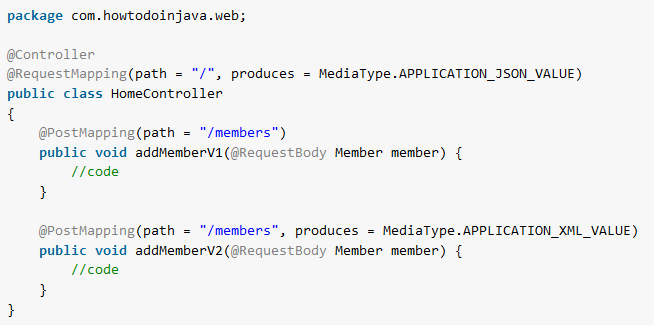
In Spring, @GetMapping maps HTTP GET requests to a controller method, and @PostMapping maps HTTP POST requests to a controller method. Both are shortcuts for @RequestMapping with a fixed HTTP method, so @GetMapping(“/songs”) means the same as @RequestMapping(path = “/songs”, method = RequestMethod.GET).
We use @GetMapping for endpoints that read data, such as a list of songs or one song by id, and @PostMapping for endpoints that create data from a request body, such as a new song sent as JSON. Both work in a Spring WebMVC application with or without Spring Boot.
The following example shows a REST controller for songs with one GET and one POST mapping. The comments show the response of each request.
@RestController
@RequestMapping(path = "/songs", produces = MediaType.APPLICATION_JSON_VALUE)
public class SongController {

  @GetMapping("/{id}")                                        // GET /songs/1  -> 200 {"id":1,"title":"Yesterday",...}
  public ResponseEntity<Song> getById(@PathVariable long id) {
    return ResponseEntity.of(songService.findById(id));       // GET /songs/99 -> 404
  }

  @PostMapping(consumes = MediaType.APPLICATION_JSON_VALUE)   // POST /songs with JSON -> 201 Created
  public ResponseEntity<Song> create(@Valid @RequestBody Song song) {
    Song saved = songService.save(song);
    URI location = ServletUriComponentsBuilder.fromCurrentRequest()
        .path("/{id}")
        .buildAndExpand(saved.id())
        .toUri();
    return ResponseEntity.created(location).body(saved);
  }
}
Notice that the class-level @RequestMapping sets the shared path /songs, and each method annotation adds only its own part and its HTTP method.
Next, we compare the shortcut annotations with @RequestMapping and build complete GET and POST endpoints. After that, we go through the annotation attributes, such as consumes and produces, and the status codes Spring returns when a request matches no method.
1. Request Mapping Annotations
Before Spring 4.3, Spring had only @RequestMapping annotation for mapping all the incoming HTTP request URLs to the corresponding controller methods.
Spring 4.3 introduced 5 new and more specific annotations for each HTTP request type. Each one fixes the method attribute of @RequestMapping to one HTTP method.
| Annotation | HTTP method | Typical use |
|---|---|---|
| @GetMapping | GET | Read one resource or a list |
| @PostMapping | POST | Create a resource |
| @PutMapping | PUT | Replace a resource |
| @PatchMapping | PATCH | Change some fields of a resource |
| @DeleteMapping | DELETE | Delete a resource |
For example, the following code uses the shortcut annotations for the read, create, update and delete operations of the songs API.
@GetMapping
public List<Song> getAll() {
  return songService.findAll();
}

@GetMapping("/{id}")
public ResponseEntity<Song> getById(@PathVariable long id) {
  return ResponseEntity.of(songService.findById(id));
}

@PostMapping(consumes = MediaType.APPLICATION_JSON_VALUE)
public ResponseEntity<Song> create(@Valid @RequestBody Song song) {
  Song saved = songService.save(song);
  URI location = ServletUriComponentsBuilder.fromCurrentRequest()
      .path("/{id}")
      .buildAndExpand(saved.id())
      .toUri();
  return ResponseEntity.created(location).body(saved);
}

@PutMapping(path = "/{id}", consumes = MediaType.APPLICATION_JSON_VALUE)
public ResponseEntity<Song> update(@PathVariable long id, @Valid @RequestBody Song song) {
  return ResponseEntity.of(songService.update(id, song));
}

@DeleteMapping("/{id}")
public ResponseEntity<Void> delete(@PathVariable long id) {
  return songService.delete(id) ? ResponseEntity.noContent().build() : ResponseEntity.notFound().build();
}
The following code maps the same requests with @RequestMapping. Notice that we specify the HTTP request type (GET, POST) with the annotation attribute method.
@RequestMapping(method = RequestMethod.GET)
public List<Song> getAll() {
  return songService.findAll();
}

@RequestMapping(method = RequestMethod.POST, consumes = MediaType.APPLICATION_JSON_VALUE)
public Song create(@RequestBody Song song) {
  return songService.save(song);
}
A @RequestMapping without the method attribute matches every HTTP method. For example, a @RequestMapping(“/count”) method answers a GET request and a DELETE request in the same way. A DELETE that only reads data surprises the client, so we prefer the shortcut annotations on methods and keep @RequestMapping for the shared mapping at the class level.
2. Spring @GetMapping Example
- The @GetMapping annotation is a composed version of @RequestMapping annotation that acts as a shortcut for @RequestMapping(method = RequestMethod.GET).
- The @GetMapping annotated methods handle the HTTP GET requests matched with the given URI expression.
The following example is a songs API in a Spring Boot 4.1.1 app (Spring Framework 7.0.9) on Java 25. A Song is a record with an id, a title and an artist, and the SongService keeps the songs in memory. The SongController maps three GET requests. The complete code is in the spring-webmvc repository on GitHub.
- HTTP GET /songs returns all songs.
- HTTP GET /songs?artist=… returns the songs of one artist.
- HTTP GET /songs/{id} returns one song by id, or 404 when the id does not exist.
@RestController
@RequestMapping(path = "/songs", produces = MediaType.APPLICATION_JSON_VALUE)
public class SongController {

  private final SongService songService;

  public SongController(SongService songService) {
    this.songService = songService;
  }

  @GetMapping
  public List<Song> getAll() {
    return songService.findAll();
  }

  @GetMapping(params = "artist")
  public List<Song> getByArtist(@RequestParam String artist) {
    return songService.findByArtist(artist);
  }

  @GetMapping("/{id}")
  public ResponseEntity<Song> getById(@PathVariable long id) {
    return ResponseEntity.of(songService.findById(id));
  }
}
The two methods for /songs differ only in params = “artist”. Spring picks getByArtist() when the URL has an artist query parameter and getAll() otherwise. The @PathVariable and @RequestParam annotations read the id from the path and the artist from the query string.
The method ResponseEntity.of() takes an Optional. It returns 200 with the song when the Optional has a value, or 404 with an empty body when it is empty. So a missing id never ends in a NoSuchElementException from Optional.get().
$ curl http://localhost:8080/songs
[{"id":1,"title":"Yesterday","artist":"The Beatles"},{"id":2,"title":"Imagine","artist":"John Lennon"}]

$ curl "http://localhost:8080/songs?artist=john%20lennon"
[{"id":2,"title":"Imagine","artist":"John Lennon"}]

$ curl -i http://localhost:8080/songs/99
HTTP/1.1 404
Content-Length: 0
Spring also answers HEAD requests for every @GetMapping method, so we don’t map HEAD ourselves.
3. Spring @PostMapping Example
- The @PostMapping is a specialized version of @RequestMapping annotation that acts as a shortcut for @RequestMapping(method = RequestMethod.POST).
- The @PostMapping annotated methods handle the HTTP POST requests matched with the given URI expression.
- As a best practice, always specify the media types (XML, JSON etc.) using the consumes and produces attributes.
Say a music app lets users add songs to a shared catalog. The app sends the new song as JSON, and the server returns the saved song with its generated id. In the following example, we map the POST request HTTP POST /songs, which creates a new song.
@PostMapping(consumes = MediaType.APPLICATION_JSON_VALUE)
public ResponseEntity<Song> create(@Valid @RequestBody Song song) {
  Song saved = songService.save(song);
  URI location = ServletUriComponentsBuilder.fromCurrentRequest()
      .path("/{id}")
      .buildAndExpand(saved.id())
      .toUri();
  return ResponseEntity.created(location).body(saved);
}
The method has four parts that a POST endpoint needs.
- The @RequestBody annotation tells Spring to convert the JSON body into a Song. Without it, Spring does not read the body, as section 7.2 shows.
- The @Valid annotation runs the Bean Validation constraints of Song, here @NotBlank on the title and the artist. An invalid song gets a 400 response, and the method never runs.
- The consumes attribute accepts only JSON request bodies.
- The method returns 201 Created with a Location header that points to the new song, which is the usual response code for a create request.
$ curl -i -X POST http://localhost:8080/songs -H "Content-Type: application/json" \
    -d '{"title":"Hey Jude","artist":"The Beatles"}'
HTTP/1.1 201
Location: http://localhost:8080/songs/3
Content-Type: application/json

{"id":3,"title":"Hey Jude","artist":"The Beatles"}

$ curl -i -X POST http://localhost:8080/songs -H "Content-Type: application/json" \
    -d '{"title":"","artist":"The Beatles"}'
HTTP/1.1 400
4. Annotation Attributes
All request mapping annotations support the same attributes, because each one is an alias for the attribute of the same name in @RequestMapping. Most attributes narrow the mapping, so a request must meet every condition before Spring calls the method.
| Attribute | The request must have | Example |
|---|---|---|
| path or value | one of the given URLs | @GetMapping({“/top”, “/popular”}) |
| params | the query parameter, or the parameter with the given value | @GetMapping(params = “artist”) |
| headers | the header, or the header with the given value | @GetMapping(path = “/home”, headers = “X-Client=mobile”) |
| consumes | a Content-Type header that matches one of the media types | @PostMapping(path = “/notes”, consumes = MediaType.TEXT_PLAIN_VALUE) |
| produces | an Accept header that accepts one of the media types | @GetMapping(path = “/export”, produces = “text/csv”) |
| name | no condition, it only names the mapping | @GetMapping(path = “/about”, name = “about”) |
| version | the API version (Spring Framework 7) | @GetMapping(version = “2”) |
Most examples in this section come from a small MappingAttributesController mapped to /attributes. The version example in section 4.7 uses its own controller mapped to /greeting.
4.1. path and value
The path attribute specifies the mapping URI, and value is an alias for it. A handler method that is not mapped to any path explicitly is effectively mapped to an empty path, so it handles the path of its class. When we pass only the path, we can leave out the attribute name, so @GetMapping(“/top”) is the same as @GetMapping(path = “/top”).
@GetMapping({"/top", "/popular"})   // the same as @GetMapping(path = {"/top", "/popular"})
public String top() {
  return "top songs";               // GET /attributes/top and GET /attributes/popular -> "top songs"
}
When we set any other attribute, Java needs the attribute name for the path too. So @PostMapping(“/notes”, consumes = …) does not compile, and we write @PostMapping(path = “/notes”, consumes = …).
4.2. consumes
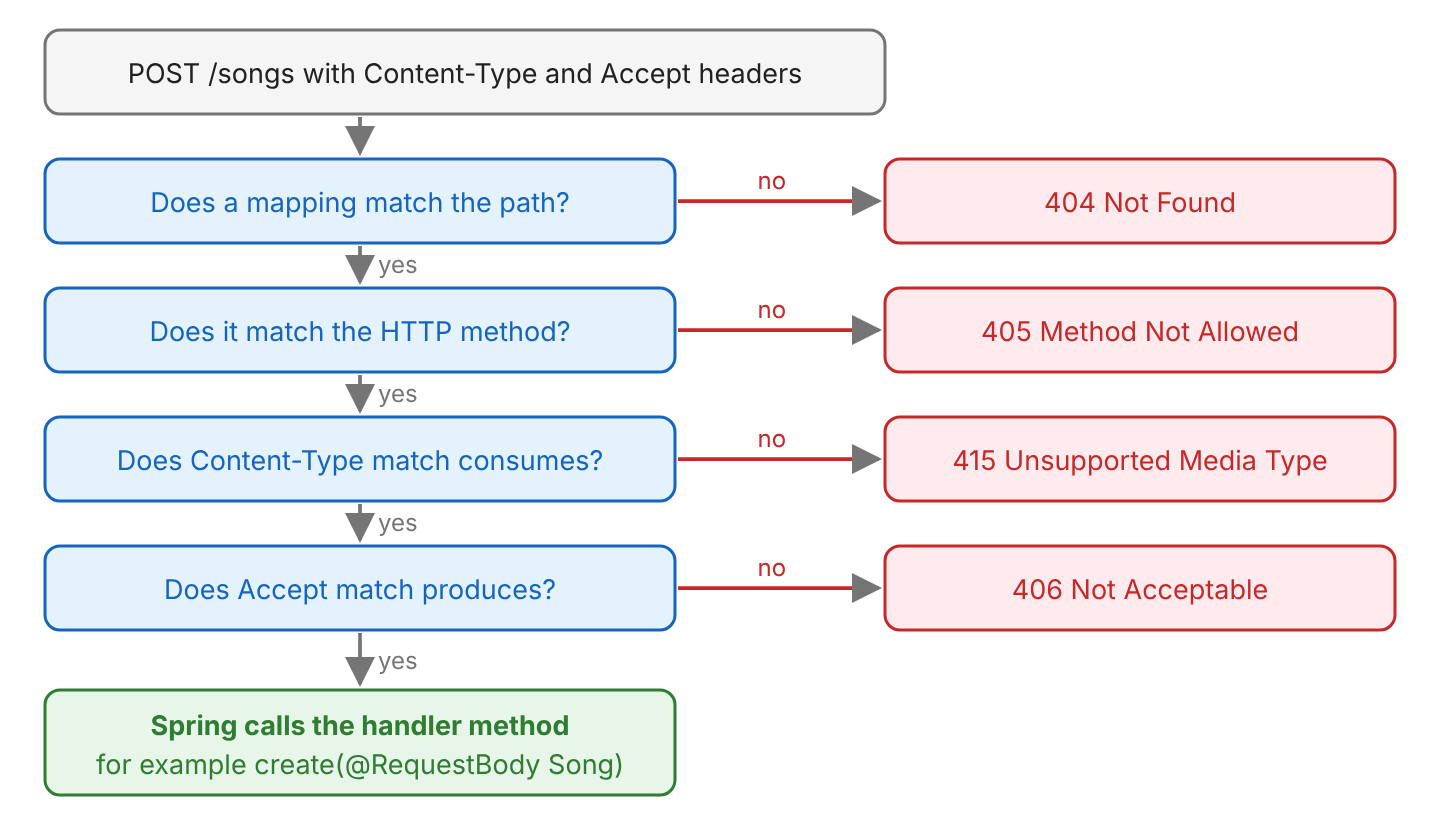
The consumes attribute lists the media types of the request body that the method accepts. Spring compares them with the Content-Type header of the request, and when no media type matches, it returns 415 Unsupported Media Type.
@PostMapping(path = "/notes", consumes = MediaType.TEXT_PLAIN_VALUE)
public String addNote(@RequestBody String note) {
  return "saved: " + note;
}
// POST /attributes/notes, Content-Type: text/plain        -> 200 "saved: Buy concert tickets"
// POST /attributes/notes, Content-Type: application/json  -> 415 Unsupported Media Type
4.3. produces
The produces attribute lists the media types that the method can return. Spring compares them with the Accept header, which is how a client asks for a format (content negotiation). Two methods can share a path and return different formats.
@GetMapping(path = "/export", produces = "text/csv")
public String exportCsv() {
  return "title,artist\nYesterday,The Beatles\n";
}

@GetMapping(path = "/export", produces = MediaType.APPLICATION_JSON_VALUE)
public String exportJson() {
  return "[{\"title\":\"Yesterday\",\"artist\":\"The Beatles\"}]";
}
// GET /attributes/export, Accept: text/csv          -> the CSV text
// GET /attributes/export, Accept: application/json  -> the JSON text
When no method produces a type that the client accepts, Spring returns 406 Not Acceptable. For example, GET /songs/1 with Accept: application/xml gets a 406, because the SongController produces only JSON. For more on JSON and XML responses, read consuming and producing JSON.
4.4. headers
The headers attribute maps a request only when each listed header is present, or has the given value. For example, a mobile app sends X-Client: mobile, and the server returns a smaller home page for it.
@GetMapping(path = "/home", headers = "X-Client=mobile")
public String mobileHome() {
  return "mobile home";
}

@GetMapping("/home")
public String webHome() {
  return "web home";
}
// GET /attributes/home, X-Client: mobile  -> "mobile home"
// GET /attributes/home, X-Client: tablet  -> "web home"
// GET /attributes/home                    -> "web home"
We don’t use headers for the Content-Type and Accept headers. The consumes and produces attributes check these two headers, and they return the right status codes, 415 and 406.
4.5. params
The params attribute works like headers, but for query parameters and form parameters. The value can be the name alone (“artist”), a name with a value (“type=live”), or a negation (“!artist”). In section 2, params = “artist” sends GET /songs?artist=… to getByArtist().
4.6. name
The name attribute assigns a name to the mapping. The name does not change which requests match. Spring uses it only to build links to the method, for example with MvcUriComponentsBuilder.fromMappingName() in a view template.
@GetMapping(path = "/about", name = "about")
public String about() {
  return "about";
}
4.7. version
Spring Framework 7 added the version attribute for API versioning. Two methods can share a path and differ only in the version, and Spring reads the requested version from a header, a query parameter, a path segment or a media type parameter. In Spring Boot 4, we choose the header with a property.
spring.mvc.apiversion.use.header=API-Version
spring.mvc.apiversion.default=1
@GetMapping(version = "1")
public String greetingV1() {
return "Hello";
}
@GetMapping(version = "2")
public String greetingV2() {
return "Hello, listener";
}
// GET /greeting -> "Hello" (default version 1)
// GET /greeting, API-Version: 2 -> "Hello, listener"
// GET /greeting, API-Version: 3 -> 400 Bad RequestThe diagram sums up how Spring uses the attributes to choose a method, and which status code the client gets when a check fails. The params, headers and version attributes narrow the match in the same way.
5. Class-level Shared Attributes
The mapping annotations such as @GetMapping and @PostMapping inherit the annotation attribute values from the @RequestMapping annotation applied at the @RestController class. Spring adds the method path to the class path, so @GetMapping(“/{id}”) in a class mapped to /songs handles /songs/{id}.
In PlaylistController, the @RequestMapping annotation at the top specifies the produces attribute as MediaType.APPLICATION_JSON_VALUE, so all the handler methods in this class, by default, will return the JSON response.
@RestController
@RequestMapping(path = "/playlists", produces = MediaType.APPLICATION_JSON_VALUE)
public class PlaylistController {

  @GetMapping("/{name}")
  public Playlist get(@PathVariable String name) {
    return new Playlist(name, 12);         // GET /playlists/roadtrip -> {"name":"roadtrip","songs":12}
  }
}
A method-level mapping annotation overrides the attribute values of the class with its own values. In the following example, the /playlists/{name}/title API overrides the produces attribute, so it returns plain text to the clients.
@GetMapping(path = "/{name}/title", produces = MediaType.TEXT_PLAIN_VALUE)
public String title(@PathVariable String name) {
  return name;                             // GET /playlists/roadtrip/title -> roadtrip (text/plain)
}
The consumes and produces attributes are the two exceptions to the “add to the class” rule. A method-level consumes or produces replaces the class-level value instead of adding to it, whereas the paths, params and headers of the class and the method are combined.
6. Difference between @PostMapping and @RequestMapping
As noted earlier, the @PostMapping annotation is one specialized version of the @RequestMapping annotation that handles only the HTTP POST requests.
@PostMapping = @RequestMapping(method = RequestMethod.POST)
The following example maps the same POST request with @PostMapping and with @RequestMapping. Both versions work the same way and differ only in syntax.
@RequestMapping(path = "/songs", method = RequestMethod.POST)

@PostMapping("/songs")      // Similar to the above declaration
In other words, @PostMapping acts as a shortcut for @RequestMapping(method = RequestMethod.POST). We can see the source code of the @PostMapping annotation in Spring Framework 7, which uses the @RequestMapping annotation as a meta-annotation and declares each attribute as an alias with @AliasFor.
@Target(ElementType.METHOD)
@Retention(RetentionPolicy.RUNTIME)
@Documented
@RequestMapping(method = RequestMethod.POST)
public @interface PostMapping {

  @AliasFor(annotation = RequestMapping.class)
  String name() default "";

  @AliasFor(annotation = RequestMapping.class)
  String[] value() default {};

  @AliasFor(annotation = RequestMapping.class)
  String[] path() default {};

  // params, headers, consumes, produces and version are declared the same way
}
The source code also shows the practical differences between the two annotations.
| @PostMapping | @RequestMapping | |
|---|---|---|
| HTTP methods | POST only | the method attribute, or every method when it is not set |
| Where we can put it | methods only (@Target(ElementType.METHOD)) | classes and methods |
| Attributes | path, value, params, headers, consumes, produces, name, version | the same, plus method |
| Typical use | one handler method | the shared path and media types of a controller class |
Because @PostMapping cannot go on a class, every controller with a shared path still needs a class-level @RequestMapping.
7. @GetMapping and @PostMapping FAQs
7.1. Why Does My Request Return 405 Method Not Allowed?
A method with the same path exists, but it is mapped to another HTTP method. For example, the SongController maps only GET and POST on /songs, so a DELETE request gets a 405, and the Allow header lists the methods that the path supports.
$ curl -i -X DELETE http://localhost:8080/songs
HTTP/1.1 405
Allow: POST, GET
We fix it by sending the right HTTP method, or by adding a mapping such as @DeleteMapping for the method the client needs.
7.2. Why Are the Fields Null in My @PostMapping Method?
The parameter has no @RequestBody annotation. Without it, Spring fills the object from the query parameters and form fields, not from the JSON body, so a JSON request leaves every field null.
@PostMapping("/mistakes/songs")
public Song create(Song song) {           // JSON body -> {"id":null,"title":null,"artist":null}
  return song;
}
We add @RequestBody to the parameter, as in section 3, and Spring converts the JSON body into the Song.
7.3. Why Does My @PostMapping Return 415 Unsupported Media Type?
The Content-Type header of the request does not match the consumes attribute, or the request has no Content-Type header at all. For a JSON endpoint, the client must send Content-Type: application/json. In curl, -d alone sends application/x-www-form-urlencoded, so we add -H “Content-Type: application/json”.
7.4. Can a @GetMapping Method Have Multiple Paths?
Yes. The path attribute takes an array, so @GetMapping({“/top”, “/popular”}) maps both URLs to one method, as in section 4.1.
7.5. Can We Use @GetMapping in a @Controller Instead of a @RestController?
Yes. The mapping annotations work the same way in both. The difference is the return value. In a @Controller, a String return value is a view name, and in a @RestController, the return value is written to the response body. To return data from a @Controller method, we add @ResponseBody to it.
8. Conclusion
Spring MVC maps requests to handler methods with @RequestMapping and its shortcut annotations. We add @GetMapping to the methods that read data and @PostMapping to the methods that create data, and Spring calls them for the matching requests. A @RequestMapping on the class holds the shared path and media types.
The attributes narrow a mapping. The consumes and produces attributes check the Content-Type and Accept headers, params and headers check the query and the headers, and Spring Framework 7 adds version for API versioning. When no method matches, the status code tells us which check failed, namely 404, 405, 415 or 406.
The same rules apply to the other request mapping annotations, @PutMapping, @DeleteMapping and @PatchMapping.
9. References
- Mapping Requests (Spring Framework reference)
- API Versioning (Spring Framework reference)
- GetMapping Javadoc
- PostMapping Javadoc
- RequestMapping Javadoc
Happy Learning !!
