

A Spring Boot REST API produces JSON by returning a Java object from a @RestController method, and consumes JSON by declaring a @RequestBody parameter, while Jackson converts between the two. We write no parsing code ourselves, because Spring Boot adds Jackson 3 with the web starter and registers it as the JSON converter for every controller.
We need JSON in and out of nearly every REST API, for example when a mobile app sends a new book to a library catalog and shows the saved book that comes back.
The following example is a BookController built with Spring Boot 4.1.1 (Jackson 3.1.5) and Java 25. The comment above each method shows the request and the response.
@RestController
@RequestMapping("/books")
public class BookController {

  // GET /books/1  ->  200 {"id":1,"title":"Dune","author":"Frank Herbert","copies":3,"addedOn":"2026-10-01"}
  @GetMapping("/{id}")
  public ResponseEntity<Book> getById(@PathVariable long id) {
    Book book = books.get(id);
    return book == null ? ResponseEntity.notFound().build() : ResponseEntity.ok(book);
  }

  // POST /books {"title":"Emma","author":"Jane Austen","copies":2,"addedOn":"2026-10-04"}
  //   ->  201, Location: /books/2, {"id":2,"title":"Emma",...}
  @PostMapping
  public ResponseEntity<Book> create(@Valid @RequestBody Book book) {
    Book saved = save(book);
    return ResponseEntity.created(URI.create("/books/" + saved.id())).body(saved);
  }
}
Notice that neither method mentions JSON. Spring picks the JSON format from the request headers, and Jackson maps the Book fields to JSON properties with the same names.
After a look at how the conversion works, we cover the error responses for bad JSON, the Jackson 3 defaults that surprise people, and the customization through application.properties, annotations and a customizer bean. We also switch to Gson and test the API.
1. How Spring Boot Converts JSON
Spring MVC reads and writes HTTP bodies with HttpMessageConverter objects. For JSON, Spring Boot 4 registers a JacksonJsonHttpMessageConverter, which uses the auto-configured Jackson JsonMapper. Two HTTP headers decide when the converter runs, which is called content negotiation.
- Content-Type says what the client sends. For application/json, the converter reads the body into the @RequestBody parameter.
- Accept says what the client wants back. For application/json, or when the header is missing, the converter writes the return value as JSON.
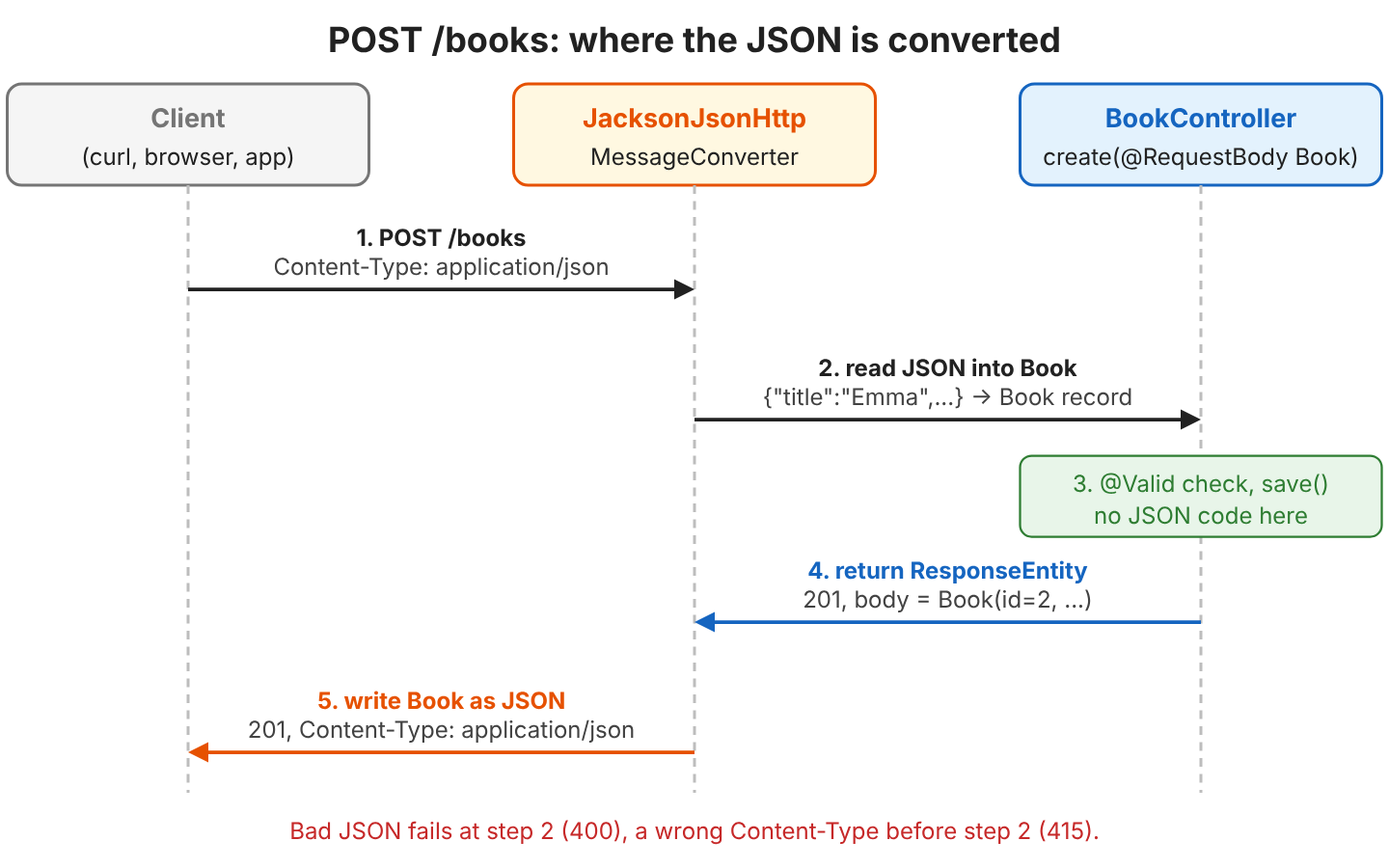
A @RestController is a @Controller whose methods all behave as if they had @ResponseBody, so Spring writes each return value to the response body instead of looking for a view. The @RestController guide compares the two annotations.
1.1. The Starter and the Versions
The starter spring-boot-starter-webmvc brings Spring MVC, an embedded Tomcat and spring-boot-starter-jackson. In Spring Boot 4, the Jackson 3 classes live in the tools.jackson packages, whereas the annotations, such as @JsonProperty, keep the package com.fasterxml.jackson.annotation.
<parent>
  <groupId>org.springframework.boot</groupId>
  <artifactId>spring-boot-starter-parent</artifactId>
  <version>4.1.1</version>
</parent>

<dependencies>
  <dependency>
    <groupId>org.springframework.boot</groupId>
    <artifactId>spring-boot-starter-webmvc</artifactId>
  </dependency>
  <dependency>
    <groupId>org.springframework.boot</groupId>
    <artifactId>spring-boot-starter-validation</artifactId>
  </dependency>
</dependencies>
The older starter spring-boot-starter-web is deprecated in Spring Boot 4 in favor of spring-boot-starter-webmvc. Jackson 2 support is deprecated and lives in the separate module spring-boot-jackson2, so we write new code against Jackson 3.
2. Producing JSON Responses
A controller method produces JSON when it returns an object, a record, a collection or a ResponseEntity that wraps one of them. Jackson writes the record components or the getters of a class as JSON properties, in the order of the record components.
Our catalog stores books as a Java record. The validation annotations come into play in section 3.2.
public record Book(
    Long id,
    @NotBlank String title,
    @NotBlank String author,
    @PositiveOrZero int copies,
    LocalDate addedOn) {
}
@GetMapping
public List<Book> getAll() {
return List.copyOf(books.values());
}[{"id":1,"title":"Dune","author":"Frank Herbert","copies":3,"addedOn":"2026-10-01"},{"id":2,"title":"Emma","author":"Jane Austen","copies":2,"addedOn":"2026-10-04"}]Notice the date. Jackson 3 writes a LocalDate as an ISO-8601 string, such as “2026-10-01”, without any extra module or setting.
We return a ResponseEntity when the status code or the headers depend on the data. For a missing book, getById() returns ResponseEntity.notFound().build(), so the client gets 404 with an empty body instead of 200 with null.
HTTP/1.1 200
Content-Type: application/json

{"id":1,"title":"Dune","author":"Frank Herbert","copies":3,"addedOn":"2026-10-01"}
3. Consuming JSON Requests
The @RequestBody annotation tells Spring to read the whole request body into the parameter. Jackson creates the record through its canonical constructor and fills each component from the JSON property with the same name.
curl -i -X POST localhost:8080/books \
     -H "Content-Type: application/json" \
     -d '{"title":"Emma","author":"Jane Austen","copies":2,"addedOn":"2026-10-04"}'
HTTP/1.1 201
Location: /books/2
Content-Type: application/json
{"id":2,"title":"Emma","author":"Jane Austen","copies":2,"addedOn":"2026-10-04"}The client must send the Content-Type: application/json header. Without the header, curl sends application/x-www-form-urlencoded, and Spring rejects the request with 415 Unsupported Media Type before the controller runs.
3.1. Accepting a JSON Array
A @RequestBody parameter can also be a collection. For example, a librarian imports a whole box of new books in one request, so the endpoint takes a List<Book>.
@PostMapping("/batch")
public List<Book> createAll(@RequestBody List<@Valid Book> newBooks) {
  return newBooks.stream().map(this::save).toList();
}
Request: [{"title":"Emma","author":"Jane Austen","copies":2},{"title":"Ulysses","author":"James Joyce","copies":1}]
Response: [{"id":3,"title":"Emma","author":"Jane Austen","copies":2,"addedOn":null},{"id":4,"title":"Ulysses","author":"James Joyce","copies":1,"addedOn":null}]The missing addedOn property becomes null in the record, and Jackson writes the null back in the response. Section 5.1 shows how to leave null values out.
3.2. Validating the JSON Body
Jackson checks only the JSON syntax and the types. To check the values, we add @Valid to the parameter and Jakarta Bean Validation annotations, such as @NotBlank, to the record. An empty title and a negative number of copies fail the validation, and Spring answers 400 Bad Request without calling the method body.
HTTP/1.1 400
{"timestamp":"2026-10-04T15:22:34.369Z","status":400,"error":"Bad Request","path":"/books"}
The request validation guide shows how to return the field errors to the client.
4. Errors When the JSON Does Not Fit
Each problem with a JSON request ends in a different status code. Spring logs the exception at WARN level, so the server log shows the real cause even when the client sees only the status.
| Request | Status | Exception in the log |
|---|---|---|
| Broken JSON, e.g. {“title”:”Emma”, | 400 | HttpMessageNotReadableException: JSON parse error: Unexpected end-of-input |
| Wrong type, e.g. “copies”:”two” | 400 | HttpMessageNotReadableException: Cannot deserialize value of type int from String “two” |
| Wrong date format, e.g. “04/10/2026” | 400 | HttpMessageNotReadableException: Cannot deserialize value of type java.time.LocalDate |
| Missing int property | 400 | HttpMessageNotReadableException: Cannot map null into type int |
| Validation fails | 400 | MethodArgumentNotValidException |
| Content-Type: text/plain | 415 | HttpMediaTypeNotSupportedException |
| Accept: application/xml | 406 | HttpMediaTypeNotAcceptableException |
| Unknown property, e.g. “pages”:474 | 201 | none, Jackson ignores it |
In Jackson 3, FAIL_ON_UNKNOWN_PROPERTIES is off by default, as it was in the Spring Boot setup for Jackson 2, so a client that sends an extra property, such as pages, still gets 201. That keeps older servers working when a newer mobile app sends a field they do not know yet.
To show the reason to the client as well, we turn on RFC 9457 problem details with spring.mvc.problemdetails.enabled=true. With the property set, Spring answers with Content-Type: application/problem+json and a detail field.
{"detail":"Failed to read request","instance":"/books","status":400,"title":"Bad Request"}4.1. Missing Primitive Properties in Jackson 3
In Jackson 3, a JSON request that leaves out a primitive property, such as an int, fails with 400, because FAIL_ON_NULL_FOR_PRIMITIVES is on by default. With Jackson 2 and Spring Boot 3, the same request created a book with copies = 0.
WARN ... Resolved [org.springframework.http.converter.HttpMessageNotReadableException: JSON parse error: Cannot map `null` into type `int` (set `DeserializationFeature.FAIL_ON_NULL_FOR_PRIMITIVES` to 'false' to allow)]We have three ways to deal with it.
- Keep the int when the property is required, because the 400 tells the client that a value is missing.
- Use Integer for an optional property, so a missing value becomes null and the code decides on a default.
- Set spring.jackson.deserialization.fail-on-null-for-primitives=false to get 0 again, or set spring.jackson.use-jackson2-defaults=true to get the Spring Boot 3 behavior for all Jackson settings during a migration.
5. Customizing the JSON Format
Spring Boot configures one JsonMapper for the whole app, so a change to it affects every controller. We have two ways to change the global settings, and annotations for a single class.
5.1. Jackson Properties in application.properties
Say a JavaScript client expects snake_case names, such as added_on, and pretty-printed JSON is easier to read during development. Three properties do the job, and the Spring Boot docs list the full set of spring.jackson.* properties.
spring.jackson.property-naming-strategy=SNAKE_CASE
spring.jackson.default-property-inclusion=non_null
spring.jackson.serialization.indent-output=true
{
"id" : 2,
"title" : "Emma",
"author" : "Jane Austen",
"copies" : 2,
"added_on" : "2026-10-04"
}
{
"id" : 3,
"title" : "Ulysses",
"author" : "James Joyce",
"copies" : 1
}The naming strategy also applies to requests. After the change, a client that still sends addedOn gets 201, but the date is null, because Jackson treats addedOn as an unknown property and ignores it. So we change the naming strategy only together with every client.
The value non_null leaves out null properties, which is why the second book has no added_on line. To leave out empty strings and empty lists as well, we use non_empty, and the Jackson null and empty values guide explains the other options.
5.2. A JsonMapperBuilderCustomizer Bean
For settings that have no property, or to keep the settings in Java code, we declare a JsonMapperBuilderCustomizer bean. Spring Boot applies every customizer to the JsonMapper.Builder before it builds the mapper, so the auto-configured defaults stay in place. The following bean gives the same output as the three properties.
@Configuration
public class JsonMapperConfig {

  @Bean
  JsonMapperBuilderCustomizer libraryJsonCustomizer() {
    return builder -> builder
        .propertyNamingStrategy(PropertyNamingStrategies.SNAKE_CASE)
        .changeDefaultPropertyInclusion(incl -> incl.withValueInclusion(JsonInclude.Include.NON_NULL))
        .enable(SerializationFeature.INDENT_OUTPUT);
  }
}
The customizer replaces the Spring Boot 3 Jackson2ObjectMapperBuilderCustomizer. We avoid declaring our own JsonMapper bean, because that turns off the whole Jackson auto-configuration, including the spring.jackson.* properties.
5.3. Jackson Annotations on One Class
When only one response needs a different shape, we put Jackson annotations on that class instead of changing the global mapper. For example, the catalog page shows a short card for each book, and the frontend team wants book_title, a German date format and no internal shelf code.
public record BookCard(
    @JsonProperty("book_title") String title,
    @JsonInclude(JsonInclude.Include.NON_NULL) String subtitle,
    @JsonFormat(pattern = "dd.MM.yyyy") LocalDate addedOn,
    @JsonIgnore String shelfCode) {
}{"book_title":"Dune","addedOn":"01.10.2026"}The annotation @JsonProperty renames the property, and @JsonFormat sets the date pattern. Because the subtitle is null, @JsonInclude leaves it out, and @JsonIgnore keeps shelfCode out of the JSON in every case. The Jackson date formats guide covers time zones and Instant values.
6. Using Gson Instead of Jackson
Spring Boot also supports Gson and JSON-B. A team that already shares Gson type adapters with an Android app can use Gson for the REST API too. We add the starter and tell Spring Boot to prefer Gson, because with both libraries on the classpath, Jackson stays the default.
<dependency>
  <groupId>org.springframework.boot</groupId>
  <artifactId>spring-boot-starter-gson</artifactId>
</dependency>spring.http.converters.preferred-json-mapper=gsonBefore Spring Boot 4, the property was called spring.mvc.converters.preferred-json-mapper. Gson has no built-in support for the java.time classes, so our Book record with a LocalDate fails on Java 25.
HTTP/1.1 500
WARN ... Resolved [org.springframework.http.converter.HttpMessageNotWritableException: Could not write JSON: Failed making field 'java.time.LocalDate#year' accessible; ...]
The fix is a GsonBuilderCustomizer bean that registers a type adapter for LocalDate. The two lambdas write the date as ISO text and parse it back.
@Bean
GsonBuilderCustomizer localDateAdapter() {
  return builder -> builder
      .registerTypeAdapter(LocalDate.class,
          (JsonSerializer<LocalDate>) (date, type, context) -> new JsonPrimitive(date.toString()))
      .registerTypeAdapter(LocalDate.class,
          (JsonDeserializer<LocalDate>) (json, type, context) -> LocalDate.parse(json.getAsString()));
}
GET /books/1 {"id":1,"title":"Dune","author":"Frank Herbert","copies":3,"addedOn":"2026-10-01"}
GET /books/1/card {"title":"Dune","addedOn":"2026-10-01","shelfCode":"B-12"}Gson ignores every Jackson annotation, so the shelfCode that @JsonIgnore hid in section 5.3 appears in the response. Gson also leaves out null values by default and puts 0 into a missing int. So we switch libraries only after we check every response class. The Gson with Spring Boot article lists the spring.gson.* properties.
7. Testing JSON Endpoints
A @WebMvcTest starts only the web layer with the same Jackson configuration as the app, so the test checks the real JSON. The class MockMvcTester sends requests without a running server and compares the body with AssertJ. The test starter is spring-boot-starter-webmvc-test.
@WebMvcTest(BookController.class)
class BookControllerTest {

  @Autowired
  MockMvcTester mvc;

  @Test
  void producesJson() {
    assertThat(mvc.get().uri("/books/1"))
        .hasStatusOk()
        .hasContentType(MediaType.APPLICATION_JSON)
        .bodyJson().isEqualTo("""
            {"id":1,"title":"Dune","author":"Frank Herbert","copies":3,"addedOn":"2026-10-01"}
            """);
  }

  @Test
  void missingPrimitiveFieldIsRejected() {
    assertThat(mvc.post().uri("/books")
        .contentType(MediaType.APPLICATION_JSON)
        .content("""
            {"title":"Emma","author":"Jane Austen"}
            """))
        .hasStatus(HttpStatus.BAD_REQUEST);
  }
}
The example project has nine such tests, which cover the status codes from section 4, the annotations and the JSON array. More MockMvc patterns are in the MockMvc examples.
8. Spring Boot JSON FAQs
8.1. How Do We Consume JSON From Another REST API?
We call the other API with Spring’s RestClient, which uses the same Jackson converter to read the response body into a record. For a generic type such as List<Book>, we pass a ParameterizedTypeReference.
RestClient client = RestClient.create("http://localhost:8080");

Book book = client.get().uri("/books/{id}", 1)
    .retrieve()
    .body(Book.class);                                              // Book[id=1, title=Dune, ...]
List<Book> all = client.get().uri("/books")
    .retrieve()
    .body(new ParameterizedTypeReference<List<Book>>() {});         // [Book[id=1, title=Dune, ...], ...]
8.2. Why Does the Browser Show XML Instead of JSON?
The browser sends an Accept header that prefers XML. When the app also has jackson-dataformat-xml on the classpath, Spring answers in XML. Without an XML library, our app returns JSON to the browser, and a client that asks only for application/xml gets 406. The XML request and response article shows how to support both formats.
8.3. Do We Need consumes and produces on Every Mapping?
No. Without them, a method accepts every format that a registered converter can read into the parameter type, and returns every format that a converter can write. In our app, only Jackson handles Book, so a text/plain request already gets 415. We add consumes = MediaType.APPLICATION_JSON_VALUE when the app also has an XML converter and the method must accept JSON only, and produces when one URL must always answer in one format.
9. Conclusion
A Spring Boot 4 REST API produces JSON by returning objects from @RestController methods, and consumes JSON through @RequestBody parameters. Jackson 3 does the conversion, based on the Content-Type and Accept headers.
Most problems show up as 400, 415 or 406, and the WARN line in the server log names the cause. In Jackson 3, a missing int property is one of those causes, so we use Integer for optional numbers.
For the format, the spring.jackson.* properties cover most needs, a JsonMapperBuilderCustomizer covers the rest, and Jackson annotations shape a single class. Gson remains an option, but it ignores the Jackson annotations and needs adapters for java.time.
10. References
- Spring Boot Reference: JSON
- Spring Boot How-to: Spring MVC
- Spring Framework Reference: Message Conversion
- Spring Boot 4.0 Migration Guide
- Jackson 3 Release Notes
Happy Learning !!

none of jackson’s customizations in @Configuration does actually work
please write where r u producing where r u consuming the API