
A TypeScript decorator is a function that we put above a class or a class member with @name, and it can replace that member with a new version. The decorator function runs once, when the class is defined. The new version it returns, such as a wrapper around a method, runs on every call. Since TypeScript 5.0, decorators follow the standard JavaScript design and need no compiler flag.
We use decorators to add the same behavior to many classes without copying code into each method, for example logging, timing or input checks. Angular, NestJS and TypeORM use decorators too, but in an older style that we compare at the end.
The following example adds a @logCalls decorator to a method. The decorator gets the original method and returns a new function that prints the call before it runs the original.
function logCalls(method: (...args: any[]) => any, context: ClassMethodDecoratorContext) {
  const name = String(context.name);
  return function (this: any, ...args: any[]) {
    console.log("Calling " + name + " with " + JSON.stringify(args));
    const result = method.apply(this, args);
    console.log(name + " returned " + result);
    return result;
  };
}

class Cart {
  @logCalls
  total(price: number, quantity: number): number {
    return price * quantity;
  }
}

const cart = new Cart();
const total = cart.total(5, 3);   // prints "Calling total with [5,3]" and "total returned 15", total = 15
The Cart class itself has no logging code. The @logCalls line swapped total() for the wrapper function when the class was defined.
In the next sections, we write a decorator for each kind of class member and see the order in which they run. At the end, we compare them with the older experimentalDecorators style and fix the usual compiler errors.
1. How a TypeScript Decorator Works
A decorator is a plain function with two parameters. The first one, value, is the thing we decorate, for example the method. The second one, context, holds details about it, such as the member name in context.name and the kind in context.kind (“method”, “field” and so on).
When the decorator returns nothing, the member stays as it is. When it returns a new value of the same shape, for example a new function for a method, that value replaces the original. What value holds and what we may return depend on the kind of member.
| Decorated member | value argument | context type | Can return |
|---|---|---|---|
| Class | The class itself | ClassDecoratorContext | A new class |
| Method | The method function | ClassMethodDecoratorContext | A new function |
| Getter / setter | The get or set function | ClassGetterDecoratorContext / ClassSetterDecoratorContext | A new function |
| Field | undefined | ClassFieldDecoratorContext | A function that changes the initial value |
| accessor field | An object with get and set | ClassAccessorDecoratorContext | An object with new get, set and init |
Standard decorators cannot decorate parameters, so @Inject() on a constructor parameter works only with the older experimentalDecorators style. We compare both styles in section 8.
2. Project Setup for Decorators in TypeScript 7
Standard decorators need no switch in tsconfig.json. We only leave the experimentalDecorators option off, which is the default, because that option turns on the older style.
The examples use TypeScript 7.0.2 and Node.js 22. TypeScript 7 supports both decorator styles, so decorators written for TypeScript 6 keep working, and TypeScript 7 vs 6 lists the options that did change.
JavaScript engines don’t run decorators yet, so tsc turns each decorator into plain function calls in the output file. For the same reason, node file.ts can’t run a decorated file. That command uses Node.js type stripping, which removes the types but leaves the @ lines, so Node.js stops with a SyntaxError.
3. TypeScript Method Decorator for Timing
A method decorator is the most common kind. It returns a wrapper function, so it can run code before and after every call of the method.
The following example is a @timed decorator that prints how long a method takes. The Playlist class has a find() method that searches a list of song titles. This time we use generics instead of any, so the wrapper keeps the parameter and return types of the method it wraps.
function timed<This, Args extends unknown[], Return>(
  method: (this: This, ...args: Args) => Return,
  context: ClassMethodDecoratorContext<This, (this: This, ...args: Args) => Return>
) {
  const name = String(context.name);
  return function (this: This, ...args: Args): Return {
    const start = performance.now();
    try {
      return method.call(this, ...args);
    } finally {
      const ms = performance.now() - start;
      console.log(name + " took " + ms.toFixed(3) + " ms");
    }
  };
}

class Playlist {
  private songs: string[] = ["Intro", "Hello", "Outro"];

  @timed
  find(title: string): number {
    return this.songs.indexOf(title);
  }
}

const index = new Playlist().find("Hello");   // prints "find took 0.023 ms", index = 1
The wrapper is a normal function that calls method.call(this, …args), so the original method still sees the right this. An arrow function as the wrapper would lose this, a common bug in method decorators. The finally block prints the time even when the method throws.
4. Class Decorator Example
A class decorator gets the class itself. It can store the class somewhere, or it can return a new class that extends it.
Say a notification service picks a handler class by a name from a config file. Instead of a hand-written list of handlers, each handler class registers itself in a Map with a @handler decorator.
const handlers = new Map<string, new () => object>();

function handler<T extends new () => object>(value: T, context: ClassDecoratorContext<T>) {
  handlers.set(String(context.name), value);
}

@handler
class EmailHandler {}

@handler
class SmsHandler {}

const names = [...handlers.keys()];                        // ["EmailHandler", "SmsHandler"]
const created = new (handlers.get("SmsHandler")!)();       // created.constructor.name = "SmsHandler"
The @handler decorator returns nothing, so both classes stay unchanged. The map is filled when the module loads, before any code creates an object.
5. Field Decorator With an Initializer
A field decorator runs before the field has a value, so its value argument is always undefined. To change the field, the decorator returns a function that gets the starting value and returns the value to use instead.
The following example trims spaces from the starting value of a title field.
function trimSpaces<This>(_value: undefined, context: ClassFieldDecoratorContext<This, string>) {
  return function (initialValue: string): string {
    return initialValue.trim();
  };
}

class Song {
  @trimSpaces
  title = "  Hello  ";
}

const song = new Song();
const title = song.title;      // "Hello"
song.title = "  Bye  ";
const after = song.title;      // "  Bye  " (later assignments are not trimmed)
The second result shows the limit of a field decorator. A plain field has no setter to wrap, so the decorator sees only the starting value.
6. Accessor Decorator Factory With Arguments
An accessor field looks like a normal field from outside, but TypeScript creates a hidden getter and setter for it. An accessor decorator can replace that setter, so it sees every write, which a field decorator can’t.
When a decorator takes arguments, such as @clamp(0, 100), the function clamp is a decorator factory. It takes our arguments and returns the decorator, which is a function with the usual (target, context) parameters.
The following example keeps the volume of a speaker between a minimum and a maximum. The target argument holds the original get and set functions. The decorator returns init to fix the starting value and a new set to fix every later value.
function clamp(min: number, max: number) {
  return function <This>(
    target: ClassAccessorDecoratorTarget<This, number>,
    context: ClassAccessorDecoratorContext<This, number>
  ): ClassAccessorDecoratorResult<This, number> {
    return {
      set(value: number) {
        target.set.call(this, Math.min(max, Math.max(min, value)));
      },
      init(value: number) {
        return Math.min(max, Math.max(min, value));
      },
    };
  };
}

class Speaker {
  @clamp(0, 100)
  accessor volume = 150;
}

const speaker = new Speaker();
const start = speaker.volume;   // 100
speaker.volume = -20;
const low = speaker.volume;     // 0
The decorator returns no get, so reads still use the original getter. With a factory, one decorator serves different settings, for example @clamp(0, 10) for a rating and @clamp(0, 100) for a volume.
7. The Order Decorators Run In
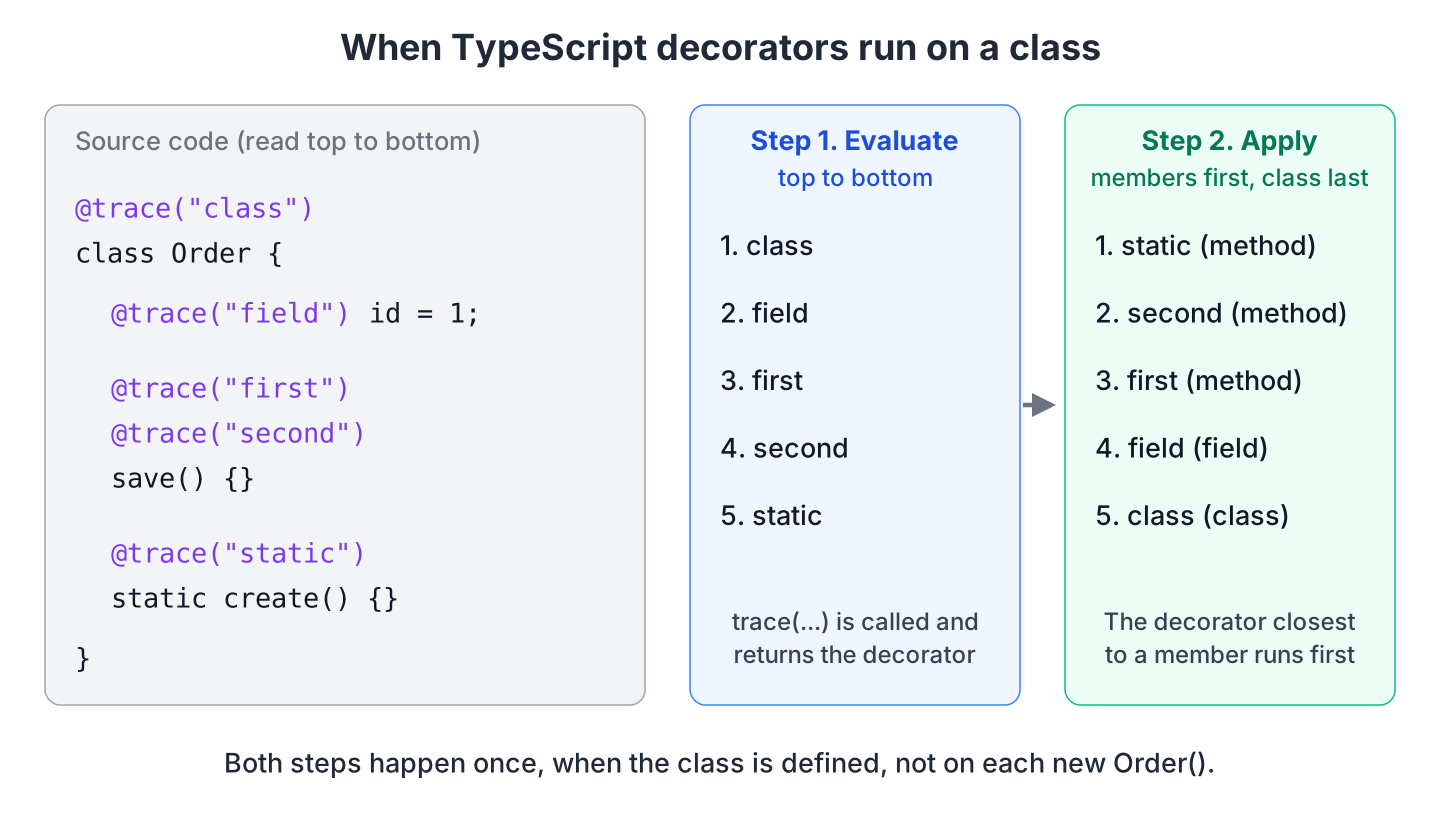
Decorators run in two steps, and both steps happen once, when the class is defined. First, TypeScript evaluates every @… expression from top to bottom, so factories such as trace(“class”) are called. After that, it applies the returned decorators to the members and to the class.
The following example uses a trace() factory that prints a line in each step. We put it on the Order class, on a field, twice on a method and on a static method.
function trace(label: string) {
  console.log("evaluate " + label);
  return function (_value: unknown, context: DecoratorContext) {
    console.log("apply    " + label + " on " + context.kind + " " + String(context.name));
  };
}

@trace("class")
class Order {
  @trace("field") id = 1;

  @trace("first")
  @trace("second")
  save() {}

  @trace("static") static create() {}
}
evaluate class
evaluate field
evaluate first
evaluate second
evaluate static
apply static on method create
apply second on method save
apply first on method save
apply field on field id
apply class on class OrderStatic members are decorated before instance members, and the class decorator runs last. On save(), the decorator closest to the method (second) is applied first, so first wraps its result. For example, with @logCalls above @timed, the logging wrapper is the outer one.
8. Standard Decorators vs experimentalDecorators
Before version 5.0, TypeScript had its own decorator design, turned on with the experimentalDecorators option. The two designs have different function signatures, and each style rejects decorators written for the other.
| Point | Standard decorators | experimentalDecorators (legacy) |
|---|---|---|
| Compiler option | None, on by default since TypeScript 5.0 | “experimentalDecorators”: true |
| Method decorator signature | (value, context) | (target, propertyKey, descriptor), where the descriptor holds the method in descriptor.value |
| How it changes a method | Returns a new function | Changes the PropertyDescriptor |
| Parameter decorators | Not supported | Supported, e.g. @Inject() |
| emitDecoratorMetadata (type info for frameworks) | Not supported | Supported |
| accessor fields | Supported | Not supported |
| Used by | New code and newer libraries | Angular, NestJS, TypeORM |
The framework decides which style a project uses.
- In an Angular, NestJS or TypeORM project, keep experimentalDecorators on. The Angular CLI and the NestJS starter turn it on, and TypeORM needs it with emitDecoratorMetadata.
- In our own code, use standard decorators. They follow the JavaScript proposal, so they keep working when engines run decorators natively.
9. Decorator Errors and How to Fix Them
Most decorator errors come from mixing the two styles. A legacy decorator with three parameters fails with standard decorators, which call it with two arguments.
src/cart.ts(5,3): error TS1241: Unable to resolve signature of method decorator when called as an expression.
  The runtime will invoke the decorator with 2 arguments, but the decorator expects 3.
We either rewrite the decorator with the (value, context) signature, or turn on experimentalDecorators when a framework needs it.
A decorator on a constructor parameter, or on a function outside a class, gives TS1206, because standard decorators work only on classes and class members.
src/mailer.ts(5,15): error TS1206: Decorators are not valid here.Running a decorated file with node src/01-first-decorator.ts fails at runtime, as we saw in section 2. We build with tsc first and run the .js output.
file:///.../decorators/src/01-first-decorator.ts:13
  @logCalls
  ^

SyntaxError: Invalid or unexpected token
10. Conclusion
A TypeScript decorator gets a class member and a context object, and it can return a replacement for that member. Method decorators wrap calls, and accessor decorators see every write. All decorators run once, when the class is defined.
Standard decorators need no compiler option since TypeScript 5.0. Angular, NestJS and TypeORM still need experimentalDecorators and the legacy (target, propertyKey, descriptor) style. The TypeScript interface and method override posts cover the class basics that decorators build on.
11. References
- TypeScript 5.0 release notes, Decorators
- TypeScript Handbook, Decorators (experimentalDecorators)
- TSConfig reference, experimentalDecorators
- TC39 decorators proposal
- Node.js documentation, TypeScript type stripping
- Announcing TypeScript 7.0
Happy Learning !!
