
Kafka queues let several consumers read records from the same partition, and each consumer confirms every record it finishes, one record at a time. Kafka calls this group of consumers a share group. It works like a job queue, where any free worker takes the next job. The feature comes from KIP-932 and is production-ready since Apache Kafka 4.2.
We use Kafka queues for jobs where the order does not matter, such as sending emails or resizing images. They also help when we need more workers than the topic has partitions.
The following example is a Spring Kafka listener that reads from a share group. The container factory creates share consumers, so groupId names a share group, not a consumer group.
@KafkaListener(topics = "thumbnails", groupId = "thumbnail-workers",
    containerFactory = "shareListenerFactory")                // share group "thumbnail-workers"
public void makeThumbnail(ConsumerRecord<String, String> record, ShareAcknowledgment ack) {
  String photo = record.value();                              // "photo-1.jpg"
  ack.acknowledge();                                          // ACCEPT, never delivered again
}
Notice the ShareAcknowledgment parameter. The listener calls acknowledge() on it to tell Kafka that this one record is done. Two copies of this listener split the records of one partition between them.
Next, we compare share groups with consumer groups and check which Kafka version we need. After that, we build a Spring Boot example with tests that prove the split.
1. How a Share Group Differs From a Consumer Group
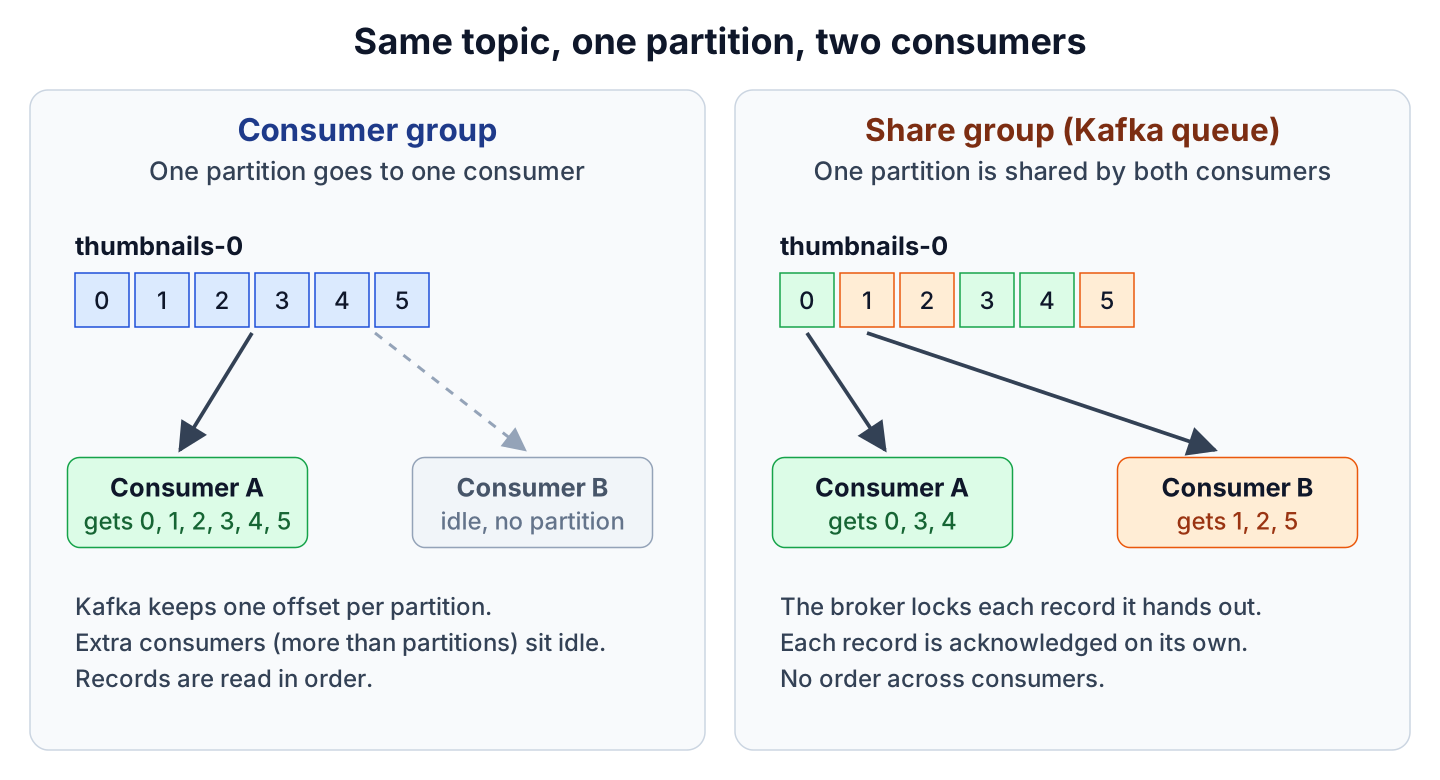
In a consumer group, Kafka gives each partition to only one consumer. That consumer reads the records in order and commits one offset (its position in the partition). If a topic has one partition and we start two consumers, the second one sits idle.
A share group works more like a job queue. The broker gives records from the same partition to every consumer in the group. While one consumer works on a record, the broker locks it, so no other consumer gets it. When the job is done, the consumer acknowledges the record, which means it tells the broker that the record is done.
Consumer groups and share groups can read the same topic at the same time, so we do not change producers or topics to try Kafka queues.
| Consumer group | Share group (Kafka queue) | |
|---|---|---|
| Who reads a partition | One consumer per partition | All consumers in the group |
| What the consumer confirms | One offset per partition | Each record (accept, release or reject) |
| Order of processing | In order within a partition | No order guarantee |
| Failed record | We retry it in our code or skip it | Release it and Kafka delivers it again |
| Too many failures | Our code decides | Kafka gives up after 5 deliveries (default) |
| Java client | KafkaConsumer | KafkaShareConsumer |
| Spring Kafka | ConcurrentKafkaListenerContainerFactory | ShareKafkaListenerContainerFactory |
1.1. When to Use a Share Group
Say an online photo album creates a thumbnail for every uploaded photo. Each photo is an independent job, and a busy evening needs 20 workers, but the topic has only 4 partitions. With a consumer group, 16 workers would be idle, whereas a share group keeps all 20 busy.
Use a share group in these cases.
- Each record is an independent job, and the order of processing does not matter.
- We need more consumers than partitions, or we want to add workers without adding partitions.
Keep a consumer group in these cases.
- The order of records matters, e.g. the events of one bank account or one order.
- We read and write records inside Kafka transactions.
- We use Kafka Streams, or we read the topic as a stream of events to replay later.
2. Status of Kafka Queues in Kafka 4.x
Kafka queues took three releases to become production-ready. Use Kafka 4.2 or newer, because the share groups in 4.0 and 4.1 are not meant for production.
| Kafka version | Status of share groups |
|---|---|
| 4.0 | Early access, for testing only |
| 4.1 | Preview, enabled with the kafka-features.sh tool (share.version=1) |
| 4.2 | Production-ready, adds the RENEW acknowledgement |
| 4.3.1 (latest) | Production-ready and on by default in a new cluster |
Share groups keep track of finished records in an internal topic called __share_group_state. By default, this topic has 3 copies (replicas), so a cluster with fewer than 3 brokers needs two broker settings. Without them, the consumers join the group but never get a record, and no error shows up.
share.coordinator.state.topic.replication.factor=1
share.coordinator.state.topic.min.isr=1
The default server.properties in the apache/kafka Docker image already has these two lines. Testcontainers passes broker settings as environment variables, so in section 3.4 we add them again. A three-broker cluster needs neither setting.
A new share group starts at the latest offset, because the group setting share.auto.offset.reset defaults to latest. Records sent before the first consumer joins are skipped. Set it to earliest for the group, as shown in section 3.2.
3. Spring Kafka Share Consumer Example
Spring Kafka supports share consumers since version 4.0, and version 4.1 made the support production-ready. The example uses Spring Boot 4.1.1 (with Spring Kafka 4.1.1 and kafka-clients 4.2.1), Java 25 and a Kafka 4.3.1 broker. The only dependency is spring-boot-starter-kafka, which also gives us a KafkaTemplate for sending records.
Photo names go to the topic thumbnails, which has one partition. The share group thumbnail-workers runs two consumers that make the thumbnails. The full project is in the kafka-share-groups folder on GitHub.
3.1. Share Consumer Factory and Container Factory
Spring Boot 4.1 does not auto-configure share consumers, so we declare two beans. The ShareConsumerFactory creates the KafkaShareConsumer instances, and the ShareKafkaListenerContainerFactory uses them to run our @KafkaListener methods. Spring Boot gives us the KafkaConnectionDetails bean, which holds the broker address from application.yaml or from Testcontainers.
@Bean
ShareConsumerFactory<String, String> shareConsumerFactory(KafkaConnectionDetails connection) {
  Map<String, Object> props = new HashMap<>();
  props.put(ConsumerConfig.BOOTSTRAP_SERVERS_CONFIG, connection.getConsumer().getBootstrapServers());
  props.put(ConsumerConfig.KEY_DESERIALIZER_CLASS_CONFIG, StringDeserializer.class);
  props.put(ConsumerConfig.VALUE_DESERIALIZER_CLASS_CONFIG, StringDeserializer.class);
  props.put(ConsumerConfig.SHARE_ACQUIRE_MODE_CONFIG, "record_limit");  // never more than max.poll.records
  props.put(ConsumerConfig.MAX_POLL_RECORDS_CONFIG, 1);                 // one photo per poll
  return new DefaultShareConsumerFactory<>(props);
}

@Bean
ShareKafkaListenerContainerFactory<String, String> shareListenerFactory(
    ShareConsumerFactory<String, String> shareConsumerFactory) {
  var factory = new ShareKafkaListenerContainerFactory<>(shareConsumerFactory);
  factory.getContainerProperties().setShareAckMode(ShareAckMode.MANUAL);  // the listener acknowledges
  factory.setConcurrency(2);                                              // 2 consumers in the share group
  return factory;
}
The concurrency value is the number of share consumers in each app instance, so two instances give four consumers in the group. By default, one poll can return a whole batch of records to one consumer. With record_limit and max.poll.records set to 1, each consumer takes one photo at a time, so slow jobs spread over all consumers.
The ShareAckMode setting decides who acknowledges the records.
- EXPLICIT (default) means the container accepts the record when the listener returns. When the listener throws an exception, the container rejects the record by default.
- MANUAL means the listener gets a ShareAcknowledgment and must acknowledge every record itself.
- IMPLICIT means Kafka accepts every record the consumer got, even when processing failed, and the listener gets no ShareAcknowledgment.
3.2. Starting the Share Group at the Earliest Record
The share.auto.offset.reset setting belongs to the group, not to one consumer, so it cannot go into the consumer properties. We set it with the Kafka Admin client instead. The ShareGroupSetup bean implements SmartInitializingSingleton, so Spring calls it after all beans are created and before the listener containers start.
try (Admin admin = Admin.create(kafkaAdmin.getConfigurationProperties())) {
  var group = new ConfigResource(ConfigResource.Type.GROUP, "thumbnail-workers");
  var earliest = new AlterConfigOp(new ConfigEntry("share.auto.offset.reset", "earliest"),
      AlterConfigOp.OpType.SET);
  admin.incrementalAlterConfigs(Map.of(group, List.of(earliest))).all().get();  // group starts at offset 0
}
3.3. Acknowledge, Release and Reject a Record
The listener decides what happens to each record by calling one of these ShareAcknowledgment methods.
- acknowledge() (ACCEPT) marks the record as done.
- release() (RELEASE) puts the record back in the queue, so Kafka delivers it again, possibly to another consumer.
- reject() (REJECT) marks the record as bad, so Kafka never delivers it again.
- renew() (RENEW, Kafka 4.2+) extends the lock on a record when its job takes longer than the lock time.
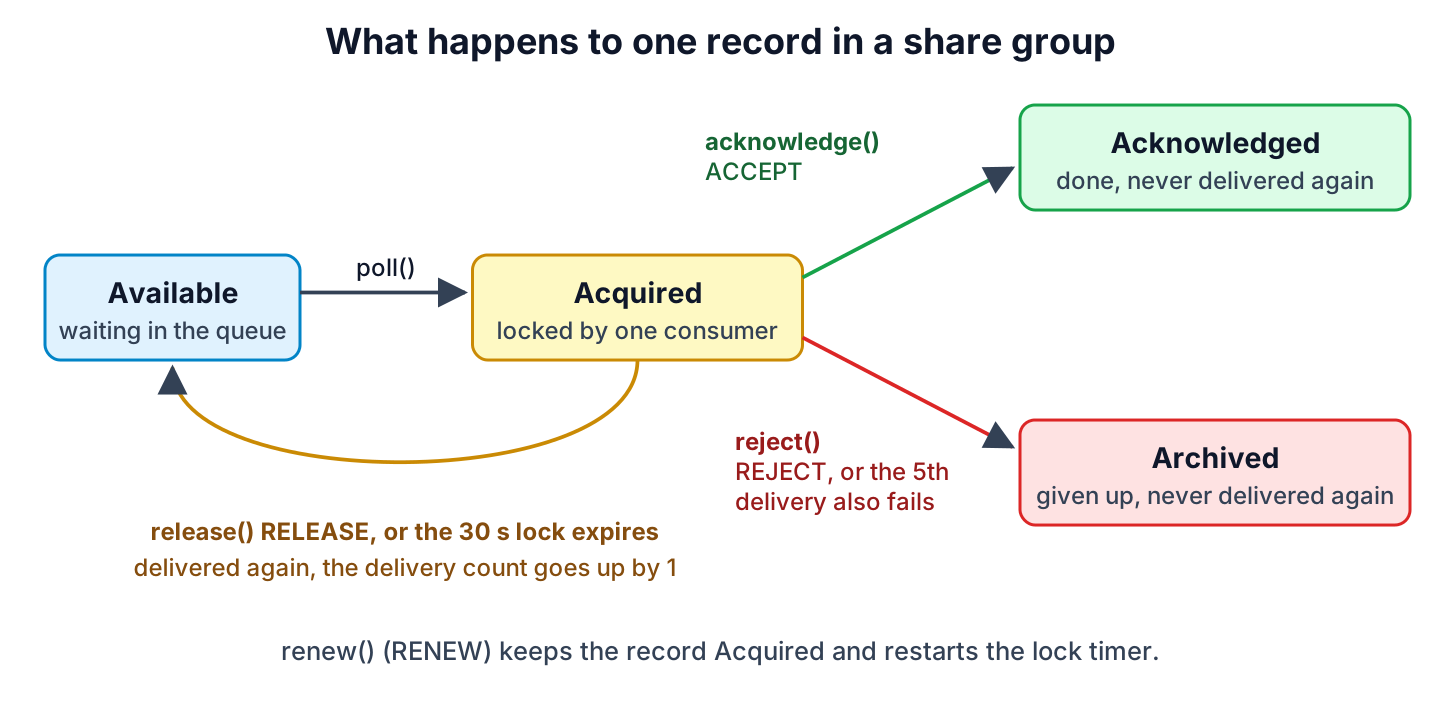
Kafka counts every delivery of a record. After 5 deliveries, set by the group setting share.delivery.count.limit, Kafka archives the record. An archived record stays in the topic, but the share group never delivers it again, so one bad record cannot loop forever. A consumer holds the lock on a record for 30 seconds by default, and if it does not acknowledge the record in that time, Kafka delivers the record again.
In our thumbnail worker, a file that is not a .jpg is rejected. The image service is busy on the first try for big.jpg, so that record is released once.
@KafkaListener(id = "thumbnailWorkers", topics = "thumbnails",
    groupId = "thumbnail-workers", containerFactory = "shareListenerFactory")
public void makeThumbnail(ConsumerRecord<String, String> record, ShareAcknowledgment ack) {
  String photo = record.value();
  int attempt = attempts.merge(photo, 1, Integer::sum);

  if (!photo.endsWith(".jpg")) {
    ack.reject();          // REJECT: "notes.txt" is never delivered again
    return;
  }
  if (photo.startsWith("big") && attempt == 1) {
    ack.release();         // RELEASE: "big.jpg" is delivered again
    return;
  }
  resize(photo);
  ack.acknowledge();       // ACCEPT: the record is done
}
In MANUAL mode, the listener must call a ShareAcknowledgment method for every record, because the consumer does not poll new records until all records of the previous poll are acknowledged.
3.4. Testing Two Consumers on One Partition
The test starts a real Kafka 4.3.1 broker with Testcontainers, and @ServiceConnection points Spring Boot to it, as in Spring Boot, Testcontainers and JUnit 5. The container also gets the two share settings from section 2.
@Container
@ServiceConnection
static KafkaContainer kafka = new KafkaContainer("apache/kafka:4.3.1")
    .withEnv("KAFKA_SHARE_COORDINATOR_STATE_TOPIC_REPLICATION_FACTOR", "1")
    .withEnv("KAFKA_SHARE_COORDINATOR_STATE_TOPIC_MIN_ISR", "1");

@Test
void twoConsumersSplitTheRecordsOfOnePartition() {
  IntStream.rangeClosed(1, 10).forEach(i -> kafkaTemplate.send("thumbnails", "photo-" + i + ".jpg"));
  await().atMost(Duration.ofSeconds(30)).until(() -> worker.doneCount("photo-") == 10);

  Map<String, List<String>> done = worker.doneByConsumer();
  assertThat(done).hasSize(2);   // both consumers made thumbnails
}
Before sending, the test waits until both consumers have joined the group. We can see that both have the same partition, thumbnails-0, and they split the ten photos.
Share group thumbnail-workers state=Stable members=2
  member thumbnailWorkers-0 partitions=[thumbnails-0]
  member thumbnailWorkers-1 partitions=[thumbnails-0]
thumbnailWorkers-C-1 -> [photo-2.jpg, photo-3.jpg, photo-5.jpg, photo-7.jpg, photo-9.jpg]
thumbnailWorkers-C-2 -> [photo-1.jpg, photo-4.jpg, photo-6.jpg, photo-8.jpg, photo-10.jpg]
The second test sends big.jpg and notes.txt. Consumer C-2 released big.jpg, and Kafka delivered it again. In this run, C-2 got it back and accepted it, but any consumer in the group can get a released record. The rejected notes.txt came only once.
thumbnailWorkers-C-2 RELEASE big.jpg (offset 10) image service busy, attempt 1
thumbnailWorkers-C-1 REJECT  notes.txt (offset 11) not an image
thumbnailWorkers-C-2 ACCEPT  big.jpg (offset 10) attempt 2
big.jpg attempts=2, notes.txt attempts=1
4. Kafka Queues With the Plain KafkaShareConsumer
Without Spring, we use KafkaShareConsumer from kafka-clients. We set share.acknowledgement.mode to explicit and call consumer.acknowledge(record, AcknowledgeType.ACCEPT) for each record, or RELEASE or REJECT. The call commitSync() sends the acknowledgements to the broker. Two such consumers on one partition split the records the same way as the Spring listeners.
5. Kafka Queues FAQs
5.1. Is Kafka a Message Queue?
Since Kafka 4.2, yes, for consumers in a share group. The topic still keeps all records for its retention time, so consumer groups can read the same records as a stream.
5.2. Do Share Groups Keep the Order of Records?
No. Two consumers work on records of the same partition at the same time, and a released record comes back after newer ones. Use a consumer group with a record key when the order matters, as shown in the Apache Kafka tutorial.
6. Conclusion
Share groups make Kafka work like a job queue, where all consumers read the same partitions and acknowledge each record on their own. They are production-ready since Kafka 4.2, and a cluster with fewer than 3 brokers needs the two replication settings for __share_group_state.
In Spring Kafka 4.1, we declare the two share factories, and a normal @KafkaListener method with a ShareAcknowledgment parameter handles each record. For ordered event streams and transactions, we keep consumer groups.
7. References
- KIP-932: Queues for Kafka
- Apache Kafka 4.2.0 release announcement
- Apache Kafka upgrade notes (share groups)
- Apache Kafka group configs
- Spring for Apache Kafka, Kafka Queues (Share Consumer)
- KafkaShareConsumer Javadoc
- ShareAcknowledgment Javadoc
Happy Learning !!
