

Every way to convert a primitive array to a List in Java boxes each element into its wrapper type, and the shortest one for an int[] is IntStream.of(array).boxed().toList(), because Arrays.asList() and List.of() do not unwrap a primitive array. Both of those methods return a list with one element, the array itself.
We need a list instead of the primitive array when an API accepts only collections, such as a charting library, a JSON mapper or Collections.max(), and when we need list operations like contains() or indexOf() on numeric data.
The following example turns a week of step counts from a fitness tracker into a list, and shows what goes wrong with Arrays.asList().
int[] steps = {4200, 8100, 6500};
List<Integer> stepList = IntStream.of(steps).boxed().toList();   // [4200, 8100, 6500]
int wrongSize = Arrays.asList(steps).size();                    // 1, the list holds the int[] itself
We can see that the correct list has three elements, and the Arrays.asList() result has one. We explain the generics reason behind that first, and go on to stream and loop conversions for every primitive type, the Guava and Commons Lang shortcuts, and which result list can be modified.
1. What Arrays.asList() Does with an int[]
The method Arrays.asList(T… a) is generic, and a type parameter such as T can only stand for a reference type, never for int. When we pass an Integer[], the compiler sets T to Integer and uses the array as the varargs array. When we pass an int[], the only possible choice is T = int[], so the whole array becomes a single element.
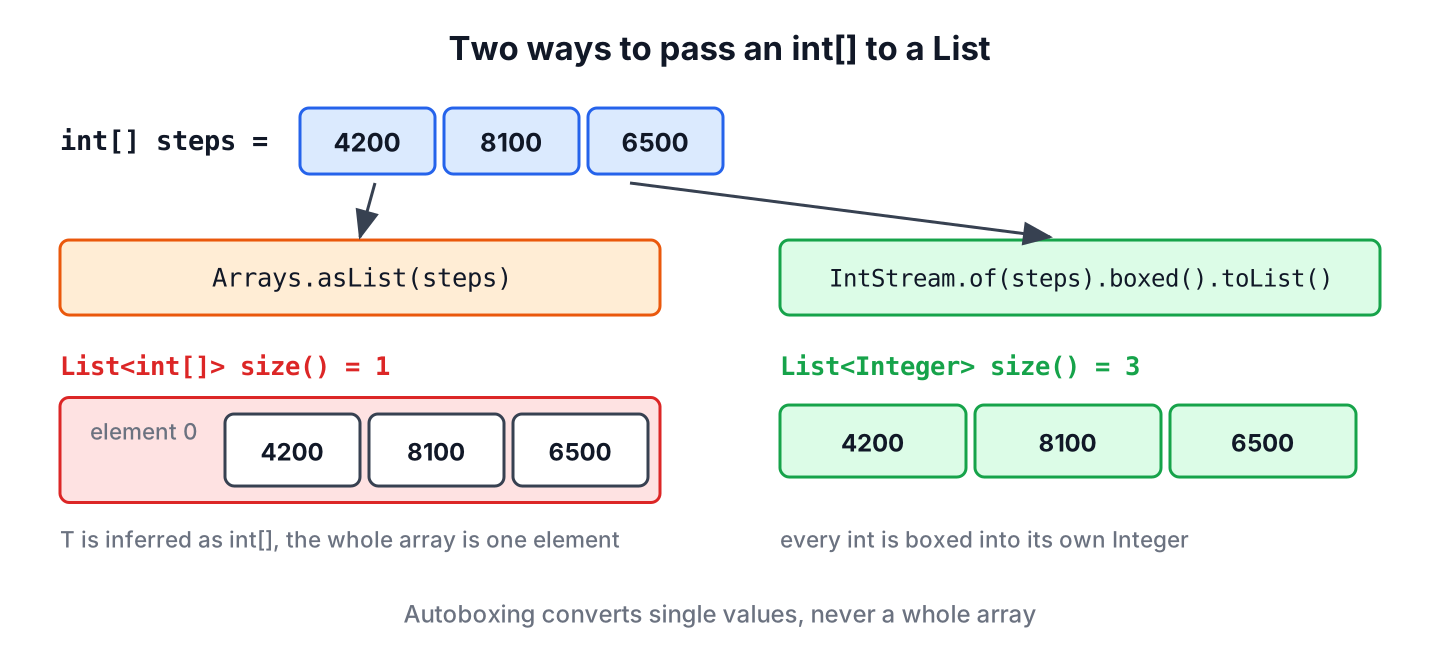
The call itself compiles, so the mistake often goes unnoticed until later. The type error shows up only when we assign the result to a List<Integer>.
// does not compile: incompatible types, inference variable T has incompatible bounds
int[] steps = {4200, 8100, 6500};
List<Integer> stepList = Arrays.asList(steps);
The same rule applies to List.of(steps), which also returns a List<int[]>. Autoboxing converts single values only, so for an array of primitives we have to box every element ourselves.
2. Convert a Primitive Array to List with boxed()
The primitive streams IntStream, LongStream and DoubleStream each have a boxed() method that turns the primitive values into wrapper objects, and Stream.toList() (Java 16) collects them.
int[] steps = {4200, 8100, 6500};
List<Integer> ints = Arrays.stream(steps).boxed().toList();         // [4200, 8100, 6500]
long[] fileSizes = {2048L, 512L};
List<Long> longs = LongStream.of(fileSizes).boxed().toList();      // [2048, 512]
double[] prices = {9.99, 4.5};
List<Double> doubles = DoubleStream.of(prices).boxed().toList();   // [9.99, 4.5]
The list from toList() is unmodifiable, so add(), remove() and set() throw UnsupportedOperationException. When we need to add items later, we collect into an ArrayList with Collectors.toCollection().
int[] steps = {4200, 8100, 6500};
List<Integer> fixed = IntStream.of(steps).boxed().toList();
boolean added = fixed.add(7000);                                   // UnsupportedOperationException
ArrayList<Integer> editable = IntStream.of(steps).boxed().collect(Collectors.toCollection(ArrayList::new));
boolean addedOk = editable.add(7000);                              // true
The older Collectors.toList() returns an ArrayList today, but its Javadoc does not promise a modifiable list, so we use toCollection(ArrayList::new) when the code depends on it. More examples of boxing an IntStream have their own tutorial.
3. A Loop for float, char, boolean, byte and short
There is no FloatStream, CharStream or BooleanStream in Java, so the other five primitive types need a plain loop. Each add() call autoboxes one value, and sizing the ArrayList up front avoids internal resizing.
float[] temps = {21.5f, 23.0f};
List<Float> tempList = new ArrayList<>(temps.length);
for (float t : temps) {
    tempList.add(t);
}
String shown = tempList.toString();   // "[21.5, 23.0]"
boolean[] seats = {true, false, true};
List<Boolean> seatList = new ArrayList<>(seats.length);
for (boolean taken : seats) {
seatList.add(taken);
}
int seatCount = seatList.size(); // 3A char[] has one more option, because String.chars() returns the characters as an IntStream. We cast each value back to char before boxing it as a Character.
char[] grades = {'A', 'C', 'B'};
List<Character> gradeList = new String(grades).chars().mapToObj(c -> (char) c).toList();   // [A, C, B]
4. Guava Ints.asList() as a View of the Array
Guava’s Ints.asList() returns a fixed-size list that is backed by the original array, without copying it. The classes Longs, Doubles, Floats, Chars, Booleans, Shorts and Bytes have the same method for the other types.
<dependency>
    <groupId>com.google.guava</groupId>
    <artifactId>guava</artifactId>
    <version>33.7.2-jre</version>
</dependency>
Because the list is a view, set() writes through to the array and changes to the array show up in the list. Adding or removing elements is not possible.
int[] steps = {4200, 8100, 6500};
List<Integer> view = Ints.asList(steps);
Integer old = view.set(0, 5000);       // 4200
int first = steps[0];                  // 5000, the array changed too
boolean added = view.add(7000);        // UnsupportedOperationException
A view is useful for large arrays that we only read through the List interface, because it creates no copy. Each get() still boxes one value, so heavy reading in a loop is slower than working with the int[].
5. ArrayUtils.toObject() from Commons Lang
Apache Commons Lang’s ArrayUtils.toObject() converts a primitive array to its wrapper array, for all eight types. We pass the result to Arrays.asList() or List.of(), which work fine with an Integer[].
<dependency>
    <groupId>org.apache.commons</groupId>
    <artifactId>commons-lang3</artifactId>
    <version>3.21.0</version>
</dependency>
float[] temps = {21.5f, 23.0f};
List<Float> tempList = Arrays.asList(ArrayUtils.toObject(temps)); // [21.5, 23.0]
boolean[] seats = {true, false};
List<Boolean> seatList = List.of(ArrayUtils.toObject(seats)); // [true, false]Here Arrays.asList() returns a fixed-size list backed by the new wrapper array, not by the original primitive array. The full set of options for that intermediate step is in the article on converting int[] to Integer[].
6. Showing Step Counts in a Chart
A fitness app reads the step counts of the last seven days from a sensor API as an int[]. The chart component takes a List<Integer> for the bars, and the app also shows the best day.
int[] week = {4200, 8100, 6500, 9900, 3000, 7200, 5600};
List<Integer> bars = IntStream.of(week).boxed().toList();   // [4200, 8100, 6500, 9900, 3000, 7200, 5600]
int best = Collections.max(bars);                          // 9900
int bestDay = bars.indexOf(best);                          // 3
The list is read-only, which suits a chart. If the user can later add a manual entry for today, we build the list with toCollection(ArrayList::new) instead. For the maximum alone, IntStream.of(week).max() works without boxing, as the article on finding the max and min in an array shows.
7. Read-Only, Modifiable or Backed by the Array
The methods differ in three ways, namely which primitive types they accept, whether the list can change, and whether it shares data with the array.
| Method | Types | List can change | Backed by the array |
|---|---|---|---|
| boxed().toList() | int, long, double | No, unmodifiable | No |
| boxed().collect(toCollection(ArrayList::new)) | int, long, double | Yes | No |
| Loop into ArrayList | All eight | Yes | No |
| Guava Ints.asList() | All eight (one class per type) | set() only | Yes |
| Arrays.asList(ArrayUtils.toObject(a)) | All eight | set() only | No, backed by a wrapper copy |
For most code, boxed().toList() is the shortest choice without a dependency. For the opposite direction, from a list to an array, see converting between a List and an array.
8. Primitive Array to List FAQs
Generics, mutability and the reverse conversion cause most follow-up problems.
8.1. Why does Arrays.asList() not work with int[]?
Because generics work only with reference types. For an int[] argument, the compiler infers T as int[], so the result is a List<int[]> with one element. An Integer[] works as expected.
8.2. How do we convert an int[] to an ArrayList<Integer>?
We collect the boxed stream into a new ArrayList.
int[] steps = {4200, 8100, 6500};
ArrayList<Integer> list = IntStream.of(steps).boxed().collect(Collectors.toCollection(ArrayList::new));   // [4200, 8100, 6500]
8.3. Is the list from toList() modifiable?
No. Stream.toList() returns an unmodifiable list, so any change throws UnsupportedOperationException. The list allows null elements, unlike List.of(), although a boxed primitive stream never contains null.
8.4. How do we convert a List<Integer> back to an int[]?
We unbox with list.stream().mapToInt(Integer::intValue).toArray(). A null element in the list throws NullPointerException, so we filter or replace it first.
8.5. Does the list change when we change the original array?
Only with a view such as Guava’s Ints.asList(). The stream, loop and ArrayUtils versions copy the values, so later changes to the array do not affect the list.
9. Conclusion
Primitive arrays do not convert to lists with Arrays.asList() or List.of(), because generics need reference types and the whole array becomes one element. We box the elements instead.
For int, long and double, boxed().toList() gives a read-only list in one line, and toCollection(ArrayList::new) gives a modifiable one. The other five types need a loop, Guava’s asList() views or ArrayUtils.toObject().
10. References
- Arrays.asList() (Java SE 25 API)
- Stream.toList() (Java SE 25 API)
- java.util.stream package (Java SE 25 API)
- Ints.asList() (Guava API)
- ArrayUtils (Apache Commons Lang API)
Happy Learning !!
