
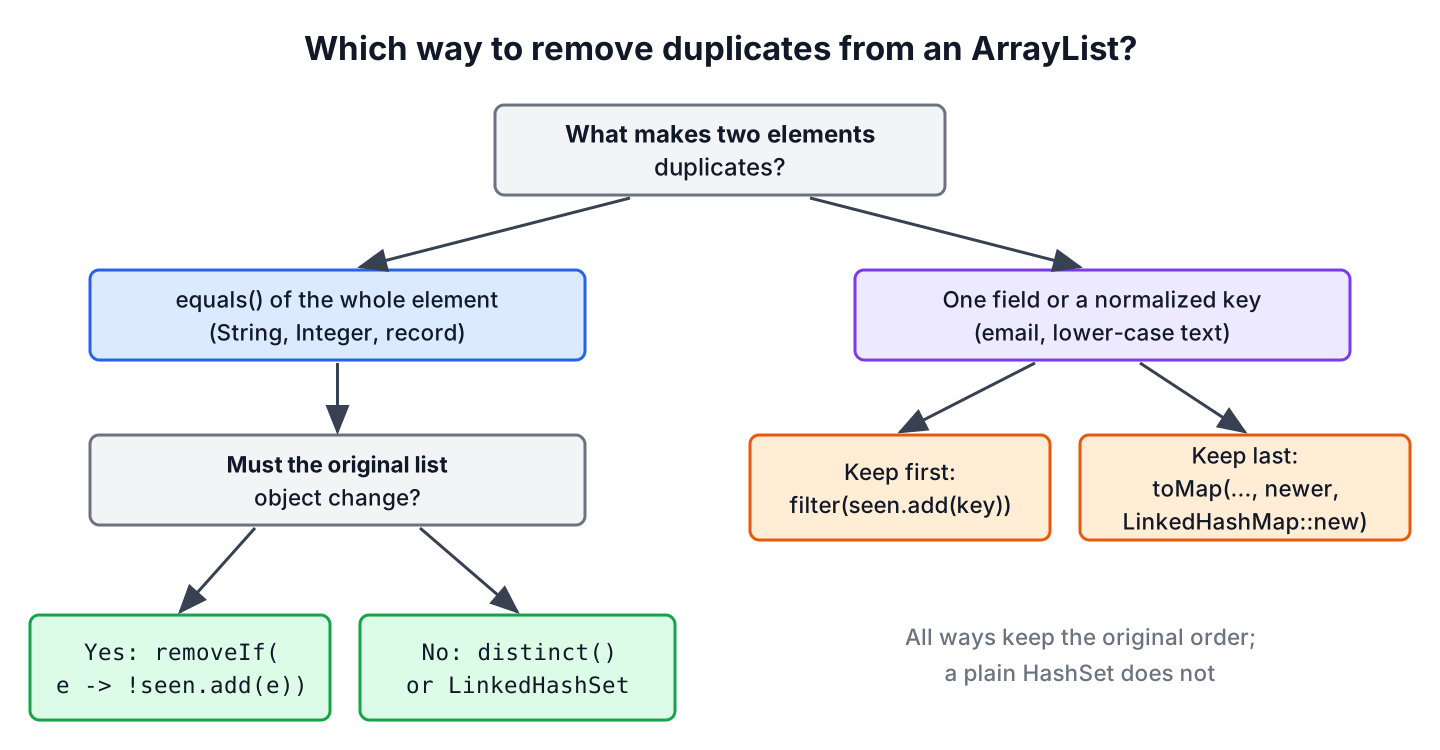
We remove duplicates from ArrayList objects in Java with one line, either by creating a new list with list.stream().distinct().toList() or by removing them in place with list.removeIf(e -> !seen.add(e)), where seen is a HashSet. Both ways keep the first occurrence of each element and the original order.
Duplicates show up whenever data comes from several sources, for example tags typed by users, rows imported from two CSV files or IDs collected from several API pages. A LinkedHashSet gives the same result as distinct(), and for objects we can also remove duplicates by one field, such as an email address.
The following example removes the duplicate tags from a list in three ways.
List<String> tags = new ArrayList<>(List.of("java", "spring", "java", "sql", "spring"));
List<String> unique = tags.stream().distinct().toList();               // [java, spring, sql]
List<String> viaSet = new ArrayList<>(new LinkedHashSet<>(tags));      // [java, spring, sql]
Set<String> seen = new HashSet<>();
tags.removeIf(tag -> !seen.add(tag));                                  // tags = [java, spring, sql]
Notice that only the last call changes tags itself. We compare the ways side by side, explain why custom objects need equals() and hashCode(), and remove duplicates by a field and without regard to case.
1. Ways to Remove Duplicates from ArrayList
Every fast way to remove duplicates uses a set or a map, because a hash-based set answers “have we seen this element?” in constant time and a TreeSet in logarithmic time. The ways differ in whether they keep the order and whether they change the original ArrayList.
| Way | Keeps original order | Changes the original list | Result |
|---|---|---|---|
| stream().distinct().toList() | Yes | No | New unmodifiable list |
| new ArrayList<>(new LinkedHashSet<>(list)) | Yes | No | New ArrayList |
| removeIf(e -> !seen.add(e)) | Yes | Yes | Same list object |
| new ArrayList<>(new HashSet<>(list)) | No | No | New ArrayList in hash order |
| new ArrayList<>(new TreeSet<>(list)) | No, sorted | No | New sorted ArrayList |
2. Using Stream.distinct() to Get a New List
The method distinct() returns a stream without duplicates, where two elements are duplicates when equals() returns true. For an ordered source such as a List, it keeps the first occurrence of each element, so the result has the same order as the input.
List<Integer> ids = List.of(3, 1, 3, 2, 1);
List<Integer> uniqueIds = ids.stream().distinct().toList();          // [3, 1, 2]
ArrayList<Integer> editable = ids.stream()
        .distinct()
        .collect(Collectors.toCollection(ArrayList::new));
editable.add(9);                                                     // editable = [3, 1, 2, 9]
The method toList() returns an unmodifiable list, so we collect into an ArrayList when the code adds elements afterwards. A stream also lets us chain other steps, such as sorting or filtering, in the same statement. More examples are in the Stream distinct() guide.
3. Using LinkedHashSet to Remove Duplicates and Keep the Order
A Set holds each element once, so copying a list into a set drops the duplicates. The LinkedHashSet also remembers the insertion order, which makes it the set-based equivalent of distinct().
List<String> tags = List.of("spring", "java", "spring", "sql");
List<String> ordered = new ArrayList<>(new LinkedHashSet<>(tags));   // [spring, java, sql]
List<String> sorted = new ArrayList<>(new TreeSet<>(tags));          // [java, spring, sql]
List<String> anyOrder = new ArrayList<>(new HashSet<>(tags));        // java, spring and sql in hash order
A plain HashSet makes no promise about the iteration order, so the result can come out in any order and can change between JDK versions. We use it only when the order does not matter, and a TreeSet when we want the unique elements sorted.
When other code holds a reference to the same list, we refill the list instead of creating a new one.
List<String> shared = new ArrayList<>(List.of("a", "b", "a"));
Set<String> distinctSet = new LinkedHashSet<>(shared);
shared.clear();
shared.addAll(distinctSet);                                          // shared = [a, b]
4. Using removeIf() to Remove Duplicates from the Original List
The method removeIf() removes every element for which a predicate returns true. Our predicate adds each element to a HashSet, and Set.add() returns false when the element is already there, so the predicate removes the second and every later occurrence.
List<Integer> readings = new ArrayList<>(List.of(5, 7, 5, 9, 7, 7));
Set<Integer> seen = new HashSet<>(readings.size());
boolean changed = readings.removeIf(r -> !seen.add(r));              // true
List<Integer> result = readings;                                     // [5, 7, 9]
A shopping cart service shows where this matters. The cart object holds a list of product IDs, and the controller, the price calculator and the session all keep a reference to that list. Creating a new list would leave the other references with the old duplicates, so the service calls removeIf() on the list they share. More on the method is in removing elements from an ArrayList.
The method removeIf() needs a modifiable list. On a list from List.of() it throws UnsupportedOperationException, and on a list from Arrays.asList() it throws as soon as it finds the first duplicate.
5. Duplicate Objects Need equals() and hashCode()
All of these ways compare elements with equals() and hashCode(), so a class that does not override them never has duplicates. The default methods from Object compare object identity, which means two objects with the same field values still count as different.
class Seat {
    final String code;
    Seat(String code) { this.code = code; }
}
record Room(String code) {}List<Seat> seats = List.of(new Seat("A1"), new Seat("A1"));
long distinctSeats = seats.stream().distinct().count(); // 2
List<Room> rooms = List.of(new Room("B2"), new Room("B2"));
long distinctRooms = rooms.stream().distinct().count(); // 1A record generates equals() and hashCode() from all its components, so equal records count as duplicates. For a regular class, we override both methods together, as explained in the hashCode() and equals() contract.
6. Remove Duplicates by a Field
Often two objects are duplicates when only one field matches. A newsletter app imports sign-ups from two forms, and the same email address appears twice with a different spelling of the name. The app must keep one subscriber per email, so distinct() does not help, because the records differ in the name.
record Subscriber(String email, String name) {}To keep the first subscriber per email, we filter with a set of keys we have already seen. The filter has state, so it gives a correct result only on a sequential stream.
List<Subscriber> signups = List.of(
        new Subscriber("ana@mail.com", "Ana"),
        new Subscriber("bo@mail.com", "Bo"),
        new Subscriber("ana@mail.com", "Ana B."));
Set<String> seenEmails = new HashSet<>();
List<Subscriber> firstPerEmail = signups.stream().filter(s -> seenEmails.add(s.email())).toList();
List<String> firstNames = firstPerEmail.stream().map(Subscriber::name).toList();    // [Ana, Bo]
To keep the last subscriber per email instead, we collect into a LinkedHashMap keyed by email and let the merge function pick the newer value. The map keeps the position of the first occurrence of each key.
List<Subscriber> signups = List.of(
        new Subscriber("ana@mail.com", "Ana"),
        new Subscriber("bo@mail.com", "Bo"),
        new Subscriber("ana@mail.com", "Ana B."));
Map<String, Subscriber> byEmail = signups.stream()
        .collect(Collectors.toMap(Subscriber::email, s -> s, (older, newer) -> newer, LinkedHashMap::new));
List<String> latestNames = byEmail.values().stream().map(Subscriber::name).toList();    // [Ana B., Bo]
For keys made of several fields, we use a record as the key, as shown in distinct by multiple fields.
7. Case-Insensitive Duplicates
For strings, “Java” and “java” are different elements, so distinct() keeps both. To treat them as duplicates, we compare a normalized key, or we use a TreeSet with a case-insensitive comparator when a sorted result is fine.
List<String> input = List.of("Java", "spring", "java", "SQL", "Spring");
Set<String> seenKeys = new HashSet<>();
List<String> firstSpelling = input.stream()
        .filter(s -> seenKeys.add(s.toLowerCase(Locale.ROOT)))
        .toList();
String kept = firstSpelling.toString();                              // "[Java, spring, SQL]"
Set<String> ignoreCase = new TreeSet<>(String.CASE_INSENSITIVE_ORDER);
ignoreCase.addAll(input);
String sortedKept = ignoreCase.toString();                           // "[Java, spring, SQL]"
We pass Locale.ROOT to toLowerCase() so the result does not depend on the language settings of the server.
8. Removing Duplicates FAQs
Removing duplicates raises a few follow-up questions about speed and about finding the duplicates themselves.
8.1. How do we remove duplicates from a list without using a Set?
We check contains() before adding each element to a new list. The result is correct and keeps the order, but each contains() call scans the new list, so the work grows with the square of the list size. We keep it for small lists only.
List<String> tags = List.of("java", "sql", "java");
List<String> result = new ArrayList<>();
for (String tag : tags) {
    if (!result.contains(tag)) {
        result.add(tag);
    }
}
String noSet = result.toString();                // "[java, sql]"
8.2. Which way to remove duplicates is the fastest?
The set-based ways, namely distinct(), LinkedHashSet and removeIf() with a HashSet, all do one hash lookup per element, so their cost grows linearly with the list size. The contains() loop grows with the square of the size. Among the linear ways, the readability of the code matters more than the small differences between them.
8.3. How do we find the duplicate elements instead of removing them?
We collect the elements whose Set.add() call returns false, or we count each element with Collectors.groupingBy() and keep the counts above one.
List<String> tags = List.of("java", "sql", "java", "go", "sql");
Set<String> seen = new HashSet<>();
Set<String> dupes = tags.stream().filter(t -> !seen.add(t)).collect(Collectors.toCollection(LinkedHashSet::new));
String found = dupes.toString();                 // "[java, sql]"
8.4. Does distinct() keep the first or the last occurrence?
The first one, for ordered streams such as a stream from a List. To keep the last occurrence, we use Collectors.toMap() with a merge function that returns the newer value, as in section 6.
9. Conclusion
To remove duplicates from an ArrayList, we use stream().distinct().toList() or new ArrayList<>(new LinkedHashSet<>(list)) for a new list, and removeIf() with a HashSet to change the list in place. All three keep the first occurrence and the original order, whereas a plain HashSet loses the order.
Custom classes need equals() and hashCode(), which records generate for us. When only one field defines a duplicate, such as an email address, we filter with a set of seen keys or collect into a LinkedHashMap, and we normalize case with Locale.ROOT before comparing strings.
10. References
Happy Learning !!

Would this approach work, if my arraylist has custom objects like below
[ {1,”Alex”,”India”},{1,”Alex”,”India”},{2,”Peter”,”India”},{3,”Alex”,”India”}]
The above list has one duplicate. How can I filter that out. I have to check all the fields to be same to consider that as duplicate.
That’s true.
in order to you `stream.distinct()` the stream has to be ordered, so for a stream of unordered values, the `distinct()` would not work
No it works!
public static int[] removeDuplicate(int[] ar) {
return Arrays.stream(ar).distinct().toArray();
}
this would have been much simpler.
Thanks Anirban for comment. The post is focused on arraylist so “
numbersList.stream().distinct().collect(Collectors.toList())” makes more sense.How to remove duplicates from ArrayList without using Collection/loop in java 6.