
![A binary min-heap with 1 at the root, 2 and 8 as its children, and 5 and 3 as the children of 2, next to the backing array [1, 2, 8, 5, 3] with indexes 0 to 4. toString() and the iterator read the array in that order, while calling poll() until the queue is empty returns 1, 2, 3, 5, 8.](https://howtodoinjava.com/wp-content/uploads/2026/10/java-priorityqueue-binary-heap-array-order-300x169.png)
A Java priority queue, the class java.util.PriorityQueue, is a Queue that always returns the element with the highest priority first, which by default is the smallest element in natural order. To use a different order, we pass a Comparator to the constructor, for example Comparator.reverseOrder() to get the largest element first.
We use a PriorityQueue when the order of processing depends on a value of each element and not on the arrival time, such as a job scheduler that runs urgent jobs first, or the shortest-path search in a map app.
The following example reads elements from a natural-order queue and from two queues with a Comparator, with the result of each line as a comment.
PriorityQueue<Integer> numbers = new PriorityQueue<>(List.of(5, 1, 8, 3));

Integer head = numbers.peek();             // 1 (smallest first, stays in the queue)
Integer first = numbers.poll();            // 1 (removed)
Integer second = numbers.poll();           // 3

PriorityQueue<Integer> maxHeap = new PriorityQueue<>(Comparator.reverseOrder());
maxHeap.addAll(List.of(5, 1, 8, 3));
Integer largest = maxHeap.poll();          // 8 (largest first)

PriorityQueue<String> byLength = new PriorityQueue<>(Comparator.comparingInt(String::length));
byLength.addAll(List.of("banana", "kiwi", "fig"));
String shortest = byLength.poll();         // "fig" (custom order, shortest first)

Integer nothing = new PriorityQueue<Integer>().poll();   // null (empty queue, no exception)
Notice that peek() only reads the head, whereas poll() reads and removes it, and both return null for an empty queue.
Next, we see how the queue keeps its order inside, which explains why a printed PriorityQueue does not look sorted. After that, we create queues with Comparable and Comparator and keep elements with the same priority in arrival order. The last sections show typical uses, such as finding the top K values, and answer common questions.
1. Introduction
1.1. What is a PriorityQueue
The PriorityQueue class is an unbounded implementation of the Queue interface that returns the queued items based on their priorities. Most other queues, such as ArrayDeque and LinkedList, follow the FIFO (First-In-First-Out) rule and return the items in the order we added them.
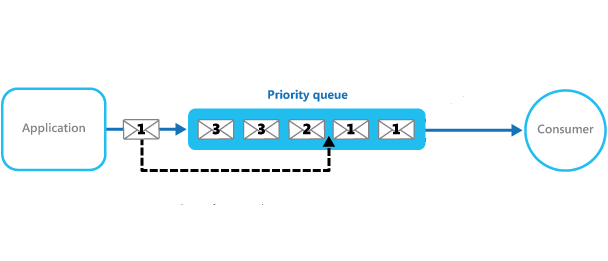
In a PriorityQueue, the added items are retrieved according to their priorities. By default, the priority is determined by the natural ordering of elements, so numbers come out smallest first and strings alphabetically. We can override the default priority with a Comparator provided at queue construction time.
When we print a priority queue, the items are not in priority order. The queue returns them in sorted order only through poll(), one item at a time.
1.2. PriorityQueue Example
In this example, we add three numbers in the order 1, 3, 2 and read them back with peek() and poll().
PriorityQueue<Integer> numbers = new PriorityQueue<>();

// Add elements with the add() or offer() methods
numbers.offer(1);
numbers.add(3);
numbers.add(2);

System.out.println("PriorityQueue: " + numbers);

// Examine the head without removing it from the queue
System.out.println("Item: " + numbers.peek());

// Retrieve the items and remove them from the queue
System.out.println("Item: " + numbers.poll());
System.out.println("Item: " + numbers.poll());
System.out.println("Item: " + numbers.poll());
The program output.
PriorityQueue: [1, 3, 2]
Item: 1
Item: 1
Item: 2
Item: 3
We can see that the printed queue shows [1, 3, 2], but poll() returns 1, 2 and 3 in sorted order.
Every operation exists in two forms. One form returns a special value, and the other form throws an exception when the queue is empty.
| Operation | Returns a value | Throws an exception |
|---|---|---|
| Add an element | offer(e) returns true | add(e) returns true, or throws IllegalStateException in a full queue with a capacity limit |
| Read the head | peek() returns null when empty | element() throws NoSuchElementException when empty |
| Read and remove the head | poll() returns null when empty | remove() throws NoSuchElementException when empty |
For a PriorityQueue, add() and offer() behave the same, because an unbounded queue always accepts the element. Both methods throw a NullPointerException for a null element.
1.3. How a PriorityQueue Orders the Elements
A PriorityQueue stores its elements in an array that forms a binary heap. In a binary heap, every parent element is smaller than or equal to its two children, so the smallest element is always at index 0, the head. The heap does not order the elements on different branches, so the rest of the array is only partly sorted.
When we add 5, 1, 8, 3 and 2, the array holds [1, 2, 8, 5, 3]. The methods toString() and iterator() read the array from left to right, which is why the printed queue is not sorted. The method poll() removes the head and moves the next smallest element to index 0, so a loop of poll() calls returns 1, 2, 3, 5, 8.
![A binary min-heap with 1 at the root, 2 and 8 as its children, and 5 and 3 as the children of 2, next to the backing array [1, 2, 8, 5, 3] with indexes 0 to 4. toString() and the iterator read the array in that order, while calling poll() until the queue is empty returns 1, 2, 3, 5, 8.](https://howtodoinjava.com/wp-content/uploads/2026/10/java-priorityqueue-binary-heap-array-order.png)
PriorityQueue<Integer> queue = new PriorityQueue<>();
queue.offer(5);
queue.add(1);
queue.add(8);
queue.add(3);
queue.add(2);
String printed = queue.toString();         // "[1, 2, 8, 5, 3]"

List<Integer> polled = new ArrayList<>();
while (!queue.isEmpty()) {
  polled.add(queue.poll());
}
// polled = [1, 2, 3, 5, 8]
The heap is also the reason for the speed of each operation. Adding an element or removing the head moves the element up or down one branch of the tree, which takes O(log n) time. Reading the head with peek() takes constant time.
2. Features of a PriorityQueue
The PriorityQueue Javadoc lists a few rules that affect every program using the class.
- PriorityQueue is an unbounded queue, and its internal array grows when we add elements.
- The default initial capacity is 11. We can set another capacity with the initialCapacity parameter of the constructor.
- The queue does not allow null elements, so add(null) throws a NullPointerException.
- By default, the items in the priority queue are ordered in their natural order.
- Without a Comparator, the items must implement Comparable, or add() throws a ClassCastException, even for the first item.
- The retrieval operations poll(), remove(), peek() and element() access the element at the head of the queue.
- The head of the PriorityQueue is the least element based on the natural ordering or the Comparator.
- If several elements have the same priority, the head is one of them, and the Javadoc says that ties are broken arbitrarily. So a PriorityQueue does not keep the insertion order for equal elements, as we fix in section 3.4.
- PriorityQueue is not thread-safe. Use PriorityBlockingQueue when several threads share the queue.
- The Iterator returned by iterator() does not traverse the elements in any particular order, as we saw in section 1.3.
The running time differs a lot between the methods, so contains() and remove(Object) in a loop over a large queue are slow.
| Method | Time |
|---|---|
| offer(), add(), poll(), remove() | O(log n) |
| peek(), element(), size() | O(1) |
| contains(Object), remove(Object) | O(n) |
3. Different Ways to Create a PriorityQueue
The order of the elements is the deciding factor when we create a priority queue. The queue gets the order either from the elements themselves, when they implement Comparable, or from a Comparator that we pass to the constructor.
The PriorityQueue class has seven constructors. We use these four most often.
- PriorityQueue() creates an empty queue with the initial capacity 11 that orders the elements in natural order.
- PriorityQueue(int initialCapacity) sets the initial capacity and uses the natural order.
- PriorityQueue(Comparator comparator) uses the order of the given Comparator. This constructor came in Java 8.
- PriorityQueue(Collection c) creates a queue that holds the elements of the given collection, for example new PriorityQueue<>(List.of(5, 1, 8, 3)).
The other three constructors take an initial capacity together with a Comparator, or copy another PriorityQueue or a SortedSet together with its order.
3.1. PriorityQueue with Comparable for Natural Ordering
For example, a help desk app keeps open support tickets in a queue, and the support team always works on the most urgent ticket first. The record Ticket implements the Comparable interface and compares tickets by the priority field. The method compareTo() compares other with this, so a higher priority number comes first.
record Ticket(int id, String title, int priority) implements Comparable<Ticket> {

  @Override
  public int compareTo(Ticket other) {
    return Integer.compare(other.priority, this.priority);   // higher priority first
  }
}
When we add a few tickets to the priority queue and poll them, we get the tickets in order of priority, not in the order we added them.
PriorityQueue<Ticket> tickets = new PriorityQueue<>();

tickets.add(new Ticket(1, "Login fails", 5));
tickets.add(new Ticket(2, "Typo on page", 1));
tickets.add(new Ticket(3, "Site down", 10));

while (!tickets.isEmpty()) {
  System.out.println(tickets.poll());
}
The program output.
Ticket[id=3, title=Site down, priority=10]
Ticket[id=1, title=Login fails, priority=5]
Ticket[id=2, title=Typo on page, priority=1]
3.2. PriorityQueue with Comparator for Custom Ordering
When we need an order that differs from the natural ordering of the objects, we pass a Comparator to the constructor. The queue uses the Comparator and ignores the compareTo() method of the class.
For example, a report lists the tickets in the order of their id field. The method Comparator.comparingInt() creates the comparator from the field.
Comparator<Ticket> idComparator = Comparator.comparingInt(Ticket::id);We pass the comparator instance to the constructor of PriorityQueue to apply the new order.
PriorityQueue<Ticket> byId = new PriorityQueue<>(idComparator);

byId.add(new Ticket(3, "Site down", 10));
byId.add(new Ticket(1, "Login fails", 5));
byId.add(new Ticket(2, "Typo on page", 1));

while (!byId.isEmpty()) {
  System.out.println(byId.poll());
}
The program output confirms that the tickets come out in the order of their ids, even though we added them in a different order.
Ticket[id=1, title=Login fails, priority=5]
Ticket[id=2, title=Typo on page, priority=1]
Ticket[id=3, title=Site down, priority=10]
3.3. Max-Heap and Multi-Field Order
A PriorityQueue is a min-heap, so the smallest element comes first. To get the largest element first, which is called a max-heap, we pass Comparator.reverseOrder() or call reversed() on another comparator. When two elements have the same main value, thenComparing() adds a second sort key.
PriorityQueue<Integer> maxHeap = new PriorityQueue<>(Comparator.reverseOrder());
maxHeap.addAll(List.of(5, 1, 8, 3));
Integer largest = maxHeap.poll();          // 8

Comparator<Ticket> byPriorityThenTitle = Comparator.comparingInt(Ticket::priority).reversed()
    .thenComparing(Ticket::title);
PriorityQueue<Ticket> sorted = new PriorityQueue<>(byPriorityThenTitle);
sorted.add(new Ticket(4, "Slow search", 5));
sorted.add(new Ticket(1, "Login fails", 5));
sorted.add(new Ticket(3, "Site down", 10));
// poll() order: Site down (10), Login fails (5), Slow search (5)
We avoid comparators such as (a, b) -> b – a for a max-heap. The subtraction overflows for large values of opposite signs and gives a wrong sign, whereas Comparator.reverseOrder() and Integer.compare() never overflow.
3.4. Keeping the Insertion Order for Equal Priorities
A PriorityQueue breaks ties arbitrarily, as we saw in section 2. In a help desk, two tickets with the same priority should still be handled in the order they arrived, so we add a sequence number to each element and use it as the second sort key.
record QueuedTicket(Ticket ticket, long sequence) {}

AtomicLong counter = new AtomicLong();
PriorityQueue<QueuedTicket> fifo = new PriorityQueue<>(
    Comparator.comparingInt((QueuedTicket q) -> q.ticket().priority()).reversed()
        .thenComparingLong(QueuedTicket::sequence));

fifo.add(new QueuedTicket(new Ticket(7, "Export broken", 5), counter.getAndIncrement()));
fifo.add(new QueuedTicket(new Ticket(8, "Import broken", 5), counter.getAndIncrement()));
fifo.add(new QueuedTicket(new Ticket(9, "Print broken", 5), counter.getAndIncrement()));
// poll() order of ids: 7, 8, 9
The lambda in comparingInt() needs the parameter type (QueuedTicket q), because Java cannot infer the type when reversed() follows in the same chain.
4. When to Use a PriorityQueue
A PriorityQueue fits every problem where we repeatedly need the smallest or the largest of a changing set of elements, without sorting the whole set again after each change.
- In task scheduling, a scheduler takes the task with the highest priority or the earliest start time from the queue, and new tasks can arrive at any time.
- To keep the K largest values of a long stream, we keep a min-heap of size K and remove the head whenever the size goes over K.
- Dijkstra’s algorithm finds the shortest path in a graph from one start node. A PriorityQueue returns the next node with the shortest known distance.
- The A* search algorithm is a pathfinding algorithm used in route planning and games. A PriorityQueue returns the node with the lowest estimated total cost from the start to the goal.
For example, a monitoring page shows the three slowest response times of the day. Sorting all values each time a new value arrives is wasteful, so we keep only three values in a min-heap. The head is the smallest of the three, and it is the one we drop when a slower time arrives.
List<Integer> responseTimes = List.of(120, 45, 300, 80, 250, 60, 410);

PriorityQueue<Integer> top = new PriorityQueue<>();
for (int time : responseTimes) {
  top.offer(time);
  if (top.size() > 3) {
    top.poll();                            // drops the smallest of the four
  }
}
List<Integer> slowest = top.stream().sorted(Comparator.reverseOrder()).toList();   // [410, 300, 250]
The heap never holds more than K + 1 elements, so each new value costs O(log K) time, and the memory stays small for millions of values.
5. PriorityQueue FAQs
5.1. Is Java PriorityQueue a Min-Heap or a Max-Heap?
PriorityQueue is a min-heap by default, so poll() returns the smallest element. With new PriorityQueue<>(Comparator.reverseOrder()) it works as a max-heap, as we saw in section 3.3.
5.2. How Do I Iterate Over a PriorityQueue in Priority Order?
We sort a copy of the elements, or poll a copy of the queue. Both ways leave the original queue unchanged, whereas a for-each loop over the queue returns the elements in heap array order.
PriorityQueue<Integer> scores = new PriorityQueue<>(List.of(5, 1, 8, 3, 2));

List<Integer> inOrder = scores.stream().sorted().toList();   // [1, 2, 3, 5, 8]

PriorityQueue<Integer> copy = new PriorityQueue<>(scores);
List<Integer> copyPolled = new ArrayList<>();
while (!copy.isEmpty()) {
  copyPolled.add(copy.poll());                                  // [1, 2, 3, 5, 8]
}
int size = scores.size();                                       // 5 (original unchanged)
For a queue with a Comparator, we pass the same comparator to sorted().
5.3. What Is the Difference Between PriorityQueue and TreeSet?
A TreeSet keeps all elements sorted and iterates in sorted order, but it does not keep duplicates, because it is a Set. A PriorityQueue allows duplicates and keeps only the head in order. So we use a PriorityQueue when we take elements from the head one by one, and a TreeSet when we need sorted iteration or a lookup in O(log n) time.
5.4. Is PriorityQueue Thread-Safe?
No. When several threads add and poll elements, we use PriorityBlockingQueue from java.util.concurrent. The class has the same ordering rules, and its take() method waits until an element is available.
Queue<Integer> shared = new PriorityBlockingQueue<>();
shared.add(5);
shared.add(1);
Integer sharedHead = shared.poll();        // 1
5.5. How Do I Check or Remove an Element That Is Not the Head?
We call contains(Object) or remove(Object). Both methods search the whole array, so they take O(n) time, as the table in section 2 shows.
PriorityQueue<Integer> ids = new PriorityQueue<>(List.of(5, 1, 8));
boolean hasEight = ids.contains(8);                 // true
boolean removed = ids.remove(Integer.valueOf(8));   // true, queue is [1, 5]
6. Conclusion
A PriorityQueue returns its elements by priority instead of arrival order. Without a Comparator, the smallest element in natural order comes first, and the elements must implement Comparable. With a Comparator, such as Comparator.reverseOrder() for a max-heap, we decide the order ourselves.
The queue stores a binary heap, so only the head is in order, and a printed queue looks unsorted. Adding and polling take O(log n) time, while contains() and remove(Object) take O(n).
Equal priorities come out in no fixed order, so we add a sequence number when the arrival order matters. For several threads, we switch to PriorityBlockingQueue.
7. References
- PriorityQueue JavaDoc (Java 25)
- PriorityBlockingQueue JavaDoc (Java 25)
- Comparator JavaDoc (Java 25)
- Queue JavaDoc (Java 25)
Happy Learning !!
