
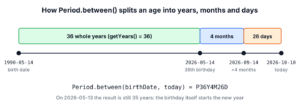
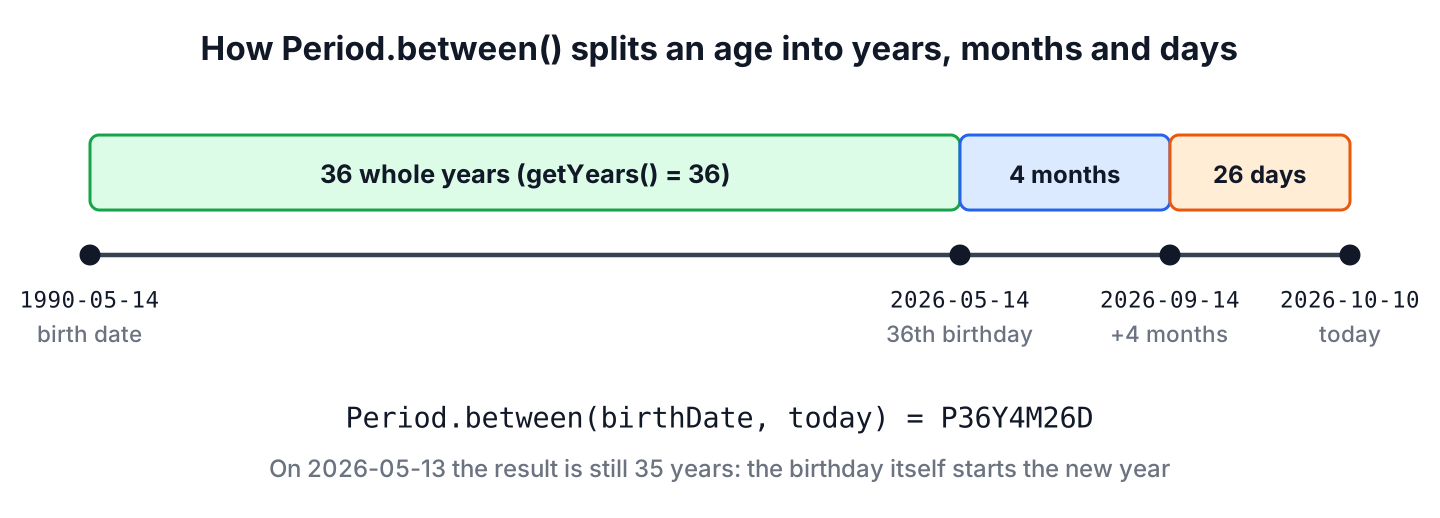
To calculate age from date of birth in Java, we pass the birth date and today’s date to Period.between() and read getYears(), which counts only the birthdays that have already passed. When we need the age as a single number of years, months or days, ChronoUnit.YEARS.between() and its sibling units return it as a long.
We need age calculations for sign-up age checks, insurance and pension rules, patient records, school admissions and any profile page that shows “36 years”. Both methods are in the java.time API since Java 8 and need no library.
The following example calculates the age of a person born on May 14, 1990, on October 10, 2026.
LocalDate birthDate = LocalDate.of(1990, Month.MAY, 14);
LocalDate today = LocalDate.of(2026, Month.OCTOBER, 10);

Period age = Period.between(birthDate, today);              // P36Y4M26D
int years = age.getYears();                                 // 36
int months = age.getMonths();                               // 4
int days = age.getDays();                                   // 26
long ageInYears = ChronoUnit.YEARS.between(birthDate, today); // 36
Notice that both methods agree on 36 years, and only Period also gives the months and days since the last birthday. We look at each method in detail, handle the edge cases (the day before a birthday, February 29, future dates and time zones), parse birth dates from text, convert legacy Date values and build a reusable age check.
1. Calculate Age From Date of Birth With Period.between()
A Period is a date-based amount of time made of years, months and days. The method Period.between(start, end) counts whole years from the start date, adds the whole months since the last anniversary and puts the leftover days last. The start date is included and the end date is excluded, so the result matches the way people state their age.
A clinic app shows the age of a child patient as “4 years, 2 months”, because dosage tables for children use months. The following example formats a Period for display and skips the parts that are zero.
static String describeAge(LocalDate birthDate, LocalDate on) {
    Period age = Period.between(birthDate, on);
    List<String> parts = new ArrayList<>();
    if (age.getYears() > 0) parts.add(age.getYears() + (age.getYears() == 1 ? " year" : " years"));
    if (age.getMonths() > 0) parts.add(age.getMonths() + (age.getMonths() == 1 ? " month" : " months"));
    if (age.getDays() > 0 || parts.isEmpty()) parts.add(age.getDays() + (age.getDays() == 1 ? " day" : " days"));
    return String.join(", ", parts);
}
String adult = describeAge(LocalDate.of(1990, 5, 14), LocalDate.of(2026, 10, 10)); // "36 years, 4 months, 26 days"
String child = describeAge(LocalDate.of(2022, 8, 10), LocalDate.of(2026, 10, 10)); // "4 years, 2 months"
String baby = describeAge(LocalDate.of(2026, 9, 9), LocalDate.of(2026, 10, 10)); // "1 month, 1 day"The toString() of a Period uses the ISO-8601 format, such as P36Y4M26D. That format is fine for logs and JSON, but users need the formatted text above. The article Java Period covers the rest of the class, such as plus(), normalized() and parsing.
2. Total Years, Months or Days With ChronoUnit
The enum ChronoUnit measures the distance between two dates in one unit. The call ChronoUnit.YEARS.between(a, b) returns the number of complete years as a long, which is the same value as Period.between(a, b).getYears(). The other units give totals, so 4 months after the 36th birthday become 436 months, not 4.
LocalDate birthDate = LocalDate.of(1990, 5, 14);
LocalDate today = LocalDate.of(2026, 10, 10);

long totalYears = ChronoUnit.YEARS.between(birthDate, today);    // 36
long totalMonths = ChronoUnit.MONTHS.between(birthDate, today);  // 436
long totalWeeks = ChronoUnit.WEEKS.between(birthDate, today);    // 1899
long totalDays = ChronoUnit.DAYS.between(birthDate, today);      // 13298
long sameDays = birthDate.until(today, ChronoUnit.DAYS);         // 13298
The method LocalDate.until(end, unit) is the same calculation written from the start date. Which one we pick depends on the question the code answers.
| Need | Code | Result for the example |
|---|---|---|
| Age as people say it | Period.between(b, t).getYears() | 36 |
| Age with months and days | Period.between(b, t) | 36 years, 4 months, 26 days |
| Age as one number of years | ChronoUnit.YEARS.between(b, t) | 36 |
| Age in months, weeks or days | ChronoUnit.MONTHS/WEEKS/DAYS.between(b, t) | 436 / 1899 / 13298 |
A baby growth chart is plotted by age in weeks, and a bank counts interest days, so those apps use ChronoUnit totals. For the difference between any two dates beyond age, see difference between two dates.
3. Birthdays, Leap Days and Future Dates
Subtracting the birth year from the current year gives the wrong age for everyone whose birthday is still ahead this year. Both Period and ChronoUnit compare the month and day as well, so the age goes up on the birthday itself and not before.
LocalDate birthDate = LocalDate.of(1990, 5, 14);

int dayBefore = Period.between(birthDate, LocalDate.of(2026, 5, 13)).getYears();  // 35
int onBirthday = Period.between(birthDate, LocalDate.of(2026, 5, 14)).getYears(); // 36
int yearMinus = 2026 - birthDate.getYear();                                       // 36, wrong on May 13
3.1. People Born on February 29
A person born on February 29 has a real birthday only in leap years. In other years, Period.between() counts the next year as complete on March 1, because February 28 is still one day short of the 29th.
LocalDate leapBirth = LocalDate.of(2000, 2, 29);

int onFeb28 = Period.between(leapBirth, LocalDate.of(2025, 2, 28)).getYears();  // 24
int onMar1 = Period.between(leapBirth, LocalDate.of(2025, 3, 1)).getYears();    // 25
LocalDate adjusted = leapBirth.plusYears(25);                                   // 2025-02-28
Legal rules differ by country, and some count the birthday on February 28 in a common year. If a rule needs February 28, we compare the date with leapBirth.plusYears(n), which moves February 29 to February 28 in a common year, instead of using Period.
3.2. Rejecting Birth Dates in the Future
A birth date after today produces a negative Period, such as P-3Y-2M-22D, and a negative age is a bug in every app. Validating the input once in the method that calculates the age keeps the rest of the code simple.
static int ageInYears(LocalDate birthDate, LocalDate today) {
    Objects.requireNonNull(birthDate, "birthDate");
    if (birthDate.isAfter(today)) {
        throw new IllegalArgumentException("Birth date is in the future: " + birthDate);
    }
    return Period.between(birthDate, today).getYears();
}
int valid = ageInYears(LocalDate.of(1990, 5, 14), LocalDate.of(2026, 10, 10)); // 36
int future = ageInYears(LocalDate.of(2030, 1, 1), LocalDate.of(2026, 10, 10)); // IllegalArgumentException4. Getting Today’s Date in the Right Time Zone
The method LocalDate.now() reads the system clock in the JVM default time zone. A server in UTC and a user in Sydney can be on different dates for several hours each day, so a birthday shows up a day early or late. We pass the user’s ZoneId, or inject a Clock so tests can fix the date.
static int currentAge(LocalDate birthDate, Clock clock) {
    return ageInYears(birthDate, LocalDate.now(clock));
}
Instant moment = Instant.parse("2026-05-13T20:00:00Z");
Clock utcClock = Clock.fixed(moment, ZoneOffset.UTC);
Clock sydneyClock = Clock.fixed(moment, ZoneId.of("Australia/Sydney"));
LocalDate utcDate = LocalDate.now(utcClock); // 2026-05-13
LocalDate sydneyDate = LocalDate.now(sydneyClock); // 2026-05-14
int ageInUtc = currentAge(LocalDate.of(1990, 5, 14), utcClock); // 35
int ageInSydney = currentAge(LocalDate.of(1990, 5, 14), sydneyClock); // 36In production, the app passes Clock.system(userZone), and unit tests pass Clock.fixed(). That way, the tests do not start failing on the day a birthday comes around. The default zone of the JVM is set with -Duser.timezone, as shown in setting the JVM time zone.
5. Parsing a Date of Birth From a String
Birth dates arrive as text from forms, CSV files and JSON. The method LocalDate.parse() reads the ISO format yyyy-MM-dd, and a DateTimeFormatter reads any other pattern. Both throw DateTimeParseException for bad input, so the safe version catches it and returns an empty Optional.
static Optional<LocalDate> parseBirthDate(String text) {
    try {
        return Optional.of(LocalDate.parse(text.strip(), DAY_FIRST));
    } catch (DateTimeParseException e) {
        return Optional.empty();
    }
}

static final DateTimeFormatter DAY_FIRST = DateTimeFormatter.ofPattern("dd/MM/uuuu")
        .withResolverStyle(ResolverStyle.STRICT);
LocalDate iso = LocalDate.parse("1990-05-14"); // 1990-05-14
Optional<LocalDate> fromForm = parseBirthDate(" 14/05/1990 "); // Optional[1990-05-14]
Optional<LocalDate> badDay = parseBirthDate("31/02/1990"); // Optional.empty
LocalDate broken = LocalDate.parse("14/05/1990"); // DateTimeParseExceptionThe pattern uses uuuu with ResolverStyle.STRICT, so February 31 is rejected instead of being changed to February 28. The article strict date parsing explains why yyyy fails in strict mode.
6. Converting Legacy Date and Calendar Values
Old code and JDBC drivers still hand us java.util.Date or java.sql.Date. We convert them to LocalDate once and use Period from there, instead of writing Calendar arithmetic. A java.util.Date is an instant, so the conversion needs a time zone, whereas java.sql.Date has a toLocalDate() method.
java.util.Date legacy = java.util.Date.from(Instant.parse("1990-05-14T00:00:00Z"));
LocalDate fromUtilDate = legacy.toInstant().atZone(ZoneOffset.UTC).toLocalDate(); // 1990-05-14
LocalDate fromSqlDate = java.sql.Date.valueOf("1990-05-14").toLocalDate();        // 1990-05-14
A common shortcut divides the milliseconds between two dates by the average length of a year, 365.25 days. The average is wrong on many birthdays, so the result is one year short on the day the person should turn older.
LocalDate born = LocalDate.of(2001, 3, 1);
LocalDate birthday = LocalDate.of(2026, 3, 1);
long millis = Duration.between(born.atStartOfDay(), birthday.atStartOfDay()).toMillis();
int approximate = (int) (millis / (365.25 * 24 * 60 * 60 * 1000));   // 24, wrong
int correct = Period.between(born, birthday).getYears();             // 25
The same bug appears in hand-written Calendar code that compares the year, month and day fields separately, because every branch of the comparison is another chance for an off-by-one error. More conversions are listed in LocalDate to Date.
7. Calculating Age With Joda-Time
Projects that started before Java 8 often use Joda-Time, whose Years.yearsBetween() returns the same whole years. Joda-Time is in maintenance mode, and its own site asks users to move to java.time. The fully qualified names in the snippet keep the Joda LocalDate apart from the JDK class.
org.joda.time.LocalDate jodaBirth = new org.joda.time.LocalDate(1990, 5, 14);
org.joda.time.LocalDate jodaToday = new org.joda.time.LocalDate(2026, 10, 10);
int jodaYears = org.joda.time.Years.yearsBetween(jodaBirth, jodaToday).getYears(); // 36
For new code, the JDK classes from section 1 do the same job without the extra dependency.
8. Checking a Minimum Age at Sign-Up
A ticket booking site sells some events only to users who are at least 18 on the day of the event, not on the day of purchase. The check compares two dates, so it needs no age number at all. A user is old enough when the birth date is on or before the event date minus 18 years.
static boolean isOldEnough(LocalDate birthDate, LocalDate eventDate, int minimumAge) {
    return !birthDate.isAfter(eventDate.minusYears(minimumAge));
}
LocalDate concert = LocalDate.of(2026, 12, 5);
boolean eighteenOnTheDay = isOldEnough(LocalDate.of(2008, 12, 5), concert, 18); // true
boolean oneDayShort = isOldEnough(LocalDate.of(2008, 12, 6), concert, 18); // false
boolean leapDayBirth = isOldEnough(LocalDate.of(2008, 2, 29), LocalDate.of(2026, 2, 28), 18); // false
boolean leapDayByPlus = !LocalDate.of(2008, 2, 29).plusYears(18).isAfter(LocalDate.of(2026, 2, 28)); // trueNotice the leap-day lines. The call minusYears(18) on February 28, 2026 gives February 28, 2008, which is before a February 29 birth date, so the check says no, the same as Period.between(). A rule that counts February 28 as the birthday adds the years to the birth date instead, because plusYears() moves February 29 to February 28. When the business rule names a specific date, we write a test for that date and pick the variant that matches it.
9. Age Calculation FAQs
Search results for age calculators list these related questions, and each one has a short java.time answer.
9.1. How do we calculate the age at a past or future date?
We pass that date as the second argument instead of today. For example, Period.between(birthDate, LocalDate.of(2030, 1, 1)).getYears() returns the age on January 1, 2030.
9.2. Why is the calculated age one year too high?
The code most likely subtracts years, as in today.getYear() – birthDate.getYear(), which ignores the month and day. The other cause is a server in a different time zone than the user, which we fix with LocalDate.now(zone) as in section 4.
9.3. Does Period.between() handle leap years?
Yes. It counts calendar years and months, not a fixed number of days, so leap years need no special handling. The only special case is a February 29 birthday, which Period treats as reached on March 1 in common years.
9.4. How do we calculate age from a date of birth in SQL instead?
Databases have their own functions, such as TIMESTAMPDIFF(YEAR, birth_date, CURDATE()) in MySQL and AGE(birth_date) in PostgreSQL. Calculating in Java keeps the rule in one place and lets unit tests with a fixed Clock cover it.
9.5. Can we calculate age from a LocalDateTime?
Yes. We call toLocalDate() on both values, because age depends on the date only. Period.between() accepts only LocalDate, and ChronoUnit.YEARS.between() also works with two LocalDateTime values, where the time of day can delay the result by a day.
10. Conclusion
The age of a person is Period.between(birthDate, today).getYears(). Period also gives the months and days since the last birthday, and ChronoUnit gives totals in a single unit, such as 436 months or 13,298 days.
Most bugs in age calculations come from the inputs rather than the formula. We take today’s date from a Clock in the user’s time zone, reject future birth dates, parse text strictly and convert legacy Date values to LocalDate before any math.
11. References
- Period Javadoc (Java 25)
- ChronoUnit Javadoc (Java 25)
- LocalDate Javadoc (Java 25)
- Clock Javadoc (Java 25)
- Joda-Time project page
Happy Learning !!

import java.util.Scanner;
import java.text.SimpleDateFormat;
import java.util.Calendar;
import java.util.Date;
import java.text.ParseException;
public class EmployeeDetails{
public static void main(String str[]) throws Exception{
Scanner sc = new Scanner(System.in);
System.out.print(“Enter name : “);
String name =sc.nextLine();
System.out.print(“Enter password :”);
String pass =sc.nextLine();
System.out.print(“DOB(dd/MM/yyyy) :”);
String dop =sc.nextLine();
try{
SimpleDateFormat sdf = new SimpleDateFormat(“dd/MM/yyyy”);
Date birthDate =sdf.parse(dop);
Age age = calculateAge(birthDate);
System.out.print(“Enter Designation No(0 to 2):”);
int desino =sc.nextInt();
System.out.print(“Enter Sub_Designation No(0 to 2):”);
int sub_desino =sc.nextInt();
System.out.print(“Enter Year of Join :”);
int yoj =sc.nextInt();
int cy =Calendar.getInstance().get(Calendar.YEAR);
String desig[] =new String[3];
desig[0] =”Admin”;
desig[1] =”Manager”;
desig[2] =”HR”;
String sub_desig[] =new String[3];
sub_desig[0] =”Level 1″;
sub_desig[1] =”Level 2″;
sub_desig[2] =”Level 3″;
int yearDif= cy-yoj;
double basic_Pay =(yearDif<4)? 10000:(yearDif3)? 20000:30000;
double Dearness_Allowance =(20*basic_Pay)/100;
double HRA =(7*basic_Pay)/100;
double tax =(basic_Pay*2)/100;
double gross_Pay = Dearness_Allowance+HRA+tax;
double net_Pay =gross_Pay-(HRA+tax);
System.out.println(“\t EmployeeName :”+name);
System.out.println(“\t EmployeePassword :”+pass);
System.out.println(“\t EmployeeDOB :”+dop);
System.out.println(“\t EmployeeAge :”+age);
System.out.println(“\t\tDesignation :”+desig[desino]);
System.out.println(“\t\tSub_Designation :”+sub_desig[sub_desino]);
System.out.println(“\t\tYear of Experiance :”+yearDif);
System.out.println(“\t\tBasic Pay :”+basic_Pay+” $”);
System.out.println(“\t\tGross Salary :”+gross_Pay+” $”);
System.out.println(“\t\tNet Salary :”+net_Pay+” $”);
}catch(ParseException e){
}
}
private static Age calculateAge(Date birthDate){
int years =0;
int months =0;
int days =0;
Calendar birthday =Calendar.getInstance();
birthday.setTimeInMillis(birthDate.getTime());
long currentTime = System.currentTimeMillis();
Calendar now = Calendar.getInstance();
now.setTimeInMillis(currentTime);
years = now.get(Calendar.YEAR) – birthday.get(Calendar.YEAR);
int currMonth = now.get(Calendar.MONTH) + 1;
int birthMonth = birthday.get(Calendar.MONTH) + 1;
months = currMonth – birthMonth;
if (months < 0)
{
years–;
months = 12 – birthMonth + currMonth;
if (now.get(Calendar.DATE) < birthday.get(Calendar.DATE))
months–;
} else if (months == 0 && now.get(Calendar.DATE) birthday.get(Calendar.DATE))
days = now.get(Calendar.DATE) – birthday.get(Calendar.DATE);
else if (now.get(Calendar.DATE) < birthday.get(Calendar.DATE))
{
int today = now.get(Calendar.DAY_OF_MONTH);
now.add(Calendar.MONTH, -1);
days = now.getActualMaximum(Calendar.DAY_OF_MONTH) – birthday.get(Calendar.DAY_OF_MONTH) + today;
}
else
{
days = 0;
if (months == 12)
{
years++;
months = 0;
}
}
//Create new Age object
return new Age(days, months, years);
}
}
class Age
{
private int days;
private int months;
private int years;
private Age()
{
//Prevent default constructor
}
public Age(int days, int months, int years)
{
this.days = days;
this.months = months;
this.years = years;
}
public int getDays()
{
return this.days;
}
public int getMonths()
{
return this.months;
}
public int getYears()
{
return this.years;
}
@Override
public String toString()
{
return years + " Years, " + months + " Months, " + days + " Days";
}
}
nice coding
Hello,
I had the same issue that Gary :(
02/11/2014 – 06/10/2014. Gives me 1 month 27 days, Should be 27 days.
Can you please try again and let me know if you are facing any issue.
Thank for this code Lokesh.It’s save me.
I’m fixed this issue.
if (months < 0) {
years–;
months = 12 – birthMonth + currMonth;
if (now.get(Calendar.DATE) < birthDay.get(Calendar.DATE))
months–;
//} else if (months == 0 && now.get(Calendar.DATE) < birthDay.get(Calendar.DATE)) {
} else if (now.get(Calendar.DATE) < birthDay.get(Calendar.DATE)) {
if (months == 0) {
years–;
months = 11;
} else {
months–;
}
}
Hope it is useful for those who have seen it like me.
import java.util.*;
import javax.swing.*;
public class BirthDate
{
public static void main(String args[])
{
Scanner sn=new Scanner(System.in);
Calendar cal1 = Calendar.getInstance();
Calendar cal2 = Calendar.getInstance();
Calendar today=Calendar.getInstance();
int dd,mm,yy;
dd=today.get(Calendar.DATE);
mm=today.get(Calendar.MONTH)+1;
yy=today.get(Calendar.YEAR);
cal1.set(yy, mm, dd); //set current date
System.out.print(“Enter your date of birth(dd mm year): “);
dd=Integer.parseInt(JOptionPane.showInputDialog(“DD: “));
mm=Integer.parseInt(JOptionPane.showInputDialog(“MM: “));
yy=Integer.parseInt(JOptionPane.showInputDialog(“YY: “));
cal2.set(yy, mm, dd); // set date of birth
int days=daysBetween(cal1.getTime(),cal2.getTime()); //number of days
System.out.println(“Days= “+days);
int year=days/365; // findout year
days=days%365;
int month=days/30; //findout month
days=days%30;
System.out.println(“YOUR age is “+year+” yrea “+month+” month “+days+” days”);
}
public static int daysBetween(Date d1, Date d2)
{
return (int)( (d1.getTime() – d2.getTime()) / (1000 * 60 * 60 * 24));
}
}
It’s proper code
Scanner?
[
// this is the correction of if statement…
if(ybirth dnow)
age–;
}else if(mbirth > mnow){ age–; }
}
]
// date format: yyyy-MM-dd
private int getAge(String birthdate, String today){
String birth[] = birthdate.split(“-“);
String now[] = today.split(“-“);
int age = 0;
int ybirth = Integer.parseInt(birth[0]);
int mbirth = Integer.parseInt(birth[1]);
int dbirth = Integer.parseInt(birth[2]);
int ynow = Integer.parseInt(now[0]);
int mnow = Integer.parseInt(now[1]);
int dnow = Integer.parseInt(now[2]);
if(ybirth dnow)
age–;
}else if(mbirth > mnow){ age–; }
}
return age;
}
if(ybirth dnow)
age–;
}else if(mbirth > mnow){ age–; }
}
It should be:
15/07/2014 – 04/08/2014. Doesnt seem to work. Any ideas? Gives me 1 month 20 days, Should be 20 days.