
The difference between sleep and wait in Java is the lock. Thread.sleep() pauses the current thread for a fixed time and keeps every monitor it holds, whereas Object.wait() releases the monitor of one object and waits until another thread notifies it or the timeout ends.
We use the sleep method when a thread must pause for a known time, for example between two retries of an HTTP call. We use wait() when a thread must stop until another thread changes some shared state, such as an order that becomes ready.
The following example runs both calls inside a synchronized block on the same object. The helper pause(), declared in section 1, keeps the monitor the same way Thread.sleep() does.
Object lock = new Object();
synchronized (lock) {
    lock.wait(100);              // releases lock for 100 ms, then takes it back
}
synchronized (lock) {
    pause(100);                  // keeps lock for the whole 100 ms
}
boolean held = Thread.holdsLock(lock);   // false
Both blocks wait 100 milliseconds, but only the first one lets other threads enter synchronized (lock) during that time. We look at each method, compare them in a table, test the lock behavior with two threads and pick the right tool for modern Java 25 code, which in many cases is neither of the two.
1. Pausing the Current Thread With Thread.sleep()
The sleep method is a static method of Thread that stops the current thread for at least the given time. During the pause, the thread is in the TIMED_WAITING state, and it keeps every lock it already holds. When the time is over, the thread becomes runnable again without any signal from another thread.
Java 25 offers three overloads. The Duration overload, added in Java 19, is the most readable one, so we prefer it in new code.
- Thread.sleep(long millis) pauses for the given milliseconds.
- Thread.sleep(long millis, int nanos) adds nanoseconds, although the real precision depends on the OS timer.
- Thread.sleep(Duration duration) takes a java.time.Duration such as Duration.ofMillis(200).
Because the method is static, it always pauses the thread that calls it. Writing worker.sleep(500) compiles with a warning, but it pauses the current thread and never worker. If another thread interrupts the paused thread, the sleep method throws InterruptedException and clears the interrupt flag, so we restore the flag in the catch block with Thread.currentThread().interrupt().
Our snippets pause with the helper pause(), which parks the current thread through LockSupport. Like Thread.sleep(), it keeps every monitor the thread holds, so the lock behavior in the examples is the same.
static void pause(long ms) {
    LockSupport.parkNanos(TimeUnit.MILLISECONDS.toNanos(ms));
}
The following example starts a cook thread that pauses inside synchronized (menu). A second thread, guest, tries to enter the same block while the cook is paused.
Object menu = new Object();
Thread cook = Thread.ofPlatform().start(() -> {
    synchronized (menu) {
        pause(300);
    }
});
pause(50);
Thread guest = Thread.ofPlatform().start(() -> {
    synchronized (menu) {
        // reads the menu
    }
});
pause(50);
Thread.State cookState = cook.getState();     // TIMED_WAITING
Thread.State guestState = guest.getState();   // BLOCKED
cook.join();
guest.join();
The guest thread is BLOCKED because the paused cook still owns the monitor of menu. Pausing while holding a lock makes every other thread that needs that lock wait for the full pause, so we keep pauses outside synchronized blocks.
A virtual thread behaves differently in one useful way. When a virtual thread calls the sleep method, the JDK unmounts it from its carrier thread, so the carrier can run other virtual threads during the pause. A paused platform thread keeps its OS thread busy for the whole time.
2. Waiting for a Condition With Object.wait()
The wait() method is an instance method of Object, so we call it on the object whose state we wait for. The calling thread must own that object’s monitor, which means it runs inside synchronized on the same object. Otherwise the call throws IllegalMonitorStateException.
When the thread calls wait(), it releases the monitor and goes to the WAITING state, or to TIMED_WAITING for wait(long). It wakes up in one of four cases.
- Another thread calls notify() or notifyAll() on the same object.
- The timeout of wait(long) or wait(long, int) ends.
- Another thread interrupts it, and wait() throws InterruptedException.
- It wakes up for no reason, which is called a spurious wakeup.
The thread must get the monitor back before wait() returns, so after a notification it sits in BLOCKED until the notifying thread leaves its synchronized block. Because of spurious wakeups and other threads that change the state first, we always call wait() inside a while loop that checks the condition.
Say a restaurant app has a guest thread that waits for its order, and a kitchen thread that marks the order as ready. The following Kitchen class keeps the state in the field orderReady, and both methods synchronize on the same Kitchen object.
class Kitchen {
    private boolean orderReady;

    synchronized void markReady() {
        orderReady = true;
        notifyAll();
    }

    synchronized String awaitOrder() throws InterruptedException {
        while (!orderReady) {
            wait();
        }
        return "served";
    }
}
Kitchen kitchen = new Kitchen();
try (ExecutorService pool = Executors.newVirtualThreadPerTaskExecutor()) {
Future<String> order = pool.submit(kitchen::awaitOrder);
pause(50);
kitchen.markReady();
String dish = order.get(1, TimeUnit.SECONDS); // "served"
}The call kitchen.markReady() enters the synchronized method while the guest is still inside awaitOrder(). That works only because wait() released the monitor. If the kitchen marks the order ready before the guest starts waiting, the while loop sees orderReady == true and never calls wait(), so the notification is not lost. The full producer and consumer pattern is in our guide to wait(), notify() and notifyAll().
3. Difference Between sleep and wait in Java
Both methods stop the current thread and both throw InterruptedException, which is why they look alike. They differ in what they do with locks and in what wakes the thread up, and the diagram puts the two cases next to each other.
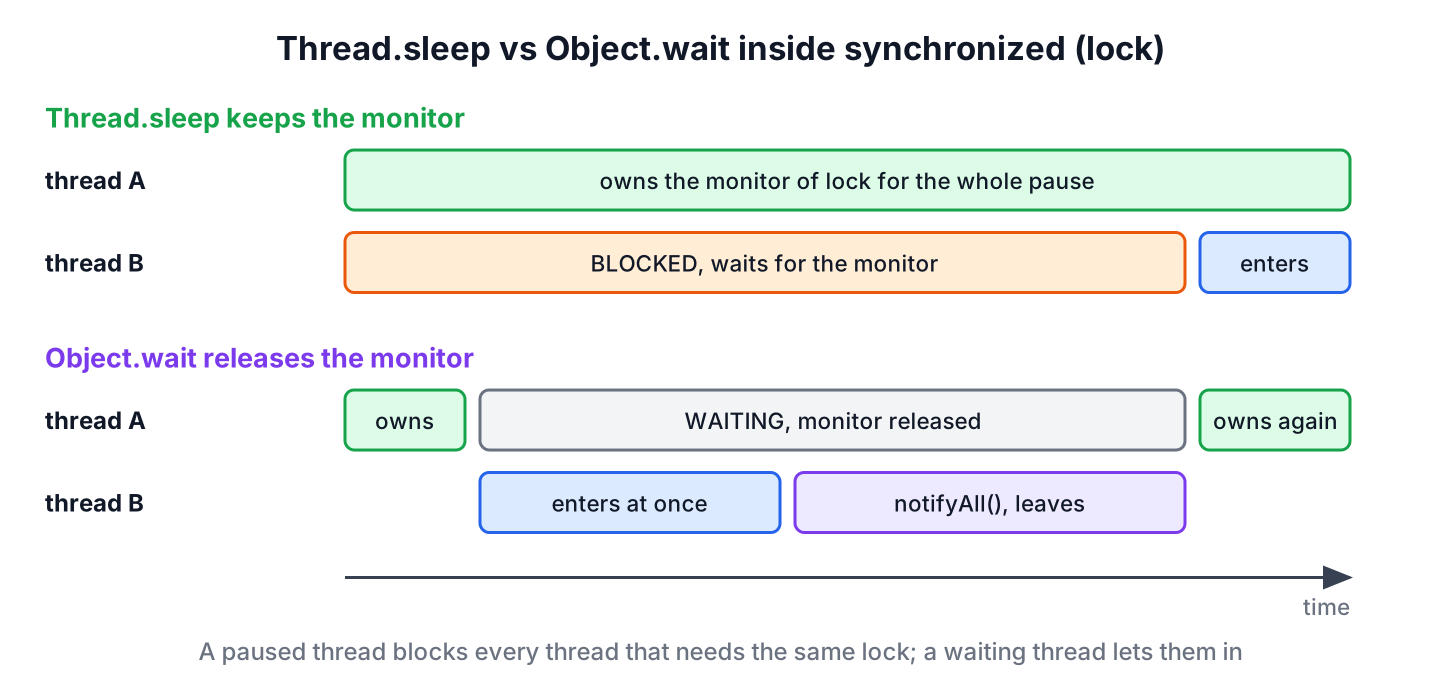
Most rows follow from one fact, namely that wait() works on the monitor of one object, whereas the sleep method only affects the current thread.
| Feature | Thread.sleep() | Object.wait() |
|---|---|---|
| Declared in | Thread, static | Object, final instance method |
| Which thread stops | The current thread | The current thread, on the object it calls |
| Needs the monitor | No, works anywhere | Yes, otherwise IllegalMonitorStateException |
| Locks during the pause | Keeps all monitors and locks | Releases only the monitor of that object |
| Thread state | TIMED_WAITING | WAITING, or TIMED_WAITING with a timeout |
| Wakes up when | The time is over, or on interrupt | notify(), notifyAll(), timeout, interrupt or a spurious wakeup |
| Overloads | long, long, int, Duration (Java 19) | No arguments, long, long, int |
| Called in a loop | No | Yes, always in a while loop on the condition |
| Typical use | A fixed delay, a retry backoff, a test | Waiting until shared state changes |
The key rule is that wait() releases the monitor and the sleep method does not. A thread that waits lets other threads change the state it waits for, whereas a thread that pauses inside synchronized blocks every thread that needs the same lock.
4. Checking Which Method Releases the Lock
Thread states make the lock behavior visible. In the following example, the holder thread calls wait(300) on table, and a second thread enters synchronized (table) while the holder waits.
Object table = new Object();
Thread holder = Thread.ofPlatform().start(() -> {
    synchronized (table) {
        try {
            table.wait(300);
        } catch (InterruptedException e) {
            Thread.currentThread().interrupt();
        }
    }
});
pause(50);
CountDownLatch entered = new CountDownLatch(1);
Thread visitor = Thread.ofPlatform().start(() -> {
    synchronized (table) {
        entered.countDown();
    }
});
boolean visitorGotIn = entered.await(100, TimeUnit.MILLISECONDS);   // true
Thread.State holderState = holder.getState();                       // TIMED_WAITING
holder.join();
visitor.join();
We can see that visitorGotIn is true while the holder is still in TIMED_WAITING. Compared with the cook in section 1, where the guest stayed BLOCKED, the only change is wait(300) in place of a pause.
There is one more detail. The wait() method releases only the monitor of the object it is called on. If the thread also holds the monitor of a second object from an outer synchronized block, it keeps that one, and other threads that need it stay blocked, which is a common cause of a deadlock.
5. Choosing Between sleep, wait and java.util.concurrent
Both methods are low-level tools. In application code written for Java 25, the classes of java.util.concurrent cover most cases with less code and fewer mistakes.
| Need | Old style | Better choice in Java 25 |
|---|---|---|
| Delay between retries | Thread.sleep() in a loop | The sleep method on a virtual thread, or a ScheduledExecutorService |
| Run a task every few seconds | A loop with a pause | scheduleAtFixedRate() |
| Wait until N tasks finish | wait() and a counter | CountDownLatch or ExecutorService.close() |
| Hand items from producer to consumer | wait() and notifyAll() on a list | A BlockingQueue |
| Wait for one async result | wait() on a flag | CompletableFuture.get() or join() |
For example, a payment client retries a failed call three times with a growing delay of 200, 400 and 800 milliseconds. On a virtual thread, the sleep method costs almost nothing, so a plain loop with Thread.sleep() is fine there. On a small pool of platform threads, the same loop occupies a pool thread for every pause, and a scheduled executor frees it.
Old code that uses wait() and notifyAll() also runs well on virtual threads, because since Java 24 (JEP 491) a virtual thread in Object.wait() unmounts from its carrier thread. New code still reads better with the higher-level classes listed in the Java concurrency guide.
6. Sleep vs Wait FAQs
Lock ownership and missed notifications are where the two methods trip people up, both in older thread code and in interviews.
6.1. Does Thread.sleep release the lock?
No. The sleep method keeps every monitor and every Lock the thread holds. Other threads that need one of those locks stay BLOCKED until the pause ends and the thread leaves the synchronized block.
6.2. Can we call wait() without synchronized?
No. The call compiles, but without the monitor of bell it throws IllegalMonitorStateException at runtime. The same rule applies to notify() and notifyAll().
Object bell = new Object();
bell.wait(10);                       // IllegalMonitorStateException
6.3. Why is sleep static but wait is not?
The sleep method always pauses the current thread, so it needs no target object, and a static method makes that clear. The wait() method works with the monitor of a specific object, so it belongs to Object and we call it on that object.
6.4. What happens if notify() is called before wait()?
The notification is lost, because notify() wakes only threads that are already waiting. A later wait() without a condition check waits forever. The while loop on a shared flag, as in section 2, fixes that case because the thread sees the flag and never calls wait().
6.5. Is wait(1000) the same as a one-second sleep?
No. Both stop the thread for up to one second, but wait(1000) releases the monitor and can return earlier on notify() or a spurious wakeup. A one-second sleep keeps the monitor and returns only after the full second or on an interrupt.
6.6. Which is better for polling a value?
Neither. A loop that pauses and checks a value wastes time between checks and adds delay to every change. We use a CountDownLatch, a CompletableFuture or a BlockingQueue, so the waiting thread wakes up at the moment the value is ready.
7. Conclusion
The sleep method pauses the current thread for a fixed time and keeps its locks. The wait() method needs the monitor of an object, releases it while waiting and returns after a notification, a timeout, an interrupt or a spurious wakeup, so it always goes in a while loop.
We use the sleep method for plain delays, preferably outside synchronized blocks, and wait() only for state that other threads change. For new code, BlockingQueue, CountDownLatch, CompletableFuture and scheduled executors replace most hand-written wait and notify logic.
8. References
- Thread Javadoc (Java 25)
- Object.wait Javadoc (Java 25)
- JLS 25, Wait Sets and Notification
- JEP 491, Synchronize Virtual Threads without Pinning
Happy Learning !!

which one hits a performance ? sleep or wait ?
Awesome explanation. Thanks keep up the good work and knowledge sharing.
it’s true
Great tutorial, thanks!
Very informative article. Thanks
Good Article..Really useful
Hi Lokesh,
many thanks for your valuable posts .
The only site I refer for any java queries is this !!!!!!!!!!
Hi Lokesh,
Nice article. Please explain/add yield() and join() method to this article as sometime this 4 api looks similar yet so diffrent.
I added it to my TODO list.
I have found the article very clear and explanatory.
you write in easy way…really you are doing good job ..james gosling invented java and lokesh is making easyjava :)
:-)
Hi.. I have a question!!!
Why wait(), notift(),notifyAll() always works in Synchronized Block?
Puneet, because it was designed in this way only. These methods were introduced as means of making safe interactions between threads. If they were allowed without synchronization, there were occur lots of other problems such as race condition, data corruption and even program crash.
Please note that a program does not get any kind of surety from low level OS thread scheduling, so it depends on language runtime to manage its thread.
Thanks for the answer Lokesh..
I have 1 more question!!!
why wait(), notift(),notifyAll() are the methods of Object class, insteed of Thread Class?
Pardon for being lazy here, just came from office. You can get a good explanation here:
https://stackoverflow.com/questions/17840397/concept-behind-putting-wait-notify-methods-in-object-class
It is so because, Thread 2 will not have the idea of Thread 1 state, where t1 is in wait state or it is notified. That’s why there methods are of Object class. please let me know, if i am wrong.
I will say partly because real problem is to find out which all threads are in application and then which one are waiting on current monitor.
Lokesh, What happens if someone dosent call notify( earlier thread called wait) ?
will this keep the program in hanged state? will it not allow program to exit/terminate?
Tricky question.. In my view, no major impact on application just because one of several hundreds thread is blocked somewhere. Rest of application will run fine. This is very much clear and easy.
No, program will not hang. According to theory, it should not allow to terminate and you might need to do it forcefully.
Good points you are covering here, it will be more helpful if you take up the relatively new topics like concurrent package, annotations, generics, nio etc
Sure, I will take up these topics in near future..