

A Java NIO Path (java.nio.file.Path) is an object that represents the location of a file or directory as a sequence of names, such as /home/lokesh/photos/beach.jpg, and the file does not have to exist. We create one with Path.of() and pass it to the Files methods that read, write, copy and delete files.
We use Path to build file locations without string concatenation, to take a location apart into folder and file name, and to compute where a file goes when we copy a whole folder tree. It replaces most uses of the older java.io.File class.
The following example works with the location of a photo in a photo library app on Java 25 and shows every Path operation this guide covers.
Path photo = Path.of("/home/lokesh/photos/2026/beach.jpg");
Path fileName = photo.getFileName();                        // beach.jpg
Path folder = photo.getParent();                            // /home/lokesh/photos/2026
int names = photo.getNameCount();                           // 5
Path year = photo.getName(3);                               // 2026
Path thumb = folder.resolve("thumbs").resolve(fileName);    // /home/lokesh/photos/2026/thumbs/beach.jpg
Path next = photo.resolveSibling("lake.jpg");               // /home/lokesh/photos/2026/lake.jpg
Path inLibrary = Path.of("/home/lokesh/photos").relativize(photo);   // 2026/beach.jpg
Path clean = Path.of("photos/./2026/../2025/a.jpg").normalize();     // photos/2025/a.jpg
boolean absolute = photo.isAbsolute();                      // true
Notice that none of these calls touches the disk, because they work only on the names. We look at how a Path differs from File, the ways to create one, reading its parts, joining paths, relative, absolute and canonical paths, and conversions.
1. What Is a Java NIO Path?
The Path interface is part of the java.nio.file package. A Path has an optional root, such as / on Linux and macOS or C:\ on Windows, followed by zero or more names separated by the separator of the file system. Each Path belongs to a FileSystem, and Path.of() always uses the default one.
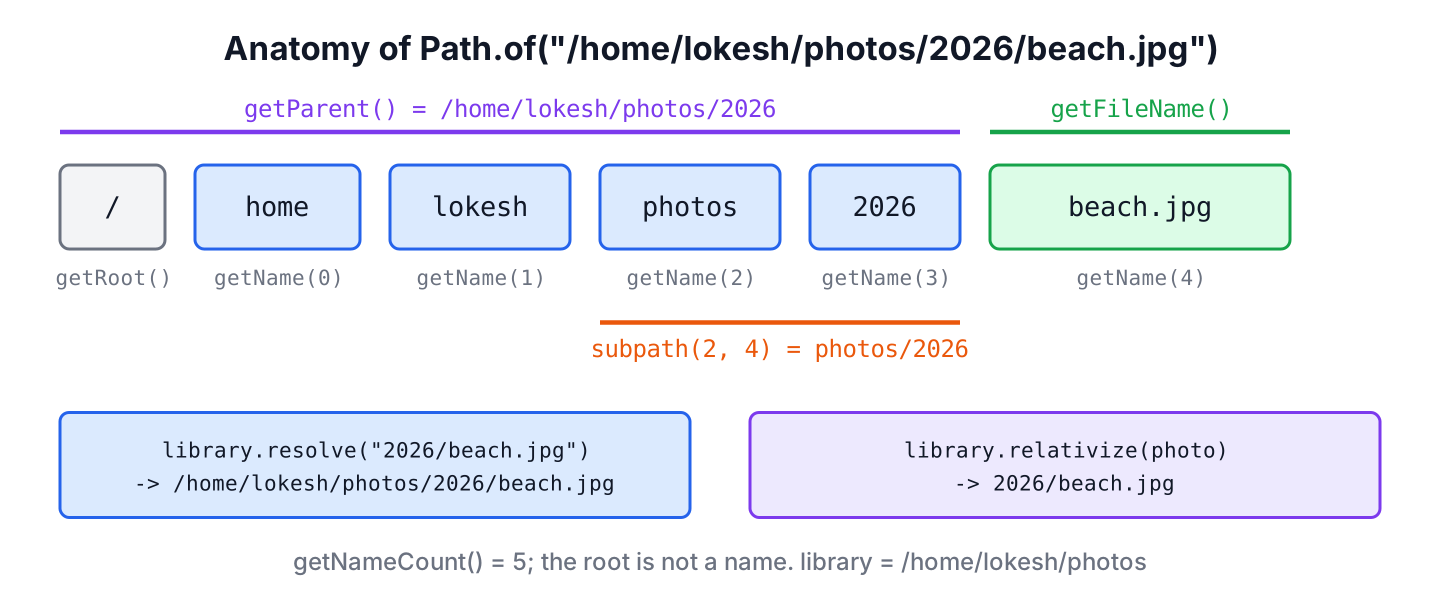
A Path is immutable and safe to share between threads. Operations such as resolve() return a new Path, and only a few methods, such as toRealPath(), read the file system. The table compares Path with the two older types that tutorials still show.
| Type | What it is | Use it for |
|---|---|---|
| java.nio.file.Path | Interface for a location, created with Path.of() (Java 11) | All new code, together with Files |
| java.nio.file.Paths | Utility class with Paths.get(), which returns a Path | Nothing new; Path.of() replaces it |
| java.io.File | Legacy class that holds a path and has file operations such as delete() | APIs that still take a File; convert with toPath() |
The File methods return false when an operation fails, so we never learn why. The Files methods that take a Path throw an IOException subclass, such as NoSuchFileException or AccessDeniedException, which is the main reason to prefer Path. The differences between the two packages are covered in standard IO vs new IO.
2. Creating a Path with Path.of()
The method Path.of(first, more…) joins its arguments with the separator of the platform. An argument that starts with a root makes the path absolute, and anything else gives a relative path, which Java resolves against the current working directory when we use it.
Path absolute = Path.of("/home/lokesh/photos/2026/beach.jpg");    // /home/lokesh/photos/2026/beach.jpg
Path joined = Path.of("/home/lokesh", "photos", "2026", "beach.jpg");   // /home/lokesh/photos/2026/beach.jpg
Path relative = Path.of("photos", "2026", "beach.jpg");             // photos/2026/beach.jpg
Path inHome = Path.of(System.getProperty("user.home"), "photos");   // /home/lokesh/photos
Path fromUri = Path.of(URI.create("file:///home/lokesh/photos/2026/beach.jpg"));   // /home/lokesh/photos/2026/beach.jpg
Path fromFile = new File("photos/beach.jpg").toPath();              // photos/beach.jpg
Path fromFs = FileSystems.getDefault().getPath("photos", "beach.jpg");   // photos/beach.jpg
Passing the names as separate arguments keeps the code portable, because Java inserts / or \ for us. Hard-coded strings such as “C:/photos” work only on Windows, and on Windows a path such as “/photos” is not absolute at all, because it has no drive letter and resolves against the current drive. For a folder that differs per user, we start from user.home or from a setting.
Creating a Path fails only when the text contains characters that the file system does not allow, and the call throws InvalidPathException. On Linux, only the NUL character is invalid.
Path bad = Path.of("photos\u0000beach.jpg"); // InvalidPathException: Nul character not allowed3. Reading the Parts of a Path
A path is a list of names, and index 0 is the name closest to the root. The root itself is not one of the names, so /home/lokesh/photos/2026/beach.jpg has five names. The methods return Path objects, not strings, so the result plugs into further path operations.
Path photo = Path.of("/home/lokesh/photos/2026/beach.jpg");
Path root = photo.getRoot();                // /
Path first = photo.getName(0);              // home
Path middle = photo.subpath(2, 4);          // photos/2026
Path relativeParent = Path.of("beach.jpg").getParent();   // null
String ext = fileExtension(photo);          // "jpg"
A relative path with one name has no parent, so getParent() returns null, and the same is true for getRoot() on any relative path. Java 25 has no method for the file extension, so we take it from the file name.
static String fileExtension(Path path) {
    String name = path.getFileName().toString();
    int dot = name.lastIndexOf('.');
    return dot > 0 ? name.substring(dot + 1) : "";
}
The methods startsWith() and endsWith() compare whole names, not characters. A path in /home/lokesh does not start with /home/lok, although its string does, which makes the Path versions the right test for “is this file inside that folder”.
Path photo = Path.of("/home/lokesh/photos/2026/beach.jpg");
boolean inPhotos = photo.startsWith("/home/lokesh/photos");    // true
boolean partialName = photo.startsWith("/home/lok");           // false
boolean textMatch = photo.toString().startsWith("/home/lok");  // true
boolean isJpeg = photo.endsWith("beach.jpg");                  // true
boolean suffixText = photo.endsWith("ach.jpg");                // false
4. Joining Paths with resolve() and relativize()
The method resolve(other) appends a relative path to the current one, and resolveSibling(other) appends it to the parent. When other is absolute, resolve() returns other unchanged. The method relativize(other) does the opposite, i.e. it computes the relative path that leads from the current path to other.
Path library = Path.of("/home/lokesh/photos");
Path photo = library.resolve("2026/beach.jpg");                 // /home/lokesh/photos/2026/beach.jpg
Path ignored = library.resolve("/tmp/upload.jpg");              // /tmp/upload.jpg
Path renamed = photo.resolveSibling("beach-edited.jpg");        // /home/lokesh/photos/2026/beach-edited.jpg
Path down = library.relativize(photo);                          // 2026/beach.jpg
Path up = photo.relativize(library);                            // ../..
Path mixed = library.relativize(Path.of("2026"));               // IllegalArgumentException: 'other' is different type of Path
A photo backup tool shows why the pair matters. It walks the library folder and copies each file into a backup drive while keeping the folder structure. For every file, relativize() gives the part below the library folder, and resolve() places that part under the backup folder.
Path source = Path.of("/home/lokesh/photos");
Path backup = Path.of("/mnt/backup/photos");
Path file = Path.of("/home/lokesh/photos/2026/beach.jpg");
Path target = backup.resolve(source.relativize(file));      // /mnt/backup/photos/2026/beach.jpg
The same two lines are the core of copying a directory with Files.walk(). The method relativize() throws IllegalArgumentException when one path is absolute and the other relative, so both sides must be of the same kind.
5. Relative, Absolute and Canonical Paths
A path can spell out the location in three degrees of detail.
- A relative path, such as photos/2026/beach.jpg, has no root and means nothing until Java resolves it against the working directory.
- An absolute path, such as /home/lokesh/photos/../photos/beach.jpg, starts at the root and finds the file on its own, but it can still contain ., .. and symbolic links.
- A canonical (real) path is the absolute path with . and .. removed and every symbolic link replaced by its target, so each file has only one canonical path.
Both File and Path can produce all three forms. The Path methods are more precise, because they split text-only cleanup from the file system lookup.
| What we want | java.io.File | java.nio.file.Path | Reads the disk |
|---|---|---|---|
| The path as given | getPath() | toString() | No |
| Absolute path | getAbsolutePath() | toAbsolutePath() | No |
| Remove . and .. as text | Not available | normalize() | No |
| Canonical path | getCanonicalPath() | toRealPath() | Yes |
| Missing file | Returns a path anyway | toRealPath() throws NoSuchFileException | Yes |
The difference between normalize() and toRealPath() shows up with symbolic links. In the following example, current is a link to archive/2026. The text cleanup removes current/.. and ends at the base folder, whereas the real path follows the link first and ends in archive.
Path base = Files.createTempDirectory("photos").toRealPath();
Path year = Files.createDirectories(base.resolve("archive/2026"));
Path current = Files.createSymbolicLink(base.resolve("current"), year);

Path viaLink = current.resolve("..");                            // <base>/current/..
boolean textToBase = viaLink.normalize().equals(base);           // true
Path real = base.relativize(viaLink.toRealPath());               // archive
Path canonical = base.relativize(Path.of(viaLink.toFile().getCanonicalPath()));   // archive
Path absolute = Path.of("photos/../beach.jpg").toAbsolutePath();  // /home/lokesh/demo/photos/../beach.jpg
Path missing = Path.of("no-such-folder").toRealPath();           // NoSuchFileException: no-such-folder
So we use normalize() to clean up paths that come from configuration or user input, and toRealPath() when we must know the actual file, for example before checking that an upload stays inside its folder. To compare two paths that may point to the same file in different ways, we call Files.isSameFile(), because equals() compares only the text.
6. Converting Between Path, File, URI and String
Code that mixes old and new APIs needs a few conversions. All of them are single calls, and none of them reads the disk.
Path photo = Path.of("/home/lokesh/photos/2026/beach.jpg");
File legacy = photo.toFile();                     // /home/lokesh/photos/2026/beach.jpg
Path back = legacy.toPath();                      // /home/lokesh/photos/2026/beach.jpg
URI uri = photo.toUri();                          // file:///home/lokesh/photos/2026/beach.jpg
String text = photo.toString();                   // "/home/lokesh/photos/2026/beach.jpg"
Path fromText = Path.of(text);                    // /home/lokesh/photos/2026/beach.jpg
The method toUri() adds a trailing slash for an existing directory and encodes spaces as %20, so we convert with Path.of(uri) and never cut strings out of a URL.
7. Using a Path with the Files Class
A Path only names a location. The Files class does the work, and every method takes a Path, which keeps the code short.
Path library = Files.createTempDirectory("library");
Path album = Files.createDirectories(library.resolve("2026/summer"));
Path notes = Files.writeString(album.resolve("notes.txt"), "Beach day", StandardCharsets.UTF_8);
boolean exists = Files.exists(notes);                         // true
String content = Files.readString(notes);                     // "Beach day"
long size = Files.size(notes);                                // 9
boolean isFolder = Files.isDirectory(album);                  // true
The related tasks have their own guides, such as checking whether a file exists, reading a file to a String, writing to a file, listing files and deleting a directory recursively.
8. Java Path FAQs
Most doubts about the Path API appear the first time old File code meets the newer classes.
8.1. What is the difference between Path.of() and Paths.get()?
There is none in behavior. Since Java 11, Paths.get() calls Path.of(), and the Paths class may be deprecated in a future release. Use Path.of() in new code.
8.2. Does creating a Path check that the file exists?
No. Path.of(), resolve(), normalize() and toAbsolutePath() work on the text only. To check the disk, call Files.exists(), or toRealPath(), which throws NoSuchFileException for a missing file.
8.3. How do we compare two paths?
The method equals() compares the names as text, so photos/a.jpg and photos/../photos/a.jpg are not equal. Normalize both sides first, or call Files.isSameFile() to ask the file system, which also handles links. On Windows, equals() ignores letter case, whereas on Linux it does not.
8.4. How do we get the file name without the extension?
We take getFileName().toString() and cut at the last dot, the same way as fileExtension() in section 3.
Path photo = Path.of("/home/lokesh/photos/2026/beach.jpg");
String name = photo.getFileName().toString();
String baseName = name.substring(0, name.lastIndexOf('.'));   // "beach"
9. Conclusion
A Path is an immutable list of names with an optional root, created with Path.of(), and the file behind it does not have to exist. The methods getFileName(), getParent(), getName() and subpath() take it apart, while resolve(), resolveSibling() and relativize() build new paths, all without touching the disk.
For the three forms of a path, toAbsolutePath() adds the working directory, normalize() removes . and .. as text, and toRealPath() asks the file system for the canonical path and follows links. We pass the result to the Files methods, and the Java IO tutorial lists the guides for each file task.
10. References
- Path Javadoc (Java 25)
- Paths Javadoc (Java 25)
- Files Javadoc (Java 25)
- File.getCanonicalPath() Javadoc (Java 25)
- Path Operations (The Java Tutorials)
Happy Learning !!

Thanks, nice post.
Hi Lokesh,
thanks for the nice samples. However, I am looking desperately for a solution: I have a desktop Swing app, developed under NetBeans 7.3. I have some embedded data sources in my project. Something like myProject=>Source Packages=>data=>datfile1, datafile2 etc. How can I address this “embedded” path? Normally, I write simply “/data” – many interface understand it. Any help pls.? Thanks / Gabor
No idea around netbeans. Probably fellow learners can take this up. Anybody, would like to solve?
You should use absolute path to the files in your project, like “D://Java programs//SomeProject//build//web//resources//img//
@max3d: No! You should not! freaking terrible advice – always use relative paths – especially if you have an app that is deployed on multiple architectures – Mac/ Linux/ BSD
Like why would you even use Java which provides all these lovely mechanism to get around OS compatibility issues and then do something stupid like hard coding paths in your application? newb level sauce right there.