
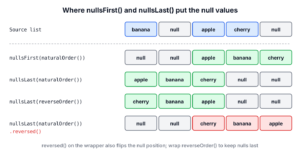
To sort a Java Stream that contains null values, we wrap the comparator in Comparator.nullsFirst() or Comparator.nullsLast(), which puts the null values at the start or at the end and compares the other values with the wrapped comparator. Without the wrapper, the sort throws a NullPointerException as soon as it compares a null.
We need a null-safe sort whenever the data has gaps, such as rows read from a database where a column is empty, or a to-do app where some tasks have no due date. The null can be the element itself or a field of the element, and each case needs the wrapper in a different place.
The following example sorts a list of fruit names with two null elements, and a list of tasks where one due date is null. The comment on each line shows the result.
List<String> fruits = Arrays.asList("banana", null, "apple", "cherry", null);

List<String> plain = fruits.stream().sorted().toList();                                                       // NullPointerException
List<String> nullsFirst = fruits.stream().sorted(Comparator.nullsFirst(Comparator.naturalOrder())).toList();   // [null, null, apple, banana, cherry]
List<String> nullsLast = fruits.stream().sorted(Comparator.nullsLast(Comparator.naturalOrder())).toList();     // [apple, banana, cherry, null, null]
List<String> descending = fruits.stream().sorted(Comparator.nullsLast(Comparator.reverseOrder())).toList();    // [cherry, banana, apple, null, null]

List<Task> tasks = List.of(new Task("rent", LocalDate.of(2026, 11, 1)), new Task("milk", null), new Task("taxes", LocalDate.of(2026, 10, 15)));
List<Task> byDueDate = tasks.stream().sorted(Comparator.comparing(Task::dueDate, Comparator.nullsLast(Comparator.naturalOrder()))).toList();   // [taxes(2026-10-15), rent(2026-11-01), milk(null)]
Notice that the null check goes where the null can appear. For null elements, we wrap the whole comparator, and for null fields, we pass nullsLast() as the second argument of Comparator.comparing(). In the rest of the post, we look at how the two wrappers compare values, sort custom objects with null elements and null fields, avoid the reversed() trap in descending order, and sort a List or an array in place.
1. How nullsFirst() and nullsLast() Compare Values
Both methods are static methods of the Comparator interface, added in Java 8. Each one takes a comparator for the non-null values and returns a new null-friendly comparator that checks for null on every comparison.
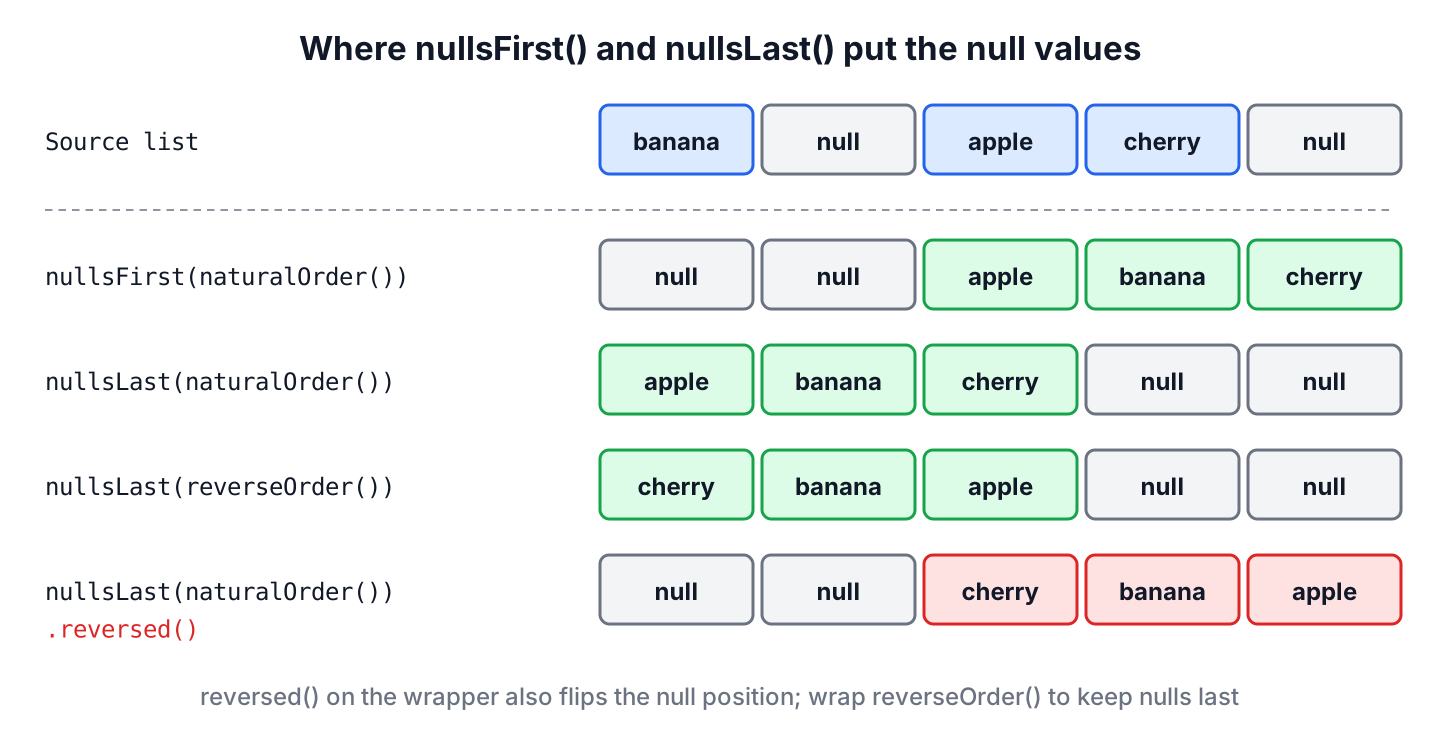
- The comparator Comparator.nullsFirst(comparator) treats null as less than any non-null value, so the null values come first.
- The comparator Comparator.nullsLast(comparator) treats null as greater than any non-null value, so the null values come last.
In both cases, two null values are equal, and two non-null values go to the wrapped comparator. When the wrapped comparator itself is null, all non-null values are equal, which we use in section 5.2. The return values of compare(a, b) for each pair of inputs look like this.
| a | b | nullsFirst(cmp).compare(a, b) | nullsLast(cmp).compare(a, b) |
|---|---|---|---|
| null | null | 0 | 0 |
| null | “apple” | -1 | 1 |
| “apple” | null | 1 | -1 |
| “apple” | “banana” | cmp.compare(“apple”, “banana”) | cmp.compare(“apple”, “banana”) |
Both methods return an instance of the JDK class java.util.Comparators.NullComparator. Its field nullFirst is true for nullsFirst() and false for nullsLast(), and the field real holds the comparator we passed in. The compare() method has three branches.
// does not compile: excerpt from the JDK class Comparators.NullComparator
public int compare(T a, T b) {
    if (a == null) {
        return (b == null) ? 0 : (nullFirst ? -1 : 1);
    } else if (b == null) {
        return nullFirst ? 1 : -1;
    } else {
        return (real == null) ? 0 : real.compare(a, b);
    }
}

public Comparator<T> reversed() {
    return new NullComparator<>(!nullFirst, real == null ? null : real.reversed());
}
The reversed() method flips nullFirst as well, so a reversed nullsLast() comparator puts the null values first. We come back to this in section 3.3.
A plain sorted() without a comparator uses the natural order, which calls compareTo() on the elements. When one of the elements is null, the call fails, and the whole stream pipeline stops with this exception on Java 25.
java.lang.NullPointerException: Cannot invoke "java.lang.Comparable.compareTo(Object)" because "c1" is null2. Sorting a Stream of Custom Objects
For custom objects, a null can appear in two places. Either an element of the list is null, or the element is present but one of its fields is null. The null-friendly comparator goes around the whole comparator in the first case and around the key comparator in the second.
The following example is a to-do app. Each task is a record with a title and an optional due date, and its toString() method prints the title with the due date in parentheses. The app lists the tasks with the nearest due date first, and the helper method sampleTasks() returns five tasks, two of them without a due date.
record Task(String title, LocalDate dueDate) {

    @Override
    public String toString() {
        return title + "(" + dueDate + ")";
    }
}
static List<Task> sampleTasks() {
return List.of(
new Task("rent", LocalDate.of(2026, 11, 1)),
new Task("milk", null),
new Task("taxes", LocalDate.of(2026, 10, 15)),
new Task("gym", null),
new Task("passport", LocalDate.of(2027, 1, 20)));
}2.1. Some Objects in the List Are Null
A null element shows up when a list is filled from a lookup that found nothing, for example a method findTask(id) that returns null for a deleted task. The comparator Comparator.comparing(Task::dueDate) calls dueDate() on each element, so it throws a NullPointerException for a null element.
We wrap the comparator in nullsFirst() or nullsLast(). The wrapper checks the elements for null before comparing() calls dueDate().
Task rent = new Task("rent", LocalDate.of(2026, 11, 1));
Task taxes = new Task("taxes", LocalDate.of(2026, 10, 15));
List<Task> withNullTasks = Arrays.asList(rent, null, taxes, null);

List<Task> sorted = withNullTasks.stream().sorted(Comparator.nullsFirst(Comparator.comparing(Task::dueDate))).toList();   // [null, null, taxes(2026-10-15), rent(2026-11-01)]
2.2. Some Field Values Are Null
In the to-do app, the tasks milk and gym have no due date. The task objects are present, but dueDate() returns null, so comparing(Task::dueDate) calls compareTo() on a null date and throws the exception.
List<Task> tasks = sampleTasks();
List<Task> unsafe = tasks.stream().sorted(Comparator.comparing(Task::dueDate)).toList();   // NullPointerException
We have two ways to handle the null due dates, a hand-written comparator or the key comparator of comparing().
2.2.1. Null Checks in a Custom Comparator
We can write the null checks ourselves in a lambda. The comparator byDueDateManual puts the tasks without a due date at the end and compares the other dates with compareTo().
List<Task> tasks = sampleTasks();
Comparator<Task> byDueDateManual = (t1, t2) -> {
    if (t1.dueDate() == null && t2.dueDate() == null) {
        return 0;
    } else if (t1.dueDate() == null) {
        return 1;
    } else if (t2.dueDate() == null) {
        return -1;
    }
    return t1.dueDate().compareTo(t2.dueDate());
};
List<Task> sorted = tasks.stream().sorted(byDueDateManual).toList();   // [taxes(2026-10-15), rent(2026-11-01), passport(2027-01-20), milk(null), gym(null)]
The tasks milk and gym keep their original order, because Stream.sorted() is stable for ordered streams such as a stream from a List. A stable sort keeps the order of elements that compare as equal.
2.2.2. Using Comparator.comparing() With nullsLast()
The method Comparator.comparing() has a second overload that takes a key comparator. The key comparator compares the extracted due dates, so we pass a null-friendly comparator there. The result is the same as with byDueDateManual, in one line.
List<Task> tasks = sampleTasks();
Comparator<Task> byDueDate = Comparator.comparing(Task::dueDate, Comparator.nullsLast(Comparator.naturalOrder()));
List<Task> sorted = tasks.stream().sorted(byDueDate).toList();   // [taxes(2026-10-15), rent(2026-11-01), passport(2027-01-20), milk(null), gym(null)]
We prefer comparing(key, nullsLast(…)) over a hand-written comparator, because the JDK method has no branch that we can get wrong. A custom comparator still makes sense when the order has rules that the Comparator factory methods cannot express.
2.3. Null Objects and Null Fields Together
When the list can contain null tasks and tasks with a null due date, we need both checks. The inner nullsLast() handles the null due dates, and the outer nullsLast() handles the null tasks.
Task rent = new Task("rent", LocalDate.of(2026, 11, 1));
Task milk = new Task("milk", null);
Task taxes = new Task("taxes", LocalDate.of(2026, 10, 15));
List<Task> both = Arrays.asList(rent, null, milk, taxes, null);
Comparator<Task> byDueDate = Comparator.comparing(Task::dueDate, Comparator.nullsLast(Comparator.naturalOrder()));

List<Task> sorted = both.stream().sorted(Comparator.nullsLast(byDueDate)).toList();   // [taxes(2026-10-15), rent(2026-11-01), milk(null), null, null]
Without the outer wrapper, byDueDate calls dueDate() on a null task and throws a NullPointerException. The same outer wrapper works around the hand-written comparator, as in Comparator.nullsLast(byDueDateManual).
2.4. Sorting by a Second Field
The tasks without a due date compare as equal, so they stay in the order of the source list. To show them in a fixed order, we add a second sort key with thenComparing(). The post on sorting a stream by multiple fields covers longer chains.
List<Task> tasks = sampleTasks();
Comparator<Task> byDueDate = Comparator.comparing(Task::dueDate, Comparator.nullsLast(Comparator.naturalOrder()));
List<Task> sorted = tasks.stream().sorted(byDueDate.thenComparing(Task::title)).toList();   // [taxes(2026-10-15), rent(2026-11-01), passport(2027-01-20), gym(null), milk(null)]
The second key compares only the tasks with an equal due date, so gym comes before milk in the result. If the title can also be null, we write thenComparing(Task::title, Comparator.nullsLast(Comparator.naturalOrder())).
3. Sorting With Nulls in Natural Order
For built-in Java types such as wrapper classes and strings, we sort by their natural order, which comes from their compareTo() method. The only thing we take care of is that a null value does not break the sort with a NullPointerException.
Note that primitive values such as int can never be null, so the problem appears only with wrapper types such as Integer and with other object types.
3.1. Ordering the Nulls Last
We use Comparator.nullsLast(Comparator.naturalOrder()) to put the non-null values first in ascending order and the null values at the end. We create the list with Arrays.asList(), because List.of() does not accept null elements, as section 5.3 shows.
List<Integer> scores = Arrays.asList(70, null, 95, 40, null);
List<Integer> sorted = scores.stream().sorted(Comparator.nullsLast(Comparator.naturalOrder())).toList();   // [40, 70, 95, null, null]
3.2. Ordering the Nulls First
A report of missing exam scores is a typical case for the opposite order, where the students without a score must be at the top. We use Comparator.nullsFirst(Comparator.naturalOrder()) for it.
List<Integer> scores = Arrays.asList(70, null, 95, 40, null);
List<Integer> sorted = scores.stream().sorted(Comparator.nullsFirst(Comparator.naturalOrder())).toList();   // [null, null, 40, 70, 95]
3.3. Descending Order With Nulls Last
For a descending sort, we wrap Comparator.reverseOrder() in nullsLast(). The values come in reverse order, and the null values stay at the end.
List<String> fruits = Arrays.asList("banana", null, "apple", "cherry", null);
List<String> descending = fruits.stream().sorted(Comparator.nullsLast(Comparator.reverseOrder())).toList();   // [cherry, banana, apple, null, null]

List<Task> tasks = sampleTasks();
List<Task> latestFirst = tasks.stream().sorted(Comparator.comparing(Task::dueDate, Comparator.nullsLast(Comparator.reverseOrder()))).toList();   // [passport(2027-01-20), rent(2026-11-01), taxes(2026-10-15), milk(null), gym(null)]
Calling reversed() on the finished comparator gives a different result. As we saw in section 1, reversed() flips the position of the null values too, so they move to the front.
List<String> fruits = Arrays.asList("banana", null, "apple", "cherry", null);
List<String> reversed = fruits.stream().sorted(Comparator.nullsLast(Comparator.<String>naturalOrder()).reversed()).toList();   // [null, null, cherry, banana, apple]

List<Task> tasks = sampleTasks();
Comparator<Task> byDueDate = Comparator.comparing(Task::dueDate, Comparator.nullsLast(Comparator.naturalOrder()));
List<Task> reversedTasks = tasks.stream().sorted(byDueDate.reversed()).toList();   // [milk(null), gym(null), passport(2027-01-20), rent(2026-11-01), taxes(2026-10-15)]
For example, an orders page sorts by delivery date with the newest date first. A developer adds .reversed() to the existing ascending comparator, and the orders without a delivery date jump from the bottom of the page to the top. So we reverse the wrapped comparator, not the null-friendly one.
3.4. Removing the Nulls Before Sorting
When the null values carry no information, we remove them with filter(Objects::nonNull) and sort the rest with the natural order. The result is shorter than the input, so we use it only when the reader of the list does not need to see the gaps.
List<String> fruits = Arrays.asList("banana", null, "apple", "cherry", null);
List<String> withoutNulls = fruits.stream().filter(Objects::nonNull).sorted().toList();   // [apple, banana, cherry]
4. Sorting a List or an Array in Place
The same comparators work outside of streams. The method List.sort() sorts a modifiable list in place, and Arrays.sort() does the same for an object array. Without a comparator, both use the natural order and throw a NullPointerException for a null element, like sorted().
List<String> list = new ArrayList<>(Arrays.asList("banana", null, "apple", "cherry", null));
list.sort(Comparator.nullsLast(Comparator.naturalOrder()));
List<String> sortedList = list;                                         // [apple, banana, cherry, null, null]

String[] array = {"banana", null, "apple"};
Arrays.sort(array, Comparator.nullsFirst(Comparator.naturalOrder()));
String[] sortedArray = array;                                           // [null, apple, banana]
The method Stream.toList() (Java 16) returns an unmodifiable list, so calling sort() on it throws an UnsupportedOperationException. We copy such a list into an ArrayList before sorting it in place. For sets, maps and arrays, the Java sorting guide has the matching methods, and the Stream sorted() examples show more comparators for streams.
5. Stream Sort With Null Values FAQs
Most questions about null-safe sorting come from code that already uses nullsFirst() or nullsLast() and behaves in a surprising way.
5.1. Why Does reversed() Put the Nulls First?
Because reversed() inverts every comparison, including the comparisons with null. The null-friendly comparator returns a new comparator with the opposite null position, as the JDK source in section 1 shows. To sort in descending order with the null values last, we write Comparator.nullsLast(Comparator.reverseOrder()).
5.2. How Do I Move Nulls to the End Without Sorting the Other Values?
We pass null as the wrapped comparator. The comparator Comparator.nullsLast(null) treats all non-null values as equal, and the stable sort keeps them in their original order.
List<String> fruits = Arrays.asList("banana", null, "apple", "cherry", null);
List<String> nullsMoved = fruits.stream().sorted(Comparator.nullsLast(null)).toList();   // [banana, apple, cherry, null, null]
5.3. Can List.of() Hold Null Values?
No. The methods List.of(), Set.of() and Map.of() throw a NullPointerException when an element is null, whereas Stream.toList() accepts null elements. For test data with null values, we use Arrays.asList() or an ArrayList.
List<String> rejected = List.of("banana", null);         // NullPointerException
List<String> accepted = Arrays.asList("banana", null);   // [banana, null]
5.4. How Do I Sort Strings Ignoring Case With Nulls?
We wrap String.CASE_INSENSITIVE_ORDER in nullsLast() or nullsFirst(). The case-insensitive comparator throws a NullPointerException for null values on its own, like the natural order.
List<String> mixedCase = Arrays.asList("banana", null, "Apple", "cherry");
List<String> sorted = mixedCase.stream().sorted(Comparator.nullsLast(String.CASE_INSENSITIVE_ORDER)).toList();   // [Apple, banana, cherry, null]
5.5. Does sorted() Keep the Order of Equal Elements?
Yes, for ordered streams. A stream from a List, an array or Stream.of() is ordered, so sorted() is stable and equal elements, including several null values, keep their source order. For unordered streams, such as a stream from a HashSet, the Javadoc makes no stability guarantee.
6. Conclusion
A sort calls compare() or compareTo() on the elements, so a null element or a null sort key ends in a NullPointerException. The methods Comparator.nullsFirst() and Comparator.nullsLast() wrap a comparator and decide where the null values go.
For null elements, we wrap the whole comparator. For null fields, we pass the null-friendly comparator as the key comparator of Comparator.comparing(), and when both can be null, we use both wrappers.
For a descending order, we wrap Comparator.reverseOrder() and don’t call reversed() on the null-friendly comparator, because reversed() moves the null values to the other end.
7. References
- Comparator Javadoc (Java 25)
- Stream Javadoc (Java 25)
- List Javadoc (Java 25)
- Arrays Javadoc (Java 25)
Happy Learning !!
