
A ThreadPoolExecutor keeps the tasks that wait for a thread in a BlockingQueue, and the type and capacity of that queue decide when the pool adds threads above its core size and when it rejects tasks. We pass the queue to the constructor together with the core size, the maximum size and a rejection policy.
We configure the queue ourselves whenever the Executors factory methods do not fit, for example when a service must not buffer more than a few hundred jobs in memory, or when urgent jobs must run before the others.
The following example creates a pool with two core threads, four threads at most and a queue for two tasks, and keeps six tasks busy until we read the pool state. The helper await() is declared in section 1.
CountDownLatch hold = new CountDownLatch(1);
ThreadPoolExecutor pool = new ThreadPoolExecutor(2, 4, 30, TimeUnit.SECONDS,
        new ArrayBlockingQueue<>(2));
for (int i = 0; i < 6; i++) {
    pool.execute(() -> await(hold));
}
int threads = pool.getPoolSize();               // 4
int queued = pool.getQueue().size();            // 2
hold.countDown();
pool.close();
Notice that the pool grew to four threads only because the queue was full. With an unbounded queue, the same pool would have stayed at two threads. We walk through the rule behind these numbers, compare the four queue types, handle rejected tasks, size the core, the maximum and the queue, and add hooks that run around every task.
1. How ThreadPoolExecutor Uses Its Queue
Every call to execute() or submit() goes through the same queuing decision. The pool prefers a new thread while it is below the core size, prefers the queue once the core threads exist, and adds threads above the core size only when the queue refuses the task.
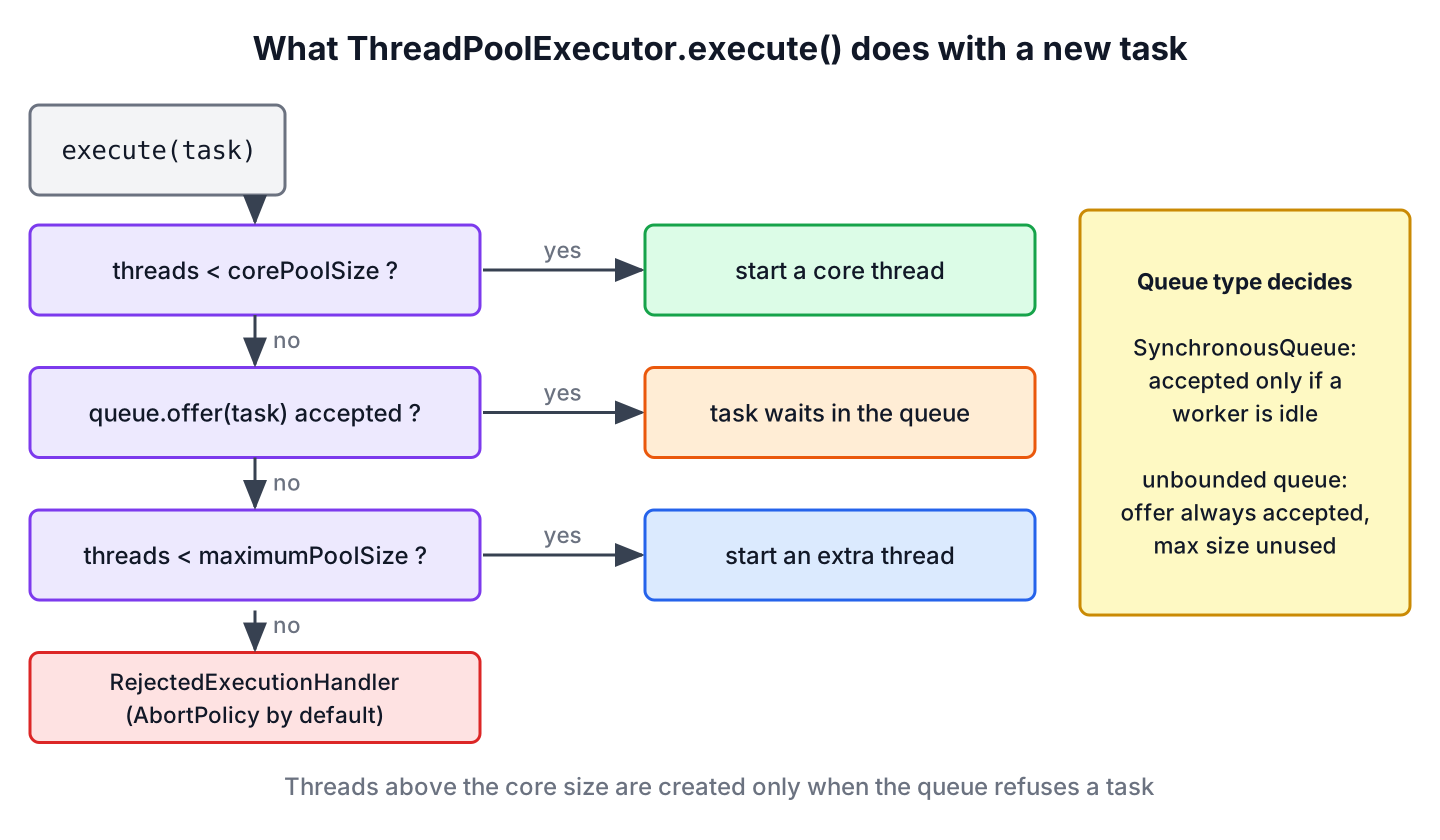
- If fewer than corePoolSize threads are running, the pool starts a new thread for the task, even when other threads are idle.
- If the core threads are running, the pool offers the task to the queue.
- If the queue is full, the pool starts a new thread, as long as the total stays at or below maximumPoolSize.
- If the queue is full and the pool has maximumPoolSize threads, the task goes to the RejectedExecutionHandler.
The intro example follows these rules task by task. The tasks wait on a latch through a small helper that keeps the interrupt flag.
static void await(CountDownLatch latch) {
    try {
        latch.await();
    } catch (InterruptedException e) {
        Thread.currentThread().interrupt();
    }
}| Task | Pool state before | What happens |
|---|---|---|
| 1 and 2 | Fewer than 2 threads | A new core thread for each task |
| 3 and 4 | 2 threads, queue empty | Both go into the queue, which is full after task 4 |
| 5 and 6 | 2 threads, queue full | Two extra threads, the pool reaches 4 |
| 7 (not sent) | 4 threads, queue full | Rejected, RejectedExecutionException by default |
Say a reporting service exports PDF reports for its customers. With two core threads and room for a few queued exports, a normal day never starts an extra thread. At the end of the month, when every customer exports at once, the queue fills and the pool adds threads up to the maximum, and anything beyond that is refused instead of filling the heap.
2. ThreadPoolExecutor Constructor Parameters
The class has four constructors. All of them take the first five parameters, and the longer ones add a thread factory, a rejection handler or both. If we leave them out, the pool uses Executors.defaultThreadFactory() and AbortPolicy.
| Parameter | Meaning |
|---|---|
| int corePoolSize | Threads the pool keeps, even when idle (unless allowCoreThreadTimeOut(true) is set) |
| int maximumPoolSize | Upper limit of threads, reached only when the queue is full |
| long keepAliveTime, TimeUnit unit | How long a thread above the core size may stay idle before it ends |
| BlockingQueue<Runnable> workQueue | Holds tasks that wait for a thread |
| ThreadFactory threadFactory | Optional, creates the threads, for example with readable names |
| RejectedExecutionHandler handler | Optional, decides what happens to a task that does not fit |
The constructor throws IllegalArgumentException when maximumPoolSize is smaller than corePoolSize or not positive, and NullPointerException when the queue is null.
3. Choosing a BlockingQueue
A BlockingQueue is a thread-safe queue whose take() method waits until an element is available. The workers of the pool block on take() or poll(timeout), so idle threads use no CPU. The pool itself calls offer(), which never blocks and returns false when the queue is full, and that false is what makes the pool add threads.
Four queue types cover nearly every need, and each one changes how maximumPoolSize behaves.
| Queue | Capacity | Effect on the pool | Typical use |
|---|---|---|---|
| SynchronousQueue | None, direct handoff | Grows to the maximum at once and rejects after that | Short tasks that must start right away |
| LinkedBlockingQueue (no capacity) | Integer.MAX_VALUE | Never grows past the core size, maximumPoolSize is ignored | Steady load where every task must be kept |
| ArrayBlockingQueue | Fixed | Grows when the queue is full and rejects at the maximum | Production services that must limit memory |
| PriorityBlockingQueue | Unbounded | Never grows past the core size, runs tasks by priority | Urgent jobs before batch jobs |
3.1. Direct Handoff With SynchronousQueue
A SynchronousQueue stores nothing. An offer() succeeds only when a worker is already waiting in take(), so every task either goes to an idle thread or makes the pool start a new one. The cached thread pool uses this queue with an unlimited maximum.
CountDownLatch handoffGate = new CountDownLatch(1);
ThreadPoolExecutor handoff = new ThreadPoolExecutor(1, 3, 30, TimeUnit.SECONDS,
        new SynchronousQueue<>());
for (int i = 0; i < 3; i++) {
    handoff.execute(() -> await(handoffGate));
}
int handoffThreads = handoff.getPoolSize();     // 3
handoff.execute(() -> await(handoffGate));      // RejectedExecutionException
handoffGate.countDown();
handoff.close();
With a bounded maximum, a direct handoff rejects tasks as soon as all threads are busy, so we combine it with a large maximum or a CallerRunsPolicy.
3.2. Unbounded Queue With LinkedBlockingQueue
A LinkedBlockingQueue created without a capacity accepts up to Integer.MAX_VALUE tasks, so the queue is never full in practice. The pool starts its core threads and queues everything else, and the maximum size never comes into play. The fixed thread pool and the single thread executor both use this queue.
CountDownLatch openGate = new CountDownLatch(1);
ThreadPoolExecutor open = new ThreadPoolExecutor(2, 10, 30, TimeUnit.SECONDS,
        new LinkedBlockingQueue<>());
for (int i = 0; i < 6; i++) {
    open.execute(() -> await(openGate));
}
int openThreads = open.getPoolSize();           // 2
int openQueued = open.getQueue().size();        // 4
openGate.countDown();
open.close();
A maximumPoolSize larger than the core size has no effect with an unbounded queue. The 10 in the example is dead configuration, and a burst of tasks waits in memory instead of getting more threads. That is the most common surprise with ThreadPoolExecutor, and it is also why a slow consumer can end in an OutOfMemoryError.
3.3. Bounded Queue With ArrayBlockingQueue
An ArrayBlockingQueue has a fixed capacity that we choose in the constructor. It gives the full behavior from section 1, as the intro example showed. A LinkedBlockingQueue created with a capacity, such as new LinkedBlockingQueue<>(500), behaves the same and allocates its nodes on demand.
The size of the queue and the size of the pool trade against each other. Large queues with small pools keep CPU use and context switching low but can lower throughput, whereas small queues with large pools keep the CPUs busier but add scheduling overhead. For most services, a bounded queue a few times larger than the number of tasks the pool finishes per second is a reasonable start.
3.4. Running Urgent Tasks First With PriorityBlockingQueue
A PriorityBlockingQueue hands out the smallest element first, using the elements’ compareTo() method or a Comparator. With a thread pool, the queued tasks must be comparable, so we write the task as a record that implements both Runnable and Comparable.
record Job(int priority, String name, List<String> log)
        implements Runnable, Comparable<Job> {
    public void run() {
        log.add(name);
    }
    public int compareTo(Job other) {
        return Integer.compare(priority, other.priority);
    }
}
List<String> order = new CopyOnWriteArrayList<>();
CountDownLatch busy = new CountDownLatch(1);
ThreadPoolExecutor ranked = new ThreadPoolExecutor(1, 1, 0, TimeUnit.SECONDS,
new PriorityBlockingQueue<>());
ranked.execute(() -> await(busy));
ranked.execute(new Job(3, "batch", order));
ranked.execute(new Job(1, "urgent", order));
ranked.execute(new Job(2, "normal", order));
busy.countDown();
ranked.close();
String runOrder = order.toString(); // "[urgent, normal, batch]"The first task kept the only thread busy, so the three jobs waited in the queue and ran by priority. The jobs go in through execute(). The submit() method wraps every task in a FutureTask, which is not Comparable, so the first submit() that reaches the queue throws ClassCastException. To get futures back with a priority queue, we override newTaskFor() and return a comparable FutureTask subclass.
4. Handling Rejected Tasks
A task is rejected when the queue is full and the pool runs maximumPoolSize threads, or when the executor has been shut down. The pool passes the task to its RejectedExecutionHandler, and the JDK has four of them.
| Policy | What happens to the rejected task |
|---|---|
| AbortPolicy (default) | execute() throws RejectedExecutionException |
| CallerRunsPolicy | The thread that called execute() runs the task itself |
| DiscardPolicy | The task is dropped without any message |
| DiscardOldestPolicy | The oldest queued task is dropped, and the new task is retried |
The RejectedExecutionHandler article shows each policy and a custom handler. One policy deserves a closer look here, because it is the simplest form of backpressure. With CallerRunsPolicy, a producer that submits too fast has to run a task itself, so it stops submitting until that task is done.
CountDownLatch slow = new CountDownLatch(1);
ThreadPoolExecutor exporter = new ThreadPoolExecutor(1, 1, 0, TimeUnit.SECONDS,
        new ArrayBlockingQueue<>(1), new ThreadPoolExecutor.CallerRunsPolicy());
exporter.execute(() -> await(slow));
exporter.execute(() -> await(slow));
AtomicReference<String> runner = new AtomicReference<>();
exporter.execute(() -> runner.set(Thread.currentThread().getName()));
boolean ranInCaller = runner.get().equals(Thread.currentThread().getName());   // true
slow.countDown();
exporter.close();
The worker thread was busy and the queue was full, so the third task ran in the submitting thread before execute() returned. A producer can also wait for a free slot by acquiring a Semaphore permit before each execute() and releasing it when the task ends. Never add tasks to the queue returned by getQueue(), because that skips the thread creation rules and the rejection handler.
5. Sizing Core Threads, Maximum Threads and the Queue
The three numbers work together, so we choose them as a set and check them under load.
- The core size covers the normal load. For CPU-bound tasks it is about the number of cores, and for I/O-bound tasks it is higher, as the thread pool sizing section explains.
- The queue capacity absorbs short bursts. A queue that is always full shows a core size that is too small, while a queue that never holds tasks shows more core threads than the load needs.
- The maximum size handles longer peaks. It matters only with a bounded queue or a SynchronousQueue.
- The keepAliveTime removes the extra threads after the peak. With allowCoreThreadTimeOut(true), idle core threads end as well, which suits pools that are idle most of the day.
A new pool starts with no threads, and the first tasks pay for creating them. The method prestartAllCoreThreads() starts the core threads ahead of time, which helps a service that must answer its first requests fast.
ThreadPoolExecutor warm = new ThreadPoolExecutor(3, 6, 1, TimeUnit.MINUTES,
        new ArrayBlockingQueue<>(50));
int started = warm.prestartAllCoreThreads();    // 3
warm.allowCoreThreadTimeOut(true);
boolean coreTimeout = warm.allowsCoreThreadTimeOut();   // true
warm.close();
6. Running Code Before and After Each Task
A ThreadPoolExecutor calls the protected methods beforeExecute() and afterExecute() around every task, on the worker thread. We override them to set up logging context, to measure task time or to count failures. The afterExecute() method gets the exception only for tasks sent with execute(). For submit() the exception is stored in the Future, so we read it from there.
static class CountingPool extends ThreadPoolExecutor {
    final AtomicInteger started = new AtomicInteger();
    final AtomicInteger failed = new AtomicInteger();

    CountingPool(int threads) {
        super(threads, threads, 0, TimeUnit.SECONDS, new ArrayBlockingQueue<>(100));
    }

    @Override
    protected void beforeExecute(Thread t, Runnable r) {
        super.beforeExecute(t, r);
        started.incrementAndGet();
    }

    @Override
    protected void afterExecute(Runnable r, Throwable t) {
        super.afterExecute(r, t);
        boolean futureFailed = r instanceof Future<?> f && f.isDone()
                && f.state() == Future.State.FAILED;
        if (t != null || futureFailed) {
            failed.incrementAndGet();
        }
    }
}
CountingPool counting = new CountingPool(2);
counting.submit(() -> 10 / 2);
counting.submit(() -> 10 / 0);
counting.submit(() -> 10 / 5);
counting.close();
int startedTasks = counting.started.get(); // 3
int failedTasks = counting.failed.get(); // 1The Future.state() method used here exists since Java 19 and replaces the older pattern of calling get() inside afterExecute() and catching ExecutionException.
7. ThreadPoolExecutor and BlockingQueue FAQs
Pools that refuse to grow, producers that should wait and cancelled tasks that stay in the queue cause most of the questions about this pair.
7.1. Why does my ThreadPoolExecutor never use more than the core threads?
Because its queue is unbounded. The pool adds threads above the core size only when offer() on the queue returns false, and an unbounded LinkedBlockingQueue or PriorityBlockingQueue always accepts the task. Use a bounded queue, or set the core size to the number of threads we want.
7.2. How do we make execute() block when the queue is full?
The JDK has no built-in policy that blocks the caller. The usual options are CallerRunsPolicy, which slows the producer by running the task in its thread, or a Semaphore with as many permits as threads plus queue slots, acquired before execute() and released when the task ends.
7.3. Which queue does newFixedThreadPool use?
An unbounded LinkedBlockingQueue, so it never rejects tasks while running and never grows past its n threads. The cached thread pool uses a SynchronousQueue, and the scheduled pool uses an internal delay queue.
7.4. Does ThreadPoolExecutor remove a cancelled task from the queue?
No. A Future cancelled with cancel() stays in the queue until a worker takes it and skips it. On large queues, the method purge() removes cancelled tasks earlier, as the task cancellation article shows.
7.5. Can we use a DelayQueue as the work queue?
No. A DelayQueue holds only Delayed elements, and the pool offers plain Runnable tasks. For delayed or periodic tasks we use a ScheduledThreadPoolExecutor, which has its own delay queue built in.
8. Conclusion
A ThreadPoolExecutor fills its core threads first, its queue second and its extra threads up to the maximum last, and it rejects what is left. The queue type decides which of these steps ever happen. A SynchronousQueue skips the queue, an unbounded queue skips the extra threads, and a bounded ArrayBlockingQueue uses all four steps.
For production pools we choose a bounded queue, a rejection policy such as CallerRunsPolicy that slows producers down, and sizes checked under load. Priority queues work with execute() and comparable tasks, and the beforeExecute() and afterExecute() hooks give us logging and metrics for every task. Submitting tasks and reading their results is the topic of the ExecutorService guide, and the Java concurrency overview places this pool next to the other tools.
9. References
- ThreadPoolExecutor Javadoc (Java 25)
- BlockingQueue Javadoc (Java 25)
- RejectedExecutionHandler Javadoc (Java 25)
- PriorityBlockingQueue Javadoc (Java 25)
Happy Learning !!

Hii Lokesh ,
What is differnece between newFixedThreadPool and Blocking queue in multi threading? Please help .
I’m curious here,
Shouldn’t I wait till the executor is terminated??
Could you please give me idea on this one?
My mCustomBDThreadPoolEx.toString() shows 161k queued tasks.
[Shutting down, pool size = 10, active threads = 10, queued tasks = 16249, completed tasks = 9967]
16249,
Is this checking is mandatory?
What does it do actaullly.
mCustomBDThreadPoolEx.shutdown();
while (!mCustomBDThreadPoolEx.isTerminated()) {
try {
log.info(“executoor still runing”);
Thread.sleep(1000);
} catch (InterruptedException e) {
log.info(“error at mCustomBDThreadPoolEx” + e);
}
}
Hello, am implementing a thread pool in web service using jersey framework, but the problem is that in jersey every request will create a new object of the resource place and it is this class that i have instantiated the thread pool class, how do i this without creating the a new instance of the thread pool every time a request comes in, thank you
Can you please share more information about how you have implemented it till now??
Hi,
Great tutorial. Many thanks.
In the section Explaining Blocking Queue, I wonder if the sentence “Consumer thread will automatically wait until BlockingQueue is not populated with some data.” should actually be “Consumer thread will automatically wait until BlockingQueue is populated with some data.”
Thanks,
Ron.
hi Lokesh,
Nice tutorial!!!!
When using ThreadPoolExecutor, Suppose if some thread is blocked, and i want to terminate all active threads and restart the ThreadPoolExecutor.
Is it possible to terminate all active threads and start creating threads again to perform the task.
Could you please explain. Thanks in advance..:)
As stated in the documentation, you cannot reuse an ExecutorService that has been shut down. I’d recommend against any workarounds, since (a) they may not work as expected in all situations; and (b) you can achieve what you want using standard classes.
This line giving error :
BlockingQueue blockingQueue = new ArrayBlockingQueue(
50);
Yes, this line gives an error.
I am using this constructor.
Can i use LinkedBlockingQueue like LinkedBlockingQueue logQueue = new LinkedBlockingQueue(QUEUE_CAPACITY)?
I do not see any problem as far as it is implementation of BlockingQueue.
How to maintain the thread execution order? I want threads to be executed in the order they are created.
Two thoughts come up immediately in my mind.
1) If you want ordering, then no need to multi-thread your application. Multi-threading is inherently un-ordered and for parallel execution.
2) If you still demand ordering based on object counter, doesn’t Queue process them sequentially in order they were added? Yes it does.
Am I missing anything, Guys?
I think they are not executing in the same order as they are created. For example, in my first run of the above code, thread 5 got executed before thread 1
Hi Lokesh, Thanks for the beautiful explanation!!
blockingQueue has never been used, why have you declared in first place?
I passed it into CustomThreadPoolExecutor’s constructor.
Your main program never terminates.
Yes, it’s expected and intended behavior.
I have a scenario where I need a module based scheduling.. Probably I will consider separate BLOCKING QUEUE for each module for handling different their implementation. Do you think that creating a Map for module name to its Blocking queue would be the right solution ?
Seems ok to me. Basically you would like to hide it behind a factory kind of wrapper. It will help in replacing the logic if not proved correct in future.
Is there any way that I can override getTask() method of threadpool executor ?. Because I need to implement my own logic to get next task.
Thanks,
Dimal
NO. You can not. Reason is simple in two aspects. First the method getTask() is private so you cannot override. Second, this method plays a critical part in fetching the next executable/runnable from queue. If you are changing the logic here, then the whole idea of using a Queue falls apart. Queues use a fixed insertion/retrieval ordering and any program should honor this default behavior.
Regarding your own logic to get next task, I will suggest you to research more on PriorityBlockingQueue concept. You can add a comparator to priority queue and it will re-arrange (theoretically i suppose, not tested myself) the runnables in queue and whenever executor ask for new task, queue can provide the next task as per your logic in comparator.
Again, I have not tested it myself but this should be your area of research.
https://docs.oracle.com/javase/7/docs/api/java/util/concurrent/PriorityBlockingQueue.html
Thanks Lokesh for your valuable feedback. I have a question about the second point that you mentioned, why do we need a complex method to fetch next executable from queue? . So you are saying if I have my own implementation for getTask(), I no need to extends ThreadPoolExecutor.
Thanks,
Dimal
Hi,
Is there a possibility that I can reduce the number of threads of executor service once the threads are started? executor.shutdown() will terminate all the threads, but can I terminate one of the thread which was started by executor service?
Thanks,
Bala
Hi,
I am facing a problem in ThreadPoolExecutor, i am using ArrayBlockingQueue to queue the tasks. CorePoolSize is 50, maximum pool size is MAX value of integer. When I submit requests and number of threads reaches corePoolSize then it queue up the request in the ArrayBlockingQueue but never execute the run() method of the submitted requests. Could you please let me know what could be reason for this and possible solution. I’m facing this problem due to which my application is getting timeout as it does not get the response.
Thanks
AK
Because your tasks are not getting executed. Try to put some log statements OR sysout statements to check that even a single task was executed.
Then check if they are not being rejected. Add RejectedExecutionHandler.
If still struck, paste the code here. I will try to get you a solution.
I still don’t see why new tasks should be rejected if the queue is full. If new tasks are rejected when the queue is full, the purpose of using bounded queue is lost. The purpose of the bounded queue is that the put() method is blocked when the queue is full. It seems the ThreadPoolExecutor is not using this feature.
Therefore, I think this is a design fault in ThreadPoolExecutor.
Hmmm, it’s good point. But I do not completely agree with you. Reason is that this is well documented behavior. Please refer to bounded queue and unbounded queue sections.
https://github.com/openjdk-mirror/jdk7u-jdk/blob/master/src/share/classes/java/util/concurrent/ThreadPoolExecutor.java
It is desired in many cases to prevent resource exhaustion. Otherwise waiting queue can keep growing and eat up whole system resources.
New tasks submitted in method execute(java.lang.Runnable) will be rejected when the Executor has been shut down, and also when the Executor uses finite bounds for both maximum threads and work queue capacity, and is saturated
100% correct. You are right.
Try using the CallerRunsPolicy:
https://docs.oracle.com/javase/7/docs/api/java/util/concurrent/ThreadPoolExecutor.CallerRunsPolicy.html
From ThreadPoolExecutor JavaDoc:
“In ThreadPoolExecutor.CallerRunsPolicy, the thread that invokes execute itself runs the task. This provides a simple feedback control mechanism that will slow down the rate that new tasks are submitted.”
It also ensures that tasks will never be discarded.
It’s good point.
You are right! execute(Runnable task) adds tasks in blocking queue using offer(task) which will return false if queue if full and will not block producer : https://www.baeldung.com/java-blocking-queue . However, you can setRejectedExecutionHandler by using a timeout for which you want to block the producer before resubmit the task again.
Using RejectedExecutionHandler is good concept. Liked it
The RejectedExecutionHandler has one approach problem. When a very large number of executions come in at a very short time (lets say the implementation is a kind of server) the method may encounter a stack overflow as rejected calls execution which rejects the execution back to rejected and so on eventually reaching overflow. I write this from experience using such an implementation in high volume transaction system. Thinking of a different solution as I can’t loose executions.
Pretty valid point. Any suggestion what you would like to do in this case? One solution may be increasing the number of size of thread pool or queue size, but it has it’s own disadvantages in resource critical systems. Another approach may be to let tasks reject and log them somewhere to get a report in future.
How about using BlockingQueue.put call which will wait till slot is empty?
            public void rejectedExecution(Runnable r, ThreadPoolExecutor executor) {
                try {
                    blockingQueue.put(r);
                } catch (InterruptedException e) {
                    e.printStackTrace();
                }
            }