
A suppressed exception in Java is a secondary exception that is attached to a primary exception instead of being thrown, so that a second failure, such as one from close(), does not hide the first one. Java added suppressed exceptions in Java 7 together with try-with-resources, along with the methods addSuppressed() and getSuppressed() on Throwable.
We meet suppressed exceptions mostly in try-with-resources, where both the body and the closing of a resource can fail. We also add them by hand when one operation produces several failures that all belong in one report, such as a cleanup job that deletes many files.
The following example attaches one exception to another and reads it back.
IOException primary = new IOException("upload interrupted");
primary.addSuppressed(new IOException("close failed"));
int count = primary.getSuppressed().length;               // 1
String attached = primary.getSuppressed()[0].getMessage(); // "close failed"
The primary exception keeps its own message and carries the second one along. From there, we move to the problem that suppressed exceptions solve, how try-with-resources uses them, how to add them by hand, how they differ from a cause, and how to turn suppression off.
1. The Lost Exception Problem
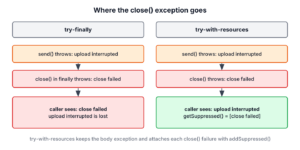
Before Java 7, resources were closed in a finally block. When the try block threw an exception and close() in finally threw another one, the second exception replaced the first. The caller saw only the failure from close(), and the real reason was gone from the logs.
Say a photo backup app uploads an album over a network connection. The upload fails halfway because the network drops, and closing the connection fails for the same reason. The useful message is the interrupted upload, not the failed close.
The following example is a resource that fails in both send() and close().
class Upload implements AutoCloseable {
    private final String name;

    Upload(String name) {
        this.name = name;
    }

    void send() throws IOException {
        throw new IOException("upload interrupted: " + name);
    }

    @Override
    public void close() throws IOException {
        throw new IOException("close failed: " + name);
    }
}
A method that closes the upload in finally loses the first exception.
static void backupWithFinally(String album) throws IOException {
    Upload upload = new Upload(album);
    try {
        upload.send();
    } finally {
        upload.close();
    }
}
IOException lost = null;
try {
backupWithFinally("photos");
} catch (IOException e) {
lost = e;
}
String seen = lost.getMessage(); // "close failed: photos"
int attached = lost.getSuppressed().length; // 0A plain try-finally block never suppresses anything; the exception from finally replaces the one from try. The original “upload interrupted” exception is not stored anywhere.
2. Java Suppressed Exceptions in try-with-resources
A try-with-resources statement closes its resources after the body. When both the body and close() fail, the exception from the body stays the primary exception, and each exception from close() is added to it with addSuppressed().
static void backup(String album) throws IOException {
    try (Upload upload = new Upload(album)) {
        upload.send();
    }
}
IOException failure = null;
try {
backup("photos");
} catch (IOException e) {
failure = e;
}
String primaryMessage = failure.getMessage(); // "upload interrupted: photos"
String hiddenMessage = failure.getSuppressed()[0].getMessage(); // "close failed: photos"When nobody catches the exception, the stack trace prints the suppressed exception under a Suppressed: line. The following output comes from a small PhotoBackup program with the same Upload class on JDK 25.
Exception in thread "main" java.io.IOException: upload interrupted: photos
	at Upload.send(Upload.java:11)
	at PhotoBackup.main(PhotoBackup.java:5)
	Suppressed: java.io.IOException: close failed: photos
		at Upload.close(Upload.java:16)
		at PhotoBackup.main(PhotoBackup.java:4)
2.1. Several Resources
With several resources, Java closes them in the reverse order of their declaration and calls close() on every one, even when an earlier close() failed. Every close failure is added to the primary exception, so the order of the suppressed exceptions follows the closing order.
static void backupAlbumAndThumbnails() throws IOException {
    try (Upload photos = new Upload("photos"); Upload thumbs = new Upload("thumbs")) {
        photos.send();
    }
}
List<String> closeErrors = new ArrayList<>();
try {
backupAlbumAndThumbnails();
} catch (IOException e) {
for (Throwable s : e.getSuppressed()) {
closeErrors.add(s.getMessage());
}
}
List<String> order = closeErrors; // [close failed: thumbs, close failed: photos]2.2. When Only close() Fails
If the body completes without an exception, there is nothing to suppress into, so the first exception from close() becomes the primary exception. Later close failures are suppressed into that one. The following example also uses the Java 9 form of try-with-resources, which accepts effectively final variables declared before the statement.
static void closeOnly() throws Exception {
    AutoCloseable first = () -> { throw new IOException("close failed: first"); };
    AutoCloseable second = () -> { throw new IOException("close failed: second"); };
    try (first; second) {
        IO.println("body completed");
    }
}
Exception closeFailure = null;
try {
closeOnly();
} catch (Exception e) {
closeFailure = e;
}
String thrownFirst = closeFailure.getMessage(); // "close failed: second"
String attachedLater = closeFailure.getSuppressed()[0].getMessage(); // "close failed: first"3. Adding Suppressed Exceptions by Hand
The method addSuppressed() is public, so we can use it outside try-with-resources. It fits loops that should try every item and report all failures at the end, instead of stopping at the first one.
The following example deletes temporary files after an export. It keeps going when a file cannot be deleted and throws one exception that carries every individual failure.
static void deleteAll(List<Path> files) throws IOException {
    IOException failure = null;
    for (Path file : files) {
        try {
            Files.delete(file);
        } catch (IOException e) {
            if (failure == null) {
                failure = new IOException("cleanup failed");
            }
            failure.addSuppressed(e);
        }
    }
    if (failure != null) {
        throw failure;
    }
}
int failedFiles = 0;
try {
deleteAll(List.of(Path.of("a.tmp"), Path.of("b.tmp")));
} catch (IOException e) {
failedFiles = e.getSuppressed().length;
}
int failed = failedFiles; // 2, one NoSuchFileException per missing fileThe method has two rules. It rejects null, and an exception cannot suppress itself.
IOException report = new IOException("report");
report.addSuppressed(report);              // IllegalArgumentException: Self-suppression not permitted
report.addSuppressed(null);                // NullPointerException: Cannot suppress a null exception.
Both addSuppressed() and getSuppressed() are synchronized, and getSuppressed() returns a new array on every call, so changing that array does not change the exception.
4. Suppressed Exceptions vs Cause
A suppressed exception and a cause both attach one Throwable to another, but they answer different questions. The cause, set with the constructor or initCause(), says why this exception happened. A suppressed exception is an unrelated failure that happened while the primary exception was already on its way.
| Aspect | Cause | Suppressed exceptions |
|---|---|---|
| Meaning | The reason for this exception | Another failure that happened at the same time |
| How many | At most one | Any number |
| How to set | Constructor argument or initCause(), once | addSuppressed(), any number of times |
| How to read | getCause() | getSuppressed() |
| Stack trace line | Caused by: | Suppressed: |
| Typical source | Wrapping a low-level exception | try-with-resources closing a resource |
We wrap an exception with a cause when we translate it, as described in throw vs throws. We never use addSuppressed() to wrap, because the stack trace would present the real reason as a side note.
5. Turning Suppression Off
The protected Throwable constructor with four parameters has a flag enableSuppression. When it is false, addSuppressed() does nothing and getSuppressed() returns an empty array. The same constructor can also skip the stack trace with writableStackTrace set to false.
class QuietException extends RuntimeException {
    QuietException(String message) {
        super(message, null, false, false);
    }
}
QuietException quiet = new QuietException("cache miss");
quiet.addSuppressed(new IOException("ignored"));
int kept = quiet.getSuppressed().length; // 0
int frames = quiet.getStackTrace().length; // 0App code rarely needs this constructor. It suits exceptions used for control flow inside a library or exceptions created once and reused, where a stack trace and attached failures would be wrong or wasteful. Our article on custom exceptions in Java covers the usual constructors.
6. Logging Suppressed Exceptions
The method printStackTrace() prints suppressed exceptions, and so does a logger that receives the exception object. Code that logs only e.getMessage() or e.toString() drops them, together with the stack trace. We pass the exception itself as the last argument, as in log.error(“Backup failed”, e).
A global error handler can also walk the suppressed exceptions on its own, for example to send each close failure to a metrics counter. The try-catch-finally guide explains the order in which catch and finally run around such code, and checked vs unchecked exceptions explains which of these exceptions the compiler makes us handle.
7. Suppressed Exception FAQs
Each answer starts from a symptom we see in a log or a debugger, such as the wrong exception message or an empty getSuppressed() array.
7.1. Which exception is thrown when both try and close() fail?
The exception from the try body. Try-with-resources adds the exception from close() to it as a suppressed exception. A try-finally block does the opposite and throws the exception from finally.
7.2. Why does getSuppressed() return an empty array?
Either nothing was suppressed or the exception disabled suppression. A try-finally block never adds suppressed exceptions, and an exception created with enableSuppression set to false ignores addSuppressed().
7.3. Can a suppressed exception have its own cause?
Yes. A suppressed exception is a full Throwable, so it can have a cause and its own suppressed exceptions. The stack trace prints them indented under its Suppressed: line.
7.4. Do suppressed exceptions exist before Java 7?
No. The methods addSuppressed() and getSuppressed(), the four-argument constructor and try-with-resources all arrived in Java 7, and every later version, including Java 25, keeps them unchanged.
8. Conclusion
Suppressed exceptions keep a second failure from hiding the first. Try-with-resources throws the body’s exception and attaches every close() failure to it, closing resources in reverse order, while a try-finally block loses the original exception.
We read them with getSuppressed(), add them by hand when one operation collects several failures, and keep them apart from the cause, which says why an exception happened. Logging the exception object, not only its message, keeps them in the logs.
9. References
- Throwable (Java SE 25 API)
- JLS 25, 14.20.3 try-with-resources
- The try-with-resources Statement (Java Tutorials)
- JEP 213, Milling Project Coin
Happy Learning !!

Hi Lokesh,
I am bit confused, in scenario 1, second RuntimeException was suppressed.
And in scenario 4, first NullPointerException is suppressed.
Please clarify it!!
Thanks Lokesh… This really helped me
thanks Lokesh. My appreciation for your initiative .
Hi Lokesh ,
I am bit confused with lines mentioned below . Please correct me If I’m going to wrong path. Lines are —
” If an exception is thrown from the try block and one or more exceptions are thrown from the try-with-resources statement, then those exceptions thrown from the try-with-resources statement are suppressed, and the exception thrown by the block is the one that is thrown by the closeStream() method.”
By the help of these lines you are trying to say that ultimately exception of TRY block will be thrown and other exceptions occurred during closing the resources will be suppressed…… Right ??
Right.