
To read a file from the resources folder in Java, we load it from the classpath with getResourceAsStream() and read the returned InputStream, because Maven and Gradle copy everything in src/main/resources to the root of the classpath. The same call works when we run the app from the IDE and when we run it from a packaged JAR.
We keep files in the resources folder when they ship with the app and never change at runtime, such as default settings, email templates, SQL scripts, seed data and test fixtures.
The following example reads recipes/pancakes.txt from src/main/resources of a recipe box app on Java 25.
String recipe;
try (InputStream in = RecipeReader.class.getResourceAsStream("/recipes/pancakes.txt")) {
    if (in == null) {
        throw new FileNotFoundException("recipes/pancakes.txt is not on the classpath");
    }
    recipe = new String(in.readAllBytes(), StandardCharsets.UTF_8);
}
long steps = recipe.lines().count();                    // 2
String firstStep = recipe.lines().findFirst().get();    // "Mix flour, milk and eggs."
Notice that the path has no src/main/resources part, and that a missing file gives us null instead of an exception. We look at where the build tools put resource files, the difference between getResource() and getResourceAsStream(), why File breaks inside a JAR, listing a resources folder, and the Spring way to load resources.
1. Packaging a File into the resources Folder
The resources folder is part of the Maven standard directory layout, and Gradle uses the same folders. During the build, the resources plugin copies the files into the output folder next to the compiled classes, and that output folder is on the classpath. When we package the app, the files end up at the root of the JAR.
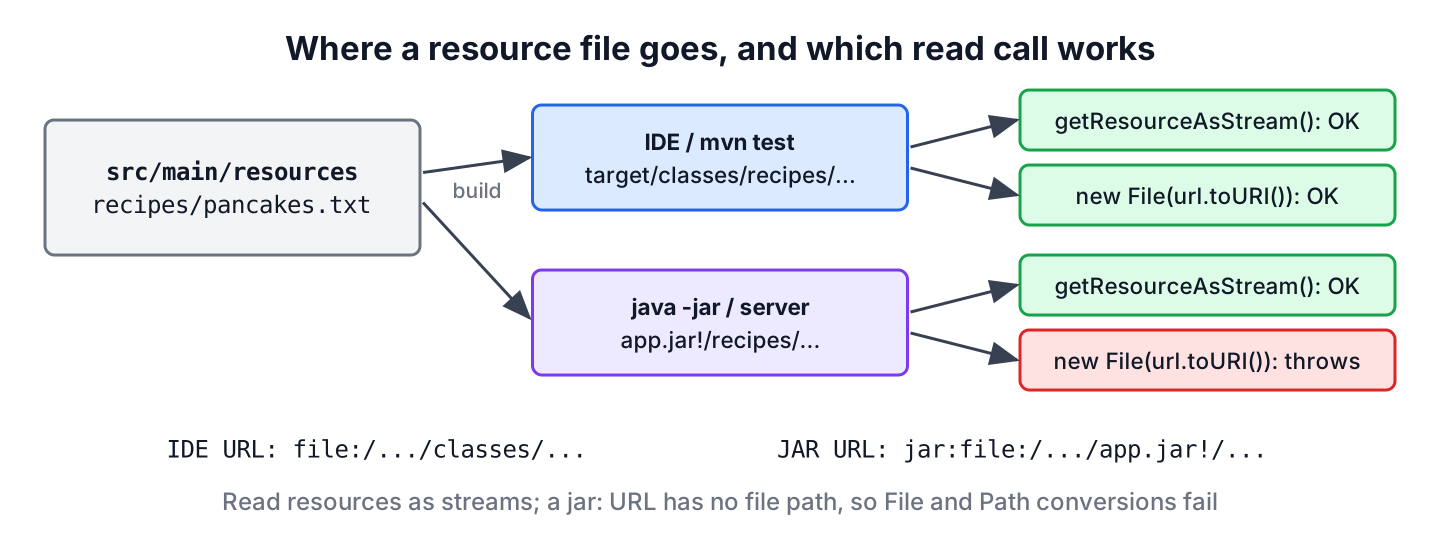
The source folder and the place where the file lands at runtime depend on the build tool and the packaging.
| Source folder | Maven output | Gradle output | Inside the package |
|---|---|---|---|
| src/main/resources | target/classes | build/resources/main | JAR root, WEB-INF/classes in a WAR, BOOT-INF/classes in a Spring Boot JAR |
| src/test/resources | target/test-classes | build/resources/test | Not packaged, only on the test classpath |
In our example, src/main/resources holds two folders. The recipes folder contains pancakes.txt and pasta.txt, and the config folder contains app.properties. The resource name of the pancakes recipe is recipes/pancakes.txt, i.e. the path below the resources folder with forward slashes on every operating system.
2. Read a File from the Resources Folder Inside a JAR
A resource inside a JAR is an entry in a zip archive, not a file on disk. The only portable way to read it is a stream, so getResourceAsStream() is our default for every resource, inside a JAR or not.
2.1. Using ClassLoader.getResourceAsStream()
The method ClassLoader.getResourceAsStream() searches the whole classpath for the name and returns an InputStream, or null when nothing matches. We wrap the lookup in a small helper that closes the stream, decodes the bytes as UTF-8 and turns null into a clear exception.
class RecipeReader {

    static String read(String name) throws IOException {
        ClassLoader loader = RecipeReader.class.getClassLoader();
        try (InputStream in = loader.getResourceAsStream(name)) {
            if (in == null) {
                throw new FileNotFoundException("Resource not found: " + name);
            }
            return new String(in.readAllBytes(), StandardCharsets.UTF_8);
        }
    }
}
String pasta = RecipeReader.read("recipes/pasta.txt").strip(); // "Boil pasta for 9 minutes."
String waffles = RecipeReader.read("recipes/waffles.txt"); // FileNotFoundException: Resource not found: recipes/waffles.txtThe method readAllBytes() reads the whole resource into memory, which is fine for templates and config files. For a large data file, we read it line by line, as in section 2.3, or copy it to a file with InputStream.transferTo().
2.2. Class.getResourceAsStream() and the Leading Slash
We can also call Class.getResourceAsStream() on a class. It hands the lookup to the class loader of that class, but first it changes the name. A name with a leading slash is absolute and starts at the classpath root. A name without the slash is relative to the package of the class.
| Call | Name passed | Looks for |
|---|---|---|
| loader.getResourceAsStream(…) | recipes/pancakes.txt | recipes/pancakes.txt at the classpath root |
| loader.getResourceAsStream(…) | /recipes/pancakes.txt | Nothing, returns null |
| RecipeReader.class.getResourceAsStream(…) | /recipes/pancakes.txt | recipes/pancakes.txt at the classpath root |
| RecipeReader.class.getResourceAsStream(…) | recipes/pancakes.txt | com/howtodoinjava/io/recipes/pancakes.txt for a class in com.howtodoinjava.io |
A leading slash belongs only in names passed to Class methods, never in names passed to ClassLoader methods. Mixing the two rules is the most common reason for a null stream.
ClassLoader loader = RecipeReader.class.getClassLoader();
boolean viaLoader = loader.getResource("recipes/pancakes.txt") != null;           // true
boolean loaderSlash = loader.getResource("/recipes/pancakes.txt") != null;        // false
boolean viaClass = RecipeReader.class.getResource("/recipes/pancakes.txt") != null;   // true
2.3. Reading a Resource Line by Line or as Properties
When we process a resource one line at a time, we wrap the stream in a BufferedReader with an explicit charset. Since Java 18 the default charset is UTF-8 (JEP 400), but naming it keeps the code correct on older runtimes and makes the intent visible.
List<String> steps = new ArrayList<>();
try (InputStream in = Objects.requireNonNull(RecipeReader.class.getResourceAsStream("/recipes/pancakes.txt"), "pancakes.txt");
     BufferedReader reader = new BufferedReader(new InputStreamReader(in, StandardCharsets.UTF_8))) {
    reader.lines().forEach(steps::add);
}
String lastStep = steps.getLast();      // "Fry for 2 minutes per side."
A .properties file in the resources folder loads the same way. We pass a Reader to Properties.load() so non-ASCII values survive, which the properties file guide explains in detail.
Properties settings = new Properties();
try (InputStream in = Objects.requireNonNull(RecipeReader.class.getResourceAsStream("/config/app.properties"), "app.properties");
     Reader reader = new InputStreamReader(in, StandardCharsets.UTF_8)) {
    settings.load(reader);
}
String appName = settings.getProperty("app.name");                     // "recipe-box"
int pageSize = Integer.parseInt(settings.getProperty("app.pageSize"));   // 20
3. getResource() vs getResourceAsStream()
The method getResource() returns a URL instead of a stream. The URL has the file: scheme when the resource sits in a folder, such as target/classes in the IDE, and the jar: scheme when it sits inside a JAR. Code that converts the URL to a File or a Path works only in the first case.
| getResourceAsStream() | getResource() | |
|---|---|---|
| Returns | InputStream, or null | URL, or null |
| Works inside a JAR | Yes | Yes, as long as we only call openStream() on the URL |
| Converting to File or Path | Not possible | Works in the IDE, throws inside a JAR |
| Typical use | Reading the content | Logging the location, passing a URL to a library, listing a folder |
A recipe box app shows the problem in practice. The team reads the default recipes with new File(url.toURI()), and every test passes in IntelliJ IDEA. After mvn package, the same code runs from recipe-box-1.0.jar and stops at startup. The following example runs the conversions on a resource that sits in the dependency menu-data.jar.
URL inJar = RecipeReader.class.getResource("/menu/today.txt");   // jar:file:/home/lokesh/.m2/.../menu-data.jar!/menu/today.txt
File asFile = new File(inJar.toURI());                           // IllegalArgumentException: URI is not hierarchical
Path asPath = Path.of(inJar.toURI());                            // FileSystemNotFoundException
boolean exists = new File(inJar.getFile()).exists();             // false
The File class needs a path on disk, and a jar: URI has none, so the constructor throws IllegalArgumentException. The Path version fails because no zip file system is open for that JAR. The old trick new File(url.getFile()) does not throw, but it points to a path such as menu-data.jar!/menu/today.txt that does not exist. Reading the same resource as a stream works.
String today;
try (InputStream in = RecipeReader.class.getResourceAsStream("/menu/today.txt")) {
    today = new String(in.readAllBytes(), StandardCharsets.UTF_8).strip();
}
String special = today;                 // "Soup of the day: tomato"
3.1. Testing the Code from a JAR File
To see both behaviors on our own machine, we package the app and start the same class once from target/classes and once from the JAR. Running the class with java -cp needs no Main-Class entry in the manifest. A Gradle build does the same with ./gradlew jar and the JAR in build/libs.
mvn clean package
java -cp target/classes com.howtodoinjava.io.RecipeApp
java -cp target/recipe-box-1.0.jar com.howtodoinjava.io.RecipeApp
The program prints the URL, the first line read through the stream and the result of the File conversion.
URL: file:/home/lokesh/recipe-box/target/classes/recipes/pancakes.txt
Stream: Mix flour, milk and eggs.
File: 54 bytes

URL: jar:file:/home/lokesh/recipe-box/target/recipe-box-1.0.jar!/recipes/pancakes.txt
Stream: Mix flour, milk and eggs.
File: java.lang.IllegalArgumentException: URI is not hierarchical
We can see that only the stream line is the same in both runs. Any test that matters for resource loading must run against the packaged JAR, or at least avoid File in the code under test.
4. Listing All Files in a Resources Folder
The class loader API has no method that lists the files in a folder. In the IDE, the folder URL converts to a Path, and Files.list() works. Inside a JAR, we open the JAR as a zip file system with FileSystems.newFileSystem() and list the folder in it. The helper handles both cases.
static List<String> listResources(String folder) throws IOException, URISyntaxException {
    URL url = Objects.requireNonNull(RecipeReader.class.getResource("/" + folder), folder);
    URI uri = url.toURI();
    if ("jar".equals(uri.getScheme())) {
        try (FileSystem jarFs = FileSystems.newFileSystem(uri, Map.of());
             Stream<Path> files = Files.list(jarFs.getPath(folder))) {
            return files.map(p -> p.getFileName().toString()).sorted().toList();
        }
    }
    try (Stream<Path> files = Files.list(Path.of(uri))) {
        return files.map(p -> p.getFileName().toString()).sorted().toList();
    }
}
List<String> recipes = listResources("recipes"); // [pancakes.txt, pasta.txt]
List<String> menu = listResources("menu"); // [today.txt]When the list of resources is known at build time, a simpler design is an index file, such as recipes/index.txt with one name per line. The app reads the index as a resource and loads each name, with no file system code at all.
5. Reading Resources in Spring and Spring Boot
Spring wraps classpath files, URLs and plain files in the Resource interface. In a Spring Boot application, we inject a Resource with @Value(“classpath:…”) or ask the injected ResourceLoader for one by name. Both read from the JAR without any extra code.
@Service
class RecipeTemplateService {

    private final Resource pancakes;
    private final ResourceLoader resourceLoader;

    RecipeTemplateService(@Value("classpath:recipes/pancakes.txt") Resource pancakes,
                          ResourceLoader resourceLoader) {
        this.pancakes = pancakes;
        this.resourceLoader = resourceLoader;
    }

    String pancakes() throws IOException {
        return pancakes.getContentAsString(StandardCharsets.UTF_8);
    }

    String recipe(String fileName) throws IOException {
        Resource resource = resourceLoader.getResource("classpath:recipes/" + fileName);
        return resource.getContentAsString(StandardCharsets.UTF_8);
    }
}
Outside a Spring bean, ClassPathResource does the same job. The method getContentAsString() reads through a stream, so it works inside a JAR. The method getFile() and the older ResourceUtils.getFile(“classpath:…”) need a real file and throw FileNotFoundException once the resource is inside a JAR.
Resource resource = new ClassPathResource("menu/today.txt");
String soup = resource.getContentAsString(StandardCharsets.UTF_8).strip();   // "Soup of the day: tomato"
File file = resource.getFile();          // FileNotFoundException: class path resource [menu/today.txt] cannot be resolved to absolute file path because it does not reside in the file system
6. Resources Folder FAQs
Code that reads resources tends to raise new doubts the first time it moves from the IDE to a server or a test suite.
6.1. Why does getResourceAsStream() return null?
The method returns null when no classpath entry has a resource with that name. Check three things. The file must be in src/main/resources (or src/test/resources for tests), the name must not contain src/main/resources, and the leading slash must match the method, as the table in section 2.2 shows. Names are case-sensitive inside a JAR, even on Windows.
6.2. How do we read a file from src/test/resources in a JUnit test?
With the same calls. Maven and Gradle put target/test-classes before target/classes on the test classpath, so a file in src/test/resources with the same name replaces the main one during tests. That is a clean way to give tests their own app.properties.
6.3. Can we write to a file in the resources folder?
No. At runtime the resources are inside a JAR or in a build folder that the next build overwrites. Files that the app changes belong outside the classpath, for example in a folder under user.home or a path passed in as a setting. The write to file guide shows the Files methods for that.
6.4. How do we get a File or Path for a resource inside a JAR?
We copy the resource to a temporary file and pass that file to the library that needs it.
Path copy = Files.createTempFile("pancakes", ".txt");
try (InputStream in = RecipeReader.class.getResourceAsStream("/recipes/pancakes.txt")) {
    Files.copy(in, copy, StandardCopyOption.REPLACE_EXISTING);
}
long size = Files.size(copy);             // 54
The temporary file guide covers deleting the copy when the app stops.
6.5. Should we use getClass() or a class literal?
Both work for a class in our own code. The call getClass() returns the runtime class, which can be a subclass in another package, so a relative name may stop resolving. A class literal such as RecipeReader.class always points to the same class, and it also works in static methods.
7. Conclusion
To read a file from the resources folder, we call getResourceAsStream() with the path below src/main/resources, check for null, and read the stream with try-with-resources and an explicit UTF-8 charset. A Class method takes a leading slash for absolute names, and a ClassLoader method never does.
The method getResource() is useful for the location, but converting its URL to a File or a Path fails once the app runs from a JAR. In Spring, a Resource from ResourceLoader or @Value reads the same files, as long as we read its content and avoid getFile(). More file tasks are grouped in the Java IO tutorial, including how classpath lookups work.
8. References
- ClassLoader.getResourceAsStream() Javadoc (Java 25)
- Class.getResource() Javadoc (Java 25)
- Maven Standard Directory Layout
- Gradle Java Plugin
- Spring Framework Resources
Happy Learning !!

Works either from filesystem and JAR:
public static void main(String[] args) throws IOException {
String resourceFile = “resource/test_resource.txt”;
InputStream resourceStream = ClassLoader.getSystemClassLoader().getResourceAsStream(resourceFile);
if (resourceStream != null) {
BufferedReader resReader = new BufferedReader(new InputStreamReader(resourceStream));
System.out.println(resReader.lines().collect(Collectors.joining()));
}
}
The class loader method works when I run it in IDE but not when the application is packaged as a jar file. I had to use a ZIP file system to load it from a jar file e.g
private byte[] loadData() throws Exception {
String relativePath = “META-INF/somebinaryfile.bmp”;
URI resource = getClass().getClassLoader().getResource(relativePath).toURI();
byte[] data = null;
try(FileSystem jarFileSystem = FileSystems.getFileSystem(resource)) {
data = readDataFromFile(relativePath, jarFileSystem);
} catch (FileSystemNotFoundException e) {
Map env = new HashMap();
env.put(“create”, “true”);
try (FileSystem jarFileSystem = FileSystems.newFileSystem(resource, env)) {
data = readDataFromFile(relativePath, jarFileSystem);
}
}
return data;
}
private byte[] readDataFromFile(String fileName, FileSystem jarFileSystem) throws IOException {
Path path = jarFileSystem.getPath(fileName);
byte[] data = Files.readAllBytes(path);
return data;
}
Thanks for sharing. Much appreciated !!