

Hibernate needs mapping metadata, the information that says which table a Java class maps to and which column each field maps to, and it reads that metadata either from annotations in the class or from XML files outside it. Annotations such as @Table and @Column are written next to the fields they describe, whereas the standard XML option, the Jakarta Persistence orm.xml file, can map a class on its own or override single annotation values.
We pick annotations for most entities and use XML when a class comes from a jar we cannot change, or when one value such as a table name differs per environment. Hibernate’s older hbm.xml format still runs in Hibernate 7.4, but it is deprecated and logs a warning at startup.
The following example maps the same Bicycle class with annotations and with orm.xml, and both mappings produce the same SQL.
@Entity
@Table(name = "bicycle")
public class Bicycle {

  @Id @GeneratedValue
  private Long id;

  @Column(nullable = false, length = 50)
  private String model;

  @Column(name = "daily_rate", precision = 6, scale = 2)
  private BigDecimal dailyRate;
}
<entity class="com.howtodoinjava.hibernate.mapping.plain.Bicycle" access="FIELD">
<table name="bicycle"/>
<attributes>
<id name="id"><generated-value/></id>
<basic name="model"><column nullable="false" length="50"/></basic>
<basic name="dailyRate"><column name="daily_rate" precision="6" scale="2"/></basic>
</attributes>
</entity>em.persist(new Bicycle("City Cruiser", 54, new BigDecimal("12.50")));
// create table bicycle (daily_rate numeric(6,2), frame_size integer, id bigint not null,
// model varchar(50) not null, primary key (id))
// insert into bicycle (daily_rate,frame_size,model,id) values (?,?,?,?)Notice that the XML entry names the class and each field as plain strings, while the annotations sit on the fields themselves.
Next, we look at where Hibernate reads the mapping from and map one entity in three ways. After that, we compare annotations with XML and answer the common migration questions.
1. Where Hibernate Reads the Mapping From
Hibernate builds one internal mapping model for each entity when the EntityManagerFactory starts. That model can come from three sources, and the resulting table is the same for all of them.
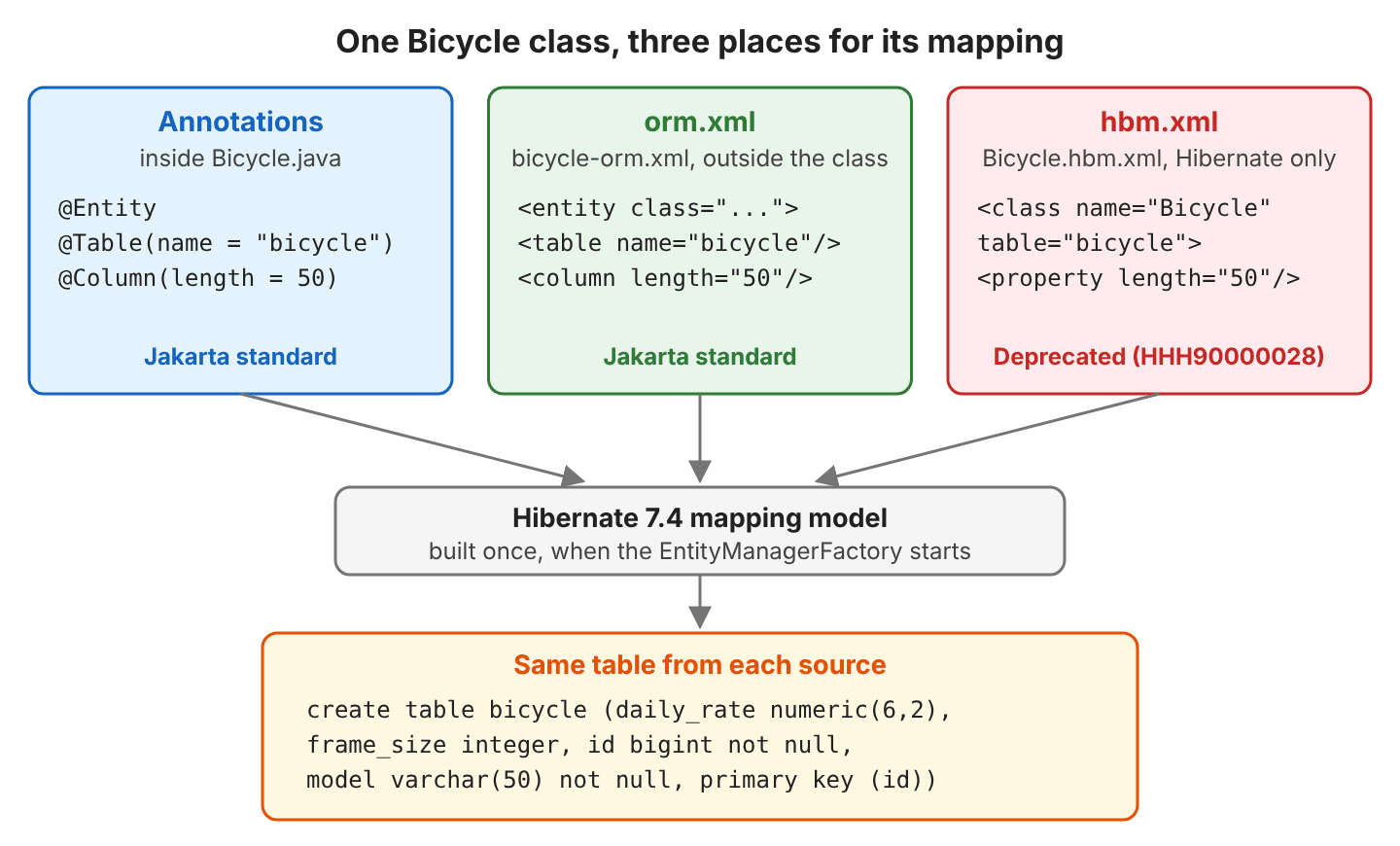
The sources differ in who defines them and how we register them.
| Source | Defined by | Status in Hibernate 7.4 | How Hibernate finds it |
|---|---|---|---|
| Annotations (@Entity, @Column) | Jakarta Persistence 3.2 | Fully supported | The class is listed as a managed class |
| orm.xml (entity-mappings) | Jakarta Persistence 3.2 | Fully supported | mappingFile() or <mapping-file> in persistence.xml |
| hbm.xml (hibernate-mapping) | Hibernate only | Deprecated, warning HHH90000028 | Configuration.addResource() |
Annotations and orm.xml can be used together on the same class. By default, a value set in XML replaces the matching annotation value, and every value the XML leaves out still comes from the annotations.
2. Mapping One Entity Three Ways
Our example is a bike rental shop. A Bicycle has a model name (“City Cruiser”), a frame size in centimeters (54) and a daily rental rate (12.50). We map it with each style in Hibernate 7.4.11, Java 25 and an in-memory H2 database, and compare the table Hibernate creates.
The complete project on GitHub starts one EntityManagerFactory per style, prints the DDL (the create table statements) and the INSERT, and checks every table and column in this section with 8 JUnit tests (mvn -q compile exec:java, mvn test).
2.1. Mapping With Annotations
With annotations, the class carries its own mapping. The @Entity annotation marks the class as an entity, @Table names the table, and @Column sets the column name, length, precision and nullability. Each annotation has more persistence annotation attributes, such as unique and columnDefinition on @Column.
@Id
@GeneratedValue
private Long id;

@Column(nullable = false, length = 50)
private String model;

@Column(name = "frame_size")
private int frameSize;

@Column(name = "daily_rate", precision = 6, scale = 2)
private BigDecimal dailyRate;
When we bootstrap with HibernatePersistenceConfiguration, we list only the class.
EntityManagerFactory emf = new HibernatePersistenceConfiguration("annotations")
    .managedClass(Bicycle.class)
    // jdbcUrl, credentials, schema action ...
    .createEntityManagerFactory();
create sequence bicycle_SEQ start with 1 increment by 50
create table bicycle (daily_rate numeric(6,2), frame_size integer, id bigint not null, model varchar(50) not null, primary key (id))
select next value for bicycle_SEQ
insert into bicycle (daily_rate,frame_size,model,id) values (?,?,?,?)2.2. Mapping a Plain Class With orm.xml
Say Bicycle comes from a shared library jar that we cannot change, so it has fields, constructors and getters, but no annotation at all.
public class Bicycle {
  private Long id;
  private String model;
  private int frameSize;
  private BigDecimal dailyRate;
}
The orm.xml file holds the whole mapping. Each <basic> element maps one field, and access=”FIELD” tells Hibernate to read the fields instead of the getters. The root element declares the Jakarta Persistence 3.2 schema.
<entity-mappings xmlns="https://jakarta.ee/xml/ns/persistence/orm"
                 xmlns:xsi="http://www.w3.org/2001/XMLSchema-instance"
                 xsi:schemaLocation="https://jakarta.ee/xml/ns/persistence/orm
                                     https://jakarta.ee/xml/ns/persistence/orm/orm_3_2.xsd"
                 version="3.2">

  <entity class="com.howtodoinjava.hibernate.mapping.plain.Bicycle" access="FIELD">
    <table name="bicycle"/>
    <attributes>
      <id name="id">
        <generated-value/>
      </id>
      <basic name="model">
        <column nullable="false" length="50"/>
      </basic>
      <basic name="frameSize">
        <column name="frame_size"/>
      </basic>
      <basic name="dailyRate">
        <column name="daily_rate" precision="6" scale="2"/>
      </basic>
    </attributes>
  </entity>
</entity-mappings>
We register the file instead of the class, because the <entity> element already names the class.
EntityManagerFactory emf = new HibernatePersistenceConfiguration("orm-xml")
    .mappingFile("META-INF/bicycle-orm.xml")
    .createEntityManagerFactory();
In a persistence.xml setup, the same file goes into a <mapping-file>META-INF/bicycle-orm.xml</mapping-file> element. Hibernate printed the same create table bicycle and insert into bicycle statements as in section 2.1, character for character, so the source of the mapping makes no difference to the table.
2.3. Overriding an Annotation With orm.xml
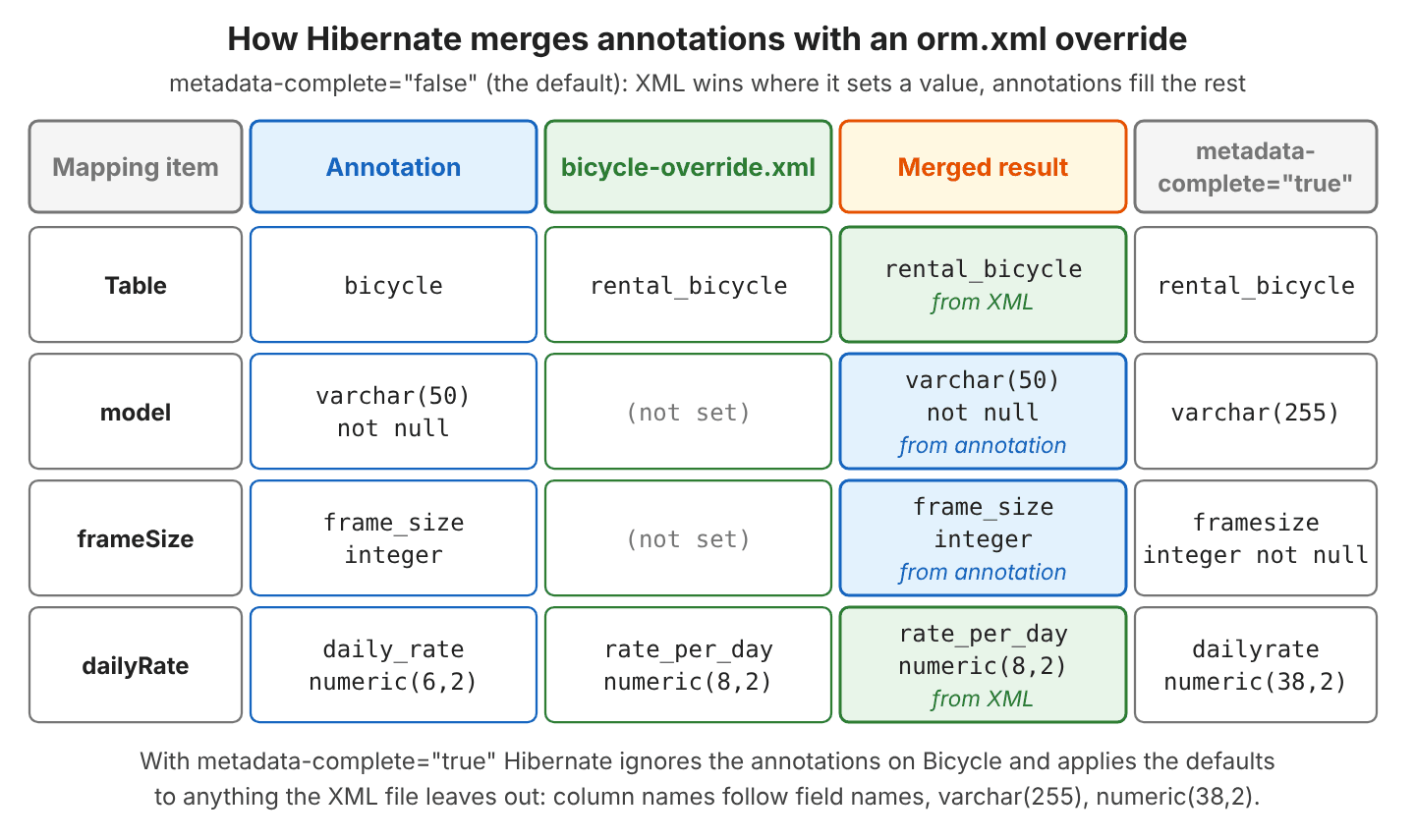
In the next case, the class keeps all its annotations, and a small orm.xml changes the table name and the dailyRate column. For example, the shop’s second branch runs on a database where the table must be called rental_bicycle. The attribute metadata-complete=”false” is the default, and it tells Hibernate to merge the XML with the annotations.
<entity class="com.howtodoinjava.hibernate.mapping.Bicycle" metadata-complete="false">
  <table name="rental_bicycle"/>
  <attributes>
    <basic name="dailyRate">
      <column name="rate_per_day" precision="8" scale="2"/>
    </basic>
  </attributes>
</entity>
We register both the annotated class and the override file.
EntityManagerFactory emf = new HibernatePersistenceConfiguration("override")
    .managedClass(Bicycle.class)
    .mappingFile("META-INF/bicycle-override.xml")
    .createEntityManagerFactory();
create table rental_bicycle (frame_size integer, rate_per_day numeric(8,2), id bigint not null, model varchar(50) not null, primary key (id))
insert into rental_bicycle (rate_per_day,frame_size,model,id) values (?,?,?,?)The table and the rate column come from XML. The columns model varchar(50) not null and frame_size still come from the annotations, because the XML file does not mention them. Hibernate merges per attribute, so XML replaces only the values it sets.
2.4. Ignoring the Annotations With metadata-complete
The setting metadata-complete=”true” tells Hibernate that the XML entry is the full mapping of the class. Hibernate then ignores every mapping annotation on that class, even ones the XML does not replace. Our file maps only the table and the id.
<entity class="com.howtodoinjava.hibernate.mapping.Bicycle" access="FIELD" metadata-complete="true">
  <table name="rental_bicycle"/>
  <attributes>
    <id name="id"><generated-value/></id>
  </attributes>
</entity>
create table rental_bicycle (dailyRate numeric(38,2), frameSize integer not null, id bigint not null, model varchar(255), primary key (id))The @Column settings are gone, so model lost length = 50 and not null, and the columns are named after the fields. We use metadata-complete=”true” only when the XML file maps every attribute, as in section 2.2.
2.5. Running a Legacy hbm.xml File in Hibernate 7
The hbm.xml format is Hibernate’s own XML format from before JPA existed, and our project still has one hbm.xml file, mapped to the plain class from section 2.2.
<!DOCTYPE hibernate-mapping PUBLIC
    "-//Hibernate/Hibernate Mapping DTD 3.0//EN"
    "http://www.hibernate.org/dtd/hibernate-mapping-3.0.dtd">

<hibernate-mapping package="com.howtodoinjava.hibernate.mapping.plain" default-access="field">
  <class name="Bicycle" table="bicycle">
    <id name="id">
      <generator class="sequence"/>
    </id>
    <property name="model" not-null="true" length="50"/>
    <property name="frameSize" column="frame_size"/>
    <property name="dailyRate" column="daily_rate" precision="6" scale="2"/>
  </class>
</hibernate-mapping>
Older projects load it with the native Configuration class, which builds a SessionFactory. HibernatePersistenceConfiguration.mappingFile(“Bicycle.hbm.xml”) accepts the file as well.
SessionFactory sf = new Configuration()
    .addResource("Bicycle.hbm.xml")
    // connection URL, credentials, hbm2ddl ...
    .buildSessionFactory();
The file still works in Hibernate 7.4.11. The table is the same bicycle table, and the insert succeeds. Hibernate logs a deprecation warning for each hbm.xml file.
WARN org.hibernate.orm.deprecation - HHH90000028: Support for `<hibernate-mappings/>` is deprecated [RESOURCE : Bicycle.hbm.xml]; migrate to orm.xml or mapping.xml, or enable `hibernate.transform_hbm_xml.enabled` for on the fly transformationDo not write new hbm.xml files. They depend on Hibernate-only APIs, and the warning says to move them to orm.xml (or Hibernate’s extended mapping.xml format).
3. Annotations vs XML Mappings Compared
Both standard styles produce the same table. They differ in where the mapping is stored and in what happens when a class or a column changes.
| Point | Annotations | orm.xml |
|---|---|---|
| Where the metadata lives | In the entity class, next to the field | In a separate XML file |
| Renaming a field in the IDE | Mapping moves with the field | XML keeps the old name; startup fails until we fix it |
| Changing a table or column name | Edit the class and recompile | Edit or swap the XML file |
| Overriding per environment or database | Not possible alone | Register a different override file per environment |
| Mapping a class we cannot edit | Not possible | Supported (section 2.2) |
| IDE support | Completion, navigation, compiler checks the syntax | Schema validation in the IDE; class and field names are plain strings |
| Readability | One file shows the class and its mapping | Two files to read side by side |
| Portability | Jakarta standard, any JPA provider | Jakarta standard, any JPA provider |
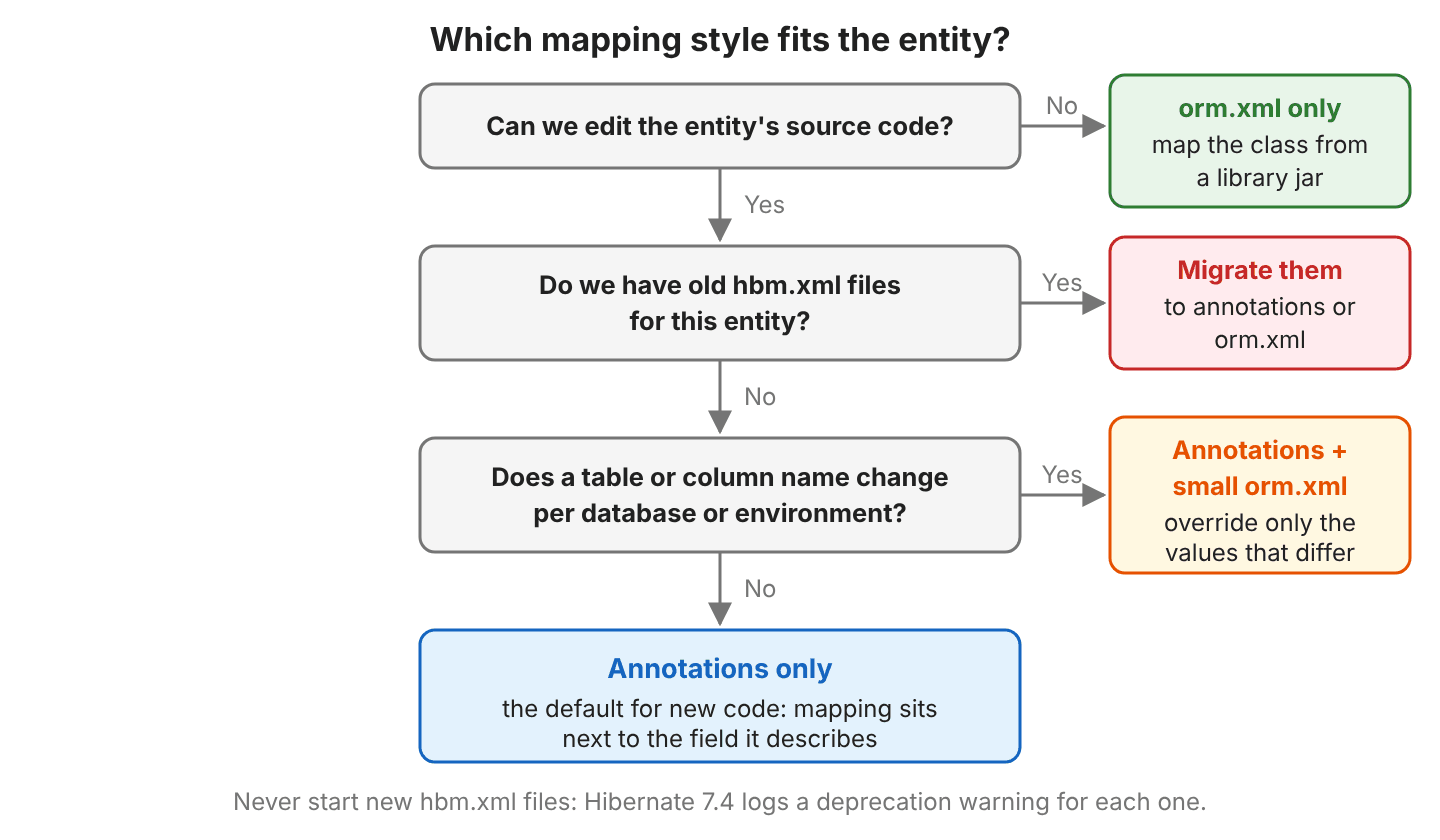
Most projects choose annotations because the mapping is short and stays correct when we refactor. XML is the right tool in a few cases.
- The entity class is in a jar we cannot change, for example a shared domain library. An orm.xml file maps the class without touching its source.
- One value differs per database or environment, such as a table name prefix or a column precision. A small override file, registered only for that environment, changes it without a second copy of the class.
- A team keeps queries out of Java code. An orm.xml file can also hold named queries, entity listeners and association mappings.
- An old project still has hbm.xml files. Moving them to orm.xml first keeps the mapping in XML and removes the deprecated format.
The decision tree puts the same reasoning in order, starting from whether we can edit the class.
4. Annotations vs XML FAQs
4.1. Is hbm.xml Removed in Hibernate 7?
No. Hibernate 7.4 still loads hbm.xml files, but they are deprecated and each one logs HHH90000028 (section 2.5). The format can still be loaded, so an old project can upgrade Hibernate first and migrate the mapping files afterward.
4.2. How Do I Convert hbm.xml to orm.xml?
Hibernate can transform hbm.xml into its mapping.xml format while it starts. We enable one setting and keep the same file.
SessionFactory sf = new Configuration()
    .addResource("Bicycle.hbm.xml")
    .setProperty("hibernate.transform_hbm_xml.enabled", "true")
    // ...
    .buildSessionFactory();
The feature is a migration aid, not a final solution. In our test it created the table, but the model column became varchar(255) instead of varchar(50): the length=”50″ attribute was lost. Compare the generated schema before and after any automatic conversion. For a permanent migration, the Hibernate Maven plugin has a transformHbm goal that writes the converted files, and we review and commit them.
4.3. Which Wins When an Annotation and orm.xml Set the Same Value?
The XML value wins. In section 2.3, @Column(name = “daily_rate”, precision = 6) and <column name=”rate_per_day” precision=”8″/> both describe dailyRate, and the table got rate_per_day numeric(8,2). The values that only the annotation sets stay in effect:
| metadata-complete | Value set in XML | Value set only by annotation |
|---|---|---|
| false (default) | XML value | Annotation value |
| true | XML value | Ignored; the default applies |
4.4. What Happens When I Rename a Field That orm.xml Maps?
Hibernate fails at startup, because the XML file still names the old field and the IDE does not update it. When the factory starts, Hibernate looks up each field named in the file and stops when one is missing. We renamed dailyRate to rate in a copy of the override file.
org.hibernate.boot.models.MemberResolutionException: Could not locate attribute member - rate (com.howtodoinjava.hibernate.mapping.Bicycle)The error appears when the EntityManagerFactory starts, not at compile time. A test that only starts the factory catches it before deployment.
5. Conclusion
Annotations keep the mapping next to the fields and follow every refactoring, so they are the default for new entities. The orm.xml file is the standard XML alternative. It maps classes we cannot edit, and with metadata-complete=”false” it overrides single annotation values per environment. Hibernate 7.4 still runs hbm.xml, but it logs a deprecation warning, so we move those files to annotations or orm.xml.
6. References
- Jakarta Persistence 3.2 specification: XML Object/Relational Mapping Descriptor
- Jakarta Persistence 3.2 specification: XML Overriding Rules
- Jakarta Persistence 3.2 orm.xml schema (orm_3_2.xsd)
- Hibernate ORM 7.4 User Guide: Bootstrap
- Hibernate ORM 7.4 User Guide: Maven tooling
- Hibernate ORM 7.4 MappingSettings JavaDoc
Happy Learning !!
