
The Java Collections Framework is the set of interfaces and classes in java.util and java.util.concurrent that store, retrieve and process groups of objects, such as lists, sets, queues and maps. Every Java app uses it, whether to hold the rows of a query result, cache values by key, keep unique tags or queue work for background threads.
The framework gives us a small number of interfaces (List, Set, Queue, Deque, Map and, since Java 21, the sequenced interfaces), several implementations for each, and utility methods for sorting, searching and creating collections. The following example touches the operations we use most often in modern Java.
List<String> fruits = new ArrayList<>(List.of("apple", "banana"));
boolean added = fruits.add("cherry");                        // true
String first = fruits.getFirst();                            // "apple"
List<String> backwards = fruits.reversed();                  // [cherry, banana, apple]
Set<String> unique = new TreeSet<>(List.of("kiwi", "apple", "kiwi"));  // [apple, kiwi]
SequencedMap<String, Integer> stock = new LinkedHashMap<>();
Integer previous = stock.put("apple", 5);                    // null
Integer bananas = stock.merge("banana", 3, Integer::sum);    // 3
Map.Entry<String, Integer> lastEntry = stock.lastEntry();    // banana=3
Deque<String> orders = new ArrayDeque<>(List.of("pizza", "pasta"));
String nextOrder = orders.pollFirst();                       // "pizza"
List<String> longNames = fruits.stream().filter(f -> f.length() > 5).toList();  // [banana, cherry]
Notice that we declare variables by interface type and pick the class only on the right side. We go through the interface hierarchy, the sequenced collections added in Java 21, how to pick an implementation, and the thread-safe and legacy classes, with links to a detailed tutorial for every class.
1. What Is the Java Collections Framework?
A collection is an object that groups other objects, called its elements. Before Java 1.2, Java had only arrays, Vector and Hashtable, and every library invented its own container classes. The Collections Framework added in Java 1.2 replaced them with one set of interfaces, so a method that accepts a List works with any list implementation.
The framework has three parts.
- Interfaces such as Collection, List and Map define what we can do with a group of elements.
- Implementations such as ArrayList, HashSet and TreeMap store the elements with a specific data structure, so each one has its own speed and ordering.
- Algorithms and helpers, mostly static methods in Collections and factory methods such as List.of(), sort, search, copy and wrap collections.
Since Java 5, all collection types are generic. A List<String> accepts only strings, so the compiler rejects a wrong element type instead of a ClassCastException appearing at runtime. We never use raw types such as List without a type argument in new code.
// does not compile: incompatible types, int cannot be converted to String
List<String> names = new ArrayList<>();
names.add(42);
Looking for plain arrays instead? A fixed-size array (int[], String[]) is not part of the Collections Framework. See the Java Arrays guide for memory layout, the Arrays utility class, and every array how-to.
2. Collection Interfaces and Their Hierarchy
Every collection type except maps extends Collection, which in turn extends Iterable, so any collection works in a for-each loop. The Map interface has its own branch because it stores key-value pairs, not single elements. Java 21 inserted three sequenced interfaces into the tree, which gives every ordered type a common parent.
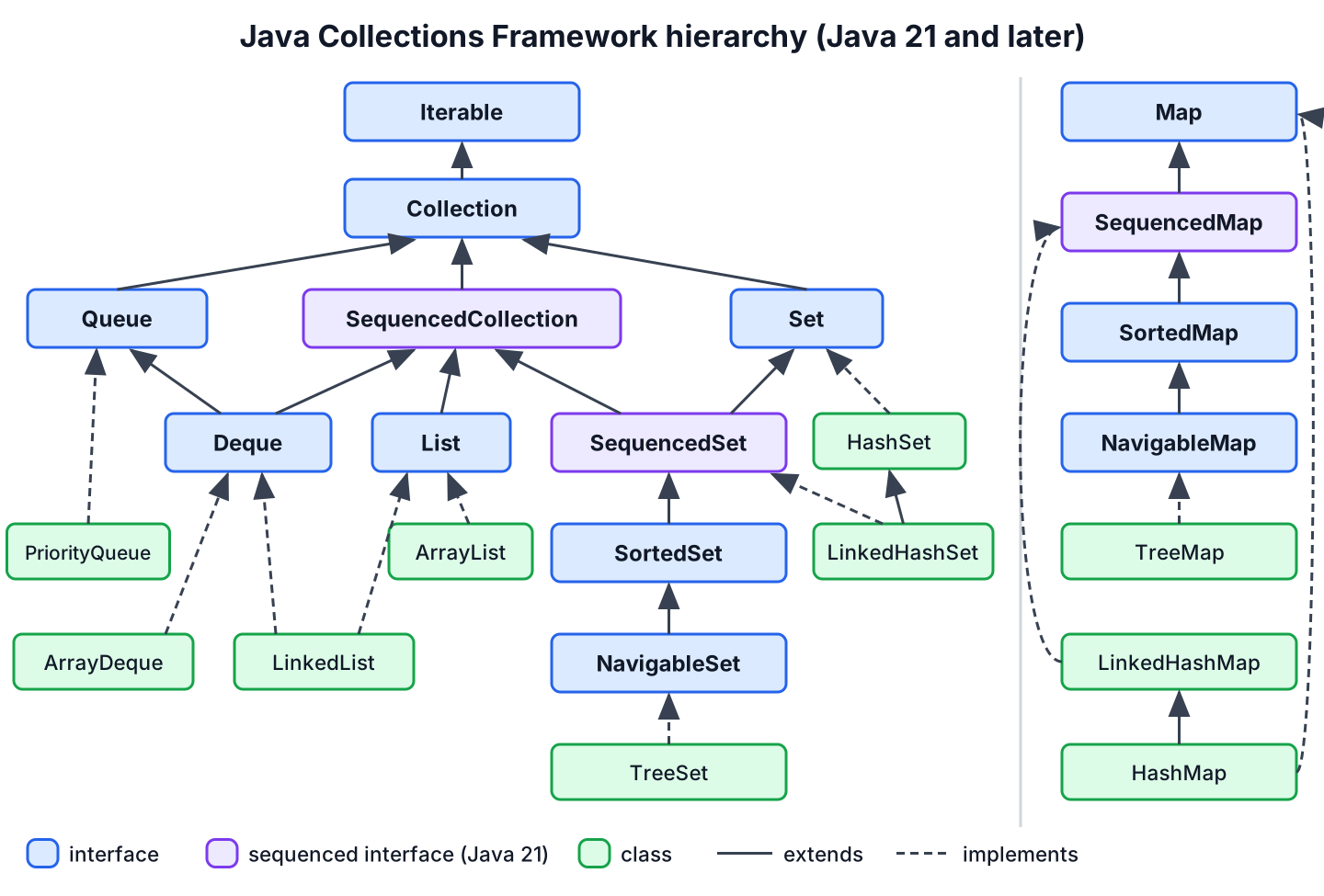
Each interface adds a guarantee on top of its parent. Knowing the guarantee is more useful than knowing the class names, because it decides which methods we can call.
| Interface | Guarantee it adds | Common implementations |
|---|---|---|
| Collection | A group of elements with add(), remove(), contains(), size() and stream() | All except maps |
| SequencedCollection (Java 21) | A defined encounter order with first and last elements and a reversed() view | List, Deque, LinkedHashSet, TreeSet |
| List | Index-based access, duplicates allowed | ArrayList, LinkedList, CopyOnWriteArrayList |
| Set | No duplicate elements, based on equals() | HashSet, LinkedHashSet, TreeSet, EnumSet |
| SortedSet / NavigableSet | Elements kept sorted, with range and nearest-match queries | TreeSet, ConcurrentSkipListSet |
| Queue | Elements wait for processing, with offer(), poll() and peek() | PriorityQueue, ArrayBlockingQueue |
| Deque | Insertion and removal at both ends, so it works as a queue and as a stack | ArrayDeque, LinkedList |
| Map | Unique keys mapped to values | HashMap, LinkedHashMap, TreeMap, EnumMap |
| SequencedMap (Java 21) | A defined key order with firstEntry(), lastEntry() and reversed() | LinkedHashMap, TreeMap |
Code that only reads or loops over elements accepts the most general interface it needs. A method that takes a Collection<String> works with a list, a set or a deque, whereas a method that takes an ArrayList<String> forces callers to copy their data.
Collection<String> tags = new ArrayList<>(List.of("java", "sql", "jpa"));
int count = tags.size();                                     // 3
boolean hasSql = tags.contains("sql");                       // true
boolean removed = tags.removeIf(t -> t.startsWith("j"));     // true
Collection<String> left = tags;                              //
A Map is part of the framework even though it is not a Collection. It gives us collection views of its content with keySet(), values() and entrySet(), and those views are regular collections.
Map<String, Integer> ages = new TreeMap<>(Map.of("Lokesh", 37, "Alex", 29));
Set<String> names = ages.keySet();                           // [Alex, Lokesh]
Collection<Integer> years = ages.values();                   // [29, 37]
boolean adult = ages.values().stream().allMatch(a -> a >= 18);  // true
3. Sequenced Collections in Java 21
Before Java 21, getting the last element looked different for every type, such as list.get(list.size() – 1), deque.getLast() or sortedSet.last(), and a LinkedHashSet had no way to get it at all. JEP 431 added SequencedCollection, SequencedSet and SequencedMap with the same methods for every ordered type. The sequenced collections tutorial covers each method in detail.
SequencedCollection<String> playlist = new ArrayList<>(List.of("intro", "verse"));
playlist.addFirst("count-in");
playlist.addLast("outro");
String opener = playlist.getFirst();                         // "count-in"
String closer = playlist.getLast();                          // "outro"
SequencedCollection<String> backwards = playlist.reversed(); // [outro, verse, intro, count-in]
SequencedMap<String, Integer> scores = new LinkedHashMap<>();
scores.put("ana", 90);
scores.put("ben", 75);
Map.Entry<String, Integer> firstScore = scores.firstEntry(); // ana=90
Map.Entry<String, Integer> removedScore = scores.pollLastEntry();  // ben=75
The reversed() method returns a view, not a copy, so it takes constant time to create and changes to the view write through to the original collection. On an unmodifiable list such as List.of(), the read methods work and addFirst() throws UnsupportedOperationException. On an empty collection, getFirst() throws NoSuchElementException.
List<String> fixed = List.of("a", "b");
String a = fixed.getFirst();                                 // "a"
fixed.addFirst("z");                                         // UnsupportedOperationException
String none = new ArrayList<String>().getFirst();            // NoSuchElementException
4. Choosing the Right Implementation
Pick the implementation from two questions, namely which order we need and how we look elements up. Most code ends up with ArrayList, HashMap, HashSet or ArrayDeque, and we move to a specialized class only when a requirement asks for it.
Say a food ordering app keeps the lines of a cart, the coupon codes a user already applied, the menu items by id and the orders waiting for the kitchen. The cart is an ArrayList because lines have a position and duplicates are fine. Applied coupons go into a HashSet, since the app only asks whether a code was used. The menu is a HashMap keyed by id, and the kitchen queue is an ArrayDeque, or a PriorityQueue when express orders go first.
| We need | Use | Typical cost of the main operation |
|---|---|---|
| Ordered elements with index access | ArrayList | get(i) O(1), add() at end amortized O(1) |
| Fast membership checks, no order | HashSet | contains() O(1) on average |
| Unique elements in insertion order | LinkedHashSet | contains() O(1) on average |
| Unique elements kept sorted | TreeSet | add(), contains() O(log n) |
| Lookup by key, no order | HashMap | get(), put() O(1) on average |
| Keys in insertion or access order | LinkedHashMap | get(), put() O(1) on average |
| Keys sorted, range queries | TreeMap | get(), put() O(log n) |
| Queue or stack | ArrayDeque | offerLast(), pollFirst(), push() O(1) |
| Smallest or highest-priority element first | PriorityQueue | offer(), poll() O(log n), peek() O(1) |
| Enum keys or enum elements | EnumMap, EnumSet | Array or bit-vector access |
Hash-based classes depend on correct equals() and hashCode() methods in the element or key class, and sorted classes depend on compareTo() or a Comparator. Records generate equals() and hashCode() from their components, so a record with immutable components works as a key without extra code.
5. List Implementations
A List keeps elements in the order we add them and allows duplicates. The Java List guide covers the interface methods, and the ArrayList guide covers the class we use in nearly every project. The ArrayList class stores elements in an array, so reading by index is fast, whereas LinkedList is faster only when we insert or remove elements at the front of the list or through a ListIterator.
| Tutorial | What it covers |
|---|---|
| Java LinkedList | A doubly linked list that implements List and Deque, and when it beats ArrayList |
| Java CopyOnWriteArrayList | A thread-safe list for read-heavy data, such as a list of event listeners |
| Create a List with a single element | List.of(e), Collections.singletonList() and a mutable single-element list |
| UnsupportedOperationException | Why add() fails on Arrays.asList() and List.of() lists, and how to fix it |
6. Set Implementations
A Set rejects duplicates, so add() returns false when the element is already present. The three general-purpose sets differ only in the order in which they return elements.
Set<String> visited = new HashSet<>();
boolean firstVisit = visited.add("home");                    // true
boolean secondVisit = visited.add("home");                   // false
Set<String> ordered = new LinkedHashSet<>(List.of("cart", "home", "cart"));  // [cart, home]
NavigableSet<Integer> prices = new TreeSet<>(List.of(30, 10, 20));
Integer cheapestOver15 = prices.ceiling(15); // 20| Tutorial | What it covers |
|---|---|
| Java HashSet | The default set, backed by a HashMap, with no iteration order |
| Java LinkedHashSet | A set that keeps insertion order and implements SequencedSet |
| Java TreeSet | A sorted set with first(), ceiling(), headSet() and custom ordering |
| Java CopyOnWriteArraySet | A thread-safe set for small, read-mostly data |
7. Map Implementations
A Map stores one value per key. Calling put() with an existing key replaces the value, and methods such as getOrDefault(), merge() and computeIfAbsent() cover the counting and grouping code we used to write with if statements. The HashMap guide is the starting point.
Map<String, Integer> wordCount = new HashMap<>();
for (String word : List.of("to", "be", "or", "not", "to", "be")) {
    wordCount.merge(word, 1, Integer::sum);
}
Integer toCount = wordCount.get("to");                       // 2
Integer missing = wordCount.getOrDefault("is", 0);           // 0
Map<Character, List<String>> byLetter = new TreeMap<>();
byLetter.computeIfAbsent('a', k -> new ArrayList<>()).add("apple");
List<String> aWords = byLetter.get('a');                     // [apple]
The map tutorials are grouped by what we want to do. Choosing a class and comparing classes come first, followed by special-purpose maps and common tasks.
| Tutorial | What it covers |
|---|---|
| Java LinkedHashMap | Insertion order, access order and a simple LRU cache |
| Java TreeMap | Sorted keys, navigation methods and range views such as subMap() |
| TreeMap vs HashMap | Ordering, performance and null handling side by side |
| Java Hashtable | The legacy synchronized map, how it differs from HashMap and why new code avoids it |
| Java EnumMap | A compact map for enum keys |
| Java WeakHashMap | Entries that disappear when the key is no longer referenced |
| Java IdentityHashMap | Key comparison with == instead of equals() |
| Immutable vs unmodifiable maps | Map.of(), Map.copyOf() and Collections.unmodifiableMap() |
| Case-insensitive map keys | TreeMap with String.CASE_INSENSITIVE_ORDER and library options |
| Nested maps | Maps of maps, with safe reads and updates |
| Inverting a map | Swapping keys and values, including duplicate values |
| Convert a List to a Map | Collectors.toMap() with merge functions and ordered maps |
8. Queue and Deque Implementations
A Queue holds elements until something processes them, such as print jobs or tasks for a worker thread. The Java Queue guide explains the two method families, where add(), remove() and element() throw exceptions and offer(), poll() and peek() return false or null instead.
Deque<String> undo = new ArrayDeque<>();
undo.push("type A");
undo.push("type B");
String lastAction = undo.pop();                              // "type B"
Queue<Integer> tickets = new PriorityQueue<>(List.of(5, 1, 3));
Integer mostUrgent = tickets.poll(); // 1| Tutorial | What it covers |
|---|---|
| Java ArrayDeque | The default queue and stack, faster than Stack and LinkedList |
| Java PriorityQueue | Natural and Comparator ordering for the next element to process |
| Java ArrayBlockingQueue | A bounded blocking queue for producer-consumer code |
| Java PriorityBlockingQueue | A thread-safe priority queue that blocks on empty |
| Java SynchronousQueue | A queue with no capacity that hands each element to a waiting thread |
| TransferQueue and LinkedTransferQueue | Producers that wait until a consumer takes the element |
9. Creating and Converting Collections
Since Java 9, the factory methods List.of(), Set.of() and Map.of() create unmodifiable collections in one line. They reject null elements, and Set.of() and Map.of() reject duplicates with an IllegalArgumentException. When we need a mutable collection, we pass the factory result to a constructor such as new ArrayList<>(…).
List<String> days = List.of("mon", "tue");
List<String> editable = new ArrayList<>(days);
boolean addedWed = editable.add("wed");                      // true
List<String> snapshot = List.copyOf(editable);               // [mon, tue, wed]
List<String> upper = editable.stream().map(String::toUpperCase).toList();  // [MON, TUE, WED]
Set<String> broken = Set.of("a", "a");                       // IllegalArgumentException: duplicate element: a
List<String> withNull = List.of("a", null);                  // NullPointerException
Streams are the usual way to build one collection from another. The stream to immutable collection tutorial compares Stream.toList(), Collectors.toUnmodifiableList() and Collectors.collectingAndThen(), and the groupingBy() tutorial shows how to build a Map of lists in one call.
10. Iterating and Sorting Collections
For most loops, the for-each loop or forEach() is enough, and the ways to iterate a collection article compares every option, including how to remove elements safely. The cursor interfaces behind those loops have their own tutorials.
- Java Iterator explains hasNext(), next(), remove() and why changing a list inside a for-each loop throws ConcurrentModificationException.
- Java ListIterator moves forward and backward through a list and adds, replaces or removes elements on the way.
- Java Spliterator splits a source into parts, which is how parallel streams divide their work.
- Iterator vs ListIterator vs Spliterator puts all cursors, including the legacy Enumeration, in one comparison table.
Sorting uses one of two contracts. A class that has one natural order implements Comparable, and any other order is a Comparator passed to List.sort(), TreeSet or TreeMap.
record Book(String title, int year) {}List<Book> books = new ArrayList<>(List.of(new Book("Dune", 1965), new Book("Emma", 1815)));
books.sort(Comparator.comparingInt(Book::year));
String oldest = books.getFirst().title(); // "Emma"11. Thread-Safe Collections
The general-purpose classes such as ArrayList and HashMap are not thread-safe. When several threads change one collection, we use a class from java.util.concurrent, which handles locking internally and gives iterators that never throw ConcurrentModificationException.
| Use case | Class | Tutorial |
|---|---|---|
| Shared cache or counters by key | ConcurrentHashMap | Java ConcurrentMap |
| Sorted keys shared between threads | ConcurrentSkipListMap | Java ConcurrentSkipListMap |
| Locking a whole map vs fine-grained locks | Collections.synchronizedMap() | synchronizedMap() vs ConcurrentHashMap |
| Producer-consumer hand-off | ArrayBlockingQueue, LinkedBlockingQueue | See the queue tutorials in section 8 |
| Listeners read often, changed rarely | CopyOnWriteArrayList | See the list tutorials in section 5 |
A ConcurrentHashMap makes single operations such as merge() atomic, but two separate calls such as containsKey() followed by put() can still interleave with another thread. We use the atomic compound methods putIfAbsent(), computeIfAbsent() and merge() whenever we read a value and update it based on what we read.
ConcurrentMap<String, Integer> hits = new ConcurrentHashMap<>();
try (ExecutorService pool = Executors.newFixedThreadPool(4)) {
    for (int i = 0; i < 1000; i++) {
        pool.submit(() -> hits.merge("home", 1, Integer::sum));
    }
}
Integer homeHits = hits.get("home");                         // 1000
12. Legacy Collection Classes
The classes from Java 1.0 still compile and run, but new code has a better replacement for each. Apart from the Enumeration interface, these classes synchronize every method, which costs time in single-threaded code and still does not make compound operations safe.
| Legacy class | Problem | Use instead |
|---|---|---|
| Vector | Synchronized on every call | ArrayList, or CopyOnWriteArrayList for shared read-mostly lists |
| Stack | Extends Vector, so it exposes index access to a stack | ArrayDeque with push() and pop() |
| Hashtable | Synchronized, no null keys or values | HashMap, or ConcurrentHashMap across threads |
| Enumeration | No remove(), long method names | Iterator, or Enumeration.asIterator() for old APIs |
We still meet these types in old APIs, for example Properties extends Hashtable, and ClassLoader.getResources() returns an Enumeration. In those places, we convert to a modern type at the boundary and keep the rest of the code on the current interfaces.
13. Java Collections FAQs
Developers who start with the Collections Framework ask these questions most often.
13.1. What is the difference between Collection and Collections?
The Collection interface is the root type for lists, sets and queues. The Collections class is a utility class with static methods such as sort(), shuffle(), unmodifiableList() and synchronizedMap().
13.2. Is Map part of the Java Collections Framework?
Yes, but Map does not extend Collection. A map stores key-value pairs, so methods such as add(E) do not fit. Its keySet(), values() and entrySet() methods return collection views.
13.3. Which collection gives the fastest lookup?
For lookup by key or membership checks, HashMap and HashSet run in constant time on average. For lookup by position, ArrayList.get(i) runs in constant time. A TreeMap is slower, O(log n), but keeps keys sorted.
13.4. Are Java collections thread-safe?
No, the general-purpose classes are not thread-safe. Use the classes in java.util.concurrent, such as ConcurrentHashMap and CopyOnWriteArrayList, when several threads change the same collection, and share unmodifiable collections freely.
13.5. Can a collection hold primitive values?
No. Collections hold objects, so an int is boxed into an Integer when we add it. For large amounts of numbers, an int[] array or an IntStream avoids the boxing cost.
13.6. Should we still use Vector and Hashtable?
No. Both are legacy classes from Java 1.0. Use ArrayList and HashMap in single-threaded code, and CopyOnWriteArrayList or ConcurrentHashMap when threads share the data.
14. Conclusion
The Java Collections Framework organizes containers into a few interfaces, and since Java 21 every ordered type also has getFirst(), getLast() and reversed(). We declare variables by interface, pick ArrayList, HashSet, HashMap or ArrayDeque by default, and move to sorted, ordered or concurrent classes when a requirement calls for them.
Factory methods and streams create collections in one line, and the legacy classes stay in old APIs only. Each class and task above links to its own tutorial with complete examples.
15. References
- Java SE 25, Java Collections Framework
- Java SE 25 API, java.util package
- Java SE 25 API, java.util.concurrent package
- JEP 431, Sequenced Collections
Happy Learning !!
