
The Map.computeIfAbsent() method returns the value mapped to a key, and when the key is missing or mapped to null, it first calls a mapping function to create the value and stores it. The function runs only for missing keys, so the value is computed once and reused on every later call.
We use computeIfAbsent() for two everyday jobs. The first is a multimap, where each key holds a list or a set that is created on first use. The second is a cache, where a slow lookup runs only the first time a key is requested.
The following example builds a map of blog posts per tag and a small cache of squares, with the result of each call as a comment.
Map<String, List<String>> postsByTag = new HashMap<>();
postsByTag.computeIfAbsent("java", tag -> new ArrayList<>()).add("Records");
postsByTag.computeIfAbsent("java", tag -> new ArrayList<>()).add("Streams");
List<String> javaPosts = postsByTag.get("java");                 // [Records, Streams]

Map<Integer, Integer> squares = new HashMap<>(Map.of(3, 9));
Integer cached = squares.computeIfAbsent(3, n -> n * n);          // 9 (function not called)
Integer computed = squares.computeIfAbsent(4, n -> n * n);        // 16 (computed and stored)
Integer nothing = squares.computeIfAbsent(5, n -> null);          // null (nothing stored)
Notice that the second computeIfAbsent(“java”, …) call returns the list created by the first call, so both titles end up in one list. We look at the two main use cases first, go through the exact rules for null values and exceptions, and compare the method with putIfAbsent(), compute(), computeIfPresent() and merge().
1. When to Use the computeIfAbsent() Method?
The method was added to the Map interface in Java 8 as a default method, and the main implementations such as HashMap, TreeMap and ConcurrentHashMap override it with faster code. It replaces the old three-step pattern of get(), a null check and put() with one call.
1.1. When the Value Is Expensive to Compute
A currency converter in a shop backend gets exchange rates from a remote API. Each call takes a few hundred milliseconds, and the same currency code is requested thousands of times a day. With computeIfAbsent(), the remote call runs once per currency, and every later request reads the stored rate.
The following example counts the calls to the loading function, which stands in for the remote API.
AtomicInteger calls = new AtomicInteger();
Function<String, Double> loadRate = code -> {
    calls.incrementAndGet();                                     // remote call in a real app
    return code.equals("USD") ? 1.08 : 0.86;
};

Map<String, Double> rates = new HashMap<>();
double first = rates.computeIfAbsent("USD", loadRate);           // 1.08 (loaded)
double second = rates.computeIfAbsent("USD", loadRate);          // 1.08 (from the map)
double pound = rates.computeIfAbsent("GBP", loadRate);           // 0.86 (loaded)
int remoteCalls = calls.get();                                   // 2
The map in the example grows without limit and never refreshes a rate. For a real cache with expiry and a size limit, a library such as Caffeine is the better choice, and it uses the same idea of a loading function per key.
1.2. Creating a Multimap
A multimap maps one key to several values, which we store in a List or a Set per key. The first value of each key needs special handling, because the list does not exist yet. The computeIfAbsent() call creates the list for a new key and returns the existing list for a known key, so the add() call always has a list to work on.
List<String> titles = List.of("Records", "Streams", "Sealed classes", "Spring Boot");
Map<Character, List<String>> byLetter = new TreeMap<>();
for (String title : titles) {
    byLetter.computeIfAbsent(title.charAt(0), letter -> new ArrayList<>()).add(title);
}
Map<Character, List<String>> index = byLetter;   // {R=[Records], S=[Streams, Sealed classes, Spring Boot]}
When the values come from a collection that we already have, Collectors.groupingBy() builds the same multimap in one stream expression. The computeIfAbsent() version is the better fit when values arrive one at a time, for example from a message listener or a loop that reads a file.
List<String> titles = List.of("Records", "Streams", "Sealed classes", "Spring Boot");
Map<Character, List<String>> byLetter = titles.stream().collect(Collectors.groupingBy(t -> t.charAt(0), TreeMap::new, Collectors.toList()));   // {R=[Records], S=[Streams, Sealed classes, Spring Boot]}
For counters, merge() is shorter than computeIfAbsent(), because merge(word, 1, Integer::sum) adds 1 to an existing count or stores 1 for a new word.
2. Map.computeIfAbsent() Syntax
The method takes the key and a Function that receives the key and returns the new value, and its full signature is default V computeIfAbsent(K key, Function<? super K, ? extends V> mappingFunction). The function never sees the old value, because it runs only when there is no usable old value.
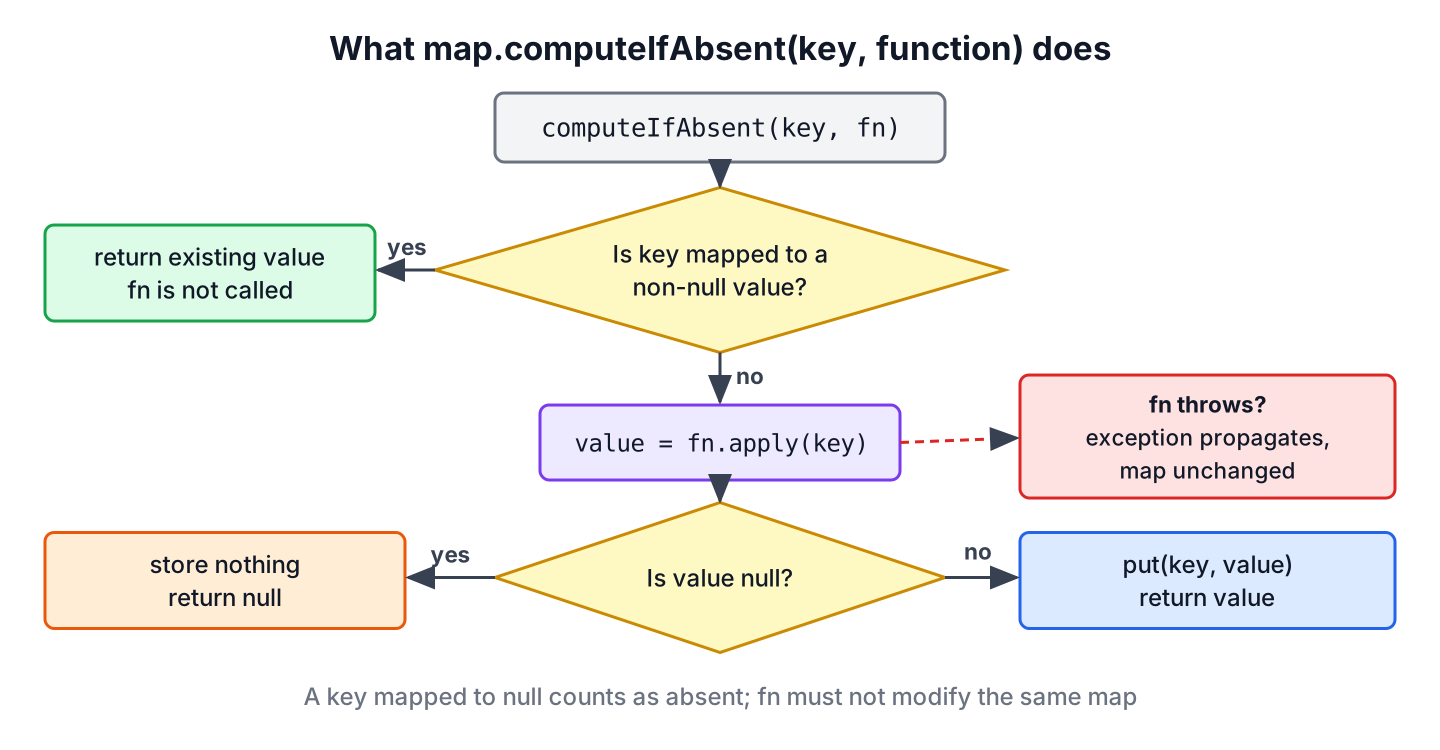
Each parameter has one rule, and the return value depends on what the map held before the call.
- The key parameter is the key to look up, and it is also passed to the function.
- The mappingFunction parameter computes the value for a missing key. It must not be null.
- The return value is the current value of the key after the call. It is either the existing value, the newly computed value, or null when the function returned null.
Each case of the call has a defined outcome, and the difference between a missing key and a key mapped to null matters in a HashMap, which allows null values.
| Map state before the call | Function called? | What the map holds after the call | Return value |
|---|---|---|---|
| Key mapped to a non-null value | No | Unchanged | The existing value |
| Key missing | Yes | New entry, unless the function returns null | The computed value |
| Key mapped to null | Yes | The null is replaced, unless the function returns null | The computed value |
| Function returns null | Yes | No new entry; an existing null entry stays | null |
| Function throws an exception | Yes | Unchanged | None, the exception propagates |
3. Handling null and Exceptions in the Mapping Function
Most problems with computeIfAbsent() come from the mapping function, not from the map. These rules hold for HashMap, TreeMap and LinkedHashMap on Java 25, and the last one is specific to how the JDK maps detect changes.
3.1. The Mapping Function Must Not Be null
Passing null instead of a function throws a NullPointerException, even when the key already exists and the function would never run.
Map<String, Integer> stock = new HashMap<>(Map.of("apple", 5));
Integer value = stock.computeIfAbsent("apple", null);            // NullPointerException
3.2. The Mapping Function May Return null
When the function returns null, the method records no mapping and returns null. A key that was already mapped to null keeps its null entry, so containsKey() still returns true for it. A null result does not remove anything, which is the main difference from compute().
Map<String, Integer> stock = new HashMap<>();
Integer none = stock.computeIfAbsent("kiwi", k -> null);         // null
boolean stored = stock.containsKey("kiwi");                       // false

stock.put("plum", null);
Integer replaced = stock.computeIfAbsent("plum", k -> 7);        // 7 (null value counts as absent)
A null result becomes a problem when we assign it to a primitive variable, because unboxing null throws a NullPointerException. So we keep the result in a wrapper type such as Integer, or make sure the function never returns null.
Map<String, Integer> stock = new HashMap<>();
int unboxed = stock.computeIfAbsent("fig", k -> null);           // NullPointerException
Integer safe = stock.computeIfAbsent("fig", k -> null);          // null
3.3. The Mapping Function Throws an Exception
If the function throws an unchecked exception, computeIfAbsent() rethrows it and leaves the map unchanged. The next call for the same key runs the function again, which is the behavior we want for a remote call that failed once.
Map<String, Integer> stock = new HashMap<>();
Integer failed = stock.computeIfAbsent("kiwi", k -> Integer.parseInt("n/a"));   // NumberFormatException
boolean present = stock.containsKey("kiwi");                                     // false
A Function cannot throw checked exceptions. When the loading code throws an IOException, we catch it inside the lambda and wrap it in an UncheckedIOException.
3.4. The Mapping Function Must Not Change the Map
The mapping function must not add or remove entries in the same map, and on Java 25, HashMap and TreeMap throw a ConcurrentModificationException when they detect such a change. The HashMap check exists since Java 9, and it works on a best-effort basis. The classic case is a recursive cache, such as Fibonacci numbers, where the function calls computeIfAbsent() again for smaller numbers.
static long fib(int n, Map<Integer, Long> cache) {
    if (n < 2) {
        return n;
    }
    return cache.computeIfAbsent(n, k -> fib(k - 1, cache) + fib(k - 2, cache));
}
long broken = fib(30, new HashMap<>()); // ConcurrentModificationExceptionThe fix is to compute the value outside of computeIfAbsent() and store it with put(). The recursive calls finish before the put(), so the map is never changed during another update.
static long fibSafe(int n, Map<Integer, Long> cache) {
    if (n < 2) {
        return n;
    }
    Long known = cache.get(n);
    if (known != null) {
        return known;
    }
    long value = fibSafe(n - 1, cache) + fibSafe(n - 2, cache);
    cache.put(n, value);
    return value;
}
long fifty = fibSafe(50, new HashMap<>()); // 125862690254. Difference With putIfAbsent(), compute() and computeIfPresent()
The Map interface has five methods that look alike, and each one answers a different question. The two things to check are when the function runs and what a null result does.
| Method | Runs when | Function input | null result | Typical use |
|---|---|---|---|---|
| computeIfAbsent(k, f) | Key missing or mapped to null | Key | Nothing stored | Cache, multimap |
| putIfAbsent(k, v) | Always evaluates v first | None, a ready value | Stores null for a missing key | Default value that is cheap to create |
| computeIfPresent(k, f) | Key mapped to a non-null value | Key and old value | Removes the key | Update or remove existing entries |
| compute(k, f) | Always | Key and old value (may be null) | Removes the key | Create or update in one call |
| merge(k, v, f) | Key mapped to a non-null value, otherwise v is stored | Old value and v | Removes the key | Counters, joining values |
4.1. computeIfAbsent() vs putIfAbsent()
The putIfAbsent() method takes a ready value, so Java creates that value on every call, even when the key exists. It also returns the previous value, which is null for a new key, so chaining add() on it fails the first time.
Map<String, List<String>> postsByTag = new HashMap<>();
boolean added = postsByTag.putIfAbsent("java", new ArrayList<>()).add("Records");   // NullPointerException
Map<String, List<String>> postsByTag = new HashMap<>();
boolean added = postsByTag.computeIfAbsent("java", tag -> new ArrayList<>()).add("Records"); // true
List<String> posts = postsByTag.get("java"); // [Records]4.2. compute() and computeIfPresent()
Both methods take a BiFunction that receives the key and the current value. The computeIfPresent() method skips keys mapped to null, whereas compute() always runs and passes null as the old value. A null result from either of them removes the entry.
Map<String, Integer> visits = new HashMap<>();
visits.put("home", null);
Integer skipped = visits.computeIfPresent("home", (k, v) -> v + 1);           // null (not called)
Integer firstVisit = visits.compute("home", (k, v) -> v == null ? 1 : v + 1);  // 1
Integer nextVisit = visits.compute("home", (k, v) -> v == null ? 1 : v + 1);   // 2
Integer removed = visits.computeIfPresent("home", (k, v) -> null);            // null (entry removed)
boolean exists = visits.containsKey("home");                                   // false
5. Is computeIfAbsent() Thread-Safe?
The answer depends on the map. A plain HashMap has no synchronization, so two threads calling computeIfAbsent() for the same key can both run the function, and one result is lost. A ConcurrentHashMap performs the whole call atomically, and the function runs at most once per missing key.
A web app that counts page hits per URL from many request threads is a good fit. The computeIfAbsent() call creates one AtomicInteger per URL, and every thread increments the same counter.
ConcurrentMap<String, AtomicInteger> hits = new ConcurrentHashMap<>();
try (ExecutorService pool = Executors.newVirtualThreadPerTaskExecutor()) {
    for (int i = 0; i < 1000; i++) {
        pool.submit(() -> hits.computeIfAbsent("/home", url -> new AtomicInteger()).incrementAndGet());
    }
}
int total = hits.get("/home").get();                             // 1000
Other threads that update the same key wait while the function runs, so the function in a ConcurrentMap has to be short. A slow remote call inside it blocks every request for that key and sometimes for other keys in the same bucket too. The ConcurrentHashMap best practices cover that trade-off in more detail.
6. computeIfAbsent() FAQs
Developers who start using computeIfAbsent() often search for these follow-up questions.
6.1. Is the Function Called if the Key Is Mapped to null?
Yes. A key mapped to null counts as absent, so the function runs and its result replaces the null. If the function returns null again, the null entry stays as it is.
6.2. Does computeIfAbsent() Return the Old or the New Value?
The method returns the value that is in the map after the call. For an existing key, that is the old value. For a missing key, it is the new value, or null when the function returned null. This is different from put() and putIfAbsent(), which return the previous value.
6.3. Should I Use computeIfAbsent() or getOrDefault()?
Use getOrDefault() to read a fallback value without changing the map, and computeIfAbsent() when the value must be stored for later calls.
Map<String, Integer> limits = new HashMap<>();
int readOnly = limits.getOrDefault("guest", 10);                 // 10 (map unchanged)
int stored = limits.computeIfAbsent("guest", k -> 10);           // 10 (map now has guest=10)
int size = limits.size();                                        // 1
6.4. Can computeIfAbsent() Cause a ConcurrentModificationException?
Yes, when the mapping function changes the same HashMap or TreeMap, for example in a recursive cache. As we saw in section 3.4, the fix is to compute the value first and call put() after it.
7. Conclusion
The computeIfAbsent() method looks up a key and, only when the key is missing or mapped to null, runs a function to create and store the value. It turns the get(), check and put() sequence into one call, which is why it is the standard way to build multimaps and simple caches.
A null result stores nothing and removes nothing, an exception leaves the map unchanged, and the function must never modify the map it belongs to. For shared maps, ConcurrentHashMap runs the function at most once per key, so we keep that function short.
8. References
- Map.computeIfAbsent() Javadoc (Java 25)
- HashMap.computeIfAbsent() Javadoc (Java 25)
- ConcurrentHashMap.computeIfAbsent() Javadoc (Java 25)
Happy Learning !!
