

An unmodifiable map in Java is a read-only view of another map, so it shows every change made to the backing map, whereas an immutable map holds its own copy of the entries, which nobody can change after creation. Both throw UnsupportedOperationException when we call put(), remove() or clear() on them.
We use unmodifiable views to expose internal state without letting callers write to it, and immutable maps for configuration, lookup tables and data shared between threads. The following example wraps the same map both ways and changes the source afterwards.
Map<String, Integer> source = new HashMap<>();
source.put("apple", 5);
Map<String, Integer> view = Collections.unmodifiableMap(source);
Map<String, Integer> copy = Map.copyOf(source);
source.put("banana", 3);
int viewSize = view.size();                        // 2, the view sees the change
int copySize = copy.size();                        // 1, the copy does not
Integer blocked = view.put("cherry", 8);           // UnsupportedOperationException
Neither map accepts writes, but only the copy stays the same when the source changes. We compare the two kinds in detail, create each with the JDK factory methods Map.of(), Map.ofEntries(), Map.copyOf() and Collectors.toUnmodifiableMap() and with Guava’s ImmutableMap, and close with a table for picking the right one.
1. Immutable vs. Unmodifiable Maps
An unmodifiable view such as Collections.unmodifiableMap() stores only a reference to the backing map and forwards every read to it. Code that still holds the backing map can add, change or remove entries, and the view shows them at once. An immutable map has no backing map, because the factory method copies the entries into a new internal structure.
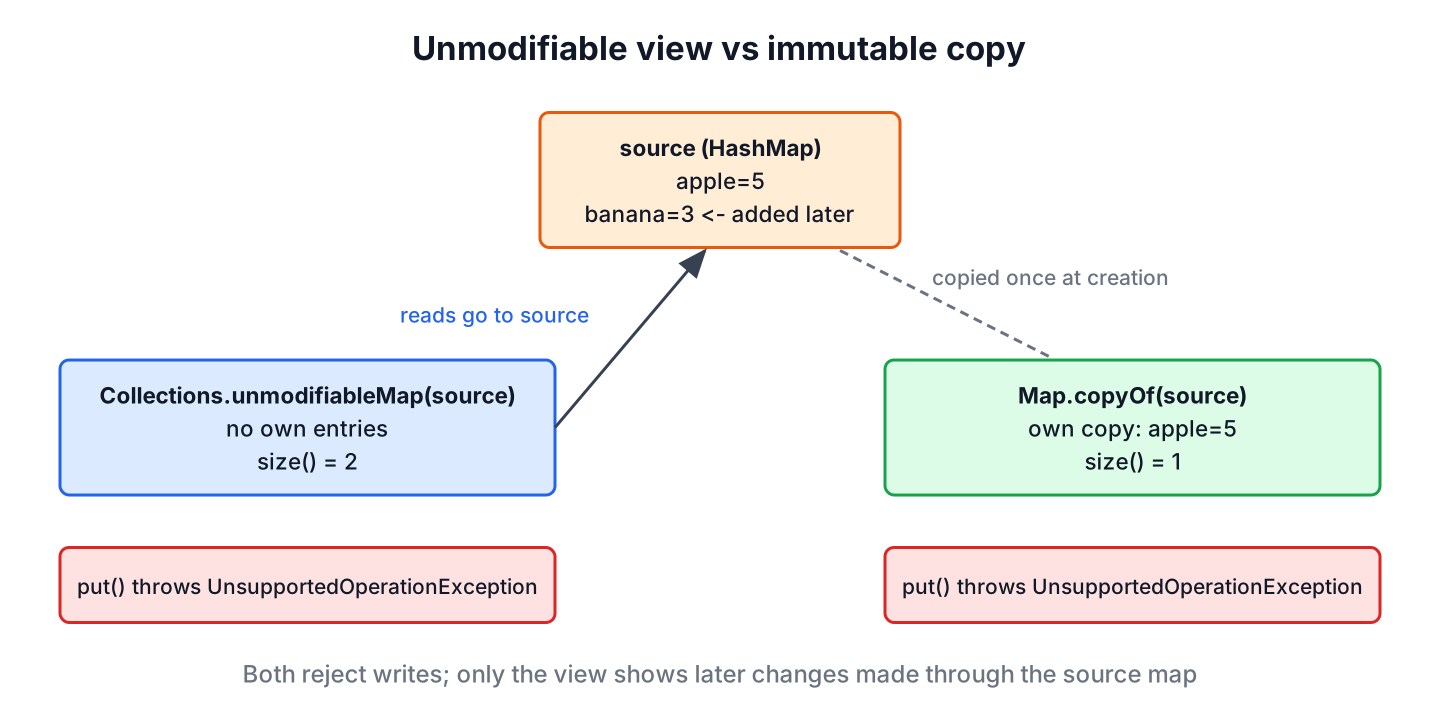
The JDK Javadoc uses the word “unmodifiable” for both kinds. It calls Collections.unmodifiableMap() an unmodifiable view, and it calls the result of Map.of() an unmodifiable map. The second kind is what most developers mean by an immutable map, and we use the two terms that way in this article.
| Feature | Unmodifiable view | Immutable map |
|---|---|---|
| Created with | Collections.unmodifiableMap(map) | Map.of(), Map.copyOf(), ImmutableMap |
| Copies the entries | No, wraps the backing map | Yes |
| Shows later changes of the source | Yes | No |
| Null keys and values | Whatever the backing map allows | NullPointerException |
| Creation cost | O(1) | O(n) |
| Safe to share between threads | Only if nobody writes to the backing map | Yes |
Both kinds are shallowly immutable, which means the map protects its entries but not the objects stored in them. If a value is a mutable object, such as an ArrayList, code can still change that object through the map.
Map<String, List<String>> roles = Map.of("anna", new ArrayList<>(List.of("viewer")));
roles.get("anna").add("admin");
List<String> annaRoles = roles.get("anna");        // [viewer, admin]
Map<String, List<String>> safeRoles = Map.of("bob", List.of("viewer"));
boolean added = safeRoles.get("bob").add("admin"); // UnsupportedOperationException
A map is fully immutable only when its keys and values are immutable too, for example String, Integer, records with immutable fields, or lists created with List.of(). The article on immutable classes covers the same rule for our own types.
2. Unmodifiable Maps
The method Collections.unmodifiableMap() has existed since Java 1.2. It returns a wrapper whose mutator methods throw UnsupportedOperationException, even for calls that would change nothing, such as removing a missing key. The class Collections has matching wrappers for the other map types.
- Collections.unmodifiableSortedMap() and unmodifiableNavigableMap() keep the sorted methods of a TreeMap.
- Collections.unmodifiableSequencedMap() (Java 21) keeps firstEntry(), lastEntry() and reversed() of a LinkedHashMap.
- Apache Commons Collections offers MapUtils.unmodifiableMap() with the same behavior.
The typical use is a getter. Say a shopping cart class keeps the quantities in a LinkedHashMap and lets the UI read them, while only the cart’s own methods may change them. Returning a view costs nothing per call and always shows the current cart.
class Cart {
    private final LinkedHashMap<String, Integer> items = new LinkedHashMap<>();

    void add(String product, int qty) {
        items.merge(product, qty, Integer::sum);
    }

    SequencedMap<String, Integer> items() {
        return Collections.unmodifiableSequencedMap(items);
    }
}
Cart cart = new Cart();
cart.add("apple", 2);
SequencedMap<String, Integer> items = cart.items();
cart.add("pear", 1);
Map.Entry<String, Integer> lastAdded = items.lastEntry(); // pear=1
Integer hacked = items.put("free-tv", 1); // UnsupportedOperationException
Map<String, Integer> commons = MapUtils.unmodifiableMap(new HashMap<>(Map.of("a", 1)));
int commonsSize = commons.size(); // 1Notice that items shows pear, which was added after we got the view. Wrapping a map that is already an unmodifiable view returns the same view instead of stacking another wrapper on top.
3. Immutable Maps
Since Java 9, the Map interface has static factory methods that create immutable maps (JEP 269), and Java 10 added Map.copyOf() and Collectors.toUnmodifiableMap(). All of them follow the same rules from the Map Javadoc.
- A null key or value throws NullPointerException, and so does containsKey(null) or get(null) on the created map.
- A duplicate key passed to Map.of() or Map.ofEntries() throws IllegalArgumentException.
- The iteration order is unspecified and changes between JVM runs, so tests must not compare the printed map with a fixed string.
The article on immutable collection factory methods covers List.of() and Set.of(), which follow the same rules.
3.1. Using Map.of()
The method Map.of() takes from zero to ten key-value pairs. Each pair count is a separate overload, so the compiler checks that keys and values alternate correctly.
Map<String, Integer> empty = Map.of();                                   // {}
Map<String, Integer> fruit = Map.of("apple", 5, "banana", 3, "cherry", 8);
Integer banana = fruit.get("banana");                                    // 3
Map<String, Integer> withNull = Map.of("apple", null);                   // NullPointerException
Map<String, Integer> duplicate = Map.of("apple", 5, "apple", 6);         // IllegalArgumentException: duplicate key: apple
boolean nullLookup = fruit.containsKey(null);                            // NullPointerException
The containsKey(null) failure surprises developers who move code from HashMap, where it returns false. When the key comes from user input, we check it for null before the lookup.
3.2. Creating Immutable Maps With More Than 10 Entries
For more than ten pairs, Map.ofEntries() takes any number of entries created with Map.entry(). It follows the same null and duplicate rules as Map.of().
Map<String, String> currencies = Map.ofEntries(
        Map.entry("US", "USD"),
        Map.entry("DE", "EUR"),
        Map.entry("IN", "INR"),
        Map.entry("JP", "JPY"));
String india = currencies.get("IN");                         // "INR"
int countries = currencies.size();                           // 4
With a static import of java.util.Map.entry, each line shortens to entry(“US”, “USD”), which reads well in long lookup tables.
3.3. Copying a Mutable Map With Map.copyOf()
The method Map.copyOf() (Java 10) creates an immutable copy of any map. Later changes to the source do not reach the copy. If the source is already an immutable map, copyOf() returns it without copying, so calling it defensively costs nothing in that case.
Map<String, Integer> stock = new HashMap<>();
stock.put("apple", 5);
Map<String, Integer> snapshot = Map.copyOf(stock);
stock.put("banana", 3);
int snapshotSize = snapshot.size();                          // 1
boolean sameInstance = Map.copyOf(snapshot) == snapshot;     // true
stock.put("cherry", null);
Map<String, Integer> failed = Map.copyOf(stock);             // NullPointerException
A Map.copyOf() call in a record’s compact constructor is the shortest way to make a record with a map field immutable. The record AppConfig stores app settings, and the caller can no longer change them after construction.
record AppConfig(String name, Map<String, String> settings) {
    AppConfig {
        settings = Map.copyOf(settings);
    }
}
Map<String, String> raw = new HashMap<>();
raw.put("theme", "dark");
AppConfig config = new AppConfig("shop", raw);
raw.put("theme", "light");
String theme = config.settings().get("theme"); // "dark"
String changed = config.settings().put("theme", "light"); // UnsupportedOperationException3.4. Collecting a Stream Into an Unmodifiable Map
The collector Collectors.toUnmodifiableMap() (Java 10) builds an immutable map at the end of a stream pipeline. A duplicate key throws IllegalStateException, unless we pass a merge function as the third argument. When the order of the entries matters, we collect into a LinkedHashMap and wrap it with collectingAndThen().
List<String> words = List.of("apple", "fig", "pear", "plum");
Map<String, Integer> lengths = words.stream()
        .collect(Collectors.toUnmodifiableMap(w -> w, String::length));
Integer pearLength = lengths.get("pear");                               // 4
Map<Integer, String> byLength = words.stream()
        .collect(Collectors.toUnmodifiableMap(String::length, w -> w, (a, b) -> a + "," + b));
String fourLetters = byLength.get(4);                                   // "pear,plum"
Map<String, Integer> ordered = words.stream()
        .collect(Collectors.collectingAndThen(
                Collectors.toMap(w -> w, String::length, (a, b) -> a, LinkedHashMap::new),
                Collections::unmodifiableMap));
String inOrder = ordered.toString();                                    // "{apple=5, fig=3, pear=4, plum=4}"
The collectingAndThen() version returns a view of a LinkedHashMap that no other code can reach, so it is immutable in practice. The article on collecting a stream into an immutable collection shows the list and set versions.
3.5. Using Guava’s ImmutableMap
Guava’s ImmutableMap predates the JDK factory methods and is still useful because it keeps the insertion order of its entries. Like Map.of(), it rejects null keys and values. We add the dependency with Maven.
<dependency>
    <groupId>com.google.guava</groupId>
    <artifactId>guava</artifactId>
    <version>33.7.2-jre</version>
</dependency>
Guava offers three ways to create an ImmutableMap.
ImmutableMap<String, Integer> fixed = ImmutableMap.of("apple", 5, "banana", 3, "cherry", 8);
String keys = fixed.keySet().toString();                     // "[apple, banana, cherry]"
ImmutableMap<String, Integer> copied = ImmutableMap.copyOf(new LinkedHashMap<>(Map.of("fig", 7)));
int copiedSize = copied.size();                              // 1
ImmutableMap<String, Integer> built = ImmutableMap.<String, Integer>builder()
        .putAll(fixed)
        .put("date", 4)
        .build();
String builtKeys = built.keySet().toString();                // "[apple, banana, cherry, date]"
ImmutableMap<String, Integer> lastWins = ImmutableMap.<String, Integer>builder()
        .put("apple", 1)
        .put("apple", 2)
        .buildKeepingLast();
Integer apple = lastWins.get("apple");                       // 2
The method ImmutableMap.of() accepts up to ten pairs. The builder’s build() throws IllegalArgumentException on a duplicate key, whereas buildKeepingLast() keeps the last value. Declaring variables as ImmutableMap instead of Map also tells readers of our API that the map cannot change.
4. Performance and Efficiency
An unmodifiable view costs O(1) to create, because it wraps a reference, and every read goes through one extra method call. An immutable copy costs O(n) once, and after that, reads are as fast as in a HashMap. The maps from Map.of() also store their entries in one compact array, without a node object per entry.
The bigger difference is safety. A view is safe only while nobody keeps a reference to the backing map and writes to it, and a large code base breaks that rule sooner or later. A copy needs no such rule, and an immutable map that is published safely, for example through a final field, can be read by any number of threads without locks.
In practice, copying a configuration map of a few hundred entries at startup is cheap. A view pays off for large maps that change often and are read through a getter, like the cart in section 2.
5. Choosing Between an Unmodifiable View and an Immutable Map
The right choice depends on whether the reader should see later changes and whether the order of the entries matters.
| Need | Use |
|---|---|
| Read-only access to a map that keeps changing | Collections.unmodifiableMap() or unmodifiableSequencedMap() |
| Constant lookup table with up to 10 entries | Map.of() |
| Constant lookup table with more entries | Map.ofEntries() |
| Defensive copy in a constructor or record | Map.copyOf() |
| Result of a stream pipeline | Collectors.toUnmodifiableMap() |
| Immutable map that keeps insertion order | Guava ImmutableMap, or collectingAndThen() with a LinkedHashMap |
| Map with null keys or values | Collections.unmodifiableMap() over a HashMap |
The Java Collections guide shows where these maps fit among the other collection types.
6. Immutable and Unmodifiable Map FAQs
Most questions about immutable maps are about Map.of() and its rules.
6.1. Is Map.of() immutable?
Yes, in the everyday sense. The Javadoc calls it an unmodifiable map, because its mutator methods throw UnsupportedOperationException and it has no backing map. Its values are only as immutable as the objects we store in it.
6.2. Does Collections.unmodifiableMap() copy the map?
No. It returns a view that reads from the original map, so changes to the original show through. Use Map.copyOf() for a copy.
6.3. Can an immutable map contain null?
Not with Map.of(), Map.ofEntries(), Map.copyOf(), toUnmodifiableMap() or Guava’s ImmutableMap, which all throw NullPointerException. To keep null values, wrap a HashMap with Collections.unmodifiableMap() and do not share the HashMap.
6.4. How do we create an immutable map with more than 10 entries?
Use Map.ofEntries() with Map.entry() for each pair, build a HashMap and call Map.copyOf(), or use Guava’s ImmutableMap.builder(), as shown in section 3.2.
6.5. Is an unmodifiable map thread-safe?
Only while no thread writes to the backing map, because an unmodifiable view does not lock anything. An immutable map, such as the result of Map.copyOf(), is thread-safe once it is published safely.
6.6. What is the difference between Map.copyOf() and Collections.unmodifiableMap()?
Map.copyOf() copies the entries, rejects null and ignores later changes of the source. Collections.unmodifiableMap() wraps the source, accepts whatever the source accepts and shows every later change.
7. Conclusion
An unmodifiable view blocks writes through itself but follows its backing map, while an immutable map owns a copy of its entries. Both are shallow, so the values need to be immutable as well.
For new code, Map.of(), Map.ofEntries(), Map.copyOf() and Collectors.toUnmodifiableMap() cover most needs without a library. Guava’s ImmutableMap remains the simplest choice when an immutable map must keep its insertion order, and Collections.unmodifiableMap() remains the right tool for read-only access to data that keeps changing.
8. References
- Map Javadoc, Unmodifiable Maps (Java 25)
- Collections Javadoc (Java 25)
- Collectors Javadoc (Java 25)
- JEP 269: Convenience Factory Methods for Collections
- Guava ImmutableMap Javadoc
Happy Learning !!
