
Java TreeMap is a Map that keeps its keys sorted, either in their natural order or by a Comparator we pass to the constructor. It stores the entries in a red-black tree, so get(), put() and remove() take O(log n) time.
We use a TreeMap when the order of the keys is part of the answer, for example a price list printed from the lowest price, or a lookup for the nearest key such as “which shipping rate applies to 2.4 kg?”. Its navigation methods and range views answer those questions without a loop.
The following example stores discount tiers by order amount and runs the lookups that the later sections explain one by one.
TreeMap<Integer, String> tiers = new TreeMap<>();
tiers.put(100, "silver");
tiers.put(0, "basic");
tiers.put(500, "gold");
String sorted = tiers.toString();                          // "{0=basic, 100=silver, 500=gold}"
Integer lowest = tiers.firstKey();                         // 0
Integer floor = tiers.floorKey(250);                       // 100
Integer ceiling = tiers.ceilingKey(250);                   // 500
SortedMap<Integer, String> below500 = tiers.headMap(500);  // {0=basic, 100=silver}
NavigableMap<Integer, String> desc = tiers.descendingMap(); // {500=gold, 100=silver, 0=basic}
We inserted the keys out of order, and the map returned them sorted. We go through the tree behind that ordering, custom comparators, the navigation methods, and the subMap(), headMap() and tailMap() views.
1. How TreeMap Sorts Its Keys
A TreeMap stores each entry as a node of a red-black tree, which is a binary search tree that rebalances itself after every insert and removal. Keys smaller than a node go to its left subtree and larger keys go to its right subtree. The rebalancing keeps the height of the tree at about log n, so a lookup in a map with one million keys visits about 20 to 40 nodes.
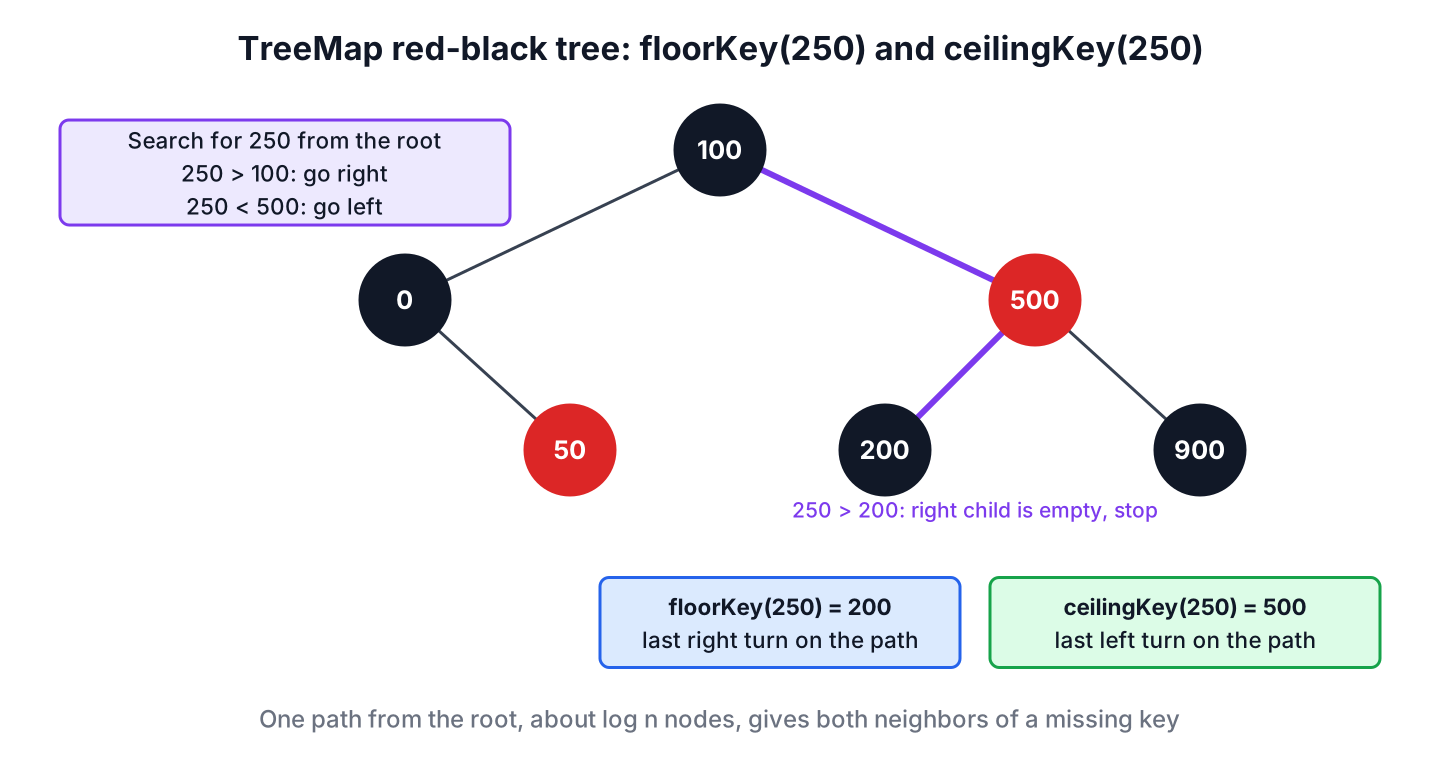
The tree compares keys with compareTo() from the Comparable interface, or with compare() of the Comparator we supplied. It never calls hashCode(). The class implements NavigableMap, which extends SortedMap, and since Java 21 both extend SequencedMap.
Compared with HashMap, a TreeMap is slower for single-key lookups and faster for anything that depends on order. The article on TreeMap vs HashMap compares the two in detail, and the Java Collections overview places both in the framework.
2. Creating a TreeMap
The four TreeMap constructors differ only in where the ordering comes from.
TreeMap<String, Integer> natural = new TreeMap<>();                                   // natural order of String
TreeMap<String, Integer> reverse = new TreeMap<>(Comparator.reverseOrder());          // descending
TreeMap<String, Integer> fromMap = new TreeMap<>(Map.of("pear", 2, "fig", 7));        // {fig=7, pear=2}
TreeMap<String, Integer> sameOrder = new TreeMap<>(reverse);                          // copies the comparator too
The constructor that takes a SortedMap keeps the comparator of the source map, whereas the Map constructor always uses natural ordering. A copy of a TreeMap sorted in reverse order is therefore sorted in reverse order as well.
2.1. Sorting Keys With a Comparator
A comparator lets us sort keys that have no natural order, or sort them differently. Case-insensitive maps are the most common case, and String.CASE_INSENSITIVE_ORDER gives us one without any extra code.
TreeMap<String, String> headers = new TreeMap<>(String.CASE_INSENSITIVE_ORDER);
headers.put("Content-Type", "text/html");
String type = headers.get("content-type");                 // "text/html"
headers.put("CONTENT-TYPE", "application/json");
int headerCount = headers.size();                          // 1
String stored = headers.toString();                        // "{Content-Type=application/json}"
A TreeMap treats two keys as the same key whenever the comparator returns 0, even when equals() says they differ. That is what we want for HTTP headers, but it loses data when the comparator looks at only part of the key.
TreeMap<String, Integer> byLength = new TreeMap<>(Comparator.comparingInt(String::length));
byLength.put("kiwi", 1);
byLength.put("pear", 2);
String lost = byLength.toString();                         // "{kiwi=2}"
TreeMap<String, Integer> fixed = new TreeMap<>(Comparator.comparingInt(String::length).thenComparing(Comparator.naturalOrder()));
fixed.put("kiwi", 1);
fixed.put("pear", 2);
String kept = fixed.toString();                            // "{kiwi=1, pear=2}"
The key pear has the same length as kiwi, so the first map replaced the value of kiwi. Adding thenComparing() as a tie-breaker keeps both keys.
3. Adding, Reading and Removing Entries
The Map methods work on a TreeMap the way they work on any map, and every iteration returns the entries in key order. Iterating with forEach() or entrySet() reads each entry once, whereas looping over keySet() and calling get() searches the tree again for every key.
TreeMap<String, Integer> pantry = new TreeMap<>();
pantry.put("rice", 2);
pantry.put("flour", 1);
pantry.merge("rice", 3, Integer::sum);
Integer rice = pantry.get("rice");                          // 5
Integer sugar = pantry.getOrDefault("sugar", 0);            // 0
Integer removed = pantry.remove("flour");                   // 1
boolean hasFlour = pantry.containsKey("flour");             // false
StringBuilder report = new StringBuilder();
pantry.forEach((item, qty) -> report.append(item).append('=').append(qty).append(' '));
String line = report.toString().strip();                    // "rice=5"
4. Finding the Nearest Key
The NavigableMap interface adds methods that find the closest key to a given value. Each method exists in a …Key() form that returns the key and a …Entry() form that returns the key-value pair, and both return null when no such key exists. The exceptions are firstKey() and lastKey(), which throw NoSuchElementException on an empty map, whereas firstEntry() and lastEntry() return null. The third column applies each method to the keys 0, 100 and 500 of the intro example.
| Method | Returns | tiers result |
|---|---|---|
| floorKey(250) | Greatest key less than or equal to 250 | 100 |
| ceilingKey(250) | Least key greater than or equal to 250 | 500 |
| lowerKey(100) | Greatest key strictly less than 100 | 0 |
| higherKey(100) | Least key strictly greater than 100 | 500 |
| firstKey(), lastKey() | Smallest or largest key | 0, 500 |
| pollFirstEntry(), pollLastEntry() | Removes and returns the first or last entry | 0=basic, 500=gold |
| descendingMap() | A reverse-ordered view | {500=gold, 100=silver, 0=basic} |
A courier app charges by weight bands that start at 0 kg, 1 kg, 5 kg and 20 kg. To price a 2.4 kg parcel, the app needs the band with the largest start weight that does not exceed 2.4. That is one floorEntry() call.
TreeMap<Double, Double> rates = new TreeMap<>(Map.of(0.0, 4.0, 1.0, 6.5, 5.0, 9.0, 20.0, 15.0));
Map.Entry<Double, Double> band = rates.floorEntry(2.4);     // 1.0=6.5
Double price = band.getValue();                             // 6.5
Map.Entry<Double, Double> none = rates.floorEntry(-1.0);    // null
Map.Entry<Double, Double> heaviest = rates.lastEntry();     // 20.0=15.0
The entries returned by the navigation methods are snapshots. Calling setValue() on them throws UnsupportedOperationException, so we update a value with put() on the map. A real app also checks for the null result, because a weight below the first band has no rate.
5. Range Views With subMap(), headMap() and tailMap()
A range view is a SortedMap or NavigableMap that shows only the keys in a given range. The view is backed by the original map, so creating it only stores the two bounds and copies nothing. All three methods have a short form that returns a SortedMap and a form with boolean flags for inclusive or exclusive bounds that returns a NavigableMap.
The following example is a calendar app that stores booked appointments by start time, and the next three subsections query the same four bookings.
TreeMap<LocalTime, String> slots = new TreeMap<>();
slots.put(LocalTime.of(9, 0), "anna");
slots.put(LocalTime.of(10, 30), "bob");
slots.put(LocalTime.of(12, 0), "carl");
slots.put(LocalTime.of(15, 0), "dina");
int booked = slots.size();                                  // 4
5.1. subMap()
The method subMap(fromKey, toKey) returns the keys from fromKey, inclusive, to toKey, exclusive. The four-argument version sets both bounds explicitly.
TreeMap<LocalTime, String> slots = new TreeMap<>(Map.of(LocalTime.of(9, 0), "anna", LocalTime.of(10, 30), "bob", LocalTime.of(12, 0), "carl", LocalTime.of(15, 0), "dina"));
SortedMap<LocalTime, String> morning = slots.subMap(LocalTime.of(9, 0), LocalTime.of(12, 0));                      // {09:00=anna, 10:30=bob}
NavigableMap<LocalTime, String> withNoon = slots.subMap(LocalTime.of(9, 0), true, LocalTime.of(12, 0), true);      // {09:00=anna, 10:30=bob, 12:00=carl}
5.2. headMap()
The method headMap(toKey) returns all keys strictly less than toKey. With inclusive set to true, the view includes toKey as well.
TreeMap<LocalTime, String> slots = new TreeMap<>(Map.of(LocalTime.of(9, 0), "anna", LocalTime.of(10, 30), "bob", LocalTime.of(12, 0), "carl", LocalTime.of(15, 0), "dina"));
SortedMap<LocalTime, String> beforeNoon = slots.headMap(LocalTime.of(12, 0));               // {09:00=anna, 10:30=bob}
NavigableMap<LocalTime, String> untilNoon = slots.headMap(LocalTime.of(12, 0), true);       // {09:00=anna, 10:30=bob, 12:00=carl}
5.3. tailMap()
The method tailMap(fromKey) returns all keys greater than or equal to fromKey. With inclusive set to false, fromKey itself is left out.
TreeMap<LocalTime, String> slots = new TreeMap<>(Map.of(LocalTime.of(9, 0), "anna", LocalTime.of(10, 30), "bob", LocalTime.of(12, 0), "carl", LocalTime.of(15, 0), "dina"));
SortedMap<LocalTime, String> fromNoon = slots.tailMap(LocalTime.of(12, 0));                 // {12:00=carl, 15:00=dina}
NavigableMap<LocalTime, String> afterNoon = slots.tailMap(LocalTime.of(12, 0), false);      // {15:00=dina}
5.4. Range Views Are Backed by the TreeMap
Changes go both ways between a view and its map. A key added to the map inside the range appears in the view, and a write through the view changes the map. A view also enforces its range, so putting a key outside it throws IllegalArgumentException.
TreeMap<LocalTime, String> slots = new TreeMap<>(Map.of(LocalTime.of(9, 0), "anna", LocalTime.of(15, 0), "dina"));
SortedMap<LocalTime, String> morning = slots.subMap(LocalTime.of(8, 0), LocalTime.of(12, 0));
slots.put(LocalTime.of(11, 0), "eva");
int inView = morning.size();                                               // 2
morning.remove(LocalTime.of(9, 0));
boolean annaGone = !slots.containsKey(LocalTime.of(9, 0));                // true
String outside = morning.put(LocalTime.of(16, 0), "finn");                 // IllegalArgumentException: key out of range
TreeMap<LocalTime, String> copy = new TreeMap<>(morning);                  // independent copy
int copied = copy.size();                                                  // 1
When the result must not follow later changes, for example a report of the morning bookings, we copy the view into a new TreeMap as in the last lines.
5.5. Getting a Submap From a HashMap
A HashMap has no key order, so it has no range views. To get a submap of selected keys, we build a new map. Filtering the entries with a stream leaves the source unchanged, whereas keySet().retainAll() removes the other keys from the map it is called on, so we call it on a copy.
Map<String, Integer> stock = new HashMap<>(Map.of("apple", 5, "banana", 3, "cherry", 8));
Set<String> wanted = Set.of("apple", "cherry");
Map<String, Integer> filtered = stock.entrySet().stream()
        .filter(e -> wanted.contains(e.getKey()))
        .collect(Collectors.toMap(Map.Entry::getKey, Map.Entry::getValue));
int filteredSize = filtered.size();                         // 2
Map<String, Integer> retained = new HashMap<>(stock);
retained.keySet().retainAll(wanted);
boolean sameEntries = retained.equals(filtered);             // true
int original = stock.size();                                 // 3
Using a Set for the wanted keys keeps each contains() check at O(1). Guava’s Maps.filterKeys() returns a live filtered view instead of a copy, which suits large maps that we read only once.
Map<String, Integer> stock = new HashMap<>(Map.of("apple", 5, "banana", 3, "cherry", 8));
Map<String, Integer> view = Maps.filterKeys(stock, k -> k.startsWith("a") || k.startsWith("c"));
int viewSize = view.size();                                 // 2
6. TreeMap and Sequenced Collections in Java 21
Since Java 21, TreeMap is also a SequencedMap, so the sequenced collections methods work on it. The methods firstEntry(), lastEntry(), pollFirstEntry() and pollLastEntry() existed before, and reversed() returns the same kind of view as descendingMap(). The methods putFirst() and putLast() throw UnsupportedOperationException, because the comparator decides the position of every key.
TreeMap<String, Integer> scores = new TreeMap<>(Map.of("anna", 7, "bob", 9));
SequencedMap<String, Integer> sequenced = scores;
String firstName = sequenced.firstEntry().getKey();          // "anna"
SequencedMap<String, Integer> reversed = scores.reversed();  // {bob=9, anna=7}
Integer forced = sequenced.putFirst("zoe", 1);               // UnsupportedOperationException
7. Null Keys, Performance and Thread Safety
A TreeMap with natural ordering rejects a null key with NullPointerException, even when the map is empty, because it compares every new key. A comparator built with Comparator.nullsFirst() or nullsLast() accepts one null key. Values can be null in both cases.
TreeMap<String, Integer> plain = new TreeMap<>();
Integer rejected = plain.put(null, 1);                       // NullPointerException
TreeMap<String, Integer> nullable = new TreeMap<>(Comparator.nullsFirst(Comparator.naturalOrder()));
nullable.put("b", 2);
nullable.put(null, 0);
String withNull = nullable.toString();                       // "{null=0, b=2}"
The operations containsKey(), get(), put() and remove() take O(log n) time, and so do the navigation methods. Iterating over a range costs time for each entry it returns, and so does size() on a range view, because the view counts the entries in its range. Each tree node holds the key, the value, three references to other nodes and a color flag, so a TreeMap does not use less memory than a HashMap with the same entries.
A TreeMap is not synchronized, and its iterators are fail-fast. For a map that several threads read and write, the JDK offers two options.
- The wrapper Collections.synchronizedSortedMap(new TreeMap<>()) locks the whole map on every call, and we must hold its lock while iterating.
- The class ConcurrentSkipListMap is a sorted NavigableMap with the same navigation methods and lock-free reads, which makes it the better choice for concurrent code.
8. TreeMap FAQs
Null keys, ordering and speed are the topics of most TreeMap questions.
8.1. Does TreeMap allow null keys?
Not with natural ordering, which throws NullPointerException. With a comparator that handles null, such as Comparator.nullsFirst(Comparator.naturalOrder()), it accepts one null key, as shown in section 7.
8.2. Is TreeMap sorted by key or by value?
By key only. To order entries by value, we sort entrySet() with Map.Entry.comparingByValue() and collect the result into a LinkedHashMap, as described in sorting a map by values.
8.3. How do we sort a TreeMap in descending order?
Either pass Comparator.reverseOrder() to the constructor, or keep the natural order and read descendingMap() or reversed(), which return reverse-ordered views of the same data.
8.4. What is the difference between subMap(), headMap() and tailMap()?
The method subMap() takes a lower and an upper bound, headMap() takes only an upper bound, and tailMap() takes only a lower bound. By default, the lower bound is inclusive and the upper bound is exclusive, and the overloads with boolean flags change that.
8.5. When should we use TreeMap instead of HashMap?
Use a TreeMap when we print or process the keys in sorted order, or need the nearest key, the first or last key, or a range of keys. For plain lookups by exact key, a HashMap is faster. For sorted unique values without a value part, TreeSet is the matching set.
9. Conclusion
A TreeMap keeps its keys sorted in a red-black tree, by natural order or by a comparator, and every basic operation costs O(log n). The comparator decides which keys count as equal, so it must look at the whole key or add a tie-breaker.
The navigation methods find the nearest key in one call, and subMap(), headMap() and tailMap() return live views of a key range. For concurrent access, ConcurrentSkipListMap offers the same API without a global lock.
10. References
- TreeMap Javadoc (Java 25)
- NavigableMap Javadoc (Java 25)
- ConcurrentSkipListMap Javadoc (Java 25)
- JEP 431: Sequenced Collections
Happy Learning !!
