

ResolverStyle.STRICT makes a DateTimeFormatter reject a date or time that does not exist, such as February 29, 2019, with a DateTimeParseException instead of changing it into a nearby valid value. We switch it on with withResolverStyle(ResolverStyle.STRICT), and the two other styles, SMART and LENIENT, adjust bad values in different ways.
We use strict parsing whenever the parsed value must be the value the user or the file meant, for example a check-in date in a hotel booking form or a payment date in a bank statement import. A silent change from February 29 to February 28 there is a bug, not a convenience.
The following example parses the same non-existent date with a strict and with a default (smart) formatter.
DateTimeFormatter strict = DateTimeFormatter.ofPattern("uuuu-MM-dd").withResolverStyle(ResolverStyle.STRICT);
LocalDate valid = LocalDate.parse("2019-02-28", strict);      // 2019-02-28
LocalDate invalid = LocalDate.parse("2019-02-29", strict);    // DateTimeParseException: '2019' is not a leap year
DateTimeFormatter smart = DateTimeFormatter.ofPattern("uuuu-MM-dd");
LocalDate adjusted = LocalDate.parse("2019-02-29", smart);    // 2019-02-28
Notice the year letters uuuu instead of yyyy; with yyyy, even the valid date fails in strict mode. We compare the three styles on the same inputs first, look at that year trap in detail, apply strict parsing to LocalDateTime and LocalTime, and build a validation helper.
1. ResolverStyle Parsing Styles
Parsing a string to a date in Java happens in two phases. In the first phase, the formatter reads the text according to the pattern and collects field values such as day 29, month 2 and year 2019. In the second phase, it resolves those field values into a date or time object, and the ResolverStyle enum controls how this second phase treats values that do not fit.
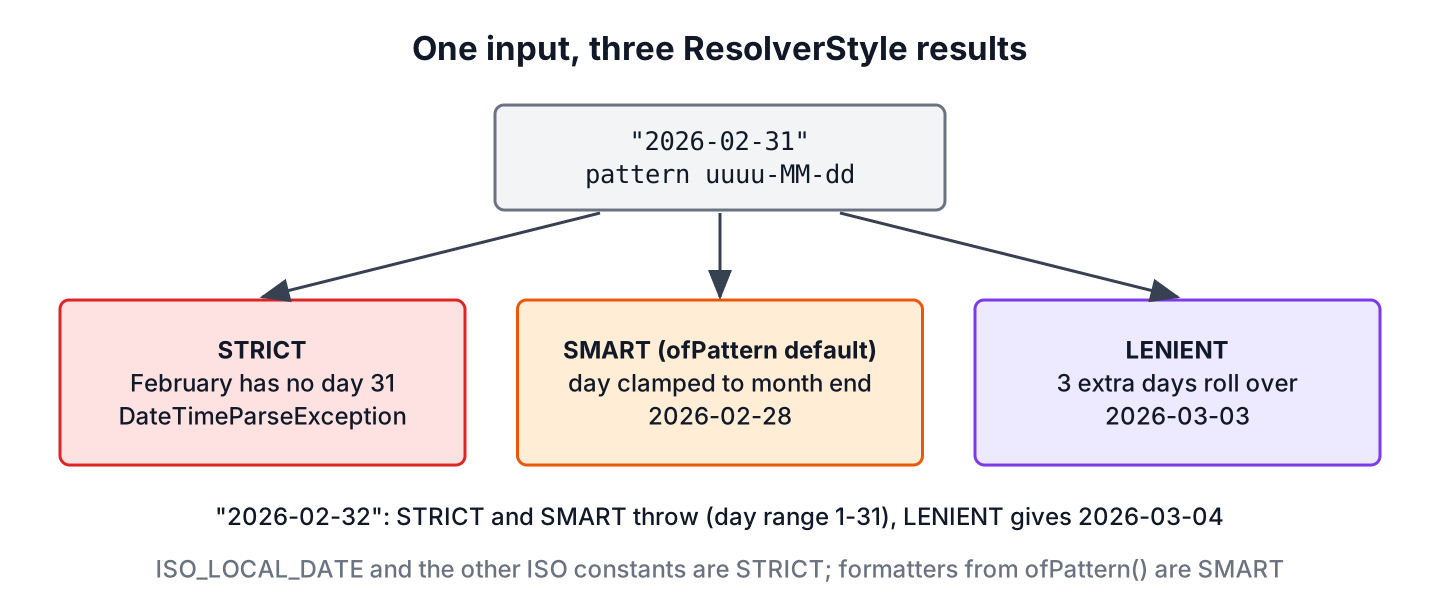
- STRICT accepts only values that form a real date or time, and throws DateTimeParseException otherwise.
- SMART rejects values outside the field range (day 32, month 13), but changes a day of 29, 30 or 31 that the month does not have to the last day of the month.
- LENIENT accepts out-of-range values and rolls the extra amount into the next field, so day 32 of February becomes a day in March.
The behavior is easiest to see on a few inputs parsed with the pattern uuuu-MM-dd.
| Input | STRICT | SMART | LENIENT |
|---|---|---|---|
| 2026-02-28 | 2026-02-28 | 2026-02-28 | 2026-02-28 |
| 2028-02-29 (leap year) | 2028-02-29 | 2028-02-29 | 2028-02-29 |
| 2026-02-29 | Exception | 2026-02-28 | 2026-03-01 |
| 2026-04-31 | Exception | 2026-04-30 | 2026-05-01 |
| 2026-02-32 | Exception | Exception | 2026-03-04 |
| 2026-13-01 | Exception | Exception | 2027-01-01 |
| 2026-03-00 | Exception | Exception | 2026-02-28 |
The name SMART hides a simple rule. The SMART style checks each field against its range, and for the day of month it only clamps 29, 30 and 31 to the end of the month.
DateTimeFormatter base = DateTimeFormatter.ofPattern("uuuu-MM-dd");
LocalDate s1 = LocalDate.parse("2026-04-31", base);                                          // 2026-04-30
LocalDate s2 = LocalDate.parse("2026-02-32", base);                                          // DateTimeParseException: Invalid value for DayOfMonth
LocalDate l1 = LocalDate.parse("2026-02-32", base.withResolverStyle(ResolverStyle.LENIENT));  // 2026-03-04
LocalDate l2 = LocalDate.parse("2026-13-01", base.withResolverStyle(ResolverStyle.LENIENT));  // 2027-01-01
1.1. Which Style a Formatter Uses by Default
A formatter created with ofPattern() uses SMART, whereas the predefined ISO formatters use STRICT. That is why LocalDate.parse(“2019-02-29”) without a formatter throws, while the same text with a hand-written uuuu-MM-dd pattern returns February 28.
ResolverStyle fromPattern = DateTimeFormatter.ofPattern("dd/MM/uuuu").getResolverStyle();   // SMART
ResolverStyle isoDate = DateTimeFormatter.ISO_LOCAL_DATE.getResolverStyle();                 // STRICT
ResolverStyle rfc = DateTimeFormatter.RFC_1123_DATE_TIME.getResolverStyle();                 // SMART
LocalDate isoParse = LocalDate.parse("2019-02-29");                                          // DateTimeParseException: '2019' is not a leap year
The method withResolverStyle() returns a new formatter and leaves the original unchanged, because DateTimeFormatter is immutable. We keep the strict copy in a constant and reuse it.
2. Strict LocalDate Parsing
Strict parsing of a LocalDate needs one more change besides withResolverStyle(). The pattern letter y means year-of-era, a year that counts from 1 within an era (AD or BC), while u means the proleptic year, a plain signed year number. With yyyy and no era in the text, STRICT has a year-of-era but no era, so it refuses to build a date.
DateTimeFormatter yearOfEra = DateTimeFormatter.ofPattern("yyyy-MM-dd").withResolverStyle(ResolverStyle.STRICT);
LocalDate fails = LocalDate.parse("2026-03-14", yearOfEra);   // DateTimeParseException: Unable to obtain LocalDate from TemporalAccessor
SMART and LENIENT assume the current era, so the same yyyy pattern works there, which is why the problem shows up only after someone adds STRICT to existing code. There are three ways to fix it.
- Use uuuu in the pattern. This is the simplest fix and the one we use in all examples.
- Keep yyyy and add the era to the pattern with G, when the text contains it.
- Keep yyyy and give the era a default value with parseDefaulting(ChronoField.ERA, 1) on a DateTimeFormatterBuilder.
DateTimeFormatter proleptic = DateTimeFormatter.ofPattern("uuuu-MM-dd").withResolverStyle(ResolverStyle.STRICT);
LocalDate checkIn = LocalDate.parse("2026-03-14", proleptic);        // 2026-03-14
LocalDate badCheckIn = LocalDate.parse("2026-02-30", proleptic);     // DateTimeParseException: Invalid date 'FEBRUARY 30'
DateTimeFormatter eraDefault = new DateTimeFormatterBuilder()
        .appendPattern("yyyy-MM-dd")
        .parseDefaulting(ChronoField.ERA, 1)
        .toFormatter()
        .withResolverStyle(ResolverStyle.STRICT);
LocalDate withEra = LocalDate.parse("2026-03-14", eraDefault);       // 2026-03-14
For the ISO format yyyy-MM-dd itself, we can skip the pattern and use LocalDate.parse(text), which is already strict, as section 1 showed. The String to LocalDate article covers the other pattern letters.
3. Strict LocalDateTime Parsing
The same rules apply to the time fields of a LocalDateTime or LocalTime. Strict parsing rejects an impossible date part, and it also rejects hour 24, which SMART accepts as midnight of the next day.
DateTimeFormatter stamp = DateTimeFormatter.ofPattern("uuuu-MM-dd'T'HH:mm:ss.SSSS").withResolverStyle(ResolverStyle.STRICT);
LocalDateTime ok = LocalDateTime.parse("2019-02-28T11:23:56.1234", stamp);     // 2019-02-28T11:23:56.123400
LocalDateTime leap = LocalDateTime.parse("2019-02-29T11:23:56.1234", stamp);   // DateTimeParseException: '2019' is not a leap year
DateTimeFormatter minuteSmart = DateTimeFormatter.ofPattern("uuuu-MM-dd'T'HH:mm");
LocalDateTime nextDay = LocalDateTime.parse("2026-03-14T24:00", minuteSmart); // 2026-03-15T00:00
DateTimeFormatter minuteStrict = minuteSmart.withResolverStyle(ResolverStyle.STRICT);
LocalDateTime noHour24 = LocalDateTime.parse("2026-03-14T24:00", minuteStrict); // DateTimeParseException: Invalid value for HourOfDay
LocalTime lenientTime = LocalTime.parse("10:75", DateTimeFormatter.ofPattern("HH:mm").withResolverStyle(ResolverStyle.LENIENT)); // 11:15Hour 24 has a real use in schedules, where “open until 24:00” means the end of the day. If our input uses that convention, we keep SMART for that one formatter on purpose and document it; everywhere else, STRICT is the safer default.
4. Using ResolverStyle.STRICT to Validate Input
Say a hotel booking form sends the check-in date as dd/MM/uuuu text. The backend must reject 31/04/2026, because April has 30 days, instead of booking the guest for April 30. A strict formatter in a small class does the check, and the method returns an empty Optional for any text that is not a real date.
final class CheckInDates {
    private static final DateTimeFormatter FORMAT =
            DateTimeFormatter.ofPattern("dd/MM/uuuu").withResolverStyle(ResolverStyle.STRICT);

    static Optional<LocalDate> parse(String text) {
        if (text == null) {
            return Optional.empty();
        }
        try {
            return Optional.of(LocalDate.parse(text.strip(), FORMAT));
        } catch (DateTimeParseException e) {
            return Optional.empty();
        }
    }
}
Optional<LocalDate> april30 = CheckInDates.parse("30/04/2026"); // Optional[2026-04-30]
Optional<LocalDate> april31 = CheckInDates.parse("31/04/2026"); // Optional.empty
Optional<LocalDate> leapDay = CheckInDates.parse("29/02/2028"); // Optional[2028-02-29]Strict parsing proves only that the date exists. Business rules, such as “check-in is not in the past”, come after parsing, and the date validation article adds those range checks.
LENIENT is rarely the right choice for input, because it turns a typing error such as 32/01/2026 into a valid but wrong date, February 1.
5. ResolverStyle FAQs
Switching formatters to strict mode changes how existing patterns and inputs behave.
5.1. Why does yyyy fail with ResolverStyle.STRICT?
Because yyyy is the year-of-era, and STRICT needs the era to turn it into a year. The text has no era, so the formatter cannot build a LocalDate and throws “Unable to obtain LocalDate from TemporalAccessor”. We replace yyyy with uuuu, as in section 2.
5.2. Does LocalDate.parse() without a formatter use STRICT?
Yes. It uses ISO_LOCAL_DATE, whose resolver style is STRICT, so 2026-02-30 throws. Only formatters that we create with ofPattern() or DateTimeFormatterBuilder start as SMART.
5.3. Does STRICT check that the day name matches the date?
Yes, but so do the other styles. If the pattern contains EEE and the text says Fri 2026-03-14, every style throws “Conflict found”, because March 14, 2026 is a Saturday.
5.4. Does STRICT reject single-digit days such as 4/3/2026?
No. The number of digits is decided by the pattern in the first phase, not by the resolver style. The pattern d/M/uuuu accepts one or two digits in every style, and dd/MM/uuuu rejects 4/3/2026 in every style.
DateTimeFormatter loose = DateTimeFormatter.ofPattern("d/M/uuuu").withResolverStyle(ResolverStyle.STRICT);
LocalDate oneDigit = LocalDate.parse("4/3/2026", loose);   // 2026-03-04
6. Conclusion
ResolverStyle decides what happens to field values that do not form a real date or time. STRICT throws, SMART clamps day 29 to 31 to the end of the month but rejects other out-of-range values, and LENIENT rolls any extra amount into the next field.
Formatters from ofPattern() start as SMART, so we add withResolverStyle(ResolverStyle.STRICT) and write the year as uuuu for any text that comes from users or files. The DateTimeFormatter guide and the Java date and time tutorial link to the related parsing topics.
7. References
- ResolverStyle (Java SE 25 API)
- DateTimeFormatter.withResolverStyle() (Java SE 25 API)
- ChronoField.YEAR_OF_ERA (Java SE 25 API)
Happy Learning !!
