

The JMH error Unable to find the resource: /META-INF/BenchmarkList means the JMH runner found no benchmark list file on the classpath, because the JMH annotation processor did not run when our benchmark classes were compiled. The processor writes that file, so the fix is always to make the compiler run jmh-generator-annprocess and to rebuild.
On JDK 23 and later, the most common cause is a build that worked on JDK 21 or older. Since JDK 23, javac no longer runs annotation processors that it only finds on the classpath, and the official JMH 1.37 Maven archetype relies on it.
The following example is the Maven fix. It puts the processor on the processor path of maven-compiler-plugin, which works on every JDK from 8 to 25.
<plugin>
  <groupId>org.apache.maven.plugins</groupId>
  <artifactId>maven-compiler-plugin</artifactId>
  <version>3.16.0</version>
  <configuration>
    <annotationProcessorPaths>
      <path>
        <groupId>org.openjdk.jmh</groupId>
        <artifactId>jmh-generator-annprocess</artifactId>
        <version>1.37</version>
      </path>
    </annotationProcessorPaths>
  </configuration>
</plugin>
After the change, we run mvn clean package so the benchmark classes compile again. We also look at why the file goes missing, the javac change in JDK 23, two more Maven options, the Gradle and IDE setups, and the shaded JAR case where some benchmarks disappear.
1. Problem
JMH finds benchmarks through a generated file, not by scanning classes at runtime. When that file is not on the classpath, the JMH runner stops before it forks a single benchmark JVM and throws a RuntimeException, which is an unchecked exception, so nothing in the build warns us earlier.
The following example is a small benchmark that compares two ways to join words. The class compiles fine on JDK 25 with jmh-core 1.37 on the classpath.
@State(Scope.Benchmark)
@BenchmarkMode(Mode.AverageTime)
@OutputTimeUnit(TimeUnit.NANOSECONDS)
public class StringJoinBenchmark {

    String[] words = {"apple", "banana", "cherry"};

    @Benchmark
    public String concat() {
        String result = "";
        for (String word : words) {
            result += word;
        }
        return result;
    }

    @Benchmark
    public String builder() {
        StringBuilder sb = new StringBuilder();
        for (String word : words) {
            sb.append(word);
        }
        return sb.toString();
    }
}
When we compile it without the annotation processor and start the runner from a main() method, the run() call fails.
Options options = new OptionsBuilder()
        .include(StringJoinBenchmark.class.getSimpleName())
        .forks(1)
        .build();
Collection<RunResult> results = new Runner(options).run();   // RuntimeException: ERROR: Unable to find the resource: /META-INF/BenchmarkList
The uber JAR built from the JMH archetype fails the same way when we start it with java -jar target/benchmarks.jar on JDK 25. Notice that the trace ends in org.openjdk.jmh.Main instead of our own class.
Exception in thread "main" java.lang.RuntimeException: ERROR: Unable to find the resource: /META-INF/BenchmarkList
	at org.openjdk.jmh.runner.AbstractResourceReader.getReaders(AbstractResourceReader.java:98)
	at org.openjdk.jmh.runner.BenchmarkList.find(BenchmarkList.java:124)
	at org.openjdk.jmh.runner.Runner.internalRun(Runner.java:252)
	at org.openjdk.jmh.runner.Runner.run(Runner.java:208)
	at org.openjdk.jmh.Main.main(Main.java:71)
Say a team keeps a JMH module that compares two JSON parsers, and the CI job runs it every night. Somebody moves the build image from JDK 21 to JDK 25, no source file changes, and the next run fails with this error. The pom declares jmh-generator-annprocess as a plain dependency, which was enough until JDK 22.
2. Why the BenchmarkList File Is Missing
The JMH annotation processor, org.openjdk.jmh.generators.BenchmarkProcessor, runs inside javac. For every @Benchmark method it generates a wrapper class in a jmh_generated package, and it writes one line per benchmark into META-INF/BenchmarkList, plus compiler hints into META-INF/CompilerHints. At runtime, BenchmarkList.find() reads that file to learn which benchmarks exist.
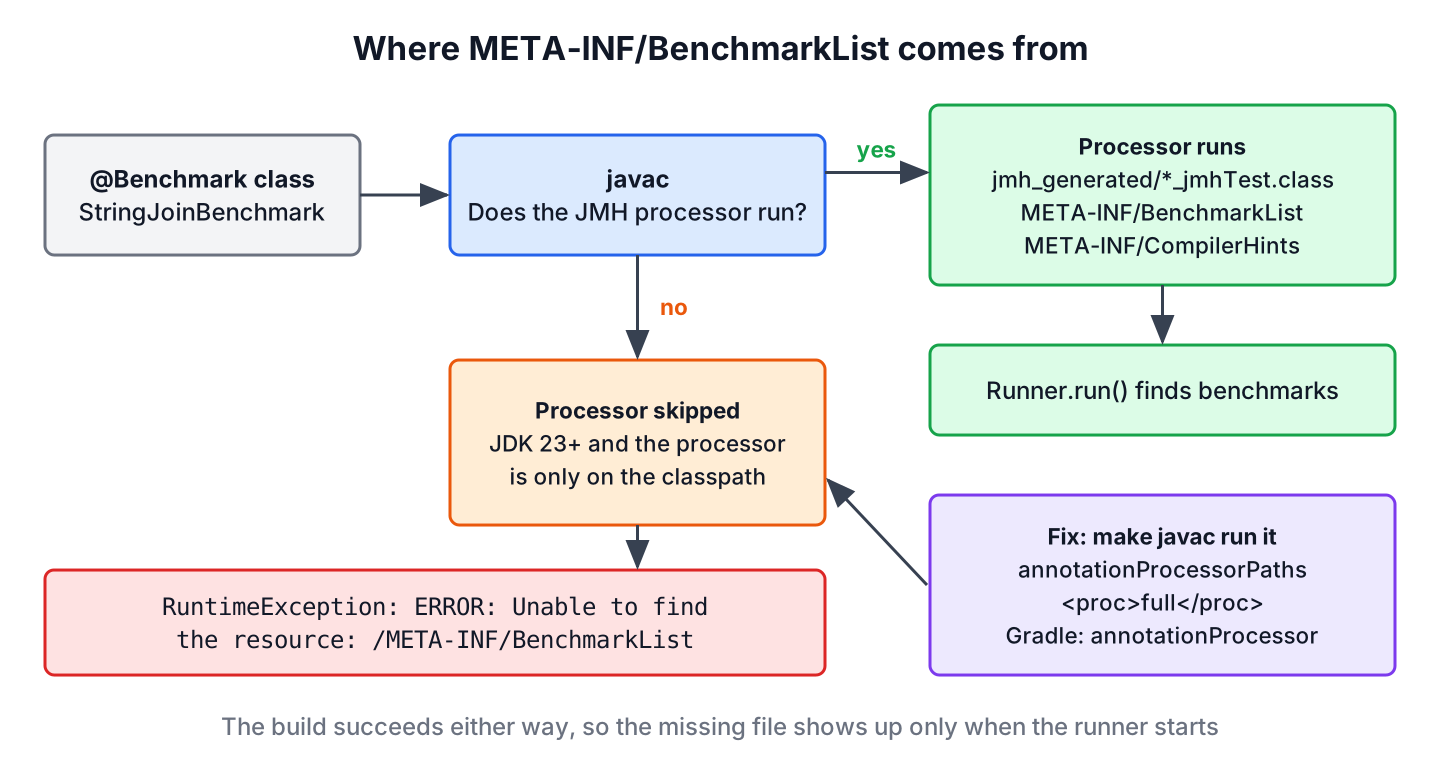
If the processor does not run, the build still succeeds, because our class is valid Java. The JAR contains StringJoinBenchmark.class and nothing else, and the problem shows up only when the runner starts.
2.1. The javac Change in JDK 23
Up to JDK 22, javac ran every processor it found on the classpath, so adding jmh-generator-annprocess as a dependency was enough. JDK 21 and 22 added a note about it, and JDK 23 changed the default policy (JDK-8321314). In JDK 23 and later, javac runs annotation processing only when we name a processor with -processor, set a –processor-path, or pass -proc:full.
| JDK used by javac | Processor only on the classpath | Result |
|---|---|---|
| 8 to 20 | Runs without any message | META-INF/BenchmarkList is generated |
| 21 and 22 | Runs and prints a note that a future release may disable it | META-INF/BenchmarkList is generated |
| 23 to 25 | Does not run | No BenchmarkList, the runner throws the error |
| Any, with -proc:full or –processor-path | Runs | META-INF/BenchmarkList is generated |
We can check the behavior with plain javac 25. The first command puts both JMH jars on the classpath, and the output folder gets only our class.
javac -cp jmh-core-1.37.jar:jmh-generator-annprocess-1.37.jar -d out StringJoinBenchmark.java
find out -type fout/com/example/StringJoinBenchmark.classAdding -proc:full, or moving the processor jar to –processor-path, brings the generated files back.
javac -proc:full -cp jmh-core-1.37.jar:jmh-generator-annprocess-1.37.jar -d out StringJoinBenchmark.java
ls out/META-INF
BenchmarkList
CompilerHintsThe same commands on JDK 21 generate the files and print the note “Annotation processing is enabled because one or more processors were found on the class path. A future release of javac may disable annotation processing …”. If our CI logs showed that note before an upgrade, the JDK 23 change is the cause.
3. Solution for Maven Projects
The maven-compiler-plugin offers three settings that make the processor run on JDK 23 and later. We tested each one with maven-compiler-plugin 3.16.0, JMH 1.37 and maven.compiler.release 25, and all three generate META-INF/BenchmarkList.
| Setting | What javac gets | When to pick it |
|---|---|---|
| annotationProcessorPaths | –processor-path with the JMH jars | Default choice, keeps the processor off the runtime classpath |
| <proc>full</proc> | -proc:full | Smallest change to an existing pom that has the processor as a dependency |
| annotationProcessors | -processor BenchmarkProcessor | Fix used in the JMH archetype on the master branch |
3.1. Adding the Processor Path
The annotationProcessorPaths setting from the intro is the cleanest fix. Once a processor path is set, javac looks for processors only there, so other jars on the classpath cannot start processors by accident. With this setting, the jmh-generator-annprocess dependency can be removed from the dependencies section.
3.2. Setting proc to full
If the pom already lists jmh-generator-annprocess as a provided dependency, as the JMH archetype does, one line restores the old behavior. Even the archetype’s old maven-compiler-plugin 3.8.0 passes the value through to javac, and the -proc:full flag exists in JDK 21 and later and in recent 17u, 11u and 8u updates.
<configuration>
  <proc>full</proc>
</configuration>
3.3. Naming the Processor
The third option names the processor class. It also needs the processor jar on the compile classpath, so we keep the provided dependency.
<configuration>
  <annotationProcessors>
    <annotationProcessor>org.openjdk.jmh.generators.BenchmarkProcessor</annotationProcessor>
  </annotationProcessors>
</configuration>
3.4. Rebuilding and Checking the JAR
Incremental builds can keep old class files, so we rebuild from scratch after any of the three changes. In Maven, to rebuild the project, run the clean package command, and list the JAR to confirm that the file is there.
mvn clean package
jar tf target/benchmarks.jar | grep META-INF/BenchmarkListMETA-INF/BenchmarkListAn empty result from the grep command means the processor still did not run. In that case, we run mvn -X clean compile and look for -processorpath or -proc:full in the printed javac arguments.
4. Solution for Gradle Projects
Gradle has kept annotation processors off the compile classpath since Gradle 5, so the JDK change does not matter there. The error appears when jmh-generator-annprocess sits in implementation instead of the annotationProcessor configuration. We tested both variants with Gradle 8.14 and a JDK 25 toolchain, and only the second one produced META-INF/BenchmarkList.
dependencies {
    implementation 'org.openjdk.jmh:jmh-core:1.37'
    annotationProcessor 'org.openjdk.jmh:jmh-generator-annprocess:1.37'
}
Benchmarks under src/test/java need testAnnotationProcessor instead. Another option is the jmh-gradle-plugin (me.champeau.jmh, version 0.7.3), which adds a separate src/jmh/java source set, sets up the processor and runs the benchmarks with gradle jmh.
5. Running Benchmarks From IntelliJ IDEA or Eclipse
An IDE compiles with its own settings, so a benchmark can work with mvn package and fail when we press Run on the main() method. IntelliJ IDEA reads annotationProcessorPaths from the pom when it imports a Maven project, so after changing the pom we reload the Maven project and rebuild.
- In IntelliJ IDEA, open Settings | Build, Execution, Deployment | Compiler | Annotation Processors and check that Enable annotation processing is selected for the module that contains the benchmarks. After that, run Build | Rebuild Project.
- In Eclipse, open the project properties, go to Java Compiler | Annotation Processing, select Enable annotation processing, and add the jmh-generator-annprocess jar under Factory Path.
- If the IDE still fails, delegate the build to Maven or Gradle in the IDE settings, so the IDE uses the same compiler setup as the command line.
6. Benchmarks Missing From a Multi-Module Shaded JAR
Multi-module builds produce a related problem. Each module with benchmarks writes its own META-INF/BenchmarkList, and the maven-shade-plugin keeps only one of the files with the same name when it builds the uber JAR. The runner starts, but it lists the benchmarks of one module only.
In our test, a json module and a csv module were shaded into one JAR, and java -jar benchmarks.jar -l listed only JsonBenchmark.parse. Two AppendingTransformer entries merge the files, and after the change both benchmarks appeared.
<transformers>
  <transformer implementation="org.apache.maven.plugins.shade.resource.ManifestResourceTransformer">
    <mainClass>org.openjdk.jmh.Main</mainClass>
  </transformer>
  <transformer implementation="org.apache.maven.plugins.shade.resource.AppendingTransformer">
    <resource>META-INF/BenchmarkList</resource>
  </transformer>
  <transformer implementation="org.apache.maven.plugins.shade.resource.AppendingTransformer">
    <resource>META-INF/CompilerHints</resource>
  </transformer>
</transformers>
7. JMH Configuration Example
A single-module pom.xml for JMH needs only jmh-core as a dependency, plus the compiler and shade plugins in current versions. It compiles with the processor path, builds an uber JAR named benchmarks.jar and runs on JDK 25.
<properties>
  <maven.compiler.release>25</maven.compiler.release>
  <project.build.sourceEncoding>UTF-8</project.build.sourceEncoding>
</properties>

<dependencies>
  <dependency>
    <groupId>org.openjdk.jmh</groupId>
    <artifactId>jmh-core</artifactId>
    <version>1.37</version>
  </dependency>
</dependencies>

<build>
  <plugins>
    <plugin>
      <groupId>org.apache.maven.plugins</groupId>
      <artifactId>maven-compiler-plugin</artifactId>
      <version>3.16.0</version>
      <configuration>
        <annotationProcessorPaths>
          <path>
            <groupId>org.openjdk.jmh</groupId>
            <artifactId>jmh-generator-annprocess</artifactId>
            <version>1.37</version>
          </path>
        </annotationProcessorPaths>
      </configuration>
    </plugin>
    <plugin>
      <groupId>org.apache.maven.plugins</groupId>
      <artifactId>maven-shade-plugin</artifactId>
      <version>3.6.2</version>
      <executions>
        <execution>
          <phase>package</phase>
          <goals>
            <goal>shade</goal>
          </goals>
          <configuration>
            <finalName>benchmarks</finalName>
            <transformers>
              <transformer implementation="org.apache.maven.plugins.shade.resource.ManifestResourceTransformer">
                <mainClass>org.openjdk.jmh.Main</mainClass>
              </transformer>
              <transformer implementation="org.apache.maven.plugins.shade.resource.ServicesResourceTransformer"/>
            </transformers>
            <filters>
              <filter>
                <artifact>*:*</artifact>
                <excludes>
                  <exclude>META-INF/*.SF</exclude>
                  <exclude>META-INF/*.DSA</exclude>
                  <exclude>META-INF/*.RSA</exclude>
                </excludes>
              </filter>
            </filters>
          </configuration>
        </execution>
      </executions>
    </plugin>
  </plugins>
</build>
The signature filter matters when a dependency ships a signed JAR, because a shaded JAR with stale signature files fails to start with a SecurityException. JMH 1.37 is the latest release on Maven Central, published in August 2023, and it runs fine on JDK 25.
8. BenchmarkList Error FAQs
The error shows up in IDE runs, test folders and CI pipelines, and each of them adds its own detail.
8.1. Does this error mean JMH 1.37 does not support Java 25?
No. JMH 1.37 compiles and runs benchmarks on JDK 25 once the annotation processor runs. The error comes from the build setup, not from the JMH runtime.
8.2. Why does the benchmark work with Maven but fail in the IDE?
The IDE compiled the classes with its own settings and the processor did not run there. Turn on annotation processing for the module, or delegate the build to Maven, as shown in section 5, and rebuild the project.
8.3. Can benchmarks live in src/test/java?
Yes. A configuration block at the plugin level of maven-compiler-plugin applies to both the compile and testCompile goals, so the processor path covers test sources too. In Gradle, we use testAnnotationProcessor. The runner must also start with the test classpath, for example from a test or with exec-maven-plugin and classpathScope set to test.
8.4. Will a newer JMH version print a clearer message?
Yes, once it is released. The JMH master branch replaces the short message with a guide that names the JDK 23 change and the shade merge problem. Version 1.37 is still the latest release, so the short message is what we see today.
9. Conclusion
The Unable to find the resource: /META-INF/BenchmarkList error always means the JMH annotation processor did not run at compile time. On JDK 23 and later, a processor that only sits on the classpath is ignored, so builds that relied on it, including the JMH 1.37 archetype, break after a JDK upgrade.
In Maven, we add jmh-generator-annprocess to annotationProcessorPaths, or set proc to full, and rebuild with mvn clean package. In Gradle, the processor belongs in annotationProcessor. For multi-module uber JARs, two AppendingTransformer entries keep every module’s benchmarks in the list.
10. References
- JDK 23 Release Notes, Annotation processing in javac disabled by default
- The javac Command, Java SE 25
- Maven Compiler Plugin, compiler:compile
- Maven Shade Plugin, Resource Transformers
- OpenJDK JMH on GitHub
Happy Learning !!

JMH annotation processor in the compiler plugin where to add this plugin
pom.xml