
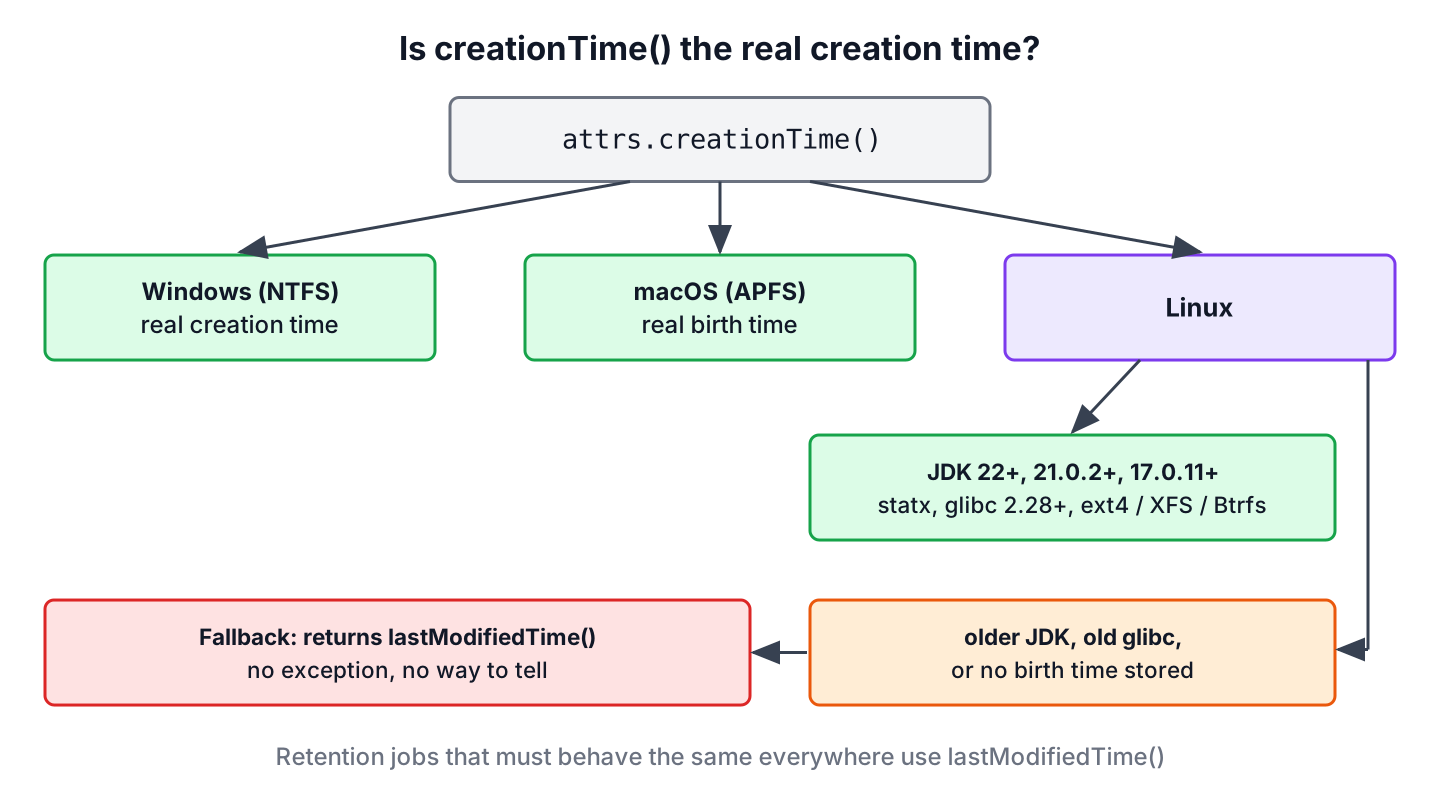
The file creation date in Java comes from BasicFileAttributes.creationTime(), which we read with Files.readAttributes(path, BasicFileAttributes.class) and which returns a FileTime. Whether that value is the real creation time depends on the operating system, the file system and the JDK version.
We read creation dates to show when a document was added, to sort uploads by age, or to delete exported reports after a retention period. Unlike the last-modified time, the creation time stays the same when the file content changes.
The following example reads the creation time of a new file, converts it to a local date and time, and shows that changing the last-modified time leaves the creation time alone.
Path report = Files.writeString(Files.createTempFile("report", ".txt"), "draft");
BasicFileAttributes attrs = Files.readAttributes(report, BasicFileAttributes.class);
FileTime created = attrs.creationTime();                                  // time the file was created, in UTC
LocalDateTime local = LocalDateTime.ofInstant(created.toInstant(), ZoneId.systemDefault());   // same moment in our time zone
Files.setLastModifiedTime(report, FileTime.from(Instant.parse("2020-01-01T00:00:00Z")));
FileTime createdAgain = Files.readAttributes(report, BasicFileAttributes.class).creationTime();
boolean unchanged = createdAgain.equals(created);                         // true on Windows, macOS and Linux with JDK 22+
The last comment matters, because the platform decides that result. We cover the timestamp attributes, both ways to read them, conversions and formatting, the platform rules, setting a creation time, and a cleanup job that finds old files.
1. File Attributes That Store Timestamps
A file system keeps metadata next to the content of each file, and Java exposes it as file attributes grouped in views. The basic view exists on every platform and holds three timestamps, along with the size and the file type.
| Attribute | What it records | Changes when |
|---|---|---|
| creationTime | When the file was created | The file is created again, for example by a copy or a save that replaces the file |
| lastModifiedTime | When the content last changed | Any write, or a call to Files.setLastModifiedTime() |
| lastAccessTime | When the file was last read | A read, if the file system tracks it, which many Linux mounts limit with relatime |
Other views add platform attributes, such as dos on Windows with the hidden and archive flags, and posix or unix on Linux and macOS with owners, permissions and the inode change time unix:ctime. The ctime of Unix is the time the metadata last changed, not the creation time, which is a common mix-up. Asking for a view the platform lacks throws UnsupportedOperationException, and an unknown attribute name throws IllegalArgumentException.
2. Using Files.readAttributes()
The Files.readAttributes(Path, Class, LinkOption…) method reads all basic attributes in one call to the file system and returns them as a typed object. It is the best choice when we need more than one value, such as the creation time and the size for a file list in a UI.
Path upload = Files.write(Files.createTempFile("photo", ".jpg"), new byte[2048]);
BasicFileAttributes info = Files.readAttributes(upload, BasicFileAttributes.class);
FileTime createdTime = info.creationTime();                               // creation time of photo.jpg
long uploadSize = info.size();                                            // 2048
boolean regular = info.isRegularFile();                                   // true
For a symbolic link, the method reads the attributes of the target file. Passing LinkOption.NOFOLLOW_LINKS reads the attributes of the link itself, so we get the time the link was created. Directories work the same way as files.
3. Using Files.getAttribute()
When we need one value, Files.getAttribute(Path, String, LinkOption…) reads it by name. The name has the form view:attribute, and the view defaults to basic. The method returns Object, so we cast the result to FileTime.
Path invoice = Files.writeString(Files.createTempFile("invoice", ".txt"), "Total 80");
FileTime byName = (FileTime) Files.getAttribute(invoice, "creationTime");
FileTime withView = (FileTime) Files.getAttribute(invoice, "basic:creationTime");
boolean sameValue = byName.equals(withView);                              // true
Object typo = Files.getAttribute(invoice, "createdTime");                 // IllegalArgumentException
The string form also reads several attributes at once into a map, as in Files.readAttributes(path, “creationTime,lastModifiedTime”). A typo in the attribute name compiles fine and fails only at runtime, which is why the typed BasicFileAttributes from section 2 is the safer default.
4. Converting in Different Time Units
A FileTime is a point on the timeline in UTC, with up to nanosecond precision. For display and date math, we convert it to java.time classes with toInstant(), and for numbers we use to(TimeUnit) or toMillis(), which count from the epoch 1970-01-01T00:00:00Z.
FileTime time = FileTime.from(Instant.parse("2026-03-15T09:30:00Z"));
Instant instant = time.toInstant();                                       // 2026-03-15T09:30:00Z
ZonedDateTime berlin = instant.atZone(ZoneId.of("Europe/Berlin"));        // 2026-03-15T10:30+01:00[Europe/Berlin]
String shown = DateTimeFormatter.ofPattern("dd MMM yyyy, HH:mm", Locale.ENGLISH).format(berlin);   // "15 Mar 2026, 10:30"
long millis = time.toMillis();                                            // 1773567000000
long days = time.to(TimeUnit.DAYS);                                       // 20527
Always pick the time zone on purpose. A FileTime printed with toString() is in UTC, while a user in Berlin expects local time, so we pass the user’s zone to atZone(). The ZonedDateTime guide covers zones in detail.
5. Platform Support for File Creation Time
A file system may lack a creation timestamp, and in that case creationTime() returns a default value, typically the last-modified time, instead of throwing an exception. Code that reads the value cannot tell a real creation time from the fallback.
| Platform | Real creation time | Notes |
|---|---|---|
| Windows (NTFS) | Yes | Stored by the file system for every file |
| macOS (APFS, HFS+) | Yes | Stored as the birth time |
| Linux, JDK 22 and later | Yes, on most local file systems | Uses the statx system call; ext4, XFS and Btrfs store the birth time |
| Linux, JDK 21.0.2+ and 17.0.11+ | Yes, in OpenJDK update builds | Backported from JDK 22, but Oracle JDK reverted the backport in 21.0.5 |
| Linux, older JDKs | No | Returns the last-modified time |
| Network shares, FAT, some containers | Depends | Falls back to the last-modified time when no birth time is available |
The Linux support came with JDK-8316304, which reads the birth time through statx. It needs glibc 2.28 or later, so old base images keep the fallback. An early version of the change returned the epoch for files without a birth time, and later releases, including JDK 23.0.2, 21.0.5 and 17.0.13, return the last-modified time instead.
Copies and some saves create a new file, so the creation time can be newer than we expect. Files.copy() makes a new file, and editors that save by writing a temporary file and renaming it over the original also reset the creation time on every save.
6. Setting the Creation Time of a File
Restoring files from a backup sometimes needs the original creation dates back. The method BasicFileAttributeView.setTimes() takes the last-modified, last-access and creation times, and null leaves a value unchanged.
Path restored = Files.writeString(Files.createTempFile("restored", ".txt"), "data");
FileTime original = FileTime.from(Instant.parse("2024-05-01T12:00:00Z"));
BasicFileAttributeView view = Files.getFileAttributeView(restored, BasicFileAttributeView.class);
view.setTimes(null, null, original);
FileTime after = Files.readAttributes(restored, BasicFileAttributes.class).creationTime();
boolean applied = after.equals(original);                                 // false on Linux, true on Windows and macOS
Windows applies the new creation time, and macOS does since JDK 20. Linux has no system call to change a birth time, so the JDK ignores the value without an exception. The call Files.setAttribute(path, “creationTime”, time) behaves the same way.
7. Finding Files Older Than a Number of Days
A reporting app writes an export for every request and must delete exports older than 30 days. The method Files.find() fits the job, because its filter gets the BasicFileAttributes of every file without an extra call.
For retention rules, the last-modified time is the more portable choice. It exists on every platform, backup tools keep it with COPY_ATTRIBUTES, and tests can set it, while a creation time on an older Linux JDK is the last-modified time anyway. We backdate one export by 45 days, and the filter finds only that file.
Path exports = Files.createTempDirectory("exports");
Path oldExport = Files.writeString(exports.resolve("march.csv"), "a,b");
Path newExport = Files.writeString(exports.resolve("october.csv"), "c,d");
Files.setLastModifiedTime(oldExport, FileTime.from(Instant.now().minus(Duration.ofDays(45))));
Instant cutoff = Instant.now().minus(Duration.ofDays(30));
List<String> expired;
try (Stream<Path> found = Files.find(exports, 1,
        (path, a) -> a.isRegularFile() && a.lastModifiedTime().toInstant().isBefore(cutoff))) {
    expired = found.map(p -> p.getFileName().toString()).sorted().toList();
}
List<String> toDelete = expired;                                          // [march.csv]
Replacing lastModifiedTime() with creationTime() in the filter gives an age by creation where the platform supports it. The files found this way can go to Files.delete(), and the find a file in a directory article shows more Files.find() filters.
8. File Creation Date in Java FAQs
The platform rules lead to most of the questions about creation dates.
8.1. Can we get the creation date with java.io.File?
No. The File class has only lastModified(). We convert with file.toPath() and read BasicFileAttributes, as in section 2.
8.2. Why is the creation time the same as the last-modified time on Linux?
The JDK either predates birth time support, which arrived in JDK 22 and in 21.0.2 and 17.0.11, or the file system or C library cannot report it. In both cases creationTime() returns the last-modified time. Upgrading the JDK and running on ext4, XFS or Btrfs with glibc 2.28 or later gives the real value.
8.3. How do we get the creation date of a directory?
The same way as for a file. Files.readAttributes(dir, BasicFileAttributes.class).creationTime() returns the creation time of the directory itself, not of any file inside it.
8.4. How do we format the creation time as a date string?
Convert it with toInstant(), attach a zone with atZone(), and format it with a DateTimeFormatter, as in section 4. The result of FileTime.toString() is always in UTC.
8.5. Does creationTime() throw an exception when the platform has no creation time?
No. It returns a fallback value, which is the last-modified time on current JDKs. Only Files.readAttributes() itself throws, for example NoSuchFileException when the file does not exist.
9. Conclusion
Java reads the file creation date through BasicFileAttributes.creationTime(), either with the typed Files.readAttributes() or by name with Files.getAttribute(). The result is a UTC FileTime that we convert with toInstant() and format in the user’s time zone.
Windows and macOS store a real creation time, and Linux delivers it with JDK 22 or the 21 and 17 updates that carry the backport. Everywhere else the method falls back to the last-modified time, which is also the portable choice for retention jobs. The Java IO tutorial has the other file metadata tasks.
10. References
- BasicFileAttributes Javadoc (Java 25)
- FileTime Javadoc
- BasicFileAttributeView Javadoc
- JDK-8316304, creationTime() support for Linux
- JDK-8151430, setting the creation time on macOS
Happy Learning !!
