
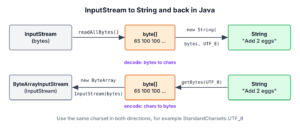
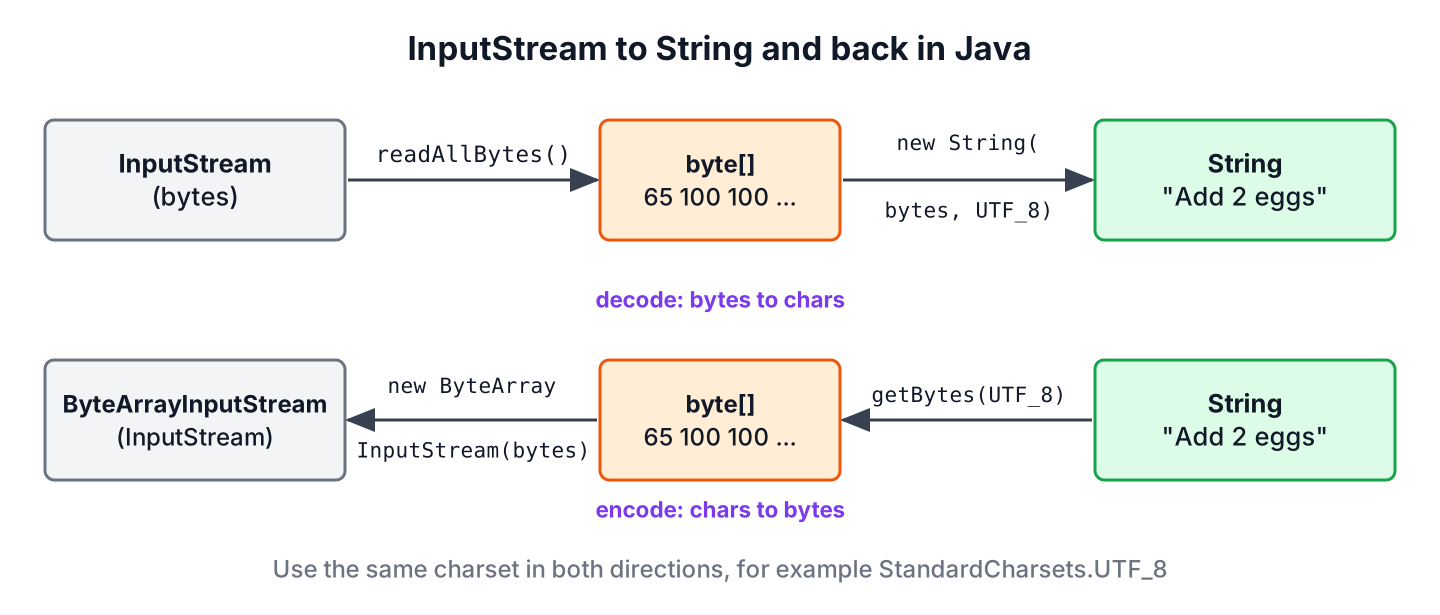
Converting an InputStream to a String in Java takes two steps, reading all bytes with readAllBytes() (Java 9) and decoding them with new String(bytes, StandardCharsets.UTF_8). Since Java 25, we can also wrap the stream in an InputStreamReader and call readAllAsString() on it.
We need InputStream to String conversion whenever an API gives us bytes but our code works with text, for example an HTTP response body, a file from the classpath, the output of a child process or an uploaded file. The way back, from a String to an InputStream, is as common in unit tests that feed text into a parser.
The following example converts a stream to a String in both ways and turns the text back into a stream.
InputStream in = new ByteArrayInputStream("Add 2 eggs".getBytes(StandardCharsets.UTF_8));
String text = new String(in.readAllBytes(), StandardCharsets.UTF_8);          // "Add 2 eggs"

InputStream in2 = new ByteArrayInputStream("Add 2 eggs".getBytes(StandardCharsets.UTF_8));
String text2 = new InputStreamReader(in2, StandardCharsets.UTF_8).readAllAsString();   // "Add 2 eggs"

InputStream back = new ByteArrayInputStream(text.getBytes(StandardCharsets.UTF_8));
int firstByte = back.read();                                                   // 65
Notice that we name the charset on both sides of each conversion, because bytes have no meaning as text without one. After the JDK methods, we cover BufferedReader, Scanner, the Guava and Commons IO helpers, the reverse conversion with ByteArrayInputStream and the StringReader class, and finish with a table for picking a method.
1. Using InputStream.readAllBytes()
The method readAllBytes() reads from the stream until the end and returns every byte in one array. The constructor String(byte[], Charset) decodes that array into characters. The two calls together are the shortest correct answer, and they keep the text as it was, including line breaks and a trailing newline.
The following example reads a recipe file through a file stream. The stream holds an open file handle, so we open it in a try-with-resources statement.
Path recipe = Files.writeString(Files.createTempFile("recipe", ".txt"), "Boil water\nAdd pasta\n");

String content;
try (InputStream in = Files.newInputStream(recipe)) {
    content = new String(in.readAllBytes(), StandardCharsets.UTF_8);
}
long lineCount = content.lines().count();          // 2
boolean endsWithNewline = content.endsWith("\n");  // true
If we have a Path and not a stream, Files.readString(path) does the same work in one call, as the article on reading a file to a String shows. The stream version matters for sources that have no path, such as a socket or a resource inside a JAR file.
The method readAllBytes() loads the whole stream into memory, so we never call it on input whose size we do not control. An array can hold at most about 2 GB, and the method throws an OutOfMemoryError as soon as the heap cannot hold the bytes. Say a price-comparison service reads the response bodies of partner APIs. A partner that sends a 3 GB body by mistake would crash the service, so the code reads at most a fixed number of bytes with readNBytes(int) (Java 11).
InputStream body = new ByteArrayInputStream("{\"price\": 5}".getBytes(StandardCharsets.UTF_8));
int limit = 1_000_000;

byte[] bytes = body.readNBytes(limit + 1);
if (bytes.length > limit) {
    throw new IOException("Response body larger than " + limit + " bytes");
}
String json = new String(bytes, StandardCharsets.UTF_8);   // "{"price": 5}"
Before Java 9, the usual pattern copied the stream into a ByteArrayOutputStream. It still has a use when the bytes go to the buffer in pieces, and the method toString(Charset) (Java 10) decodes the buffer without an extra array copy in our code.
InputStream in = new ByteArrayInputStream("Stir well".getBytes(StandardCharsets.UTF_8));
ByteArrayOutputStream buffer = new ByteArrayOutputStream();

long copied = in.transferTo(buffer);                      // 9
String text = buffer.toString(StandardCharsets.UTF_8);    // "Stir well"
2. Using BufferedReader
A BufferedReader on top of an InputStreamReader reads the stream as text, one line at a time. We pick it when we want to process lines while we read, for example to skip comments or to stop at a marker line. For a plain conversion of the whole stream, it has a side effect that the byte-based methods do not have.
The methods readLine() and lines() return each line without its line terminator. When we join the lines again, we choose the separator ourselves, so \r\n from a Windows file becomes \n, and the trailing newline disappears.
InputStream in = new ByteArrayInputStream("Boil water\r\nAdd pasta\r\n".getBytes(StandardCharsets.UTF_8));

String joined;
try (BufferedReader reader = new BufferedReader(new InputStreamReader(in, StandardCharsets.UTF_8))) {
    joined = reader.lines().collect(Collectors.joining("\n"));
}
int joinedLength = joined.length();            // 20
boolean hasCarriageReturn = joined.contains("\r");   // false
The original text has 23 characters, and the joined text has 20. That is fine for line-based processing, but it changes the content, so a checksum or signature over the text no longer matches. For an exact copy of the text through a Reader, we use Reader.readAllAsString() (Java 25), or Reader.transferTo(Writer) (Java 10) into a StringWriter on older versions.
InputStream in = new ByteArrayInputStream("Boil water\r\nAdd pasta\r\n".getBytes(StandardCharsets.UTF_8));

String exact;
try (Reader reader = new InputStreamReader(in, StandardCharsets.UTF_8)) {
    exact = reader.readAllAsString();
}
int exactLength = exact.length();              // 23

StringWriter writer = new StringWriter();
long chars = new StringReader(exact).transferTo(writer);   // 23
A loop that calls readLine() and appends each line to a StringBuilder without a separator, as older tutorials show, glues all lines into one. The BufferedReader guide covers line reading in detail.
3. Using Scanner
A Scanner splits its input into tokens with a delimiter pattern. With the pattern \A, which matches only the beginning of the input, the first token is the whole stream. The trick works, but it runs a regular expression over the text and it hides decoding problems, because Scanner replaces bytes it cannot decode with the character U+FFFD.
InputStream in = new ByteArrayInputStream("Serve hot".getBytes(StandardCharsets.UTF_8));

String text;
try (Scanner scanner = new Scanner(in, StandardCharsets.UTF_8).useDelimiter("\\A")) {
    text = scanner.hasNext() ? scanner.next() : "";
}
String result = text;   // "Serve hot"
The hasNext() check matters, because next() on an empty stream throws a NoSuchElementException. In Java source, the pattern is written “\\A”; a single backslash is an illegal escape and the code does not compile. We keep Scanner for token parsing, as in reading console input, and use readAllBytes() for conversion.
4. Using Guava or Commons IO
Projects that already use Guava (33.7.2-jre) or Apache Commons IO (2.22.0) can convert a stream with one library call. Neither library does anything for this task that the JDK cannot, so we do not add a dependency only for it.
InputStream in = new ByteArrayInputStream("Chop onions".getBytes(StandardCharsets.UTF_8));
String guava;
try (Reader reader = new InputStreamReader(in, StandardCharsets.UTF_8)) {
    guava = CharStreams.toString(reader);
}
String fromGuava = guava;                                           // "Chop onions"

InputStream in2 = new ByteArrayInputStream("Add salt".getBytes(StandardCharsets.UTF_8));
String fromCommons = IOUtils.toString(in2, StandardCharsets.UTF_8);   // "Add salt"
Guava’s CharStreams.toString() takes a Readable, so we decode the bytes with an InputStreamReader first. Commons IO’s IOUtils.toString(InputStream, Charset) reads the stream to the end but does not close it, so the caller still needs try-with-resources for a file or network stream. The overloads without a charset, such as IOUtils.toString(InputStream), are deprecated, because they used the platform charset.
5. Converting a String to an InputStream
The reverse conversion encodes the text with a charset and wraps the bytes in a ByteArrayInputStream. The stream reads from the array in memory, so it needs no closing and never throws an IOException on read().
A typical case is a unit test for a CSV import service whose method takes an InputStream. The test builds the input from a String instead of keeping a file in the test resources.
String csv = "apple,5\nbanana,3\n";
InputStream csvStream = new ByteArrayInputStream(csv.getBytes(StandardCharsets.UTF_8));

List<String> rows = new String(csvStream.readAllBytes(), StandardCharsets.UTF_8).lines().toList();   // [apple,5, banana,3]

InputStream empty = InputStream.nullInputStream();
int firstByte = empty.read();                                    // -1
InputStream fromCommons = IOUtils.toInputStream(csv, StandardCharsets.UTF_8);
int available = fromCommons.available();                         // 17
For an empty stream, InputStream.nullInputStream() (Java 11) returns a stream that is at its end from the start. Commons IO’s IOUtils.toInputStream() does the same as the ByteArrayInputStream line and is only worth it when the library is already on the classpath.
The method getBytes() without an argument uses the default charset, which is UTF-8 on every platform since Java 18 (JEP 400). We still pass StandardCharsets.UTF_8, because code that runs with -Dfile.encoding=COMPAT or on an older JVM gets a different default.
6. Reading a String as a Reader With StringReader
A StringReader is a character stream whose source is a String. We use it when a method accepts a Reader and we have the text in memory, so no charset is involved at all. The XML parsers in the JDK and JSON and CSV libraries such as Jackson and Commons CSV accept a Reader for that reason.
Reader reader = new StringReader("tea");

int first = reader.read();                     // 116
char[] rest = new char[2];
int count = reader.read(rest);                 // 2
int end = reader.read();                       // -1

Reader fromOf = Reader.of("coffee");
String all = fromOf.readAllAsString();         // "coffee"
The method read() returns each character as an int, and -1 at the end of the text. The factory method Reader.of(CharSequence) (Java 24) also accepts a StringBuilder. Unlike StringReader, the returned reader is not synchronized, so it is meant for use by one thread.
Say an order service receives an XML document as a String from a message queue. The DOM parser reads from an InputSource, and an InputSource wraps a Reader, so a StringReader connects the two. The article on parsing a String to an XML DOM covers the parser options.
String xml = "<order><item>apple</item></order>";

DocumentBuilder builder = DocumentBuilderFactory.newInstance().newDocumentBuilder();
Document document = builder.parse(new InputSource(new StringReader(xml)));
String item = document.getElementsByTagName("item").item(0).getTextContent();   // "apple"
Closing a StringReader releases nothing, but it makes later read() calls throw an IOException with the message Stream closed.
7. Picking a Conversion Method
For new code on Java 9 and later, readAllBytes() with an explicit charset is the default choice, and readNBytes() replaces it for input from outside the app. The other methods earn their place only when we need lines, tokens or a library that is already in the project.
| Method | Java version | Keeps line breaks | Best for |
|---|---|---|---|
| new String(in.readAllBytes(), UTF_8) | 9 | Yes | Default conversion of streams we trust |
| in.readNBytes(limit) | 11 | Yes | Input from users, partners or the network |
| new InputStreamReader(in, UTF_8).readAllAsString() | 25 | Yes | Code that already works with a Reader |
| in.transferTo(baos) + baos.toString(UTF_8) | 10 | Yes | Bytes that arrive in pieces |
| BufferedReader.lines() + joining() | 8 | No, normalizes them | Filtering or changing lines while reading |
| Scanner with \A | 5 | Yes | Legacy code only |
| IOUtils.toString(in, UTF_8) | Commons IO | Yes | Projects that use Commons IO |
8. InputStream to String FAQs
Most of these questions start with a String that looks wrong, or with code that still has to run on an old JDK.
8.1. Why Does My String Contain Strange Characters After Conversion?
The stream was decoded with a different charset than the one used to write it. For example, UTF-8 bytes decoded as ISO-8859-1 turn every accented letter into two wrong characters. We find out the charset of the source, such as the Content-Type header of an HTTP response, and pass it to the String constructor.
byte[] utf8 = "caf\u00e9".getBytes(StandardCharsets.UTF_8);

int rightLength = new String(utf8, StandardCharsets.UTF_8).length();        // 4
int wrongLength = new String(utf8, StandardCharsets.ISO_8859_1).length();   // 5
The article on reading and writing UTF-8 files explains the encodings in more detail.
8.2. How Do I Convert an InputStream to a String in Java 8?
Java 8 has no readAllBytes(), so we copy the stream into a ByteArrayOutputStream with a loop and call toString(“UTF-8”) on it. The loop reads into a buffer until read() returns -1. On Java 9 and later, readAllBytes() replaces the whole loop.
8.3. Does readAllBytes() Close the Stream?
No. The method reads to the end of the stream and leaves it open, so the code that opened the stream also closes it, preferably with try-with-resources. The same rule applies to readNBytes(), transferTo() and IOUtils.toString().
8.4. How Do I Read a File From the Classpath Into a String?
We open it with getResourceAsStream(), check for null, and read it with readAllBytes(). The method returns null when the resource does not exist, so Objects.requireNonNull() stops right there with a clear message instead of a NullPointerException somewhere later. The example reads the manifest of the first JAR file on the classpath; in an app, we pass our own path, such as “templates/welcome.txt”.
String manifest;
try (InputStream in = Objects.requireNonNull(ClassLoader.getSystemResourceAsStream("META-INF/MANIFEST.MF"), "resource missing")) {
    manifest = new String(in.readAllBytes(), StandardCharsets.UTF_8);
}
String firstLine = manifest.lines().findFirst().orElse("");   // "Manifest-Version: 1.0"
The article on reading a file from the resources folder covers class loaders and paths.
9. Conclusion
Converting an InputStream to a String in Java comes down to two steps, reading the bytes and decoding them with the right charset. On Java 9 and later, new String(in.readAllBytes(), StandardCharsets.UTF_8) covers most cases, readNBytes() protects us from input of unknown size, and Java 25 adds readAllAsString() for code that works with readers.
The way back is a ByteArrayInputStream over getBytes(StandardCharsets.UTF_8), or a StringReader when the target accepts characters. BufferedReader, Scanner, Guava and Commons IO still work, but they either change line breaks or add a dependency for something the JDK does in one line. More stream and file tasks are grouped in the Java IO tutorial.
10. References
- InputStream Javadoc
- Reader Javadoc
- ByteArrayOutputStream Javadoc
- StringReader Javadoc
- JEP 400: UTF-8 by Default
- Commons IO IOUtils Javadoc
Happy Learning !!

Hi I have the data in the notepad like below:
[VERSION_NUMBER]
version_number = 1.0.0
[MULTIBACK]
BACK= 44C0E0B36BD26.JPG
BACK2= 0E0B36BD2C.JPG
[VIOLATOR_HEADER_1]
num = 0
Total = 1
Possible = 0
So i have get all the data and store in the string but I need to select any one field and edit that field how can do that please let me know
Hey , I am trying to read the data from InputStream and want to make it as a string so how can i do that.
I have read somewhere we can use JsonReader but in tomcat server i can’t able to process Json Request because its showing me Caused by: java.lang.ClassNotFoundException: org.glassfish.json.JsonProviderImpl
There is a bug in your implementation of 1). You need to insert a new-line character for each line read, otherwise the resulting string will be incorrect. HTH
Sir i have a string
String s= “B55627&827,1101111”;
I need to read this string as follows :-
int a = Integer.parseInt(s.substring(0,4));
int b = Integer.parseInt(s.substring(4,8));
int c = Integer.parseInt(s.substring(8,11));
int d = Integer.parseInt(s.substring(11, 13))
int e = Integer.parseInt(s.substring(13, 15));
int f = Integer.parseInt(s.substring(15, 17));
But i am only reading the first line not able to read the next lines at all.
What should I do sir
Hi, because code is throwing
java.lang.NumberFormatExceptionin first line itself. “B556” is not a number.Thank you sir
Sir can you give me the code as how to extract TCP packet sent from the server.
I have no prior experience of working on socket programming, till date. So You will need to research on your own or ask your question over stackoverflow. I did a quick google search and comes up with this SO thread.
I have main and class code but I am getting confused where to put the code for reading a stream of data. In class I have the code that has data separately. I need to put all those data in a stream and read that as a string. I have created in public class type. can you guide me as how should I proceed further.
Can you please post the code you have in hand, and then ask exactly where you are facing problem.
I have received TCP packet through codewarrior software in C language. I need to capture that packet and segregate into certain bytes as header is of 4 bytes and data is of 3 bytes each and unpacket it to get the original information / data. Please provide the code to do so
I need a code to read a stream of data and run as string.
You may get help from this post: https://howtodoinjava.com/java8/read-file-line-by-line/
please you can explain me the following line of code?
java.util.Scanner scanner = new java.util.Scanner(fin,”UTF-8″).useDelimiter(“A”);
String theString = scanner.hasNext() ? scanner.next() : “”;
What it is the delimiter”A”
and what it is a caracter of escape?
Tank you very much
mauro
Is it good to test the performance of scanner ? . If yes, then compare to most common way method. This scanner takes much time to read the file. If i am wrong please correct. Your resources are so helpful
long startTime = Calendar.getInstance().getTimeInMillis();
FileInputStream fin = new FileInputStream(new File(“/Users/administrator/Desktop/code.txt”));
java.util.Scanner scanner = new java.util.Scanner(fin,”UTF-8″).useDelimiter(“A”);
String theString = scanner.hasNext() ? scanner.next() : “”;
scanner.close();
System.out.println(“Scanner performance ” + (Calendar.getInstance().getTimeInMillis() – startTime));
Can you post java io package interface/classes hierarchy diagrammatical.
I will try to find time