

To shut down a Java ExecutorService, we call shutdown() and wait with awaitTermination(), and we call shutdownNow() only if the tasks run too long. An ExecutorService is a pool of threads that runs the tasks we submit, and its threads keep running until we shut the pool down. So a forgotten executor keeps the JVM alive, and the program never ends.
We shut down an executor when a batch job finishes or when the application stops, so the threads end and every submitted task either completes or comes back to us as a task that never started.
The following example shows the standard shutdown pattern from the ExecutorService JavaDoc.
pool.shutdown();                                        // 1. reject new tasks, queued tasks still run
try {
  if (!pool.awaitTermination(60, TimeUnit.SECONDS)) {   // 2. true when every task finished in time
    pool.shutdownNow();                                 // 3. interrupt running tasks, drop queued ones
    pool.awaitTermination(60, TimeUnit.SECONDS);        // 4. give tasks time to react to the interrupt
  }
} catch (InterruptedException e) {
  pool.shutdownNow();
  Thread.currentThread().interrupt();                   // 5. keep the interrupt flag for the caller
}
boolean terminated = pool.isTerminated();               // true
Notice that shutdownNow() runs only when the tasks do not finish within the first 60 seconds.
On Java 19 and later, a try-with-resources block shuts the pool down for us. ExecutorService implements AutoCloseable since Java 19, so Java calls close() at the end of the block, which calls shutdown() and waits until every task has finished.
try (ExecutorService pool = Executors.newFixedThreadPool(2)) {
  pool.submit(sendEmail("email-1", 200));
  pool.submit(sendEmail("email-2", 200));
}                                                       // email-1 sent, email-2 sent
// here the pool is shut down and terminated
Next, we compare shutdown(), shutdownNow() and close(), see what happens to waiting and new tasks, find out why a JVM sometimes does not exit, and stop the pool on Ctrl+C. The snippets use a small helper, sendEmail(name, millis), whose task waits for the given time and then prints “name sent”.
1. Difference between shutdown(), shutdownNow(), awaitTermination() and close()
ExecutorService has four methods for ending a pool. The methods shutdown() and shutdownNow() start the shutdown, and awaitTermination() waits for the shutdown to finish. The close() method does both.
void shutdown();
List<Runnable> shutdownNow();
boolean awaitTermination(long timeout, TimeUnit unit) throws InterruptedException;
void close();                                           // since Java 19
When we want the submitted tasks to finish, we call shutdown(). The pool then accepts no new tasks, but the tasks we already submitted still run, including the ones waiting in the queue. The call returns at once, so it does not wait for those tasks to finish.
When we need to stop the executor right away, we call shutdownNow(). It removes the tasks that are still waiting in the queue and returns them to us as a list, so we can log or retry them later. For the tasks that are already running, shutdownNow() can only call Thread.interrupt() on their threads. A task stops only if its code checks the interrupt flag, so a task that ignores the flag keeps running.
The awaitTermination(timeout, unit) method blocks the calling thread until one of three events happens.
- All tasks have finished after a shutdown request, and the method returns true.
- The timeout passes first, and the method returns false.
- The waiting thread itself is interrupted, and the method throws InterruptedException.
The method awaitTermination() is useful only after shutdown() or shutdownNow(), because without a shutdown request it always waits for the full timeout and returns false.
The close() method, added in Java 19, calls shutdown() and waits for all tasks with no timeout. If the waiting thread is interrupted, close() switches to shutdownNow() and keeps waiting for the running tasks, and it sets the interrupt flag again before returning.
Each row compares the four methods on one question, such as what happens to the tasks in the queue.
| shutdown() | shutdownNow() | awaitTermination() | close() | |
|---|---|---|---|---|
| New tasks after the call | rejected | rejected | no change | rejected |
| Running tasks | finish normally | interrupted | no change | finish normally |
| Queued tasks | still run | removed and returned | no change | still run |
| Blocks the caller | no | no | yes, up to the timeout | yes, until all tasks end |
| Return value | void | List<Runnable> of tasks that never started | true if terminated | void |
| Available since | Java 5 | Java 5 | Java 5 | Java 19 |
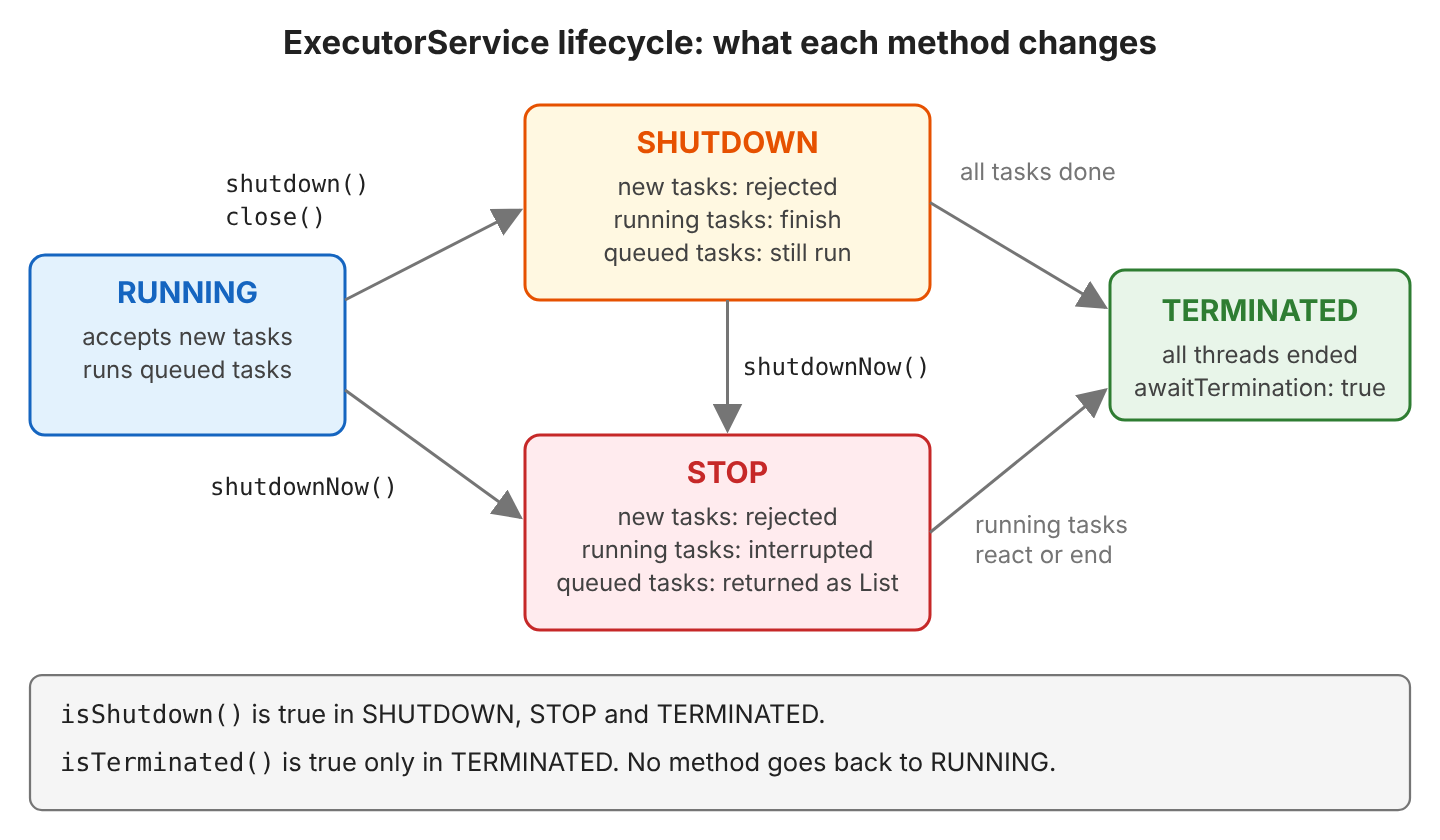
The diagram shows the same rules as states of the pool. The state names come from ThreadPoolExecutor, which is the class behind Executors.newFixedThreadPool() and most other factory methods.
2. Using shutdown() and awaitTermination()
2.1. When to Use
An ExecutorService does not shut itself down when it has no tasks to run. The pool stays alive and waits for new tasks, and its threads keep the JVM from exiting, as we will see in section 8.
A long-lived pool is helpful in web and desktop applications because they receive tasks for as long as they run. These applications create the pool once at startup and shut it down once at the end.
Some programs use the executor only for one batch of work, for example a nightly job that resizes the photos uploaded during the day, so we shut it down after the batch to end its threads and free their memory. We still want the running and waiting tasks to complete instead of being interrupted.
Calling shutdown() and then awaitTermination() keeps those tasks running to the end. The pool accepts no new tasks, the submitted tasks complete, and the caller waits for them up to the timeout.
2.2. Example
The example uses a ScheduledExecutorService, a pool that can run a task after a delay. We give it three tasks with a delay of 10, 20 and 30 seconds, and each WorkerTask is a Callable that prints the time it ran.
After 15 seconds, we shut down the executor. Because shutdown() does not wait, the print statements run right away, when only the first task has run. Then awaitTermination() waits until the other two tasks are finished.
ScheduledExecutorService executor = Executors.newScheduledThreadPool(3);
System.out.println("WorkerTasks scheduled at : " + time());   // time() returns LocalTime.now() in seconds

ScheduledFuture<String> result1 = executor.schedule(new WorkerTask("WorkerTask-1"), 10, TimeUnit.SECONDS);
ScheduledFuture<String> result2 = executor.schedule(new WorkerTask("WorkerTask-2"), 20, TimeUnit.SECONDS);
ScheduledFuture<String> result3 = executor.schedule(new WorkerTask("WorkerTask-3"), 30, TimeUnit.SECONDS);

TimeUnit.SECONDS.sleep (15);
System.out.println("*** Shutting down the executor service at : " + time());
executor.shutdown();

System.out.println("Task-1 is done : " + result1.isDone());
// ... same for Task-2 and Task-3

System.out.println("*** Waiting for tasks to complete");
boolean terminated = executor.awaitTermination(1, TimeUnit.MINUTES);
System.out.println("*** Terminated : " + terminated + " at : " + time());
In the output, tasks 2 and 3 still ran after shutdown(), each at its scheduled time.
WorkerTasks scheduled at : 04:03:09
WorkerTask [WorkerTask-1] executed at : 04:03:19
*** Shutting down the executor service at : 04:03:24
Task-1 is done : true
Task-2 is done : false
Task-3 is done : false
*** Waiting for tasks to complete
WorkerTask [WorkerTask-2] executed at : 04:03:29
WorkerTask [WorkerTask-3] executed at : 04:03:39
*** Terminated : true at : 04:03:39
Task-1 is done : true, cancelled : false
Task-2 is done : true, cancelled : false
Task-3 is done : true, cancelled : false
A ScheduledThreadPoolExecutor has one special rule about delayed tasks. By default, a delayed one-shot task still runs after shutdown(), as in this example, whereas the executor cancels a periodic task from scheduleAtFixedRate() or scheduleWithFixedDelay(). If we want different behavior, we change these defaults with setExecuteExistingDelayedTasksAfterShutdownPolicy() and setContinueExistingPeriodicTasksAfterShutdownPolicy().
3. Using shutdownNow()
The shutdownNow() method stops the ExecutorService right away, which means it interrupts the running tasks and never starts the waiting tasks. We use shutdownNow() when the application must stop processing tasks at once, for example when the remaining work is no longer needed.
3.1. The Scheduled Example With shutdownNow()
Let’s replace executor.shutdown() with executor.shutdownNow() in the previous example. This time, shutdownNow() removes the two delayed tasks from the queue and returns them to us, so awaitTermination() returns at once because no task is running.
List<Runnable> notStarted = executor.shutdownNow();
System.out.println("Tasks never started : " + notStarted.size());
WorkerTasks scheduled at : 04:03:09
WorkerTask [WorkerTask-1] executed at : 04:03:19
*** Shutting down the executor service at : 04:03:24
Tasks never started : 2
Task-1 is done : true
Task-2 is done : false
Task-3 is done : false
*** Waiting for tasks to complete
*** Terminated : true at : 04:03:24
Task-1 is done : true, cancelled : false
Task-2 is done : false, cancelled : false
Task-3 is done : false, cancelled : false3.2. What Happens to Running and Queued Tasks
A pool with one thread shows the difference between a running task and a waiting task. When we call shutdownNow(), the first email is running while the other two emails are waiting in the queue.
ExecutorService pool = Executors.newSingleThreadExecutor();
pool.submit(sendEmail("email-1", 300));
Future<?> email2 = pool.submit(sendEmail("email-2", 300));
pool.submit(sendEmail("email-3", 300));
TimeUnit.MILLISECONDS.sleep (100);                      // email-1 runs, email-2 and email-3 wait

List<Runnable> neverStarted = pool.shutdownNow();       // email-1 interrupted
int notStartedCount = neverStarted.size();              // 2
boolean terminated = pool.awaitTermination(1, TimeUnit.SECONDS);   // true
boolean email2Done = email2.isDone();                   // false
The task email-1 is in the middle of its wait, so the interrupt makes the wait throw an InterruptedException, and the task prints “email-1 interrupted”. If we called shutdown() instead, the pool would send all three emails one after another.
The Future of a task that never started stays “not done” forever, so email2.get() would block the caller for good. A Future is the handle that submit() returns, and we call get() on it to wait for the task’s result. The list from shutdownNow() holds the same task objects, of type FutureTask, so we cancel each one and no thread waits on get() forever.
for (Runnable task : neverStarted) {
  if (task instanceof Future<?> future) {
    future.cancel(false);
  }
}
boolean cancelled = email2.isCancelled();               // true, get() now throws CancellationException
4. Best Practice for Shutting Down an ExecutorService
The recommended shutdown pattern combines the three methods. It first gives the tasks time to finish, and if the running tasks do not finish in that time, it interrupts them.
static boolean shutdownAndAwaitTermination(ExecutorService pool, long timeout, TimeUnit unit) {
  pool.shutdown();                                   // 1. Stop accepting new tasks
  try {
    if (!pool.awaitTermination(timeout, unit)) {     // 2. Wait for running and queued tasks
      pool.shutdownNow();                            // 3. Interrupt the tasks still running
      if (!pool.awaitTermination(timeout, unit)) {   // 4. Wait for them to react
        System.err.println("Pool did not terminate");
        return false;
      }
    }
  } catch (InterruptedException e) {
    pool.shutdownNow();
    Thread.currentThread().interrupt();              // 5. Keep the interrupt flag
  }
  return pool.isTerminated();
}
The catch block handles one more case, namely when the waiting thread itself is interrupted, for example when the whole application stops. We never swallow an InterruptedException, so we call Thread.currentThread().interrupt() to set the flag again, and the calling code also sees the interrupt.
To use the method, we pass the ExecutorService and the timeout.
ExecutorService pool = Executors.newFixedThreadPool(2);
pool.submit(sendEmail("email-1", 200));
pool.submit(sendEmail("email-2", 200));

boolean done = shutdownAndAwaitTermination(pool, 5, TimeUnit.SECONDS);   // email-1 sent, email-2 sent, returns true
The right timeout depends on the tasks. A few seconds is enough for short tasks such as sending emails, whereas batch jobs need longer. Kubernetes and other container platforms send SIGTERM to stop a process and kill the process after a grace period (30 seconds by default), so the total wait must stay below that grace period.
5. Using close() With try-with-resources (Java 19+)
Since Java 19, ExecutorService extends AutoCloseable, so we can open the pool in a try-with-resources block, and Java calls close() when the block ends. The method close() runs shutdown() and waits until all tasks have finished.
ExecutorService copy;
try (ExecutorService pool = Executors.newFixedThreadPool(2)) {
  copy = pool;
  pool.submit(sendEmail("email-1", 200));
  pool.submit(sendEmail("email-2", 200));
}                                                       // email-2 sent, email-1 sent
boolean terminated = copy.isTerminated();               // true
The main difference between close() and shutdownAndAwaitTermination() is that close() has no timeout. A task that never ends blocks close() forever, so the caller waits forever too. We use close() when we know the tasks will finish, and the shutdownAndAwaitTermination() pattern from section 4 when a task can hang, such as a network call without a timeout.
Calling close() on an executor that is already terminated does nothing, so a second close(), or a close() after shutdown(), is safe.
6. isShutdown() vs isTerminated() and Submitting After Shutdown
Two methods tell us the state of the pool.
- The method isShutdown() returns true as soon as we call shutdown(), shutdownNow() or close().
- The method isTerminated() returns true only when the pool is shut down and every task has finished.
A pool with one running email shows the three stages.
ExecutorService pool = Executors.newFixedThreadPool(2);
pool.submit(sendEmail("email-1", 300));
boolean shutdown1 = pool.isShutdown();       // false
boolean terminated1 = pool.isTerminated();   // false

pool.shutdown();
boolean shutdown2 = pool.isShutdown();       // true
boolean terminated2 = pool.isTerminated();   // false (email-1 still running)

pool.awaitTermination(5, TimeUnit.SECONDS);
boolean shutdown3 = pool.isShutdown();       // true
boolean terminated3 = pool.isTerminated();   // true
After shutdown(), every submit() or execute() call throws a RejectedExecutionException. The exception is unchecked, so the compiler does not warn us about it, and we see it only at runtime.
pool.shutdown();
Future<?> rejected = pool.submit(sendEmail("email-4", 100));
// RejectedExecutionException: Task java.util.concurrent.FutureTask@29453f44[Not completed, task = ...]
//   rejected from java.util.concurrent.ThreadPoolExecutor@330bedb4[Terminated, pool size = 0, ...]
A running ThreadPoolExecutor also rejects tasks when its queue is full, and a RejectedExecutionHandler decides what happens in that case. For a pool that is shut down, the fix belongs in the code that submits the tasks, and we have two options.
- Check isShutdown() before submitting.
- Make sure no part of the program submits work after the shutdown starts.
7. Shutting Down a Virtual-Thread Executor
Virtual threads are cheap threads that the JVM manages, and they are final since Java 21. Executors.newVirtualThreadPerTaskExecutor() starts a new virtual thread for every task instead of reusing a fixed set of threads. The executor is still an ExecutorService, and the recommended way to end it is try-with-resources.
AtomicInteger sent = new AtomicInteger();
try (ExecutorService executor = Executors.newVirtualThreadPerTaskExecutor()) {
  for (int i = 0; i < 10_000; i++) {
    executor.submit(() -> {
      TimeUnit.MILLISECONDS.sleep (100);
      return sent.incrementAndGet();
    });
  }
}                                                       // waits for all 10,000 tasks
int total = sent.get();                                 // 10000
Virtual threads are always daemon threads, which section 8 explains, so a forgotten virtual-thread executor does not keep the JVM alive. Instead, the JVM exits without waiting, and the unfinished tasks are lost. The try-with-resources block matters here too, because it waits for the tasks. The methods shutdown(), shutdownNow() and awaitTermination() work the same way as for a normal thread pool, and so does RejectedExecutionException.
8. Why the JVM Does Not Exit
Java has two kinds of threads. A normal thread keeps the JVM alive, because the JVM exits only when the last normal thread ends, whereas a daemon thread is a background thread that does not keep the JVM alive. The threads of Executors.newFixedThreadPool() and the other factory methods are normal, non-daemon threads. So a program that forgets to shut its pool down never ends.
public static void main(String[] args) {
  ExecutorService pool = Executors.newFixedThreadPool(2);
  pool.submit(sendEmail("email-1", 200));
  System.out.println("main() finished");
}
// main() finished
// email-1 sent
// ... the process keeps running until it is killed
We have two fixes.
- Shut the pool down with close(), shutdown() or shutdownAndAwaitTermination() when the work is done, which is the right fix in almost all cases.
- Create the pool with a ThreadFactory (the object a pool calls to create its threads) that makes daemon threads. With daemon threads, the JVM exits without waiting for the tasks, so we use daemon pools only for work we can afford to drop, such as a cache refresh.
ThreadFactory daemonFactory = Thread.ofPlatform().name("mailer-", 1).daemon().factory();
ExecutorService daemonPool = Executors.newFixedThreadPool(2, daemonFactory);
// pool thread: mailer-1 daemon=true
9. Shutting Down the Pool From a Shutdown Hook
A shutdown hook is a thread that the JVM starts when the process stops on System.exit(), on Ctrl+C, or on a SIGTERM signal (which docker stop sends, for example). When we register shutdownAndAwaitTermination() in a hook, the running tasks can finish before the process ends.
ExecutorService pool = Executors.newFixedThreadPool(2);
Runtime.getRuntime().addShutdownHook(new Thread(() -> {
  System.out.println("shutdown hook started");
  boolean terminated = shutdownAndAwaitTermination(pool, 5, TimeUnit.SECONDS);
  System.out.println("pool terminated = " + terminated);
}));
pool.submit(sendEmail("email-1", 2000));
System.out.println("main() finished");
When we stopped the process with SIGTERM one second after the start, the hook let email-1 finish.
main() finished
shutdown hook started
email-1 sent
pool terminated = true
Hooks follow four rules.
- A hook does not run on kill -9 (SIGKILL) or when the JVM crashes.
- A hook must finish within the grace period, because the operating system or the container platform kills the process after it.
- A hook does not fix a JVM that does not exit. The JVM starts the hooks only when it begins to shut down, and a running non-daemon pool stops that from happening at the normal end of main().
- Spring Boot applications do not need a hook for their own executors. Spring shuts down the ThreadPoolTaskExecutor beans it manages when the application context closes.
10. ExecutorService Shutdown FAQs
10.1. Do I Need to Shut Down an ExecutorService?
Yes, every executor we create needs a shutdown. A forgotten pool holds its threads until the JVM ends, and a forgotten pool of normal (platform) threads also keeps the JVM from exiting. Some executors live as long as the application, such as a pool in a web application, so we shut those down once, when the application stops.
10.2. Why Does shutdownNow() Not Stop My Task?
The method shutdownNow() only sets the interrupt flag of the pool threads, and the task decides whether it reacts. Some methods react to the flag with an InterruptedException, for example TimeUnit.sleep, Object.wait() and BlockingQueue.take(), whereas a busy loop or a blocking socket read does not react and keeps running. The pool terminates only when the busy task ends.
pool.submit(() -> {
  while (System.nanoTime() < end) { }                   // never checks the interrupt flag, runs 1.5 s
});
pool.shutdownNow();
boolean stopped = pool.awaitTermination(500, TimeUnit.MILLISECONDS);   // false
boolean stoppedLater = pool.awaitTermination(2, TimeUnit.SECONDS);      // true (after the loop ended)
So a long-running loop should check Thread.currentThread().isInterrupted() and return when the check is true, as in the kill a thread example. Cancelling a task uses the same interrupt for a single Future.
10.3. Can I Restart an ExecutorService After shutdown()?
No. A shut-down executor cannot accept tasks again, because no method moves it back to the running state. We create a new executor instead, for example with another Executors.newFixedThreadPool() call.
10.4. How Do I Wait for All Tasks Without Shutting Down the Pool?
We use invokeAll() or the Future objects of the tasks, because awaitTermination() waits only after a shutdown. The method invokeAll() runs a list of tasks and waits for all of them, whereas with Future objects we call get() on each one.
A CountDownLatch also works, and the options differ in how they wait for threads to finish.
10.5. Can I Shut Down ForkJoinPool.commonPool()?
No. The common pool runs parallel streams and the CompletableFuture tasks that get no executor argument, so it ignores shutdown() and close(), and isShutdown() stays false after both calls. It uses daemon threads, so it does not keep the JVM alive anyway.
11. Conclusion
An ExecutorService keeps its threads until we shut it down. The method shutdown() stops new tasks and lets the submitted tasks finish, and awaitTermination() waits with a timeout. When the time runs out, shutdownNow() interrupts the running tasks and returns the waiting ones.
On Java 19 and later, try-with-resources calls close(), which shuts the pool down and waits without a timeout. For tasks that can hang, the shutdownAndAwaitTermination() pattern is the safer choice because of its timeout and the re-set interrupt flag, and a shutdown hook runs the same pattern when the process is stopped.
12. References
- ExecutorService JavaDoc (Java 25)
- ThreadPoolExecutor JavaDoc (Java 25)
- ScheduledThreadPoolExecutor JavaDoc (Java 25)
- Runtime.addShutdownHook() JavaDoc (Java 25)
- JEP 444: Virtual Threads
Happy Learning !!

API pods running on Kubernates service are getting crashed automatically due to below error. We are unable to find how on what basis ExecutorService gets shutdown automatically.
org.springframework.scheduling.concurrent.ThreadPoolTaskExecutor.shutdown – Shutting down ExecutorService ‘applicationTaskExecutor’