
The Executors.newVirtualThreadPerTaskExecutor() method returns an ExecutorService that starts a new virtual thread for every task we submit, with no pool and no upper limit on the number of threads. The method became a final API in Java 21 together with virtual threads (JEP 444).
We use it for tasks that spend most of their time waiting, such as REST calls, database queries and file reads, because a waiting virtual thread does not hold an operating system thread. A server can keep thousands of such tasks in flight with plain blocking code.
The following example submits five tasks to the executor and reads the results after the try-with-resources block closes it.
List<Future<Integer>> futures = new ArrayList<>();
try (ExecutorService executor = Executors.newVirtualThreadPerTaskExecutor()) {
    for (int num = 1; num <= 5; num++) {
        int n = num;
        futures.add(executor.submit(() -> n * n));   // one new virtual thread per task
    }
}                                                    // close() waits for all five tasks
int first = futures.get(0).resultNow();              // 1
int last = futures.get(4).resultNow();               // 25
Notice that we never call shutdown() or awaitTermination(), because close() waits for the submitted tasks to finish. We cover when the executor is the right choice, how to run and combine blocking calls, how to limit and name the threads, and how to read task failures.
1. When to use Executors.newVirtualThreadPerTaskExecutor()?
A virtual thread is a java.lang.Thread that the JVM schedules on a small set of platform threads called carrier threads. When the virtual thread blocks on I/O, the JVM unmounts it from its carrier, so the carrier can run another virtual thread in the meantime. Creating a virtual thread is cheap, because its stack is a small object on the heap that grows only as needed.
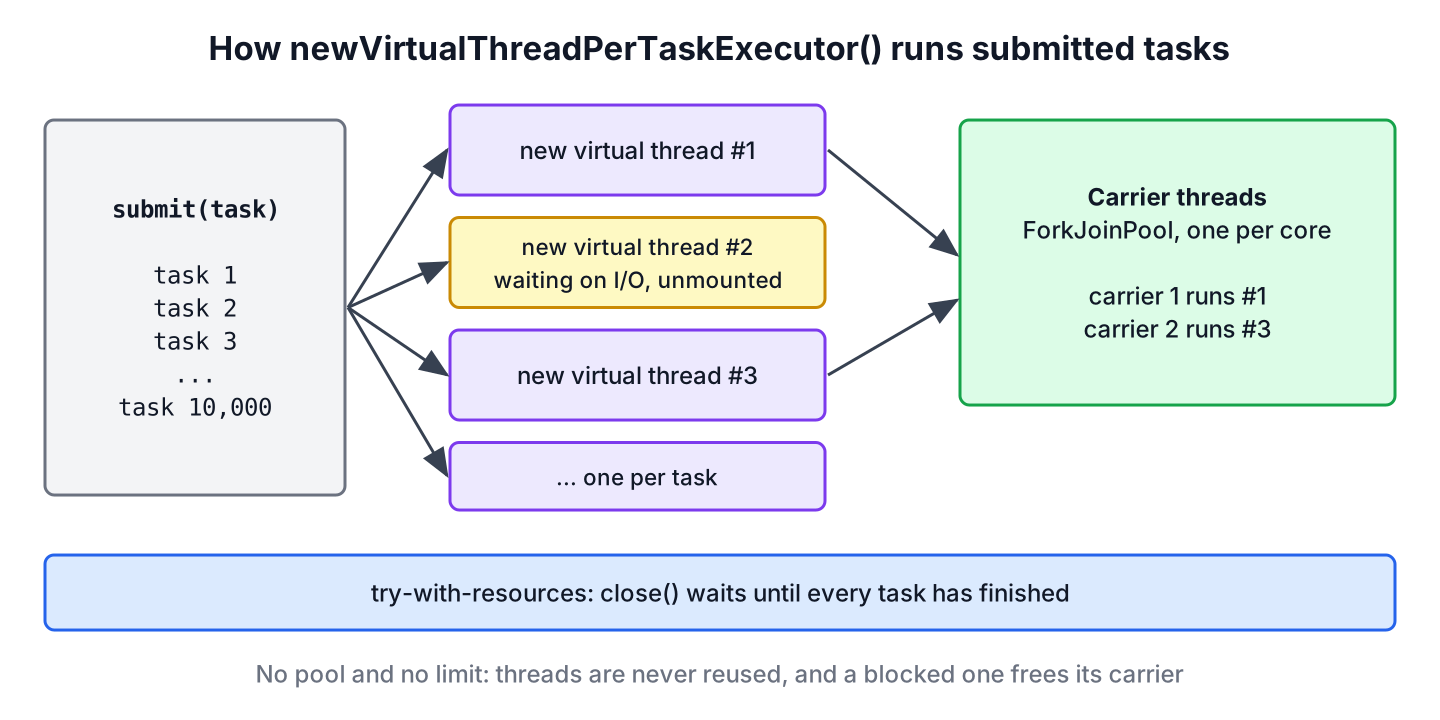
Platform threads are expensive, so a classic ExecutorService keeps a fixed number of them in a pool and queues the extra tasks. Virtual threads are cheap, so pooling them brings no benefit. Executors.newVirtualThreadPerTaskExecutor() follows that rule and creates one new virtual thread per task.
ExecutorService executorService = Executors.newVirtualThreadPerTaskExecutor();Since Java 19, ExecutorService extends AutoCloseable, so we create the executor in a try-with-resources block. The executor fits best when the tasks have these traits.
- The task blocks on network or disk I/O, for example an HTTP call, a JDBC query or a message broker call.
- The number of tasks in flight is large, such as hundreds or thousands, and each one waits much longer than it computes.
- We want to keep plain, sequential blocking code instead of callbacks or reactive operators.
Virtual threads do not make CPU-bound code faster. A task that only computes, such as image resizing, keeps its carrier busy the whole time, so it runs no faster than on a platform thread. For CPU-bound work, a thread pool sized to the number of cores or a parallel stream is the better choice.
Before Java 24, a virtual thread that blocked inside a synchronized block stayed pinned to its carrier. Since Java 24, JEP 491 removed that limitation, so synchronized code no longer pins the carrier thread on Java 25.
2. Executors newVirtualThreadPerTaskExecutor() Example
The following example calculates the square of each number in a list in a Runnable task, and each task stores its result in a ConcurrentHashMap. We use execute() because the tasks return nothing, and the closing brace of the try block waits for all of them.
List<Integer> numList = List.of(1, 2, 3, 4, 5);
Map<Integer, Integer> squares = new ConcurrentHashMap<>();
try (ExecutorService executor = Executors.newVirtualThreadPerTaskExecutor()) {
    numList.forEach(num ->
        executor.execute(() -> squares.put(num, num * num)));
}
int count = squares.size();                 // 5
int squareOfThree = squares.get(3);         // 9
The tasks run in a different order on every run, so printing from inside the tasks gives a random order. Storing the results in a map, or keeping the Future objects as in the intro, gives a stable result. The squares are only a demo, since the tasks do not wait for anything and gain nothing from virtual threads.
The executor helps when every task waits. For example, a price comparison page reads the same product from three supplier websites. The following fetchPage() method simulates the HTTP call and pauses for 100 ms, which is how long the remote site takes to answer.
static void pause(long ms) {
    LockSupport.parkNanos(TimeUnit.MILLISECONDS.toNanos(ms));
}
static String fetchPage(String url) {
pause(100); // waiting for the remote site
return url.substring(url.lastIndexOf('/') + 1);
}List<String> urls = List.of(
"https://example.com/page1",
"https://example.com/page2",
"https://example.com/page3");
List<Callable<String>> calls = urls.stream()
.map(url -> (Callable<String>) () -> fetchPage(url))
.toList();
List<Future<String>> pages;
try (ExecutorService executor = Executors.newVirtualThreadPerTaskExecutor()) {
pages = executor.invokeAll(calls);
}
String firstPage = pages.get(0).resultNow(); // "page1"
String lastPage = pages.get(2).resultNow(); // "page3"The method invokeAll() returns the futures in the order of the input list, so the result order is stable even though the three calls run at the same time. All three pages arrive after about one round trip instead of three.
3. Executing Asynchronous Tasks
With virtual threads, we can call the blocking Future.get() without the cost that blocking a platform thread has. When the calling thread is a virtual thread too, as in a server with virtual threads turned on, its carrier runs other work while it waits. That makes the classic submit-and-get style a good way to run independent calls at the same time and combine their results.
In the following example, a product page needs the price from a pricing service and the stock level from an inventory service. The two calls do not depend on each other, so we submit both and combine the results.
static String callPriceApi() {
    pause(150);                             // remote pricing service
    return "price=25";
}
static String callStockApi() {
pause(150); // remote inventory service
return "stock=3";
}static String invokeAndCombineResults() throws ExecutionException, InterruptedException {
try (ExecutorService executor = Executors.newVirtualThreadPerTaskExecutor()) {
Future<String> price = executor.submit(() -> callPriceApi());
Future<String> stock = executor.submit(() -> callStockApi());
return price.get() + ", " + stock.get();
}
}long start = System.nanoTime();
String product = invokeAndCombineResults(); // "price=25, stock=3"
long elapsedMs = (System.nanoTime() - start) / 1_000_000;
boolean overlapped = elapsedMs < 280; // true, calls ran at the same timeThe page waits for the slower of the two calls, not for their sum. If we need to chain or combine many results without blocking a thread, CompletableFuture accepts this executor as its Executor argument, and structured concurrency adds automatic cancellation of the other calls when one fails.
4. Limiting Concurrent Calls with a Semaphore
The executor is unbounded, but the systems our tasks call are not. A database pool may allow 10 connections, and a partner API may allow 3 requests at a time. A fixed pool of virtual threads is the wrong fix, because it brings back the queue and the pool that virtual threads made unnecessary.
The recommended way is a Semaphore around the limited call. Tasks that do not get a permit block, and a blocked virtual thread costs almost nothing. In the following example, 20 tasks call a partner API that allows 3 parallel requests, and we record the highest number of calls in flight.
class PartnerGateway {
    private final Semaphore permits = new Semaphore(3);
    private final AtomicInteger inFlight = new AtomicInteger();
    private final AtomicInteger maxInFlight = new AtomicInteger();

    String placeOrder(int id) throws InterruptedException {
        permits.acquire();
        try {
            maxInFlight.accumulateAndGet(inFlight.incrementAndGet(), Math::max);
            pause(20);                      // remote call
            return "order-" + id;
        } finally {
            inFlight.decrementAndGet();
            permits.release();
        }
    }

    int maxInFlight() {
        return maxInFlight.get();
    }
}
PartnerGateway gateway = new PartnerGateway();
List<Future<String>> orders = new ArrayList<>();
try (ExecutorService executor = Executors.newVirtualThreadPerTaskExecutor()) {
for (int i = 0; i < 20; i++) {
int id = i;
orders.add(executor.submit(() -> gateway.placeOrder(id)));
}
}
int done = orders.size(); // 20
boolean withinLimit = gateway.maxInFlight() <= 3; // trueWe release the permit in a finally block, so a failed call does not reduce the limit. A JDBC connection pool already works as such a limit, so we do not add another semaphore in front of it.
5. Naming the Virtual Threads
Virtual threads have no name by default, which makes thread dumps and log lines hard to read. If we want names, we build a ThreadFactory with Thread.ofVirtual() and pass it to Executors.newThreadPerTaskExecutor(). The executor still creates one new thread per task.
ThreadFactory factory = Thread.ofVirtual().name("price-", 0).factory();
Future<String> named;
Future<String> unnamed;
try (ExecutorService executor = Executors.newThreadPerTaskExecutor(factory);
     ExecutorService plain = Executors.newVirtualThreadPerTaskExecutor()) {
    named = executor.submit(() -> Thread.currentThread().getName());
    unnamed = plain.submit(() -> Thread.currentThread().getName());
}
String threadName = named.resultNow();               // "price-0"
String defaultName = unnamed.resultNow();            // ""
The factory appends a counter to the prefix, so the next threads are named price-1, price-2 and so on. Thread dumps taken with jcmd list virtual threads with these names, as shown in the guide to Java thread dumps.
6. Handling Task Failures
An exception thrown inside a task does not reach the caller on its own. The executor stores it in the task’s Future, and get() throws it wrapped in an ExecutionException. Since Java 19, Future also has state(), resultNow() and exceptionNow(), which read a finished task without try-catch blocks.
Future<String> failed;
try (ExecutorService executor = Executors.newVirtualThreadPerTaskExecutor()) {
    failed = executor.submit(() -> {
        throw new IllegalStateException("supplier down");
    });
}
Future.State state = failed.state();                 // FAILED
Throwable cause = failed.exceptionNow();             // java.lang.IllegalStateException: supplier down
String value = failed.get();                         // ExecutionException
With execute() there is no Future, so an exception goes to the thread’s uncaught exception handler, which prints the stack trace and nothing else. For tasks whose failure matters, we use submit() and check every future, or we catch and log the exception inside the task.
7. newVirtualThreadPerTaskExecutor() vs newFixedThreadPool() vs newCachedThreadPool()
The factory methods of Executors differ in two points, which are whether threads are reused and whether the number of threads has a limit. The right choice follows from what the tasks do.
| Factory method | Threads | Limit | Best for |
|---|---|---|---|
| newVirtualThreadPerTaskExecutor() | New virtual thread per task, never reused | None | Many blocking I/O tasks |
| newThreadPerTaskExecutor(factory) | New thread per task from the factory | None | Same as above, with named threads |
| newFixedThreadPool(n) | n platform threads, reused | n threads, unbounded queue | CPU-bound tasks, n near the core count |
| newCachedThreadPool() | Platform threads, reused when idle for less than 60 s | None | Short bursts of small tasks on older Java versions |
Moving an I/O-heavy app from newFixedThreadPool(200) to newVirtualThreadPerTaskExecutor() is often a one-line change. If the pool size was also protecting a downstream system, we keep that protection with a semaphore, as shown in section 4.
8. newVirtualThreadPerTaskExecutor FAQs
Shutdown, thread counts, CPU work, Spring Boot setup and the carrier pool are the details to check before moving an app to this executor.
8.1. Do we need to call shutdown() on newVirtualThreadPerTaskExecutor()?
Yes, or we close it, which is the better option. The close() method calls shutdown() and waits until all tasks finish, so a try-with-resources block does both. An executor that is never closed keeps accepting tasks, and since virtual threads are daemon threads, the JVM can exit while tasks are still running. The guide to ExecutorService shutdown covers shutdownNow() and timeouts.
8.2. How many threads does newVirtualThreadPerTaskExecutor() create?
One per submitted task, with no upper limit. The number of carrier threads that run them is small, by default equal to the number of available processors, so 10,000 waiting tasks still use only a few OS threads.
8.3. Can we use newVirtualThreadPerTaskExecutor() for CPU-bound tasks?
We can, but it gives no speedup. A virtual thread that only computes holds its carrier until it finishes, and the number of carriers equals the number of cores. For CPU-bound work, a fixed pool sized to the cores or a parallel stream is the clearer choice.
8.4. How do we enable virtual threads in Spring Boot?
We set spring.threads.virtual.enabled=true in Spring Boot 3.2 or later. With it, Spring Boot runs web requests, @Async methods and scheduled tasks on virtual threads, as described in Spring Boot virtual threads.
8.5. Is newVirtualThreadPerTaskExecutor() the same as a ForkJoinPool?
No. The executor creates the virtual threads, and the JVM runs them on its own internal ForkJoinPool of carrier threads. We never submit tasks to that internal pool, and it is separate from ForkJoinPool.commonPool() used by parallel streams.
9. Conclusion
The Executors.newVirtualThreadPerTaskExecutor() method gives each task its own virtual thread, so blocking calls can run side by side without a thread pool. We open it in a try-with-resources block, because close() waits for all tasks.
The executor is meant for tasks that wait on I/O. For limits on downstream systems, we use a Semaphore, newThreadPerTaskExecutor() adds thread names, and Future.state() with exceptionNow() shows which tasks failed. More background on how the JVM runs these threads is in our Java concurrency tutorial.
10. References
- Executors.newVirtualThreadPerTaskExecutor() Javadoc
- ExecutorService.close() Javadoc
- JEP 444, Virtual Threads
- JEP 491, Synchronize Virtual Threads without Pinning
- Oracle, Virtual Threads (Java 25)
Happy Learning !!
