

The parameterized tests are used to run the same test method multiple times with different sets of input data. This is very useful when we need to test a functionality against multiple different input values. Rather than writing multiple test methods, each handling a different input case, parameterized tests consolidate these test cases into a single method.
JUnit 5 @ParameterizedTest annotation allows us to write parameterized tests in a clean and organized way. Let’s its purpose, how to use it, and its benefits.
1. Setup
Include junit-jupiter-params dependency in order to use parameterized tests. Find the latest version at this link.
<dependency>
    <groupId>org.junit.jupiter</groupId>
    <artifactId>junit-jupiter-params</artifactId>
    <version>5.8.1</version>
    <scope>test</scope>
</dependency>
2. @ParameterizedTest Example
Use @ParameterizedTest annotation to execute a test multiple times but with different arguments.
We do not need to use @Test annotation, instead, only @ParameterizedTest annotation is used on such tests.
@ParameterizedTest(...)
@ValueSource(...)
void testMethod(String param) {
  //...
}
We must declare at least one argument source that will provide the arguments for each invocation which will be consumed in the test method.
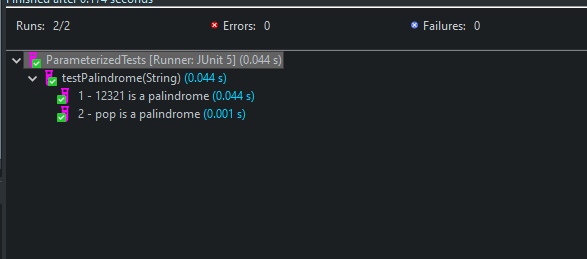
In the given example, testPalindrome will be invoked 2 times for each string in the @ValueSource annotation. We can access the argument using the method parameter word. Use name argument in the @ParameterizedTest annotation to customize the display message.
public class ParameterizedTests {

	@ParameterizedTest(name = "{index} - {0} is a palindrome")
	@ValueSource(strings = { "12321", "pop" })
	void testPalindrome(String word) {

	    assertTrue(word == null ? false : StringUtils.reverse(word).equals(word));
	}
}
3. Argument Providers
JUnit 5 uses ArgumentsProvider classes to supply the input parameters for your tests. You can implement a custom ArgumentsProvider or use the built-in providers provided by JUnit 5.
Let’s explore the built-in providers, first.
| Argument Provider | Description |
|---|---|
| @ValueSource | For simple literal values such as primitives and strings. It does not support the null as a value. |
| @NullSource | For a single null argument. |
| @EmptySource | For a single empty argument of type String, List, Set, Map, or arrays. |
| @NullAndEmptySource | For a null value and then an empty value. |
| @EnumSource | Test method is invoked for each enum constant at a time. |
| @MethodSource | For one or more factory methods that generate a stream of arguments. |
| @CsvSource | For argument lists as comma-separated values. |
| @CsvFileSource | For reading the CSV tokens from a file. |
| @ArgumentsSource | For a custom and reusable ArgumentsProvider. |
The @ValueSource annotation does not support the
nullas a value. So by using@NullSourceand@EmptySourcewith@ValueSource, we can test null, non-null and empty values, all in the same test.
Let’s understand each argument provider in more detail.
3.1. @ValueSource
Use @ValueSource for simple literal values such as primitives and strings.
- It specifies a single array of values and can only be used for providing a single argument per parameterized test invocation.
- Java supports autoboxing so we can consume the literals in their wrapper classes as well.
- We can not pass
nullas an argument, even for String and Class types.
@ParameterizedTest
@ValueSource(ints = { 1, 2, 3 })
void testMethod(int argument) {
    //test code
}

@ParameterizedTest
@ValueSource(ints = { 1, 2, 3 })
void testMethodWithAutoboxing(Integer argument) {
    //test code
}
3.2. @NullSource
It provides a single null argument to the annotated @ParameterizedTest method.
@ParameterizedTest
@NullSource
void testMethodNullSource(Integer argument) {
	assertTrue(argument == null);
}
3.3. @EmptySource
It provides a single empty argument to the annotated @ParameterizedTest method of the following types:
- java.lang.String
- java.util.List
- java.util.Set
- java.util.Map
- primitive arrays (e.g. int[])
- object arrays (e.g. String[])
@ParameterizedTest
@EmptySource
void testMethodEmptySource(String argument) {
	assertTrue(StringUtils.isEmpty(argument));
}
3.4. @NullAndEmptySource
It combines the functionality of @NullSource and @EmptySource. In the given example, the test method will be invoked two times – first with a null value and then with an empty value.
@ParameterizedTest
@NullAndEmptySource
void testMethodNullAndEmptySource(String argument) {
	assertTrue(StringUtils.isEmpty(argument));
}
3.5. @EnumSource
It provides a convenient way to use Enum constants. The test method will be invoked for each enum constant at a time.
In the given example, the test method will be invoked 4 times, once for each enum constant.
enum Direction {
	EAST, WEST, NORTH, SOUTH
}

@ParameterizedTest
@EnumSource(Direction.class)
void testWithEnumSource(Direction d) {
    assertNotNull(d);
}
3.6. @MethodSource
- It is used to refer to one or more factory methods of the test class or external classes. The factory method must generate a stream of arguments, where each argument within the stream will be consumed by the annotated @ParameterizedTest method.
- The factory method must be
static, unless the test class is annotated with@TestInstance(Lifecycle.PER_CLASS). - Also, the factory method must not take any method argument.
@ParameterizedTest
@MethodSource("argsProviderFactory")
void testWithMethodSource(String argument) {
    assertNotNull(argument);
}

static Stream<String> argsProviderFactory() {
    return Stream.of("alex", "brian");
}
If we do not explicitly provide a factory method name via @MethodSource, JUnit will search for a factory method that has the same name as the current @ParameterizedTest method by default.
So in the given example, if we do not provide the method name argsProviderFactory in @MethodSource annotation, Junit will search for a method name testWithMethodSource with return type Stream<String>.
@ParameterizedTest
@MethodSource
void testWithMethodSource(String argument) {
    assertNotNull(argument);
}

static Stream<String> testWithMethodSource() {
    return Stream.of("alex", "brian");
}
Streams for primitive types (DoubleStream, IntStream, and LongStream) are also supported.
@ParameterizedTest
@MethodSource("argsProviderFactory")
void testWithMethodSource(int argument) {
    assertNotEquals(9, argument);
}

static IntStream argsProviderFactory() {
    return IntStream.range(0, 10);
}
3.7. @CsvSource
It allows us to express argument lists as comma-separated values. Each CSV token represents a CSV line and results in one invocation of the parameterized test.
Set property ignoreLeadingAndTrailingWhitespace either true or false, which hints the Junit to honor or dishonor the whitespaces in CSV tokens.
@ParameterizedTest
@CsvSource(value = {
    "alex, 30",
    "brian, 35",
    "charles, 40"
}, ignoreLeadingAndTrailingWhitespace = true)
void testWithCsvSource(String name, int age) {
    assertNotNull(name);
    assertTrue(age > 0);
}
3.8. @CsvFileSource
It is very mi=uch similar to @CsvSource except we are reading the CSV tokens from a file instead of reading inline tokens. The CSV file may be read from the classpath or the local file system.
The default delimiter is a comma (,), but we can use another character by setting the delimiter attribute.
Note that any line beginning with a # symbol will be interpreted as a comment and will be ignored.
@ParameterizedTest
@CsvFileSource(resources = "employeeData.csv", numLinesToSkip = 0)
void testWithCsvFileSource(String name, int age) {
	assertNotNull(name);
    assertTrue(age > 0);
}
3.9. @ArgumentsSource
@ArgumentsSource can be used to specify a custom, reusable ArgumentsProvider.
@ParameterizedTest(name = "{index} - {0} is older than 40")
@ArgumentsSource(EmployeesArgumentsProvider.class)
void isEmployeeAgeGreaterThan40(Employee e) {
    assertTrue(Period.between(e.getDob(), LocalDate.now()).get(ChronoUnit.YEARS) > 40);
}

class EmployeesArgumentsProvider implements ArgumentsProvider {
    @Override
    public Stream<? extends Arguments> provideArguments(ExtensionContext context) {
        return Stream.of(
          Arguments.of(new Employee(1, "Alex", LocalDate.of(1980, 2, 3))),
          Arguments.of(new Employee(2, "Brian", LocalDate.of(1979, 2, 3))),
          Arguments.of(new Employee(3, "Charles", LocalDate.of(1978, 2, 3)))
        );
    }
}
4. Parameterized Tests with Multiple Arguments
To write tests that can consume multiple arguments, we can use the following annotations:
4.1. @CsvSource
As shown in the previous section 3.7, we can provide many literals and simple types of arguments using the @CsvSource annotation.
We need to provide all arguments in a single CSV token and then define the matching method arguments.
@ParameterizedTest
@CsvSource({
    "alex, 30, HR, Active",
    "brian, 35, Technology, Active",
    "charles, 40, Finance, Purged"
})
void testWithCsvSource(String name, int age, String department, String status) {
	//test code
}
4.2. Custom ArgumentsProvider
To provide multiple test arguments of complex or custom types, we should be using @ArgumentsSource annotation with ArgumentsProvider annotation.
In the given example, we are passing three arguments to the test method testArgumentsSource, of types Employee, LocalDate and enum constant of type Direction.
@ParameterizedTest
@ArgumentsSource(EmployeesArgumentsProvider.class)
void testArgumentsSource(Employee e, LocalDate date, Direction d) {

    // Use arguments to test functionality
    //...
    assertTrue(Period.between(e.getDob(), LocalDate.now()).get(ChronoUnit.YEARS) > 40);
    assertNotNull(date);
    assertNotNull(d);
}

class EmployeesArgumentsProvider implements ArgumentsProvider {
    @Override
    public Stream<? extends Arguments> provideArguments(ExtensionContext context) {
        return Stream.of(
          Arguments.of(new Employee(1, "Alex", LocalDate.of(1980, 2, 3)), LocalDate.now(), Direction.EAST),
          Arguments.of(new Employee(2, "Brian", LocalDate.of(1979, 2, 3)), LocalDate.now(), Direction.NORTH),
          Arguments.of(new Employee(3, "Charles", LocalDate.of(1978, 2, 3)), LocalDate.now(), Direction.SOUTH)
        );
    }
5. Conclusion
Junit 5 @ParameterizedTest annotation is very helpful in writing tests that must be invoked multiple times but with different arguments to test. Junit provides multiple ways that can be used declaratively to provide arguments to the test method.
We can combine different annotations to test various kinds of inputs in a single test as well.
There are some more complex concepts such as arguments aggregator, arguments converter etc. Please read the official Junit documentation for the latest information.
Happy Learning !!

Comments