
A Maven parent POM is a pom.xml with packaging pom that other POMs, the child POMs, inherit from. We write shared settings such as the groupId, the version, properties, dependency versions and plugin versions once in the parent, and every child gets them. A POM without a parent element still has one, the built-in Super POM, which gives every project Maven Central and the default folders such as src/main/java.
We use a parent POM in a multi-module project to keep the Java version and every library and plugin version in one file. A company can also publish one base POM that all its projects build on, the way Spring Boot projects use spring-boot-starter-parent.
The following example is the complete pom.xml of a child module. It names the parent and its own artifactId, and gets everything else from the parent.
<parent>
  <groupId>com.howtodoinjava.catalog</groupId>   <!-- parent coordinates -->
  <artifactId>catalog-parent</artifactId>
  <version>1.0.0-SNAPSHOT</version>
  <!-- relativePath defaults to ../pom.xml -->
</parent>

<artifactId>catalog-core</artifactId>              <!-- the only required line -->
<!-- groupId and version are inherited: com.howtodoinjava.catalog:catalog-core:1.0.0-SNAPSHOT -->
Notice that the child has no groupId, no version, no dependencies and no plugins, and still compiles with Java 25 and runs JUnit tests. We look at what a child inherits, how Maven finds the parent file, and what dependencyManagement, pluginManagement and modules add.
1. What a Child POM Inherits From the Parent POM
A parent POM must be declared with packaging pom. It is not meant to be distributed as a jar because it is only referenced from other projects. When Maven reads a child POM, it first reads the parent POM and then copies the child’s own elements over the parent’s. Note that if any dependency or property is configured in both parent and child POMs with different values, then the child POM value takes priority.
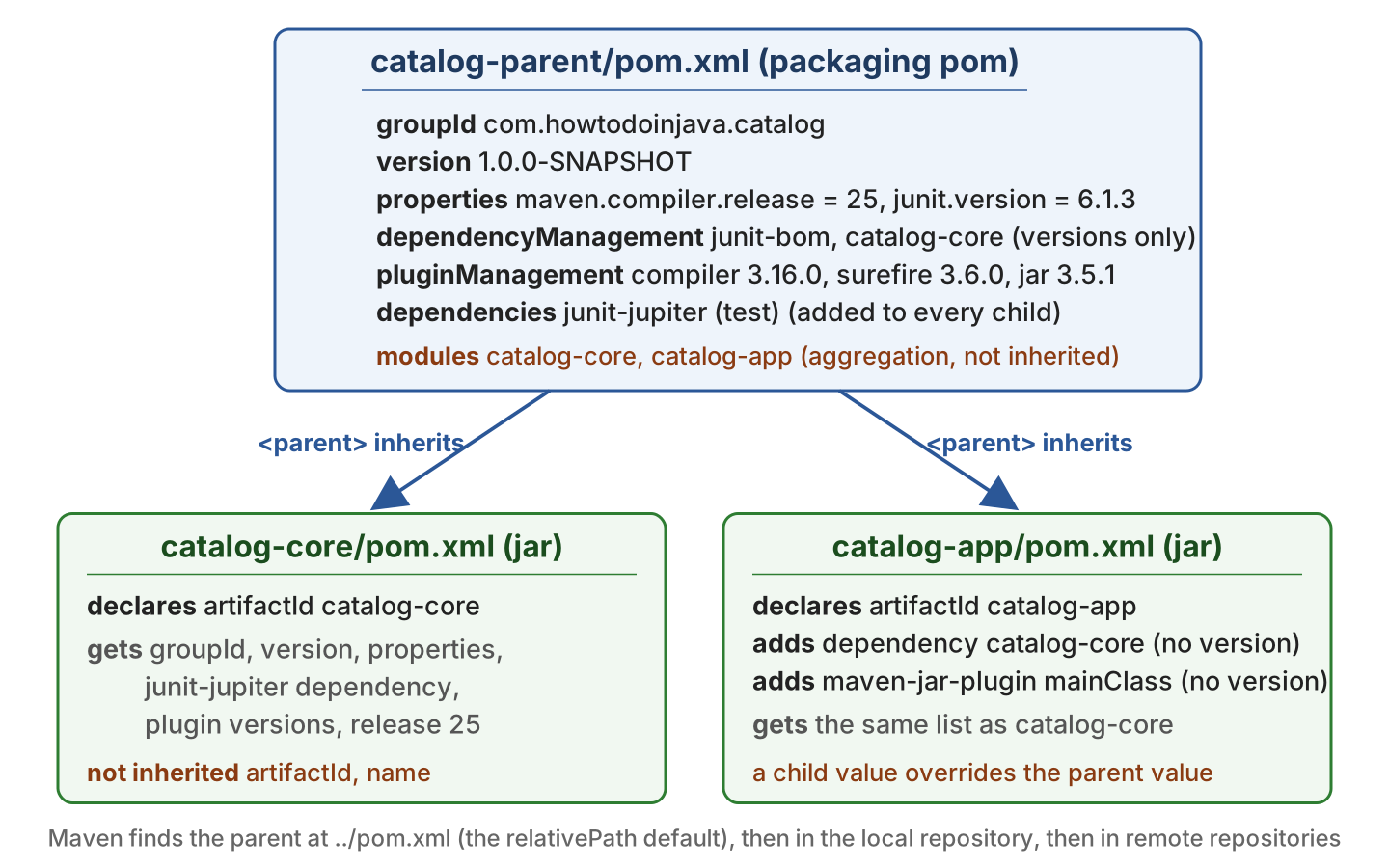
Almost every element of the POM is inherited. The few exceptions are the elements that name one project, such as the artifactId.
| Element | Inherited? | What happens in the child |
|---|---|---|
| groupId, version | Yes | The child may omit them, and sets its own only when they differ. |
| artifactId, name, description | No | Every child declares its own artifactId. |
| properties | Yes | The child can add properties or override a value. |
| dependencies | Yes | Every child gets the dependency, even when it does not need it. |
| dependencyManagement | Yes | Only the version and scope are inherited. The child still declares the dependency. |
| build/plugins | Yes | The plugin runs in every child, unless inherited is false. |
| build/pluginManagement | Yes | The version and configuration apply when the child uses the plugin. |
| modules | No | The list is for aggregation (see section 6), not for inheritance. |
2. Maven Parent and Child POM Example
The following example is a small library catalog with two modules. The catalog-core module holds a Book record and a Catalog class, and catalog-app uses catalog-core to print a summary. Each module sits in its own sub-folder under the parent.
maven-parent-child-pom/
  pom.xml                    <- parent: catalog-parent (packaging pom)
  catalog-core/
    pom.xml                  <- child: catalog-core
  catalog-app/
    pom.xml                  <- child: catalog-app, depends on catalog-core
The build uses Maven 3.9.16, Java 25, JUnit 6.1.3, maven-compiler-plugin 3.16.0 and maven-surefire-plugin 3.6.0. The complete project is in the GitHub repository.
2.1. The Parent POM
The parent POM declares the shared coordinates and the Java version. It imports the JUnit BOM in dependencyManagement, adds junit-jupiter as a test dependency for every child, and pins the plugin versions in pluginManagement.
<groupId>com.howtodoinjava.catalog</groupId>
<artifactId>catalog-parent</artifactId>
<version>1.0.0-SNAPSHOT</version>
<packaging>pom</packaging>                       <!-- required for a parent -->

<modules>                                        <!-- aggregation, see section 6 -->
  <module>catalog-core</module>
  <module>catalog-app</module>
</modules>

<properties>
  <maven.compiler.release>25</maven.compiler.release>
  <junit.version>6.1.3</junit.version>
</properties>

<dependencyManagement>                           <!-- versions only -->
  <dependencies>
    <dependency>
      <groupId>org.junit</groupId>
      <artifactId>junit-bom</artifactId>
      <version>@{junit.version}</version>
      <type>pom</type>
      <scope>import</scope>
    </dependency>
    <dependency>
      <groupId>com.howtodoinjava.catalog</groupId>
      <artifactId>catalog-core</artifactId>
      <version>@{project.version}</version>
    </dependency>
  </dependencies>
</dependencyManagement>

<dependencies>                                   <!-- every child gets this -->
  <dependency>
    <groupId>org.junit.jupiter</groupId>
    <artifactId>junit-jupiter</artifactId>
    <scope>test</scope>
  </dependency>
</dependencies>

<build>
  <pluginManagement>                             <!-- versions and config, used on demand -->
    <plugins>
      <plugin>
        <groupId>org.apache.maven.plugins</groupId>
        <artifactId>maven-compiler-plugin</artifactId>
        <version>3.16.0</version>
        <configuration>
          <release>@{maven.compiler.release}</release>
        </configuration>
      </plugin>
      <plugin>
        <groupId>org.apache.maven.plugins</groupId>
        <artifactId>maven-jar-plugin</artifactId>
        <version>3.5.1</version>
      </plugin>
    </plugins>
  </pluginManagement>
</build>
2.2. The Child POMs
To match a parent POM, Maven uses two rules. There is a pom.xml in the parent folder (or in the path given by relativePath), and the parent element in the child names the same groupId, artifactId and version as that file. The catalog-core POM from the intro is the smallest possible child. The catalog-app POM adds a dependency on catalog-core and a mainClass for the jar, both without a version.
<parent>
  <groupId>com.howtodoinjava.catalog</groupId>
  <artifactId>catalog-parent</artifactId>
  <version>1.0.0-SNAPSHOT</version>
  <relativePath>../pom.xml</relativePath>        <!-- the default, written out -->
</parent>

<artifactId>catalog-app</artifactId>

<dependencies>
  <dependency>
    <groupId>com.howtodoinjava.catalog</groupId>
    <artifactId>catalog-core</artifactId>        <!-- version 1.0.0-SNAPSHOT from dependencyManagement -->
  </dependency>
</dependencies>

<build>
  <plugins>
    <plugin>
      <groupId>org.apache.maven.plugins</groupId>
      <artifactId>maven-jar-plugin</artifactId>  <!-- version 3.5.1 from pluginManagement -->
      <configuration>
        <archive>
          <manifest>
            <mainClass>com.howtodoinjava.catalog.app.CatalogApp</mainClass>
          </manifest>
        </archive>
      </configuration>
    </plugin>
  </plugins>
</build>
The groupId and the version of a child are inherited, but the artifactId never is. A child may set its own groupId or version, and it still inherits everything else.
2.3. Running the Build
We run Maven in the parent folder. The modules list makes Maven build catalog-core first, because catalog-app depends on it. The tests in both modules run because both inherit the junit-jupiter dependency.
mvn clean test[INFO] Reactor Build Order:
[INFO] Library Catalog Parent
[INFO] Library Catalog Core
[INFO] Library Catalog App
[INFO] --- surefire:3.6.0:test (default-test) @ catalog-core ---
[INFO] Tests run: 2, Failures: 0, Errors: 0, Skipped: 0
[INFO] --- surefire:3.6.0:test (default-test) @ catalog-app ---
[INFO] Tests run: 1, Failures: 0, Errors: 0, Skipped: 0
[INFO] BUILD SUCCESSIf we run mvn test inside the catalog-app folder alone, Maven finds the parent through relativePath but fails with “Could not find artifact com.howtodoinjava.catalog:catalog-core:jar:1.0.0-SNAPSHOT”. A module built on its own looks for its sibling jars in the local repository, and catalog-core was never installed there. The fix is to run mvn install once from the parent folder, or mvn -pl catalog-app -am test there, which also builds the modules that catalog-app needs.
3. How Maven Finds the Parent POM (relativePath)
Maven looks for the parent POM first at the path in relativePath, which defaults to ../pom.xml, then in the local repository, and lastly in the remote repositories. The path starts from the folder of the child POM. The file found there must have the same groupId, artifactId and version as the parent element, or Maven ignores it and goes on to the repositories.
| Case | relativePath value | Where Maven looks |
|---|---|---|
| Parent folder above the module | Omitted, which means ../pom.xml | The parent folder, then the repositories. |
| Parent in a sibling folder | ../catalog-parent/pom.xml | That file, then the repositories. |
| Parent is published, not on disk | An empty element, <relativePath/> | Only the repositories. |
A wrong path stops the build before anything compiles. Pointing catalog-app at ../parent/pom.xml produces the following message, because no file is there and the parent is not in the local repository.
[FATAL] Non-resolvable parent POM for com.howtodoinjava.catalog:catalog-app:1.0.0-SNAPSHOT:
  Could not find artifact com.howtodoinjava.catalog:catalog-parent:pom:1.0.0-SNAPSHOT
  and 'parent.relativePath' points at wrong local POM @ line 7, column 11
The fix is to correct the path. When the parent is not next to the child, we run mvn install -N in the parent folder, so Maven finds it in the local repository.
4. dependencies vs dependencyManagement in the Parent
A dependencies element in the parent adds the dependency to every child. A dependencyManagement element only records the version and scope to use, and a child still has to declare the dependency to get it. The difference matters because an unused jar still ends up on the classpath and in the packaged app.
| Parent element | Child declares the dependency? | Child gets the jar? | Typical use |
|---|---|---|---|
| dependencies | No | Always | A test library every module uses, such as junit-jupiter. |
| dependencyManagement | Yes, without a version | Only when declared | Pinning versions of libraries that some modules use. |
In the example, junit-jupiter is in dependencies because every module has tests, and catalog-core is in dependencyManagement because only catalog-app needs it. A BOM such as junit-bom is a POM that only lists versions. We import it in dependencyManagement with scope set to import, which copies all its versions into our parent.
A child can override a managed version by writing its own version element, and the child value wins. The effective POM in section 7 shows which version a module ended up with.
5. pluginManagement in the Parent
A plugin listed under build/plugins in the parent runs in every child with the same configuration. A plugin listed under build/pluginManagement does nothing by itself. Maven applies its version and configuration only when a child lists the plugin under build/plugins, as catalog-app does with maven-jar-plugin, or when a build phase such as compile calls the plugin anyway.
The compiler, resources, surefire and jar plugins run in every build without being listed, so pinning their versions in pluginManagement is enough to control the whole build. Without a pinned version, Maven uses its built-in default version of the plugin, which is often old.
6. Inheritance vs Aggregation With modules
Inheritance and aggregation are two separate features that are often in the same file. The parent element in a child gives inheritance, so the child gets the parent’s settings. The modules element gives aggregation, so one mvn command builds all listed modules in dependency order.
A POM can do one without the other. A company base POM is only a parent and lists no modules. In most multi-module projects, one root POM does both, as catalog-parent does.
7. Checking What the Child Inherited With effective-pom
The effective POM is the child POM after Maven merged in the whole parent chain up to the Super POM. It shows which version a module uses without reading three files.
mvn -pl catalog-app help:effective-pom<groupId>com.howtodoinjava.catalog</groupId> <!-- from the parent -->
<artifactId>catalog-app</artifactId>
<version>1.0.0-SNAPSHOT</version> <!-- from the parent -->
<dependencies>
<dependency>
<artifactId>catalog-core</artifactId>
<version>1.0.0-SNAPSHOT</version> <!-- filled in from dependencyManagement -->
</dependency>
<dependency>
<artifactId>junit-jupiter</artifactId>
<version>6.1.3</version> <!-- inherited dependency, version from junit-bom -->
<scope>test</scope>
</dependency>
</dependencies>
<plugin>
<artifactId>maven-jar-plugin</artifactId>
<version>3.5.1</version> <!-- filled in from pluginManagement -->Notice that every missing value in the child is filled in, and that the modules element is gone, because aggregation is not inherited. The junit-bom import expanded into seventeen managed JUnit artifacts. Adding -Doutput=effective.xml writes the output to a file.
8. Using a Parent From a Remote Repository
The parent does not have to be in our project. Spring Boot publishes spring-boot-starter-parent to Maven Central, and we inherit from it with an empty relativePath, so Maven does not look for a file on disk.
<parent>
  <groupId>org.springframework.boot</groupId>
  <artifactId>spring-boot-starter-parent</artifactId>
  <version>4.1.1</version>
  <relativePath/>                                <!-- look in the repositories only -->
</parent>
A published parent gives us tested library and plugin versions, but a POM has only one parent. When a project needs both a company parent and Spring Boot, we keep our own parent and import spring-boot-dependencies as a BOM in dependencyManagement. The BOM gives us the versions, and we configure the Spring Boot Maven plugin ourselves.
9. Conclusion
A parent POM holds what our modules share, and a child POM holds only what is specific to the module. The child inherits the groupId and version but declares its own artifactId, and a value in the child always wins over the parent.
Maven finds the parent at ../pom.xml unless relativePath says otherwise, and falls back to the repositories. Dependencies every module needs go in dependencies, and versions go in dependencyManagement and pluginManagement. When a version looks wrong, mvn help:effective-pom shows what the module got.
10. References
- Introduction to the POM, Maven
- POM Reference, inheritance and aggregation
- Maven Model, the parent and relativePath elements
- Maven Help Plugin, effective-pom
- Guide to Working with Multiple Modules
Happy Learning !!

Is it correct to create a module in the parent so the child can inherit it?
I don’t see a problem with it.
I tried this, but during compilation, Maven search the PARENT remotely…
[ERROR] Failed to execute goal on project GraphClientPropietary: Could not resolve dependencies for project com.graphclient.propietary: GraphClientPropietary:war:1.0-SNAPSHOT: Could not transfer artifact com.graphclient:GraphClient:jar:1.
0-SNAPSHOT from/to central1 (https://mvnrepository.com/artifact): authorization failed for https://mvnrepository.com/artifact/com/graphclient/ GraphClient/1.0-SNAPSHOT/GraphClient-1.0-SNAPSHOT.jar, status: 403 Forbidden -> [Help 1]
How can I solve it?
Please check if you are using the
packagingtopomin the parent project. See if Multi-Module Maven Project example helps?Parent common dependency jars are available in child under lib folder and it is. working in STS/ ECLIPSE/RAD/ or IDE.But when same used do mvn clean install, manifest file dependency jars are not appended. Due to this we are getting run time error class not found
What if I want to use parent classes in child module how to do that in spring?
Hi, I have a Parent and Child POM which I stored in my personal GitHub, they both work as intended, but only if I build them sepparatelly in my machine, building the Child alone doesn’t build the parent POM and the jar, class and pom files of the parent do not get created. I have created a release in GitHub to which I attached the POM and JAR files of the parent but no luck, I also tried to use JitPack with the GitHub release, but same as before…the mvn install and mvn build instructions failed to find the files of the parent.
Here’s my personal Git repo for reference: https://github.com/omarjmc
In general yes, but you shouldn’t place property in it suppose to be fixed. The correct approach is to use rpropertiest in dependecies, plugin configuration etc.
I have a parent pom in which i have defined a properties
<project>
     <modelVersion>4.0.0</modelVersion>
     <groupId>com.mycompany.app</groupId>
     <artifactId>my-module</artifactId>
     <version>${artifact.version}</version>
.....
.....
<properties>
            <artifact.version>1.12.0</artifact.version>
</properties>
</project>
I have multiple modules in my workspace, so to keep version in one place, I have done above changes.
Now in all my child modules defining the parent tag as below.
<parent>
     <groupId>com.mycompany.app</groupId>
      <artifactId>my-module-child</artifactId>
      <version>${artifact.version}</version>
     <relativePath>../my-module/pom.xml</relativePath>
</parent>
Please suggest if this is correct approach to use the relative path or there are any issue with above code.
I am trying to reference classes of child module from the parent module and it is giving error that class not found. Also, when compiling though mvn compile the parent project, it doesn’t compile the module. Even after entering garbage chars, compile is getting passed for parent project. Please help.
Is there a way to reference parent javascript with maven?
Maven can help in extracting jars and put JS files in predefined locations. If does not reference it.
Hello,
If you have such an example and you try to do a mvn release:prepare release:perform , it will cruch :
The version could not be updated: ${spring.version} …
Can you please advise ?
Thank you in advance!
Can you please give any sample project to refer with detailed steps..!
I updated the post with a demo. Please refer it.
Do I need to mvn install Parent project then child project?
Yes. Follow these steps:
1) Create parent maven project. Set packaging to pom.
2) Create any maven project and add parent tag.
3) You should be able to use parent pom’s properties.
How to execute Parent & Child POM project?
Do I need to mvn install Parent project then child project?