

A Java password validation regex checks each password rule with a lookahead, a zero-width test written (?=…), and checks the length once at the end. The common pattern ^(?=.*[a-z])(?=.*[A-Z])(?=.*\d)(?=.*[^a-zA-Z0-9]).{8,64}$ requires a lowercase letter, an uppercase letter, a digit and a special character, in any order, in a password of 8 to 64 characters. Each lookahead is independent, so we can add or remove a rule without rewriting the rest.
We use such a regex on sign-up and password-change forms, in a Spring or Jakarta Bean Validation annotation, or in a shared validator that several services call. The following example compiles the pattern once and tests four passwords against it.
Pattern strong = Pattern.compile("^(?=.*[a-z])(?=.*[A-Z])(?=.*\\d)(?=.*[^a-zA-Z0-9]).{8,64}$");

boolean valid = strong.matcher("Apple@123").matches();         // true
boolean noUpper = strong.matcher("apple@123").matches();       // false, no uppercase
boolean noSpecial = strong.matcher("Apple1234").matches();     // false, no special character
boolean tooShort = strong.matcher("Ap@1").matches();           // false, too short
Notice that the four lookaheads come first and only .{8,64} reads the characters. We go through the regex part by part, show how lookaheads work, add negative lookaheads for things to reject, and build a validator that names the failed rule. Current NIST guidance advises against composition rules, so section 7 also shows a length-and-blocklist check that follows it. Readers new to Pattern and Matcher can start with the regex basics in Java.
1. The Password Validation Regex, Part by Part
The pattern has an anchor at each end, four lookaheads in the middle and one part that consumes the characters. Reading it left to right gives the full rule set.
| Part | Meaning |
|---|---|
| ^ | Start of the input, where every lookahead is tested |
| (?=.*[a-z]) | Somewhere ahead there is a lowercase letter |
| (?=.*[A-Z]) | Somewhere ahead there is an uppercase letter |
| (?=.*\d) | Somewhere ahead there is a digit |
| (?=.*[^a-zA-Z0-9]) | Somewhere ahead there is a character that is not a letter or digit |
| .{8,64} | The password itself, 8 to 64 characters of any kind except a line break |
| $ | End of the input |
The special-character class [^a-zA-Z0-9] is a negated class, which matches any character that is not listed. A negated class is simpler than a list of symbols such as [@#$%], which rejects a password whose only symbol is ! or -. A space also counts as not a letter or digit, so Apple @123 passes.
Pattern strong = Pattern.compile("^(?=.*[a-z])(?=.*[A-Z])(?=.*\\d)(?=.*[^a-zA-Z0-9]).{8,64}$");

boolean bang = strong.matcher("Apple!123").matches();       // true
boolean space = strong.matcher("Apple 123").matches();      // true, space counts as special
2. How a Lookahead Works
A lookahead tests whether its pattern can match at the current position, and the engine returns to that position afterwards. It never consumes characters, which is why it is called zero-width. A search for (?=.*\d) alone succeeds in abc1 but matches an empty string at index 0.
Matcher m = Pattern.compile("(?=.*\\d)").matcher("abc1");
boolean found = m.find();                                   // true
String matched = m.group();                                 // ""
int at = m.start();                                         // 0

boolean consumesNothing = "abc1".matches("(?=.*\\d)");      // false, nothing consumed
boolean withBody = "abc1".matches("(?=.*\\d).*");           // true
boolean firstOnly = "abc1".matches("(?=\\d).*");            // false, no digit at position 0
The last two lines show why each lookahead starts with .*. Without it, (?=\d) asks whether the first character is a digit. With it, (?=.*\d) asks whether a digit appears anywhere after zero or more other characters.
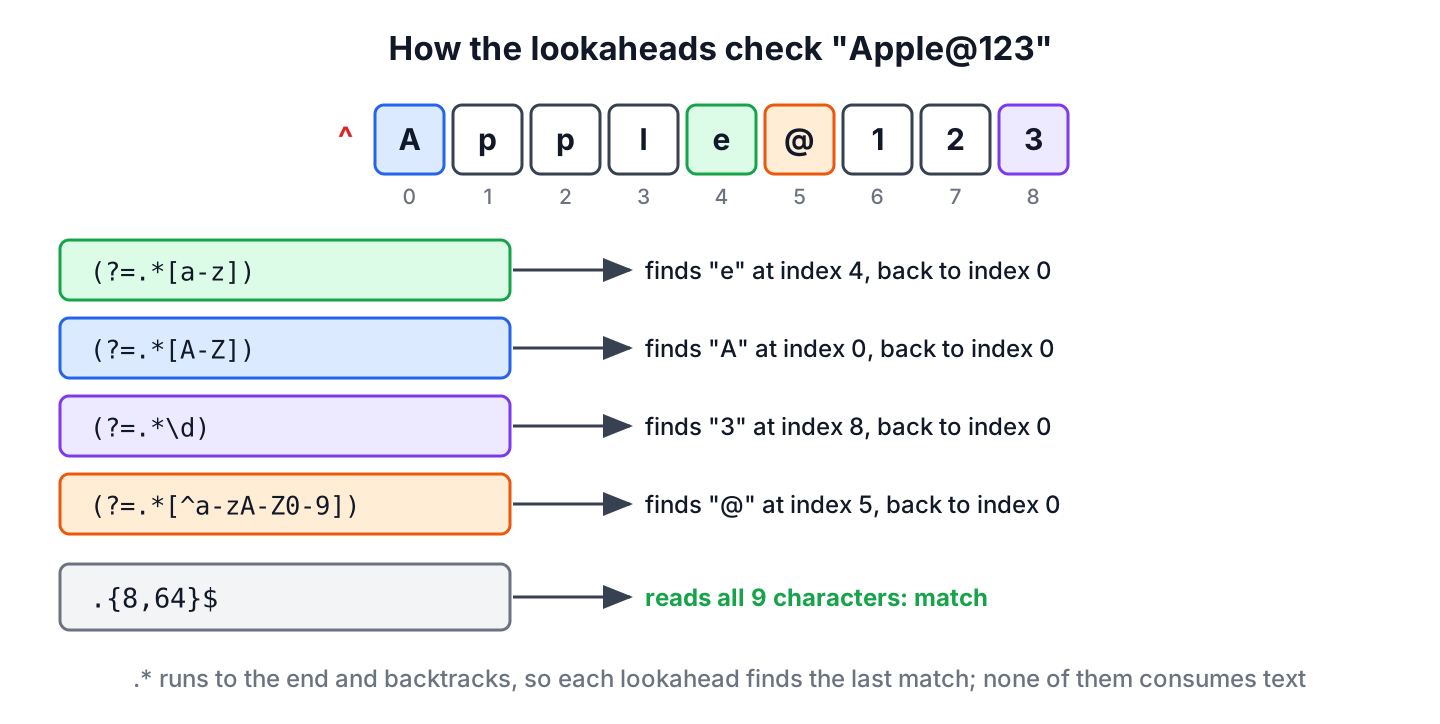
Because every lookahead starts at the same position, right after ^, the lookaheads combine like a logical AND. All of them must succeed before .{8,64} reads a single character. Their order does not change the result.
3. Adding the Rules One at a Time
Building the regex step by step shows what each lookahead removes. Each row adds one lookahead, each column is one sample password, and T means the regex matches while F means it does not.
| Regex | Apple@123 | apple@123 | APPLE@123 | Apple@abc | Apple1234 | Ap@1 |
|---|---|---|---|---|---|---|
| ^.{8,64}$ | T | T | T | T | T | F |
| + (?=.*[a-z]) | T | T | F | T | T | F |
| + (?=.*[A-Z]) | T | F | F | T | T | F |
| + (?=.*\d) | T | F | F | F | T | F |
| + (?=.*[^a-zA-Z0-9]) | T | F | F | F | F | F |
Only Apple@123 passes every rule. The password Ap@1 fails from the first row, because the length check applies whatever the lookaheads say.
4. Negative Lookaheads for Things to Reject
A negative lookahead, written (?!…), succeeds when its pattern can not match ahead. It expresses must-not-contain rules, and three of them come up in most password policies.
- The lookahead (?!.*\s) rejects any whitespace.
- The lookahead (?!.*(.)\1\1) rejects three identical characters in a row, because (.) captures one character and \1 refers back to it.
- The lookahead (?!.*(?i:\Qlokesh\E)) rejects the user name in any letter case.
boolean noSpace = "Apple @123".matches("^(?!.*\\s).+$");           // false
boolean triple = "Appple@123".matches("^(?!.*(.)\\1\\1).+$");      // false, "ppp"
boolean noTriple = "Apple@123".matches("^(?!.*(.)\\1\\1).+$");     // true

Pattern noUser = Pattern.compile("^(?!.*(?i:" + Pattern.quote("lokesh") + ")).+$");
String userRegex = noUser.pattern();                               // "^(?!.*(?i:\Qlokesh\E)).+$"
boolean hasUser = noUser.matcher("Lokesh@2026").matches();         // false
boolean otherWord = noUser.matcher("Apple@2026").matches();        // true
When user input becomes part of a regex, we always wrap it with Pattern.quote(). The method puts the text between \Q and \E, so characters such as . or * in a user name are treated as plain text. The (?i:…) group turns on case-insensitive matching for that part only.
5. The Missing Backslash Bug
A frequent bug in copied password regexes is a lost backslash. In the pattern ((?=.*[a-z])(?=.*d)(?=.*[@#$%])(?=.*[A-Z]).{6,16}), the digit rule (?=.*d) looks for the letter d, not for a digit.
Pattern broken = Pattern.compile("((?=.*[a-z])(?=.*d)(?=.*[@#$%])(?=.*[A-Z]).{6,16})");

boolean noDigit = broken.matcher("Password@").matches();       // true, no digit at all
boolean withDigits = broken.matcher("Apple@123").matches();    // false, has digits but no "d"
In a Java string literal, the regex \d must be written as "\\d". A single backslash in the source, as in "\d", does not compile, so the mistake happens when a regex is copied from a web page that dropped one backslash. A test with a password that has digits but no letter d catches the bug at once. The same pattern also limits passwords to 16 characters, far below what current guidance recommends.
6. A Configurable Validator With Error Messages
A single matches() call only says that a password is invalid, while users need to know which rule they missed. A PasswordPolicy class can serve both needs from the same rules.
- Each rule is stored as a lookahead string plus a message.
- The build() method joins all lookaheads and the length part into one regex and compiles it once.
- The violations() method tests each rule on its own and returns the messages of the failed ones.
Each rule is a small record, and the policy keeps one compiled Pattern for the whole regex plus one per rule.
record Rule(String message, String lookahead) {}final class PasswordPolicy {
private final List<Rule> rules;
private final List<Pattern> checks;
private final int min;
private final int max;
private final Pattern pattern;
private PasswordPolicy(List<Rule> rules, int min, int max) {
this.rules = List.copyOf(rules);
this.checks = rules.stream().map(r -> Pattern.compile("^" + r.lookahead())).toList();
this.min = min;
this.max = max;
String lookaheads = rules.stream().map(Rule::lookahead).collect(Collectors.joining());
this.pattern = Pattern.compile("^" + lookaheads + ".{" + min + "," + max + "}$");
}
static Builder builder() {
return new Builder();
}
String regex() {
return pattern.pattern();
}
boolean isValid(String password) {
return pattern.matcher(password).matches();
}
List<String> violations(String password) {
List<String> failed = new ArrayList<>();
int length = password.codePointCount(0, password.length());
if (length < min || length > max) {
failed.add("must be " + min + " to " + max + " characters long");
}
for (int i = 0; i < rules.size(); i++) {
if (!checks.get(i).matcher(password).lookingAt()) {
failed.add(rules.get(i).message());
}
}
return failed;
}
static final class Builder {
private final List<Rule> rules = new ArrayList<>();
private int min = 8;
private int max = 64;
Builder length(int min, int max) { this.min = min; this.max = max; return this; }
Builder requireLowercase() { return add("needs a lowercase letter", "(?=.*[a-z])"); }
Builder requireUppercase() { return add("needs an uppercase letter", "(?=.*[A-Z])"); }
Builder requireDigit() { return add("needs a digit", "(?=.*\\d)"); }
Builder requireSpecial() { return add("needs a character that is not a letter or digit", "(?=.*[^a-zA-Z0-9])"); }
Builder forbidWord(String word) {
return add("must not contain \"" + word + "\"", "(?!.*(?i:" + Pattern.quote(word) + "))");
}
private Builder add(String message, String lookahead) {
rules.add(new Rule(message, lookahead));
return this;
}
PasswordPolicy build() {
return new PasswordPolicy(rules, min, max);
}
}
}The combined regex and the messages for some inputs show both uses of the same rules.
PasswordPolicy policy = PasswordPolicy.builder().length(8, 64).requireLowercase().requireUppercase().requireDigit().requireSpecial().forbidWord("lokesh").build();

String regex = policy.regex();                                 // "^(?=.*[a-z])(?=.*[A-Z])(?=.*\d)(?=.*[^a-zA-Z0-9])(?!.*(?i:\Qlokesh\E)).{8,64}$"
boolean ok = policy.isValid("Apple@123");                      // true
List<String> missing = policy.violations("apple123");          // [needs an uppercase letter, needs a character that is not a letter or digit]
List<String> shortOne = policy.violations("Ap@1");             // [must be 8 to 64 characters long]
List<String> userName = policy.violations("Lokesh@123");       // [must not contain "lokesh"]
A Pattern is immutable and thread-safe, so one policy object can serve all requests of a web app. The length check in violations() uses codePointCount() instead of length(), because an emoji such as U+1F600 has a length() of 2 but is one code point, and the regex dot also counts it as one character.
String emoji = "\uD83D\uDE00abc";
int chars = emoji.length();                                    // 5
int codePoints = emoji.codePointCount(0, emoji.length());      // 4
boolean dotCount = emoji.matches(".{4}");                      // true
7. What NIST SP 800-63B-4 Recommends
NIST SP 800-63B-4, published in July 2025, is the US government guideline for authentication, and many companies follow it. Its rules for password verifiers differ from the classic upper, lower, digit and symbol policy.
- Passwords used as the only authentication factor must be at least 15 characters long, and passwords used only together with a second factor (MFA) must be at least 8.
- Verifiers should allow a maximum length of at least 64 characters, and should accept all printing ASCII characters, the space and Unicode characters, counting each Unicode code point as one character.
- Verifiers shall not impose other composition rules, such as requiring a mix of character types.
- Every new password shall be compared against a blocklist of common, expected or breached passwords, including the service name and the user name.
- Verifiers shall not require periodic password changes, but shall force a change when there is evidence of compromise.
The guideline explains why in its appendix on password strength. Composition rules add less strength than expected and make passwords harder to remember, and users respond in predictable ways, so someone who would pick password picks Password1! when a digit, an uppercase letter and a symbol are required.
A NIST-style check needs a regex only for length, and the rest is plain Java. The blocklist here has four entries to keep it readable, while a real one is loaded from a file of many thousands of breached passwords.
static List<String> nistViolations(String password, String userName) {
    Set<String> blocklist = Set.of("password123", "qwerty123", "123456789", "iloveyou");
    String lower = password.toLowerCase(Locale.ROOT);
    List<String> failed = new ArrayList<>();
    int length = password.codePointCount(0, password.length());
    if (length < 15 || length > 64) {
        failed.add("must be 15 to 64 characters long");
    }
    if (blocklist.contains(lower)) {
        failed.add("is a commonly used password");
    }
    if (lower.contains(userName.toLowerCase(Locale.ROOT))) {
        failed.add("must not contain the user name");
    }
    return failed;
}
boolean longEnough = Pattern.compile("^.{15,64}$").matcher("green apple tree").matches(); // true
List<String> passphrase = nistViolations("green apple tree", "lokesh"); // []
List<String> short2 = nistViolations("apple tree", "lokesh"); // [must be 15 to 64 characters long]
List<String> common = nistViolations("PASSWORD123", "lokesh"); // [must be 15 to 64 characters long, is a commonly used password]
List<String> withUser = nistViolations("lokesh likes apples", "lokesh"); // [must not contain the user name]Whatever the rules, the password itself is stored only as a slow, salted hash, and the article on secure password hashing covers PBKDF2 and bcrypt.
8. A Note on Performance
Each (?=.*X) first runs .* to the end of the input and backtracks until it finds X. For a password of at most 64 characters, that cost is too small to measure, and two habits keep it that way.
- Check the maximum length before running the regex, or keep {8,64} in the pattern, so a 1 MB request body is never scanned by four lookaheads.
- Write each lookahead with a negated class, such as (?=[^a-z]*[a-z]) or (?=\D*\d), which moves forward to the first match without backtracking.
Pattern strongNegated = Pattern.compile("^(?=[^a-z]*[a-z])(?=[^A-Z]*[A-Z])(?=\\D*\\d)(?=[a-zA-Z0-9]*[^a-zA-Z0-9]).{8,64}$");

boolean sameValid = strongNegated.matcher("Apple@123").matches();      // true
boolean sameInvalid = strongNegated.matcher("Apple1234").matches();    // false
The tests in the example project check that both patterns give the same result for every sample password.
9. Password Validator Code and Tests
The project on GitHub contains PasswordPolicy, the regexes from this article and the NIST-style check. The main class prints every result shown here, including the step-by-step table from section 3, and the JUnit 6 tests assert them. The project targets Java 25 and builds with Maven.
mvn -q compile exec:java
mvn test
10. Password Regex FAQs
Password rules beyond the four classic ones lead to questions about digit counts, spaces, client-side checks and real strength.
10.1. How Do We Require at Least Two Digits?
We repeat the digit search inside the lookahead. The lookahead (?=(?:.*\d){2}) needs two digits anywhere in the password, and the count can be any number.
boolean twoDigits = "Apple@12".matches("^(?=(?:.*\\d){2}).{8,64}$");    // true
boolean oneDigit = "Apple@1x".matches("^(?=(?:.*\\d){2}).{8,64}$");     // false
10.2. How Do We Disallow Spaces in a Password?
We add the negative lookahead (?!.*\s) next to the other rules. NIST recommends accepting spaces, because passphrases such as green apple tree contain them, so we forbid spaces only when a legacy system cannot store them.
boolean noSpaces = "Apple @123".matches("^(?!.*\\s)(?=.*\\d).{8,64}$"); // false10.3. Should We Validate the Password on the Client or the Server?
On both, but the server check is the one that counts. A client-side check in JavaScript gives instant feedback, while the server must repeat every rule, because a request can bypass the browser. The four composition lookaheads work unchanged in a JavaScript regex, whereas the forbidWord() rule does not, because JavaScript does not support \Q…\E quoting.
10.4. Is a Regex Enough for a Strong Password?
No. A regex checks the shape of a password, not whether attackers already know it. A password such as Password1! passes every composition rule and is still in breach lists, which is why NIST asks for a blocklist check as well.
11. Conclusion
Lookaheads let one regex check several independent rules. Each (?=.*X) requires X somewhere in the password, each (?!.*X) forbids it, and a final .{min,max} checks the length. Testing each rule separately turns the same lookaheads into clear error messages.
Before adding composition rules, we compare them with NIST SP 800-63B-4. A 15-character minimum, a maximum of 64 characters or more and a blocklist protect accounts better than one symbol and one digit.
12. References
- NIST SP 800-63B-4, Authentication and Authenticator Management
- NIST SP 800-63B-4 publication page (CSRC)
- Pattern (Java SE 25 API)
- Pattern.quote() (Java SE 25 API)
- Lookahead and lookbehind (regular-expressions.info)
Happy Learning !!

when ever we validating its follwing same as regex pattern…
Hi, you have an error in you regex at line 42, there should be
patternBuilder.append("(?=.*\d)");