
To remove non-ASCII characters from a Java string, we replace every match of \P{ASCII} with an empty string; to remove non-printable characters, we replace \p{Cntrl} (ASCII control characters) or \p{C} (invisible Unicode characters). ASCII is the 128-character set with code points 0 to 127, which holds English letters, digits, punctuation, the space and 33 control characters such as tab and line feed.
Text copied from Word documents, PDFs, web pages or spreadsheets often carries extra characters outside this set, such as accented letters, zero-width spaces and byte order marks. We clean them out because they break CSV parsers, database columns with an ASCII charset, file names and string comparisons.
The following example shows one cleaning rule per line, and the comment is the returned string. Unicode characters are written as Java escapes, for example \u00e9 is “e” with an acute accent and \u200b is a zero-width space.
String noAscii = "caf\u00e9".replaceAll("\\P{ASCII}", "");                           // "caf"
String hexRange = "caf\u00e9".replaceAll("[^\\x00-\\x7F]", "");                      // "caf"
String noControl = "a\u0000b\u0007c".replaceAll("\\p{Cntrl}", "");                   // "abc"
String joined = "a\tb\nc".replaceAll("\\p{Cntrl}", "");                              // "abc"
String keepLines = "a\u0007\tb\nc".replaceAll("[\\p{Cntrl}&&[^\\r\\n\\t]]", "");     // "a\tb\nc"
String printable = "caf\u00e9\tbar".replaceAll("\\P{Print}", "");                    // "cafbar"
String invisible = "caf\u00e9\u200b".replaceAll("\\p{C}", "");                       // "caf\u00e9"
String noAccents = stripAccents("caf\u00e9 na\u00efve");                             // "cafe naive"
String ascii = AsciiCleaner.toAscii("\u00c9t\u00e9\u00a0\ufb01ne\u200b!");                        // "Ete fine!"
Notice that \p{Cntrl} also removes tabs and line breaks unless we exclude them. The last two lines call the helper methods stripAccents() and toAscii() from section 6 and section 7, which turn accented letters such as “e” with an acute accent into plain “e” instead of deleting them.
1. Which Characters Are Non-ASCII and Which Are Non-Printable
The two terms overlap, but they are not the same. A non-ASCII character has a code point above 127, so accented letters, the euro sign and emoji are non-ASCII, and all of them are visible. A non-printable character has no visible shape. The tab, the line feed and the bell character are non-printable, and all of them are ASCII.
Java regex has a predefined character class for each group. Classes written as \p{Name} match one character from the named set, and the uppercase form \P{Name} matches any character outside it.
| Class | Matches | Covers Unicode? |
|---|---|---|
| \p{ASCII} | Any ASCII character, [\x00-\x7F] | No |
| \P{ASCII} | Any character outside ASCII | Yes, by definition |
| \p{Cntrl} | An ASCII control character, [\x00-\x1F\x7F] | No |
| \p{Print} | A printable ASCII character, [\x20-\x7E] (space included) | No |
| \p{C} | Any Unicode “Other” character, such as controls, format characters, private use and unassigned code points | Yes |
| \p{Cf} | Unicode format characters, such as the zero-width space and the byte order mark | Yes |
The POSIX classes \p{Cntrl} and \p{Print} look only at ASCII by default. The Unicode control character U+0085 (next line) is not in \p{Cntrl}, and the letter “e” with an acute accent is not in \p{Print}, even though it prints fine.
boolean letter = "A".matches("\\p{ASCII}");              // true
boolean accent = "\u00e9".matches("\\p{ASCII}");         // false
boolean tab = "\t".matches("\\p{Cntrl}");                // true
boolean nextLine = "\u0085".matches("\\p{Cntrl}");       // false
boolean space = " ".matches("\\p{Print}");               // true
boolean accentPrint = "\u00e9".matches("\\p{Print}");    // false
boolean nextLineC = "\u0085".matches("\\p{C}");          // true
boolean zeroWidth = "\u200b".matches("\\p{C}");          // true
boolean noBreak = "\u00a0".matches("\\p{C}");            // false
The last line is false because Unicode classifies the no-break space as a space separator, not as an “Other” character.
2. Removing Non-ASCII Characters
When the target system accepts only ASCII, we delete every character above code point 127. Java gives us two equivalent ways to write the pattern.
- The negated predefined class \P{ASCII} reads well in code.
- The negated range of hex code points [^\x00-\x7F] works in almost every regex engine.
String byClass = "na\u00efve caf\u00e9".replaceAll("\\P{ASCII}", "");         // "nave caf"
String byRange = "na\u00efve caf\u00e9".replaceAll("[^\\x00-\\x7F]", "");     // "nave caf"
String marked = "na\u00efve caf\u00e9".replaceAll("\\P{ASCII}", "?");         // "na?ve caf?"
The result “nave caf” shows the problem with plain deletion, since the words lose letters. For names and words in European languages, converting the letters with Normalizer (section 6) keeps the text readable. Replacing with “?” is useful when we need to see where something was removed.
Java regex works on Unicode code points, not on single char values. An emoji such as U+1F600 takes two char values in a String (a surrogate pair), but \P{ASCII} matches it once and removes both halves, so the result never contains a broken half character.
String smile = new String(Character.toChars(0x1F600));
int length = ("hi" + smile).length();                            // 4
String hi = ("hi" + smile).replaceAll("\\P{ASCII}", "");         // "hi"
3. Removing ASCII Control Characters
Control characters are the 33 ASCII codes that do not print, namely code points 0 to 31 and 127 (delete). They include the null character \u0000, the bell \u0007 and the escape character \u001B, which often appear in log files and in data exported from old systems. The class \p{Cntrl} matches all of them.
String clean = "a\u0000b\u001Bc\u007Fd".replaceAll("\\p{Cntrl}", ""); // "abcd"Tab, line feed and carriage return are control characters too, so \p{Cntrl} also joins all lines into one. To keep them, we use character class intersection, where [A&&[^B]] matches characters that are in A and not in B. The pattern [\p{Cntrl}&&[^\r\n\t]] reads as “a control character, but not a carriage return, line feed or tab”.
String lines = "line1\r\nline2\u0007".replaceAll("[\\p{Cntrl}&&[^\\r\\n\\t]]", ""); // "line1\r\nline2"4. Keeping Only Printable ASCII
The opposite approach is an allow list, where we describe the characters to keep and delete everything else. Printable ASCII is the range from the space (code point 32) to the tilde (126). Two patterns match a character outside the range.
- The negated POSIX class \P{Print} is the short form.
- The class [^\x20-\x7E] writes the same range with hex code points.
String price = "Price: 10\u20ac\t".replaceAll("\\P{Print}", "");                 // "Price: 10"
String priceHex = "Price: 10\u20ac\t".replaceAll("[^\\x20-\\x7E]", "");          // "Price: 10"
String multiLine = "a\u00e9\tb\nc".replaceAll("[^\\p{Print}\\r\\n\\t]", "");     // "a\tb\nc"
The first two lines delete both the euro sign and the tab. The third pattern adds \r, \n and \t to the allow list, so a multi-line text keeps its lines. An allow list is the safer choice for input that must be plain ASCII, because a new kind of unexpected character is removed without a change to the regex.
5. Removing Invisible Unicode Characters but Keeping Accents
Sometimes the text should keep its accented letters and lose only the characters nobody can see. The Unicode category \p{C} (“Other”) is the right class for the job. It covers ASCII and Unicode control characters, format characters, private-use characters and unassigned code points, and it leaves letters and symbols alone.
Format characters (\p{Cf}) cause the most confusing bugs. A customer search for “coop” returns nothing although the product list shows “coop”, because the stored name has a soft hyphen inside, so the two strings look equal on screen but equals() returns false. Common format characters are these.
- The byte order mark U+FEFF appears at the start of a file saved by some Windows editors.
- The zero-width space U+200B comes with text copied from web pages.
- The soft hyphen U+00AD is an invisible hint for line wrapping.
- The zero-width joiner U+200D joins parts of emoji sequences.
String bom = "\ufeffhello".replaceAll("\\p{C}", "");                                  // "hello"
String coop = "co\u00adop\u200b".replaceAll("\\p{Cf}", "");                           // "coop"
String flat = "caf\u00e9\u200b\nbar".replaceAll("\\p{C}", "");                        // "caf\u00e9bar"
String kept = "caf\u00e9\u200b\nbar".replaceAll("[\\p{C}&&[^\\r\\n\\t]]", "");        // "caf\u00e9\nbar"
The class \p{C} also matches line breaks and tabs, as the third line shows. The intersection from section 3 keeps them.
The no-break space U+00A0 is not in \p{C}, because Unicode classifies it as a space separator. To turn it into a normal space, we replace \h (any horizontal whitespace) with a space.
String spaced = "a\u00a0b".replaceAll("\\h", " "); // "a b"The flag Pattern.UNICODE_CHARACTER_CLASS switches the POSIX classes to Unicode rules. With it, \p{Print} matches “e” with an acute accent and \p{Cntrl} matches U+0085. We prefer the explicit Unicode categories such as \p{C}, because their meaning does not depend on a flag set somewhere else.
6. Converting Accented Letters to ASCII With Normalizer
Many accented letters can be stored in two forms in Unicode, either as one precomposed code point, or as a base letter followed by a combining mark. The letter “e” with an acute accent is U+00E9 in the first form, and “e” plus U+0301 (combining acute accent) in the second. The java.text.Normalizer class converts between these forms, and normalization form NFD splits each precomposed letter into its base letter and its marks.
String nfd = Normalizer.normalize("\u00e9", Normalizer.Form.NFD);    // "e\u0301"
int nfdLength = nfd.length();                                        // 2
After the split, the regex \p{M} (any combining mark) removes the accents and leaves the base letters.
static String stripAccents(String text) {
    return Normalizer.normalize(text, Normalizer.Form.NFD).replaceAll("\\p{M}", "");
}
String dessert = stripAccents("Cr\u00e8me br\u00fbl\u00e9e"); // "Creme brulee"
String bird = stripAccents("\u00f1and\u00fa"); // "nandu"
String same = stripAccents("\u00f8 \u00df \u00e6"); // "\u00f8 \u00df \u00e6"NFD does not convert every non-ASCII letter. The Danish “o” with a stroke (U+00F8), the German sharp s (U+00DF) and the “ae” ligature (U+00E6) are separate letters in Unicode, not a base letter plus a mark, so they stay unchanged and a later \P{ASCII} step removes them. For these, we need an explicit mapping table (for example U+00DF to “ss”) or a transliteration library such as ICU4J.
Normalization form NFKD goes one step further. It also replaces compatibility characters with their plain equivalents, such as the “fi” ligature (U+FB01), full-width letters used in East Asian text, and the no-break space.
String ligature = Normalizer.normalize("\ufb01", Normalizer.Form.NFKD);    // "fi"
String fullWidth = Normalizer.normalize("\uff21", Normalizer.Form.NFKD);   // "A"
7. A Complete Method to Convert Text to Clean ASCII
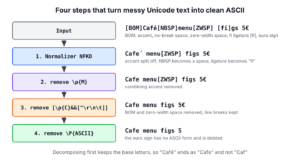
In real data, all these problems appear in the same string. A typical case is a menu export from a restaurant app that must go into a legacy point-of-sale system accepting only ASCII. The toAscii() method runs four steps in a fixed order.
![A four-step pipeline. The input with a byte order mark, accented letters, a no-break space, a zero-width space and the fi ligature goes through NFKD, which splits letters and marks; then removing \p{M} drops the accents; then removing [\p{C}&&[^\r\n\t]] drops invisible characters; then removing \P{ASCII} drops what is left, giving plain ASCII text.](https://howtodoinjava.com/wp-content/uploads/2026/10/java-clean-text-to-ascii-pipeline.png)
The patterns are compiled once into static final fields, because String.replaceAll() compiles its regex on every call.
class AsciiCleaner {
    private static final Pattern MARKS = Pattern.compile("\\p{M}");
    private static final Pattern CONTROL_EXCEPT_WHITESPACE = Pattern.compile("[\\p{C}&&[^\\r\\n\\t]]");
    private static final Pattern NON_ASCII = Pattern.compile("\\P{ASCII}");

    static String toAscii(String text) {
        String decomposed = Normalizer.normalize(text, Normalizer.Form.NFKD);
        String noMarks = MARKS.matcher(decomposed).replaceAll("");
        String noControls = CONTROL_EXCEPT_WHITESPACE.matcher(noMarks).replaceAll("");
        return NON_ASCII.matcher(noControls).replaceAll("");
    }
}
The sample input starts with a byte order mark and contains accents, a no-break space, a zero-width space, a bell character, the “fi” ligature, a Windows line break and the euro sign.
String dirty = "\ufeffCaf\u00e9\u00a0menu\u200b:\u0007 cr\u00e8me br\u00fbl\u00e9e, \ufb01gs\r\nTotal: 5\u20ac";
String menu = AsciiCleaner.toAscii(dirty);    // "Cafe menu: creme brulee, figs\r\nTotal: 5"
String filtered = dirty.codePoints().filter(c -> c < 128).collect(StringBuilder::new, StringBuilder::appendCodePoint, StringBuilder::append).toString();   // "Cafmenu:\u0007 crme brle, gs\r\nTotal: 5"
For comparison, the last line filters the code points without any regex, and it keeps the bell character and loses the accented letters. The euro sign has no ASCII equivalent, so the last step of toAscii() deletes it. When symbols carry meaning, we replace them before cleaning, for example with replace(“\u20ac”, “EUR”). The article regex for currency symbols shows how to find all of them with \p{Sc}.
8. Cleaning Text Read From a File
To clean a file, we read it as a String and pass it to the same method, as in toAscii(Files.readString(Path.of(“data.txt”))). The method Files.readString() always decodes the bytes as UTF-8.
If each accented letter shows up as two strange characters, for example a capital “A” with a tilde followed by a copyright sign in place of an “e” with an acute accent, the file was decoded with the wrong charset, and no regex can repair it. This happens when a UTF-8 file is read as ISO-8859-1 or Windows-1252. Cleaning that text only produces new garbage.
String wrong = new String("caf\u00e9".getBytes(StandardCharsets.UTF_8), StandardCharsets.ISO_8859_1);   // "caf\u00c3\u00a9"
String garbage = AsciiCleaner.toAscii(wrong);                                                           // "cafA"
The fix is to read the file with its real charset, for example Files.readString(path, Charset.forName(“windows-1252”)). Since Java 18, the default charset of the JVM is UTF-8 on every platform (JEP 400), which removed most of these problems for FileReader and similar classes.
9. Running the Example Project
The example project on GitHub contains toAscii(), stripAccents() and every snippet from this article. It prints non-ASCII characters as Java escapes, so the output reads the same on any console, and its JUnit 6 tests assert each result. It needs Java 25 and Maven.
mvn -q compile exec:java
mvn test
10. Non-Printable Characters FAQs
Text cleaning in Java raises a few more questions. The Java regex tutorial groups the other Unicode and symbol articles.
10.1. Do trim() and strip() Remove Non-Printable Characters?
Only partly, and only at the ends. The method trim() removes every character up to U+0020 from both ends, which includes ASCII control characters. The method strip() removes only whitespace as defined by Character.isWhitespace(), so it keeps a bell character. Neither removes a zero-width space, because U+200B is a format character, not whitespace.
String trimmed = "\u0007 hi\u0000".trim();     // "hi"
int stripped = "\u0007hi".strip().length();     // 3
int zeroWidth = "\u200bhi".trim().length();     // 3
10.2. How Do I Find Which Invisible Characters a String Contains?
We print the code points of the suspicious characters. The stream filter keeps format characters and shows each one in the U+XXXX notation, which we can look up in the Unicode charts.
List<String> hidden = "a\u200bb\ufeff".codePoints().filter(c -> Character.getType(c) == Character.FORMAT).mapToObj(c -> String.format("U+%04X", c)).toList(); // [U+200B, U+FEFF]10.3. How Do I Remove Emoji but Keep Accented Letters?
We remove the “other symbol” category \p{So} together with the two helper characters of emoji sequences, the variation selector U+FE0F and the zero-width joiner U+200D. The pattern \P{ASCII} would also delete the accented letters.
String text = "hi \uD83D\uDE00 caf\u00e9";
String noEmoji = text.replaceAll("[\\p{So}\\x{FE0F}\\x{200D}]", "");   // "hi  caf\u00e9"
10.4. Can I Replace Non-Printable Characters With a Space Instead?
Yes. We pass a space as the replacement. When several invisible characters sit next to each other, we collapse the spaces afterwards with \s+.
String replaced = "a\u0007b\u200bc".replaceAll("\\p{C}", " "); // "a b c"11. Conclusion
For plain ASCII output, \P{ASCII} or [^\x00-\x7F] removes everything above code point 127, and \P{Print} keeps only visible ASCII characters and the space. The class \p{Cntrl} removes ASCII control characters, and \p{C} also removes invisible Unicode characters such as the zero-width space and the byte order mark. An intersection such as [\p{C}&&[^\r\n\t]] keeps line breaks and tabs.
Before deleting accented letters, we run Normalizer with NFD or NFKD and remove \p{M}, so a word with an accented “e” becomes “cafe” and not “caf”.
12. References
- Pattern (Java SE 25 API)
- Normalizer (Java SE 25 API)
- Unicode Standard Annex #15: Unicode Normalization Forms
- Unicode Standard Annex #44: Unicode Character Database (General Category values)
- Unicode Regular Expressions (regular-expressions.info)
Happy Learning !!

i want to keep /n new line char how can i do it ??
Hi Lokesh,
I was not knowing about how to work with Control Characters.
I was not knowing that these characters will not be displayed in editors like eclipse,notepad etc.
I had requirement to split Control Characters separated words in a binary file.
I used your code-
text.replaceAll(“\\p{C}+”, “”);
It helped me. Thanks a lot.
Regards,
Subhashish
I am glad it is useful.