
Changing the Maven repository location in Eclipse is a straightforward process. By default, Maven uses the .m2/repository folder in the user home directory (e.g., C:\Users\YourUsername\.m2\repository on Windows or ~/.m2/repository on Linux/macOS).
To change the Maven repository location in Eclipse, follow the steps below:
1. Manually Updating the M2_REPO Location
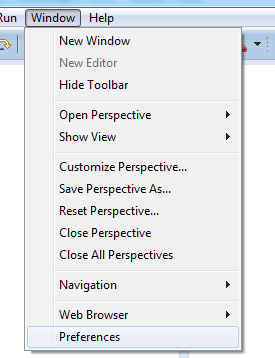
1.1. Navigate to Windows > Preferences
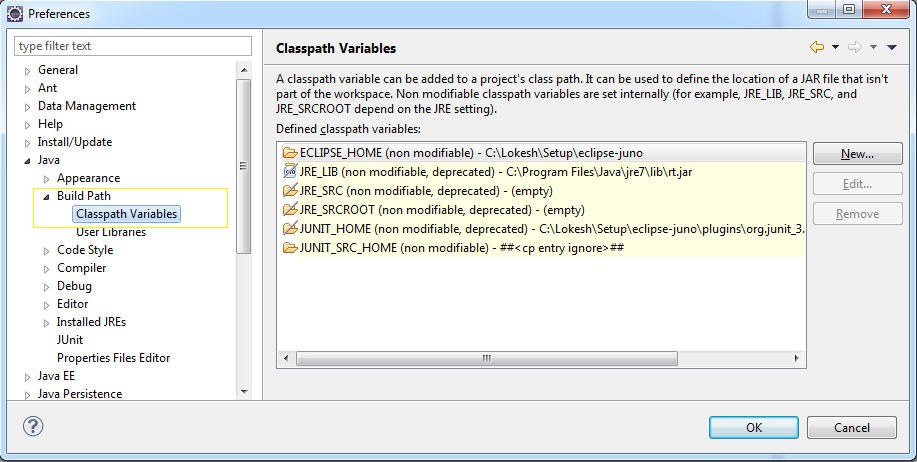
1.2. Navigate to Java > Build path > Classpath Variables
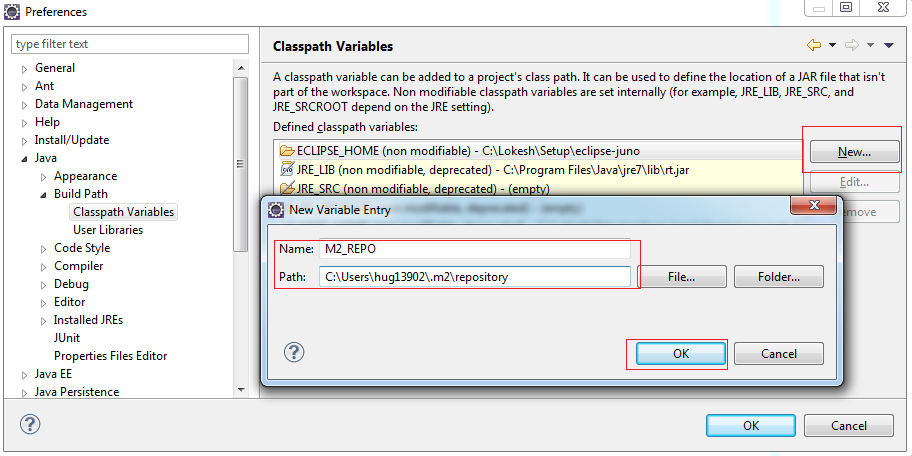
1.3. Define new classpath variable “M2_REPO”
Create new variable M2_REPO and point it to maven local repository location.
1.4. Verify that variable has been added

2. Update M2_REPO from Command Line
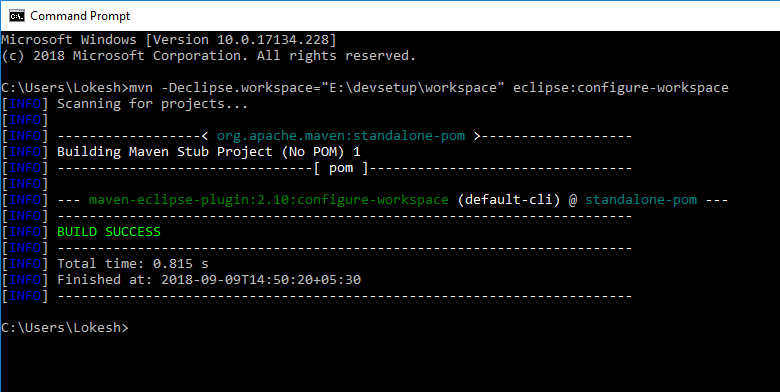
Alternatively, you can define and add M2_REPO via the Maven command “eclipse:configure-workspace“.
$ mvn -Declipse.workspace="WORKSPACE_LOCATION" eclipse:configure-workspaceFor example, this is the output of the command in my system.
Microsoft Windows [Version 10.0.17134.228]
(c) 2018 Microsoft Corporation. All rights reserved.

C:\Users\Lokesh>mvn -Declipse.workspace="E:\devsetup\workspace" eclipse:configure-workspace
[INFO] Scanning for projects...
[INFO]
[INFO] ------------------< org.apache.maven:standalone-pom >-------------------
[INFO] Building Maven Stub Project (No POM) 1
[INFO] --------------------------------[ pom ]---------------------------------
[INFO]
[INFO] --- maven-eclipse-plugin:2.10:configure-workspace (default-cli) @ standalone-pom ---
[INFO] ------------------------------------------------------------------------
[INFO] BUILD SUCCESS
[INFO] ------------------------------------------------------------------------
[INFO] Total time: 0.815 s
[INFO] Finished at: 2018-09-09T14:50:20+05:30
[INFO] ------------------------------------------------------------------------
3. Set the Repository Location Temporarily
If you do not want to modify the settings.xml file, you can set the Maven repository location temporarily by passing the -Dmaven.repo.local flag during a Maven command:
mvn clean install -Dmaven.repo.local=D:/maven/repositoryThis change is only valid for the current Maven execution.
Happy Learning !!

changed facet correctly, but to create web application from scratch mvn archetype:generate
is stopping at number 242 :242 which creates, not a simple quick start web project but plugin project.
which does not takes dependencies in pom file .
so why mvn behavior is correct ?as it has so many options up till 710 , so what do ?
You must be having another maven version. Mine is 3.0.4. So, this list can differ.
Filter for archetype quickstart like in below post.
https://howtodoinjava.com/maven/create-java-project-maven/
I don’t have Modify Project option in projects facets page
what to do?
Follow: https://help.eclipse.org/latest/index.jsp?noscript=1
yes I have added the repository but demoWebApplication gives folloing error
when I changed java compiler from 1.7 to 1.6 ,even for java 1.7 this error was there
Description Resource Path Location Type
Java compiler level does not match the version of the installed Java project facet. demoWebApplication Unknown Faceted Project Problem (Java Version Mismatch)
and when I create myfirstServlet and try to run it ,it gives
HTTP 404 error-requested re source not available
Pl give the remedy
Refer to following link for changing project facets correctly. Correct the JRE version here installed in your system.
https://help.eclipse.org/latest/index.jsp?noscript=1