
In Java, the wait(), notify() and notifyAll() methods of Object let threads coordinate on shared state. A thread calls wait() to release an object’s monitor and pause until another thread calls notify() or notifyAll() on the same object.
We use the three methods when one thread must wait for a change made by another thread, for example a consumer that waits for tasks in a queue, or a producer that waits for free space. They are the low-level building blocks behind classes such as BlockingQueue, and we still meet them in older code and in interviews.
The following example lets one thread add a task to taskQueue and notify, while the main thread waits in a loop until the queue is not empty.
List<Integer> taskQueue = new ArrayList<>();
Thread.ofPlatform().start(() -> {
    synchronized (taskQueue) {
        taskQueue.add(7);
        taskQueue.notifyAll();          // wakes the threads waiting on taskQueue
    }
});
int task;
synchronized (taskQueue) {
    while (taskQueue.isEmpty()) {
        taskQueue.wait();               // releases the monitor until notified
    }
    task = taskQueue.remove(0);
}
int received = task;                    // 7
Both threads synchronize on the same object, and the waiting thread checks the condition in a while loop. We first look at what each method does, build a bounded producer and consumer queue, compare notify() with notifyAll() and replace the hand-written code with java.util.concurrent classes. For a shorter comparison with the sleep method, see our sleep vs wait article.
1. What Are wait(), notify() and notifyAll() Methods?
Every Java object has a monitor, and a thread owns it while it runs inside synchronized on that object. The monitor also has a wait set, which is the group of threads that called wait() on the object and have not woken up yet. The three methods are final methods of Object that move threads into and out of that wait set.
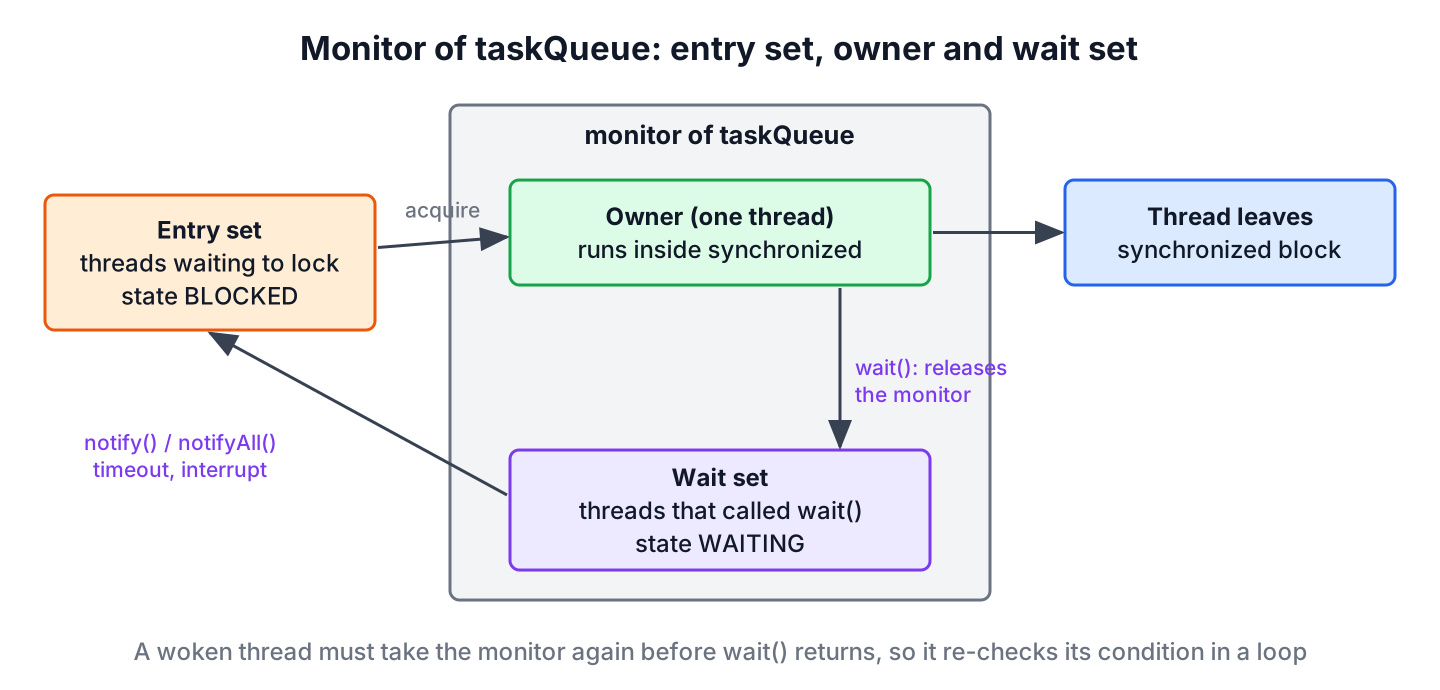
All three methods have the same rule. The calling thread must own the monitor of the object, or the call throws IllegalMonitorStateException.
1.1. wait()
The wait() method releases the monitor of the object and puts the current thread in the WAITING state. The overloads wait(long timeoutMillis) and wait(long timeoutMillis, int nanos) use TIMED_WAITING and give up after the timeout. The thread leaves the wait set for one of four reasons.
- Another thread calls notify() and the JVM picks this thread.
- Another thread calls notifyAll().
- The timeout ends, if we passed one.
- Another thread interrupts it, so wait() throws InterruptedException, or it wakes up spuriously, that is, without any of the other reasons.
Before wait() returns, the thread takes the monitor back, so the code after it always runs inside the synchronized block again. Because a thread can wake up while the condition is still false, we always call wait() in a while loop that checks the condition.
1.2. notify()
The notify() method wakes up one thread from the wait set of the object, and the Java specification does not say which one. The call does not release the monitor. The woken thread moves to the queue for the monitor and runs only after the notifying thread leaves its synchronized block.
So if the notifier still works for ten seconds inside its synchronized block after notify(), the woken thread waits those ten seconds too. If no thread is waiting, notify() does nothing and the signal is lost.
1.3. notifyAll()
The notifyAll() method wakes up every thread in the wait set of the object. The threads still run one at a time, because each of them must take the monitor back before wait() returns. Thread priority does not decide the order, so we never write code that depends on which thread runs first.
In a print server, for example, five printer threads wait on a job queue. When an admin cancels all jobs, the queue calls notifyAll() once, and every printer thread wakes up, sees the empty queue and goes back to waiting.
2. How to Use wait(), notify() and notifyAll() in Java
The producer and consumer problem is the classic use case. A producer adds tasks to a queue with a fixed capacity, and a consumer removes them. The producer must wait while the queue is full, and the consumer must wait while it is empty.
The following example keeps the logic in one class, TaskQueue, with a capacity of 2. The producer adds tasks 1 to 5 and the consumer takes five tasks, so both threads finish and we can check the result.
2.1. The Shared Queue
Both methods are synchronized, so they lock the TaskQueue object, and wait() and notifyAll() are called on this. Each method waits in a loop for its own condition and notifies after it changes the list.
class TaskQueue {
    private final List<Integer> tasks = new ArrayList<>();
    private final int capacity;

    TaskQueue(int capacity) {
        this.capacity = capacity;
    }

    synchronized void put(int task) throws InterruptedException {
        while (tasks.size() == capacity) {
            wait();                      // queue full, the producer waits
        }
        tasks.add(task);
        notifyAll();                     // wakes a waiting consumer
    }

    synchronized int take() throws InterruptedException {
        while (tasks.isEmpty()) {
            wait();                      // queue empty, the consumer waits
        }
        int task = tasks.remove(0);
        notifyAll();                     // wakes a waiting producer
        return task;
    }
}
We call notifyAll() here because producers and consumers wait on the same object for different conditions. With notify(), a producer could wake another producer instead of a consumer, which we look at in section 3.
2.2. Producer and Consumer Threads
The producer and the consumer are plain lambdas. Each one catches InterruptedException and restores the interrupt flag, so the thread stops cleanly if someone interrupts it while it waits.
TaskQueue queue = new TaskQueue(2);
List<Integer> consumed = Collections.synchronizedList(new ArrayList<>());

Thread producer = Thread.ofPlatform().name("producer").start(() -> {
    try {
        for (int i = 1; i <= 5; i++) {
            queue.put(i);
        }
    } catch (InterruptedException e) {
        Thread.currentThread().interrupt();
    }
});

Thread consumer = Thread.ofPlatform().name("consumer").start(() -> {
    try {
        for (int i = 1; i <= 5; i++) {
            consumed.add(queue.take());
        }
    } catch (InterruptedException e) {
        Thread.currentThread().interrupt();
    }
});

producer.join();
consumer.join();
List<Integer> result = List.copyOf(consumed);   // [1, 2, 3, 4, 5]
2.3. What Happens at Runtime
The consumer gets the tasks in order, and the list never holds more than two tasks. How often each thread waits differs from run to run, because the scheduler decides when each thread runs.
- If the consumer starts first, it finds an empty list, calls wait() and releases the monitor.
- The producer adds task 1 and calls notifyAll(), which moves the consumer to the queue for the monitor.
- When the list holds two tasks, the producer waits in put() until the consumer removes one and notifies.
Neither thread pauses inside its synchronized block. A pause there keeps the monitor for the whole delay and blocks the other thread for no reason, so we leave delays out of synchronized code.
3. Choosing Between notify() and notifyAll()
The choice depends on who waits on the object. The notifyAll() method is the safe default, and notify() is an optimization for one specific case.
| Question | notify() | notifyAll() |
|---|---|---|
| Threads woken | One, chosen by the JVM | All threads in the wait set |
| Safe when waiters wait for different conditions | No, it can wake the wrong thread | Yes |
| Safe when all waiters are the same kind and one change lets only one continue | Yes | Yes, with extra wake-ups |
| Cost | One wake-up | Every waiter wakes, checks the condition and most wait again |
Say a TaskQueue with a capacity of 1 has two producers and one consumer, and the queue is full, so both producers wait. The consumer takes the task and calls notify(), which wakes producer A, and comes back for the next task, finds the queue empty and waits. Producer A adds a task, and its notify() wakes producer B instead of the consumer. Producer A tries to add its next task and waits, producer B sees a full queue and waits too, and since nobody is awake, all three threads wait forever.
With notifyAll(), the consumer is always among the woken threads, so it makes progress. If we need targeted wake-ups without that risk, a Lock with two Condition objects gives each kind of thread its own wait set.
4. Replacing wait() and notify() in Java 25 Code
The java.util.concurrent package, added in Java 5, already contains tested versions of most wait and notify patterns. For example, the whole TaskQueue class becomes one line with an ArrayBlockingQueue, whose put() and take() block in the same way.
BlockingQueue<Integer> jobs = new ArrayBlockingQueue<>(2);
jobs.put(1);
jobs.put(2);
boolean added = jobs.offer(3, 50, TimeUnit.MILLISECONDS);   // false, queue full
int first = jobs.take();                                     // 1
When we need our own condition logic, ReentrantLock with Condition replaces the monitor methods. Each Condition has its own wait set, so signal() wakes a thread that waits for that condition only.
class BoundedBuffer {
    private final Deque<Integer> items = new ArrayDeque<>();
    private final ReentrantLock lock = new ReentrantLock();
    private final Condition notEmpty = lock.newCondition();
    private final Condition notFull = lock.newCondition();

    void put(int item) throws InterruptedException {
        lock.lock();
        try {
            while (items.size() == 2) {
                notFull.await();
            }
            items.addLast(item);
            notEmpty.signal();
        } finally {
            lock.unlock();
        }
    }

    int take() throws InterruptedException {
        lock.lock();
        try {
            while (items.isEmpty()) {
                notEmpty.await();
            }
            int item = items.removeFirst();
            notFull.signal();
            return item;
        } finally {
            lock.unlock();
        }
    }
}
BoundedBuffer buffer = new BoundedBuffer();
buffer.put(4);
int item = buffer.take(); // 4Most hand-written wait and notify code in business apps falls into four patterns, and each one has a ready-made class.
- A queue between threads uses a BlockingQueue.
- Waiting until several tasks finish uses a CountDownLatch or ExecutorService.close().
- Waiting for one result uses a CompletableFuture.
- Custom conditions use a Lock and Condition from the Lock API.
Old code with wait() and notifyAll() also works on virtual threads. Since Java 24 (JEP 491), a virtual thread that waits inside synchronized releases its carrier thread, so there is no need to rewrite such code only because of virtual threads. Other coordination classes, such as Semaphore and Phaser, are grouped in the Java concurrency guide.
5. wait(), notify() and notifyAll() FAQs
Lost signals, spurious wakeups and the order of woken threads are the parts of wait and notify that interviewers probe most.
5.1. What happens when notify() is called and no thread is waiting?
Nothing. The notification is lost, because the monitor does not remember it. A thread that calls wait() later waits for the next notification, which is why the waiting thread checks a shared condition before it calls wait().
5.2. Can there be a race condition while wait() releases or reacquires the lock?
No. The JVM adds the thread to the wait set and releases the monitor as one atomic step, so a notification sent right after the release reaches the thread. On the way back, wait() returns only after the thread owns the monitor again.
5.3. If a thread receives a notification, is the condition guaranteed to be true?
No. Between the notification and the moment the thread gets the monitor back, another thread can take the monitor first and change the state, for example a second consumer that takes the only task. Spurious wakeups also return without any notification. The while loop checks the condition again and waits once more if it is false.
5.4. Which thread gets the notification when several threads wait?
The specification leaves it open. Which thread notify() wakes depends on the JVM and on timing, and thread priority gives no guarantee. When the choice matters, we call notifyAll() and let each thread check its own condition, or use separate Condition objects.
5.5. Does notifyAll() wake up all threads at the same time?
All waiting threads leave the wait set, but they do not run in parallel. Each one must take the monitor back, so they continue one after another, and only after the notifying thread leaves its synchronized block.
5.6. Why wake up all threads if only one of them can continue?
Because the waiting threads may wait for different conditions, such as producers waiting for space and consumers waiting for tasks. With notifyAll(), the thread that can continue is always woken, and the others go back to waiting after checking their condition.
5.7. Why are wait() and notify() defined in Object and not in Thread?
Because they work with the monitor of an object, and every object has one. A thread waits on the object that holds the shared state, such as a queue, so the methods belong to that object. Calling them on a Thread object is a bad idea, because the JDK uses the Thread monitor for join().
6. Conclusion
The wait() method releases an object’s monitor and pauses the thread, notify() wakes one waiting thread and notifyAll() wakes all of them. Every call needs the monitor of the same object, and every wait() sits in a while loop that checks the condition.
We prefer notifyAll() when threads wait for different conditions, and keep pauses out of synchronized blocks. For new code, BlockingQueue, Lock with Condition, CountDownLatch and CompletableFuture give the same coordination with less room for lost signals.
7. References
- Object Javadoc (Java 25)
- JLS 25, Wait Sets and Notification
- Condition Javadoc (Java 25)
- Oracle Java Tutorial, Guarded Blocks
Happy Learning !!

Hi Lokesh, How to terminate all those threads, after, let’s say, all 30 items where “produced” and “consumed”? Thank you.
Wonderful content and beautifully explained. thanks…
Threads are objects so they have lock like other objects. When we use wait() and notify() in synchronized methods, which lock do we release? Thread’s or the object sources which thread use?
@mimi, calling wait and notify release object’s lock. Thread don’t have lock associated with it, object’s have lock with it that’s why we call wait(), notify() method on object reference and not thread reference.
This is an excellent article. However, with the above code I get a very orderly production, until the queue is full, and a very orderly consumption, until the queue is empty, and then this repeats.
The example would be much better if the Thread.sleep() were placed outside the synchronized block, and randomized for a different timeout each time, say, between 500ms and 1000ms.
The critical section (synchronized block) is simply too large, and by the time the block ends, it repeats immediately and therefore the same thread is likely to reacquire the lock immediately, thus the long strings of production and consumption, without much interleaving. Move the sleep outside and randomize it, and you will have a much better example.
Thanks for the feedback
Thank you for the blog!
I have a question:
Why do we need to write `while (taskQueue.size() == MAX_CAPACITY)` ?
Can we use `if` instead of `while`?
because we want to check the condition repetitively, not only once.
Hi,
Thanks for such a wonderful post.
In your example both consumer and producer can’t run parallel right?
To produce or consume they require lock. So if producer is running, consumer can’t process any entry even if the queue is not empty.
Hello Lokesh,my problem is when i run the program post in your blog ,the output is regular,the consumer do not wake up until the queue is full,can you help me?tks
Produced: 0
Produced: 1
Produced: 2
Produced: 3
Produced: 4
Queue is full Producer is waiting , size: 5
Consumed: 0
Consumed: 1
Consumed: 2
Consumed: 3
Consumed: 4
Queue is empty Consumer is waiting , size: 0
Produced: 5
Produced: 6
Produced: 7
Produced: 8
Produced: 9
Queue is full Producer is waiting , size: 5
Consumed: 5
Consumed: 6
Consumed: 7
Consumed: 8
Consumed: 9
Queue is empty Consumer is waiting , size: 0
Produced: 10
Produced: 11
Produced: 12
Produced: 13
Produced: 14
Queue is full Producer is waiting , size: 5
Consumed: 10
Consumed: 11
Consumed: 12
Consumed: 13
Consumed: 14
Queue is empty Consumer is waiting , size: 0
Produced: 15
Produced: 16
Nobody can control the output, it’s totally depends on OS scheduler. Above output is also a valid output.
To have the process interleave at all I needed to add a Thread.currentThread().yield(); just inside the while (true) loops of the Consumer and Producer.
Hi Lokesh,
Can u tell me that what r the conditions to get the object lock. Means can we lock the object through synchronised method and what is the role of wait() method for getting the objects lock.
See i was really devasted and could not understand how to explain this concept in practical scenarios you showed how easily it can be explained
Hello Lokesh,
I implemented the code mentioned in the blog and mentioned below is the output I was getting
Now, the question :
Q.1
I hoped for this output only, not the output mentioned in the mentioned in blog as synchronization is on taskQueue (which is being passed from static void main() method) in both the class. So what happens when tProducer.start() happens. It gets the lock of taskQueue object and starts producing and then releases the lock when wait is called. At this time tConsumer which was was in waiting for the lock of taskQueue object in consume() method to get into synchronized block and goes into consuming the item from list and when size is zero it goes into wait and releases the lock and tProducer acquires it and this keeps on going. Am I correct with this understanding ?
Q.2 I am not able to get what does this “taskQueue.wait()” means in his code. What would have happened if I happen if I use “wait()” or “notifyAll()” only, when I tried it I got this as output after running for a while.
1) You are right.
2)
wait()andnotifyAll()must be called on some object, which producer and consumer both can access. So rather than creating a new monitor object for this purpose, I used this existing object.Regarding error, not sure how you have modified the wait() and notify() calls. Please share the modified code.
Hello Lokesh,
Firstly thanks for the clearing my doubt. And secondly, I just wrote like this in Producer and Consumer
Thanks for such a quick response and clearing my doubt.
and what I did in my code was “this.notifyAll()” and “this.wait()” INSTEAD of “taskQueue.wait()” or “taskQueue.notifyAll()”.
Now that you have told that “wait() and notifyAll() must be called on some object, which producer and consumer both can access” , I somehow think I am able to figure out why error came but it would be really nice if you can elaborate it or what this IllegalMonitorStateException means ?
You can’t wait() on an object unless the current thread owns that object’s monitor – otherwise
IllegalMonitorStateExceptionis thrown. To own the monitor of that object, you must synchronize on it.e.g. So if you want to use
this.wait()which I do not recommend, you must do it insidesynchronized(this) {...}block.Thanks for the post. It cleared up many of the confusions I had about threading in general. I just have one quick question about the notify() method. In Producer class after you add(produce) the product into the LinkedList you call notify(), is this to ‘wake up’ the Consumer Thread or Producer Thread? and if it’s for consumer Thread, why so ?
I only ask this question because my understanding of notify() is “it wakes up a thread that is waiting on this object’s moniotr”. Thus, since Producer has been put on “waiting” when the list is full, it has to be notified by notify()method within its body to start working again. Is this wrong?
when notify method is called which thread is revoked execution has two ambiguous answers.
1) definition of notify() : It wakes up the first thread that called wait() on the same object
2) answer of question: What happens when more than one thread is waiting for notification? Which threads actually get the notification when the notify() method is called?
Could you please tell me which one is correct.
Hi Chandan, Thanks for pointing out this typo. Second answer is correct. In first answer, please read “single” in place of “first”. I have updated the post.
Thanks Lokesh,
Article is really helpful to understand concepts of java multi threading thread communication. Is there some mechanism possible which can notify to a particular thread only or a particular thread should be invoked. ,Because I had a problem where have three threads t1,t2, t3 which are having data {1,4,7},{2,6,8},{3,6,9} respectively. I want to run these threads in parallel to give result of {1,2,3,4,5,6,7,8,9}
Regards,
Chandan
You may try this solution. https://stackoverflow.com/questions/30964133/3-threads-printing-numbers-in-sequence
Nice article.
It cleared many of my doubts regarding multithreading.
synchronized (taskQueue)
      {
         while (taskQueue.size() == MAX_CAPACITY)
         {
            System.out.println("Queue is full " + Thread.currentThread().getName() + " is waiting , size: " + taskQueue.size());
            taskQueue.wait();
         }
Like here in above code you associated wait() diirectly on taskqueue object.
https://www.java-samples.com/showtutorial.php?tutorialid=306
On this link,wait() is not written like this.wait(). Is wait() directly got link with q object.
Very Nice, Keep the Good Work .
I would like to have hyperlink on this from my website.
Thanks for kind words. And a hyperlink is much appreciated.
really good..most of other learning forums have explained the concept..but here you have put in very simple way. the approach of taking consumer from one Thread class object and Producer as different Thread class object simplified the things and I am able to understand quickly…keep posting..Thanks a lot…
HI,
Thanks for such an wonderful post. But recently, a question asked to my friend. So, can you help me with that.
1) Write a small program to create dead lock with wait() and notify().
2) Write a small programm to create dead lock with synchronixed block().
If possible please answer.
2) https://howtodoinjava.com/java/multi-threading/writing-a-deadlock-and-resolving-in-java/
1) I will work.
For #1
public class DeadLock {
public static void main(String[] args) throws InterruptedException {
new DeadLock().deadlock();
}
private synchronized void deadlock() {
try {
wait();
} catch (InterruptedException ex) {
ex.printStackTrace();
}
}
}
But the problem is it’s only with wait(). Not with using wait() notify both. So, it will be great if you can provide exaple with both.
Thanks for the #2 answer
“By waking up all the threads, we can design the program so that the threads decide among themselves which thread should execute next”
Can you please explain me how it can be done ? How can the threads decide among themselves ?
An example could be group of threads (one thread processing only a specific type of message) watching a message queue. Upon placing a message in queue, producer can notify all consumer threads. Then each consumer thread may check if message is for it, and if it is then process it otherwise wait again.
This design may look inefficient as correct thread may get chance to check in last; BUT it will start making sense when you start adding more message types and their handler threads into system without modifying code of other handlers.
Just for an example. Make sense?
yes..Thanks
I think in this example instead of List, Queue should be used.
Else each time only element @ location zero will be consumed only.
I appreciate the article very much!
So I’d like to argue for it. Maybe a queue is better to understand here, but there is no doubt that a list can be used as a queue in a proper way (append to rear, get&remove from front), as what the article did. For your question, a consumer indeed consumes only element @location zero each time, and this is also the meaning of First Out for a queue.