
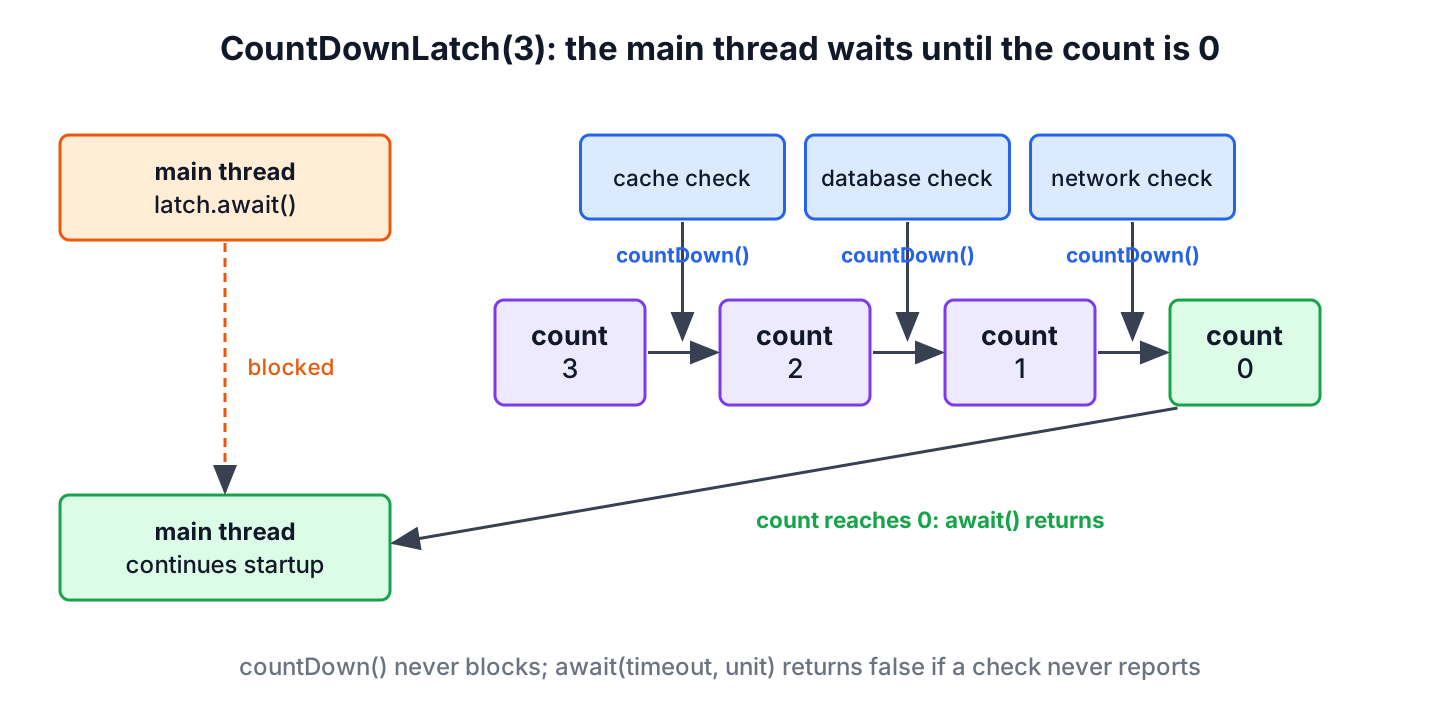
CountDownLatch is a synchronization aid in java.util.concurrent that lets one or more threads wait until a set of operations in other threads completes. We create it with a count, the worker threads call countDown() when they finish, and the threads blocked in await() continue once the count reaches zero.
We use a CountDownLatch when an app must not start before its external services are verified, when a test needs many threads to start at the same moment, and whenever one thread waits for a fixed number of events from other threads.
The following example waits for three startup checks.
CountDownLatch servicesReady = new CountDownLatch(3);    // wait for 3 events
long before = servicesReady.getCount();                  // 3
servicesReady.countDown();                               // database is up
servicesReady.countDown();                               // cache is up
servicesReady.countDown();                               // network is up
boolean allUp = servicesReady.await(5, TimeUnit.SECONDS);   // true, returns at once
long after = servicesReady.getCount();                   // 0
Notice that await() returns at once because the count is already zero, and that the timed version returns true. In a real app, the three countDown() calls run in three different threads. We look at how the latch works, build a startup health check, add timeouts and a starting gate, and compare the latch with CyclicBarrier and the newer options.
1. CountDownLatch Class
The CountDownLatch class was added in Java 5, together with other concurrency utilities such as CyclicBarrier, Semaphore, ConcurrentHashMap and BlockingQueue. It lets a Java thread wait until other threads complete their tasks.
For example, the main thread of an app waits until the threads that check the database, the cache and the network have finished. The latch holds a counter that starts at the number of expected events and goes down by one with each countDown() call. When the counter reaches zero, every thread waiting on the latch continues.
2. How does a CountDownLatch Work?
The CountDownLatch class has one constructor, CountDownLatch(int count). The count is the number of events the latch waits for. Often that is one event per thread, but one thread can also call countDown() several times, for example once per file it has processed. The count can be set only once, and the class has no method to reset it.
- The thread that needs to wait, often the main thread, calls await() after it has started the other threads.
- The waiting thread stops in await() until the count reaches zero, or until a timeout or an interrupt ends the wait.
- The worker threads need a reference to the latch, because they report completion by calling countDown().
- Each countDown() call lowers the count by 1. When it reaches zero, all waiting threads continue, and later await() calls return at once.
| Method | What it does |
|---|---|
| countDown() | Lowers the count by one; does nothing when it is already zero; never blocks |
| await() | Blocks until the count is zero; throws InterruptedException on interrupt |
| await(timeout, unit) | Blocks up to the timeout; returns true when the count reached zero, false on timeout |
| getCount() | Returns the current count, mostly for logging and tests |
The latch also makes memory changes visible. Everything a worker thread did before its countDown() is visible to the thread that returns from await(), so the main thread can read the results of the workers without extra synchronization.
3. Java CountDownLatch Example
In this example, an application startup class starts three threads that check external systems and report back to the latch on which the startup class waits. As soon as all services are verified, the startup continues, or it stops when a check fails or takes too long.
The BaseHealthChecker class is a Runnable and the parent of all service checkers. It keeps the latch in one place and calls countDown() in a finally block, so a failing check still lowers the count instead of leaving the startup waiting forever.
abstract class BaseHealthChecker implements Runnable {
    private final CountDownLatch latch;
    private final String serviceName;
    private volatile boolean serviceUp;

    BaseHealthChecker(String serviceName, CountDownLatch latch) {
        this.serviceName = serviceName;
        this.latch = latch;
    }

    @Override
    public void run() {
        try {
            verifyService();
            serviceUp = true;
        } catch (RuntimeException e) {
            serviceUp = false;
        } finally {
            latch.countDown();                          // always, even when the check fails
        }
    }

    String getServiceName() {
        return serviceName;
    }

    boolean isServiceUp() {
        return serviceUp;
    }

    abstract void verifyService();
}
The NetworkHealthChecker, CacheHealthChecker and DatabaseHealthChecker classes extend BaseHealthChecker and differ only in the service name and in the time the check takes. A real checker would open a connection or call a health endpoint, and the pause() helper stands in for that work.
static void pause(long ms) {
    LockSupport.parkNanos(TimeUnit.MILLISECONDS.toNanos(ms));
}
class NetworkHealthChecker extends BaseHealthChecker {
NetworkHealthChecker(CountDownLatch latch) {
super("Network Service", latch);
}
@Override
void verifyService() {
pause(70);
}
}
class CacheHealthChecker extends BaseHealthChecker {
CacheHealthChecker(CountDownLatch latch) {
super("Cache Service", latch);
}
@Override
void verifyService() {
pause(30);
}
}
class DatabaseHealthChecker extends BaseHealthChecker {
DatabaseHealthChecker(CountDownLatch latch) {
super("Database Service", latch);
}
@Override
void verifyService() {
pause(50);
}
}The ApplicationStartup class creates the latch with the number of checkers, runs each checker on its own virtual thread and waits for the latch with a timeout. A checker that hangs makes await() return false after 5 seconds, so the startup fails with a clear result instead of hanging.
class ApplicationStartup {
    static boolean checkExternalServices() throws InterruptedException {
        CountDownLatch latch = new CountDownLatch(3);
        List<BaseHealthChecker> services = List.of(
                new NetworkHealthChecker(latch),
                new CacheHealthChecker(latch),
                new DatabaseHealthChecker(latch));
        try (ExecutorService executor = Executors.newVirtualThreadPerTaskExecutor()) {
            services.forEach(executor::execute);
            if (!latch.await(5, TimeUnit.SECONDS)) {
                executor.shutdownNow();                 // interrupt the hanging checks
                return false;
            }
        }
        return services.stream().allMatch(BaseHealthChecker::isServiceUp);
    }
}
boolean result = ApplicationStartup.checkExternalServices(); // trueThe method returns true after about 70 ms, the time of the slowest check, because the three checks run in parallel. If one checker throws an exception, its finally block still counts down, the latch opens and isServiceUp() reports the failed service.
4. Waiting With a Timeout
A plain await() waits forever when a worker dies before it calls countDown(), so production code uses await(timeout, unit). The timed version returns false when the time runs out, and getCount() tells us how many events are still missing.
CountDownLatch reports = new CountDownLatch(2);
reports.countDown();                                     // only one of two workers reported
boolean finished = reports.await(100, TimeUnit.MILLISECONDS);   // false, timed out
long missing = reports.getCount();                       // 1
Both await() methods also throw InterruptedException when the waiting thread is interrupted, for example during a shutdown. We let the exception propagate, or restore the interrupt flag with Thread.currentThread().interrupt() when we catch it, as the InterruptedException guide explains.
5. Starting Many Threads at the Same Moment
A latch with a count of 1 works as a starting gate. All threads wait on it, and a single countDown() releases them together. A second latch counts the threads that finished, so the test knows when to check the result.
Say a booking app has one seat left, and we want to prove that only one of five parallel requests books it. Threads started one after another in a loop rarely overlap, so the race never shows up in the test. With a starting gate, all five threads call the code at once.
CountDownLatch startGate = new CountDownLatch(1);
CountDownLatch done = new CountDownLatch(5);
AtomicInteger seatsLeft = new AtomicInteger(1);
AtomicInteger booked = new AtomicInteger();
for (int i = 0; i < 5; i++) {
    Thread.ofVirtual().start(() -> {
        try {
            startGate.await();                          // every thread waits here
            if (seatsLeft.getAndUpdate(n -> n > 0 ? n - 1 : n) > 0) {
                booked.incrementAndGet();
            }
        } catch (InterruptedException e) {
            Thread.currentThread().interrupt();
        } finally {
            done.countDown();
        }
    });
}
startGate.countDown();                                  // opens the gate for all 5
boolean allDone = done.await(1, TimeUnit.SECONDS);      // true
int bookings = booked.get();                            // 1
With a separate get() and decrementAndGet() instead of the single getAndUpdate() call, the same test sometimes reports 2 bookings, which is the bug we want the test to catch. The same pattern helps to check that a lazy singleton creates only one instance.
6. Possible Usages of CountDownLatch
A latch fits any place where a thread waits for a known number of one-time events. The common cases in real apps are these.
- Waiting for N tasks to complete before continuing, for example an app that checks all external systems before it accepts user requests.
- Starting threads at the same time to get the most parallelism, mainly in tests that try to reproduce a race condition.
- Waiting for a single event, such as a message listener that has connected, with a latch of count 1.
- Waiting in several threads for one event, because every thread that calls await() continues when the count reaches zero.
7. CountDownLatch vs CyclicBarrier and Other Options
A CountDownLatch is used once, and the threads that count down do not wait for each other. A CyclicBarrier makes a fixed number of threads wait for each other at a barrier point and resets itself for the next round. Newer APIs often replace the latch when the workers are tasks that return results.
| Option | Waits for | Reusable | Good fit |
|---|---|---|---|
| CountDownLatch | A count of events from any threads | No | Startup checks, starting gates, one-time signals |
| CyclicBarrier | All parties to arrive at the barrier | Yes | Simulations and algorithms that run in rounds |
| Thread.join() | One specific thread to end | Not applicable | A few threads we started ourselves |
| invokeAll() | All submitted tasks, returns futures | Not applicable | Tasks with results on an executor |
| CompletableFuture.allOf() | All futures, without blocking | Not applicable | Asynchronous pipelines |
For tasks that return values, invokeAll() or CompletableFuture is shorter, because the result and the exception come back with the task. For threads we created by hand, Thread.join() is enough. The latch stays the best choice when the events do not map to tasks, such as one worker reporting several steps, or when many threads wait for one signal. The Java concurrency overview groups these tools by task.
8. CountDownLatch FAQs
A latch cannot be reset and does not notice a worker that never counts down, so most questions about it concern reuse and failure handling.
8.1. Can a CountDownLatch be reused?
No. The count cannot be reset, so once it reaches zero, the latch stays open. For repeated rounds, we create a new latch per round or use a CyclicBarrier or Phaser.
8.2. What happens if a worker throws an exception before countDown()?
The count never reaches zero, and a plain await() blocks forever. We call countDown() in a finally block, as BaseHealthChecker does, and wait with await(timeout, unit).
8.3. Can multiple threads wait on the same CountDownLatch?
Yes. Any number of threads can call await(), and all of them continue when the count reaches zero. That is how the starting gate in section 5 releases five threads with one call.
8.4. What happens if countDown() is called more times than the count?
Nothing. When the count is already zero, countDown() does nothing, so extra calls cause no error. They do hide a bug in the count, so it pays to log getCount() while testing.
9. Conclusion
A CountDownLatch lets threads wait until a count of events from other threads reaches zero. We call countDown() in finally so that a failing worker still reports, and we wait with a timeout so that a hanging worker does not stop the app.
The latch works for one round only. For tasks that return results, invokeAll() and CompletableFuture are often simpler, while the latch remains the right tool for startup checks, one-time signals and starting gates in concurrency tests.
10. References
- CountDownLatch Javadoc (Java 25)
- CyclicBarrier Javadoc (Java 25)
- java.util.concurrent memory consistency properties
Happy Learning !!

Mr Lokesh…excellent tutorial. How about a situation for CDL, where a group of tester wait for development team to start…and after some amount of development of the project is completed, testing team can start and development team will finish first… and testing team will also finish.. Correct me if I am wrong… Thank you..
Possible usages of CountDownLatch in real time applications:
Example : In a typical request processing scenario where multiple checks (tasks ) are happening sequentially. Here we can replace this with parallel processing by create multiple threads for each task and initialize the CountDownlatch with the same number, here we can call countDown() method each time when thread completes the execution, When count reaches to zero, it means all threads have completed,so that main thread wait until all threads to complete the execution.
Hi Sir,Superb explanation,small doubt regarding Executor.in real time application,is it mandatory to shutdown the Executor?
The shutdown() method does one thing: prevents clients to send more work to the executor service. This means all the existing tasks will still run to completion unless other actions are taken.
Let’s assume you have a console application which has an executor service running N tasks. If the user hits CTRL-C, you expect the application to terminate gracefully i.e. complete tasks at hand but do not accept new tasks.
To summarize, calling shutdown() depends on usecase.
thread which is goind to => thread which is going to, just a simple correction.
There should be a small correction. The count is not actually the number of threads to wait, because a single thread can count down any number of time. Instead it should be as threads has to wait until count reaches to 0.
Hi,
In How CountDownLatch works? section, that is a method, not a constructor.
Thanks
Priyesh
Ohh… that ‘void’ made un-necessary. Thanks Priyesh. Corrected it !!
Hi Lokesh,
Nice explanation. But there are couple of doubts:-
1) We can use CountDownLatch only when we know the number of thread to create (with fixed thread pool). am I correct?
2) If we are using Thread Pool Executor, then what is the need of CountDownLatch, we can call executor.awaitTermination() to wait for all the threads to complete.
Please help me to clarify above doubts.
Thanks,
Barun
1) Yes
2) awaitTermination() blocks until all tasks have completed execution “–after a shutdown request–“, or the timeout occurs, or the current thread is interrupted, whichever happens first. CountDownLatch is different thing.
Lokesh, could you explain little further.
_latch.await() also seems to block the caller Thread till completion of all Threads.
How is this different?
Hey Sanjeet seems to make some point.
any clarification from any one.
Lokesh, do you have a minute to comment?
CountDownLatchdoesn’t require all threads callingcountDown()to wait for the count to reach zero before proceeding (i.e. they callcountDown()and move on to their individual execution path; No need to terminate any thread OR executor), it simply prevents primary thread (which calledawait()method) from proceeding past await() method until other threads could callcountDown()method.executor.awaitTermination()is no where close to this concept. It tries to hold the shutdown of executor until all threads are done their complete execution path.Hope it helps :-)
Hi Lokesh,
Regarding example “an application start-up class want to ensure that all N external systems are Up and running before handling the user requests.”
My understanding is that here we are trying to say that…when ever we are rebooting the application server at that time ONLY countdown latches will be executing the below services i.e here in this example it is :
NetworkHealthChecker
DatabaseHealthChecker
Is my understanding is correct? Plz let me know….Thanks…
NO. There could be other means of checking the services as well. Countdown latches are only for example here.
Hi Lokesh,
Thanks for making us understaing multi threading concepts with so ease.
I have one multi threading problem. Could you suggest me a solution.
Question : There are multiple threads(can be more than thousand). Each thread has a numeric value i.e thread1 has ‘1’ , thread2 has ‘2’ and so on. I want these numbers(1,2,3,,……) to be printed in ascending order. How to do this. It looks to me that countdownlatch will be used here but don’t know how to implement this.
Thanks in advance.
Hi Ranjeet,
You can refer to below piece of code, if you can please improvise it!
[Java]
import java.util.concurrent.TimeUnit;
import java.util.concurrent.atomic.AtomicInteger;
public class NumberSequenceInThread {
private Object monitor = new Object();
private AtomicInteger numberOfThreads = new AtomicInteger(0);
private AtomicInteger sequenceNumber = new AtomicInteger(1);
public class Sequence implements Runnable{
final int threadId;
public Sequence(int threadId) {
this.threadId = threadId;
}
@Override
public void run() {
numberOfThreads.incrementAndGet();
System.out.println(“Starting the thread ” + this.threadId);
printSequence();
}
private void printSequence() {
try{
while(true){
TimeUnit.SECONDS.sleep(2);
synchronized (monitor) {
if(numberOfThreads.get() + 1 == sequenceNumber.get()){
break;
}
if(threadId != sequenceNumber.get()){
monitor.wait();
}else{
sequenceNumber.incrementAndGet();
System.out.println(” Sequence number “+ threadId);
monitor.notifyAll();
}
}
}
}catch(Exception e){
e.printStackTrace();
}
}
}
public static void main(String[] args) {
final int MAX_NUMBER = 20;
NumberSequenceInThread num = new NumberSequenceInThread();
Thread[] t = new Thread[MAX_NUMBER];
for(int i=0 ; i < MAX_NUMBER ; i++){
t[i] = new Thread(num.new Sequence(i+1));
}
for(int i=0 ; i < MAX_NUMBER ; i++){
t[i].start();
}
}
}
[/Java]
Hi Lokesh,
Does the count in the constructor denotes the number of threads for which the latch should wait or is it the number of times countDown() method needs to be called before the main thread proceeds?
Ideally both. Because each thread should call countDown() method exactly once.
Is CountDownLatch is doing any different work than Thread’s join() ?
Using intelligently, you can achieve any desired result with basic method calls e.g. wait(), notify(), sleep() or join(). CountDownLatch provides you the ease so that you can concentrate on business, not on other tiny implementation details.
request you to post on cyclic barrier as well.
I will soon.
This sample is a perfect solution for one of our requirement.I tried your source code, the main thread never gets terminated after execution of the program.What could be the reason for that?
use ExecutorService instead of Executor interface , after execute () call shutdown() to gracefully shutdown the ExecutorService and finally the main() will close.
//Start service checkers using executor framework
ExecutorService executor = Executors.newFixedThreadPool(_services.size());
for(final BaseHealthChecker v : _services)
{
executor.execute(v);
}
executor.shutdown();
//Now wait till all services are checked
_latch.await();
Hi Lokesh ,
Can you explain CountDownlatch with simple program , i mean please do not use Executer framework.
I will try to find some time.
Please post some tutorial on java.concurrent package classes like CyclicBarrier,ReentrantLock,Semaphore etc…
List verifyServices = new ArrayList
Hi’
i have small doubt in hibernate please give me solution
how to access last updated records in the data base?
If table colum have any timestamp or date field, then sort on this using criteria.
session.createCriteria(Customer.class).addOrder(Order.desc(“lastUpdated”)).list();