
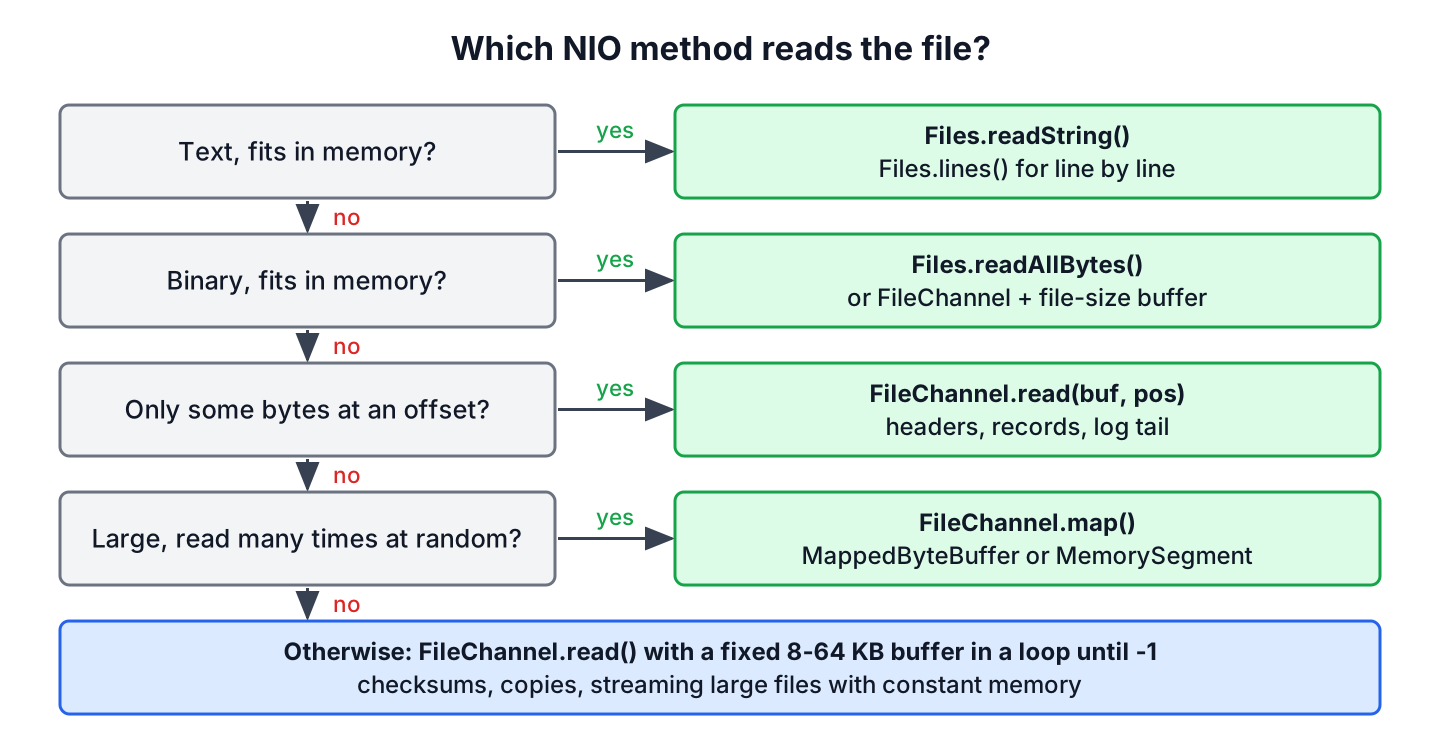
To read a file with Java NIO, we either call a Files method such as Files.readString() or Files.readAllBytes(), or open a FileChannel and read the bytes into a ByteBuffer. The Files methods are the short answer for most text and small files, and the channel gives us control over buffer size, file position and memory use.
We read with a channel when the file is too large for one array, when we process binary data in chunks (for example to compute a checksum), when we need bytes at a given offset, or when we map a large file into memory.
The following example loads the same small recipe file twice, once with Files.readString() and once with a FileChannel and a ByteBuffer.
Path file = Files.writeString(Files.createTempFile("recipe", ".txt"), "flour\nsugar\n");
String all = Files.readString(file);                    // "flour\nsugar\n"
try (FileChannel channel = FileChannel.open(file)) {
    ByteBuffer buffer = ByteBuffer.allocate(Math.toIntExact(channel.size()));
    while (buffer.hasRemaining() && channel.read(buffer) != -1) {
    }
    String viaChannel = new String(buffer.array(), StandardCharsets.UTF_8);   // "flour\nsugar\n"
}
Notice that the channel version needs a loop and an explicit charset, whereas Files.readString() does both for us and decodes UTF-8 by default. We pick the right method for each case, read small files in one buffer and large files in chunks, decode text safely across chunk boundaries, map a file, and read bytes at a given position.
1. Choosing a Way to Read a File With NIO
The java.nio.file.Files class covers the common cases in one line, and the read file to String and read file line by line tutorials show those methods in depth. A FileChannel is the lower-level API under them, and we use it when the one-line methods load too much into memory or give too little control.
| Need | Method | Memory use |
|---|---|---|
| Whole text file as a String | Files.readString(path) | Whole file |
| Whole binary file | Files.readAllBytes(path) | Whole file |
| Text line by line | Files.lines(path) or Files.newBufferedReader(path) | One line |
| Small binary file into a buffer | FileChannel with a buffer of the file size | Whole file |
| Large file in chunks, checksums, copies | FileChannel with a fixed-size buffer | One buffer |
| Bytes at an offset, file headers | FileChannel.read(buffer, position) | One buffer |
| Large file with random access | FileChannel.map() and MappedByteBuffer | Pages touched, off-heap |
2. Reading a Small File With FileChannel and ByteBuffer
For a small file, we create a ByteBuffer as large as the file and fill it. We open the channel with FileChannel.open(), which opens the file for reading by default, and get the size from channel.size().
static byte[] readSmall(Path file) throws IOException {
    try (FileChannel channel = FileChannel.open(file, StandardOpenOption.READ)) {
        ByteBuffer buffer = ByteBuffer.allocate(Math.toIntExact(channel.size()));
        while (buffer.hasRemaining()) {
            if (channel.read(buffer) == -1) {
                break;                                  // the file shrank while reading
            }
        }
        return buffer.array();
    }
}
Path file = Files.write(Files.createTempFile("logo", ".bin"), new byte[]{1, 2, 3, 4});
byte[] bytes = readSmall(file);
int count = bytes.length; // 4A single read() may return fewer bytes than the buffer can hold, so we loop until the buffer is full. Math.toIntExact() protects the cast, because a buffer holds at most Integer.MAX_VALUE bytes and a plain (int) cast of a 3 GB size overflows without an error. For a file of that size, the answer is a chunked read, not a bigger buffer.
long hugeSize = 3L * 1024 * 1024 * 1024;
int wrong = (int) hugeSize;                             // -1073741824
int checked = Math.toIntExact(hugeSize);                // ArithmeticException: integer overflow
3. Reading a Large File in Chunks
For a large file, we reuse one buffer of a fixed size, often between 8 KB and 64 KB. Each pass fills the buffer, flips it, processes the bytes and clears it. The read() method returns -1 at the end of the file, so the loop condition is != -1.
A real use of chunked reads is a checksum. For example, a file upload service computes the SHA-256 hash of every uploaded file to detect duplicates. Uploads can be several gigabytes, so the service streams the file through a 64 KB direct buffer, and memory use stays at 64 KB whatever the file size.
static String sha256(Path file) throws IOException, NoSuchAlgorithmException {
    MessageDigest digest = MessageDigest.getInstance("SHA-256");
    ByteBuffer buffer = ByteBuffer.allocateDirect(64 * 1024);
    try (FileChannel channel = FileChannel.open(file)) {
        while (channel.read(buffer) != -1) {
            buffer.flip();
            digest.update(buffer);                      // consumes the remaining bytes
            buffer.clear();
        }
    }
    return HexFormat.of().formatHex(digest.digest());
}
Path upload = Files.writeString(Files.createTempFile("upload", ".txt"), "abc");
String hash = sha256(upload); // "ba7816bf8f01cfea414140de5dae2223b00361a396177a9cb410ff61f20015ad"3.1. Decoding Text Across Chunk Boundaries
Decoding each chunk of a text file on its own breaks every character that spans two chunks. In UTF-8, characters outside ASCII take two to four bytes, and a fixed-size buffer can end in the middle of one. Printing each byte with (char) buffer.get(), as many older examples do, is worse, because it breaks every non-ASCII character, not only the ones on a boundary.
Path file = Files.writeString(Files.createTempFile("menu", ".txt"), "caf\u00e9 au lait");
StringBuilder broken = new StringBuilder();
try (FileChannel channel = FileChannel.open(file)) {
    ByteBuffer buffer = ByteBuffer.allocate(4);         // ends inside the 2-byte e-acute
    while (channel.read(buffer) != -1) {
        broken.append(new String(buffer.array(), 0, buffer.position(), StandardCharsets.UTF_8));
        buffer.clear();
    }
}
boolean garbled = broken.toString().contains("\uFFFD");   // true, replacement characters
A CharsetDecoder solves the problem. Its decode() method leaves an incomplete character in the byte buffer, and compact() moves those bytes to the front, so the next read completes the character.
static String readText(Path file, int bufferSize) throws IOException {
    CharsetDecoder decoder = StandardCharsets.UTF_8.newDecoder()
            .onMalformedInput(CodingErrorAction.REPLACE)
            .onUnmappableCharacter(CodingErrorAction.REPLACE);
    ByteBuffer bytes = ByteBuffer.allocate(bufferSize);
    CharBuffer chars = CharBuffer.allocate(bufferSize);
    StringBuilder text = new StringBuilder();
    try (FileChannel channel = FileChannel.open(file)) {
        boolean end = false;
        while (!end) {
            end = channel.read(bytes) == -1;
            bytes.flip();
            decoder.decode(bytes, chars, end);          // keeps an incomplete character
            text.append(chars.flip());
            chars.clear();
            bytes.compact();
        }
        decoder.flush(chars);
        text.append(chars.flip());
    }
    return text.toString();
}
Path file = Files.writeString(Files.createTempFile("menu", ".txt"), "caf\u00e9 au lait");
String text = readText(file, 4);
boolean correct = text.equals("caf\u00e9 au lait"); // trueFor text, the decoder loop is rarely worth writing by hand. Files.newBufferedReader(path) runs the same logic inside a Reader and returns whole lines, so we keep the channel loop for binary data and for cases where we need the bytes and the text at the same time.
4. Reading a File With MappedByteBuffer
A MappedByteBuffer maps the file into memory, so we read it with the buffer methods and no read() calls. The operating system loads the pages when we touch them. We map in READ_ONLY mode and decode the buffer with a charset.
static String readMapped(Path file) throws IOException {
    try (FileChannel channel = FileChannel.open(file)) {
        MappedByteBuffer buffer = channel.map(FileChannel.MapMode.READ_ONLY, 0, channel.size());
        return StandardCharsets.UTF_8.decode(buffer).toString();
    }
}
Path file = Files.writeString(Files.createTempFile("notes", ".txt"), "eggs\nmilk\n");
String notes = readMapped(file); // "eggs\nmilk\n"The buffer stays valid after the channel closes, and the mapping is released only when the garbage collector removes the buffer. One mapping holds at most about 2 GB. Creating a mapping has a cost of its own, so it pays off for large files that we read many times or at random offsets, not for one-pass reads of small files.
5. Reading Bytes at a Given Position
The read(ByteBuffer, long position) method reads from an absolute offset without changing the position of the channel. We use it for file headers, fixed-size records and the tail of a log file.
For example, an image upload service must not trust the file extension, so it checks the first 8 bytes of every upload against the PNG signature before it stores the file.
static boolean isPng(Path file) throws IOException {
    byte[] signature = {(byte) 0x89, 'P', 'N', 'G', '\r', '\n', 0x1A, '\n'};
    ByteBuffer header = ByteBuffer.allocate(signature.length);
    try (FileChannel channel = FileChannel.open(file)) {
        while (header.hasRemaining() && channel.read(header, header.position()) != -1) {
        }
    }
    return header.flip().equals(ByteBuffer.wrap(signature));
}
Path image = Files.write(Files.createTempFile("avatar", ".png"),
new byte[]{(byte) 0x89, 'P', 'N', 'G', '\r', '\n', 0x1A, '\n', 0, 0});
Path fake = Files.writeString(Files.createTempFile("fake", ".png"), "not an image");
boolean real = isPng(image); // true
boolean notReal = isPng(fake); // falseThe equals() call compares the remaining bytes of both buffers, which is why we flip the header first. A file shorter than 8 bytes leaves the buffer partly empty, so the comparison returns false.
6. Java NIO Read File FAQs
When channel-based file reading misbehaves, developers search for answers about speed, buffer sizes and garbled text.
6.1. Is FileChannel faster than BufferedReader?
Not for text. BufferedReader also reads in blocks, and it decodes lines for us. A FileChannel helps with binary data, large files, position-based reads and memory mapping. For text, we use Files.readString() or Files.newBufferedReader().
6.2. What buffer size should we use with FileChannel?
Most code uses a buffer between 8 KB, the default size of BufferedInputStream, and 64 KB for sequential reads. Larger buffers rarely help, because the operating system already reads ahead. We measure with our own files before going beyond that range.
6.3. Why are the characters garbled when reading a file with ByteBuffer?
The bytes are decoded with the wrong charset, or one byte at a time with (char) buffer.get(), or each chunk is decoded on its own and splits multi-byte characters. Decode with StandardCharsets.UTF_8 and a CharsetDecoder, as in section 3.1.
6.4. Can FileChannel.read() return 0?
Yes, when the buffer has no space remaining. A loop that waits for -1 spins forever if it never clears or compacts the full buffer. We check for -1, which marks the end of the file, and make sure the buffer has room before each read.
6.5. Should we still use RandomAccessFile to get a FileChannel?
No. The method FileChannel.open(path, options) opens a channel without a RandomAccessFile or a stream. We call getChannel() only if other code already gives us a RandomAccessFile or a FileInputStream.
7. Conclusion
For most files, a Files method such as readString(), readAllBytes() or lines() is the right way to read with Java NIO. A FileChannel with a ByteBuffer is the tool for large binary files, checksums, headers and fixed-size records.
Read small files into a buffer of the file size and loop until it is full. Read large files in fixed-size chunks until read() returns -1, and decode text with a CharsetDecoder or a Reader. Map a file only when it is large and read at random, and browse the Java IO tutorial for writing, copying and walking files.
8. References
Happy Learning !!

MappedByteBuffer buffer = inChannel.map(FileChannel.MapMode.READ_ONLY, 0, inChannel.size());
—-> inChannel.size()
it looks like size of the file. What will happen if file is having 8-10 GB. Will mappedbytebuffer is suggestible and how internally it will work without out of memory
It is size of the region to be mapped. It is not buffer size.
https://docs.oracle.com/javase/7/docs/api/java/nio/channels/FileChannel.html#map%28java.nio.channels.FileChannel.MapMode,%20long,%20long%29
Nice examples. I just wonder that on your first example “1) Read a small file in buffer of file size” why did you not use finally{} block for aFile resource?
When you close the reader it will close the file for you, theoretically you would miss the case when the reader throws an exception in the constructor after the file has opened, but I believe the only exceptions that could occur at that time would be things like out of memory and similar which would forcibly close down your JVM anyways.
Hi Lokesh,
I want to divide an xml file according to size using NIO. We can read char or byte only from buffer, so how can i check whether the xml file is proper or not.
Animesh
Brilliant question. And that means I do not know the answer :-) I will try to find a solution for this problem when time permits. I you get any solution, then please update me as well. Thanks !!
Hi,
Could you please explain why in the example “1) Read a small file in buffer of file size”, you write:
20 buffer.rewind();
21 buffer.flip();
Wouldn’t be enough to use buffer.flip(), like in the example “2) Read a large file in chunks with fixed size buffer”?
You are right. I must have forget to comment that line. Actually both methods are almost similar. In fact, you can use rewind( ) to go back and reread the data in a buffer that has already been flipped.
How multiple threads could read single file parallely
Hi Lokesh, thanks for the informative write-up. The key difference is that in NIO you are reading a buffer not a stream. And NIO is by design non-blocking. So the thread is not blocked.
Just a question. I have to process huge text files (billions of records, each) line by line. Should I read them with IO, NIO, or NIO2? Which class?
IO is not good solution. Use ReadFileWithFixedSizeBuffer example. In java 8, you can use https://howtodoinjava.com/java8/read-file-line-by-line/
Sorry but the old famous way do not the same – here is reading line by line – and with a Reader.
The three other sources reading byte by byte – with a stream.
No good!
Dear friend, it’s not about lines or bytes or streams. It’s about how it was and how it is.