

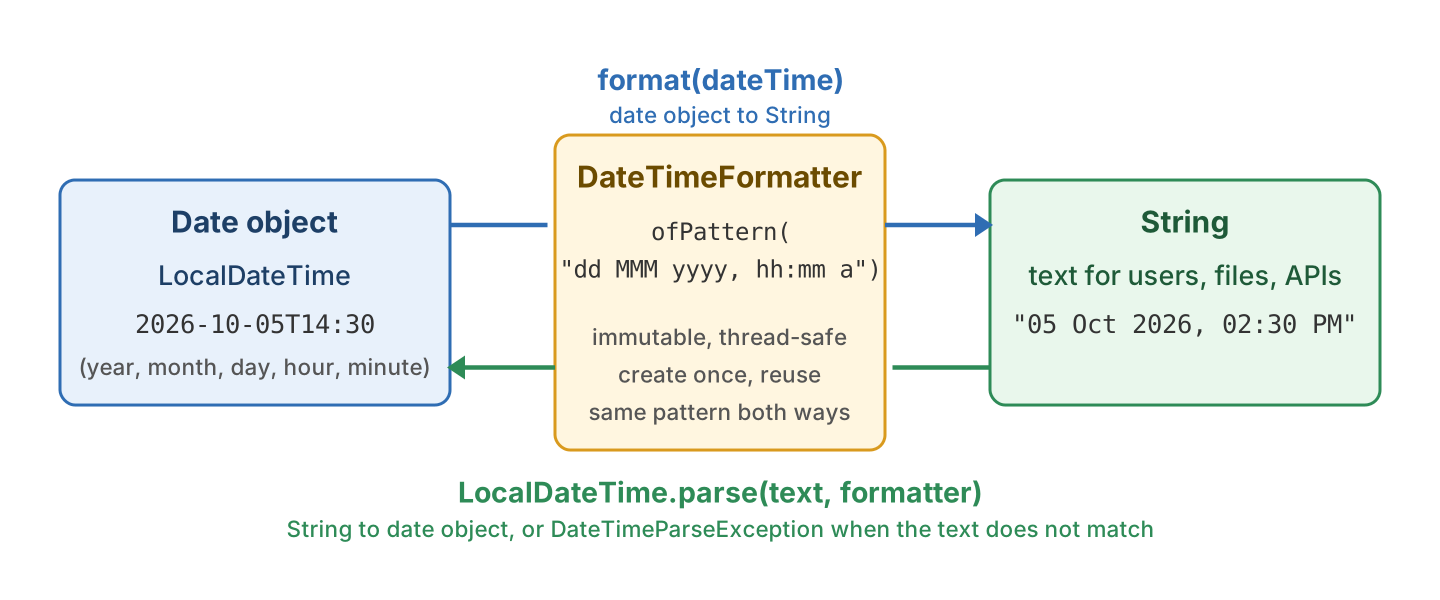
Java DateTimeFormatter is the class in java.time.format that turns a date-time object into a String and a String back into a date-time object, using either a pattern such as “dd MMM yyyy” or a ready-made ISO format. It works with every class of the Date Time API, such as LocalDate, LocalTime, LocalDateTime and ZonedDateTime.
We use a DateTimeFormatter when we show a date to a user or write it into a log or a JSON response, and when we read a date that a user typed.
The following example creates one formatter from a pattern and uses it in both directions.
static final DateTimeFormatter BOOKING_FORMAT
    = DateTimeFormatter.ofPattern("dd MMM yyyy, hh:mm a", Locale.US);

LocalDateTime checkIn = LocalDateTime.of(2026, 10, 5, 14, 30);

String text = BOOKING_FORMAT.format(checkIn);                               // "05 Oct 2026, 02:30 PM"
LocalDateTime back = LocalDateTime.parse("05 Oct 2026, 02:30 PM", BOOKING_FORMAT);   // 2026-10-05T14:30
LocalDate bad = LocalDate.parse("Oct 5", BOOKING_FORMAT);                    // DateTimeParseException
Notice that one pattern serves both format() and parse(), and that text which does not match it throws a DateTimeParseException. We go through the pattern letters, the ISO constants, the locale-specific styles, parse errors, the time zone letters and the pattern mistakes every team makes once.
1. Pattern Letters in DateTimeFormatter
The ofPattern() method builds a formatter from a pattern string. Each letter stands for one field of the date, such as y for the year and M for the month. The number of times we repeat the letter decides how the field is printed. For example, M prints the month as “10”, MM pads it to two digits, MMM prints “Oct” and MMMM prints “October”. Text that is not a pattern letter, such as the “T” in an ISO timestamp, goes in single quotes.
| Letter | Meaning | Pattern | Output for Monday, 5 Oct 2026, 14:30:45 |
|---|---|---|---|
| y | Year | yyyy / yy | 2026 / 26 |
| M | Month | MM / MMM / MMMM | 10 / Oct / October |
| d | Day of month | d / dd | 5 / 05 |
| E | Day of week | EEE / EEEE | Mon / Monday |
| H | Hour, 0 to 23 | HH | 14 |
| h | Hour, 1 to 12 | hh | 02 |
| a | AM or PM | a | PM |
| m | Minute | mm | 30 |
| s | Second | ss | 45 |
| S | Fraction of second | SSS | 000 |
| ‘text’ | Literal text | ‘at’ | at |
The DateTimeFormatter Javadoc has the full list, but these letters cover almost every pattern we write at work.
LocalDateTime checkIn = LocalDateTime.of(2026, 10, 5, 14, 30, 45);

String longDate = DateTimeFormatter.ofPattern("MMMM d, yyyy").format(checkIn);         // October 5, 2026
String stamp    = DateTimeFormatter.ofPattern("yyyy-MM-dd'T'HH:mm").format(checkIn);   // 2026-10-05T14:30
String words    = DateTimeFormatter.ofPattern("'Check-in on' EEEE 'at' h a").format(checkIn);   // Check-in on Monday at 2 PM
A pattern can only ask for fields the object has, so ofPattern(“yyyy-MM-dd HH:mm”) throws an UnsupportedTemporalTypeException for a LocalDate. The post on formatting a LocalDate has the patterns that work for dates alone.
2. Predefined ISO Constants
For text that another program reads, such as JSON fields and log lines, we do not need a pattern at all. The DateTimeFormatter class has ready-made constants for the ISO 8601 formats, such as “2026-10-05T14:30:45”. Every java.time class uses its matching constant in toString() and in parse(text). So LocalDate.parse(“2026-10-05”) works with no formatter because LocalDate uses ISO_LOCAL_DATE by default.
| Constant | Output | Notes |
|---|---|---|
| ISO_LOCAL_DATE | 2026-10-05 | Default for LocalDate |
| ISO_LOCAL_TIME | 14:30:45 | Default for LocalTime |
| ISO_LOCAL_DATE_TIME | 2026-10-05T14:30:45 | Default for LocalDateTime |
| ISO_OFFSET_DATE_TIME | 2026-10-05T14:30:45-04:00 | Default for OffsetDateTime |
| ISO_ZONED_DATE_TIME | 2026-10-05T14:30:45-04:00[America/New_York] | Default for ZonedDateTime |
| ISO_DATE_TIME | 2026-10-05T14:30:45 | Offset and zone are optional |
| ISO_INSTANT | 2026-10-05T18:30:45Z | Always in UTC, default for Instant |
| BASIC_ISO_DATE | 20261005 | No separators |
| RFC_1123_DATE_TIME | Mon, 5 Oct 2026 14:30:45 -0400 | HTTP headers |
The constants with LOCAL in the name print no offset, and the OFFSET ones need one. The plain ISO_DATE and ISO_DATE_TIME print the offset and zone only when the object has them. The plain constants are the safest choice for parsing, because they accept text with or without an offset.
ZonedDateTime checkInNy = checkIn.atZone(ZoneId.of("America/New_York"));

String withZone = DateTimeFormatter.ISO_DATE_TIME.format(checkInNy);   // 2026-10-05T14:30:45-04:00[America/New_York]
String noZone   = DateTimeFormatter.ISO_DATE_TIME.format(checkIn);     // 2026-10-05T14:30:45
3. Locale-Specific Formats with FormatStyle
A date shown to a person should follow the date format of that person’s country. A user in Germany reads “05.10.2026” and a user in the United States reads “10/5/26”, and we do not want to hard-code either pattern. The ofLocalizedDate(), ofLocalizedTime() and ofLocalizedDateTime() methods take a FormatStyle (how long the text is) and build the pattern from the Locale for us. By default, that is the locale of the server JVM, not of the user, so we call withLocale() with the user’s locale.
| FormatStyle | Locale.US | Locale.GERMANY |
|---|---|---|
| FULL | Monday, October 5, 2026 | Montag, 5. Oktober 2026 |
| LONG | October 5, 2026 | 5. Oktober 2026 |
| MEDIUM | Oct 5, 2026 | 05.10.2026 |
| SHORT | 10/5/26 | 05.10.26 |
For times, the FULL and LONG styles print a zone name, so they need a ZonedDateTime. With a LocalDateTime they throw a DateTimeException with the message “Unable to extract ZoneId”.
DateTimeFormatter mixed = DateTimeFormatter
    .ofLocalizedDateTime(FormatStyle.MEDIUM, FormatStyle.SHORT).withLocale(Locale.US);
String dateAndTime = mixed.format(checkIn);                                       // Oct 5, 2026, 2:30 PM

String fr = DateTimeFormatter.ofPattern("EEEE d MMMM yyyy", Locale.FRANCE).format(checkIn);   // lundi 5 octobre 2026
Notice that ofPattern() also accepts a Locale, which changes the month and day names but keeps our field order. One catch since Java 20 is the space before “PM” in the localized output. It looks like a normal space but it is a narrow no-break space (Unicode 202F). The localized formatter parses its own output, but it rejects “2:30 PM” typed with a normal space, so for text that users type we prefer our own ofPattern() pattern.
4. Parsing Text and Handling DateTimeParseException
The parse() methods go the other way, from a String to a date-time object. We call them on the target class, for example LocalDate.parse(text, formatter), so the result already has the right type. The pattern must match the text field by field, and the target class must get every field it needs from the pattern. For example, parsing “05/10/2026” into a LocalDateTime fails with “Unable to obtain LocalDateTime”, because the pattern has no hour and minute. When the text has only a date, we parse a LocalDate and call atStartOfDay() to get midnight.
DateTimeFormatter dateFormat = DateTimeFormatter.ofPattern("dd/MM/yyyy");

LocalDate parsed = LocalDate.parse("05/10/2026", dateFormat);                 // 2026-10-05
LocalDateTime withTime = LocalDate.parse("05/10/2026", dateFormat).atStartOfDay();   // 2026-10-05T00:00
LocalDateTime noTime = LocalDateTime.parse("05/10/2026", dateFormat);         // DateTimeParseException: Unable to obtain LocalDateTime
When the text does not fit the pattern, parse() throws a DateTimeParseException. It is an unchecked exception, so the compiler does not force us to catch it. If we do not catch it in a web controller, the user gets an HTTP 500 for a typo. The message reads like “Text ‘2026-10-05’ could not be parsed at index 2”. In app code we wrap the call in a method that returns an Optional, so the caller decides what to do with bad input.
static Optional<LocalDate> parseDate(String text) {
  try {
    return Optional.of(LocalDate.parse(text, DateTimeFormatter.ofPattern("dd/MM/yyyy")));
  } catch (DateTimeParseException e) {
    return Optional.empty();
  }
}

Optional<LocalDate> ok  = parseDate("05/10/2026");   // Optional[2026-10-05]
Optional<LocalDate> bad = parseDate("Oct 5");        // Optional.empty
Notice that “31/02/2026” does not throw. By default, a formatter uses ResolverStyle.SMART, which moves February 31 to February 28. If we want an invalid date to fail instead, we call withResolverStyle(ResolverStyle.STRICT) and write the year as uuuu, as the post on strict date parsing explains. The posts on parsing a LocalDate, parsing a LocalDateTime and parsing a ZonedDateTime show more input formats for each class.
5. Time Zone and Offset Letters
A ZonedDateTime or an OffsetDateTime carries a zone or an offset, and several pattern letters print it in different ways. We pick the letter by who reads the text. People read a zone name such as “EDT”. Another program needs the offset “-04:00” or the zone id “America/New_York”, because a short name such as “IST” means a different zone in India and in Israel.
| Letter | Prints | Output for 14:30 in America/New_York | Use it for |
|---|---|---|---|
| z | Short zone name | EDT | Display to users |
| zzzz | Full zone name | Eastern Daylight Time | Display to users |
| Z | Offset without a colon | -0400 | Older style, prints “+0000” for UTC |
| xxx | Offset with a colon | -04:00 | ISO 8601, prints “+00:00” for UTC |
| XXX | Offset with a colon | -04:00 | ISO 8601, prints “Z” for UTC |
| VV | Zone id | America/New_York | Storing and sending the zone |
The VV letter must always be doubled, and the X letters print “Z” for UTC where the x letters print “+00:00”.
ZonedDateTime checkInNy = LocalDateTime.of(2026, 10, 5, 14, 30, 45).atZone(ZoneId.of("America/New_York"));

String forUsers  = DateTimeFormatter.ofPattern("yyyy-MM-dd HH:mm z").format(checkInNy);         // 2026-10-05 14:30 EDT
String isoOffset = DateTimeFormatter.ofPattern("yyyy-MM-dd'T'HH:mm:ssXXX").format(checkInNy);   // 2026-10-05T14:30:45-04:00

ZonedDateTime parsedZoned = ZonedDateTime.parse("2026-10-05 14:30 America/New_York",
    DateTimeFormatter.ofPattern("yyyy-MM-dd HH:mm VV"));                                         // 2026-10-05T14:30-04:00[America/New_York]
A LocalDateTime or an Instant has no zone, so a pattern with z throws a DateTimeException with the message “Unable to extract ZoneId” for it. To print such a value with a zone, we call withZone(ZoneId.of(“Asia/Kolkata”)) on the formatter. The formatter converts an Instant into that zone and prints “00:00 IST”, whereas it keeps the fields of a LocalDateTime and prints “14:30 IST”.
6. Thread Safety and Reuse
A DateTimeFormatter is immutable, so methods such as withLocale() and withZone() return a new copy instead of changing it. An immutable object is thread-safe, so one instance can be shared by every request thread in a web app. The old SimpleDateFormat class is not thread-safe, so it could not be shared like that.
Create each formatter once, as a static final constant like BOOKING_FORMAT in the intro, and reuse it. Calling ofPattern() parses the pattern string every time, which is wasted work inside a loop or a request handler.
7. Common Mistakes in Java DateTimeFormatter Patterns
Pattern letters are case-sensitive, and a pattern with the wrong case compiles and runs. The bug shows up as a wrong value in the output, not as an exception, so it can go unnoticed for months. Three pairs of letters cause most wrong dates in production.
| Wrong | Right | What goes wrong |
|---|---|---|
| YYYY | yyyy | Y is the week-based year. 31 Dec 2024 is in week 1 of 2025, so YYYY-MM-dd prints 2025-12-31. |
| hh:mm | HH:mm | h is the 12-hour clock. 14:05 prints as 02:05, and without a nobody can tell AM from PM. |
| mm/dd/yyyy | MM/dd/yyyy | m is the minute. 5 Oct at 14:30 prints as 30/05/2026. |
LocalDate newYearsEve = LocalDate.of(2024, 12, 31);
String weekYear = DateTimeFormatter.ofPattern("YYYY-MM-dd").format(newYearsEve);   // 2025-12-31, wrong
String year     = DateTimeFormatter.ofPattern("yyyy-MM-dd").format(newYearsEve);   // 2024-12-31
One more mistake throws instead of printing a wrong value. A plain word in the pattern, such as “UTC”, fails with an “Unknown pattern letter” error unless we quote it as ‘UTC’.
8. Conclusion
A DateTimeFormatter is built once, from a pattern or from an ISO constant, and used by both format() and parse(). The ISO constants fit text that another program reads, and the localized styles fit text that a person reads.
Parsing throws DateTimeParseException on bad input, so we catch it close to the user. In the pattern, we write yyyy not YYYY, HH for a 24-hour clock and MM for the month.
9. References
- DateTimeFormatter Javadoc
- DateTimeParseException Javadoc
- FormatStyle Javadoc
- ResolverStyle Javadoc
- ISO 8601 date and time format
Happy Learning !!
