
JDBC 4.2 drivers, JPA 2.2 and later, and Hibernate 6 and 7 read and write LocalDate and LocalTime values without any conversion, so we convert a LocalDate to java.sql.Date only for legacy APIs, with java.sql.Date.valueOf(localDate) and sqlDate.toLocalDate(). For times, java.sql.Time.valueOf(localTime) and sqlTime.toLocalTime() do the same.
We still meet java.sql.Date and java.sql.Time in old DAO classes, in stored-procedure wrappers and in libraries whose method signatures use them. We convert at that boundary and keep java.time types everywhere else, including the entity classes and the service code.
The following example converts a class date and a start time of a gym schedule to the java.sql types and back.
LocalDate classDay = LocalDate.of(2026, 3, 14);
java.sql.Date sqlDate = java.sql.Date.valueOf(classDay);            // 2026-03-14
LocalDate fromSql = sqlDate.toLocalDate();                          // 2026-03-14
java.sql.Time sqlTime = java.sql.Time.valueOf(LocalTime.of(9, 30));  // 09:30:00
LocalTime fromTime = sqlTime.toLocalTime();                         // 09:30
Both directions keep the calendar day and the clock time. We start with the JDBC and JPA code that needs no conversion at all, followed by the conversion methods, the cases where they lose data or throw, and the migration of a legacy DAO.
1. java.time Types in JDBC 4.2, JPA and Hibernate
The JDBC 4.2 specification, released with Java 8, maps the java.time types to SQL types, so a driver accepts them in setObject() and returns them from getObject(). Every current driver for PostgreSQL, MySQL, Oracle, SQL Server and H2 supports this mapping.
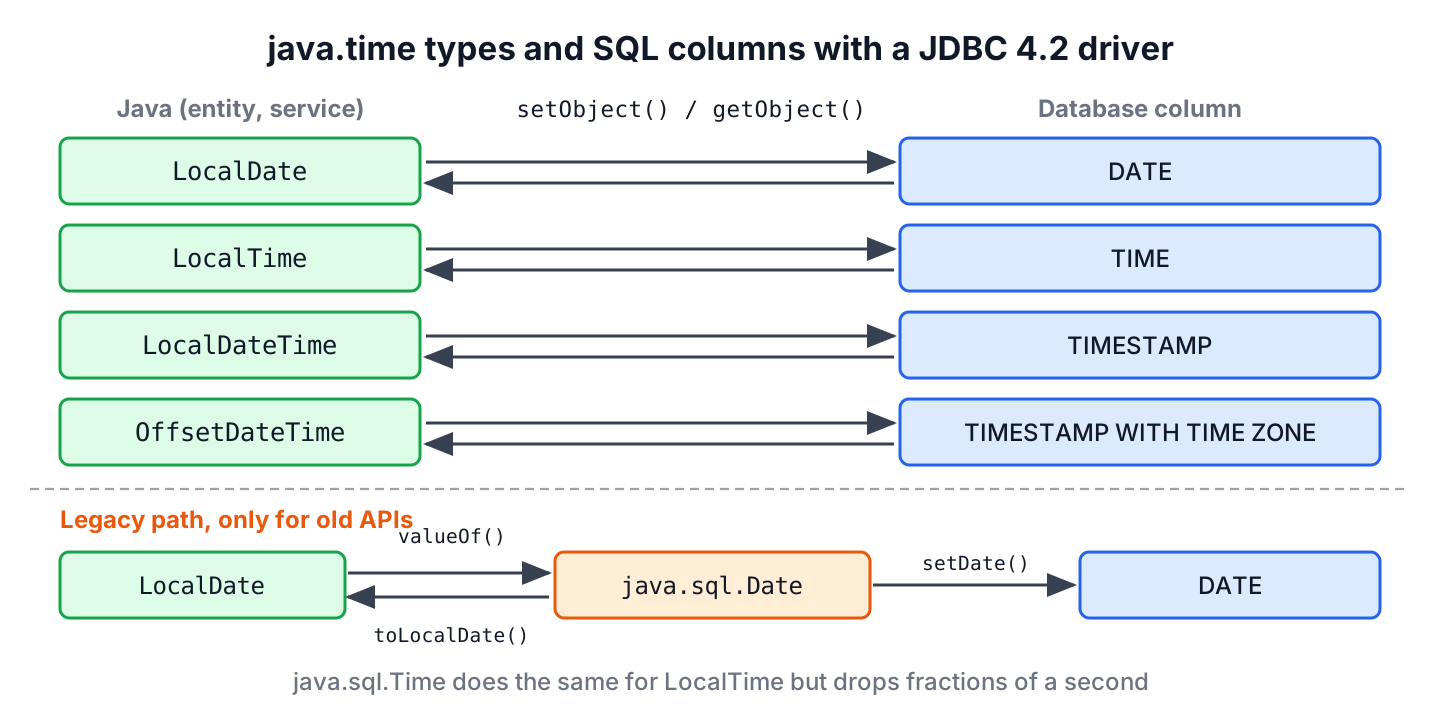
| java.time type | SQL column type | Legacy java.sql type |
|---|---|---|
| LocalDate | DATE | java.sql.Date |
| LocalTime | TIME | java.sql.Time |
| LocalDateTime | TIMESTAMP | java.sql.Timestamp |
| OffsetTime | TIME WITH TIME ZONE | None |
| OffsetDateTime | TIMESTAMP WITH TIME ZONE | None |
Instant and ZonedDateTime are not in the JDBC table, and the PostgreSQL JDBC driver rejects them. For an Instant, we write instant.atOffset(ZoneOffset.UTC) to a TIMESTAMP WITH TIME ZONE column.
1.1. Plain JDBC With setObject() and getObject()
A gym app stores each class with its day and start time. The insert passes the java.time values to setObject(), and the query reads them with getObject(column, LocalDate.class), which returns null for a SQL NULL.
static void saveClass(Connection con, int id, LocalDate day, LocalTime start) throws SQLException {
    String sql = "INSERT INTO gym_class (id, class_day, starts_at) VALUES (?, ?, ?)";
    try (PreparedStatement ps = con.prepareStatement(sql)) {
        ps.setInt(1, id);
        ps.setObject(2, day);          // DATE column
        ps.setObject(3, start);        // TIME column
        ps.executeUpdate();
    }
}
static Optional<LocalDate> findClassDay(Connection con, int id) throws SQLException {
try (PreparedStatement ps = con.prepareStatement("SELECT class_day FROM gym_class WHERE id = ?")) {
ps.setInt(1, id);
try (ResultSet rs = ps.executeQuery()) {
return rs.next() ? Optional.ofNullable(rs.getObject("class_day", LocalDate.class)) : Optional.empty();
}
}
}With an H2 2.4 in-memory database, the round trip gives back the same LocalDate, and no java.sql.Date appears in our code.
Connection con = DriverManager.getConnection("jdbc:h2:mem:gym");
boolean created = con.createStatement().execute("CREATE TABLE gym_class (id INT PRIMARY KEY, class_day DATE, starts_at TIME)");   // false
saveClass(con, 1, LocalDate.of(2026, 3, 14), LocalTime.of(9, 30));
Optional<LocalDate> day = findClassDay(con, 1);       // Optional[2026-03-14]
Optional<LocalDate> none = findClassDay(con, 2);      // Optional.empty
con.close();
In a Spring application, JdbcClient and JdbcTemplate pass a LocalDate parameter to the driver in the same way.
1.2. JPA Entities and Hibernate
JPA 2.2 added LocalDate, LocalTime, LocalDateTime, OffsetTime and OffsetDateTime as basic types, and Jakarta Persistence 3.2 added Instant and Year and deprecated Date, Calendar, the java.sql types and @Temporal for new applications. An entity field of type LocalDate needs no annotation and no AttributeConverter.
@Entity
class GymClass {
    @Id
    Long id;
    LocalDate classDay;          // DATE column
    LocalTime startsAt;          // TIME column
    LocalDateTime createdAt;     // TIMESTAMP column
}
Hibernate 6 and 7 also map Instant, ZonedDateTime and OffsetDateTime. Older tutorials that write an AttributeConverter from LocalDate to java.sql.Date target JPA 2.1, which is from 2013. More mapping options are in Hibernate date and time mappings.
2. Where java.sql.Date Is Still Needed
The conversion methods stay useful wherever the old types are part of an API that we do not control. The old types still appear in four places.
- A legacy DAO or repository interface that takes or returns java.sql.Date, java.sql.Time or java.sql.Timestamp.
- Older code that reads columns with rs.getDate(), rs.getTime() or rs.getTimestamp() and calls setDate() on a PreparedStatement.
- A driver older than JDBC 4.2, such as Oracle’s ojdbc6, which predates Java 8.
- A third-party library, such as a reporting or export tool, whose parameters are typed as java.sql.Date.
In each case, we convert right next to the call and pass a LocalDate or LocalTime to the rest of the code.
3. LocalDate to java.sql.Date With valueOf()
The static method java.sql.Date.valueOf(LocalDate) creates a java.sql.Date for midnight of that day in the JVM default zone. Its toString() prints the date in the ISO format, and a null argument throws NullPointerException.
java.sql.Date fromLocal = java.sql.Date.valueOf(LocalDate.of(2026, 3, 14));
String text = fromLocal.toString();                              // "2026-03-14"
java.sql.Date fromText = java.sql.Date.valueOf("2026-03-14");
boolean same = fromText.equals(fromLocal);                       // true
java.sql.Date broken = java.sql.Date.valueOf((LocalDate) null);  // NullPointerException
Legacy columns are often nullable, so the safe version checks for null first. A small helper keeps that check in one place.
static java.sql.Date toSqlDate(LocalDate date) {
    return date == null ? null : java.sql.Date.valueOf(date);
}
java.sql.Date empty = toSqlDate(null); // null
java.sql.Date filled = toSqlDate(LocalDate.of(2026, 3, 14)); // 2026-03-144. java.sql.Date to LocalDate With toLocalDate()
The method toLocalDate() returns a LocalDate with the year, month and day of the java.sql.Date, read in the JVM default zone. The driver and valueOf() use the same zone, so the day stays the same as long as the default zone does not change between writing and reading.
java.sql.Date column = java.sql.Date.valueOf("2026-03-14");
LocalDate day = column.toLocalDate();                       // 2026-03-14
Instant moment = column.toInstant();                        // UnsupportedOperationException
A java.sql.Date has no time part, so toInstant() throws UnsupportedOperationException and the deprecated getters such as getHours() throw IllegalArgumentException. Code that treats every java.util.Date the same way breaks on these objects, as Date to LocalDate shows.
To get a java.sql.Date from a plain java.util.Date, we go through LocalDate with an explicit zone, as in java.sql.Date.valueOf(LocalDate.ofInstant(utilDate.toInstant(), zone)). The shortcut new java.sql.Date(utilDate.getTime()) keeps the time of day inside the object, although the time fields of a java.sql.Date must be zero.
5. LocalTime and java.sql.Time
The class java.sql.Time is the TIME counterpart of java.sql.Date, and it has the same pair of methods. Time.valueOf(LocalTime) keeps the hour, minute and second, and toLocalTime() returns them with the nanosecond field set to zero.
LocalTime opens = LocalTime.of(9, 30, 15, 250_000_000);
java.sql.Time sqlOpens = java.sql.Time.valueOf(opens);          // 09:30:15
LocalTime back = sqlOpens.toLocalTime();                         // 09:30:15
boolean lossless = back.equals(opens);                           // false, 0.25 s is lost
Instant noMoment = sqlOpens.toInstant();                         // UnsupportedOperationException
The fraction of a second disappears in both directions, so a LocalTime with milliseconds does not survive the old path. The JDBC 4.2 path with setObject() keeps fractional seconds when the column type allows them, for example TIME(3).
The date fields of a java.sql.Time are set to January 1, 1970 and must not be read, which is why getYear() and the other date getters throw IllegalArgumentException. For a time of day with business rules, such as opening hours, the LocalTime class has the comparison and arithmetic methods.
6. LocalDateTime and java.sql.Timestamp
TIMESTAMP columns use java.sql.Timestamp on the legacy path. Unlike the other two types, it keeps nanoseconds, so Timestamp.valueOf(LocalDateTime) and toLocalDateTime() lose nothing.
LocalDateTime createdAt = LocalDateTime.of(2026, 3, 14, 9, 30, 15, 123456789);
java.sql.Timestamp ts = java.sql.Timestamp.valueOf(createdAt);   // 2026-03-14 09:30:15.123456789
LocalDateTime fromTs = ts.toLocalDateTime();                     // 2026-03-14T09:30:15.123456789
A Timestamp is a subclass of java.util.Date with its own equals() rules, which LocalDateTime and Date explains.
7. Moving a Legacy DAO to getObject()
Say an older booking module reads the class day with rs.getDate(). The method looks harmless, but a NULL column returns a null java.sql.Date, and calling toLocalDate() on it throws NullPointerException in the middle of a report.
static LocalDate classDayLegacy(ResultSet rs) throws SQLException {
    java.sql.Date value = rs.getDate("class_day");
    return value == null ? null : value.toLocalDate();       // the null check is easy to forget
}
With a JDBC 4.2 driver, the conversion and the null check go away. The method getObject() returns a LocalDate or null, and the callers of the method do not change.
static LocalDate classDay(ResultSet rs) throws SQLException {
    return rs.getObject("class_day", LocalDate.class);
}
We migrate one DAO method at a time and remove the java.sql.Date import when the last getDate() call is gone. For the write side, ps.setObject(i, localDate) replaces ps.setDate(i, java.sql.Date.valueOf(localDate)).
8. LocalDate and java.sql.Date FAQs
Teams that move old JDBC code to java.time ask about driver support, @Temporal, shifted days and the java.util.Date conversion.
8.1. Does setObject() with a LocalDate work in MySQL, Oracle and PostgreSQL?
Yes, with a JDBC 4.2 driver, which means Connector/J 8 or later, ojdbc8 or later, and any PostgreSQL driver from version 42. Each of them maps LocalDate to DATE, LocalTime to TIME and LocalDateTime to TIMESTAMP.
8.2. Do we need @Temporal or an AttributeConverter for LocalDate in JPA?
No. @Temporal applies only to java.util.Date and Calendar, and JPA 2.2 and later map LocalDate as a basic type. Jakarta Persistence 3.2 deprecates @Temporal for new code.
8.3. Why is a date one day off after reading it as java.sql.Date?
The JVM default zone changed between writing and reading, or the application and the database session use different zones. The java.sql.Date class stores midnight in the default zone, so a different zone moves the instant to another day. Reading with getObject(column, LocalDate.class) avoids the zone step.
8.4. How do we convert java.util.Date to java.sql.Date?
Through a LocalDate with an explicit zone, as in section 4. The result has a zero time part, which the old constructor new java.sql.Date(millis) does not guarantee.
9. Conclusion
Modern JDBC drivers, JPA 2.2 and later, and Hibernate 6 and 7 work with LocalDate, LocalTime and LocalDateTime without conversion, so new code calls setObject() and getObject() and declares java.time fields in entities.
For old APIs, java.sql.Date.valueOf() and toLocalDate() convert dates, and java.sql.Time.valueOf() and toLocalTime() convert times while dropping fractions of a second. We check for null before converting and never call toInstant() on these types. The Java date and time guides cover the rest of the API.
10. References
- java.sql.Date (Java SE 25 API)
- java.sql.Time (Java SE 25 API)
- ResultSet.getObject() (Java SE 25 API)
- JDBC 4.2 Maintenance Release
- Jakarta Persistence 3.2
- PostgreSQL JDBC, Using Java 8 Date and Time classes
Happy Learning !!
