

The ZonedDateTime class in Java represents a date and time in a specific time zone, such as 2026-05-14T09:00+02:00[Europe/Berlin], and it applies that zone’s daylight saving rules. Each value combines a LocalDateTime, a ZoneId and the UTC offset that the zone uses at that moment, so it always identifies one exact instant.
We use ZonedDateTime when people in different places must see the same event, for example an online meeting, a flight departure or a sale that starts at midnight in New York. It is also the type to use for date arithmetic in a region, because it moves the offset when clocks change.
The following example schedules a team standup in Berlin and shows it to colleagues in New York and Kolkata.
ZoneId berlin = ZoneId.of("Europe/Berlin");
ZonedDateTime standup = ZonedDateTime.of(2026, 5, 14, 9, 0, 0, 0, berlin);          // 2026-05-14T09:00+02:00[Europe/Berlin]
ZonedDateTime newYork = standup.withZoneSameInstant(ZoneId.of("America/New_York"));  // 2026-05-14T03:00-04:00[America/New_York]
ZonedDateTime kolkata = ZonedDateTime.parse("2026-05-14T12:30+05:30[Asia/Kolkata]");  // 2026-05-14T12:30+05:30[Asia/Kolkata]
boolean sameMoment = kolkata.isEqual(standup);                                        // true
ZonedDateTime nextWeek = standup.plusWeeks(1);                                        // 2026-05-21T09:00+02:00[Europe/Berlin]
Instant utc = standup.toInstant();                                                    // 2026-05-14T07:00:00Z
String label = standup.format(DateTimeFormatter.ofPattern("dd MMM yyyy HH:mm z", Locale.US));   // "14 May 2026 09:00 CEST"
We can see that the three values print different clock times but isEqual() returns true, because they are the same instant. The article covers creating, parsing and formatting values, arithmetic, the daylight saving gaps and overlaps that make this class necessary, and conversions between zones.
1. Local Date-Time, Zone ID and Offset in One Object
A ZonedDateTime holds state equivalent to three separate objects, a LocalDateTime, a ZoneId and the resolved ZoneOffset. The zone ID names a region, such as Europe/Berlin, and the offset is the difference from UTC, such as +02:00, that the region’s rules give for that date and time.
A zone ID can have different offsets during the year when daylight saving time (DST) switches, and ZonedDateTime always picks the offset that is valid for its own date and time. Berlin is +01:00 in January and +02:00 in July, and the class works this out from the time zone database built into the JDK.
The ZoneId.of() method accepts two kinds of IDs, and the difference decides whether DST is applied. The full list of region IDs is in Java ZoneId and ZoneOffset.
| ID passed to ZoneId.of() | Kind | Follows DST |
|---|---|---|
| Europe/Berlin, America/New_York, Asia/Kolkata | Region ID | Yes, when the region uses DST |
| +05:30, Z | Fixed offset (ZoneOffset) | No |
| UTC+1, GMT+05:30 | Fixed offset with a prefix | No |
So ZoneId.of(“GMT+05:30”) is not the India time zone. It is only an offset. For people and places, we use region IDs. Like the other java.time classes, ZonedDateTime is immutable and thread-safe.
2. Creating ZonedDateTime
We create a ZonedDateTime from the current clock, from given values, or from another java.time object. Every factory method needs a zone, either passed in or taken from the JVM default.
2.1. Getting the Current Timestamp
The now() method returns the current date and time in the JVM default zone. To read the clock in another zone, we pass its zone ID, and for tests we pass a fixed Clock.
ZonedDateTime here = ZonedDateTime.now();                                       // current time, default zone
ZonedDateTime tokyo = ZonedDateTime.now(ZoneId.of("Asia/Tokyo"));               // current time in Tokyo
Clock clock = Clock.fixed(Instant.parse("2026-05-14T07:00:00Z"), ZoneId.of("Europe/Berlin"));
ZonedDateTime fixed = ZonedDateTime.now(clock);                                // 2026-05-14T09:00+02:00[Europe/Berlin]
2.2. Creating ZonedDateTime From Values
The of() method takes the date and time fields and a zone, or a LocalDate and a LocalTime, or a LocalDateTime. The atZone() methods on LocalDateTime and Instant give the same results from the other side.
ZoneId paris = ZoneId.of("Europe/Paris");
ZonedDateTime fromFields = ZonedDateTime.of(2026, 11, 30, 23, 45, 59, 0, paris);           // 2026-11-30T23:45:59+01:00[Europe/Paris]
ZonedDateTime fromParts = ZonedDateTime.of(LocalDate.of(2026, 3, 12), LocalTime.of(12, 44), paris);   // 2026-03-12T12:44+01:00[Europe/Paris]
ZonedDateTime fromLocal = LocalDateTime.of(2026, 7, 1, 8, 0).atZone(paris);                 // 2026-07-01T08:00+02:00[Europe/Paris]
ZonedDateTime fromInstant = Instant.parse("2026-07-01T06:00:00Z").atZone(paris);            // 2026-07-01T08:00+02:00[Europe/Paris]
ZonedDateTime fixedOffset = ZonedDateTime.of(2026, 7, 1, 8, 0, 0, 0, ZoneId.of("UTC+1"));    // 2026-07-01T08:00+01:00[UTC+01:00]
We can see that Paris resolves to +01:00 in March and November and to +02:00 in July, whereas the fixed UTC+1 ID stays at +01:00. The conversion from Instant has its own article, converting Instant to ZonedDateTime.
3. Parse String to ZonedDateTime
The one-argument parse() method reads the ISO_ZONED_DATE_TIME format, such as 2026-03-28T10:15:30+01:00[Europe/Paris]. The region in brackets is optional, and a string with only an offset gives a ZonedDateTime with a fixed-offset zone.
ZonedDateTime full = ZonedDateTime.parse("2026-03-28T10:15:30+01:00[Europe/Paris]");   // 2026-03-28T10:15:30+01:00[Europe/Paris]
ZonedDateTime offsetOnly = ZonedDateTime.parse("2026-03-28T10:15:30+01:00");          // 2026-03-28T10:15:30+01:00
ZonedDateTime noZone = ZonedDateTime.parse("2026-03-28T10:15:30");                    // DateTimeParseException: Text '2026-03-28T10:15:30' could not be parsed at index 19
Text without a zone cannot become a ZonedDateTime by itself. When we know the zone from the context, such as a CSV export from a Paris office, we either add the zone to the formatter with withZone() or parse a LocalDateTime and call atZone(). A custom pattern reads the region with the letters VV.
DateTimeFormatter parisText = DateTimeFormatter.ofPattern("yyyy-MM-dd hh:mm:ss a", Locale.US).withZone(ZoneId.of("Europe/Paris"));
ZonedDateTime fromCsv = ZonedDateTime.parse("2026-03-27 10:15:30 AM", parisText);     // 2026-03-27T10:15:30+01:00[Europe/Paris]
DateTimeFormatter withRegion = DateTimeFormatter.ofPattern("dd.MM.yyyy HH:mm VV");
ZonedDateTime custom = ZonedDateTime.parse("14.05.2026 09:00 Europe/Berlin", withRegion);   // 2026-05-14T09:00+02:00[Europe/Berlin]
More formats, including UTC strings that end with Z, are in parsing a String to ZonedDateTime and parsing a String to UTC date time.
4. Format ZonedDateTime
The format() method prints the value with a DateTimeFormatter. Four pattern letters cover the zone, namely VV for the region ID, z for the short name, zzzz for the long name and xxx for the numeric offset.
ZonedDateTime meeting = ZonedDateTime.of(2026, 5, 14, 9, 0, 0, 0, ZoneId.of("Europe/Berlin"));
String region = meeting.format(DateTimeFormatter.ofPattern("yyyy-MM-dd HH:mm VV"));                // "2026-05-14 09:00 Europe/Berlin"
String shortName = meeting.format(DateTimeFormatter.ofPattern("h:mm a z", Locale.US));             // "9:00 AM CEST"
String longName = meeting.format(DateTimeFormatter.ofPattern("HH:mm zzzz", Locale.US));            // "09:00 Central European Summer Time"
String offset = meeting.format(DateTimeFormatter.ISO_OFFSET_DATE_TIME);                             // "2026-05-14T09:00:00+02:00"
String rfc = meeting.format(DateTimeFormatter.RFC_1123_DATE_TIME);                                  // "Thu, 14 May 2026 09:00:00 +0200"
Short names such as CEST and IST are ambiguous, so we print them for people but never parse them back. Formatting ZonedDateTime to String lists more patterns.
5. Add or Subtract Time From ZonedDateTime
The plus and minus methods for years, months, weeks, days, hours, minutes, seconds and nanos return a new ZonedDateTime. They fall into two groups that behave differently across a DST change.
- Date-based methods, such as plusDays(), plusWeeks() and plusMonths(), work on the local date and time and keep the wall-clock time, so the elapsed hours can be 23 or 25.
- Time-based methods, such as plusHours() and plusMinutes(), work on the instant timeline, so the elapsed time is always the amount we add and the wall-clock time can jump.
ZonedDateTime saturdayNoon = ZonedDateTime.of(2026, 3, 7, 12, 0, 0, 0, ZoneId.of("America/New_York"));
ZonedDateTime plusOneDay = saturdayNoon.plusDays(1);              // 2026-03-08T12:00-04:00[America/New_York]
ZonedDateTime plus24Hours = saturdayNoon.plusHours(24);           // 2026-03-08T13:00-04:00[America/New_York]
Duration elapsed = Duration.between(saturdayNoon, plusOneDay);    // PT23H
ZonedDateTime lastYear = saturdayNoon.minusYears(1);              // 2025-03-07T12:00-05:00[America/New_York]
Clocks in New York moved forward one hour on 2026-03-08, so “tomorrow at noon” is only 23 hours away. We pick plusDays() for calendar rules, such as a daily report at noon, and plusHours() for durations, such as a 24-hour token expiry.
6. Daylight Saving Gaps and Overlaps
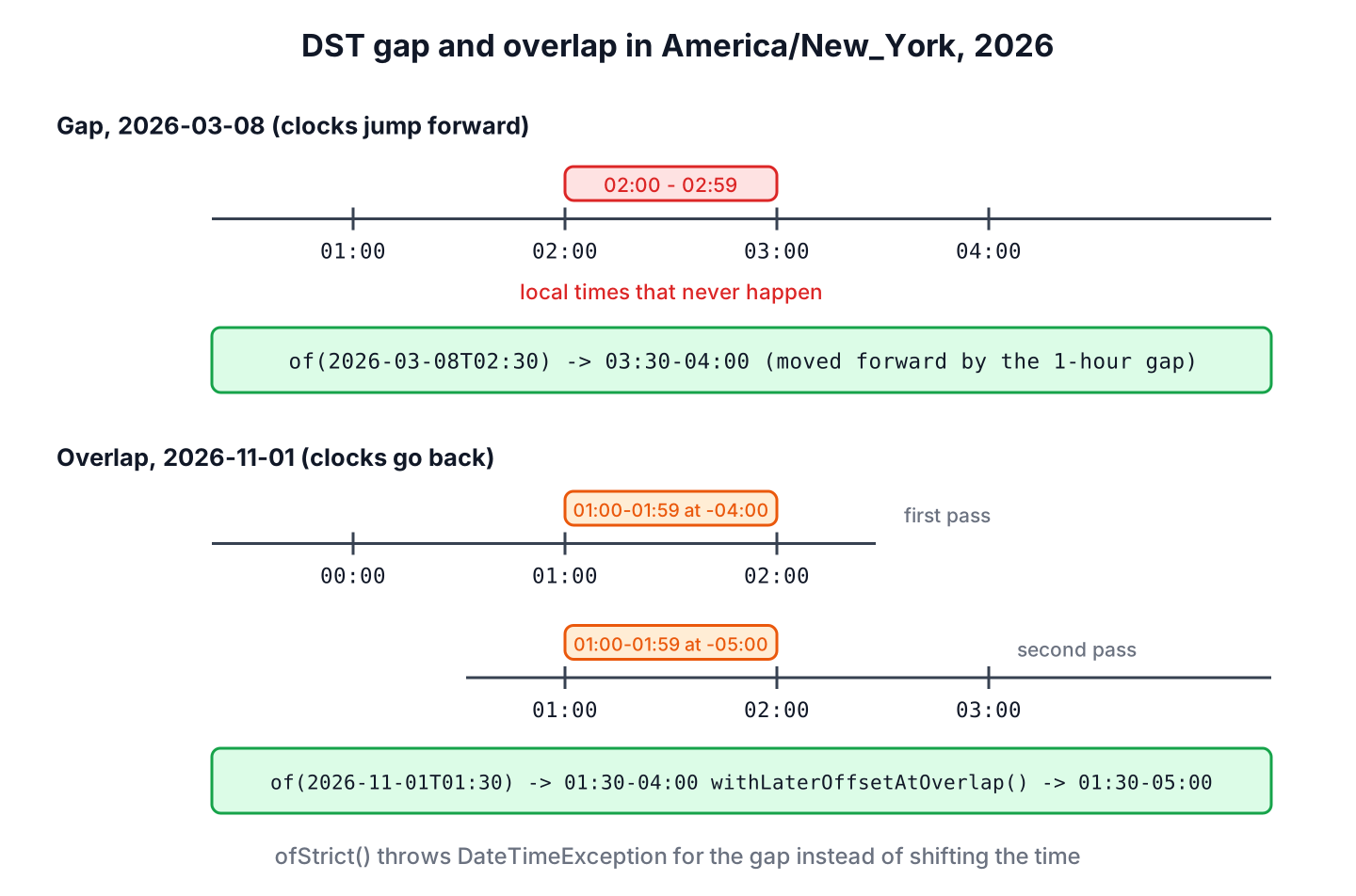
Twice a year, a region with DST has local times that are not a single instant. In spring, the clocks skip forward, so some local times never happen (a gap). In autumn, the clocks go back, so some local times happen twice (an overlap). ZonedDateTime.of() resolves both cases without an exception.
ZoneId newYork = ZoneId.of("America/New_York");
ZonedDateTime inGap = ZonedDateTime.of(LocalDateTime.of(2026, 3, 8, 2, 30), newYork);       // 2026-03-08T03:30-04:00[America/New_York]
ZonedDateTime inOverlap = ZonedDateTime.of(LocalDateTime.of(2026, 11, 1, 1, 30), newYork);  // 2026-11-01T01:30-04:00[America/New_York]
ZonedDateTime secondTime = inOverlap.withLaterOffsetAtOverlap();                            // 2026-11-01T01:30-05:00[America/New_York]
ZonedDateTime firstTime = secondTime.withEarlierOffsetAtOverlap();                          // 2026-11-01T01:30-04:00[America/New_York]
When an invalid local time must be rejected instead of shifted, for example in a booking form, ofStrict() checks the offset against the zone rules and throws a DateTimeException. We catch it and ask the user to choose another time.
ZonedDateTime strict = ZonedDateTime.ofStrict(LocalDateTime.of(2026, 3, 8, 2, 30), ZoneOffset.ofHours(-5), ZoneId.of("America/New_York")); // DateTimeException: LocalDateTime '2026-03-08T02:30' does not exist in zone 'America/New_York' 7. Converting Between Time Zones
The withZoneSameInstant() method keeps the moment and changes the clock time, which is what we need to show one event to people in different zones. The withZoneSameLocal() method changes the moment and keeps the clock time, which is right only when the same local time should apply in another place, such as a store that opens at 09:00 in every city.
ZonedDateTime berlinNine = ZonedDateTime.of(2026, 5, 14, 9, 0, 0, 0, ZoneId.of("Europe/Berlin"));
ZonedDateTime sameInstant = berlinNine.withZoneSameInstant(ZoneId.of("Asia/Kolkata"));   // 2026-05-14T12:30+05:30[Asia/Kolkata]
ZonedDateTime sameLocal = berlinNine.withZoneSameLocal(ZoneId.of("Asia/Kolkata"));       // 2026-05-14T09:00+05:30[Asia/Kolkata]
Say a team in New York holds a weekly call at 09:00 New York time, and a colleague in Berlin wants it in her calendar. The US switches to summer time on March 8, but Europe switches on March 29, so for three weeks the call starts one hour earlier in Berlin. Converting each occurrence with withZoneSameInstant() gets it right.
ZonedDateTime firstCall = ZonedDateTime.of(2026, 3, 2, 9, 0, 0, 0, ZoneId.of("America/New_York"));
ZoneId berlinZone = ZoneId.of("Europe/Berlin");
LocalTime beforeSwitch = firstCall.withZoneSameInstant(berlinZone).toLocalTime();              // 15:00
LocalTime usSummer = firstCall.plusWeeks(2).withZoneSameInstant(berlinZone).toLocalTime();      // 14:00
LocalTime bothSummer = firstCall.plusWeeks(4).withZoneSameInstant(berlinZone).toLocalTime();    // 15:00
Other conversion patterns, including a list of meeting times for several cities, are in converting date and time between time zones.
8. Comparing ZonedDateTime Values
Comparisons with isBefore(), isAfter() and isEqual() use the instants, so they work across zones. The equals() method also compares the local date-time and the zone, so two values for the same moment in different zones are not equal.
ZonedDateTime berlinValue = ZonedDateTime.parse("2026-05-14T09:00+02:00[Europe/Berlin]");
ZonedDateTime londonValue = ZonedDateTime.parse("2026-05-14T08:00+01:00[Europe/London]");
boolean sameInstant = berlinValue.isEqual(londonValue);        // true
boolean equalObjects = berlinValue.equals(londonValue);        // false
boolean earlier = berlinValue.isBefore(londonValue.plusMinutes(1));   // true
To sort events from many zones, we compare with isBefore() or sort by toInstant(). Comparing two ZonedDateTime instances explains compareTo() and the tie-breaking rules.
9. Java ZonedDateTime FAQs
Developers who work with users in several countries search for these answers about ZonedDateTime.
9.1. Is ZonedDateTime the Same as OffsetDateTime?
No. A ZonedDateTime has a region ID and follows its DST rules, whereas an OffsetDateTime has only a fixed offset. ZonedDateTime vs OffsetDateTime compares both with a DST example.
9.2. How Do We Get a ZonedDateTime in UTC?
We use ZoneOffset.UTC as the zone, for example ZonedDateTime.now(ZoneOffset.UTC) or zdt.withZoneSameInstant(ZoneOffset.UTC). The result prints with a Z, such as 2026-05-14T07:00Z.
9.3. Should We Store ZonedDateTime in a Database?
Not as a single column. SQL has no type for a region ID, and JDBC 4.2 maps only OffsetDateTime to TIMESTAMP WITH TIME ZONE. For past events we store the Instant or OffsetDateTime. For future local events, such as appointments, we store the LocalDateTime and the zone ID in two columns, so a later change of the zone rules is applied.
9.4. How Do We Print a ZonedDateTime Without the Zone in Brackets?
We format it with DateTimeFormatter.ISO_OFFSET_DATE_TIME, which prints only the offset, such as 2026-05-14T09:00:00+02:00. That is also the format most JSON APIs expect.
9.5. Does ZonedDateTime Handle Time Zone Rule Changes?
Yes, through the time zone database (tzdata) inside the JDK. When a country changes its DST rules, a JDK update brings the new data, and values created after the update use the new offsets. Long-running servers get the change only after the JDK on them is updated.
10. Conclusion
A ZonedDateTime is a local date and time plus a region and its current offset, so it identifies one instant and follows DST. We create it with of(), now(ZoneId) or atZone(), and we parse only text that contains a zone or an offset, or supply the zone through the formatter.
Date-based arithmetic keeps the wall-clock time and time-based arithmetic keeps the elapsed time, which differ on DST days. Gaps shift forward, overlaps take the earlier offset, and withZoneSameInstant() shows one event in many zones. Each related class has its own article in the Java date and time guides.
11. References
- ZonedDateTime (Java SE 25 API)
- ZoneId (Java SE 25 API)
- DateTimeFormatter (Java SE 25 API)
- IANA Time Zone Database
Happy Learning !!
