

In Java, a ZoneId names a time zone, such as Asia/Kolkata, and a ZoneOffset is a fixed difference from UTC, such as +05:30. A region-based ZoneId carries the daylight saving rules of that place, so its offset from UTC can change during the year. A ZoneOffset never changes. Both classes are part of the Java Date Time API in the java.time package.
We use a ZoneId or a ZoneOffset whenever a date and time must be shown or stored for a specific place, for example to show a meeting time to a user in New York, or to convert a LocalDateTime into an Instant.
The following example shows the calls we use most, with the result of each line as a comment.
ZoneId kolkata = ZoneId.of("Asia/Kolkata");                      // Asia/Kolkata
ZoneId newYork = ZoneId.of("America/New_York");                  // America/New_York
ZoneOffset plusFiveThirty = ZoneOffset.of("+05:30");             // +05:30
ZoneId utc = ZoneId.of("UTC");                                   // UTC
ZoneId systemZone = ZoneId.systemDefault();                      // Asia/Calcutta on this machine
Set<String> allIds = ZoneId.getAvailableZoneIds();               // 604 region IDs
ZoneOffset nyOffset = newYork.getRules().getOffset(Instant.now());  // -04:00 or -05:00
ZonedDateTime nowInKolkata = ZonedDateTime.now(kolkata);         // 2026-10-06T01:46:46.134140687+05:30[Asia/Kolkata]
Notice that the offset for America/New_York depends on the instant we pass, because New York uses daylight saving time, whereas +05:30 is always +05:30.
In the rest of the post, we look at the kinds of IDs that ZoneId.of() accepts and at the system default zone. We print the full list of zone IDs and keep a table of the ones we use most. After that, we get the ZoneOffset of a ZoneId at a given instant, handle the ZoneRulesException for unknown IDs and use the ZoneId.SHORT_IDS map.
1. ZoneId vs ZoneOffset
ZoneId specifies a time zone identifier and provides rules for converting between an Instant and a LocalDateTime. ZoneOffset specifies a time zone offset from Greenwich/UTC. The class ZoneOffset is a subclass of ZoneId, so we can pass a ZoneOffset to any method that asks for a ZoneId.
The difference matters in any app with users in a place that uses daylight saving time (DST). Say a booking app stores an appointment for 9 AM in New York. With the ZoneId America/New_York, Java picks -05:00 in January and -04:00 in July, so the appointment stays at 9 AM on the New York clock. With the ZoneOffset -05:00, the stored time is one hour off for half of the year.
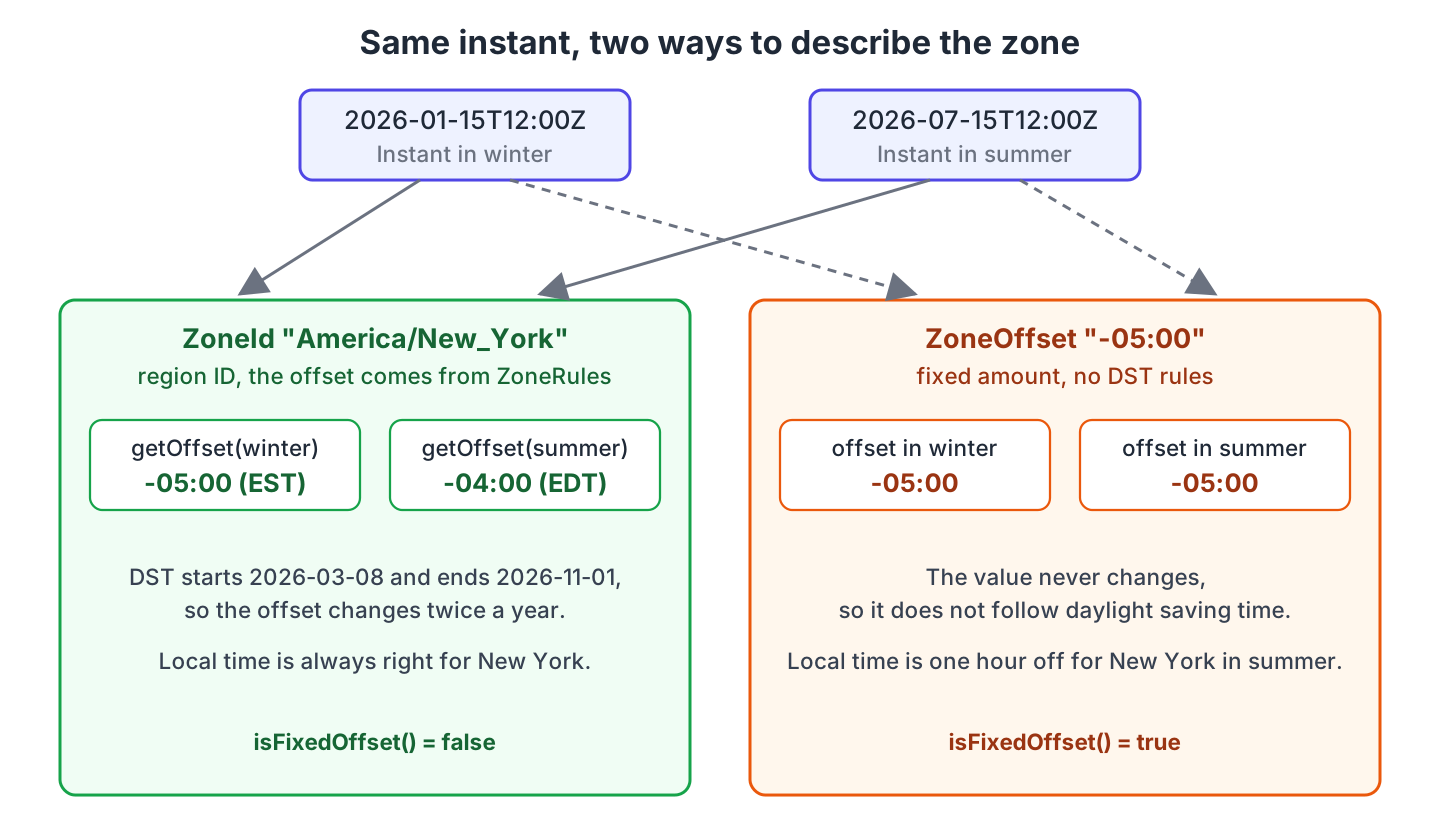
In practice, we pick the class by where the value comes from. A place name means ZoneId, and a timestamp that already carries an offset means ZoneOffset.
| ZoneId (region) | ZoneOffset | |
|---|---|---|
| Example ID | Europe/Paris, Asia/Kolkata | +02:00, -05:30, Z |
| Offset from UTC | Comes from the zone rules and can change with DST | Fixed, never changes |
| Rules source | IANA Time Zone Database (tzdata 2026b in JDK 25.0.4.1) | None |
| Date-time class | ZonedDateTime | OffsetDateTime |
| Use it for | Anything tied to a place, such as user-facing times and recurring events | Timestamps with a known offset, such as 2026-01-15T09:00-05:00 from a database or an API |
2. Creating a ZoneId with ZoneId.of()
The method ZoneId.of(String) accepts four kinds of IDs, and the kind decides which class we get back.
- A region ID is the name of a place from the IANA database, such as Europe/Paris.
- An offset ID starts with + or –, such as +02:00, and returns a ZoneOffset. The single letter Z returns ZoneOffset.UTC.
- A prefixed offset ID starts with UTC, GMT or UT followed by an offset, such as UTC+02:00.
- The plain strings UTC, GMT and UT are region IDs with the same rules as ZoneOffset.UTC.
ZoneId region = ZoneId.of("Europe/Paris");                       // Europe/Paris
ZoneId offset = ZoneId.of("+02:00");                             // +02:00 (a ZoneOffset)
ZoneId zulu = ZoneId.of("Z");                                    // Z (ZoneOffset.UTC)
ZoneId prefixed = ZoneId.of("UTC+02:00");                        // UTC+02:00
ZoneId gmt = ZoneId.of("GMT");                                   // GMT
ZoneId shortForm = ZoneId.of("GMT+2");                           // GMT+02:00 (normalized)
The prefixed forms print with their prefix, which helps when a log must show UTC+02:00 instead of +02:00. When we only need the offset, we call normalized(). It returns a ZoneOffset for every ID with a fixed offset, and returns the same ZoneId for a region such as Europe/Paris.
ZoneId normalized = prefixed.normalized();                       // +02:00 (a ZoneOffset)
ZoneId gmtNormalized = gmt.normalized();                         // Z
ZoneId parisNormalized = region.normalized();                    // Europe/Paris (unchanged)
boolean fixed = region.getRules().isFixedOffset();               // false
boolean fixedOffset = offset.getRules().isFixedOffset();         // true
Zone IDs are case-sensitive, so asia/kolkata fails even though Asia/Kolkata works. Abbreviations such as IST or PST fail too, because ZoneId.of(String) does not accept them. We look at both errors in section 8.
| Input | Result | Class of the result |
|---|---|---|
| Europe/Paris | Europe/Paris | ZoneRegion |
| +02:00, -0530, +5 | +02:00, -05:30, +05:00 | ZoneOffset |
| Z | Z | ZoneOffset (the constant ZoneOffset.UTC) |
| UTC, GMT, UT | UTC, GMT, UT | ZoneRegion with fixed rules |
| UTC+02:00, GMT+2, UT-05:00 | UTC+02:00, GMT+02:00, UT-05:00 | ZoneRegion with fixed rules |
| asia/kolkata, IST, Asia/Calcuta | ZoneRulesException | none |
| 5:30 | DateTimeException (invalid format) | none |
3. Creating a ZoneOffset
A ZoneOffset is the amount of time a zone differs from UTC, between -18:00 and +18:00. We create one from a string with ZoneOffset.of(), or from numbers with ofHours(), ofHoursMinutes() and ofTotalSeconds(). The string can be Z, +h, +hh, +hh:mm, +hhmm, +hh:mm:ss or +hhmmss, with + or – in front.
ZoneOffset fromText = ZoneOffset.of("+05:30");                   // +05:30
ZoneOffset fromHours = ZoneOffset.ofHours(-8);                   // -08:00
ZoneOffset fromHoursMinutes = ZoneOffset.ofHoursMinutes(5, 45);  // +05:45
ZoneOffset fromSeconds = ZoneOffset.ofTotalSeconds(3600);        // +01:00
ZoneOffset utc = ZoneOffset.UTC;                                 // Z
int seconds = fromText.getTotalSeconds();                        // 19800
String id = fromText.getId();                                    // "+05:30"
ZoneOffset min = ZoneOffset.MIN;                                 // -18:00
ZoneOffset max = ZoneOffset.MAX;                                 // +18:00
The method getId() always returns the normalized form, so ZoneOffset.of(“+5”) prints as +05:00 and UTC prints as Z. An offset outside the supported range throws a DateTimeException at creation time.
ZoneOffset tooBig = ZoneOffset.of("+19:00"); // DateTimeException: Zone offset hours not in valid range: value 19 is not in the range -18 to 184. The System Default Zone
The method ZoneId.systemDefault() returns the zone of the JVM. The JVM reads it from the user.timezone system property, or from the operating system when the property is not set. The methods LocalDateTime.now() and ZonedDateTime.now() use this zone, so the same code gives different results on a laptop in India and on a server set to UTC. The post on setting the JVM timezone shows how to pin it.
ZoneId systemZone = ZoneId.systemDefault();                      // Asia/Calcutta on this machine
ZoneId fromTimeZone = TimeZone.getDefault().toZoneId();          // same value
String property = System.getProperty("user.timezone");           // "Asia/Calcutta"

LocalDateTime local = LocalDateTime.of(2026, 10, 6, 9, 30);
ZonedDateTime inSystemZone = local.atZone(ZoneId.systemDefault());   // 2026-10-06T09:30+05:30[Asia/Calcutta]
ZonedDateTime inKolkata = local.atZone(ZoneId.of("Asia/Kolkata"));   // 2026-10-06T09:30+05:30[Asia/Kolkata]
Notice that the machine reports Asia/Calcutta, an older alias of Asia/Kolkata that the IANA database still accepts. Both IDs have the same rules, so the two results above are the same instant.
5. List of Zone IDs in Java
The method ZoneId.getAvailableZoneIds()) returns a Set with every region-based ID that the JDK knows. On JDK 25.0.4.1 with tzdata 2026b, the set has 604 entries. The set does not contain offset IDs such as +05:30. The count changes a little with each tzdata update, so we never hard-code it.
Set<String> zoneIds = ZoneId.getAvailableZoneIds();              // unsorted HashSet copy
int count = zoneIds.size();                                      // 604
boolean hasKolkata = zoneIds.contains("Asia/Kolkata");           // true
boolean hasOffset = zoneIds.contains("+05:30");                  // false, offsets are not listed
The set is a modifiable copy in no particular order, so we sort it before printing. One line prints the full list, which is the fastest way to find the exact spelling of a zone.
new TreeSet<>(ZoneId.getAvailableZoneIds()).forEach(System.out::println);To see only one part of the world, we filter by the prefix before the slash. The prefixes are the continents and oceans, plus a few legacy groups such as Etc, US and SystemV that the database keeps for old configurations.
List<String> europe = zoneIds.stream()
    .filter(id -> id.startsWith("Europe/"))
    .sorted()
    .toList();                                                   // 64 IDs, Europe/Amsterdam first
5.1. Commonly Used Zone IDs and Their Offsets
Most apps need only a few dozen of the 604 IDs. The table lists the ones we meet most often, with the offset on 15 January 2026 and on 15 July 2026. The DST column shows which zones change their offset during the year. The offsets come from ZoneRules.getOffset(Instant) on JDK 25.0.4.1, and a future tzdata update can change a row, for example when a country drops DST.
| Zone ID | Offset in January | Offset in July | DST |
|---|---|---|---|
| UTC, Etc/UTC, GMT | Z | Z | no |
| America/New_York | -05:00 | -04:00 | yes |
| America/Chicago | -06:00 | -05:00 | yes |
| America/Denver | -07:00 | -06:00 | yes |
| America/Phoenix | -07:00 | -07:00 | no |
| America/Los_Angeles | -08:00 | -07:00 | yes |
| America/Anchorage | -09:00 | -08:00 | yes |
| America/Toronto | -05:00 | -04:00 | yes |
| America/Vancouver | -08:00 | -07:00 | yes |
| America/Halifax | -04:00 | -03:00 | yes |
| America/St_Johns | -03:30 | -02:30 | yes |
| America/Mexico_City | -06:00 | -06:00 | no |
| America/Bogota | -05:00 | -05:00 | no |
| America/Lima | -05:00 | -05:00 | no |
| America/Santiago | -03:00 | -04:00 | yes |
| America/Sao_Paulo | -03:00 | -03:00 | no |
| America/Argentina/Buenos_Aires | -03:00 | -03:00 | no |
| Europe/London | Z | +01:00 | yes |
| Europe/Dublin | Z | +01:00 | yes |
| Europe/Lisbon | Z | +01:00 | yes |
| Europe/Paris | +01:00 | +02:00 | yes |
| Europe/Berlin | +01:00 | +02:00 | yes |
| Europe/Madrid | +01:00 | +02:00 | yes |
| Europe/Rome | +01:00 | +02:00 | yes |
| Europe/Amsterdam | +01:00 | +02:00 | yes |
| Europe/Zurich | +01:00 | +02:00 | yes |
| Europe/Stockholm | +01:00 | +02:00 | yes |
| Europe/Warsaw | +01:00 | +02:00 | yes |
| Europe/Athens | +02:00 | +03:00 | yes |
| Europe/Helsinki | +02:00 | +03:00 | yes |
| Europe/Kyiv | +02:00 | +03:00 | yes |
| Europe/Istanbul | +03:00 | +03:00 | no |
| Europe/Moscow | +03:00 | +03:00 | no |
| Asia/Riyadh | +03:00 | +03:00 | no |
| Asia/Jerusalem | +02:00 | +03:00 | yes |
| Asia/Tehran | +03:30 | +03:30 | no |
| Asia/Dubai | +04:00 | +04:00 | no |
| Asia/Karachi | +05:00 | +05:00 | no |
| Asia/Kolkata | +05:30 | +05:30 | no |
| Asia/Kathmandu | +05:45 | +05:45 | no |
| Asia/Dhaka | +06:00 | +06:00 | no |
| Asia/Bangkok | +07:00 | +07:00 | no |
| Asia/Jakarta | +07:00 | +07:00 | no |
| Asia/Ho_Chi_Minh | +07:00 | +07:00 | no |
| Asia/Singapore | +08:00 | +08:00 | no |
| Asia/Kuala_Lumpur | +08:00 | +08:00 | no |
| Asia/Manila | +08:00 | +08:00 | no |
| Asia/Hong_Kong | +08:00 | +08:00 | no |
| Asia/Shanghai | +08:00 | +08:00 | no |
| Asia/Taipei | +08:00 | +08:00 | no |
| Asia/Seoul | +09:00 | +09:00 | no |
| Asia/Tokyo | +09:00 | +09:00 | no |
| Africa/Algiers | +01:00 | +01:00 | no |
| Africa/Lagos | +01:00 | +01:00 | no |
| Africa/Cairo | +02:00 | +03:00 | yes |
| Africa/Johannesburg | +02:00 | +02:00 | no |
| Africa/Nairobi | +03:00 | +03:00 | no |
| Australia/Perth | +08:00 | +08:00 | no |
| Australia/Darwin | +09:30 | +09:30 | no |
| Australia/Adelaide | +10:30 | +09:30 | yes |
| Australia/Brisbane | +10:00 | +10:00 | no |
| Australia/Sydney | +11:00 | +10:00 | yes |
| Australia/Melbourne | +11:00 | +10:00 | yes |
| Pacific/Auckland | +13:00 | +12:00 | yes |
| Pacific/Honolulu | -10:00 | -10:00 | no |
Notice that the southern zones, such as Australia/Sydney and America/Santiago, have the larger offset in January, because their summer is in January. Zones that print Z are at UTC in that month.
See Also: Converting Date to EST/EDT Timezone
6. Converting a ZoneId to a ZoneOffset
A region-based ZoneId has no single offset, so we need an instant to get one. The call zoneId.getRules() returns the ZoneRules of the zone, and rules.getOffset(Instant) returns the offset that applies at that instant. The same ZoneRules object also tells us whether DST is in effect at that instant, and what the standard offset (the offset outside DST) is.
ZoneId newYork = ZoneId.of("America/New_York");
ZoneRules rules = newYork.getRules();

Instant winter = Instant.parse("2026-01-15T12:00:00Z");
Instant summer = Instant.parse("2026-07-15T12:00:00Z");
ZoneOffset winterOffset = rules.getOffset(winter);               // -05:00
ZoneOffset summerOffset = rules.getOffset(summer);               // -04:00
boolean dstInJuly = rules.isDaylightSavings(summer);             // true
ZoneOffset standard = rules.getStandardOffset(summer);           // -05:00

ZoneOffset nowOffset = ZonedDateTime.now(newYork).getOffset();   // -04:00 in October
ZoneOffset viaInstant = summer.atZone(newYork).getOffset();      // -04:00
When we start from a LocalDateTime instead of an Instant, we call getOffset(LocalDateTime). A local time has a problem twice a year, on the days when the clocks change. On 8 March 2026, the clocks in New York jump from 2:00 to 3:00, so the local time 2:30 does not exist (a gap). On 1 November 2026, they go back from 2:00 to 1:00, so 1:30 happens twice (an overlap). The method getValidOffsets() returns an empty list for a gap and two offsets for an overlap, and atZone() resolves a gap by moving the time forward by the length of the gap, which is one hour in New York.
LocalDateTime localWinter = LocalDateTime.of(2026, 1, 15, 9, 0);
ZoneOffset fromLocal = rules.getOffset(localWinter);             // -05:00

LocalDateTime inGap = LocalDateTime.of(2026, 3, 8, 2, 30);       // does not exist in New York
LocalDateTime inOverlap = LocalDateTime.of(2026, 11, 1, 1, 30);  // happens twice in New York
List<ZoneOffset> gapOffsets = rules.getValidOffsets(inGap);          // []
List<ZoneOffset> overlapOffsets = rules.getValidOffsets(inOverlap);  // [-04:00, -05:00]
ZonedDateTime gapResolved = inGap.atZone(newYork);               // 2026-03-08T03:30-04:00[America/New_York]
A zone without DST, such as Asia/Kolkata, returns the same offset for every instant. Still, isFixedOffset() returns false for it, because a country can change its rules in the future. Only offset IDs such as +05:30 have fixed rules.
ZoneId kolkata = ZoneId.of("Asia/Kolkata");
boolean kolkataFixed = kolkata.getRules().isFixedOffset();       // false, rules can change
ZoneOffset kolkataOffset = kolkata.getRules().getOffset(Instant.now());   // +05:30
7. ZonedDateTime vs OffsetDateTime
Each kind of zone has its own date-time class. A ZonedDateTime stores a LocalDateTime together with a ZoneId, so it knows the DST rules. An OffsetDateTime stores a LocalDateTime together with a ZoneOffset, so it knows only one fixed offset. The difference shows up when we add time. When we add six months to a ZonedDateTime in New York, the offset moves from -05:00 to -04:00 and the local time stays at 9:00. The OffsetDateTime keeps -05:00, so it is one hour away from the New York clock in July.
LocalDateTime local = LocalDateTime.of(2026, 1, 15, 9, 0);
ZonedDateTime zoned = local.atZone(ZoneId.of("America/New_York"));   // 2026-01-15T09:00-05:00[America/New_York]
OffsetDateTime offset = local.atOffset(ZoneOffset.ofHours(-5));      // 2026-01-15T09:00-05:00

ZonedDateTime zonedJuly = zoned.plusMonths(6);                   // 2026-07-15T09:00-04:00[America/New_York]
OffsetDateTime offsetJuly = offset.plusMonths(6);                // 2026-07-15T09:00-05:00

OffsetDateTime fromZoned = zoned.toOffsetDateTime();             // 2026-01-15T09:00-05:00
ZonedDateTime fromOffset = offset.atZoneSameInstant(ZoneId.of("Asia/Kolkata"));   // 2026-01-15T19:30+05:30[Asia/Kolkata]
So we use ZonedDateTime for anything a person reads or schedules in a place, and OffsetDateTime for values we store in a database or send to an API, where a fixed offset is simpler to handle. The post on ZonedDateTime vs OffsetDateTime goes deeper into the two classes.
8. ZoneRulesException for Unknown Zone IDs
When ZoneId.of() gets a string that looks like a region ID but is not in the database, it throws a ZoneRulesException with the message “Unknown time-zone ID”. The most common causes are a typo or a lowercase name. A three-letter abbreviation such as IST fails the same way. A string that does not even look like an ID, for example 5:30, fails earlier with a plain DateTimeException. Since ZoneRulesException extends DateTimeException, one catch block handles both.
ZoneId wrong = ZoneId.of("Asia/Calcuta");       // ZoneRulesException: Unknown time-zone ID: Asia/Calcuta
ZoneId lowerCase = ZoneId.of("asia/kolkata");   // ZoneRulesException: Unknown time-zone ID: asia/kolkata
ZoneId shortId = ZoneId.of("IST");              // ZoneRulesException: Unknown time-zone ID: IST
ZoneId badFormat = ZoneId.of("5:30");           // DateTimeException: Invalid ID for region-based ZoneId, invalid format: 5:30
Zone IDs often come from user settings or a config file, so we wrap the call in a small method that returns an Optional instead of throwing.
static Optional<ZoneId> parseZone(String id) {
  try {
    return Optional.of(ZoneId.of(id));
  } catch (DateTimeException e) {           // ZoneRulesException extends DateTimeException
    return Optional.empty();
  }
}

Optional<ZoneId> found = parseZone("Asia/Calcuta");              // Optional.empty
Optional<ZoneId> ok = parseZone("Asia/Kolkata");                 // Optional[Asia/Kolkata]
ZoneId withFallback = parseZone("Mars/Olympus").orElse(ZoneOffset.UTC);   // Z
9. ZoneId.SHORT_IDS
The ZoneId.SHORT_IDS is a constant Map of frequently used short time-zone names. For example, IST is used for Indian Standard Time, representing the zone id “Asia/Kolkata“. The old java.util.TimeZone class accepted these abbreviations, but ZoneId.of(String) does not. The two-argument method ZoneId.of(String, Map) looks the string up in the map first, so old config values such as IST keep working.
Map<String, String> shortIds = ZoneId.SHORT_IDS;                 // 28 entries, unmodifiable
String ist = shortIds.get("IST");                                // "Asia/Kolkata"
String est = shortIds.get("EST");                                // "America/Panama"
String pst = shortIds.get("PST");                                // "America/Los_Angeles"

ZoneId fromShort = ZoneId.of("IST", ZoneId.SHORT_IDS);           // Asia/Kolkata
ZoneId stillRegion = ZoneId.of("Europe/Paris", ZoneId.SHORT_IDS);   // Europe/Paris
Since JDK 24, EST maps to America/Panama, MST to America/Phoenix and HST to Pacific/Honolulu. Before that, the three keys mapped to the fixed offsets -05:00, -07:00 and -10:00. The change came with JDK-8340477. The Javadoc also says the mapping can change with new tzdata versions, so we should not depend on an abbreviation in new code. The map on JDK 25 has 28 entries.
ACT -> Australia/Darwin
AET -> Australia/Sydney
AGT -> America/Argentina/Buenos_Aires
ART -> Africa/Cairo
AST -> America/Anchorage
BET -> America/Sao_Paulo
BST -> Asia/Dhaka
CAT -> Africa/Harare
CNT -> America/St_Johns
CST -> America/Chicago
CTT -> Asia/Shanghai
EAT -> Africa/Addis_Ababa
ECT -> Europe/Paris
EST -> America/Panama
HST -> Pacific/Honolulu
IET -> America/Indiana/Indianapolis
IST -> Asia/Kolkata
JST -> Asia/Tokyo
MIT -> Pacific/Apia
MST -> America/Phoenix
NET -> Asia/Yerevan
NST -> Pacific/Auckland
PLT -> Asia/Karachi
PNT -> America/Phoenix
PRT -> America/Puerto_Rico
PST -> America/Los_Angeles
SST -> Pacific/Guadalcanal
VST -> Asia/Ho_Chi_Minh
The map is unmodifiable, so put() throws an UnsupportedOperationException. When our app needs its own aliases, we copy the map into a HashMap, add our entries and pass the copy to ZoneId.of(String, Map).
Map<String, String> ownAliases = new HashMap<>(ZoneId.SHORT_IDS);
ownAliases.put("NZST", "Pacific/Auckland");
ZoneId auckland = ZoneId.of("NZST", ownAliases);                 // Pacific/Auckland
10. Conclusion
A ZoneId such as America/New_York names a place and carries its DST rules, so the offset we get from it depends on the instant. A ZoneOffset such as -05:00 is a fixed value and never changes. We create both with ZoneId.of() and read the system zone with ZoneId.systemDefault(). The 604 region IDs on JDK 25 come from ZoneId.getAvailableZoneIds().
To get the offset of a zone at a moment in time, we call zoneId.getRules().getOffset(instant). An unknown region ID throws a ZoneRulesException, and the three-letter abbreviations work only through ZoneId.SHORT_IDS. Note that the list of these zone ids may change over time with newer versions of Java and tzdata.
The complete example is in the datetime folder of the Core-Java repository.
11. References
- ZoneId Javadoc (Java 25)
- ZoneOffset Javadoc (Java 25)
- ZoneRules Javadoc (Java 25)
- IANA Time Zone Database
- JDK-8340477: Remove JDK1.1 compatible behavior for EST, MST and HST
Happy Learning !!
