
Tomcat throws java.lang.IllegalArgumentException: taglib definition not consistent with specification version when a <taglib> element in web.xml sits in the wrong place for the descriptor version, so the web app does not start. In a web.xml for Servlet 2.4 or later, including every Jakarta EE version, <taglib> must be inside <jsp-config>. Only the old DTD-based 2.2 and 2.3 descriptors put it as a direct child of <web-app>.
We meet this error when we copy a <taglib> block from an old project or tutorial into a newer web.xml, or when we upgrade a descriptor header without moving its taglib entries. The fix takes a minute once we know which of the two cases we have.
The following example is a Servlet 6.1 web.xml for Tomcat 11 with the taglib entry in the accepted place.
<web-app xmlns="https://jakarta.ee/xml/ns/jakartaee"
         xmlns:xsi="http://www.w3.org/2001/XMLSchema-instance"
         xsi:schemaLocation="https://jakarta.ee/xml/ns/jakartaee https://jakarta.ee/xml/ns/jakartaee/web-app_6_1.xsd"
         version="6.1">
  <jsp-config>
    <taglib>
      <taglib-uri>/tags/recipes</taglib-uri>
      <taglib-location>/WEB-INF/tags/recipes.tld</taglib-location>
    </taglib>
  </jsp-config>
</web-app>
Notice the <jsp-config> wrapper around <taglib>. We look at the rule Tomcat checks, fix both kinds of descriptors, remove taglib entries that are not needed at all, and test web.xml before it reaches the server.
1. Why Tomcat Rejects the taglib Definition
A web.xml file comes in two formats. Servlet 2.2 and 2.3 descriptors start with a <!DOCTYPE web-app PUBLIC …> line that points to a DTD. From Servlet 2.4 on, descriptors have no DOCTYPE and declare an XML schema and a version attribute instead. The JSP configuration moved into a new <jsp-config> element at the same time.
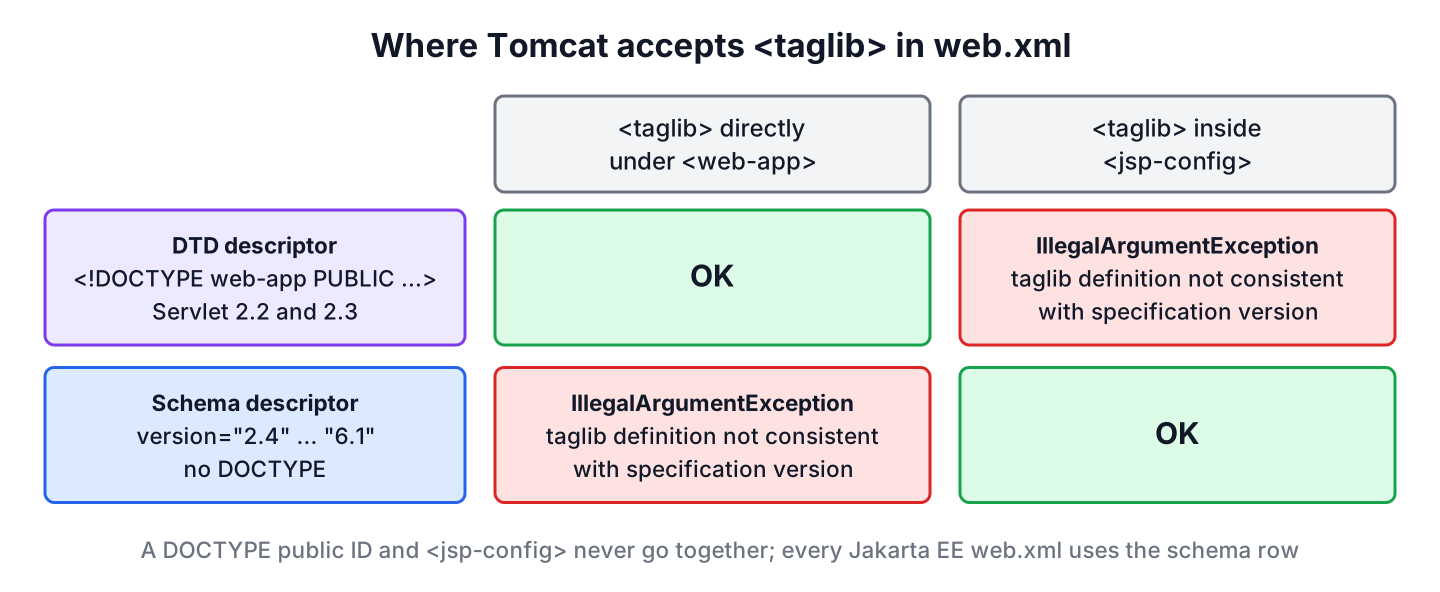
Tomcat checks the placement while it parses web.xml. Its TaglibLocationRule throws the exception in two cases.
- The descriptor has no DOCTYPE public ID (Servlet 2.4 to 6.1), but <taglib> is a direct child of <web-app>.
- The descriptor has a DOCTYPE public ID (Servlet 2.2 or 2.3), but <taglib> is inside <jsp-config>.
The rule is the same in Tomcat 9.0, 10.1 and 11.0. Tomcat 11.0.26 on JDK 25 logs the first case like this, trimmed to the important lines.
SEVERE: Begin event threw exception
java.lang.IllegalArgumentException: taglib definition not consistent with specification version
	at org.apache.tomcat.util.descriptor.web.TaglibLocationRule.begin(WebRuleSet.java:1229)
	at org.apache.tomcat.util.digester.Digester.startElement(Digester.java:1355)
	...
SEVERE: Parse error in application web.xml file at [file:/.../WEB-INF/web.xml]
org.xml.sax.SAXParseException; lineNumber: 6; columnNumber: 11; Error at line [6] column [11]: [taglib definition not consistent with specification version]
	...
Caused by: java.lang.IllegalArgumentException: taglib definition not consistent with specification version
The lineNumber in the SAXParseException points to the offending <taglib> element, so we know which entry to move. Older Tomcat versions print the same message from org.apache.catalina.startup.TaglibLocationRule.
2. Fixing a Schema-Based web.xml
A schema-based descriptor is the common case. It declares version=”2.4″ or later, often after a header upgrade, but still has <taglib> entries copied from a 2.3 file. Tomcat 11 refuses to deploy a descriptor with a taglib entry at the top level.
<web-app xmlns="https://jakarta.ee/xml/ns/jakartaee" version="6.1" ...>
  <taglib>                                            <!-- wrong place for version 6.1 -->
    <taglib-uri>/tags/recipes</taglib-uri>
    <taglib-location>/WEB-INF/tags/recipes.tld</taglib-location>
  </taglib>
</web-app>
To fix it, we wrap all <taglib> elements in one <jsp-config> element, as in the intro example. The child elements stay the same. If <jsp-config> also has <jsp-property-group> entries, the <taglib> elements come first.
The header must match the server, too. Tomcat 10.1 implements Servlet 6.0 and Tomcat 11 implements Servlet 6.1. The schemas are published in the Jakarta EE XML schema list.
| Server | web-app version | Schema file | Namespace |
|---|---|---|---|
| Tomcat 9.0 | 4.0 | web-app_4_0.xsd | http://xmlns.jcp.org/xml/ns/javaee |
| Tomcat 10.1 | 6.0 | web-app_6_0.xsd | https://jakarta.ee/xml/ns/jakartaee |
| Tomcat 11.0 | 6.1 | web-app_6_1.xsd | https://jakarta.ee/xml/ns/jakartaee |
3. Fixing an Old DTD-Based web.xml
The second case is rare but confusing. A descriptor still starts with the Servlet 2.3 DOCTYPE, and someone added a <jsp-config> block from a newer example. The DTD format does not know <jsp-config>, so Tomcat throws the same exception.
<!DOCTYPE web-app PUBLIC "-//Sun Microsystems, Inc.//DTD Web Application 2.3//EN"
        "http://java.sun.com/dtd/web-app_2_3.dtd">
<web-app>
  <jsp-config>                                        <!-- not allowed with the 2.3 DTD -->
    <taglib>
      <taglib-uri>/tags/recipes</taglib-uri>
      <taglib-location>/WEB-INF/tags/recipes.tld</taglib-location>
    </taglib>
  </jsp-config>
</web-app>
We could move <taglib> back under <web-app>, but a 2.3 descriptor also disables EL in JSP pages by default and blocks every newer servlet feature. The better fix is to delete the DOCTYPE line and use the schema header from section 2 that matches the server.
For example, a team moves an old JSP reporting app from Tomcat 6 to Tomcat 10.1. They replace the 2.3 DOCTYPE with the 6.0 schema header, and the app stops deploying with this exception, because its four <taglib> entries for in-house tag libraries are still direct children of <web-app>. Moving them into <jsp-config> fixes the startup error.
4. Removing taglib Entries That Are Not Needed
Most taglib entries in web.xml are leftovers from JSP 1.1. Since JSP 2.0, the container finds every TLD file inside META-INF of the JARs in WEB-INF/lib and in the WEB-INF folder, and maps it by the <uri> element in the TLD. This lookup is the implicit taglib map defined in Jakarta Pages 4.0.
A tag library packaged in a JAR, such as Jakarta Tags (JSTL), needs no web.xml entry at all. With Jakarta Tags 3.0, which is part of Jakarta EE 10, the tag libraries have new jakarta.tags.* URIs, while the old java.sun.com URIs still work. Tomcat does not ship Jakarta Tags, so we add the API and the implementation to the WAR.
<dependency>
    <groupId>jakarta.servlet.jsp.jstl</groupId>
    <artifactId>jakarta.servlet.jsp.jstl-api</artifactId>
    <version>3.0.2</version>
</dependency>
<dependency>
    <groupId>org.glassfish.web</groupId>
    <artifactId>jakarta.servlet.jsp.jstl</artifactId>
    <version>3.0.1</version>
</dependency>
The JSP page refers to the library by its URI, and the container resolves it from the JAR. Our own TLD in /WEB-INF/tags/recipes.tld works the same way when its <uri> element is /tags/recipes.
<%@ taglib prefix="c" uri="jakarta.tags.core" %>
<%@ taglib prefix="r" uri="/tags/recipes" %>

<c:out value="Pancakes"/>
<r:card name="Pancakes"/>
Once all libraries resolve this way, we delete the whole <jsp-config> block, and the exception cannot come back. The Spring Boot JSP view example uses the same dependencies, and Spring Security JSP taglibs are another library found from its JAR.
5. Checking web.xml Before Deployment
Tomcat reports this error only at startup, so a misplaced entry often surfaces on a test server. We can run the same parser in a unit test with tomcat-embed-core as a test dependency. The method parseWebXml() either returns true for a valid descriptor or logs the error and returns false.
WebXmlParser parser = new WebXmlParser(false, false, true);
WebXml webXml = new WebXml();
String location = Path.of("src/main/webapp/WEB-INF/web.xml").toUri().toString();
boolean valid = parser.parseWebXml(new InputSource(location), webXml, false);   // true
Map<String, String> taglibs = webXml.getTaglibs();                               // {/tags/recipes=/WEB-INF/tags/recipes.tld}
An assertion on valid fails the build as soon as someone pastes a <taglib> block into the wrong place. The IllegalArgumentException guide covers the exception itself, and the overview of checked and unchecked exceptions explains why Tomcat can throw it without declaring it.
6. web.xml taglib FAQs
Old JSP projects and copied configuration snippets lead to a handful of related questions.
6.1. Where does the taglib element go in web.xml?
Inside <jsp-config> for every web.xml with version 2.4 or later. Only a Servlet 2.2 or 2.3 descriptor with a DOCTYPE line puts <taglib> as a direct child of <web-app>.
6.2. Do I need a taglib entry in web.xml for JSTL?
No. The JSTL implementation JAR contains its TLD files in META-INF, and the container finds them by URI. A web.xml entry is useful only to give a TLD a different URI than the one inside the TLD file.
6.3. What is the JSTL core URI for Jakarta EE 10 and 11?
The URI is jakarta.tags.core, used as uri=”jakarta.tags.core” in the taglib directive. Jakarta Tags 3.0 still accepts http://java.sun.com/jsp/jstl/core, so old pages keep working after the upgrade.
6.4. Why does the error appear only when the server starts?
Because Tomcat parses web.xml while it deploys the web app, not when we build the WAR. A unit test with the Tomcat parser, as in section 5, moves the check into the build.
7. Conclusion
The message taglib definition not consistent with specification version means a <taglib> element and the web.xml format do not match. Schema-based descriptors from version 2.4 to 6.1 need <taglib> inside <jsp-config>, and DTD-based 2.3 descriptors need it under <web-app>.
On Tomcat 10.1 and 11, we use a 6.0 or 6.1 schema header and move the entries into <jsp-config>. Even better, we drop the entries for libraries that ship their TLDs in a JAR, such as Jakarta Tags 3.0 with its jakarta.tags.core URI.
8. References
- Apache Tomcat source, WebRuleSet and TaglibLocationRule
- Jakarta Pages 4.0 Specification
- Jakarta Standard Tag Library 3.0
- Jakarta EE XML Schemas
- Apache Tomcat, Which Version Do I Want?
Happy Learning !!
