
The current working directory in Java is the folder from which we started the java command, and Java stores it in the system property user.dir. To get it, we call System.getProperty(“user.dir”), which returns a String, or Path.of(“”).toAbsolutePath(), which returns a Path.
We need the working directory whenever the code uses a relative path, such as config/app.properties or logs/app.log, because Java resolves every relative path against that folder.
The following example shows the ways to get the working directory on Java 25. We start the program in the folder /home/lokesh/demo, and the result of each line is in the comment.
String userDir = System.getProperty("user.dir");                     // /home/lokesh/demo
Path cwd = Path.of("").toAbsolutePath();                             // /home/lokesh/demo
Path cwdFs = FileSystems.getDefault().getPath("").toAbsolutePath();  // /home/lokesh/demo
String fileEmpty = new File("").getAbsolutePath();                   // /home/lokesh/demo

Path dot = Path.of(".").toAbsolutePath();                            // /home/lokesh/demo/.
Path dotNormalized = Path.of(".").toAbsolutePath().normalize();      // /home/lokesh/demo
Notice that the first four calls return the same folder, whereas the “.” path keeps a trailing /. until we call normalize().
Java has no dedicated method such as getCwd(), and every way in the snippet reads the same user.dir value. We go through when to use each way, how the working directory differs from the location of the JAR file, and why changing user.dir at runtime breaks relative paths.
1. Using System.getProperty(“user.dir”)
In Java, user.dir property is the directory where java command was run from. In other words, it outputs the location where the application was started. The JVM sets user.dir at startup from the working directory of the operating system process, and the File class resolves relative paths against this “current user directory”.
String currentWorkingDir = System.getProperty("user.dir"); // /home/lokesh/demoThe value depends on where we start the program, not on where the class files are. When we start the same class from the parent folder /home/lokesh, the property changes with it.
cd /home/lokesh/demo
java -cp target/classes com.howtodoinjava.io.CurrentWorkingDirectory
# user.dir = /home/lokesh/demo

cd /home/lokesh
java -cp demo/target/classes com.howtodoinjava.io.CurrentWorkingDirectory
# user.dir = /home/lokesh
So System.getProperty(“user.dir”) returns the root folder of our Java project only when we start the program from that folder. IntelliJ IDEA and Eclipse start the program in the project folder by default, and each run configuration has a “Working directory” field to change it. Maven Surefire runs tests in the module folder, so tests in a multi-module build see the module, not the parent project.
The property user.dir is one of the standard Java system properties, so it is always set and never returns null.
2. Using Path.of(“”).toAbsolutePath()
The Path API is the better choice for new code. A Path object has methods such as resolve() and getParent(), so we build other paths from it without string concatenation, and we pass it straight to the Files methods.
The call Path.of(“”) creates an empty relative path, which stands for the working directory itself. The method toAbsolutePath() resolves the empty path against the working directory, so we get the full path.
Path cwd = Path.of("").toAbsolutePath();                              // /home/lokesh/demo
Path configFile = cwd.resolve("config").resolve("app.properties");   // /home/lokesh/demo/config/app.properties
boolean exists = Files.exists(configFile);                           // false
The method Path.of() came in Java 11 and replaces Paths.get(“”), which returns the same Path from a class that may be deprecated in a future release. The longer form FileSystems.getDefault().getPath(“”) also gives the same result, because Path.of() calls it.
2.1. When Do We Need normalize()?
Please do not forget to use normalize() method when the path starts with “.”. The method toAbsolutePath() only puts the working directory in front of the path, so “.” stays in the result. The method normalize() removes the “.” and “..” parts.
| Code | Result |
|---|---|
| Path.of(“”).toAbsolutePath() | /home/lokesh/demo |
| Path.of(“.”).toAbsolutePath() | /home/lokesh/demo/. |
| Path.of(“.”).toAbsolutePath().normalize() | /home/lokesh/demo |
| new File(“.”).getAbsolutePath() | /home/lokesh/demo/. |
| new File(“.”).getCanonicalPath() | /home/lokesh/demo |
| Path.of(“”).toRealPath() | /home/lokesh/demo |
The last two rows also resolve symbolic links, so they return the real folder on disk. Both methods read the file system and declare a checked IOException, whereas toAbsolutePath() and normalize() only work on the path text. The method toRealPath() throws a NoSuchFileException when the folder does not exist, whereas getCanonicalPath() returns the path anyway.
Path real = Path.of("").toRealPath();                      // /home/lokesh/demo
String canonical = new File(".").getCanonicalPath();       // /home/lokesh/demo
3. Using new File(“”).getAbsolutePath()
Older code that uses java.io.File can get the working directory from an empty File. For the empty pathname, getAbsolutePath() returns the current user directory.
String fileEmpty = new File("").getAbsolutePath();       // /home/lokesh/demo
Path asPath = new File("").toPath().toAbsolutePath();     // /home/lokesh/demo
We use File only when we pass the result to an API that still takes a File, and toPath() converts it when we need the modern API. For new code, Path from section 2 is the better choice.
4. Working Directory vs the JAR or Class Location
The working directory and the folder of our JAR file are often different. For example, a scheduler starts a report job with java -jar /opt/reports/report-job.jar from the home folder of the user. The job reads templates/invoice.html with a relative path and fails, because Java looks for the file in the home folder, not in /opt/reports.
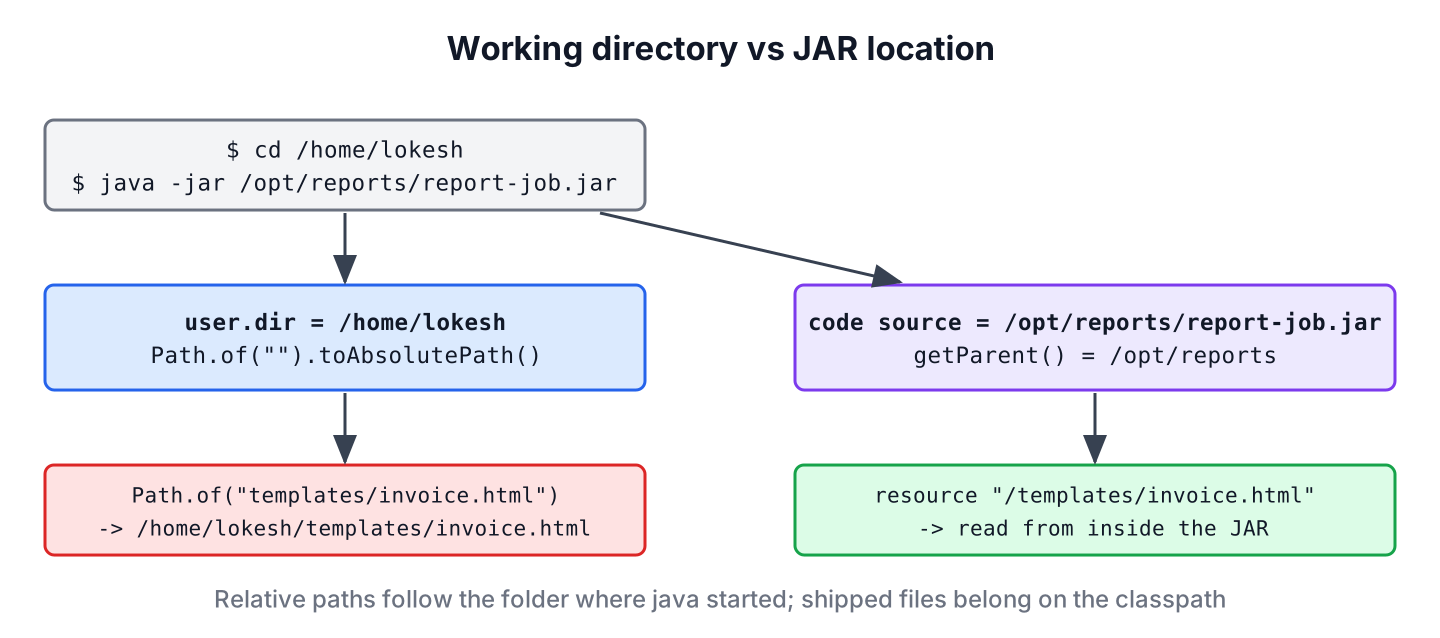
When we need the folder of the JAR or of the compiled classes, we ask the class for its code source.
class ReportJob {

    static Path codeLocation() throws URISyntaxException {
        URL location = ReportJob.class.getProtectionDomain().getCodeSource().getLocation();
        return Path.of(location.toURI());
    }
}
Path location = ReportJob.codeLocation(); // /opt/reports/report-job.jar (target/classes in the IDE)
Path appFolder = location.getParent(); // /opt/reportsWhen the program runs from a JAR, the result is the path of the JAR file itself, so we call getParent() to get its folder. The method toURI() throws the checked URISyntaxException, and converting the URL through a URI handles spaces in the folder name, which URL.getPath() returns as %20.
For files that ship with the app, such as templates, we read them from the classpath instead of the file system. The method getResourceAsStream() finds them inside the JAR, whatever the working directory is, as shown in reading a file from the resources folder.
5. Can We Change the Current Working Directory in Java?
No. Java has no method that changes the working directory of the running JVM process. Calling System.setProperty(“user.dir”, …) only changes the property text, because the JDK reads user.dir once at startup and keeps that value for resolving paths.
String old = System.setProperty("user.dir", "/tmp");
String changed = System.getProperty("user.dir");          // "/tmp"
String stillOld = new File("x").getAbsolutePath();        // /home/lokesh/demo/x
Path stillOldPath = Path.of("").toAbsolutePath();         // /home/lokesh/demo
String restored = System.setProperty("user.dir", old);    // "/tmp"
Setting -Duser.dir=… on the command line is not a fix either. The classes File and Path resolve against the new value, but the operating system process still runs in the old folder, so FileReader and FileInputStream can open a different file than Files.readString(). In the following run, the program starts in /home/lokesh/demo with -Duser.dir=/home/lokesh/demo/other, and both folders contain a hello.txt file.
FileReader: from the process directory
Files.readString: from user.dir
File.exists: true
The safe way is to start the program in the right folder, or to build absolute paths from a base folder that we pass in as a property, such as -Dapp.home=/opt/reports. When only a child process must run in another folder, we set that folder with ProcessBuilder.directory().
Process process = new ProcessBuilder("pwd").directory(new File("/tmp")).start();
String childDir;
try (InputStream out = process.getInputStream()) {
    childDir = new String(out.readAllBytes()).strip();                          // "/tmp"
}
int exitCode = process.waitFor();                                               // 0
The pwd command exists on Linux and macOS. On Windows, we start cmd /c cd instead, which prints the folder the same way.
6. Working Directory FAQs
Relative paths that work on one machine and fail on another are behind nearly every one of these questions.
6.1. Why does Java not find a file with a relative path?
Because the relative path is resolved against user.dir, not against the source file or the class file. Print Path.of(“data.csv”).toAbsolutePath() to see where Java looks. After that, either start the program in the right folder or build the path from a known base folder.
6.2. Is user.dir the same as user.home?
No. The property user.home is the home folder of the operating system user, such as /home/lokesh, and it stays the same for every run. The property user.dir changes with the folder we start the program from. Settings that the app writes per user belong under user.home.
6.3. What is the working directory of a Spring Boot app or a service?
The working directory is the folder of the process that started the JVM. A Spring Boot application started with java -jar uses the shell folder, a systemd service uses its WorkingDirectory= setting, and a Docker container uses the WORKDIR of the image. Spring Boot also looks for config/application.properties relative to that folder.
6.4. How do we list the files in the working directory?
We pass the empty path to Files.list() and close the stream. The list files guide covers filters and subfolders.
long entries;
try (Stream<Path> files = Files.list(Path.of(""))) {
    entries = files.count();
}
boolean hasEntries = entries > 0;        // true
7. Conclusion
The current working directory in Java is the folder from which we started the java command. We read it with System.getProperty(“user.dir”) when we need a String, or with Path.of(“”).toAbsolutePath() when we want a Path to build other paths. When the path starts with “.”, we add normalize().
The working directory is not the folder of the JAR file, so files that ship with the app belong on the classpath. We also never change user.dir at runtime or with -Duser.dir, because different Java APIs would resolve the same relative path to different files. Related file tasks are grouped in the Java IO tutorial.
8. References
- System.getProperties() Javadoc (Java 25)
- Path Javadoc (Java 25)
- File Javadoc (Java 25)
- ProcessBuilder Javadoc (Java 25)
- System Properties (The Java Tutorials)
Happy Learning !!
