
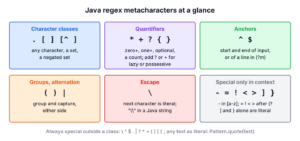
Regex metacharacters are characters that the regex engine reads as instructions, not as text to find. The plus sign in a+ means one or more, the dot in c.t means any character, and the brackets in [abc] build a set. Every other character, such as a letter or the @ sign, matches itself. To match a metacharacter as plain text, we escape it with a backslash, which a Java string literal writes as two backslashes.
We meet metacharacters every time we validate input, split a CSV line, or search logs with Pattern and Matcher, and most regex bugs come from one of them being read as an instruction by accident. The quick reference lists each metacharacter with its meaning.
| Metacharacter | Meaning | Example regex | Matches |
|---|---|---|---|
| . | Any character except a line break | c.t | cat, c9t |
| [ ] | One character from a set | [abc] | b |
| [^ ] | One character not in the set | [^abc] | x |
| * + ? | Zero or more, one or more, optional | colou?r | color, colour |
| { } | A repeat count | a{2,3} | aa, aaa |
| ^ $ | Start and end of the input | ^cat$ | cat only |
| ( ) | A group | (ab)+ | abab |
| | | Either side (alternation) | cat|dog | cat, dog |
| \ | Escapes the next character | 1\+1 | 1+1 |
The following example uses the same metacharacters in Java code, with the result of each line.
boolean dot = "cat".matches("c.t");                                     // true
boolean set = "b".matches("[abc]");                                     // true
boolean digits = "2026".matches("\\d+");                                // true
boolean optional = "color".matches("colou?r");                          // true
boolean group = "abab".matches("(ab)+");                                // true
boolean either = "gray".matches("gr(a|e)y");                            // true
boolean start = Pattern.compile("^cat").matcher("cat sat").find();      // true
boolean word = Pattern.compile("\\bcat\\b").matcher("category").find(); // false
boolean unescaped = "1+1".matches("1+1");                               // false, '+' is a quantifier
boolean escaped = "1+1".matches("1\\+1");                               // true
String quoted = Pattern.quote("1+1");                                   // "\Q1+1\E"
boolean ignoreCase = "HELLO".matches("(?i)hello");                      // true
Notice that 1+1 fails against itself until the plus sign is escaped. We go through the full list, character classes, quantifiers, anchors, groups, escaping in Java strings and inline flags, and finish with the bugs these characters cause most often, such as split(“.”) returning an empty array. The Java regex tutorial introduces Pattern and Matcher if they are new.
1. The Full List of Java Regex Metacharacters
The Pattern class is the regex engine of Java, and the Java regex tutorial from Oracle names 19 characters as metacharacters.
< ( [ { \ ^ - = $ ! | ] } ) ? * + . >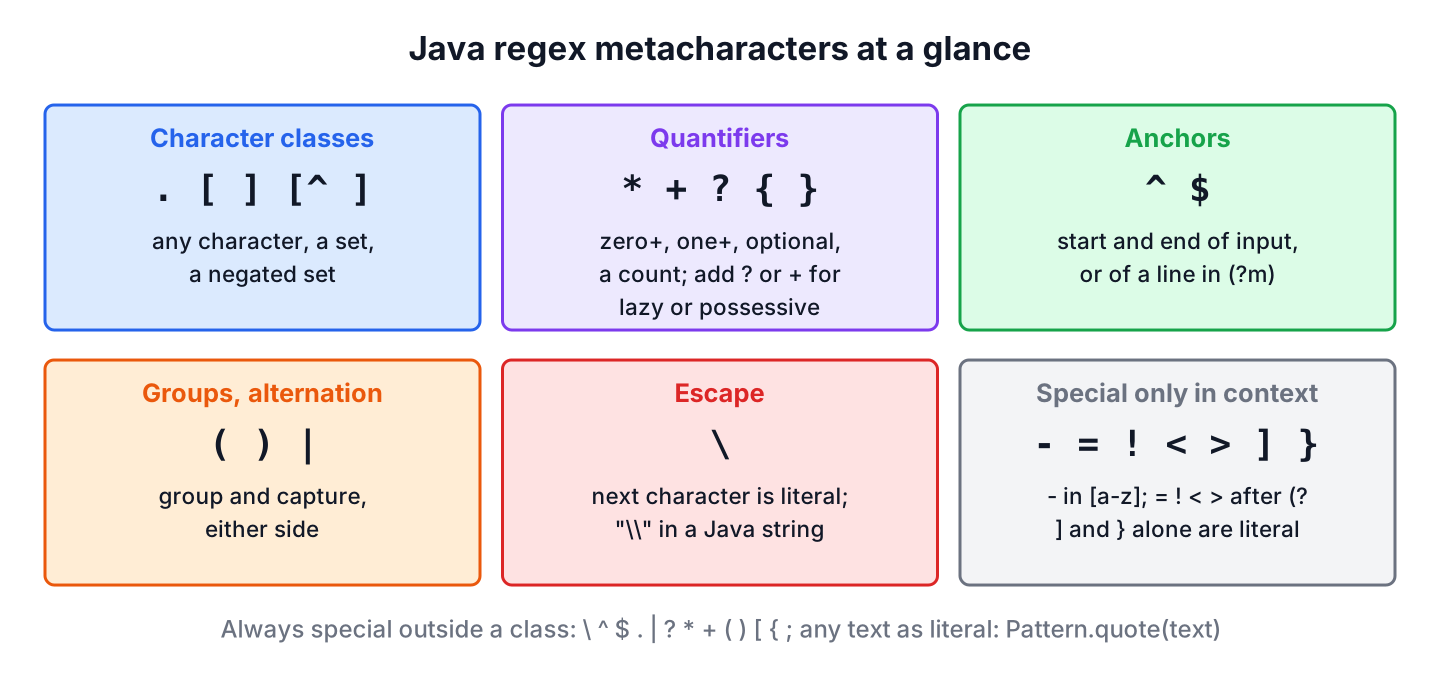
Not all of them are special everywhere. Twelve of them always have a meaning outside a character class, namely \, ^, $, ., |, ?, *, +, (, ), [ and {. The others are special only in a certain position.
- The hyphen – defines a range inside square brackets, as in [a-z].
- The characters =, !, < and > have a meaning only after (?, in lookaround and named groups such as (?=…) and (?<name>…).
- A closing ] or } without its opening partner is a plain character in Java.
Characters such as @, #, %, & and ~ never act as metacharacters in a Java regex. When in doubt, escaping a punctuation character with a backslash is always safe, because Java treats a backslash before a punctuation character as a literal match of that character.
boolean hyphen = "a-b".matches("a-b");          // true
boolean equalsSign = "a=b".matches("a=b");      // true
boolean brace = "a}".matches("a}");             // true
boolean atHash = "@#".matches("@#");            // true
boolean escapedAt = "@".matches("\\@");         // true
2. The Dot, Any Single Character
The dot . matches one character of any kind, except a line terminator such as \n. It never matches nothing, so c.t needs a character between c and t.
boolean three = "cat".matches("c.t");                                                           // true
boolean two = "ct".matches("c.t");                                                              // false
boolean lineBreak = "c\nt".matches("c.t");                                                      // false, line break
List<String> words = Pattern.compile(".at").matcher("cat bat rat").results().map(MatchResult::group).toList();   // [cat, bat, rat]
The dot has its own rules for line breaks, greedy matching and escaping. The article Regex to match any character covers them with DOTALL mode and the lazy .*?.
3. Character Classes With [ ] and Predefined Classes
A character class is a set of characters in square brackets, and it matches one character that belongs to the set. Inside the brackets, a few characters change their meaning.
- A caret ^ right after [ negates the set, so [^abc] matches any character except a, b and c.
- A hyphen between two characters is a range, so [a-f] is a to f.
- A hyphen at the start or end of the class is a literal hyphen, as in [a-z-].
- A caret anywhere except the first position is a literal caret, as in [a^].
- Most other metacharacters, such as ., + and $, are literal inside a class, so [.] matches only a dot.
- The characters ], \ and [ must be escaped inside a class, so [\]] matches ].
Java also supports class intersection with &&, which most other regex engines do not. The class [a-z&&[^aeiou]] means a lowercase letter that is not a vowel.
boolean inSet = "b".matches("[abc]");                     // true
boolean notInSet = "x".matches("[^abc]");                 // true
boolean range = "e".matches("[a-f]");                     // true
boolean consonant = "k".matches("[a-z&&[^aeiou]]");       // true
boolean vowel = "a".matches("[a-z&&[^aeiou]]");           // false
boolean literalHyphen = "-".matches("[a-z-]");            // true
boolean literalCaret = "^".matches("[a^]");               // true
boolean bracket = "]".matches("[\\]]");                   // true
boolean literalDot = ".".matches("[.]");                  // true
3.1. Predefined Character Classes
A predefined class is a short backslash code for a common set. The uppercase version of each code matches everything the lowercase version does not.
| Class | Matches | Same as (ASCII) |
|---|---|---|
| \d and \D | A digit, a non-digit | [0-9] and [^0-9] |
| \w and \W | A word character, any other character | [a-zA-Z0-9_] and [^a-zA-Z0-9_] |
| \s and \S | Whitespace, non-whitespace | [ \t\n\x0B\f\r] and its negation |
| \p{L} | A letter in any language | (Unicode property) |
| \p{Lu} | An uppercase letter | (Unicode property) |
| \p{Punct} | ASCII punctuation | The 32 ASCII punctuation characters, such as ! . @ and ~ |
boolean digit = "7".matches("\\d");               // true
boolean nonDigit = "a".matches("\\D");            // true
boolean wordChars = "user_1".matches("\\w+");     // true
boolean nonWord = "-".matches("\\W");             // true
boolean tab = "\t".matches("\\s");                // true
boolean accented = "\u00e9".matches("\\p{L}");    // true, e with an acute accent
boolean upper = "A".matches("\\p{Lu}");           // true
boolean punct = "!".matches("\\p{Punct}");        // true
By default, \w and \d cover only ASCII, so \w does not match an accented letter. For letters in any language, we use \p{L} or the UNICODE_CHARACTER_CLASS flag. The article Regex for alphanumeric characters compares these options for input validation.
4. Quantifiers *, +, ? and { }
A quantifier says how many times the item before it may repeat, where the item is one character, one class or one group. A quantifier applies only to the single item right before it, so ab+ repeats b, not ab.
| Quantifier | Meaning | Example | Matches |
|---|---|---|---|
| * | Zero or more | a* | empty text, a, aaa |
| + | One or more | a+ | a, aaa |
| ? | Zero or one | colou?r | color, colour |
| {n} | n times | a{3} | aaa |
| {n,} | n or more | a{2,} | aa, aaaa |
| {n,m} | From n to m | a{2,3} | aa, aaa |
boolean emptyStar = "".matches("a*");            // true
boolean emptyPlus = "".matches("a+");            // false
boolean colour = "colour".matches("colou?r");    // true
boolean threeA = "aaa".matches("a{3}");          // true
boolean twoOrMore = "aaaa".matches("a{2,}");     // true
boolean tooMany = "aaaa".matches("a{2,3}");      // false
4.1. Greedy, Lazy and Possessive Quantifiers
Each quantifier has three modes, chosen by the character that follows it. The mode decides how many characters the quantifier takes when several counts would work.
- Greedy (the default, a+) takes as many characters as it can and gives some back if the rest of the pattern fails.
- Lazy, also called reluctant (a+?), takes as few characters as it can.
- Possessive (a*+) takes as many characters as it can and never gives any back.
Matcher greedy = Pattern.compile("a+").matcher("aaa");
boolean greedyFound = greedy.find();             // true
String greedyText = greedy.group();              // "aaa"

Matcher lazy = Pattern.compile("a+?").matcher("aaa");
boolean lazyFound = lazy.find();                 // true
String lazyText = lazy.group();                  // "a"

boolean backtracks = "aaa".matches("a*a");       // true
boolean possessive = "aaa".matches("a*+a");      // false, a*+ keeps every "a"
The possessive form fails in the last line because a*+ consumes all three a characters and refuses to return one for the final a. Possessive quantifiers help performance, because they stop the engine from retrying positions it already tried.
5. Anchors and Boundaries ^, $ and \b
Anchors match a position, not a character. They have zero width, so they never become part of the matched text.
- The anchor ^ matches at the start of the input, or at the start of each line in MULTILINE mode.
- The anchor $ matches at the end of the input, or at the end of each line in MULTILINE mode.
- The anchor \b matches a word boundary, which is a position between a word character and a non-word character.
- The anchor \B matches any position that is not a word boundary.
- The anchors \A, \z and \Z always match the start or end of the whole input, whatever the flags.
boolean atStart = Pattern.compile("^cat").matcher("cat sat").find();          // true
boolean notAtStart = Pattern.compile("^sat").matcher("cat sat").find();       // false
boolean atEnd = Pattern.compile("sat$").matcher("cat sat").find();            // true
boolean wholeWord = Pattern.compile("\\bcat\\b").matcher("the cat").find();   // true
boolean partOfWord = Pattern.compile("\\bcat\\b").matcher("category").find(); // false
boolean inside = Pattern.compile("\\Bcat").matcher("concat").find();          // true
Two articles cover anchors in depth. The article Regex start and end of string explains ^, $, \A, \z, \Z and MULTILINE. The article Regex word boundaries explains \b and \B, and matching an exact word applies them to whole-word search.
6. Groups and Alternation With ( ) and |
Parentheses group several items into one unit. A quantifier after a group repeats the whole group, and the text that the group matched is saved (captured) for later use. The vertical bar | means either the left side or the right side. Alternation has the lowest priority of all regex operators, so gra|ey means gra or ey, and a group limits the alternation, as in gr(a|e)y.
boolean repeatGroup = "abab".matches("(ab)+");     // true
boolean repeatB = "abab".matches("ab+");           // false, + repeats only "b"
boolean grouped = "gray".matches("gr(a|e)y");      // true
boolean ungrouped = "gray".matches("gra|ey");      // false
boolean dog = "dog".matches("cat|dog");            // true
Java supports several kinds of groups, and each one starts with an opening parenthesis.
| Syntax | Name | What it does |
|---|---|---|
| (X) | Capturing group | Groups X and saves the match as group 1, 2 and so on |
| (?<name>X) | Named group | Same, and the group can be read by name |
| (?:X) | Non-capturing group | Groups X without saving the match |
| \1 | Backreference | Matches the same text that group 1 matched |
| (?=X) and (?!X) | Lookahead | The next characters must or must not match X |
| (?<=X) and (?<!X) | Lookbehind | The previous characters must or must not match X |
Capturing groups are counted from left to right by their opening parenthesis. The Matcher class reads them with group(int) or group(String), and a replacement string refers to them as $1, $2 and so on.
Matcher name = Pattern.compile("(?<first>\\w+) (?<last>\\w+)").matcher("Lokesh Gupta");
boolean full = name.matches();                                                       // true
String first = name.group(1);                                                        // "Lokesh"
String last = name.group("last");                                                    // "Gupta"
int groups = name.groupCount();                                                      // 2
int nonCapturing = Pattern.compile("(?:ab)+").matcher("abab").groupCount();          // 0
boolean repeated = "hello hello".matches("(\\w+) \\1");                              // true
boolean different = "hello world".matches("(\\w+) \\1");                             // false
String swapped = "Lokesh Gupta".replaceAll("(\\w+) (\\w+)", "$2, $1");               // "Gupta, Lokesh"
6.1. Lookahead and Lookbehind
A lookaround checks the text next to the current position without including it in the match. Lookahead looks at the text after the position, and lookbehind looks at the text before it. A common use is a password rule such as contains at least one digit, written as (?=.*\d) at the start of the pattern.
Matcher usd = Pattern.compile("\\d+(?= USD)").matcher("5 EUR 10 USD");
boolean usdFound = usd.find();                     // true
String amount = usd.group();                       // "10"

Matcher price = Pattern.compile("(?<=\\$)\\d+").matcher("cost $25");
boolean priceFound = price.find();                 // true
String cost = price.group();                       // "25"

boolean hasDigit = "abc1".matches("(?=.*\\d).+");  // true
boolean noDigit = "abc".matches("(?=.*\\d).+");    // false
boolean notDog = "cat".matches("(?!dog)\\w+");     // true
A lookbehind must have a maximum length that Java can work out when it compiles the pattern. A repeated single character such as (?<=a+) compiles, but a repeated group does not, so we keep lookbehind content short and of fixed length.
boolean singleChar = Pattern.compile("(?<=a+)b").matcher("aab").find();   // true
Pattern repeatedGroup = Pattern.compile("(?<=(ab)+)c");    // PatternSyntaxException: Look-behind group does not have an obvious maximum length
7. Escaping Metacharacters in Java Strings
To match a metacharacter as plain text, the regex needs a backslash before it, as in \+, \. and \(. In a Java string literal, the backslash itself must be escaped, so every regex backslash is written twice. The regex \d becomes the Java string \”\\d\”, and the regex \\ that matches one backslash becomes \”\\\\\”.
| To match | Regex | Java string literal |
|---|---|---|
| A plus sign | \+ | \”\\+\” |
| A dot | \. | \”\\.\” |
| Parentheses | \(1\) | \”\\(1\\)\” |
| A digit (class, not escaping) | \d | \”\\d\” |
| One backslash | \\ | \”\\\\\” |
| A dollar sign | \$ | \”\\$\” |
Java offers three ways to make a metacharacter literal.
- A backslash before the character, as in 1\+1.
- A character class around it, as in 1[+]1, because most metacharacters are literal inside brackets.
- Quoting with \Q and \E, where every character between them is literal. The method Pattern.quote() wraps a string in these markers for us.
boolean plusLiteral = "1+1".matches("1+1");                  // false
boolean ones = "11".matches("1+1");                          // true, + means "one or more 1s"
boolean backslash = "1+1".matches("1\\+1");                  // true
boolean bracketed = "1+1".matches("1[+]1");                  // true
boolean qe = "1+1".matches("\\Q1+1\\E");                     // true
String quote = Pattern.quote("1+1");                         // "\Q1+1\E"
boolean viaQuote = "1+1".matches(Pattern.quote("1+1"));      // true
boolean path = "C:\\temp".matches("C:\\\\temp");             // true
boolean parens = "(1)".matches("\\(1\\)");                   // true
A shop search box shows why quoting matters. A customer types C++ or (draft), and the code builds a regex from that text to highlight matches in product names. When part of a pattern comes from user input or a variable, we pass it through Pattern.quote(), because without it the input either changes the meaning of the regex or throws an exception.
String userInput = "(draft";
Pattern search = Pattern.compile(Pattern.quote(userInput), Pattern.CASE_INSENSITIVE);
boolean hit = search.matcher("Notes (Draft) v2").find();                   // true
Pattern raw = Pattern.compile(userInput);                                  // PatternSyntaxException: Unclosed group near index 6
boolean cppRaw = Pattern.compile("C++").matcher("C++").matches();          // false, C++ is a possessive quantifier
boolean cppQuoted = Pattern.compile(Pattern.quote("C++")).matcher("C++").matches();   // true
The input C++ is the harder bug, because it compiles without an error. The regex engine reads it as C with the possessive quantifier ++, so it matches C, CC or CCC and never the text C++.
A single backslash before a regex code, as in \”\d\”, does not compile at all. The Java compiler reports illegal escape character, because \d is not a valid Java string escape. Text blocks (Java 15 and later) follow the same escape rules, so a text block does not remove the need for double backslashes.
7.1. String.split() Takes a Regex
The methods String.split(), replaceAll(), replaceFirst() and matches() all treat their first argument as a regex. For example, an app that splits a version string such as 1.2.3 on the dot gets an empty array, because the dot matches every character.
String[] everyChar = "a.b.c".split(".");          // [], every character is a separator
String[] byDot = "a.b.c".split("\\.");            // [a, b, c]
String[] byBar = "a|b".split("|");                // [a, |, b], empty alternation matches everywhere
String[] byEscapedBar = "a|b".split("\\|");       // [a, b]
String[] byPlus = "1+1".split("+");               // PatternSyntaxException
The last line throws an exception, because a quantifier needs an item before it. The String.split() article covers the limit argument and other separators.
java.util.regex.PatternSyntaxException: Dangling meta character '+' near index 0
+
^
7.2. Metacharacters in the Replacement String
The replacement string of replaceAll() has its own two metacharacters. A dollar sign $ starts a group reference such as $1, and a backslash escapes the next character. A replacement that should contain a literal dollar sign throws an exception at run time.
String noGroup = "cost 5".replaceAll("\\d+", "$10");                                // IndexOutOfBoundsException: No group 1
String escapedDollar = "cost 5".replaceAll("\\d+", "\\$10");                         // "cost $10"
String quotedRepl = Matcher.quoteReplacement("$10");                                 // "\$10"
String safe = "cost 5".replaceAll("\\d+", Matcher.quoteReplacement("$10"));          // "cost $10"
The method Matcher.quoteReplacement() does for the replacement what Pattern.quote() does for the pattern. We use it whenever the replacement text is not a constant, for example a price or a file path read at run time.
7.3. Errors From Unbalanced Metacharacters
A pattern with an unbalanced or misplaced metacharacter throws a PatternSyntaxException when it is compiled. The exception message names the problem and points to the position with a caret, as the comments show for three common mistakes.
Pattern dangling = Pattern.compile("*abc");      // PatternSyntaxException: Dangling meta character '*' near index 0
Pattern openClass = Pattern.compile("[abc");     // PatternSyntaxException: Unclosed character class near index 3
Pattern openGroup = Pattern.compile("(abc");     // PatternSyntaxException: Unclosed group near index 4
The PatternSyntaxException is an unchecked exception, so the compiler does not force us to catch it. We compile constant patterns once, in a static final field, so a syntax error shows up when the class loads instead of in the middle of a request.
8. Inline Flags (?i), (?m), (?s) and (?x)
A flag changes how the whole pattern, or part of it, is read. We can pass a flag constant to Pattern.compile(), or write it inside the regex as an inline flag. Inline flags are the only option with methods that accept a plain string, such as String.matches().
| Inline flag | Pattern constant | Effect |
|---|---|---|
| (?i) | CASE_INSENSITIVE | Ignores case for ASCII letters |
| (?m) | MULTILINE | ^ and $ match at every line |
| (?s) | DOTALL | The dot also matches line breaks |
| (?x) | COMMENTS | Ignores spaces and # comments in the pattern |
| (?u) | UNICODE_CASE | Case-insensitive matching for all Unicode letters |
| (?U) | UNICODE_CHARACTER_CLASS | \w, \d and \s follow Unicode rules |
A flag at the start of the pattern applies to all of it. The form (?i:X) applies the flag only to the group X.
boolean caseless = "HELLO".matches("(?i)hello");                        // true
boolean noDotAll = "a\nb".matches("a.b");                               // false
boolean dotAll = "a\nb".matches("(?s)a.b");                             // true
boolean multiline = Pattern.compile("(?m)^b").matcher("a\nb").find();   // true
boolean comments = "123-4567".matches("(?x) \\d{3} - \\d{4}  # number"); // true
boolean partial = "HELLO world".matches("(?i:hello) world");            // true
boolean partialMiss = "HELLO WORLD".matches("(?i:hello) world");        // false
9. Running the Metacharacter Examples
The example project on GitHub prints every snippet from this article with its result. A JUnit 6 test class asserts the same results, including the text of each exception. It needs Java 25 and Maven.
mvn -q compile exec:java
mvn test
10. Regex Metacharacter FAQs
Questions from search results and Stack Overflow about metacharacters return to escaping more than to anything else.
10.1. Which Characters Must Be Escaped in a Java Regex?
Outside a character class, the twelve characters \ ^ $ . | ? * + ( ) [ { must be escaped to match as text. Inside a class, only ], \, [, a leading ^ and a hyphen between two characters need care. For text we do not control, Pattern.quote() escapes everything at once.
10.2. What Is the Difference Between a Metacharacter and an Escape Sequence?
A metacharacter is a single character with a special meaning, such as + or .. An escape sequence is a backslash plus a letter that stands for a class or a position, such as \d, \s or \b. A backslash before a letter turns on a special meaning, while a backslash before a metacharacter turns it off.
10.3. Why Are ^ and $ Not Needed With String.matches()?
The method matches() succeeds only when the pattern matches the whole input, so it behaves as if the pattern had ^ and $ around it. The anchors matter with find(), which searches for the pattern anywhere in the text.
boolean whole = "cat sat".matches("cat");                          // false
boolean partFind = Pattern.compile("cat").matcher("cat sat").find(); // true
11. Conclusion
Java regex has twelve characters that are always special (\ ^ $ . | ? * + ( ) [ {) and a few more that are special only in brackets or after (?. Character classes, quantifiers, anchors and groups are built from them.
To match any of them as text, we escape it with a backslash, which a Java string writes as \\, or we quote the whole value with Pattern.quote(). In replacement strings, $ and \ are special too, and Matcher.quoteReplacement() makes them literal.
12. References
- Pattern (Java SE 25 API)
- Matcher (Java SE 25 API)
- PatternSyntaxException (Java SE 25 API)
- String Literals and Metacharacters (The Java Tutorials)
- Literal Characters and Special Characters (regular-expressions.info)
Happy Learning !!
