
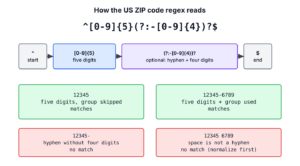
A US ZIP code is five digits, optionally followed by a hyphen and four more digits, as in 12345 or 12345-6789. The longer form is called ZIP+4. In Java, the regex ^[0-9]{5}(?:-[0-9]{4})?$ accepts both forms and rejects everything else.
We use this US ZIP code regex as the first check on a checkout or sign-up form, and on every row of an imported address file, before the value reaches the database. The following example compiles the pattern once and tests a few typical inputs.
Pattern zip = Pattern.compile("^[0-9]{5}(?:-[0-9]{4})?$");

boolean five = zip.matcher("12345").matches();                  // true
boolean plus4 = zip.matcher("12345-6789").matches();            // true
boolean tooShort = zip.matcher("1234").matches();               // false
boolean tooLong = zip.matcher("123456").matches();              // false
boolean space = zip.matcher("12345 6789").matches();            // false
boolean shortForm = "12345".matches("\\d{5}(-\\d{4})?");        // true
Notice that “12345 6789” fails the strict check, which is correct for stored data but unfriendly on a form. We go through the regex part by part, validate with a reused Pattern, normalize what users type, find ZIP codes inside longer text, and list what a format check cannot tell us.
A Java string literal doubles every backslash, so each of the four patterns has a regex form and a string form, and copying the wrong one is a common cause of a pattern that never matches.
| To match | Regex | Java string literal |
|---|---|---|
| 5 digits or ZIP+4 (strict) | ^[0-9]{5}(?:-[0-9]{4})?$ | “^[0-9]{5}(?:-[0-9]{4})?$” |
| The same, shorter | \d{5}(-\d{4})? | “\\d{5}(-\\d{4})?” |
| ZIP+4 with a hyphen, a space or nothing | (\d{5})(?:[-\s]?(\d{4}))? | “(\\d{5})(?:[-\\s]?(\\d{4}))?” |
| A ZIP code inside text | \b\d{5}(?:-\d{4})?\b | “\\b\\d{5}(?:-\\d{4})?\\b” |
1. The Two ZIP Code Formats
The US Postal Service (USPS) uses two formats. The basic ZIP code has five digits and identifies a delivery area. The ZIP+4 code adds a hyphen and four digits that narrow the address down to a block, a building or a PO box.
The USPS addressing standard, Publication 28, keeps the hyphen in ZIP+4 even when all other punctuation is dropped, so “12345-6789” is the canonical written form.
ZIP codes can start with zero. Addresses in New England, New Jersey and Puerto Rico have ZIP codes such as 01234 or 00601, and the lowest ZIP code in use is 00501. Our samples use made-up values like 12345 that only need the right shape.
| Input | Valid? | Why |
|---|---|---|
| “12345” | yes | Five digits |
| “01234” | yes | A leading zero is a normal digit |
| “12345-6789” | yes | ZIP+4 with a hyphen |
| “1234” | no | Only four digits |
| “123456” | no | Six digits |
| “12345-678” | no | The add-on has three digits |
| “12345-67890” | no | The add-on has five digits |
| “1234-56789” | no | The hyphen is in the wrong place |
| “12345 6789” | no | A space instead of the hyphen (see section 4) |
| “123456789” | no | Nine digits without the hyphen (see section 4) |
| “ABCDE” | no | Letters |
| ” 12345″ | no | A leading space |
2. How the US ZIP Code Regex Works
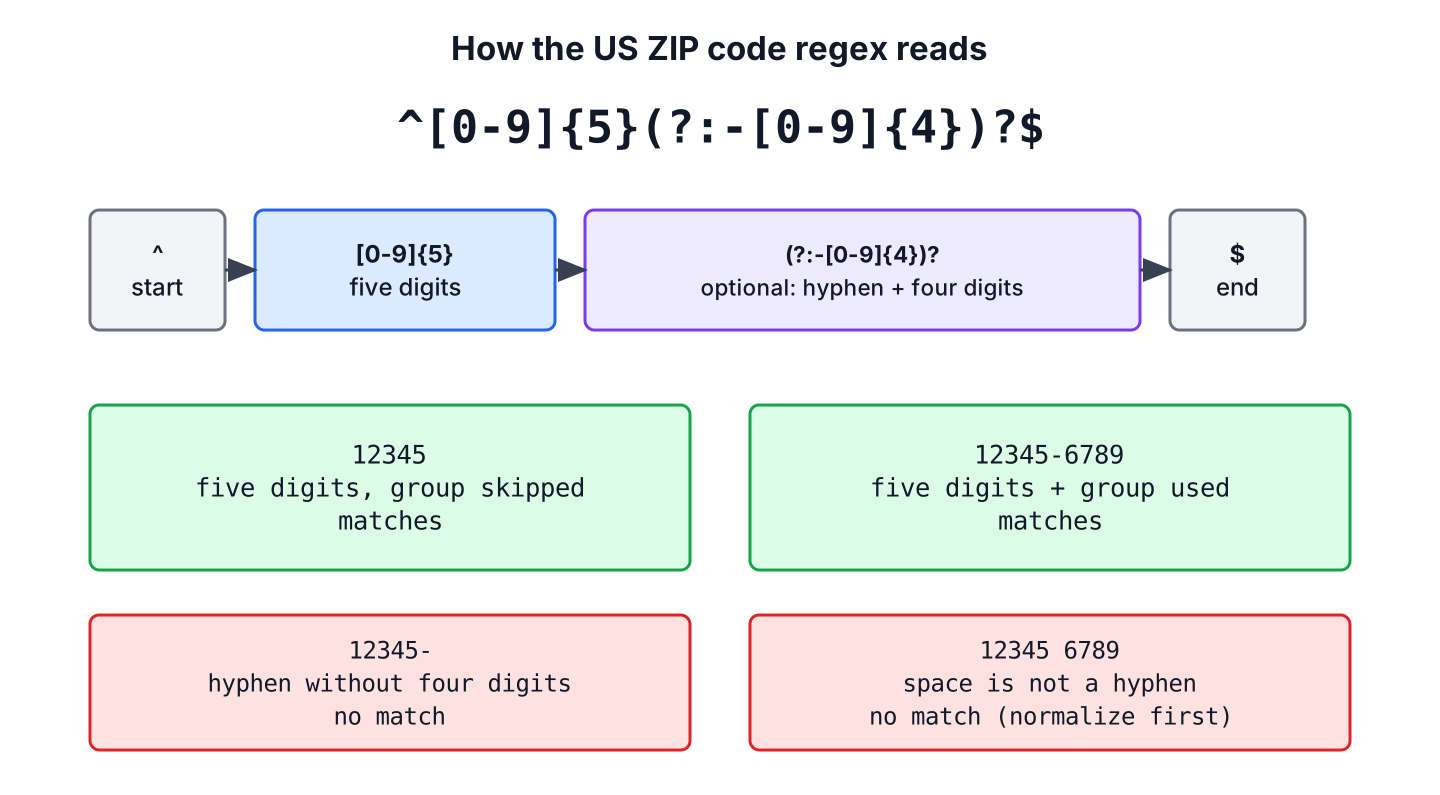
The pattern has three parts, namely five required digits, an optional group for the add-on, and the two anchors. An anchor matches a position, not a character. The anchor ^ is the start of the input and $ is the end.
| Part | Meaning |
|---|---|
| ^ | Start of the input |
| [0-9]{5} | Five digits from 0 to 9 |
| (?: … ) | A non-capturing group, which groups items without saving the matched text |
| -[0-9]{4} | Inside the group, a hyphen followed by four digits |
| ? after the group | The whole group may appear once or not at all |
| $ | End of the input |
The ? applies to the whole group, so the hyphen and the four digits come together or not at all. That is why “12345-” fails. The hyphen alone does not complete the group, and nothing else in the pattern can match it.
In Java, \d means the same as [0-9] unless the UNICODE_CHARACTER_CLASS flag is set. We use [0-9] in the main pattern because it reads the same in every regex engine, and \d in the shorter forms. Inside a Java string literal, each backslash is doubled, so \d becomes “\\d”.
3. Validating a ZIP Code in Java
Java runs a regular expression in two common ways, and both give the same result for ZIP codes.
- The method String.matches(regex) compiles the regex on every call. It is fine for a one-off check or a test.
- A Pattern stored in a static final field is compiled once and reused. We use it in code that runs often, such as a request handler or a loop over a file.
For an address service, we keep the compiled pattern and the check in one small class. The class rejects null instead of throwing a NullPointerException, because a missing form field is ordinary bad input.
final class ZipCodes {
    static final Pattern ZIP = Pattern.compile("^[0-9]{5}(?:-[0-9]{4})?$");

    static boolean isValidZip(String input) {
        return input != null && ZIP.matcher(input).matches();
    }
}
boolean leadingZero = ZipCodes.isValidZip("01234"); // true
boolean shortAddOn = ZipCodes.isValidZip("12345-678"); // false
boolean missing = ZipCodes.isValidZip(null); // falseThe matches() method compares the whole input, so ^ and $ are optional with it. The anchors matter with find(), which searches for the pattern anywhere in the input. There is one trap. In Java, $ also matches before a line break at the very end of the input, so with find(), a value read from a file with its line ending still attached passes the check, while matches() rejects it.
boolean noAnchors = "12345-6789".matches("\\d{5}(-\\d{4})?");      // true
boolean partial = "12345-6789".matches("[0-9]{5}");                // false
boolean withMatches = ZipCodes.ZIP.matcher("12345\n").matches();   // false
boolean withFind = ZipCodes.ZIP.matcher("12345\n").find();         // true
Anchors and line terminators get a fuller treatment in regex to match the start and end of a string.
For filtering a collection, Pattern.asMatchPredicate() turns the pattern into a Predicate that calls matches() on each value.
Predicate<String> isZip = ZipCodes.ZIP.asMatchPredicate();

boolean ok = isZip.test("54321");                                                   // true
boolean bad = isZip.test("5432");                                                   // false
List<String> valid = Stream.of("12345", "9876", "12345-6789").filter(isZip).toList();   // [12345, 12345-6789]
4. Accepting a Space or No Separator
People type ZIP+4 codes in several ways, such as “12345-6789”, “12345 6789” or “123456789”, often with spaces around the value. Rejecting these is correct for a strict check, but on a web form it is friendlier to accept them and save the value in one standard form. The lenient pattern makes the separator optional with [-\s]?, which means “a hyphen, a whitespace character, or nothing”. Named groups, written (?<name>…), let us read each part by name. We keep the lenient pattern in its own class, because only the form handler needs it.
final class ZipNormalizer {
    static final Pattern ZIP_LENIENT =
            Pattern.compile("(?<zip>\\d{5})(?:[-\\s]?(?<plus4>\\d{4}))?");

    static Optional<String> normalizeZip(String input) {
        if (input == null) {
            return Optional.empty();
        }
        Matcher m = ZIP_LENIENT.matcher(input.strip());
        if (!m.matches()) {
            return Optional.empty();
        }
        String plus4 = m.group("plus4");
        return Optional.of(plus4 == null ? m.group("zip") : m.group("zip") + "-" + plus4);
    }
}
Optional<String> plain = ZipNormalizer.normalizeZip("12345"); // Optional[12345]
Optional<String> spaced = ZipNormalizer.normalizeZip("12345 6789"); // Optional[12345-6789]
Optional<String> padded = ZipNormalizer.normalizeZip(" 123456789 "); // Optional[12345-6789]
Optional<String> wrong = ZipNormalizer.normalizeZip("1234-5678"); // Optional.emptyThe call strip() removes the spaces around the value before the match. When the add-on is missing, group(“plus4”) returns null, and the method returns the five-digit code alone. After this step, every stored ZIP code passes the strict regex from section 2.
A checkout page shows the gain. A customer pastes “12345 6789” from an old spreadsheet, the form accepts it, and the order record stores “12345-6789”, so the shipping label and later reports see one format.
5. Finding ZIP Codes in Text
To pull ZIP codes out of an address line or a document, we replace the anchors with word boundaries. The word boundary \b matches between a letter or digit and a character that is neither, so \b\d{5}\b finds a five-digit number but not five digits from the middle of “123456”. The method Matcher.results() returns every match as a stream.
final class ZipFinder {
    static final Pattern ZIP_IN_TEXT = Pattern.compile("\\b\\d{5}(?:-\\d{4})?\\b");

    static List<String> findZips(String text) {
        return ZIP_IN_TEXT.matcher(text).results().map(MatchResult::group).toList();
    }
}
List<String> two = ZipFinder.findZips("Ship to 12345 or 54321-0001"); // [12345, 54321-0001]
List<String> none = ZipFinder.findZips("Order 123456 shipped"); // []
List<String> noisy = ZipFinder.findZips("Invoice 55555 for Anytown, NY 12345"); // [55555, 12345]The third call shows the weakness of this approach, because an invoice number with five digits looks like a ZIP code. In a US address, the ZIP code follows the two-letter state abbreviation on the last line, so we can require that context and capture only the digits in group 1.
Pattern afterState = Pattern.compile("\\b[A-Z]{2}\\s+(\\d{5}(?:-\\d{4})?)\\b");
List<String> zips = afterState.matcher("Invoice 55555 for Anytown, NY 12345").results().map(r -> r.group(1)).toList();   // [12345]
6. What the Regex Does Not Check
A regex checks the shape of the value, nothing more. Three questions stay open after a successful match.
- The regex does not know which ZIP codes exist. “00000” and “99999” pass, but neither is assigned. To confirm a real ZIP code, or that it belongs to the given city and state, we look it up in USPS data, for example with the USPS ZIP Code Lookup or the address API on the USPS developer portal.
- The regex does not check that the ZIP+4 add-on is valid for the street address.
- The regex covers US ZIP codes only. Canadian and British postal codes contain letters and have their own rules, covered in Canada postal code validation and UK postcode validation.
A ZIP code is text, not a number, so we store it in a String field and a text column. Converting it to an int loses the leading zero, and the value no longer passes validation.
int number = Integer.parseInt("01234");                             // 1234
boolean stillValid = ZipCodes.isValidZip(String.valueOf(number));   // false
7. Download and Run the ZIP Code Project
The example project on GitHub contains UsZipCodeValidation, which prints every expression from this article with its result, and a JUnit 6 test class that checks the valid and invalid samples from section 1, the normalization and the text search. Build it with Maven 3.9 or newer and JDK 25.
mvn -q compile exec:java
mvn test
8. US ZIP Code Regex FAQs
ZIP code fields on US forms lead to questions about leading zeros, storage, the nine-digit form and real addresses.
8.1. Can a US ZIP Code Start With 0?
Yes. ZIP codes in the Northeast and in Puerto Rico start with 0, such as 02108 in Boston or 00601 in Puerto Rico. The regex treats 0 like any other digit, so the problem appears only when code converts the value to a number.
8.2. Should We Store a ZIP Code as an int?
No. An int drops the leading zero and cannot hold the hyphen of a ZIP+4 code. We store the normalized String, for example in a VARCHAR(10) column, which fits “12345-6789”.
8.3. How Do We Validate a 9-Digit ZIP Code Without a Hyphen?
We either accept it with the lenient pattern from section 4 and store it with the hyphen, or accept only the compact form with ^\d{5}(?:\d{4})?$. Mixing both formats in one database column makes searches harder, so we normalize first.
boolean compact = "123456789".matches("\\d{5}(?:\\d{4})?"); // true8.4. Does the Regex Prove That a ZIP Code Exists?
No. A regex checks only the five or nine digits. Only USPS data, through the ZIP Code Lookup tool or the USPS address API, confirms that a ZIP code is assigned and matches the city and state.
9. Conclusion
The regex ^[0-9]{5}(?:-[0-9]{4})?$ validates both US ZIP code formats, five digits, and five digits plus a hyphen and four digits. We compile it once into a Pattern, call matches() for whole values, and use word boundaries instead of anchors to search text.
For user input, normalizing “12345 6789” to “12345-6789” before saving keeps the stored data consistent. A matching value has the right shape but may still not exist, so a USPS lookup is the next step when the address must be deliverable.
10. References
- USPS Publication 28, Postal Addressing Standards, Punctuation
- USPS Publication 28, Last Line Format
- ZIP Code (Wikipedia)
- Pattern (Java SE 25 API)
- Matcher (Java SE 25 API)
Happy Learning !!
