

Hibernate Search is a Hibernate library that adds full-text search to Hibernate entities. It copies the fields we choose into a search index, updates that index when a transaction commits, and answers queries with managed entities. Full-text search matches words, not characters, so a search for “testing” also finds “tests”, and the best match comes first.
We use Hibernate Search behind the search box of an app, for example a podcast catalog where listeners type a few words and expect the most relevant episodes first. The index is stored either in Apache Lucene inside our application or in an Elasticsearch or OpenSearch server.
The following example maps an Episode entity with @Indexed and field annotations such as @FullTextField, and searches it with the SearchSession DSL next to a JPQL LIKE query.
@Entity
@Indexed
public class Episode {

  @Id
  @GeneratedValue
  private Long id;

  @FullTextField(analyzer = "english")
  private String title;

  @FullTextField(analyzer = "english")
  private String description;

  @KeywordField
  private String host;

  @GenericField(sortable = Sortable.YES)
  private LocalDate publishedOn;
}
SearchSession searchSession = Search.session(em);
List<Episode> hits = searchSession.search(Episode.class)
.where(f -> f.match().fields("title", "description").matching("testing"))
.fetchHits(20); // [Testing Spring Boot Apps, Code Reviews]
// select ... from Episode e1_0 where e1_0.id in (?,?)
List<Episode> likeRows = em.createQuery("from Episode where lower(description) like :text", Episode.class)
.setParameter("text", "%testing%")
.getResultList(); // [] : "tests" does not contain "testing"Notice that the LIKE query returns an empty list, because “tests” does not contain the characters “testing”, whereas Hibernate Search finds both episodes and loads them with one SELECT by id.
Next, we compare full-text search with SQL LIKE and build the podcast example step by step, from the analyzer and indexing to boosting, phrases, filters, sorting, paging and highlighting. After that, we add Hibernate Search to a Spring Boot application with a REST search endpoint.
1. What Does Hibernate Search Add Over SQL LIKE?
A LIKE ‘%text%’ condition compares characters, so it misses other forms of a word and matches words that only contain the text, such as “latest” for “test”. It also returns the rows in no useful order. A full-text index stores terms instead. An analyzer splits the text into lowercase words and reduces each word to its root, so “tests” and “testing” both become the term “test”. The query text goes through the same analyzer, so the query and the index compare the same terms.
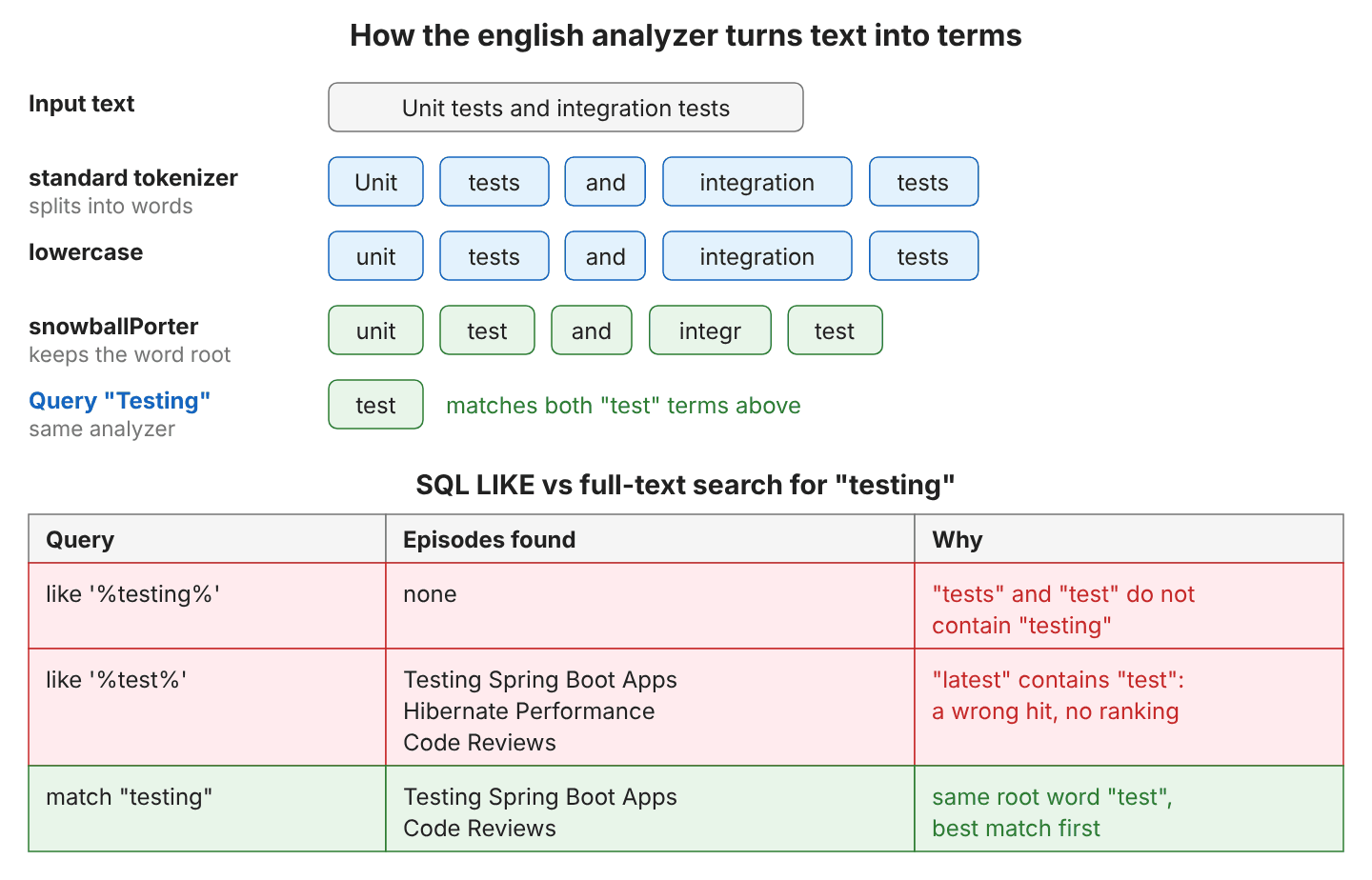
For example, a shop needs typo tolerance and the best match first in its product search box, whereas an admin screen that filters orders by an exact customer code works fine with plain SQL. Both approaches answer different questions, so most applications use both.
| Need | SQL LIKE or JPQL | Hibernate Search |
|---|---|---|
| Other forms of a word (“tests” for “testing”) | No | Yes, through the analyzer |
| Avoid matches inside other words (“latest” for “test”) | No | Yes, whole terms only |
| Best match first | No, needs an ORDER BY column | Yes, by relevance score |
| Typos (“virtul” for “virtual”) | No | Yes, with fuzzy() |
| Highlight the matched words | No | Yes |
| Uses a database index on ‘%text%’ | No, scans the rows | Yes, the Lucene index |
| Sees uncommitted changes in the same transaction | Yes | No, the index is updated after commit |
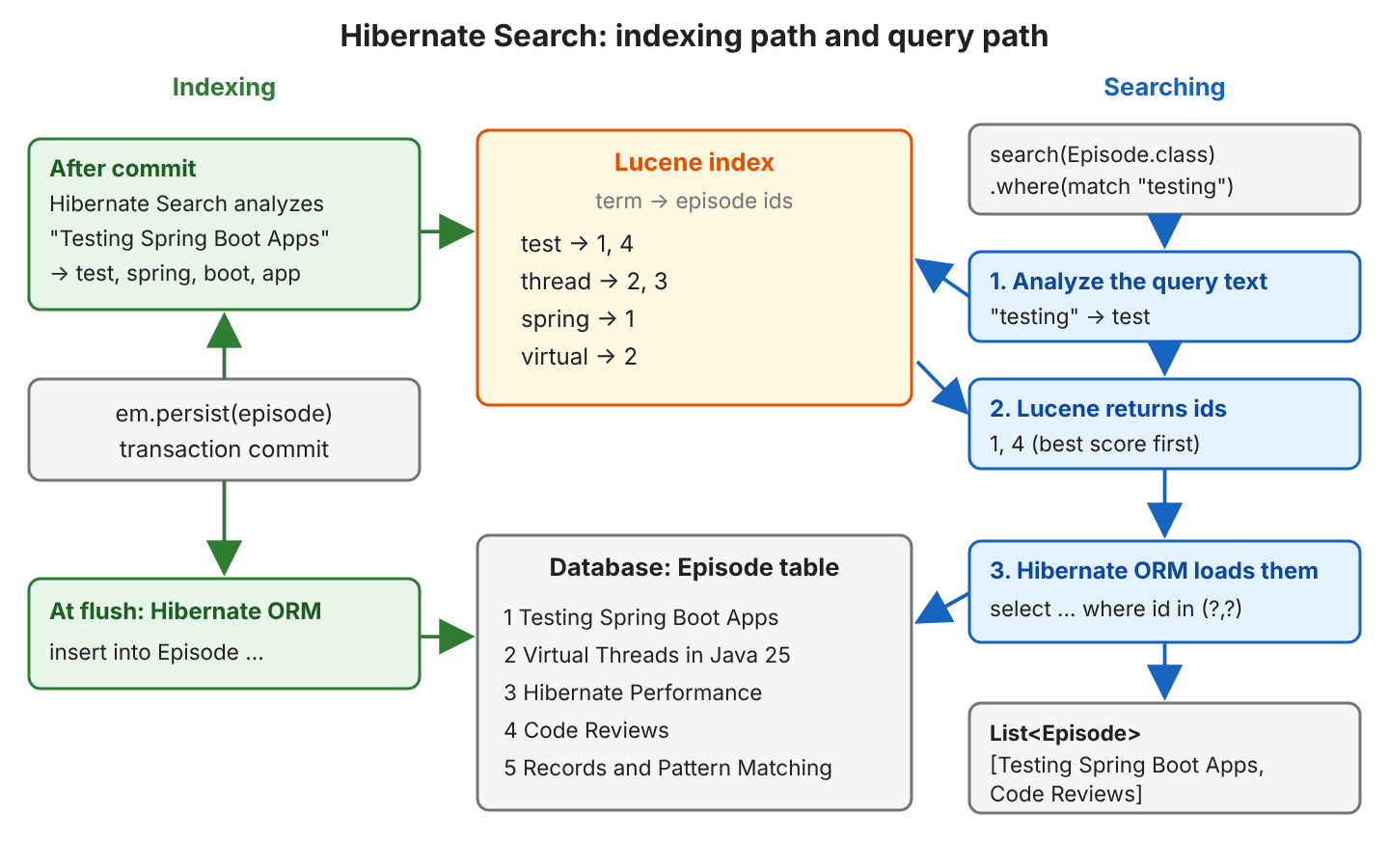
Hibernate Search keeps two copies of the data. The database stays the source of truth; the index holds only the searchable fields and the entity id. A search runs against the index, and Hibernate ORM then loads the matching entities from the database by id.
2. Hibernate Search Example
The following example is a podcast catalog, in which each Episode has a title, a description, a host, a publish date and a duration. It runs on Hibernate Search 8.4.0.Final with Hibernate ORM 7.4, Java 25 and H2, and keeps the Lucene index in memory, so no search server is needed. We can also run Hibernate Search with Lucene in a Spring Boot application with the same mapping. The catalog starts with five episodes.
| Episode | Host | Published | Minutes |
|---|---|---|---|
| Testing Spring Boot Apps | Lokesh | 2026-01-10 | 42 |
| Virtual Threads in Java 25 | Anna | 2026-02-14 | 35 |
| Hibernate Performance | Lokesh | 2026-03-03 | 50 |
| Code Reviews | Ravi | 2026-04-21 | 28 |
| Records and Pattern Matching | Anna | 2026-05-30 | 31 |
2.1. Dependencies and Configuration
Hibernate Search needs two modules, namely a mapper that reads the annotations on our entities and a backend that stores the index. Hibernate Search 8.4 is the series built for Hibernate ORM 7.4, and its release page lists ORM 7.4 as the compatible version, with Java 17, 21, 25 or 26.
<dependency>
  <groupId>org.hibernate.search</groupId>
  <artifactId>hibernate-search-mapper-orm</artifactId>
  <version>8.4.0.Final</version>
</dependency>
<dependency>
  <groupId>org.hibernate.search</groupId>
  <artifactId>hibernate-search-backend-lucene</artifactId>
  <version>8.4.0.Final</version>
</dependency>
Hibernate Search starts with Hibernate and reads its settings from the same configuration. We bootstrap with HibernatePersistenceConfiguration; the same keys work in persistence.xml or hibernate.properties.
new HibernatePersistenceConfiguration("podcast-search")
    .managedClasses(Episode.class)
    .jdbcUrl("jdbc:h2:mem:podcast;DB_CLOSE_DELAY=-1")
    .property("hibernate.search.backend.directory.type", "local-heap")
    .property("hibernate.search.backend.lucene_version", "LATEST")
    .property("hibernate.search.backend.analysis.configurer",
        "class:com.howtodoinjava.hibernate.search.EnglishAnalysisConfigurer")
    .createEntityManagerFactory();
Two of the keys stay unset in our example, so Hibernate Search uses their defaults.
| Property | Our value | What it does |
|---|---|---|
| hibernate.search.backend.directory.type | local-heap | Keeps the index in memory; the default local-filesystem writes it to disk |
| hibernate.search.backend.directory.root | not set | Folder for local-filesystem indexes; default is the working directory |
| hibernate.search.backend.lucene_version | LATEST | Lucene index format; without it Hibernate Search logs warning HSEARCH000075 and uses 9.12.3 |
| hibernate.search.backend.analysis.configurer | our configurer class | Registers custom analyzers and normalizers |
| hibernate.search.schema_management.strategy | not set | Creates missing indexes at startup and validates existing ones (create-or-validate) |
2.2. Mapping the Episode Entity
The @Indexed annotation gives the entity its own index, named after the entity. Each field annotation adds one field to that index, and the annotation decides how the value is stored and how we can search it.
| Annotation | How the value is indexed | Use it for | Our fields |
|---|---|---|---|
| @FullTextField | Split into terms by an analyzer | Word search, phrases, relevance, highlighting | title, description |
| @KeywordField | The whole value as one term | Exact match, sorting text, facets | host, title_sort |
| @GenericField | As a number, date, boolean or enum | Exact match, ranges, sorting | publishedOn, durationMinutes |
A field is sortable only when we ask for it, because sorting needs extra data in the index. A full-text field cannot be sorted at all, so we index the title a second time as a keyword field named title_sort.
@FullTextField(analyzer = "english")
@KeywordField(name = "title_sort", sortable = Sortable.YES, normalizer = "lowercase")
private String title;

@FullTextField(analyzer = "english", highlightable = Highlightable.UNIFIED)
@Column(length = 2000)
private String description;

@KeywordField
private String host;

@GenericField(sortable = Sortable.YES)
private LocalDate publishedOn;

@GenericField(sortable = Sortable.YES)
private int durationMinutes;
The annotations @Entity, @Id and @Column are the usual JPA annotations, and Hibernate Search uses the entity id as the document id. A LocalDate field such as publishedOn is indexed as a date, so date ranges work without conversion.
2.3. Defining an Analyzer
An analyzer has one tokenizer, which splits the text into words, and a chain of token filters, which change each word. The Lucene backend has built-in analyzers named default, standard, simple, whitespace, stop and keyword. The default analyzer splits and lowercases, but it does not reduce words to their root, so “tests” would not match “testing”. We register our own english analyzer with a LuceneAnalysisConfigurer.
public class EnglishAnalysisConfigurer implements LuceneAnalysisConfigurer {

  @Override
  public void configure(LuceneAnalysisConfigurationContext context) {
    context.analyzer("english").custom()
        .tokenizer("standard")
        .tokenFilter("lowercase")
        .tokenFilter("snowballPorter").param("language", "English")
        .tokenFilter("asciiFolding");

    context.normalizer("lowercase").custom()
        .tokenFilter("lowercase")
        .tokenFilter("asciiFolding");
  }
}
The snowballPorter filter is the stemmer, which cuts “testing” and “tests” to “test”, and “integration” to “integr”. The asciiFolding filter turns accented letters into plain ones, so an accented “e” is indexed as “e”. A normalizer is an analyzer without a tokenizer, so it keeps the value as one term and only changes it, which is what keyword fields need.
2.4. Indexing on Commit
We save entities as usual with em.persist(). Hibernate Search listens to Hibernate ORM events and updates the index after the transaction commits, not at persist() or flush(), so a search in the same transaction does not see the new episodes yet. For example, an admin page that saves an episode and searches for it in the same transaction gets an empty list. The helper EpisodeSearch.match() runs the match query from the intro snippet.
emf.runInTransaction(em -> {
  Database.episodes().forEach(em::persist);   // insert into Episode (...) values (...)  x5
  em.flush();
  List<Episode> before = EpisodeSearch.match(em, "testing");   // [] : not indexed before commit
});

emf.runInTransaction(em ->
  EpisodeSearch.match(em, "testing"));        // [Testing Spring Boot Apps, Code Reviews]
Updates and deletes work the same way. Calling a setter on a managed entity reindexes it, and deleting the entity removes its document.
emf.runInTransaction(em -> {
  Episode reviews = EpisodeSearch.match(em, "reviews").get(0);
  reviews.setTitle("Code Reviews and Testing");   // update Episode set ... where id=?
});
List<Episode> updated = EpisodeSearch.match(em, "testing");   // [Testing Spring Boot Apps, Code Reviews and Testing]

emf.runInTransaction(em -> em.remove(EpisodeSearch.match(em, "reviews").get(0)));
                                      // delete from Episode where id=?
List<Episode> remaining = EpisodeSearch.match(em, "testing");   // [Testing Spring Boot Apps]
2.5. Indexing Existing Data With the MassIndexer
Hibernate Search sees only the changes that go through entities, so rows written with native SQL or a bulk JPQL update never reach the index. The same is true for rows from another application or a database restore, and for all the data that existed before we added Hibernate Search.
em.createNativeQuery("insert into Episode (id, title, ...) values (100, 'Kotlin for Java Developers', ...)")
  .executeUpdate();
List<Episode> kotlin = EpisodeSearch.match(em, "kotlin");   // []
The MassIndexer rebuilds an index from the database. It purges the index and reads all ids. After that, it loads the entities in batches, on its own threads and transactions, and writes the documents.
try (EntityManager em = emf.createEntityManager()) {
  Search.session(em).massIndexer(Episode.class).startAndWait();
}
// select count(e1_0.id) from Episode e1_0
// select e1_0.id from Episode e1_0
// select ... from Episode e1_0 where e1_0.id in (?,?,?,?,?)

List<Episode> rebuilt = EpisodeSearch.match(em, "kotlin");   // [Kotlin for Java Developers]
A bulk JPQL update is the less visible case, because the row changes but the index keeps the old text. After update Episode set title = ‘Kotlin Reviews’ where host = ‘Ravi’, a search for “kotlin” returns nothing, while a search for “code” still returns the episode, which Hibernate loads with the new title “Kotlin Reviews”.
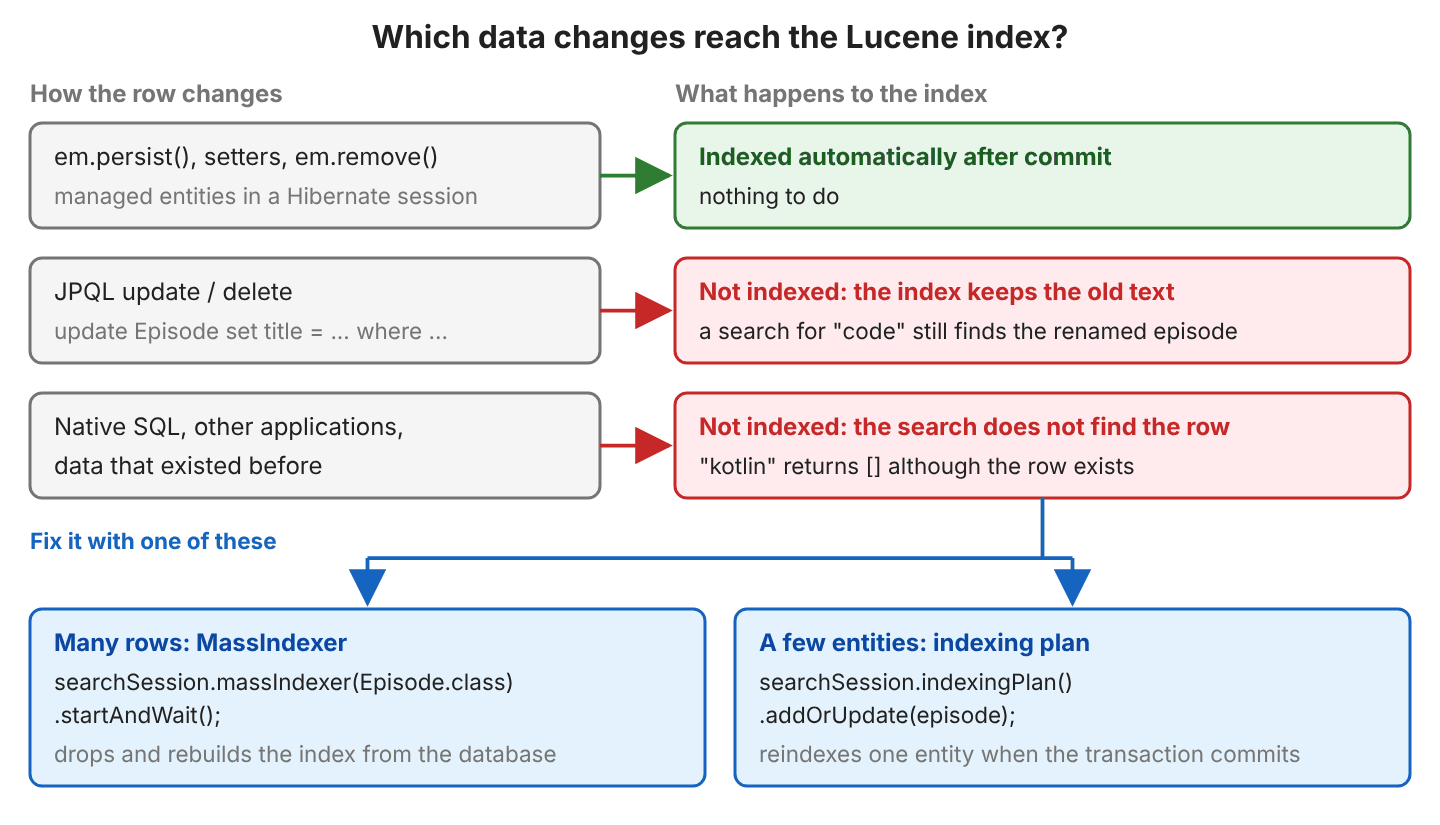
Say a nightly import job writes a few new episodes with native SQL. For a few known rows like these, the indexing plan is cheaper than a full rebuild. For example, row 101, “Kotlin Coroutines”, was inserted with native SQL too, and addOrUpdate() reindexes it when the transaction commits.
emf.runInTransaction(em -> {
  Episode coroutines = em.find(Episode.class, 101L);
  Search.session(em).indexingPlan().addOrUpdate(coroutines);
});
List<Episode> one = EpisodeSearch.match(em, "kotlin");   // [Kotlin Coroutines]
We run the MassIndexer the first time Hibernate Search runs against an existing database, after a mapping change, and after any bulk SQL update. It loads entities on several threads, and each thread needs a database connection, so we size the connection pool for them.
2.6. Searching With match(), Boost and Fuzzy
Every search starts from a SearchSession, which we get from the EntityManager. The where() lambda gets a predicate factory f, and f.match() is the main full-text predicate.
SearchSession searchSession = Search.session(em);

List<Episode> hits = searchSession.search(Episode.class)
    .where(f -> f.match().fields("title", "description").matching("TESTS"))
    .fetchHits(20);     // [Testing Spring Boot Apps, Code Reviews]
The search text is analyzed too, so “TESTS” finds the same episodes as “testing”. With several words, match() finds documents that contain any of them, and documents with more matches get a higher score. Hits come back best score first.
The boost() method makes a match in one field count more. In the second query, a match in the title counts twice, so the episode with “code” in its title moves to the top.
.where(f -> f.match().fields("title", "description").matching("test code"))
                    // [Testing Spring Boot Apps, Code Reviews, Virtual Threads in Java 25]

.where(f -> f.match()
    .field("title").boost(2.0f)
    .field("description")
    .matching("test code"))
                    // [Code Reviews, Testing Spring Boot Apps, Virtual Threads in Java 25]
The fuzzy() option accepts small typos in the search text. With fuzzy(1), each term may differ by one letter edit, for example the missing “a” in “virtul”, and fuzzy(2) accepts two edits.
.where(f -> f.match().fields("title", "description").matching("virtul"))
                    // []
.where(f -> f.match().fields("title", "description").matching("virtul").fuzzy(1))
                    // [Virtual Threads in Java 25]
When we need only the number of matches, fetchTotalHitCount() reads it from the index and runs no SQL.
long count = searchSession.search(Episode.class)
    .where(f -> f.match().fields("title", "description").matching("threads"))
    .fetchTotalHitCount();      // 2
2.7. Phrase Search
The match() predicate treats “virtual threads” as two separate words, so the episode about “thread pools” matches too. The phrase() predicate requires the words next to each other, in this order.
.where(f -> f.match().fields("title", "description").matching("virtual threads"))
                    // [Virtual Threads in Java 25, Hibernate Performance]

.where(f -> f.phrase().fields("title", "description").matching("virtual threads"))
                    // [Virtual Threads in Java 25]
2.8. Combining Conditions With bool()
The bool() predicate combines other predicates. For example, a listener searches for “threads” but wants only Anna’s episodes, so the host goes into a clause that does not change the relevance order. Each clause type treats the match and the score in its own way.
- A must() clause requires a match, and the match adds to the score.
- A should() clause is optional, and a match raises the score.
- A filter() clause requires a match but leaves the score unchanged, so we use it for exact conditions.
- A mustNot() clause excludes the documents that match.
.where(f -> f.bool()
    .must(f.match().fields("title", "description").matching("threads"))
    .filter(f.match().field("host").matching("Anna")))
                    // [Virtual Threads in Java 25]

.where(f -> f.bool()
    .must(f.match().fields("title", "description").matching("test"))
    .mustNot(f.match().field("host").matching("Ravi")))
                    // [Testing Spring Boot Apps]
2.9. Range Queries and Sorting
The range() predicate works on @GenericField numbers and dates, and on keyword fields. It offers between(), atLeast(), greaterThan(), atMost() and lessThan(). The sort() step replaces the relevance order with field values, like ORDER BY in sorting with JPQL.
.where(f -> f.range().field("durationMinutes").between(30, 45))
.sort(f -> f.field("durationMinutes"))
                    // [Records and Pattern Matching, Virtual Threads in Java 25, Testing Spring Boot Apps]

.where(f -> f.range().field("publishedOn").atLeast(LocalDate.of(2026, 3, 1)))
.sort(f -> f.field("publishedOn"))
                    // [Hibernate Performance, Code Reviews, Records and Pattern Matching]

.where(f -> f.matchAll())
.sort(f -> f.field("publishedOn").desc())
                    // [Records and Pattern Matching, Code Reviews, Hibernate Performance, ...]
2.10. Pagination and Total Hit Count
The call fetch(offset, limit) returns one page of hits together with the total number of matches, which is what a results page with pagination needs. We always pass a limit, because fetchAllHits() loads every match from the database.
SearchResult<Episode> page = searchSession.search(Episode.class)
    .where(f -> f.matchAll())
    .sort(f -> f.field("title_sort"))
    .fetch(2, 2);                   // offset 2, limit 2

List<Episode> hits = page.hits();       // [Records and Pattern Matching, Testing Spring Boot Apps]
long total = page.total().hitCount();   // 5
2.11. Highlighting Matched Words
A highlight projection returns the parts of a field that matched, with the matched words wrapped in em tags. A projection reads values from the index instead of loading entities, so this search runs no SQL. With the Lucene backend, the field must allow it with the highlightable attribute, as description does in section 2.2.
List<List<String>> fragments = searchSession.search(Episode.class)
    .select(f -> f.highlight("description"))
    .where(f -> f.match().field("description").matching("tests"))
    .fetchHits(20);
// [[We write unit <em>tests</em> and integration <em>tests</em> for a Spring Boot service.],
//  [What we look for in a pull request, and how to <em>test</em> a change before merging.]]
Each hit returns a list, because a long text can produce several fragments.
The complete project on GitHub runs every search of this section and prints the results with the SQL, and its 17 JUnit tests check them (mvn -q compile exec:java, mvn test).
3. Hibernate Search With Spring Boot
In a Spring Boot application, Hibernate Search runs on the Hibernate ORM that Spring Data JPA configures, so the mapping and the SearchSession queries from section 2 stay the same. Only the dependencies, the property prefix, the analyzer registration and the indexing of existing rows change. The following sections build a wine catalog with a REST search endpoint, and the Spring Boot example project on GitHub contains the complete code.
Spring Boot has no starter for Hibernate Search, but every piece connects to a feature Spring Boot already has.
| Spring Boot feature | What Hibernate Search uses it for |
|---|---|
| spring-boot-starter-data-jpa | Creates the EntityManagerFactory; Hibernate Search starts with it |
| *spring.jpa.properties.** keys | Passes the Hibernate Search settings to Hibernate ORM |
| Spring beans | The analyzer configuration is a @Component, referenced by bean name |
| ApplicationReadyEvent | Starts the MassIndexer, which indexes rows that already exist |
| @Transactional | Each commit updates the index |
The following example is a wine catalog with a REST endpoint GET /wines/search?q=…. It runs on Spring Boot 4.1.1, Hibernate ORM 7.4, Hibernate Search 8.4.0.Final with the Lucene backend, Java 25 and an H2 database. A customer of an online wine shop types a flavor such as “cherry” into the search box and expects the closest matches first. The catalog starts with eight wines, loaded from data.sql.
| Name | Region | Grape | Tasting notes | Price |
|---|---|---|---|---|
| Rioja Reserva | Rioja | Tempranillo | Ripe cherry and plum with vanilla from oak barrels. | 24.00 |
| Chianti Classico | Tuscany | Sangiovese | Sour cherry, dried herbs and a dry finish. | 19.50 |
| Barolo | Piedmont | Nebbiolo | Roses, tar and red cherries with strong tannins. | 55.00 |
| Sauvignon Blanc | Marlborough | Sauvignon Blanc | Fresh lime, passion fruit and cut grass. | 16.00 |
| Malbec Reserva | Mendoza | Malbec | Blackberry and plum with a smoky finish. | 21.00 |
| Napa Cabernet | Napa Valley | Cabernet Sauvignon | Blackcurrant, cedar and dark chocolate. | 48.00 |
| Chablis | Burgundy | Chardonnay | Green apple, lemon and a crisp mineral finish. | 27.00 |
| Prosecco | Veneto | Glera | Light bubbles with pear and white flowers. | 12.00 |
3.1. Maven Dependencies
Hibernate Search has two parts, namely the mapper, which reads the annotations on our entities, and the backend, which stores the index. Spring Boot does not manage their versions, so we import the Hibernate Search BOM (a POM that pins compatible versions of all its modules).
<parent>
  <groupId>org.springframework.boot</groupId>
  <artifactId>spring-boot-starter-parent</artifactId>
  <version>4.1.1</version>
</parent>

<properties>
  <java.version>25</java.version>
  <hibernate.version>7.4.11.Final</hibernate.version>
</properties>

<dependencyManagement>
  <dependencies>
    <dependency>
      <groupId>org.hibernate.search</groupId>
      <artifactId>hibernate-search-bom</artifactId>
      <version>8.4.0.Final</version>
      <type>pom</type>
      <scope>import</scope>
    </dependency>
  </dependencies>
</dependencyManagement>

<dependencies>
  <dependency>
    <groupId>org.springframework.boot</groupId>
    <artifactId>spring-boot-starter-webmvc</artifactId>
  </dependency>
  <dependency>
    <groupId>org.springframework.boot</groupId>
    <artifactId>spring-boot-starter-data-jpa</artifactId>
  </dependency>
  <dependency>
    <groupId>org.hibernate.search</groupId>
    <artifactId>hibernate-search-mapper-orm</artifactId>
  </dependency>
  <dependency>
    <groupId>org.hibernate.search</groupId>
    <artifactId>hibernate-search-backend-lucene</artifactId>
  </dependency>
  <dependency>
    <groupId>com.h2database</groupId>
    <artifactId>h2</artifactId>
    <scope>runtime</scope>
  </dependency>
</dependencies>
The Hibernate Search version must match the Hibernate ORM minor version that Spring Boot brings. Hibernate Search 8.4 is the series for Hibernate ORM 7.4, and Spring Boot 4.1.1 manages Hibernate ORM 7.4.5.Final. The hibernate.version property moves it to the latest 7.4 patch, which is the version Hibernate Search recommends. The Lucene backend brings Lucene 9.12.3 with it.
3.2. Configuring the Lucene Backend and the Index Directory
Hibernate Search reads its settings from the Hibernate ORM configuration, not from Spring Boot. In application.properties, every Hibernate Search key needs the spring.jpa.properties. prefix, so that Spring Boot passes it to Hibernate.
spring.datasource.url=jdbc:h2:mem:wines
spring.jpa.hibernate.ddl-auto=create-drop
spring.jpa.defer-datasource-initialization=true
spring.jpa.open-in-view=false
spring.jpa.show-sql=true

spring.jpa.properties.hibernate.search.backend.type=lucene
spring.jpa.properties.hibernate.search.backend.directory.type=local-filesystem
spring.jpa.properties.hibernate.search.backend.directory.root=data/wine-index
spring.jpa.properties.hibernate.search.backend.lucene_version=LATEST
spring.jpa.properties.hibernate.search.backend.analysis.configurer=bean:wineAnalysisConfigurer
Each Hibernate Search setting has one job, and only analysis.configurer points to our own code.
| Property (after spring.jpa.properties.) | Our value | What it does |
|---|---|---|
| hibernate.search.backend.type | lucene | Selects the backend; needed only when more than one backend is on the classpath |
| hibernate.search.backend.directory.type | local-filesystem | Stores the index on disk (the default); local-heap keeps it in memory |
| hibernate.search.backend.directory.root | data/wine-index | Parent folder of the indexes; the default is the working directory |
| hibernate.search.backend.lucene_version | LATEST | Lucene index format; without it, Hibernate Search logs a warning at startup |
| hibernate.search.backend.analysis.configurer | bean:wineAnalysisConfigurer | The Spring bean that defines our analyzers (section 2.4) |
Each indexed entity gets its own folder under the root. On the first start, Hibernate Search creates the folder and logs its path.
INFO org.hibernate.search.lucene : HSEARCH000041: Index directory does not exist, creating: '.../data/wine-index/Wine'The spring.jpa.defer-datasource-initialization=true setting runs data.sql after Hibernate has created the wine table.
3.3. Mapping the Wine Entity
The Wine entity uses the annotations from section 2.2. The id becomes the document id, so it needs no annotation. The name is indexed twice, once as a full-text field for searching and once as the sortable keyword field name_sort.
@Entity
@Indexed
public class Wine {

  @Id
  @GeneratedValue(strategy = GenerationType.IDENTITY)
  private Long id;

  @FullTextField(analyzer = "wine")
  @KeywordField(name = "name_sort", sortable = Sortable.YES, normalizer = "lowercase")
  private String name;

  @KeywordField(normalizer = "lowercase")
  private String region;

  @FullTextField(analyzer = "wine")
  private String grape;

  @FullTextField(analyzer = "wine")
  @Column(length = 1000)
  private String tastingNotes;

  @GenericField(sortable = Sortable.YES)
  @Column(precision = 8, scale = 2)
  private BigDecimal price;
}
3.4. Registering the Analyzer as a Spring Bean
An analyzer turns text into the terms stored in the index, as described in section 2.3. In Spring Boot, we define the same analyzer chain under the name wine.
We register the analyzers in a LuceneAnalysisConfigurer. Because it is a Spring @Component, it can use dependency injection like any other bean.
@Component("wineAnalysisConfigurer")
public class WineAnalysisConfigurer implements LuceneAnalysisConfigurer {

  @Override
  public void configure(LuceneAnalysisConfigurationContext context) {
    context.analyzer("wine").custom()
        .tokenizer("standard")
        .tokenFilter("lowercase")
        .tokenFilter("snowballPorter").param("language", "English")
        .tokenFilter("asciiFolding");

    context.normalizer("lowercase").custom()
        .tokenFilter("lowercase")
        .tokenFilter("asciiFolding");
  }
}
The bean: prefix in application.properties tells Hibernate Search to look the configurer up by name in the Spring context. The lookup works because Spring Boot registers a bean container for Hibernate.
3.5. Indexing Existing Rows on Startup
Hibernate Search updates the index only for changes that go through Hibernate entities. Rows inserted by data.sql, a native SQL query, a database restore or another application never reach the index. Without an extra step, our eight wines are in the database, but a search finds none of them.
long count = wineRepository.count();                                 // 8
long found = wineSearchService.search("cherry", null, 0, 10, WineSort.RELEVANCE)
    .total();                                                        // 0
The MassIndexer rebuilds an index from the database. It removes the old documents and reads all ids. After that, it loads the entities in batches on its own threads and transactions. We run it when Spring Boot publishes ApplicationReadyEvent, the event that marks the end of startup.
@Component
@ConditionalOnBooleanProperty(name = "wine.search.reindex-on-startup", matchIfMissing = true)
public class IndexRebuilder {

  private final EntityManagerFactory entityManagerFactory;

  @EventListener(ApplicationReadyEvent.class)
  public void rebuildIndex() throws InterruptedException {
    log.info("Mass indexing started");
    long start = System.currentTimeMillis();
    try (EntityManager em = entityManagerFactory.createEntityManager()) {
      Search.session(em).massIndexer(Wine.class)
          .threadsToLoadObjects(2)
          .batchSizeToLoadObjects(25)
          .startAndWait();
    }
    log.info("Mass indexing finished in {} ms", System.currentTimeMillis() - start);
  }
}
Each loading thread needs a database connection, so threadsToLoadObjects() must stay below the size of the connection pool. The @ConditionalOnBooleanProperty switch lets us turn the rebuild off with wine.search.reindex-on-startup=false. The log shows the three queries the MassIndexer runs.
INFO  o.s.boot.tomcat.TomcatWebServer : Tomcat started on port 8080 (http) with context path '/'
INFO  c.h.hibernate.searchboot.IndexRebuilder : Mass indexing started
Hibernate: select count(w1_0.id) from wine w1_0
Hibernate: select w1_0.id from wine w1_0
INFO  o.hibernate.search.mapper.massindexing : HSEARCH000027: Mass indexing is going to index 8 entities.
Hibernate: select w1_0.id,w1_0.grape,w1_0.name,w1_0.price,w1_0.region,w1_0.tasting_notes from wine w1_0 where w1_0.id in (?,?,?,?,?,?,?,?)
INFO  o.hibernate.search.mapper.massindexing : HSEARCH700168: Mass indexing complete in PT0.293023604S. Indexed 8/8 entities.
INFO  c.h.hibernate.searchboot.IndexRebuilder : Mass indexing finished in 7968 ms
Notice the order of the first two log lines. Tomcat accepts requests before ApplicationReadyEvent is published. When we restart the application and send GET /wines/search?q=cherry during startup, every response has “total”:0 while the MassIndexer runs. The first response after it has written the documents has “total”:3.

For a small catalog, a few seconds of empty results after a restart are acceptable. For a large one, we run the rebuild only when the index is out of date, such as after the first deployment or a mapping change.
3.6. Writing the Search Service With SearchSession
Search.session(entityManager) returns the SearchSession for the current Spring transaction. Spring injects a shared EntityManager that points to the persistence context of the current transaction, so we run the search in a read-only @Transactional method.
@Transactional(readOnly = true)
public WinePage search(String text, String region, int page, int size, WineSort sort) {
  SearchSession searchSession = Search.session(entityManager);

  SearchResult<Wine> result = searchSession.search(Wine.class)
      .where(f -> f.bool().with(b -> {
        b.must(f.matchAll());
        if (text != null && !text.isBlank()) {
          b.must(f.match()
              .field("name").boost(2.0f)
              .fields("grape", "tastingNotes")
              .matching(text));
        }
        if (region != null && !region.isBlank()) {
          b.filter(f.match().field("region").matching(region));
        }
      }))
      .sort(f -> switch (sort) {
        case RELEVANCE -> f.score();
        case NAME -> f.field("name_sort");
        case PRICE_ASC -> f.field("price").asc();
        case PRICE_DESC -> f.field("price").desc();
      })
      .fetch(page * size, size);

  return new WinePage(text, result.total().hitCount(), page, size, result.hits());
}
The method builds one query from the optional parameters.
- The bool() predicate combines conditions. The must() clauses have to match and add to the score, whereas filter() clauses have to match but do not change the score.
- The matchAll() predicate matches every wine, so an empty q lists the whole catalog.
- The match() predicate searches the full-text fields, and boost(2.0f) makes a match in the name count twice.
- The sort() call replaces the default relevance order, and f.score() keeps it.
- The call fetch(offset, limit) returns one page of hits and the total number of matches.
WinePage is a record with the fields query, total, page, size and wines. Each search runs one SQL statement, which loads the hits of the page by id.
select w1_0.id,w1_0.grape,w1_0.name,w1_0.price,w1_0.region,w1_0.tasting_notes from wine w1_0 where w1_0.id in (?,?)3.7. Adding the REST Endpoint
The controller reads the query parameters, limits the page size, and rejects an unknown sort order with HTTP 400.
@RestController
@RequestMapping("/wines")
public class WineController {

  @GetMapping("/search")
  public WinePage search(@RequestParam(defaultValue = "") String q,
                         @RequestParam(required = false) String region,
                         @RequestParam(defaultValue = "0") int page,
                         @RequestParam(defaultValue = "10") int size,
                         @RequestParam(defaultValue = "relevance") String sort) {
    WineSort wineSort;
    try {
      wineSort = WineSort.valueOf(sort.toUpperCase());
    } catch (IllegalArgumentException e) {
      throw new ResponseStatusException(HttpStatus.BAD_REQUEST, "Unknown sort: " + sort);
    }
    return wineSearchService.search(q, region, Math.max(page, 0), Math.clamp(size, 1, 50), wineSort);
  }

  @PostMapping
  @ResponseStatus(HttpStatus.CREATED)
  public Wine create(@RequestBody Wine wine) {
    return wineSearchService.save(wine);
  }
}
A search for “cherry” with two wines per page returns the two best matches and the total number of matches.
curl "http://localhost:8080/wines/search?q=cherry&size=2"{
"query": "cherry",
"total": 3,
"page": 0,
"size": 2,
"wines": [
{"name": "Chianti Classico", "region": "Tuscany", "grape": "Sangiovese",
"tastingNotes": "Sour cherry, dried herbs and a dry finish.", "price": 19.50, "id": 2},
{"name": "Barolo", "region": "Piedmont", "grape": "Nebbiolo",
"tastingNotes": "Roses, tar and red cherries with strong tannins.", "price": 55.00, "id": 3}
]
}The region parameter filters on the keyword field. Its lowercase normalizer makes the filter case-insensitive.
curl "http://localhost:8080/wines/search?q=plum®ion=rioja"{"query":"plum","total":1,"page":0,"size":10,"wines":[{"name":"Rioja Reserva","region":"Rioja","grape":"Tempranillo","tastingNotes":"Ripe cherry and plum with vanilla from oak barrels.","price":24.00,"id":1}]}Without the region, “plum” matches Rioja Reserva and Malbec Reserva.
3.8. Paging and Sorting the Results
The parameters page and size map to fetch(page size, size)*, so page numbers start at 0, like in Spring Data. The total field lets a client show “page 2 of 3” without a second query. Paging works like pagination in JPA, except that Hibernate Search applies the offset in the index. The sort values cover relevance, name and price.
| Request | total | wines |
|---|---|---|
| ?q=cherry | 3 | Chianti Classico, Barolo, Rioja Reserva |
| ?q=cherry&sort=price_asc | 3 | Chianti Classico (19.50), Rioja Reserva (24.00), Barolo (55.00) |
| ?q=cherry&sort=price_desc | 3 | Barolo, Rioja Reserva, Chianti Classico |
| ?sort=name&page=1&size=3 | 8 | Malbec Reserva, Napa Cabernet, Prosecco |
| ?q=cherries | 3 | Chianti Classico, Barolo, Rioja Reserva |
| ?q=chery | 0 | (empty) |
| ?q=cherry&sort=year | HTTP 400 |
Sorting works only on fields indexed with sortable = Sortable.YES, which is why name_sort and price have it. Sorted by name, the second page with three wines per page starts at Malbec Reserva.
{"query":"","total":8,"page":1,"size":3,"wines":[
  {"name":"Malbec Reserva","region":"Mendoza","grape":"Malbec","tastingNotes":"Blackberry and plum with a smoky finish.","price":21.00,"id":5},
  {"name":"Napa Cabernet","region":"Napa Valley","grape":"Cabernet Sauvignon","tastingNotes":"Blackcurrant, cedar and dark chocolate.","price":48.00,"id":6},
  {"name":"Prosecco","region":"Veneto","grape":"Glera","tastingNotes":"Light bubbles with pear and white flowers.","price":12.00,"id":8}]}
Sorting by relevance is the default for a text search. For a list without q, matchAll() gives no useful relevance order, so a client asks for sort=name or a price sort.
3.9. Automatic Indexing After Save
We do not call Hibernate Search when we save. The service method is a plain Spring Data save() in a transaction.
@Transactional
public Wine save(Wine wine) {
  return wineRepository.save(wine);   // indexed when this transaction commits
}
Hibernate Search listens to Hibernate ORM events. When the transaction commits, it writes the new document to the index, and the next search sees it.
curl -X POST http://localhost:8080/wines -H "Content-Type: application/json" \
  -d '{"name":"Beaujolais","region":"Burgundy","grape":"Gamay","tastingNotes":"Fresh red cherries and strawberry.","price":15.00}'
HTTP/1.1 201
{"name":"Beaujolais","region":"Burgundy","grape":"Gamay","tastingNotes":"Fresh red cherries and strawberry.","price":15.00,"id":9}
Hibernate: insert into wine (grape,name,price,region,tasting_notes,id) values (?,?,?,?,?,default)curl "http://localhost:8080/wines/search?q=cherry&sort=price_asc&size=2"
# total 4: [Beaujolais (15.00), Chianti Classico (19.50)]Updates and deletes work the same way. Changing a field of a managed entity reindexes it at commit, and deleting the entity with wineRepository.delete() removes its document. After the delete, a search for “gamay” returns total 0 again.
3.10. Testing the Search With @SpringBootTest and MockMvc
A @SpringBootTest starts the whole application, including the MassIndexer on ApplicationReadyEvent, so the tests search the same eight wines. We give the tests their own index folder, so a test run does not touch the index of a running application.
@SpringBootTest(properties = "spring.jpa.properties.hibernate.search.backend.directory.root=target/test-index")
@AutoConfigureMockMvc
class WineSearchTest {

  @Autowired
  MockMvc mvc;

  @Test
  void restEndpointReturnsOnePage() throws Exception {
    mvc.perform(get("/wines/search").param("q", "cherry").param("size", "2"))
        .andExpect(status().isOk())
        .andExpect(jsonPath("$.total").value(3))
        .andExpect(jsonPath("$.wines", hasSize(2)))
        .andExpect(jsonPath("$.wines[*].name", contains("Chianti Classico", "Barolo")));
  }
}
@AutoConfigureMockMvc (from spring-boot-starter-webmvc-test) sends requests to the controller without a real HTTP port. The method jsonPath() reads fields from the JSON response.
Do not put @Transactional on a search test that saves data. The test transaction never commits, so the index is never updated. A test that checks automatic indexing commits first, here with Spring’s TransactionTemplate.
long insideTransaction = transactionTemplate.execute(status -> {
  wineRepository.saveAndFlush(new Wine("Pinot Noir", "Oregon", "Pinot Noir",
      "Raspberry and earthy notes.", new BigDecimal("32.00")));
  return search("raspberry").total();                    // 0: not indexed yet
});

List<Wine> afterCommit = search("raspberry").wines();    // [Pinot Noir]: indexed at commit
Tests that add wines delete them at the end, so every test sees the same catalog. The complete project on GitHub has 15 tests for these results (mvn test); mvn spring-boot:run starts the application, and the README lists the curl commands.
4. Hibernate Search FAQs
4.1. Why Does a Search on a Keyword Field Return Nothing?
A keyword field stores the value as it is, so the match is case-sensitive and “lokesh” does not match “Lokesh”. A normalizer lowercases the value at indexing and search time, so we add a second keyword field for case-insensitive search.
@KeywordField
@KeywordField(name = "host_ignorecase", normalizer = "lowercase")
private String host;
The host field keeps the exact match, and host_ignorecase adds the case-insensitive one.
| Search | Result |
|---|---|
| field(“host”).matching(“Lokesh”) | [Testing Spring Boot Apps, Hibernate Performance] |
| field(“host”).matching(“lokesh”) | [] |
| field(“host_ignorecase”).matching(“lokesh”) | [Testing Spring Boot Apps, Hibernate Performance] |
4.2. Why Can’t I Sort or Highlight a Field?
The field was not indexed with the data that the operation needs. Sorting needs sortable = Sortable.YES on a keyword or generic field, and highlighting with Lucene needs highlightable on a full-text field. Both mistakes fail when the query runs, with the same error code HSEARCH000604.
HSEARCH000604: Cannot use 'sort:field' on field 'title': Make sure the field is marked as searchable/sortable/projectable/aggregable/highlightable (whichever is relevant). If it already is, then 'sort:field' is not available for fields of this type.To sort by a text field, we add a second @KeywordField with sortable = Sortable.YES on the same property, as title_sort in section 2.2.
4.3. What Replaced FullTextEntityManager and @Field?
Hibernate Search 6 replaced the whole API, and versions 7 and 8 kept the new one. Old tutorials still show the Hibernate Search 5 classes, which do not exist anymore. So an app that moves from Hibernate Search 5 to a current version rewrites every FullTextEntityManager call.
| Hibernate Search 5 | Hibernate Search 6, 7 and 8 |
|---|---|
| Search.getFullTextEntityManager(em) | Search.session(em) returns a SearchSession |
| @Field | @FullTextField, @KeywordField, @GenericField |
| QueryBuilder and createFullTextQuery() | searchSession.search(Episode.class).where(…) |
| fullTextEntityManager.createIndexer() | searchSession.massIndexer() |
| @AnalyzerDef on an entity | LuceneAnalysisConfigurer |
| javax.persistence | jakarta.persistence |
4.4. Can I Use Elasticsearch or OpenSearch Instead of Lucene?
Yes. We replace the backend dependency and tell Hibernate Search where the cluster is, and the mapping and the search code stay the same.
<dependency>
  <groupId>org.hibernate.search</groupId>
  <artifactId>hibernate-search-backend-elasticsearch</artifactId>
  <version>8.4.0.Final</version>
</dependency>
hibernate.search.backend.hosts = localhost:9200
hibernate.search.backend.protocol = httpThe main difference between the two backends is where the index is stored, which decides how several application nodes share it.
| Lucene backend | Elasticsearch / OpenSearch backend | |
|---|---|---|
| Runs | Inside our JVM | As a separate server or cluster |
| Supported versions (Hibernate Search 8.4) | Lucene 9.12 (10.4 with the -next module) | Elasticsearch 7.10 to 9.4, OpenSearch 1.3 to 3.6 |
| Several application nodes | Each node has its own index | All nodes share one index |
| Analyzers | LuceneAnalysisConfigurer | ElasticsearchAnalysisConfigurer |
With several application instances, we use Elasticsearch or OpenSearch, because a local Lucene index on each node only sees the changes made on that node.
4.5. Where Does Hibernate Search Store the Lucene Index?
With the default local-filesystem directory, each index is a folder named after the entity under hibernate.search.backend.directory.root, by default the working directory. Our Episode index would be in ./Episode/. The local-heap type from our example keeps the index in memory and loses it when the JVM stops, which suits tests with an in-memory database.
hibernate.search.backend.directory.type = local-filesystem
hibernate.search.backend.directory.root = /var/podcast/index
4.6. Does a Search Load Entities From the Database?
Yes. Hibernate ORM loads the entity hits with one SELECT … where id in (…) per search, through the persistence context. A count or a projection reads only the index, so it runs no SQL.
| Call | SQL statements |
|---|---|
| fetchHits(20) with two hits | 1: select … from Episode e1_0 where e1_0.id in (?,?) |
| fetchTotalHitCount() | 0 |
| select(f -> f.highlight(“description”)) | 0 |
4.7. Why Are My hibernate.search Properties Ignored?
The properties are written without the spring.jpa.properties. prefix. Spring Boot does not know the *hibernate.search.** keys and does not pass them to Hibernate, and it reports no error.
# Ignored: Spring Boot never passes this to Hibernate Search
hibernate.search.backend.directory.root=target/ignored-index

# Used
spring.jpa.properties.hibernate.search.backend.directory.root=data/wine-index
Hibernate Search never sees the first value. With this line, the application starts without a warning, and the target/ignored-index folder is never created. The same applies to application.yaml, where the keys go under spring.jpa.properties.
4.8. Which Hibernate Search Version Works With My Spring Boot Version?
Pick the Hibernate Search series that matches the Hibernate ORM minor version managed by Spring Boot.
| Spring Boot | Hibernate ORM it manages | Hibernate Search |
|---|---|---|
| 3.5.x | 6.6 | 7.2.x |
| 4.0.x | 7.1 (4.0.0) or 7.2 (later 4.0 patches) | 8.1.x or 8.2.x |
| 4.1.x | 7.4 | 8.4.x |
Hibernate Search 9.0 is in development for Hibernate ORM 8.0, and every Hibernate Search release series names the ORM version it needs.
4.9. Do I Need to Run the MassIndexer on Every Startup?
No. Our example runs it on every start because H2 is an in-memory database, so the data is new on every start, and the index on disk still holds the documents of the previous run. With a real database and a local-filesystem index, both survive a restart, so a rebuild on every start only costs time. Rebuild the index only when it can be out of date.
- After the first deployment with Hibernate Search, when the existing rows are not indexed.
- After a change in the @Indexed mapping or the analyzers.
- After bulk SQL updates, imports or a database restore.
Our IndexRebuilder has a property that turns the startup rebuild off.
wine.search.reindex-on-startup=falseTo keep the startup thread free, we call massIndexer().start(), which returns a CompletionStage instead of blocking like startAndWait().
4.10. Can I Keep the Index in Memory for Tests?
Yes. The local-heap directory type keeps the index in the JVM heap, and it is gone when the test ends. Our second test class uses it together with its own H2 database, and switches the startup rebuild off to show that data.sql rows are not indexed.
@SpringBootTest(properties = {
    "wine.search.reindex-on-startup=false",
    "spring.datasource.url=jdbc:h2:mem:wines-not-indexed",
    "spring.jpa.properties.hibernate.search.backend.directory.type=local-heap"
})
Each different set of test properties starts a new Spring context. Two contexts must not use the same index folder at the same time, because Lucene locks an index for one writer. We avoid the conflict with a separate folder or with local-heap.
5. Conclusion
Hibernate Search gives Hibernate entities a full-text index. The @Indexed annotation and the field annotations decide what goes into the index, and an analyzer turns text into searchable terms. After each commit, the index follows every change made through a managed entity. The SearchSession DSL combines match(), phrase(), bool(), range(), sorting, paging and highlighting and returns entities from the database. Data that bypasses the entities needs the MassIndexer or the indexing plan. In a Spring Boot application, every Hibernate Search setting needs the spring.jpa.properties. prefix, and a MassIndexer started on ApplicationReadyEvent indexes the rows that already exist.
6. References
- Hibernate Search 8.4 Reference Guide
- Hibernate Search 8.4: Getting Started with Hibernate ORM
- Hibernate Search 8.4 release and compatibility
- Hibernate Search 6.0 Migration Guide (from version 5)
- Hibernate ORM 7.4 User Guide
- Apache Lucene
- Hibernate Search 8.4: Spring Boot configuration properties
- Hibernate Search 8.4: Bean references
- Hibernate Search 8.4: MassIndexer
- Spring Boot: Additional native JPA properties
- Spring Boot: Application events and listeners
- Spring Boot: Testing with a mock environment
Happy Learning !!
